
 简体中文
简体中文 English
Website review
This review may include AI-generated content and is not individually verified. Domain, certificate and other facts come from the observed data on this page.
What is Retrica?
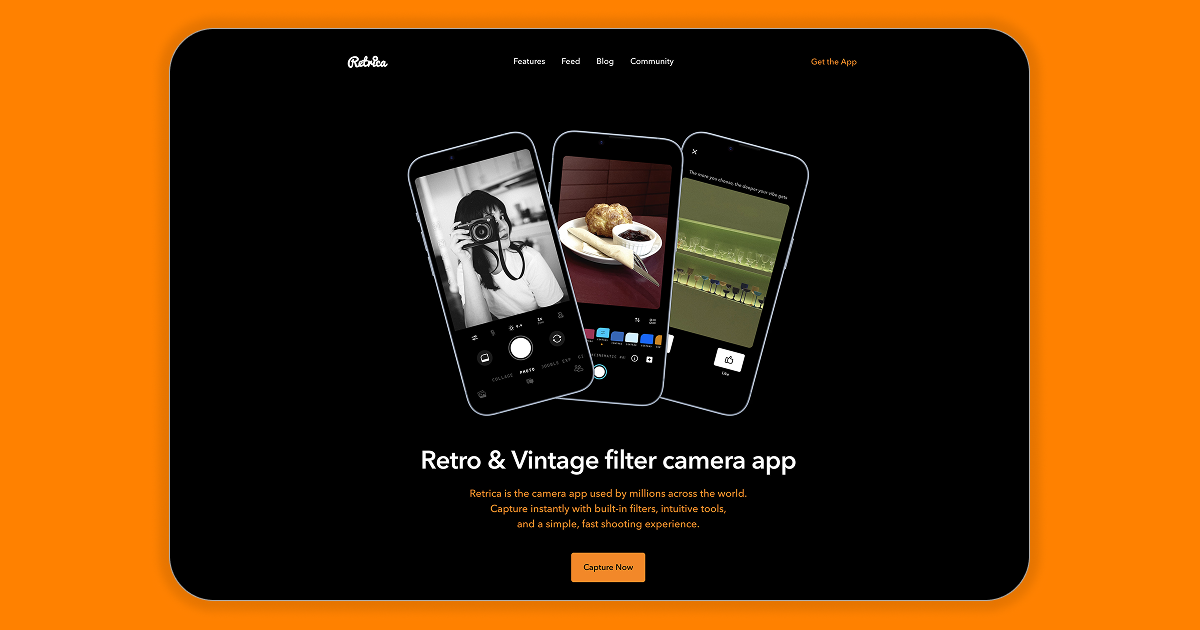
Retrica is a retro and vintage filter camera app for iOS and Android. It is built around taking and editing photos with a distinctive, nostalgic look: the site describes it as “the original vintage filter camera app,” used by millions worldwide, with real-time effects, built-in filters and a fast, simple shooting experience.
Its main pieces, according to the site, are:
- Presets — one-tap looks that change color and mood, described as “richer colors, stronger moods.”
- Camera — quick, intuitive capture designed to keep you in the moment.
- Studio — simple but capable adjustments for shaping a photo into your own style.
- Feed — a place to explore styles, moods and ideas from a creative community.
If you want a quick decision: Retrica suits someone who wants a social-ready photo with a retro feel in a few taps, not a full manual editing suite. A practical next step is to shoot the same scene once with a preset and once without, then compare in Studio — that shows you whether the app’s look matches your taste before you invest time in it.
How do I use Retrica to apply vintage filters to my photos?
Retrica is built around applying its vintage and retro looks while you shoot, rather than as an afterthought. Based on the app's own description, the core workflow is: open the camera, choose a filter or preset, and capture — then use the studio tools if you want to refine the result.
The basic flow
- Open the camera. Retrica presents itself as a fast, intuitive shooting experience, so the filter step happens in the live view before you press the shutter.
- Pick a preset or filter. The site describes presets as "your vibe, in one tap," with richer colors and stronger moods. This is the fastest route to a vintage look.
- Capture. Because the effect is applied in real time, what you see is close to what you get — useful for judging whether a scene suits a faded or warm retro treatment.
- Refine in the studio. If a shot needs adjustment, the editing tools let you fine-tune it "without the complexity," per the page. That is where you would correct exposure or push a look further.
Choosing between presets and manual editing
| Approach | Best for | Trade-off |
|---|---|---|
| One-tap presets | Quick posts, consistent style across many photos | Less control over individual images |
| Studio adjustments | A single photo that matters, or a look you want to match precisely | Slower, and requires some judgment about color and contrast |
A practical scenario
Say you are photographing a street scene at dusk. Applying a vintage preset in the live view lets you see immediately whether the muted tones flatter the image or just make it look muddy. If the preset flattens the sky, switch to the studio and lift contrast slightly rather than abandoning the look entirely. Vintage filters tend to reduce saturation and add warmth, so they work best on scenes with strong shapes or texture — architecture, foliage, portraits with soft light — and less well on images that depend on vivid, accurate color.
Where to go next
- Explore the in-app feed for styles and moods from other users, then recreate a look you like with a preset.
- Check the features page on Retrica for the current filter and editing lineup.
- Note that the site mentions subscribing and subscription, so some filters or tools may sit behind a paid tier — confirm in the app before committing.
If you want a consistent signature look, choose one preset and use it repeatedly rather than switching per photo; consistency reads as style, while variety reads as randomness.
Is Retrica free to use, or does it require a subscription?
Retrica is free to download and use, but it also offers a subscription. The site describes Retrica as free on iOS and Android, while its pricing signals reference subscribing and a subscription, so you should expect some features or content to sit behind a paid plan.
Retrica
H3 What that means in practice
- You can install the app and start shooting with its built-in filters and camera tools at no cost.
- A subscription likely unlocks additional presets, editing options or an ad-free experience, though the exact split between free and paid isn't spelled out on the page.
- The app is positioned around retro and vintage filters, real-time effects and a fast shooting flow, with presets, a camera and a studio-style editing area.
H3 How to decide If you only want occasional retro-filtered photos, the free tier is probably enough to test whether you like the look. If you find yourself using specific presets or editing tools regularly, check the in-app subscription options before committing, since pricing isn't listed on the website. A reasonable next step is to download the app, try the free filters for a week, and note which features prompt you to subscribe.
What differentiates Retrica from other filter camera apps like Instagram or VSCO?
Retrica positions itself as a dedicated retro/vintage filter camera rather than a social network or a full editing suite. Its page emphasizes shooting first with built-in filters, one-tap presets, a simple camera, and a lightweight studio for adjustments — the pitch is speed and a distinct vintage look, not posting or follower growth.
The practical split comes down to what you want the app to do:
| App type | Primary job | Best for |
|---|---|---|
| Retrica | Retro/vintage capture with real-time filters and presets | People who want a stylized photo the moment they shoot |
| Social feed, stories, messaging, plus filters | Sharing and discovery, with editing as a side feature | |
| VSCO | Editing, presets and a creative community | Fine-tuning photos and browsing preset-based inspiration |
If your goal is a quick, unmistakably retro shot with minimal editing, Retrica's focus is the differentiator. If your goal is reach, comments or a preset library to apply after the fact, Instagram or VSCO fit better. Retrica mentions subscriptions in its pricing signals, so check the current in-app plan before committing to heavier use.
A useful next step: shoot the same scene in Retrica and in Instagram's or VSCO's editor, then compare how much time each takes to reach a result you'd actually post. That tells you whether Retrica's real-time vintage approach saves you work or just adds a step.
Can I use Retrica on both iOS and Android devices?
Yes. Retrica is offered for both iOS and Android, so you can use it on either type of phone.
A few practical points:
- Same app, two platforms: The camera, presets, and studio editing described on the site are presented as the Retrica experience across iOS and Android rather than a single-platform tool.
- Account expectations: The site references subscribing, so if you pay for anything, check whether the subscription is tied to an App Store or Google Play account. Subscriptions bought through one store generally do not transfer to the other.
- Switching phones: If you move from iPhone to Android, expect to reinstall and sign in again, and verify that any paid features carry over before relying on them.
If you use both an iPhone and an Android device, the simplest approach is to install Retrica on each, sign in with the same account, and confirm that your presets and any subscription appear on both before committing to a paid plan. Official details are at Retrica.
How do I edit photos in Retrica after taking them?
Use the Studio section inside the Retrica app to edit a photo after you shoot it. Retrica's own page describes Studio as "powerful adjustments that stay simple," aimed at fine-tuning a shot into your own style without complexity. In practice, that means opening the app, choosing the photo from your device or from your Retrica captures, and applying adjustments and presets there rather than expecting a desktop-style editor.
A practical editing flow
- Open Retrica and go to Studio (the editing area) rather than the camera view.
- Pick the photo you want to work on from your gallery or recent shots.
- Start with a preset if you want a fast look — the page frames presets as "your vibe, in one tap," with richer colors and stronger moods. This suits casual users who want a retro or vintage feel immediately.
- Move to manual adjustments only if the preset needs tweaking — brightness, color and similar controls are described as simple, deliberate adjustments rather than a full professional toolset.
- Save or export the finished image back to your device.
Who this suits
- Casual and social shooters who want a vintage or retro look quickly and consistently.
- People who prefer one app for both capture and light editing, instead of shooting in one app and editing in another.
If you need layered masking, curves, or precise color grading, a dedicated editor will serve you better; Retrica's editing is intentionally lightweight. For a fuller sense of the presets and Studio features before you start, check the official site at Retrica.
Quick decision guide
| Your goal | Best first move in Retrica |
|---|---|
| Fast, consistent retro look | Apply a preset in Studio |
| Fix exposure or color on one photo | Use the simple manual adjustments |
| Heavy retouching or compositing | Use a separate full-featured editor |
Next step: take one test photo, apply a preset in Studio, then adjust one slider at a time so you can see exactly what each change does before saving.
 Amazon Route 53
 Google Workspace
 Amsterdam, North Holland, The Netherlands

User reviews (0)