
 简体中文
简体中文 English
Website review
This review may include AI-generated content and is not individually verified. Domain, certificate and other facts come from the observed data on this page.
What is riffle?
riffle is a browser-based music-making canvas. Instead of a traditional DAW’s track lanes and plugin windows, it gives you an open space where you drag and drop audio, lyrics, samples, images, embeds and notes, then stack and arrange them into a track. You can record ideas, layer sounds, collaborate in real time and share what you make, all without installing anything. It also includes “sous chef,” an AI co-producer that suggests ideas you can keep, tweak or discard.
The clearest way to understand it is as a Figma-style workspace applied to music: one shared canvas rather than a chain of separate tools.
H3 Who it suits
- Beginners and casual creators who want to sketch musical ideas without learning a DAW’s interface, routing or plugin mechanics.
- Songwriters and producers who want a fast place to capture fragments, lyrics and references before committing to a full production.
- Remote collaborators who need live editing and comments in one shared space.
- People who already use Suno-style generators but want more hands-on control over arrangement and sound choices.
H3 Who might prefer something else
- Engineers doing detailed mixing, mastering or complex signal routing will likely still want a conventional DAW.
- Anyone needing deep MIDI editing, advanced automation or hardware integration should treat riffle as a complement, not a replacement.
H3 A practical example You have a voice memo of a melody, a drum loop you like and a half-written lyric. In riffle you drop all three onto one board, stack the loop under the vocal, add a note about the second verse, then invite a friend to comment and edit live. You end up with a shareable sketch in one session rather than exporting files between apps.
The next step: open a free board and try recreating a 10–20 second idea you already have in your head. If the drag-and-drop canvas feels faster than your current starting point, riffle fits your workflow.
How does riffle work without needing to install a DAW?
Riffle works by putting the core of a music-making environment into a browser canvas rather than a desktop application. Instead of installing a DAW, you open a board and start dragging things onto it: audio, lyrics, sounds, images, embeds and notes all land in the same infinite space. There is no separate project folder, plugin scan or file-import step to learn first.
The workflow is deliberately limited to a few gestures. You drop material onto the canvas, stack licensed samples and instruments layer by layer, and arrange multiple ideas side by side. Everyone on a board can edit in real time and leave comments, so collaboration happens inside the same document rather than through exported stems and file transfers. An assistant called Sous Chef offers suggestions, but you decide whether to keep, tweak or cut each one.
That approach trades depth for accessibility. It suits songwriters, beginners and small groups who want to capture an idea quickly, or people who have felt blocked by a traditional DAW's interface. It is less suited to work that depends on deep mixing, precise automation or specialist plugin chains. Riffle's own FAQ says no download or DAW knowledge is required, and that boards are private by default.
A practical next step: open a free board, drag in one voice memo and one loop, and see whether the canvas matches how you already think about a song. If you need fine control over every track, keep a conventional DAW alongside it. For a browser-based alternative with a more traditional session layout, compare Soundtrap; for sketching and sharing loops, BandLab is another reference point.
Can I collaborate with others in real-time on riffle?
Yes. Real-time collaboration is central to Riffle, not a bonus feature. The site describes boards where "everyone edits together": you can leave comments, edit in real time, and create together from anywhere in the world. It's designed as a shared "intelligent canvas" rather than a single-user tool you later export from.
H3 What that looks like in practice
- Shared canvas: Everyone works on the same board, so ideas, audio, lyrics, images, embeds and notes stay in one place instead of being passed between apps.
- Live editing: Multiple people can edit simultaneously, similar to how collaborative documents work — useful for co-writing sessions, remix swaps, or a producer and vocalist working from different cities.
- Comments: Feedback happens in context on the board rather than in a separate chat thread.
- Browser-based: No install step, so a collaborator can join from a link without setting up software.
H3 A concrete scenario Say you and a friend are sketching a track. You drop in a drum loop and a guitar idea; they layer a bassline and leave a comment on the section they think should be cut. Neither of you needs to learn a DAW interface first — the site explicitly frames Riffle as drag, drop and click.
H3 Trade-offs to weigh
- Simplicity vs. depth: The low barrier to entry (no DAW knowledge, no download) is the main draw, but if you need detailed mixing, automation or plugin chains, a traditional DAW still does more.
- Shared boards vs. private work: Boards are private by default, so you control what gets shared — worth confirming the exact sharing and permission settings before inviting a larger group.
- AI as a collaborator, not a replacement: "Sous Chef" is positioned as an intelligent co-producer offering suggestions you can keep, tweak or cut. It's a second opinion, not an autopilot.
Next step: Start a free board, invite one collaborator, and test a short loop together before committing a full project — that tells you quickly whether the real-time workflow fits how you and your collaborators actually work. If you want to compare approaches, Riffle sits alongside browser tools like Soundtrap and BandLab, both of which also emphasize online collaboration.
What is Sous Chef and how does it help me make music?
Sous Chef is riffle's built-in AI co-producer — the feature behind the site's "your intelligent co-producer" line. It's pitched for "second opinions, fresh ideas, and the grunt work," and the site stresses that you stay in control: you can keep, tweak, or cut every suggestion it makes. In practice, think of it as a collaborator sitting inside the same canvas where your sounds already live, rather than a separate tool you bounce files to.
How it fits your workflow on riffle
- You drop audio, lyrics, samples, images, embeds and notes onto one infinite canvas, and stack licensed samples, instruments and arrangements layer by layer.
- Sous Chef works on that same canvas, so a suggestion can be auditioned against your actual layers instead of in isolation.
- Because boards are collaborative — comments and real-time editing — you can treat Sous Chef as a third pair of ears when a human collaborator isn't around.
Who it suits, and the trade-off
If you're the person the site describes as blocked by "having to learn a DAW's interface, specs, and all the mechanics," Sous Chef lowers the cost of getting an idea moving: you sketch, it proposes, you decide. If you already work in a full DAW and want precise mixing control, expect Sous Chef to be more of a sketchpad companion than a replacement for your existing setup — the value is speed and momentum, not surgical editing.
A concrete scenario
You hum a melody into your phone, drop the file on the canvas, and add a drum loop and a lyric note. Ask Sous Chef for ideas, audition two or three, keep the one that fits, and delete the rest. Then invite a friend to comment on the board before you commit to a full arrangement.
Next step
Start a free board, drag in one loop and one idea — a voice memo or a lyric — and ask Sous Chef for suggestions before you add anything else. Deciding on a near-empty canvas makes it obvious whether its ideas match your taste, which is the real test of whether it earns a place in your process. If you already use a DAW, compare what you can finish in riffle in ten minutes against your usual starting routine, and let that decide where it belongs.
Is riffle free to use and what are the limitations?
Yes — riffle is free to start. Its own page states you can create boards, collaborate, and share your work for free, and that anything that costs money will be disclosed upfront. There is no download and no card required to make a track. The site does not publish a detailed free-tier limit list, so treat specific caps (number of boards, collaborators, exports) as something to confirm in-app.
What "free" covers, based on the product's own description
- Browser-based music-making: record ideas, layer sounds, collaborate live, and share tracks without installing a DAW.
- Real-time collaboration: others can edit on the same canvas, leave comments, and work from anywhere.
- "Sous chef," the built-in AI co-producer, which suggests ideas you can keep, tweak, or cut.
- Privacy by default: boards are private unless you choose to share them.
Where limits realistically show up The page is explicit that paid elements exist but doesn't itemize them. In tools with this shape, the usual dividing lines are export/download quality, number of active boards or collaborators, and how much AI assistance you get. Riffle's own framing — "if something costs money, we'll tell you upfront" — suggests costs are surfaced at the point of use rather than hidden behind a tier chart.
| Question | What riffle says | What to verify yourself |
|---|---|---|
| Cost to start | Free, no card required | Whether a signup is needed to save work |
| Install / DAW skill | None; runs in the browser | Browser and audio-input compatibility |
| Privacy | Private by default | Who can see a board once you share it |
| Paid extras | Exist, disclosed upfront | Export formats, AI usage caps, collaborator seats |
A practical next step Make a short track first — a few layered samples and one recording — then try to export or share it. That single loop tells you whether the free tier fits your workflow before you invest time in a bigger project. If you only need to sketch ideas and pass links to friends, the free offering is likely enough; if you need clean stems or lossless files for release, check the export options early.
For context on how this compares with other browser-first music tools, see Soundtrap and BandLab.
How does riffle compare to other music-making tools like Suno?
riffle is a browser-based collaborative music canvas, not a prompt-to-song generator. Its own page frames it as an infinite space to record ideas, layer sounds, edit live with others, and share tracks — with drag-and-drop audio, licensed samples, instruments and notes on one surface, plus an AI co-producer ("sous chef") whose suggestions you keep, tweak or cut. A reader quote on the page makes the distinction directly: someone who has used Suno says riffle is "nothing like that — way more control, way more fun."
How the two differ in practice
| Dimension | riffle | Suno-style generators |
|---|---|---|
| Starting point | Your own audio, samples, instruments and notes | A text prompt |
| Your role | Performer, arranger, editor | Prompt writer and curator |
| Collaboration | Real-time editing and comments on a shared board | Typically solo, output-centric |
| Where it runs | Browser, no download required | Usually browser or app, varies |
| Main trade-off | More control, more decisions to make | Fast results, less control over detail |
Who each suits
- Choose riffle if you already play, sing, produce, or want to build a track layer by layer with other people — a band sketching remotely, a songwriter capturing voice notes and guitar, a producer arranging samples. The page's own onboarding pitch is that you only need to drag, drop and click, so no DAW fluency is assumed.
- Choose a generator when you want a finished-sounding demo from an idea in minutes and don't care about owning each part.
- Use both if you like: generate a rough sketch elsewhere, then rebuild and refine it on a canvas where you control the stems and the arrangement.
What to check before committing
The page states boards, collaboration and sharing are free, with no download and no card, and that boards are private by default. If you are weighing it against a traditional DAW, the honest question is whether browser-based editing and live collaboration matter more to you than plugin depth and offline work.
A concrete next step: open a free board, drag in one loop and one voice memo, and invite one person to edit alongside you. That single session will tell you faster than any comparison whether this fits how you actually make music. For a different, prompt-first approach, see Suno.
 Cloudflare
 Vercel
 Google Workspace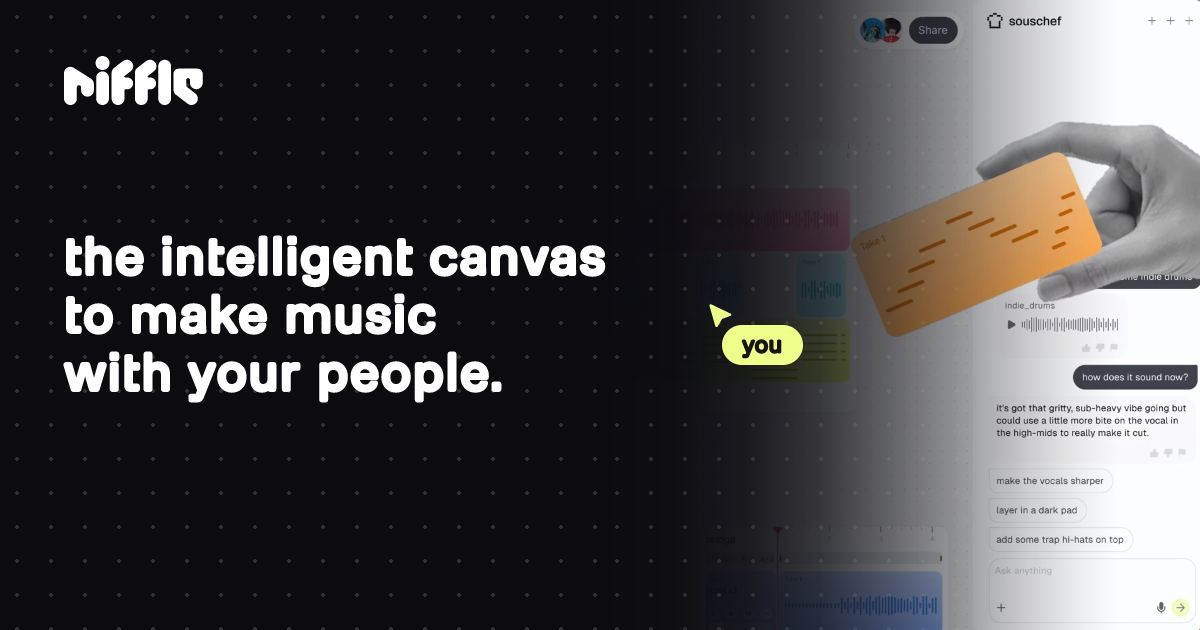

User reviews (0)