Website profiles · Technology insights · Alternatives

rylo.com

The sign language translation tool Sign.mt is now part of Rylo!

No paid content found
Visit website
Profile views 10 Outbound visits 3 Normal
Rylo Translate Full homepage screenshot

At a glance

Category
Software & Apps
Language
English
Paid-content signal
No paid content foundObserved
Registered
2022
Hosting
VercelInferred
HTTPS certificate trusted
PassedObserved
Last updated

Website review

This review may include AI-generated content and is not individually verified. Domain, certificate and other facts come from the observed data on this page.

What is Rylo Translate?

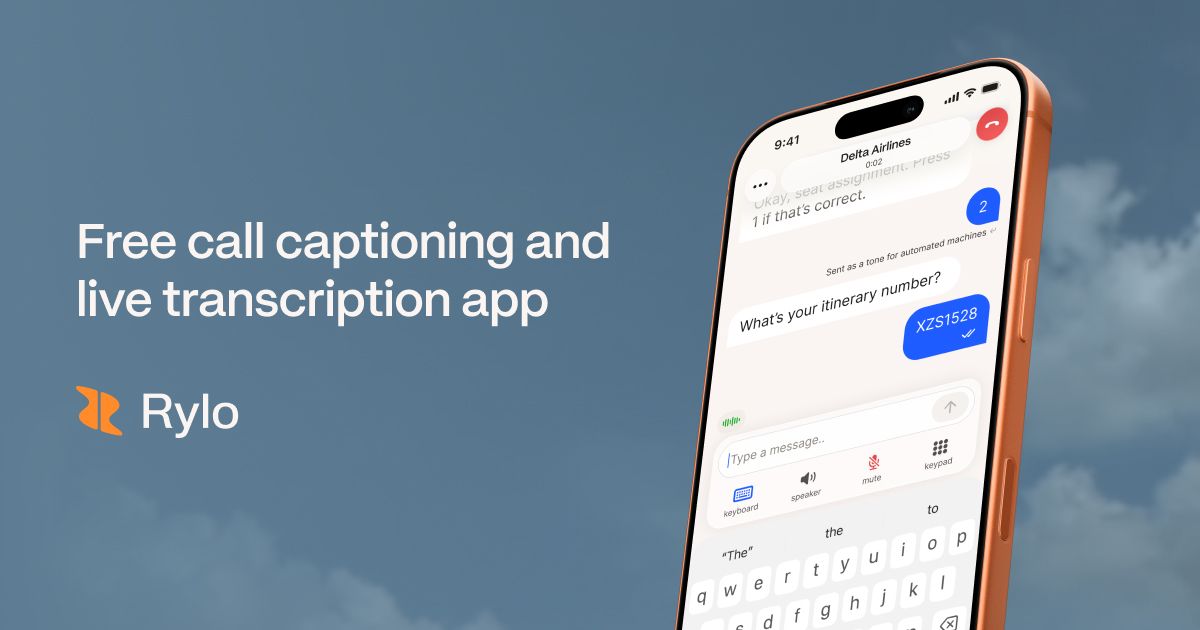
Rylo Translate is a free call-captioning and live-transcription app built for Deaf and hard-of-hearing users. Rather than translating between spoken languages, it turns speech into readable text in real time so you can follow phone conversations, reply by voice or keyboard, and keep a private transcript afterward. Its page describes it as FCC-certified, free for individuals with hearing loss, and private, with transcripts stored locally on your device.

What it actually does

  • Captions calls made through the app in real time, aiming for no dropped words or gaps.
  • Lets you keep your existing phone number or get a new one.
  • Supports 50+ languages and auto-detects language changes mid-conversation.
  • Offers reply options: speak, type, or use AI-powered quick replies.
  • Shows non-verbal cues such as who is speaking, typing, or pausing, plus speaker sentiment.
  • Includes spam and profanity filtering.
  • Pairs with hearing aids, cochlear implants, and Bluetooth headsets.
  • Lets you adjust caption styles and the tone and pace of talk-to-text audio.

Who it suits

The clearest fit is someone who can hear some speech but misses words on phone calls, or who prefers reading to listening. It also suits people who want captions without paying for a traditional relay or captioning service, and multilingual households where calls switch languages. If you rely on American Sign Language as your primary language, note that this is a captioning tool, not a video interpreter service; for live interpreting you would typically use a service such as Sorenson or ZVRS.

Trade-offs to weigh

  • Calls need to go through the Rylo app, so your normal dialer workflow changes.
  • Captioning quality depends on audio clarity, accents, and background noise.
  • Transcripts stay on your device, which is good for privacy but means you manage backups yourself.
  • The app is described as free for individuals with hearing loss; other uses may differ, so check current terms before relying on it.

One user quoted on the page, audiologist Dr. Nissen, says patients grew more confident in relationships after using it, and reviewer Mary Beth Maynard calls it the easiest captioned calling app she has used. Treat those as individual impressions; the practical test is whether it handles your own accent, phone, and hearing-aid setup well.

Next step: install it and run one short call with a familiar person, ideally with your hearing aid or headset paired, to judge caption accuracy and latency before making it your default way to call.

How does Rylo help Deaf and hard of hearing people make phone calls?

Rylo turns a phone call into something you can read. When you place or receive calls through the Rylo app, it captions speech into text in real time, so you can follow the conversation word by word instead of straining to hear. It is built for the Deaf and hard of hearing community, and the site describes it as a free call captioning and live transcription app.

What it does during a call

  • Live captions: Speech is converted into on-screen text as it is spoken, so you can read along in the moment.
  • Your existing number: You can keep your current phone number for calls and texts, or get a new one.
  • Reply your way: Respond by speaking or by typing on your keyboard.
  • Quick replies: AI-powered short responses let you keep the conversation moving with a few taps.
  • Non-verbal context: The app indicates who is speaking, typing or pausing, and shows speaker sentiment, which helps fill in cues you would normally get from tone of voice.
  • Caption styling: You can change how the conversation text looks, and adjust the tone and pace of talk-to-text audio using keyboard shortcuts.
  • Language support: The site says it handles 50+ languages and detects language changes in real time.
  • Spam and profanity filters: You can screen out conversation types you don't want.
  • Device pairing: It works with hearing aids, cochlear implants and Bluetooth headsets.
  • Privacy and transcripts: Calls are described as private, with transcripts saved locally on your device for later.

A practical example

Imagine a Deaf user expecting a call from a doctor's office. They keep their existing number, pair their hearing aids over Bluetooth, and read the captions as the receptionist speaks. When asked to confirm a date, they type a reply or tap a quick response. Afterwards, the transcript stays on their phone to check details later.

How to decide if it fits

If your main need is reading what is said during ordinary phone calls, with replies by voice or keyboard, Rylo targets exactly that. If you need in-person interpreting or a full sign language dictionary, those are different tools. The trade-off is that captions depend on accurate speech recognition and a stable connection, so unusual names, heavy accents or crosstalk may still need clarification.

A useful next step: download the app and test it with one familiar caller before relying on it for an important call. Check that your hearing aids or headset pair correctly and that your existing number carries over, then try a short call with a friend to see how the captions and quick replies feel in practice.

Is Rylo really free, and who qualifies for the FCC-certified service?

Yes. Rylo presents itself as a completely free call captioning and live transcription app, and its page states it is offered at no cost to individuals with hearing loss. That is the qualifier to focus on: the free service is framed around the Deaf and hard of hearing community, not as a general-purpose free captioning tool for everyone.

What "free" means here

Rylo's page says the app is free to download and that calls made through the app are captioned in real time at no cost. It also says the service is FCC certified. In the U.S., FCC certification for this kind of service generally relates to telecommunications relay and captioning services designed to make phone communication accessible to people with hearing or speech disabilities. So the practical answer is: free for the intended accessibility use, and certification signals it meets a regulatory standard for that purpose.

Who it is for

  • People who are Deaf or hard of hearing and want to read captions of phone conversations.
  • Users who want to keep their existing phone number while using captioned calling.
  • People who pair the app with hearing aids, cochlear implants, or Bluetooth headsets.
  • Multilingual callers, since Rylo says it supports 50+ languages and auto-detects language changes.

What you get beyond captions

Rylo's page lists features that go past simple transcription: voice or keyboard replies, AI-powered quick replies, speaker identification, sentiment and non-verbal cue tracking, spam and profanity filtering, adjustable caption styles, and locally saved transcripts. The privacy claim is that transcripts are stored on your device.

Practical next step

If you are considering it for yourself or a family member, check two things before relying on it: whether your phone and carrier support the app's calling method, and whether keeping your existing number works with your current plan. Then test one real call with a familiar person to see how accurately it captions your typical speech, accent, and background noise. For official program details and eligibility questions, the FCC's own site is the authoritative source: FCC.

Can I keep my existing phone number and use Rylo for calls and texts?

Yes. According to the Rylo page, you can choose between getting a fresh phone number or keeping your existing one for calls and texts. The app is positioned as free call captioning and live transcription for the Deaf and hard of hearing community, with calls made through the app captioned in real time.

What that means in practice

  • You don't have to abandon your number. If people already reach you on your current number, keeping it avoids telling everyone to update their contacts.
  • Calls and texts are both mentioned. The page specifically says the choice covers "calls and texts," not just incoming calls.
  • Captioning applies to calls made through the Rylo app. The page states that when you make calls through Rylo, speech is converted to readable text in real time.
  • Privacy is handled locally. Rylo says transcripts are saved locally on your device.

A practical next step

Before committing, confirm the setup steps inside the app for porting or linking your existing number, and test one call with a frequent contact. That tells you whether captions, replies, and your number all behave the way you need in daily use.

Quick comparison

Option Best for Trade-off to check
Keep existing number Staying reachable without changing contacts Confirm how your carrier and the app handle the connection
Get a new Rylo number Starting fresh or separating captioned calls You'll need to share the new number with contacts

If your main goal is captioned phone calls without disrupting how people already reach you, keeping your existing number is the more convenient route.

How private are Rylo calls and where are my transcripts stored?

Rylo presents its calls as private and its transcripts as local: the page states that "All Rylo calls are fully private with transcripts saved locally on your device." That is the key distinction. The transcript itself is described as staying on your phone rather than sitting in a cloud account you log into later, so privacy here rests mainly on your own device's security—your passcode, biometric lock, and whether anyone else uses your phone.

What that means in practice

  • Your transcript is your responsibility. If it lives only on your device, then losing or wiping the phone, or switching handsets without a transfer, can mean losing the conversation history. Backups matter more, not less.
  • Privacy is not the same as encryption in transit. The page's claim is about where transcripts are stored. It does not say calls are end-to-end encrypted, and captions have to be generated somehow, so treat "100% Private" as a storage claim rather than a full security guarantee.
  • Sharing is still possible. You can read a transcript on screen and screenshot it, or hand someone your phone. Local storage limits silent access, not deliberate disclosure.
  • Household devices count. A shared tablet or a phone without a screen lock weakens the benefit considerably.

A concrete scenario

A Deaf user takes a medical scheduling call through the app, then wants to check the appointment time two weeks later. With local storage, the transcript is there on their own phone—but if they upgrade devices and restore from a backup that excludes app data, that record may be gone. For anything consequential, copy key details into a notes app or calendar as you go.

How to decide and what to check next

Compare Rylo with services that store transcripts server-side, such as captioning built into major calling platforms, where you trade device-level control for cross-device access. If keeping records on your own hardware is the priority, local storage is the stronger choice; if you need transcripts on multiple devices or after a phone loss, it is the weaker one.

Before relying on it, confirm three things in the app itself: whether transcripts can be exported or backed up, whether the app requires a lock to open, and whether any setting sends data off the device. Those answers, not the headline claim, determine your real exposure.

Does Rylo work with hearing aids, cochlear implants, and Bluetooth headsets?

Yes. Rylo states that it pairs with hearing aids, cochlear implants, and Bluetooth headsets, so you can keep using the devices you already rely on while reading captions in the app. Rylo is a free call captioning and live transcription app, certified by the FCC, with transcripts saved locally on your device.

What that means in practice

  • Hearing aids and cochlear implants: If your device supports Bluetooth audio streaming, you can route the call audio through it while Rylo shows the spoken words as text on screen. This is useful when audio alone is tiring or unclear but you still want to hear tone and emotion.
  • Bluetooth headsets: Any standard Bluetooth headset can serve the same role, which helps in noisy places or when you want privacy on a call.
  • Caption styles and non-verbal cues: You can adjust how captions look, see who is speaking, typing, or pausing, and track speaker sentiment, which adds context that audio alone may miss.

A useful next step

Before relying on it for an important call, test one short call with your specific device: confirm the audio routes to your hearing aid, implant, or headset, and check that captions keep up. Bluetooth behavior varies by device and phone, so a two-minute trial call is the fastest way to know your setup works.

If you also want to compare captioning options, the FCC's own resource on telecommunications relay and captioning services is a good starting point: FCC. Rylo's own site is Rylo.

Related questions

More questions →
What Is a Sign Language Dictionary and How Do You Use One?

A sign language dictionary is a reference that maps words or concepts to signs, but it does not work like a print dictionary for a spoken language. You usually cannot look up a sign by spelling it letter by letter. Instead, you search by an English (or other spoken-language) word, by a visual feature such as handshape or location, or by topic, and you confirm the result with a video or a Deaf signer. A dictionary entry shows one possible sign for a concept; it does not teach you the grammar or the context that decides whether that sign fits.

How a sign language dictionary differs from a spoken-language dictionary

Spoken-language dictionaries are organized around spelling and pronunciation. Sign language dictionaries are organized around meaning and visual form.

  • Entry point is meaning, not spelling. You start from a word you already know in a written language, then find the sign that carries that meaning.
  • The "pronunciation" is visual. A sign is described by handshape, location, movement, palm orientation, and sometimes non-manual signals (facial expression, mouth movement, head tilt).
  • Video matters more than text. A written description of a sign is easy to misread. A short clip shows the movement and timing that text cannot.
  • One word, several signs. English "run" can mean jogging, running a business, or a run in a stocking. These are different signs, and a good dictionary lists them separately.

Types of sign language dictionaries

Type What it contains Best for
Print dictionary Photos or drawings plus written descriptions Reference and browsing, limited motion detail
Online text dictionary Searchable entries, often with images Quick lookups when video is not available
Video dictionary Clips of each sign, sometimes from multiple angles Learning accurate handshape and movement
Themed vocabulary list Signs grouped by topic (family, food, school) Building vocabulary in a subject area
ASL-specific vs. other sign languages Entries for one signed language only Matching the dictionary to the sign language you are learning

Sign languages are not universal. American Sign Language (ASL), British Sign Language (BSL), and others are distinct languages with their own vocabulary and grammar. A dictionary for one will not serve another.

How to look up a word

  1. Start with the concept, not the English word. Decide what you actually mean. "Light" as in not heavy and "light" as in a lamp are different concepts and likely different signs.
  2. Search the spoken-language word. Type the English word into the dictionary's search field.
  3. Check for multiple entries. If several signs appear, read the gloss or note that distinguishes them.
  4. Watch the video if one is provided. Note handshape, where the hands are, how they move, and any facial expression.
  5. Confirm with a fluent signer. A dictionary gives you a candidate sign. A Deaf signer or instructor tells you whether it is the sign used in your region and context.

Common misunderstandings

  • Signs are not English words spelled on the hands. Fingerspelling is used for names and borrowed terms, not as a substitute for signs.
  • A dictionary entry is not a translation. Word-for-word substitution produces broken signing. Grammar, word order, and facial expression carry meaning in sign languages.
  • Regional variation is normal. The same concept may have different signs in different countries, regions, or communities. A dictionary may note variants, but it cannot cover every local usage.
  • One sign can cover several English words. Looking up a single English word may not return the sign you need if the underlying concept is broader or narrower.

What to check when choosing a dictionary

  • Video demonstrations. Motion is part of the sign; still images leave out timing and direction.
  • Regional variant labels. Entries that note where a sign is used help you avoid mixing dialects.
  • Deaf community involvement. Dictionaries produced with Deaf signers and linguists are more likely to reflect real usage.
  • Clear glossing. A good entry tells you the concept it represents, not just a one-word English label.
  • Coverage of non-manual signals. Facial expression and mouth movement are grammatical in many sign languages; entries that ignore them are incomplete.

If your goal is communication access rather than vocabulary study, note that a dictionary is a learning tool, not a live translation service. For real-time conversation, captioning and transcription apps such as Rylo handle spoken and written language on phone calls, while a qualified sign language interpreter handles signed communication. The two serve different needs.

What Does a Sign Language Interpreter Do and How Do You Work With One?

A sign language interpreter converts meaning between a signed language and a spoken language in real time, in both directions, so a Deaf and a hearing person can hold an actual conversation. You need one whenever the exchange is live and interactive — a doctor's visit, a job interview, a parent-teacher meeting, a phone call. You do not need an interpreter for a written document (that's translation) or for one-way speech you only need to read (that's captioning). The rest of this article explains the difference, the main ways interpreting is delivered, what credentials to look for, and how to book and run a session without surprises.

Interpreter vs. translator vs. captioning: three different jobs

These terms get used interchangeably, but they solve different problems.

Service Direction Medium Typical use
Sign language interpreter Two-way, live Signed ↔ spoken Conversations, meetings, appointments, calls
Translator One-way, written Written text ↔ written text Documents, websites, letters
Captioning / transcription One-way, live or recorded Speech → text Phone calls, videos, lectures, one-on-one chat

The key distinction is interactivity. An interpreter is a person in the loop who can ask for clarification, handle interruptions, and switch speakers mid-sentence. Captioning shows you what was said but doesn't speak back for you. That's why captioning apps and interpreters are complements, not substitutes — see the section on phone calls below.

The main ways interpreting is delivered

In-person interpreting

The interpreter is physically in the room. Best for situations with lots of visual context, multiple speakers, or where you need to read body language and room dynamics — medical exams, courtrooms, large meetings.

Video remote interpreting (VRI)

The interpreter appears on a screen (tablet, laptop, or dedicated unit) while the Deaf and hearing parties are together in one location. Useful when you need an interpreter now and can't wait for one to travel, or in rural areas. It depends heavily on a stable, high-bandwidth connection and good camera framing.

Video relay service (VRS)

A specific use of VRI for phone calls. The Deaf caller signs to the interpreter over video; the interpreter voices to the hearing party on the phone, and voices the reply back in sign. This is how many Deaf people make ordinary phone calls to businesses, banks, and government offices.

What credentials and quality signals to check

Certification and licensing rules vary by country and region, so verify what applies where you are. In the United States, the recognized professional credential is RID certification (from the Registry of Interpreters for the Deaf), and many states also require a state license or have their own screening. When you book, it's reasonable to ask:

  • Which certification(s) the interpreter holds, and whether your state requires a license.
  • Whether they have experience in your specific setting (medical, legal, educational, technical).
  • Whether they've worked with the specialized vocabulary involved — for example, a cardiology consult or a software engineering interview.

For anything with legal or medical consequences, a certified interpreter isn't just preferable — it may be a legal requirement. Don't accept a well-meaning bilingual friend or family member as a substitute in those settings; it creates conflicts of interest and accuracy problems.

How to book an interpreter: the details that prevent problems

Give the agency or interpreter these facts up front. Missing any of them is the most common cause of a bad session.

  • Setting and purpose — what kind of appointment or event, and what will be discussed.
  • Date, start time, and expected duration — plus buffer if it might run long. Interpreting is cognitively intense; sessions typically need a second interpreter for long blocks, so tell them the real length.
  • Number of Deaf participants — one Deaf person signing to a group is a different job than a group discussion with several signers.
  • Number of hearing participants and how they'll speak — one speaker, a panel, or open discussion changes the setup.
  • Specialized vocabulary or names — send an agenda, slide deck, or list of technical terms in advance. This is the single biggest quality lever you control.
  • Format — in-person, VRI, or VRS — and the platform or equipment involved.
  • Any accessibility needs on the Deaf side — preferred sign language or dialect, since signed languages are not universal (American Sign Language, British Sign Language, and others are distinct).

Running the session well

A few habits make interpreting work far better:

  • Speak to the Deaf person, not the interpreter. The interpreter is a conduit, not a participant. Say "What do you think?" to the person, not "Ask her what she thinks."
  • One person speaks at a time. Overlapping speech is the hardest thing to interpret.
  • Pause for the interpretation. The interpreter needs a beat to finish before the next person starts.
  • Don't ask the interpreter to editorialize or summarize. Their job is to convey meaning faithfully, including tone.
  • Flag problems openly. If the video freezes, audio drops, or something was misheard, say so immediately rather than pushing through.

Where captioning and transcription apps fit

Interpreters handle live, two-way signed conversation. For phone calls and one-on-one spoken conversations, a captioning or live-transcription app can cover a lot of ground on its own — and it's often faster to start than booking an interpreter.

Rylo, for example, is a call captioning and live transcription app that shows every word as it's spoken during calls made through the app, keeps your existing phone number, supports 50+ languages with real-time language detection, and saves transcripts locally on your device. It's certified by the FCC and offered at no cost to individuals with hearing loss, and it works alongside hearing aids, cochlear implants, and Bluetooth headsets. For a Deaf signer who needs to sign on a call, a video relay service is still the right tool; for a hard-of-hearing person who speaks and needs to read the other side, captioning is the direct fit. Many people use both depending on the call.

Common problems and how to fix them

The interpreter doesn't show up. Confirm the booking 24–48 hours ahead, get a direct contact number, and have a backup — a VRI provider you can reach on short notice.

Role boundaries blur. If the interpreter starts answering for the Deaf person or offering opinions, redirect: "Please interpret what I said." This is a training issue, not a reason to abandon the session.

Poor video or audio. For VRI, test the connection and camera framing before the appointment, use a wired connection if possible, and position the camera so the interpreter can see hands and face clearly.

The wrong interpreter for the content. If specialized vocabulary is being fumbled, request a different interpreter or one with subject-matter experience for the next session.

Uncertainty about whether a certified interpreter is required. For legal, medical, and government settings, assume yes and confirm the specific rule with the provider or the institution. Getting this wrong can invalidate a proceeding or compromise care.

Quick decision guide

  • Live conversation, signed, two-way → book an interpreter (in-person or VRI).
  • Phone call where you sign → video relay service (VRS).
  • Phone call or one-on-one where you speak and need to read → captioning/transcription app such as Rylo.
  • Written document → translator.
  • Legal, medical, or official setting → certified interpreter, verified credentials, booked with full details in advance.
What Is a Sign Language Translator and How Does It Work?

A sign language translator is any tool or person that converts meaning between a signed language (like American Sign Language) and a spoken or written language. The term covers three very different things: a human sign language interpreter, a video remote interpreting (VRI) service, and automated sign translation software. Which one you need depends on the setting — a medical appointment, a phone call, or a casual conversation each calls for a different level of accuracy and a different kind of tool. Captioning and live transcription apps are sometimes grouped under "translator," but they solve a different problem: they turn spoken audio into text, not sign into speech.

The three types of sign language translation

Human sign language interpreters

A human interpreter watches a Deaf signer and voices their message aloud (or signs a hearing person's speech) in real time. They handle grammar, facial expression, tone, and cultural nuance — the parts of signed language that carry as much meaning as the hand shapes themselves. This is the standard for legal, medical, and other high-stakes settings, and it's what "sign language interpreter" usually means in professional contexts.

Video remote interpreting (VRI)

VRI puts a human interpreter on a video call instead of in the room. You get the same human skill set without waiting for someone to travel to you, which makes it practical for shorter or unplanned interactions. The trade-off is dependence on a stable video connection and a clear camera angle — if the interpreter can't see hands and face clearly, accuracy drops.

Automated and AI sign translation

Automated tools use computer vision to recognize hand shapes and gestures and output text or speech. They're improving, but they generally struggle with the features that make signed languages full languages: complex grammar, spatial referencing, rapid fingerspelling, regional variation, and non-manual signals like eyebrow and mouth movements. Treat them as assistive for simple, predictable exchanges rather than as replacements for a human interpreter.

How sign language translation differs from captioning

It's easy to conflate the two, but they move in opposite directions:

Tool Input Output Best for
Sign language interpreter / VRI Sign (or speech) Speech (or sign) Two-way conversations where a Deaf signer needs to be understood
Captioning / live transcription Spoken audio On-screen text Following a phone call, meeting, or video when you can hear some speech or want a text record

Captioning apps like Rylo translate spoken words into readable text in real time — the app's own description frames it as a call captioning and live transcription tool for the Deaf and hard of hearing community, with features like keeping your existing phone number, 50+ supported languages, speaker identification, and transcripts saved locally on your device. That's genuinely useful, but it is not sign language translation: it assumes the conversation is happening in spoken audio, not in signs.

If you sign and the other person speaks, captioning alone won't carry your side of the conversation. You need either an interpreter or a setup where you type or sign and the other person reads or hears the result.

Key limitations of automated sign translation

  • Vocabulary coverage — most systems recognize a limited set of signs and miss names, technical terms, and fingerspelled words.
  • Grammar — signed languages don't map word-for-word onto spoken ones, so literal sign-by-sign output often reads as broken sentences.
  • Facial expression and body movement — these carry grammatical meaning in many signed languages and are hard for cameras to capture reliably.
  • Speed and variation — fast signing, regional dialects, and one-handed variants reduce accuracy.
  • Two-way flow — many tools only go sign-to-text, leaving the hearing person's reply untranslated.

Choosing the right option for your situation

  • Phone call with a hearing person — if you can hear some speech, a captioning app handles it. If you sign and need your replies voiced, you need an interpreter or a relay service.
  • Medical, legal, or government appointment — use a qualified human interpreter, in person or via VRI. Automated tools aren't appropriate where a misunderstanding has real consequences.
  • Everyday, low-stakes conversation — an automated app or a mix of typing and captioning can be enough, especially for short, predictable exchanges.
  • Group meetings or classrooms — VRI or an on-site interpreter, plus captioning if a text record helps.
  • Learning vocabulary on your own — a sign language dictionary (video-based, ideally) is the right tool, not a translator.

A practical rule: the higher the stakes and the more nuanced the language, the more you need a human. The more routine and one-directional the exchange, the more an automated tool can carry.

FAQ

Is a sign language translator the same as an interpreter? Not exactly. "Translator" is the broad term for any tool or person converting between signed and spoken language. "Interpreter" specifically means a human working in real time.

Can an app translate sign language into speech? Some experimental tools attempt it, but accuracy is limited by vocabulary, grammar, and facial-expression handling. For anything important, use a human interpreter.

Does a captioning app replace a sign language interpreter? No. Captioning converts spoken audio to text. It doesn't translate signs, so it can't carry a signing person's side of a conversation.

What should I look for in a sign language dictionary? Video demonstrations rather than static images, since hand shape, movement, and location all matter, plus regional variation notes if your area has them.

What Is Sign Language Translation and How Does It Work?

Sign language translation is the process of converting meaning between a sign language (such as American Sign Language, ASL) and a spoken or written language. It is not the same as captioning or speech-to-text transcription. Captioning converts spoken words into written text in the same language; sign language translation converts meaning across two different languages and modalities — one visual-gestural, one spoken-aural. If you need to understand a phone call, a captioning app may be enough. If you need a Deaf signer and a hearing non-signer to understand each other in a full conversation, you generally need a human interpreter or, in limited cases, an automated sign-recognition system.

Sign language translation vs. captioning and transcription

These terms are often used interchangeably, but they solve different problems.

Task Input Output Who it serves
Captioning / live transcription Spoken words Written text in the same language People who can read the language but cannot hear it well
Sign language translation Signs, facial expression, body posture Spoken or written words (and vice versa) Deaf signers and hearing non-signers who do not share a language
Sign language recognition Recorded or live signing Text or gloss of the signs Research, tooling, partial automation

A Deaf person who uses ASL and reads English fluently may be well served by a captioning app on a phone call. A Deaf person who prefers ASL and a hearing colleague who knows no sign language need a translator, not a caption.

The main forms of sign language translation

1. Human sign language interpreters

This is the standard for accuracy and nuance. Interpreters work in person or remotely over video (Video Remote Interpreting, VRI) and are the default for medical, legal, educational, and employment settings. They handle grammar, tone, regional variation, and cultural context that automated systems miss.

2. Video Relay Service (VRS)

VRS lets a Deaf signer communicate with a hearing person over a phone or video call through an interpreter. The signer signs to the interpreter, who speaks to the hearing party, and vice versa. In the United States, VRS is a regulated telecommunications service. Availability, eligibility, and equipment rules vary by country, so check your local provider rather than assuming a given app includes it.

3. Automated sign language recognition and translation

Research systems and some apps attempt to detect hand shapes, movement, and facial cues and output text or speech. These are improving but remain limited: sign languages use simultaneous signals (hands, face, mouth, torso, use of space) and grammar that does not map word-for-word to spoken language. Treat automated sign translation as experimental, not as a substitute for an interpreter in high-stakes situations.

Why automated sign translation is harder than speech-to-text

Speech-to-text has one stream to decode: audio. Sign language has several at once:

  • Handshape, location, movement, and orientation — changing any one can change the meaning.
  • Facial expression and mouthing — grammatical, not just emotional. Raised eyebrows can mark a question.
  • Body posture and use of signing space — used to track who did what to whom.
  • No one-to-one word mapping — a single sign can carry a phrase's worth of meaning, and word order differs from English.

That is why a system that recognizes a few dozen isolated signs is far from translating a real conversation.

What phone apps can and cannot do

Apps like Rylo focus on call captioning and live transcription, not sign language translation. According to the site, Rylo is a free call captioning and live transcription app, certified by the FCC and offered at no cost to individuals with hearing loss. It captions calls in real time, lets you keep your existing phone number or get a new one, supports replying by voice or keyboard, saves transcripts locally on your device, supports 50+ languages with automatic language detection, and can pair with hearing aids, cochlear implants, and Bluetooth headsets.

What that means in practice:

  • Good fit: A Deaf or hard-of-hearing person who reads the spoken language well and wants to follow phone conversations via text, reply by typing or speaking, and keep a private transcript.
  • Not a fit: A Deaf ASL signer who needs their signing translated into speech for a hearing person who does not sign. Captioning does not read signs; it reads speech.

The site also notes features such as speaker sentiment, who is speaking/typing/pausing, spam and profanity filtering, adjustable caption styles, and AI-powered quick replies. These support call comprehension and flow — they do not perform sign-to-speech translation.

How to choose

Use this as a starting filter:

  • You can read the spoken language and mainly need to follow audio: a captioning/transcription app is appropriate. Check that it fits your phone, number, and privacy needs.
  • You sign and the other person does not: book a qualified sign language interpreter, or use a VRS provider where available.
  • You want to look up a single sign: a sign language dictionary is the right tool, not a translator app.
  • You are testing automated sign translation: treat output as a draft, verify anything important, and do not rely on it for medical, legal, or emergency communication.

Practical checks before relying on any tool

  1. Confirm what the tool actually converts — speech to text, or sign to speech. The two are not interchangeable.
  2. Check language and dialect coverage. ASL, British Sign Language, and others are distinct languages.
  3. Confirm privacy handling. Rylo states calls are private with transcripts saved locally; verify the same for any tool you use.
  4. For regulated services like VRS, confirm eligibility and rules with the provider in your country.
  5. For anything consequential, use a human interpreter.
What Is Sign Language and How Does It Work?

Sign language is a complete natural language that uses hand shapes, movement, position, and facial expression to convey meaning. It is not a gesture-by-gesture version of spoken English or any other spoken language. Each sign language has its own grammar, vocabulary, and word order, and different countries have their own distinct sign languages — American Sign Language (ASL), British Sign Language (BSL), and others — which are not mutually intelligible. If you want to learn, the most effective path is community classes, a dictionary for the specific sign language used where you live, and regular conversation with Deaf signers. If you need to communicate with a Deaf or hard-of-hearing person and don't sign, a sign language interpreter or a real-time captioning app can bridge the gap.

Sign language is a language, not a code

A common misconception is that sign language is spoken English "acted out" with the hands. It isn't. ASL, for example, has its own syntax that differs from English — a question might be marked by raised eyebrows rather than word order, and the same hand shape can mean different things depending on where and how it moves.

Sign languages developed naturally within Deaf communities, the same way spoken languages developed within hearing communities. That's why they vary by region and carry their own idioms, poetry, and humor.

The building blocks of a sign

A sign is made up of several components that work together. Change one and you change the meaning:

  • Hand shape — the configuration of the fingers
  • Location — where the sign is made relative to the body
  • Movement — how the hand travels
  • Palm orientation — which way the hand faces
  • Non-manual markers — facial expression, head tilt, mouth movement, and body posture

That last point matters most for beginners. In many sign languages, facial expression isn't decoration — it carries grammatical information such as whether a sentence is a statement, a question, or a negation. Signing with a flat face can make a sentence hard to understand or change its meaning entirely.

Different countries, different sign languages

There is no universal sign language. Some examples:

Sign language Primary region
ASL (American Sign Language) United States, parts of Canada
BSL (British Sign Language) United Kingdom
Auslan Australia
LSF (French Sign Language) France

ASL and BSL are not related, even though both countries speak English. If you're learning, pick the sign language used by the Deaf community in your area — that's the one you'll actually be able to use.

How to start learning

  1. Find a local class or Deaf community group. In-person instruction from a Deaf teacher gives you feedback on facial expression and hand shape that apps can't easily provide.
  2. Use a dictionary for your target sign language. A video dictionary is far more useful than a static one, because movement and timing are part of the sign.
  3. Practice with native signers. Immersion is how fluency develops. Many Deaf community centers, libraries, and online groups welcome learners.
  4. Be patient with receptive skills. Understanding sign language when it's signed to you is usually harder than producing it, and it takes longer to develop.

A practical note: when you learn a sign, learn it in a full sentence. Isolated vocabulary without grammar won't get you far in a real conversation.

When you need interpretation or captioning instead

If you don't sign and need to communicate with someone who does, you have two main routes:

  • A sign language interpreter — a trained professional who translates between a spoken language and a sign language in real time. This is the standard for medical, legal, and formal settings.
  • Real-time captioning — converting spoken words into text the other person can read. This helps Deaf and hard-of-hearing people follow phone calls and conversations without an interpreter present.

For phone calls specifically, captioning apps exist for this purpose. Rylo, for example, is described as a free call captioning and live transcription app that shows every word as it's spoken, supports 50+ languages with automatic language detection, and lets users reply by voice or keyboard. It also notes features like keeping your existing phone number, saving transcripts locally on your device, and pairing with hearing aids, cochlear implants, and Bluetooth headsets. It states it is certified by the FCC and offered at no cost to individuals with hearing loss.

Captioning and sign language interpretation solve different problems: captioning gives you the spoken words as text, while interpretation conveys meaning between two full languages. Which one you need depends on whether the Deaf person in the conversation uses a sign language as their primary mode of communication.

A quick way to decide your next step

  • You want to communicate directly with Deaf signers → learn the sign language used in your region, starting with a local class.
  • You need to understand a specific conversation now → arrange a sign language interpreter for formal settings.
  • You need to follow phone calls or spoken conversation → a real-time captioning app covers that gap.
  • You're just curious about how sign language works → remember the core point: it's a full language with its own grammar, carried by hands and face, and it differs from country to country.

Website Overview

Page metadata, canonical configuration and social previews work together to provide more consistent search and sharing presentation.

Domain and Registration

Transfer-protection status is present, helping reduce the risk of unauthorized domain transfers. The domain has about 4 years of registration history; its current configuration provides more context than age alone. The registrar is Cloudflare, Inc., a widely used domain service provider. The domain uses the common .com extension, which is not an independent safety signal.

DNS and Email

Nameservers are provided by Cloudflare, indicating managed DNS hosting. MX records point to the Google Workspace email service. No CNAME was found; the observed records resolve directly to addresses. SPF and DMARC are configured. DKIM status is unknown. TXT records include verification markers for Google, Apple, Microsoft. Such markers may also remain after a service stops being used.

TLS and Certificates

The public key uses EC with 256 bits. The server supplied a complete certificate chain. No organization name is present in the certificate; the available fields are consistent with domain validation. The certificate was issued within the Google Trust Services cloud or CDN ecosystem. The certificate's total validity is about 90 days, consistent with a short renewal cycle.

HTTP and Browser Security

The response lacks these common security headers: CSP, X-Content-Type-Options, Referrer-Policy, Permissions-Policy, clickjacking protection. CORS permits any origin to read this response. This is common for public resources; sensitive responses need narrower handling. No X-Powered-By header was found, reducing one common source of backend fingerprinting information. The cf-ray, x-cache, x-served-by, via response header indicates a CDN or caching proxy in the delivery path. No obvious internal addresses or debug information were found in the headers.

Technology Stack Analysis

The public page identifies Cloudflare, Vercel without precise versions, leaving fewer clues for version-specific scanning.

Search and Social Sharing

Twitter Card metadata is configured. JSON-LD includes Organization data, helping describe the organization as an entity. The title has 37 characters, within a common display range. A meta description is present, with 121 characters. The observed directives allow indexing and link following.

Hosting and Email

DNSCloudflare
HostingVercel
EmailGoogle Workspace
Approximate IP geolocation (inferred; a CDN or proxy may differ from the origin server) Location unknown Inferred 104.21.50.122

Registration details

RDAP / WHOIS

RegistrarCloudflare, Inc.
Registered2022-04-14
Expires2028-04-14
Domain statusclient transfer prohibited
Nameserversdenver.ns.cloudflare.com、raegan.ns.cloudflare.com
DNSSECunsigned

DNS records

DNS

TypeNameValueTTLPriority
Arylo.com104.21.50.122300—
Arylo.com172.67.163.43300—
AAAArylo.com2606:4700:3033::6815:327a300—
AAAArylo.com2606:4700:3033::ac43:a32b300—
MXrylo.comaspmx.l.google.com3001
MXrylo.comalt1.aspmx.l.google.com3005
MXrylo.comalt2.aspmx.l.google.com3005
MXrylo.comalt3.aspmx.l.google.com30010
MXrylo.comalt4.aspmx.l.google.com30010
NSrylo.comdenver.ns.cloudflare.com86400—
NSrylo.comraegan.ns.cloudflare.com86400—
TXTrylo.comMS=ms30631123300—
TXTrylo.comapple-domain-verification=emaIsPb1Z4KTHXNA300—
TXTrylo.comgoogle-gws-recovery-domain-verification=67721176300—
TXTrylo.comgoogle-site-verification=Um4OJOABg7Fj_rZpSX3ToVSF2k-JSxkBtbqrA7_fVhE300—
TXTrylo.comv=spf1 include:_spf.google.com -all300—
DMARC_dmarc.rylo.comv=DMARC1; p=none; rua=mailto:[email protected]300—

TLS and certificates

TLS / SSL

AssessmentNormal configuration
Supported protocolsTLSv1.2、TLSv1.3
Negotiated protocolTLSv1.3
Certificate subjectrylo.com
IssuerGoogle Trust Services
Valid until2026-11-03T17:39 · Remaining when checked: 28 days
Verification detailsCertificate trust: Passed · Hostname match: Passed

HTTP response headers

HTTP

HeaderValue
content-typetext/html; charset=utf-8
cache-controlmax-age=600
servercloudflare
strict-transport-securitymax-age=31556952
access-control-allow-origin*

Identified technologies

CloudflareVercel

Pages, Search and Sharing

Meta descriptionThe completely free call captioning app making it easy to communicate with anyone, anywhere. FCC certified, 100% private.
Canonical URLhttps://rylo.com/
LanguageEnglish (default)
Twitter Cardsummary_large_image
All bots 1 allowed · 0 disallowed
  • Allow/
gptbot 0 allowed · 1 disallowed
  • Disallow/sign/dictionary
claudebot 0 allowed · 1 disallowed
  • Disallow/sign/dictionary
ccbot 0 allowed · 1 disallowed
  • Disallow/sign/dictionary
google-extended 0 allowed · 1 disallowed
  • Disallow/sign/dictionary
applebot-extended 0 allowed · 1 disallowed
  • Disallow/sign/dictionary
meta-externalagent 0 allowed · 1 disallowed
  • Disallow/sign/dictionary
bytespider 0 allowed · 1 disallowed
  • Disallow/sign/dictionary

User reviews (0)

  • No reviews yet.