
 简体中文
简体中文 English
Website review
This review may include AI-generated content and is not individually verified. Domain, certificate and other facts come from the observed data on this page.
What is SendCutSend?
SendCutSend is an online custom manufacturing service, focused mainly on sheet metal fabrication, that turns your CAD files into finished parts. You upload a STEP or DXF file, get instant pricing, and receive parts in as little as a day or two. It also covers CNC machining, bending and forming, welding, hole features, hardware insertion, tapping, and finishes such as anodizing, plating, powder coating, deburring, and media blasting.
The core appeal is speed and accessibility for small-batch and one-off work. Instead of calling a local shop for a quote, you get automated pricing on upload, which suits engineers, product designers, hobbyists, and small businesses prototyping or producing short runs. The site notes 175+ materials in stock and says it is trusted by 100,000+ companies, and it emphasizes US-based manufacturing.
What you can have made
- Sheet cutting: laser cutting, waterjet, and CNC routing for sheet materials
- CNC machining: multiaxis machining from billet stock
- Forming: bending held to within about 1 degree of accuracy or better
- Joining and fastening: welding, hardware insertion, and tapping
- Finishing: anodizing in 5 colors, zinc and nickel plating, powder coating in 15 options, tumbling, deburring, and media blasting
When it fits — and when it may not
It fits best when your part is flat or simply formed, you can supply a clean STEP or DXF file, and you value fast turnaround over working directly with a fabricator. If you need no CAD at all, the site offers templates to start from. For complex assemblies, tight tolerances across many operations, or unusual materials, a traditional shop with a human quoting process may still be the better route.
As a next step, check the guidelines and min/max part size chart before uploading, since file quality and part dimensions determine whether instant pricing works. If you are unsure, start with a simple flat bracket in a common material to test the workflow and finish quality before committing to a larger order.
How do I get instant pricing for my custom sheet metal parts?
Upload your CAD file to SendCutSend and the site returns a price on the spot — that is the core of its "instant pricing" flow. You do not request a quote and wait for an email; the cost appears once the geometry, material and quantity are known.
What the instant-pricing step needs from you
- A file the service can read. The site asks for STEP or DXF uploads. STEP suits 3D machined or formed parts; DXF suits flat cut profiles.
- Material and thickness. The service lists 175+ materials in stock, and price changes with the stock you pick.
- Quantity. Per-part cost usually falls as quantity rises, so enter the real number you need rather than pricing one.
- Secondary operations. Bending, countersinking, tapping, hardware insertion, anodizing, plating and powder coating are separate services, so each one you add changes the total.
- No CAD file? The site offers templates as a starting point, which is useful if you are reverse-engineering a bracket or a simple plate.
A practical first run
Take a flat bracket you already understand: export a DXF of the outline and any holes, upload it, choose your material and thickness, and set quantity to 1, 10 and 100. Compare the three prices before you add bending or finishing. That sequence tells you whether your cost is driven by material, machine time or the finishing steps — the number that actually decides whether the design is worth revising.
Trade-offs to weigh
Instant pricing rewards files that match the service's standard guidelines: clean geometry, sensible hole sizes, bends that respect the tooling. A file that violates those rules may price quickly but fail a manual review, or need rework. If your part is highly toleranced, welded into an assembly or made from an unusual alloy, treat the instant figure as a starting estimate and confirm the details before committing.
For a design decision: if the instant price at your real quantity fits the budget, order; if it does not, change one variable at a time — thickness, material, or a finishing step — and re-upload. That is faster than trading emails about a quote.
What file formats can I upload for laser cutting or CNC machining?
SendCutSend accepts STEP and DXF files for instant pricing and ordering. Those are the two formats named directly on the site: STEP for 3D CAD models (the natural fit for CNC machining and other subtractive processes) and DXF for 2D profiles (the standard for laser cutting, waterjet and CNC routing of sheet material). The homepage also notes that if you don't have CAD, you can start from a template rather than authoring a file yourself.
Which format to pick
| Your part | Likely format | Why |
|---|---|---|
| Flat sheet part, laser cut or routed | DXF | 2D outline, holes and cut paths are all the machine needs |
| Machined 3D component | STEP | Carries solid geometry, pockets and 3D features |
| Bent sheet part | DXF plus bend information | The flat pattern drives cutting; bend lines and angles drive forming |
| No CAD at all | Template | Start from a pre-drawn shape and adjust dimensions |
Practical notes
- Export DXF as a clean 2D outline with closed contours and no stray construction lines; overlapping or open paths are the most common cause of a quote that won't process or a part that comes out wrong.
- STEP is generally preferred over STL for machining because it describes precise surfaces rather than a mesh approximation.
- If your part is both cut and machined — say a laser-cut plate with tapped holes — you may need to supply geometry that covers both operations, or split the work into separate uploads.
Next step
Upload your file to SendCutSend and check the instant quote before you commit. If the geometry doesn't read correctly, that's your signal to re-export rather than to place the order and hope. Their guidelines pages on sheet cutting and bending are worth reading first if you're unsure how to prepare the file.
What materials are available for sheet metal fabrication?
SendCutSend stocks 175+ materials, so the practical answer is that the service covers the common sheet-metal families plus a long tail of specialty stock. Its service list is organized around sheet cutting (laser, waterjet, and CNC routing), CNC machining, bending, hardware insertion, tapping, and finishing, which tells you the material choice is meant to pair with a process rather than stand alone.
Material families to expect
- Metals: mild steel, stainless steel, aluminum and its alloys, copper, brass, and titanium are the usual sheet-fabrication staples.
- Plastics: acrylic, polycarbonate, ABS, delrin/acetal, and similar machinable or cuttable sheet plastics.
- Composites and specials: carbon fiber, G10/garolite, and other engineered sheet goods appear in large online fabrication catalogs.
Matching material to process
| Need | Sensible material direction | Trade-off |
|---|---|---|
| Structural brackets, low cost | Mild steel | Rusts without plating or powder coating |
| Corrosion resistance, food/medical-adjacent | Stainless steel | Harder to cut and bend; higher cost |
| Lightweight enclosures, panels | Aluminum | Softer, dents more easily; anodizing helps |
| Electrical or decorative parts | Copper, brass | Expensive and heavy for their strength |
| RF/insulating or low-weight panels | G10, acrylic, polycarbonate | Not weldable; heat limits differ |
Finishes change the answer
The finish often decides the material. Anodizing works on aluminum, plating suits steel and some other metals, and powder coating covers most conductive sheet. If your part needs threads or inserted hardware, the base material must be thick and strong enough to hold them.
A useful next step: open the material list and pricing page, pick two candidate materials, and compare cost, lead time, and available finishes for your exact geometry. If you have no CAD file, the template route lets you start from a standard shape before choosing stock.
How fast can I get my custom parts delivered?
SendCutSend advertises delivery in as little as 24 hours for its custom sheet metal fabrication and CNC machining services. That is the fastest turnaround shown on its site; it is not a guaranteed door-to-door time for every order. Your actual delivery date depends on the material, thickness, finishing steps and quantity you upload.
What tends to add time
- Secondary operations such as anodizing, plating, powder coating, tapping, countersinking or hardware insertion
- Parts that need bending, welding or dimple forming after cutting
- Large quantities or unusual materials
- Any file that needs manual review before production
How to get a realistic date
- Upload your STEP or DXF file to the instant pricing tool.
- Select material, thickness, quantity and finish.
- Read the lead time shown at checkout for that exact configuration.
That checkout estimate is more useful than the headline 24-hour figure, because it reflects the specific part you are ordering. If timing is critical, keep the design simple, choose a stock material and skip cosmetic finishing. For a first order, run one small test part before committing to a full batch.
SendCutSend is one option among several online fabrication services; compare quoted lead times and shipping costs across two or three before deciding. See SendCutSend for its current services and guidelines.
What finishing services can I add to my parts, like anodizing or powder coating?
You can add several finishing options to parts ordered through SendCutSend, covering both surface cleanup and cosmetic or protective coatings. The service menu lists anodizing, powder coating, plating, media blasting, tumbling, and deburring, plus related operations like countersinking, tapping, dimple forming, hardware insertion, and welding.
What each finish is for
- Anodizing — Class II anodizing in five colors. Best for aluminum parts where you want increased durability plus a colored finish.
- Powder coating — A protective layer in 15 color options. Useful when you want a bold, long-lasting coating on custom cut parts.
- Plating — Zinc and nickel plating, chosen for rust prevention, wear resistance, and strength.
- Deburring — Smooths sharp edges and cleans up metal parts. A practical default when parts will be handled or assembled.
- Media blasting — Gives CNC machined parts a finished appearance and smoothed edges.
- Tumbling — Reduces surface blemishes and handling scratches found in raw materials.
How to choose
| Goal | Finish to consider |
|---|---|
| Color + durability on aluminum | Anodizing |
| Color + protection on other metals | Powder coating |
| Corrosion and wear resistance | Plating |
| Safe, clean edges | Deburring |
| Uniform cosmetic look on machined parts | Media blasting |
| Removing minor surface marks | Tumbling |
A useful next step is to decide whether your priority is appearance, protection, or handling safety, since those point to different finishes. For example, a bracket that will be touched during assembly mainly needs deburring, while an outdoor enclosure benefits more from powder coating or plating.
 Cloudflare
 Google Workspace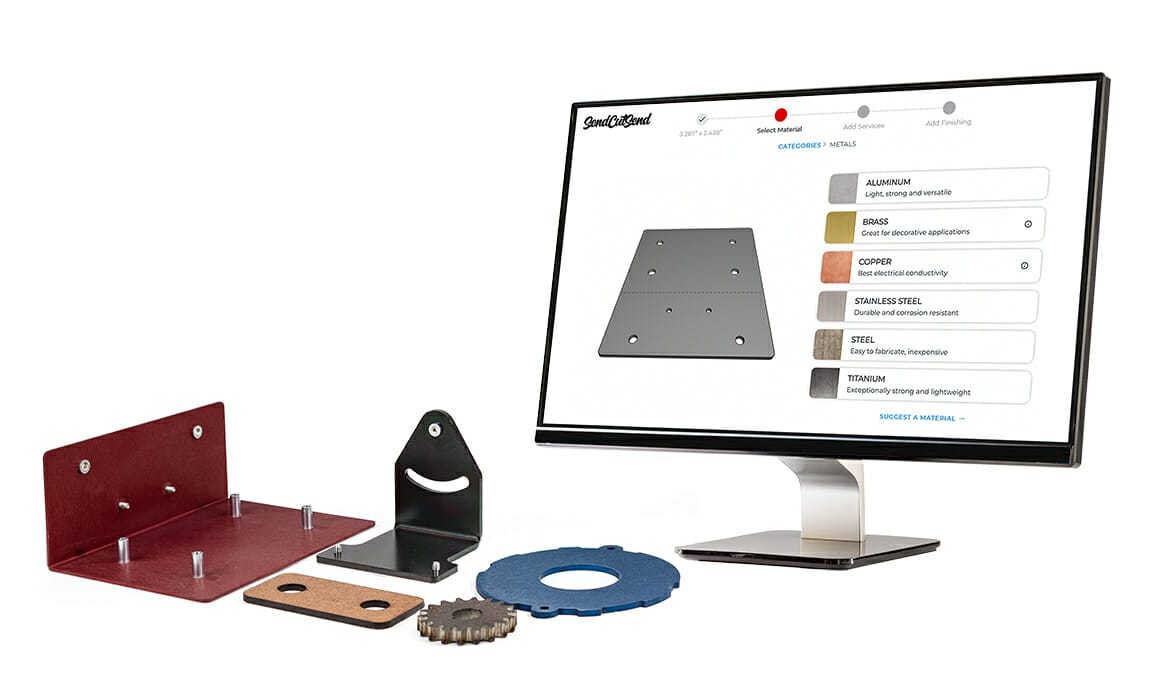
User reviews (0)