Website profiles · Technology insights · Alternatives

sineptic-software.itch.io

No paid content found
Visit website
Profile views 1 Outbound visits 0 Normal
Sineptic Software Full homepage screenshot

At a glance

Category
Software & Apps
Language
English
Paid-content signal
No paid content foundObserved
Registered
Unknown
Hosting
CloudflareInferred
HTTPS certificate trusted
PassedObserved
Last updated

Website review

This review may include AI-generated content and is not individually verified. Domain, certificate and other facts come from the observed data on this page.

What is Sineptic Software?

Sineptic Software is the itch.io profile of an independent creator who builds small, practical software tools and experiments with AI-assisted workflows. The page presents it as a personal studio rather than a company: the creator describes a love of coding, testing setups, and retro games, and the projects on the page reflect that hands-on, tinkering style.

What the page shows

Two projects illustrate the focus:

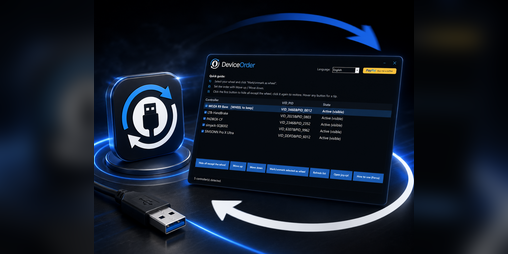
  • DeviceOrder – Wheel & Pedals Fix for Sim Racing: hides and restores DirectInput devices to resolve wheel and pedal binding problems in sim racing games.
  • S4W – Scanlines for Windows: adjustable shaders and scanlines with CRT, VHS effects and bezels.

Both are narrow, fix-oriented utilities aimed at people who want a specific problem solved or a particular visual effect, not broad suites or general-purpose apps.

Who it suits

Sim racers dealing with device-detection conflicts and users who want retro display effects on Windows are the clearest audiences. If you are looking for a large, actively marketed software brand, this is not that; it is a small creator's outlet where tools appear as personal projects.

A useful next step

Open the project page for the specific tool you need and read its description and changelog before installing, since small utilities often depend on your exact hardware and Windows version. For sim racing device issues, check whether the fix matches your wheel base and game before changing device settings.

Which Sineptic Software tool should I use to fix wheel and pedal binding issues in sim racing games?

Use DeviceOrder – Wheel & Pedals Fix for Sim Racing. It is the Sineptic Software tool explicitly made to hide and restore DirectInput devices, which is the practical fix when a sim racing game detects your wheel and pedals in the wrong order or refuses to bind them correctly. The scanline and CRT tool on the same page, S4W, is a visual shader utility and does not address controller binding.

How to decide it fits your case

  • Use DeviceOrder if the wheel and pedals work in Windows but a specific game binds the wrong axis, swaps devices, or ignores one of them.
  • Do not expect it to fix a dead USB port, missing drivers, or a wheel that never appears in Windows at all. Those need hardware or driver troubleshooting first.
  • Check the game’s own input settings before and after hiding devices, since some sims let you pick a specific DirectInput device directly.

Practical next step

Open the DeviceOrder page on Sineptic Software and read its usage notes before changing anything. Then note which devices Windows currently lists, launch the game, and hide only the extra DirectInput devices you are not using, such as a spare gamepad or a virtual controller. Restore them afterward so other games are unaffected.

If DeviceOrder does not resolve it, the next places to look are the wheel manufacturer’s official support pages and the sim game’s own controller documentation, since binding problems often come from the game’s input layer rather than device order alone.

How do I set up S4W - Scanlines for Windows to get CRT or VHS effects?

S4W - Scanlines for Windows is a Windows tool from Sineptic Software that applies adjustable shaders, scanlines, CRT and VHS effects, and bezels over what's on screen. The listing describes it as adjustable rather than preset-only, which means setup is mostly about choosing an effect style and tuning its strength to your display.

A practical setup sequence

  1. Install and launch it from the Sineptic Software page on itch.io, following the creator's own install notes there.
  2. Start with a single effect. Pick scanlines or a CRT look first, before layering VHS distortion or bezels. Stacking everything at once makes it hard to judge which setting is causing a problem.
  3. Tune intensity against your actual content. Text-heavy games and desktop work suffer quickly from heavy scanlines or blur; pixel-art and retro titles tolerate much stronger settings.
  4. Match the effect to the resolution. CRT effects usually look most convincing when the scanline spacing suits the game's native pixel scale, so try a couple of strengths before settling.
  5. Add bezels last. A bezel frames the image and changes how much screen area the effect covers, so adjust it after the shader looks right.

Choosing between CRT and VHS

Goal Effect to favour Trade-off
Nostalgic arcade or console look Scanlines and CRT shaders Can soften text and fine UI details
Old-tape, horror or analogue-video mood VHS-style distortion and colour artefacts Distortion is deliberately imprecise; poor for reading small text
Framed, "monitor in a room" feel Bezels combined with a CRT effect Bezels reduce usable screen area

For a concrete case: someone replaying a 16-bit platformer would likely run moderate scanlines with a light CRT curve and skip VHS entirely. Someone playing a lo-fi horror game might invert that, using stronger VHS artefacts and a subtle bezel.

Next step

Test each effect on one game you know well, note the settings that work, and save them as your baseline before experimenting further. If wheel-and-pedal binding problems are also on your list, the same creator's DeviceOrder tool addresses input-device conflicts separately.

Is DeviceOrder compatible with my racing wheel and pedals, and how do I hide or restore DInput devices?

DeviceOrder is a small Windows utility from Sineptic Software aimed at sim racers whose wheel and pedals show up as DirectInput (DInput) devices and cause binding conflicts in games. Its stated purpose is to hide and restore DInput devices so that a game only sees the controller you want it to see. Compatibility is therefore about whether your wheel or pedals appear as a DInput device in Windows, not about a specific brand or model.

Who it is for

  • Sim racers with multiple input devices (wheel, pedals, shifter, button box) where a game binds the wrong one.
  • Players using older titles that enumerate every DInput device and get confused by duplicates or virtual devices.
  • Anyone who wants a quick toggle rather than unplugging hardware between games.

How hiding and restoring typically works

The usual workflow for this kind of tool is:

  1. Close the game so it re-scans devices on next launch.
  2. Open DeviceOrder and locate the device you want the game to ignore.
  3. Hide that device, then start the game and rebind your controls.
  4. Restore the device when you need it in another game or in the wheel's own configuration software.

The practical benefit is that you keep everything plugged in and avoid physically swapping USB ports, which can reset device IDs.

Trade-offs to weigh

  • Hiding a device affects Windows as a whole while it is hidden, so your wheel's tuning software may not see it until you restore it.
  • Some games read devices at launch only; others re-scan, so you may need to restart after toggling.
  • If your wheel and pedals are a single combined device, hiding one may hide both.

Next step

Check Windows' game controllers list (search "Set up USB game controllers") to see exactly how your wheel and pedals are enumerated. If they appear as separate DInput entries, DeviceOrder's hide/restore approach matches your problem; if they appear as one device, the conflict is likely inside the game's own binding menu instead.

Can Sineptic Software's scanline shaders be customized with bezels and adjustable effects for retro gaming?

Yes. Sineptic Software's S4W - Scanlines for Windows is described as offering adjustable shaders, scanlines, CRT and VHS effects, and bezels, so the retro-gaming look is meant to be tuned rather than locked to one preset. The same page also lists DeviceOrder, a separate tool for hiding and restoring DInput devices to fix wheel and pedal binding problems in sim racing—useful context that this is a small independent creator's catalogue rather than a single-purpose utility shop.

What this means in practice

For a retro-gaming setup, the appeal of adjustable scanlines plus CRT/VHS effects and bezels is that you can match the overlay to the game and display: heavier scanlines and curvature for 8- and 16-bit console titles, lighter treatment for DOS-era PC games where text legibility matters, and bezels to frame a 4:3 image on a widescreen monitor. The trade-off is time: each effect layer you enable needs tuning per game or per resolution, and aggressive CRT/VHS settings can blur fine UI text or add shimmer during scrolling.

A concrete test: pick one game you know well, set the overlay to a mild scanline-only profile, then add bezel and VHS effects one at a time and compare at your normal viewing distance. If you play on a large TV, err toward subtler scanlines; on a smaller monitor, stronger ones read better.

Next step

Check the S4W page on Sineptic Software for the current feature list and any demo or documentation before committing to a setup, and confirm it suits your Windows version and display resolution.

What other projects or tools has Sineptic Software released on itch.io?

Sineptic Software's itch.io page lists two tools beyond any single headline project: DeviceOrder – Wheel & Pedals Fix for Sim Racing and S4W – Scanlines for Windows.

What each tool does

  • DeviceOrder is aimed at sim racers whose wheel or pedal bindings break because games pick up the wrong DirectInput devices. The page describes it as hiding and restoring DInput devices so bindings behave correctly. It suits players juggling multiple controllers—a wheel, pedals, a shifter, maybe a separate handbrake—where the game grabs the wrong one.
  • S4W adds adjustable shaders, scanlines, CRT and VHS effects, and bezels to Windows. Its natural audience is people running retro or pixel-art games who want a period look, or anyone who prefers a softened, CRT-style display over a sharp modern panel.

How to choose

These solve different problems, so the decision is about your setup rather than comparing features:

If your problem is… Try
Wheel/pedal bindings misbehaving in racing games DeviceOrder
Wanting scanlines, CRT/VHS filters or bezels on Windows S4W

Both are narrow, single-purpose utilities from an independent creator who also mentions experimenting with AI-assisted workflows and retro games—consistent with tools built for tinkerers.

Next step: open Sineptic Software and check each project's page for supported Windows versions and setup notes before downloading, since compatibility with your specific wheel or display setup is the main thing to confirm.

Related questions

More questions →
What Is Sineptic Software on itch.io?

Sineptic Software is an independent creator's profile page on itch.io, not a studio storefront. The page describes the author as "an independent creator who loves building software, experimenting with AI-assisted workflows, and taking on projects that truly inspire me," and it lists small utility tools rather than a catalog of games. If you arrived looking for a company storefront or a game library, this is the wrong expectation to hold; if you want to see what one developer publishes, the page is the right place.

What the page actually offers

The profile presents two named projects, both Windows-oriented utilities:

Project What the page says it does
DeviceOrder – Wheel & Pedals Fix for Sim Racing Hide and restore DInput devices to fix wheel and pedal binding issues in sim racing games
S4W – Scanlines for Windows Adjustable shaders, scanlines, CRT, VHS effects, bezels

Both are described as tools for specific, narrow problems: input device conflicts in racing sims, and retro display effects on Windows. The page does not present them as a broad software suite.

Who is behind it

The self-description points to a single developer who builds software, experiments with AI-assisted workflows, and spends off-hours on hardware setups and retro games. That context matches the two projects: a device-ordering fix for sim racing hardware and a scanline/CRT shader tool for retro-style display. Treat the profile as a personal creator page, so expect an irregular release pace and a small number of projects rather than a maintained product line.

How to use the page

  1. Open the profile and read the two project entries to confirm which one matches your problem.
  2. Open the individual project page for the tool you need; that is where download and version details live.
  3. Check the project description against your setup before installing — DeviceOrder targets DInput device binding in sim racing titles, and S4W targets Windows display effects.

The page itself does not state pricing, licensing terms, or supported Windows versions in the material available, so verify those on each project page before relying on either tool.

When this page is not what you need

  • You want a game to play: the profile lists utilities, not games.
  • You need a supported commercial product with formal support channels: this is a personal creator page.
  • You are on macOS or Linux: both listed tools are described as Windows-focused, so check compatibility first.

For anyone troubleshooting wheel and pedal bindings in a racing sim, or wanting CRT and scanline effects on a Windows desktop, the page is a reasonable starting point — just go through the individual project pages for the details the profile omits.

Where to Find Sineptic Software's Projects and itch.io Community Profile

Sineptic Software's projects and community presence are hosted on its itch.io profile at sineptic-software.itch.io. That page is the central place to browse the creator's available tools, including DeviceOrder and S4W, and to reach the linked itch.io community profile.

What the itch.io Page Shows

The Sineptic Software page on itch.io presents the creator as an independent developer who builds software, experiments with AI-assisted workflows, and works on projects that inspire them. The page lists the creator's published tools directly, so you can move from the profile to a specific project without searching elsewhere.

Two projects are listed on the page:

Project What it does
DeviceOrder - Wheel & Pedals Fix for Sim Racing Hides and restores DInput devices to fix wheel and pedal binding issues in sim racing games
S4W - Scanlines for Windows Provides adjustable shaders, scanlines, CRT and VHS effects, and bezels

How to Reach the Projects and Community Profile

  1. Open sineptic-software.itch.io in a browser.
  2. Browse the project listings on the page to find DeviceOrder or S4W.
  3. Select a project to view its own itch.io page and any available downloads or details.
  4. Use the itch.io · Community profile link on the page to reach the creator's community profile.

The expected result is direct access to each tool's page and to the creator's community presence on itch.io, without needing a separate search.

When This Page Is the Right Entry Point

Use the Sineptic Software itch.io page when you already know the creator's name and want an overview of their published tools, or when you are looking specifically for DeviceOrder or S4W. If you are trying to solve a sim racing binding problem, start with the DeviceOrder project page; if you want display effects such as scanlines or CRT styling on Windows, start with S4W. The profile page itself is best treated as the index, with each project page holding the details for that tool.

What Is S4W - Scanlines for Windows by Sineptic Software?

S4W - Scanlines for Windows is a Windows display-styling tool from independent creator Sineptic Software, listed on the studio's itch.io profile. Its stated purpose is to apply adjustable shaders, scanlines, CRT and VHS effects, and bezels to what you see on a Windows screen. It suits people who want a retro or arcade look for games, emulators, or desktop use and who are comfortable adjusting visual settings themselves. The profile listing is the source for what the tool does; it does not state price, system requirements, or download terms, so check the project page before installing.

What the tool is designed to do

The itch.io profile describes S4W as offering:

  • Adjustable shaders — visual filters you can tune rather than a single fixed preset.
  • Scanlines — the horizontal line pattern associated with CRT monitors and old console output.
  • CRT effects — styling that mimics the look of a cathode-ray tube display.
  • VHS effects — tape-era visual artifacts for a worn, analog appearance.
  • Bezels — frames or overlays around the display area, common in arcade and emulator setups.

The common thread is retro display styling on Windows. The word "adjustable" matters: the tool is presented as something you configure, not a one-click theme.

Who it is for

S4W fits you if:

  • You run emulators or older games on Windows and want a period-accurate look.
  • You want a CRT or VHS aesthetic for a specific app or the desktop.
  • You are willing to spend time tuning shader and effect settings to taste.

It is a weaker fit if you want a zero-configuration visual change, or if you need documented compatibility and support commitments before installing — the profile excerpt does not provide those.

Where to find it and what to check first

S4W is listed on the Sineptic Software itch.io profile, alongside the studio's other project, DeviceOrder - Wheel & Pedals Fix for Sim Racing. The profile identifies the creator as an independent developer who builds software and experiments with AI-assisted workflows.

Before downloading, confirm on the project page:

  1. Price and download terms — the profile excerpt does not state whether S4W is free, paid, or demo-only.
  2. Windows version support — no supported versions are listed in the available material.
  3. How effects are applied — whether shaders target specific applications, games, or the whole desktop is not specified in the excerpt.
  4. Update history and creator notes — itch.io project pages typically carry devlogs and changelogs that clarify current behavior.

How it relates to the studio's other tool

Sineptic Software's profile also lists DeviceOrder, which hides and restores DirectInput devices to fix wheel and pedal binding issues in sim racing games. The two projects serve different needs: DeviceOrder addresses input device conflicts, while S4W addresses visual presentation. If your goal is fixing controller bindings rather than display styling, DeviceOrder is the relevant listing.

What Does DeviceOrder - Wheel & Pedals Fix Do for Sim Racing?

DeviceOrder is a small Windows utility from Sineptic Software that hides and restores DirectInput (DInput) devices so sim racing games can detect your wheel and pedals correctly. It is aimed at drivers whose games misread, reorder, or fail to bind the right controller when multiple input devices are connected. You can find it on the Sineptic Software itch.io page alongside the creator's other tools.

The problem it targets

Sim racing titles often enumerate every connected DInput device at launch. If you have a wheel, a separate pedal set, a shifter, a button box, or a virtual controller driver installed, the game may:

  • Bind axis inputs to the wrong device
  • Show duplicate or phantom controllers in the settings menu
  • Refuse to recognize the wheel at all
  • Reset your bindings between sessions

DeviceOrder addresses this by letting you hide selected DInput devices before launching the game, then restore them afterward. With the conflicting devices out of view, the game sees only the hardware you want it to use.

How the hide-and-restore workflow fits your setup

The tool is a device visibility manager, not a driver or a game patch. The practical loop looks like this:

  1. Connect all your sim racing hardware as usual.
  2. Open DeviceOrder and hide the DInput devices the game should ignore — for example, a spare gamepad or a virtual device created by another utility.
  3. Launch the game and bind your wheel and pedals.
  4. Restore the hidden devices when you are done, so other software can use them again.

Because the change is reversible, you are not permanently disabling hardware in Windows. That matters if the same pedals or button box are shared with other games or apps.

Who should consider it

DeviceOrder is most useful if you recognize one of these situations:

Your symptom Why DeviceOrder may help
Game lists two wheels or an extra controller Hiding the duplicate leaves one clean device
Pedals bind to the wrong axis Removing competing devices simplifies enumeration
Bindings break after plugging in another device You control which devices are visible at launch
A virtual controller driver confuses the game Hide it during the session, restore it later

If your wheel is not detected at all, check the manufacturer's driver and USB connection first. DeviceOrder works on device visibility, so it cannot fix missing drivers or faulty hardware.

What it does not do

Based on the tool's description, DeviceOrder is scoped to DInput device visibility. It is not a force feedback tuner, a pedal calibration tool, or a game-specific profile manager. Expect to configure it per session rather than relying on automatic per-game profiles. Also note that it is a Windows utility, matching the platform focus of the creator's other release, S4W - Scanlines for Windows.

Before you download

  • Confirm your wheel and pedals are connected and working in Windows' game controllers panel.
  • Identify which extra devices appear there — those are your candidates for hiding.
  • Keep a note of what you hid, so restoring is straightforward.
  • Check the itch.io page for the current version and any stated requirements, since details can change between releases.

For sim racers dealing with device detection conflicts rather than hardware faults, DeviceOrder offers a focused, reversible fix: hide what the game should not see, bind your controls, then restore.

Website Overview

Several search or sharing settings need attention. Together they may make snippets, preview images or preferred URLs less consistent across platforms.

Domain and Registration

Unknown

DNS and Email

Nameservers are provided by Cloudflare, indicating managed DNS hosting. MX records point to the Zoho Mail email service. No CNAME was found; the observed records resolve directly to addresses. SPF and DMARC are configured. DKIM status is unknown. TXT records include verification markers for Google. Such markers may also remain after a service stops being used.

TLS and Certificates

The public key uses EC with 256 bits. The server supplied a complete certificate chain. No organization name is present in the certificate; the available fields are consistent with domain validation. The certificate was issued within the Google Trust Services cloud or CDN ecosystem. The certificate's total validity is about 90 days, consistent with a short renewal cycle.

HTTP and Browser Security

The response lacks these common security headers: HSTS, CSP, Permissions-Policy. No X-Powered-By header was found, reducing one common source of backend fingerprinting information. The cf-ray response header indicates a CDN or caching proxy in the delivery path. No obvious internal addresses or debug information were found in the headers. The Server header identifies cloudflare without an exact version.

Technology Stack Analysis

The public page identifies Google Analytics, Cloudflare without precise versions, leaving fewer clues for version-specific scanning.

Search and Social Sharing

No homepage meta description was detected, leaving snippet selection more dependent on page text. No homepage canonical URL was detected. If duplicate URLs exist, consolidation may be less explicit. No Open Graph metadata was detected, so social previews may depend on platform inference. Twitter Card metadata is configured. The title has 27 characters, within a common display range.

Hosting and Email

DNSCloudflare
HostingCloudflare
EmailZoho Mail
Approximate IP geolocation (inferred; a CDN or proxy may differ from the origin server) Location unknown Inferred 104.26.8.198

Registration details

RDAP / WHOIS

Unknown

DNS records

DNS

TypeNameValueTTLPriority
Asineptic-software.itch.io104.26.8.198300—
Asineptic-software.itch.io104.26.9.198300—
Asineptic-software.itch.io172.67.69.99300—
AAAAsineptic-software.itch.io2606:4700:20::681a:8c6300—
AAAAsineptic-software.itch.io2606:4700:20::681a:9c6300—
AAAAsineptic-software.itch.io2606:4700:20::ac43:4563300—
MXitch.iomx.zoho.com30010
MXitch.iomx2.zoho.com30020
NSitch.iodawn.ns.cloudflare.com86400—
NSitch.ionoah.ns.cloudflare.com86400—
TXTitch.iogoogle-site-verification=6hl42kO3bIWWIu-mf44uXdzQc2ckxn-If90YdNhRUBg300—
TXTitch.iov=spf1 include:mailgun.org include:zohomail.com include:mail.zendesk.com include:spf.mtasv.net -all300—
TXTitch.iozoho-verification=zb14183429.zmverify.zoho.com300—
DMARC_dmarc.itch.iov=DMARC1; p=none; pct=100; rua=mailto:[email protected]; sp=none; aspf=r;300—

TLS and certificates

TLS / SSL

AssessmentNormal configuration
Supported protocolsTLSv1.2、TLSv1.3
Negotiated protocolTLSv1.3
Certificate subjectitch.io
IssuerGoogle Trust Services
Valid until2027-01-16T18:22 · Remaining when checked: 84 days
Verification detailsCertificate trust: Passed · Hostname match: Passed

HTTP response headers

HTTP

HeaderValue
content-typetext/html
servercloudflare
x-frame-optionsSAMEORIGIN
x-content-type-optionsnosniff
referrer-policyno-referrer-when-downgrade

Identified technologies

Google AnalyticsCloudflare

Pages, Search and Sharing

Meta descriptionNot detected
Canonical URLNot detected
LanguageEnglish (default)
Twitter Cardsummary_large_image
mediapartners-google 0 allowed · 0 disallowed
All bots 0 allowed · 4 disallowed
  • Disallow/*/download/
  • Disallow/*/rh/
  • Disallow/*/rp/
  • Disallow/-/

User reviews (0)

  • No reviews yet.