Website profiles · Technology insights · Alternatives

slint.dev

Slint is a declarative GUI toolkit for Rust, C++, JavaScript & Python — build native UIs for embedded, desktop, and web from a single codebase.

No paid content found
Visit website
Profile views 8 Outbound visits 13 Normal
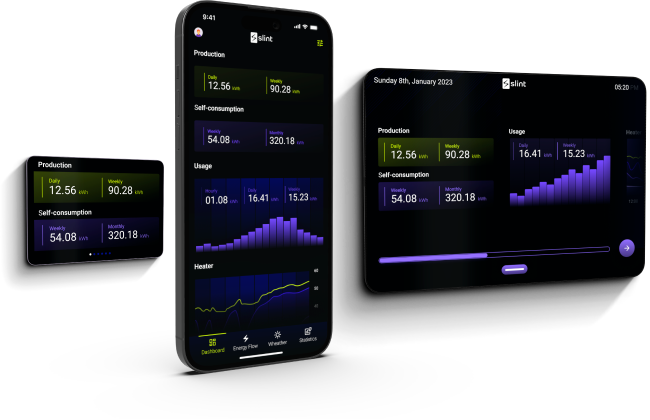
Slint Full homepage screenshot

At a glance

Category
Development
Language
English
Paid-content signal
No paid content foundObserved
Registered
2022
Hosting
CloudflareInferred
HTTPS certificate trusted
PassedObserved
Last updated

Website review

This review may include AI-generated content and is not individually verified. Domain, certificate and other facts come from the observed data on this page.

What is Slint?

Slint is a declarative GUI toolkit for building native user interfaces from a single codebase across Rust, C++, JavaScript, and Python. Its focus is on embedded, desktop, and mobile targets, with a workflow it summarizes as “Design to Deploy.”

The core idea is separation of concerns: you describe the UI declaratively, and Slint handles rendering and platform integration so the same interface can be compiled for different devices and operating systems. That matters most when one product needs consistent behavior on a small touchscreen, a desktop app, and a phone without maintaining three separate UI stacks.

What it is used for

  • Embedded HMIs and device panels, where performance and predictable resource use matter.
  • Desktop tools and plugins, including audio software interfaces.
  • Cross-platform products that want one UI definition rather than platform-specific rewrites.

Who tends to choose it

  • Teams already working in Rust, C++, JavaScript, or Python who want a native-feeling UI layer.
  • Hardware and device makers that need a UI to scale across display sizes.
  • Developers building plugins or tools where a custom, responsive interface is part of the product.

Evidence from real products

The page highlights several shipped examples. OTIV uses it for autonomous rail vehicle interfaces, where the co-founder describes safe, reliable, intuitive UIs as critical. WesAudio adopted it to redesign digital audio workstation plugin interfaces, with its CEO pointing to out-of-the-box platform support. SK Signet used it for an EV charger HMI that scales between 15-inch and 32-inch touch displays. Aava, a convolution plugin, is also built with it; its creator calls Slint mature and production-ready and notes responsive issue handling.

Those examples are useful because they show the trade-off Slint is aiming at: a single declarative UI codebase that still reaches embedded, desktop, and mobile targets, rather than a web-only or desktop-only framework.

How to decide if it fits

Start with your target platforms and language. If you are building in Rust, C++, JavaScript, or Python and need native UI on embedded or desktop hardware, Slint is worth evaluating directly. If your product is primarily a browser web app, or your team is standardized on a different UI framework, the fit is weaker.

A practical next step is to take one screen from your actual product — ideally the most constrained one, such as a small touch display — and rebuild it in Slint. That will tell you more about the declarative workflow and platform support than any feature list. You can see the language and examples at Slint.

How does Slint compare to other GUI toolkits like Qt or Electron for embedded and desktop development?

Slint sits in a different spot from both Qt and Electron: it is a declarative UI toolkit that compiles a .slint markup file into native code for Rust, C++, JavaScript and Python, targeting embedded, desktop and mobile from one codebase. Qt is a mature C++ framework with a much broader surface area (widgets, networking, multimedia, tooling); Electron bundles a Chromium runtime and renders HTML/CSS/JS. The practical difference is where the UI layer lives: compiled native rendering (Slint), a C++ object model with bindings (Qt), or a full browser engine (Electron).

How the trade-offs usually play out

Criterion Slint Qt Electron
UI definition Declarative markup, compiled C++/QML, widgets or Qt Quick HTML/CSS/JS
Runtime weight Lean, no browser engine Moderate to heavy depending on modules Heavy — ships Chromium and Node
Embedded fit Explicit target, including constrained devices Strong, long embedded track record Poor fit for small/RTOS-class devices
Language reach Rust, C++, JS, Python from one UI Primarily C++, with bindings JS/TS ecosystem
Ecosystem breadth Focused on UI Very broad, plus commercial tooling Huge web ecosystem
Team ramp-up Learn the markup plus a host language Steepest for C++, QML is gentler Easiest for web developers

Embedded. This is where the choice matters most. Electron is generally the wrong tool: a Chromium runtime needs memory, storage and a full OS that many device classes cannot spare. Qt has decades of embedded deployments behind it, so if you need a proven path, unusual hardware support, or certification experience, that history is real value. Slint's own customer stories point at this segment — OTIV for autonomous rail vehicle interfaces, SK Signet for an EV charger HMI that scales across 15-inch and 32-inch touch displays. Note that those are vendor-published case studies, so treat the performance and support claims as the customers' characterisation rather than independent measurement.

Desktop. Electron wins on familiarity and ecosystem: any web developer can ship a desktop app, and the same code often runs in a browser. The cost is footprint and memory per window, which is why utilities and tools that must feel native tend to avoid it. Qt gives you a deep native toolkit and long-term stability, at the price of C++ complexity and licensing decisions. Slint targets the middle: native-feeling UI defined declaratively, with the host language doing the application logic — attractive if your team is already in Rust or C++ and wants less ceremony than Qt.

Audio and plugin work. WesAudio and Aava (a convolution plugin) are both audio-domain examples in Slint's customer list. That domain is demanding: real-time constraints, custom-drawn meters and curves, tight host integration. It is a reasonable signal that the toolkit handles custom rendering, but it also reflects the vendor selecting flattering examples.

A decision criterion

Pick Electron when your team is web-native, the app is a desktop or internal tool, and a few hundred megabytes of runtime is acceptable. Pick Qt when you need the widest module coverage, long-term commercial support contracts, or an established embedded track record. Pick Slint when you want one declarative UI across embedded and desktop, your logic already lives in Rust, C++ or Python, and you would rather not carry a browser engine or a large framework.

Next step

Take one real screen from your product — ideally the most custom-drawn one — and build it in two candidates. A single screen exposes the things that matter: how binding and state work, how custom rendering behaves, what the binary or bundle size looks like, and how painful the build is on your actual target board. Also confirm the licence terms for your distribution model before you commit; Slint's customer pages reference a proprietary licence alongside the open-source option, and Qt's licensing varies by usage. For the toolkit itself, start at Slint; for the alternatives, compare against Qt and Electron.

Can I use Slint to build a user interface for a commercial product without paying licensing fees?

Yes — you can ship a commercial product with Slint without paying anything, but only if you accept the obligations of its open-source license (GPLv3), which for a closed-source product generally means you cannot. If you want to keep your application's source proprietary, you need Slint's commercial license instead. Commercial licensing is the route the vendors featured on the site took: the OTIV rail, WesAudio audio, SK Signet EV charger, and Aava plugin case studies are all labelled "Proprietary License."

H3 How to decide

  • Your product is open source under GPLv3-compatible terms: the free route works. Your users must receive the source and the same freedoms.
  • Your product is closed source: you need the paid commercial license. There is no royalty-free proprietary option.
  • You are evaluating, prototyping, or building an internal tool that never leaves your organisation: the free license is normally fine, since you are not distributing to third parties.
  • You embed Slint in hardware you sell (chargers, instruments, vehicles): distribution is happening, so the same GPLv3-versus-commercial choice applies.

H3 A concrete scenario

Say you are a two-person team building a desktop plugin or an embedded device panel. You prototype with Slint under the free license, then decide to sell binaries. At that point you either publish your full application source under GPLv3 or buy a commercial license — budget for it before you commit to the toolkit, because it is a per-product business decision, not a technical one.

H3 Practical next step

Check the exact license terms on Slint and, if you are unsure whether your distribution model triggers GPLv3, ask their team directly before you build. If you want to compare licensing models across toolkits, Qt's dual-licensing approach is a well-known reference point at Qt.

Which programming languages can I use with Slint, and how do they differ in features or performance?

Slint supports four host languages: Rust, C++, JavaScript, and Python. The UI itself is written in Slint's own declarative markup (.slint files), and each language binds to that same runtime — so the markup, layout and styling behave the same regardless of which language you drive it from. The differences are mostly about how you write application logic, tooling maturity, and deployment targets.

Where the languages differ

  • Rust — The most direct fit. Slint is a Rust project, so the Rust API tends to get new features first, and the compile-time macro approach (slint::include_modules!) generates typed Rust structs and callbacks from your .slint files. That gives you compile-time checking between markup and logic, which the other bindings generally can't match. Best if you're targeting embedded or desktop and want no runtime interpreter in the loop.
  • C++ — Aimed at teams with existing C++ codebases and embedded toolchains. You get generated headers and a CMake integration, so it slots into conventional C++ build systems. Expect a similar native-code performance profile to Rust, but a heavier build setup and less ergonomic generated code than Rust's macros.
  • JavaScript — Convenient for prototyping, web-adjacent work, and quick demos, since you can drive the UI from Node. The trade-off is a runtime dependency and weaker static guarantees; type mismatches between markup and logic surface at runtime rather than at build time. For embedded targets, this is usually the least attractive option.
  • Python — The quickest path to a working prototype, and a reasonable choice for tooling, internal apps, or test harnesses around a UI. Performance is bounded by the interpreter, so for a frame-rate-sensitive embedded HMI it's typically not the deployment language, even if it's fine for development.

Practical comparison

Language Typical fit Main trade-off
Rust Embedded, desktop, performance-critical Steepest language learning curve
C++ Existing C++/embedded codebases More build plumbing, clunkier generated bindings
JavaScript Prototypes, web-adjacent tools Runtime dependency, errors found late
Python Prototypes, internal tools, scripting Interpreter overhead limits demanding UIs

A useful rule: pick the language your team already ships and debugs in, then check that Slint's binding for it covers the platforms you're targeting. If you're starting fresh on embedded hardware, Rust is the path of least friction; if you're bolting a new UI onto a C++ product, stay in C++.

One caveat worth knowing: the four languages differ in binding maturity, not in the UI language itself. Porting logic between them is a rewrite of the glue code, not of your .slint files — so the markup investment is portable even if the host language choice isn't permanent.

To decide concretely, build the same small screen — a list, a button, a callback into your logic — in two candidate languages and compare build time, binary size, and how errors are reported. That exercise usually settles the question faster than feature lists. The project's own examples and demos at Slint are the quickest starting point, and if you're weighing alternatives for Rust desktop work, Tauri takes a webview-based approach rather than Slint's native rendering, which is a meaningfully different trade-off in binary size and rendering consistency.

How do I get started with Slint, from installing it to deploying a GUI on a device?

Getting started with Slint means installing the toolkit, writing a declarative .slint UI file, connecting it to your Rust, C++, JavaScript or Python logic, then cross-compiling or bundling for the target device. The site presents Slint as a single-codebase route to native UIs for embedded, desktop, mobile and web, so the practical path is: pick your host language, build a desktop prototype first, then move the same UI to the device.

A workable first path

  1. Choose your language. Slint supports Rust, C++, JavaScript and Python. Pick the one you already build your product in; the UI language stays the same either way.
  2. Install the toolkit. Add the Slint crate/package for your language and install the tooling the docs recommend for your platform (the compiler and any preview tooling). Follow the official install page rather than a blog post, since version-specific steps change.
  3. Write a minimal UI. Create one .slint file with a window, a couple of elements and a callback. Run it on your desktop to confirm the toolchain works before touching hardware.
  4. Wire up logic. Expose properties and callbacks from the UI file and handle them in your host language. Keep business logic out of the UI file so it stays portable.
  5. Move to the device. Cross-compile for the target architecture, choose the rendering backend that fits the device's GPU/software capabilities, and package the binary into your device image. Test on the real display, at the real resolution.

Choosing where to start

Situation Sensible starting point
New project, no existing codebase Rust, for the tightest integration with Slint's own tooling
Existing C++ or Python product Stay in that language; the UI layer is the same
Team includes designers Prototype the .slint file first, connect logic later
Embedded target with modest resources Validate memory and rendering backend early, not after the UI is finished

What the customer examples suggest

The page's case studies point at where this toolkit is actually used. OTIV builds rail-automation interfaces and its co-founder, Sam De Smet, highlights safe, reliable and intuitive UIs; WesAudio's CEO, Michał Węglicki, values the out-of-the-box platform support for cross-platform work; SK Signet's Sang-Baek Lee cites flexibility, performance and value for money, with one HMI scaling across 15-inch and 32-inch touch displays. Jussi Viira, creator of the Aava convolution plugin, calls it production-ready and notes fast responses to issues and feature requests. My read: these are all cases where one UI must run on several screen sizes or hardware variants, which is exactly the problem a declarative, single-codebase toolkit is meant to solve. If your project is a one-off desktop tool, the benefit is smaller.

Next step

Read the official getting-started and platform-support pages at Slint before you commit, and check whether your target device and rendering backend are listed. Then build the smallest possible UI, run it on the actual hardware, and only expand once that round trip works.

What types of applications and industries have successfully used Slint in production?

Slint is used in production across embedded, desktop, and mobile software, with the strongest public evidence in industrial and professional-audio products. Its common thread is a need for native-feeling, high-performance interfaces built from one codebase and deployed close to the hardware.

Production examples by industry

Industry Application What it shows
Rail automation OTIV autonomous and remote-driving rail vehicles Safety-critical, operator-facing controls in an industrial setting
Professional audio WesAudio digital audio workstation plugin UIs A complete redesign of plugin interfaces, where responsiveness matters
EV charging SK Signet next-generation charger HMI One interface scaling across 15-inch and 32-inch touch displays
Audio software Aava convolution plugin A smaller team shipping a production-ready plugin UI

The OTIV example is notable because the company frames reliable, intuitive interfaces as critical for customers operating rail vehicles, not as a cosmetic layer. SK Signet's case is the clearest illustration of a single UI adapting to very different screen sizes in the field. Aava and WesAudio show that Slint also fits smaller audio-software teams, not just large industrial vendors.

How to judge whether it fits your project

  • If you are building an embedded HMI, a desktop tool, or a plugin interface and want one codebase for several targets, these examples are directly relevant.
  • If your product depends on a large ecosystem of pre-built widgets or web-style UI libraries, check how much you would need to build yourself.
  • If your team works in Rust, C++, JavaScript, or Python, Slint's declarative approach is designed to fit those languages rather than requiring a separate UI stack.

A practical next step: pick your most demanding screen — the one with the tightest performance or sizing constraint — and reproduce it as a small prototype before committing. The customer journeys linked from the Slint site, including the WesAudio and SK Signet write-ups, are useful for seeing how real teams approached that transition.

Related questions

More questions →
What Licensing Options Does Slint Offer for Commercial Products?

Slint is a declarative GUI toolkit for Rust, C++, JavaScript, and Python, and its own site shows it being used in commercial products — including OTIV autonomous rail vehicles, a WesAudio digital audio workstation plugin, an SK Signet EV charger HMI, and the Aava convolution plugin. Each of those customer entries on slint.dev carries a "Proprietary License" label, which tells you that shipping a closed-source commercial product on Slint is an accepted, documented use. What the site does not publish is a price list or a self-service checkout, so the practical answer for a commercial team is: commercial use is supported, but the exact terms depend on your product, and you confirm them with the Slint team rather than from a public pricing page.

What the "Proprietary License" label means

On slint.dev, the "Proprietary License" tag appears next to customer product pages, not as a general statement about the toolkit. Read it as a signal about how that customer ships Slint, not as the only license available to you:

  • It indicates the customer distributes a closed-source product built with Slint.
  • It implies a commercial arrangement exists between that customer and Slint, separate from any open-source license.
  • It does not tell you the price, the seat count, the royalty structure, or whether support is bundled.

Because the label is attached per customer, you cannot infer your own terms from it. Treat it as evidence that the commercial path is real and in production, then get your own terms in writing.

The two-track model you should assume

The page evidence supports a dual-licensing pattern rather than a single license:

Track Who it fits What the site confirms
Open-source license Projects willing to meet that license's obligations Slint is distributed publicly and used across embedded, desktop, and mobile targets
Proprietary / commercial license Closed-source products that cannot meet open-source obligations Four named commercial customers ship under "Proprietary License"

The important consequence: if your product can satisfy the open-source license conditions, you may not need a commercial agreement at all. If it cannot — for example, you ship a closed-source plugin, charger HMI, or vehicle UI — the commercial track is the one the customer examples point to.

What to confirm before you ship

The site gives you no pricing signals, no payment platform, and no license comparison table, so these are the questions to settle with Slint directly. Frame them around your actual product:

  1. Distribution model — are you shipping a binary, a library linked into someone else's product, or a hosted service? Each can fall under different terms.
  2. Closed vs. open source — will your Slint-based UI code be published, or kept proprietary?
  3. Target platforms — embedded, desktop, mobile, or web. The site markets one codebase across these, but confirm your specific targets are covered.
  4. Support and updates — the customer quotes emphasize responsiveness and support; check whether that is part of the commercial agreement or a separate item.
  5. Volume and product count — one product or a family of products, and how many devices or seats.

How to get the right license

There is no pricing page or checkout flow on slint.dev, so the route is direct contact:

  • Start from the Slint site and use its contact or sales channel to describe your product.
  • Bring the answers to the five questions above; a specific description gets you a specific quote faster than a generic inquiry.
  • Ask explicitly which license applies to your case and request the terms in writing before you commit engineering time.
  • If you are evaluating first, the demos and the customer product pages show what the toolkit does in production — use them to judge fit, then negotiate terms.

The short version: Slint supports commercial, closed-source products, and its own site names four companies doing exactly that under a proprietary license. It does not publish prices or terms, so the licensing decision is a conversation with Slint, not a download-and-go step.

Can Slint Be Used for Embedded, Desktop, and Web Interfaces from One Codebase?

Yes. Slint is a declarative GUI toolkit that targets embedded, desktop, and web from a single codebase, and it supports Rust, C++, JavaScript, and Python. That combination is the core reason teams evaluating it for cross-platform work tend to shortlist it: you write the UI once in a declarative language and bind it to whichever host language and platform you are shipping on. The practical caveat is that "one codebase" covers the UI layer and its bindings, not your entire application — platform-specific drivers, OS integration, and deployment packaging still differ per target.

What Slint actually is

Slint is a declarative UI toolkit. You describe the interface in a .slint markup file — elements, layout, properties, and logic hooks — and the toolkit compiles that into native UI for the target platform. The host application logic lives in Rust, C++, JavaScript, or Python, and calls into the generated UI code.

The site frames this as "Design to Deploy" and "Seamlessly build elegant modern stylish native elegant GUIs for Embedded, Desktop, and Mobile." The current release referenced on the page is Slint 1.18.

Two properties matter most for the cross-platform question:

  • Declarative UI definition. The interface is described once, separately from the host language, so the same markup can be reused across targets.
  • Native rendering. The site describes the output as native GUIs, which is what makes it viable on embedded hardware where a browser engine is not an option.

Which targets and languages are covered

Dimension What Slint states
Target platforms Embedded, Desktop, Mobile, Web
Host languages Rust, C++, JavaScript, Python
UI definition Declarative .slint markup
Current release shown Slint 1.18

The four host languages are the important detail for mixed teams. A firmware team working in C++ and a tooling team working in Python can share the same UI definition rather than maintaining two divergent interfaces.

Why embedded is the harder case, and how Slint addresses it

Desktop and web targets generally have generous CPU, memory, and GPU budgets. Embedded targets do not. A toolkit that only works by embedding a browser engine will struggle on a device with limited RAM and no full compositor.

Slint's positioning on the site is explicitly embedded-first: the customer stories are industrial and device-level, not web dashboards. That is a meaningful signal, because it means the toolkit was designed around constrained rendering rather than adapted to it.

When evaluating for your own embedded project, check these against your hardware rather than assuming:

  • Display resolution and scaling. The SK Signet case is directly relevant here — their HMI "scales to both 15-inch and 32-inch touch displays" installed on EV chargers. That is a real example of one interface definition serving two very different panel sizes.
  • Touch input. Charger HMIs and vehicle interfaces are touch-driven; confirm your input stack is supported.
  • Rendering backend. Match the backend to what your SoC actually provides.
  • Memory ceiling. This is the constraint most likely to disqualify a toolkit, so measure it early with a representative screen rather than a hello-world.

What the production cases show

The site's #MadeWithSlint section lists shipping products across several device categories, which is more useful than a feature list for judging fit:

  • OTIV autonomous rail vehicles. OTIV builds assisted, remote, and autonomous driving technology for rail. Co-founder Sam De Smet describes Slint as "an exceptional partner," citing "high-performance UI solutions." The relevant takeaway is safety-critical industrial UI on moving vehicles.
  • WesAudio digital audio workstation plugin. WesAudio redesigned their DAW plugin UIs with Slint. CEO Michał Węglicki highlights "extensive out-of-the-box platform support" for cross-platform development. Audio plugins are a demanding case because they must run inside multiple host applications across operating systems.
  • SK Signet EV charger HMI. The U.S. EV charging provider launched an HMI scaling across 15-inch and 32-inch touch displays. Manager Sang-Baek Lee cites "flexibility, high performance and value-for-money."
  • Aava convolution plugin. Creator Jussi Viira calls Slint "a mature, production-ready UI solution" and notes the team is responsive, with issues and requested features "usually getting solved really quickly."

Across these, the pattern is consistent: one UI definition, several hardware or host configurations, and a preference for native performance over web technology. Note that the product pages for OTIV, WesAudio, and SK Signet are each marked "Proprietary License" — that label applies to those customers' products, not to Slint's own licensing, which the page does not specify.

How to decide for your project

Choose Slint when:

  • You need the same interface on embedded hardware and on desktop or web, and you do not want to maintain separate UI implementations.
  • Your team is split across Rust, C++, JavaScript, or Python and you want a shared UI layer.
  • You are building a device HMI — charger, instrument, vehicle interface, plugin — where native rendering and predictable resource use matter more than access to the full web ecosystem.
  • Your interface must scale across different display sizes from one definition, as in the SK Signet case.

Look elsewhere when:

  • Your UI depends heavily on web-only libraries, browser APIs, or a DOM-based workflow.
  • You need a large ecosystem of pre-built web components rather than a declarative markup language.
  • Your team has no appetite for learning a declarative UI syntax alongside the host language.

Verifying fit before committing

  1. Pick your hardest target first. If embedded is the constraint, prototype there, not on desktop. A desktop prototype tells you nothing about your memory ceiling.
  2. Build one representative screen, not a demo — include your worst-case layout, your real font sizes, and your actual touch targets.
  3. Measure on target hardware. Check memory footprint and frame behavior under your real display resolution.
  4. Confirm your host language binding is the one you will actually ship with, and that your build pipeline produces the artifact your device needs.
  5. Check the release you are targeting. The site references Slint 1.18; pin a version and read its notes rather than tracking the latest.

The single-codebase claim holds for the UI layer. Plan for the platform-specific work around it — drivers, packaging, and OS integration — as separate tasks, and the cross-platform promise is realistic rather than aspirational.

What Real-World Products and Companies Use Slint for Their User Interfaces?

Slint is used in production by companies across embedded, desktop, and professional audio domains. The official site's #MadeWithSlint section names four concrete products: OTIV autonomous rail vehicles, WesAudio's digital audio workstation (DAW) plugin, SK Signet electric vehicle chargers, and the Aava convolution plugin. Each case is a shipped or launched product, and each is listed with a proprietary license, which makes them useful reference points if you are judging whether Slint is production-ready for your own project.

The four featured cases

Product Domain What the UI runs on License listed
OTIV autonomous rail vehicles Rail automation (embedded/industrial) In-vehicle operator interfaces for assisted, remote, and autonomous driving Proprietary
WesAudio DAW plugin Professional audio (desktop) Redesigned plugin user interfaces Proprietary
SK Signet EV charger Embedded HMI Touch HMI scaling to 15-inch and 32-inch displays Proprietary
Aava convolution plugin Professional audio (desktop) Plugin UI for adjusting IR parameters Proprietary

OTIV — autonomous rail vehicles

OTIV builds technology for assisted, remote, and autonomous rail driving, aimed at industrial companies, railway undertakings, infrastructure managers, and OEMs. Co-founder Sam De Smet states that "safe, reliable, and intuitive user interfaces are critical for our customers," and describes Slint as "an exceptional partner" providing "high-performance UI solutions." The relevant signal here is the safety- and reliability-sensitive context: rail automation is not a casual consumer app, so a UI toolkit used there is being trusted in a demanding operational setting.

WesAudio — digital audio workstation plugin

WesAudio, a professional audio equipment manufacturer, adopted Slint for a complete redesign of its DAW plugin user interfaces. CEO Michał Węglicki highlights "extensive out-of-the-box platform support, making it a prime choice for cross-platform development," and adds that the support and willingness to help were "more than extraordinary." The site links both a live preview and a customer journey write-up for this case, so you can inspect the actual UI rather than rely on the quote alone.

SK Signet — electric vehicle charger HMI

SK Signet, described as the No. 1 EV charging solutions provider in the U.S., launched a new HMI that scales to both 15-inch and 32-inch touch displays on its chargers. Manager Sang-Baek Lee cites "flexibility, high performance and value-for-money along with great support." The scaling detail is the concrete engineering point: one HMI codebase covering two very different display sizes is exactly the kind of constraint embedded teams face.

Aava — convolution plugin

Aava is a convolution plugin that lets users adjust IR parameters. Creator Jussi Viira calls Slint "a mature, production-ready UI solution and a joy to work with," and notes that issues, bugs, and even requested features "usually get solved really quickly." This is the most direct production-readiness claim among the four quotes.

What these cases tell you if you're evaluating Slint

  • Domain spread: the cases cover industrial/embedded (OTIV, SK Signet) and desktop audio tooling (WesAudio, Aava). If your product sits in one of those areas, you have a close comparable.
  • Display and platform variety: the SK Signet case shows a single HMI spanning 15-inch and 32-inch touch displays; the WesAudio case emphasizes cross-platform support. Together they speak to the "one codebase, multiple targets" claim.
  • Recurring themes in customer quotes: performance, cross-platform/platform support, and responsive support appear across multiple cases rather than in just one testimonial.
  • Licensing context: all four products are listed with a proprietary license, so these are commercial deployments, not hobby projects.

How to use this as evidence

Treat the case list as a starting point, not a guarantee. The quotes are vendor-published testimonials, so they tell you who chose Slint and what they valued — not independently benchmarked performance. To make a decision:

  1. Open the linked product pages and the WesAudio customer journey to see the interfaces in context.
  2. Match your own constraints (display sizes, target platforms, embedded vs. desktop) against the closest case above.
  3. If your situation resembles SK Signet's scaling requirement or WesAudio's cross-platform requirement, those are the two cases to study first.

If none of the four domains matches your project, the case list still answers the narrower question — Slint is used in shipped commercial products — but you will need to validate fit on your own targets.

Which programming languages does Slint support for building user interfaces?

Slint officially supports four languages for building user interfaces: Rust, C++, JavaScript, and Python. You write the UI once in Slint's declarative .slint markup, then connect it to application logic in whichever of these languages your project already uses. If your stack is one of these four, you can adopt Slint without switching languages; if it isn't, there is no official binding for you to use.

The four supported languages

Language How you use it Typical fit
Rust Native Rust API, compiled into your binary Systems, embedded, performance-sensitive desktop tools
C++ Native C++ API Existing C++ codebases, embedded and desktop products
JavaScript JS binding for the UI layer Web-adjacent and Node-based tooling
Python Python binding Scripting, prototyping, internal tools

The key mechanism is separation: the .slint file describes layout, properties, and behavior hooks, and each language binding exposes that UI as an object your code can read from and write to. Because the UI definition is language-neutral, the same interface can be reused across bindings and across the platforms Slint targets — embedded, desktop, and mobile — from a single codebase.

How the bindings differ in practice

  • Rust and C++ are compiled languages, so the UI is built into the application binary. This is the path used in production products shown on the site, such as OTIV's rail automation interfaces and SK Signet's EV charger HMI, where performance and deployment on fixed hardware matter.
  • JavaScript and Python are typically used where faster iteration or integration with an existing runtime is more important than a fully compiled binary.
  • The declarative layer stays the same across all four, so moving a UI from one binding to another does not mean rewriting the interface definition — only the glue code that connects it to your logic.

Choosing a binding for your project

Pick the binding that matches the language your application logic is already written in:

  • Existing Rust or C++ codebase → use the matching native binding; you get a compiled UI with no extra runtime layer.
  • Python tooling or scripts → use the Python binding to add a native UI without leaving Python.
  • JavaScript environment → use the JS binding when your surrounding stack is JS-based.
  • Cross-platform product with mixed teams → the shared .slint UI can be maintained once while different parts of the product use different bindings.

If your project uses a language outside these four, Slint is not a fit unless you are willing to introduce one of them for the UI layer.

Where to start

The site's "Get Slint" entry point and its demos are the practical starting places: check the demo that matches your target platform, then follow the binding for your language. The customer examples — OTIV (rail), WesAudio (audio plugin UIs), SK Signet (EV charger HMI), and Aava (convolution plugin) — all illustrate the same pattern: a declarative UI connected to logic in a supported language, deployed to embedded or desktop targets.

What is Slint and what kind of GUI applications can you build with it?

Slint is a declarative GUI toolkit for Rust, C++, JavaScript, and Python that lets you build native user interfaces for embedded, desktop, and web targets from a single codebase. It fits teams that want one UI definition reused across resource-constrained devices and full desktop or mobile apps, and that prefer a declarative syntax over hand-written imperative UI code. If you only need a quick web-only UI in a single language, a browser-native framework may be simpler; Slint's value shows up when native performance and cross-target reuse matter.

What "declarative GUI toolkit" means here

You describe the interface — layout, properties, states, and how elements relate — and the toolkit handles rendering and the underlying native widgets or drawing. The same UI description is compiled for each supported language binding and target, so the UI logic is not rewritten per platform.

The practical effect: UI structure lives in one place, while application logic stays in your chosen host language (Rust, C++, JavaScript, or Python). This is the "single codebase" claim on the site — one UI definition, multiple deployment targets.

What you can build with it

The site groups targets as Embedded, Desktop, and Mobile, and the customer examples show the range in production:

Product Domain What Slint provides
OTIV autonomous rail vehicles Rail automation High-performance UI for safety-critical operator interfaces
WesAudio DAW plugin Professional audio Cross-platform plugin UI redesign
SK Signet EV charger EV charging HMI One HMI scaling to 15-inch and 32-inch touch displays
Aava convolution plugin Audio plugin Production-ready plugin UI

Two patterns stand out from these cases:

  • Scaling across display sizes — SK Signet's HMI scales to both 15-inch and 32-inch touch displays, which is the kind of layout flexibility a declarative system is meant to give you.
  • Cross-platform reach — WesAudio's CEO cites "extensive out-of-the-box platform support" as the reason for choosing Slint for a cross-platform plugin redesign.

So the realistic answer to "what can you build" is: embedded device HMIs (chargers, industrial equipment, vehicles), desktop applications, audio/plugin interfaces, and mobile UIs — anywhere you want native rendering and one UI source.

When Slint is a good fit

Choose it when several of these are true:

  • You need the same UI on embedded hardware and desktop/mobile, and don't want to maintain separate UI code.
  • You want native performance rather than a web view wrapper.
  • Your team already works in Rust, C++, JavaScript, or Python and wants to stay in that language.
  • You need a UI that adapts to different screen sizes (e.g., 15-inch and 32-inch panels).

Consider alternatives when:

  • You only target the browser and want the largest ecosystem of web components.
  • You need a UI toolkit tied to a single language's ecosystem rather than a cross-language one.

Getting started

The site's primary entry points are Get Slint and See Demos, and the current release referenced is Slint 1.18. The customer pages include Open Live Preview and Read Customer Journey links, which are useful for seeing real interfaces before committing.

A reasonable first step: pick your host language, open a demo, and check whether the declarative UI model matches how your team thinks about layout. The customer journeys (OTIV, WesAudio, SK Signet) are the most concrete evidence of what production use looks like.

A note on licensing and pricing

The customer product pages are labeled Proprietary License, indicating commercial licensing is part of how Slint is used in those products. The provided site material does not include pricing figures or a pricing page, so cost and license terms should be confirmed directly with Slint rather than assumed.

Website Overview

The available information shows a mix of normal operation and configuration gaps. Depending on how the website is used, these gaps may affect secure access or the consistency of its public presentation.

Domain and Registration

Transfer-protection status is present, helping reduce the risk of unauthorized domain transfers. The domain has about 4 years of registration history; its current configuration provides more context than age alone. The registrar is CloudFlare, Inc., a widely used domain service provider. The domain uses the common .dev extension, which is not an independent safety signal.

DNS and Email

Nameservers are provided by Cloudflare, indicating managed DNS hosting. MX records point to the slint.dev email service. No CNAME was found; the observed records resolve directly to addresses. SPF and DMARC are configured. DKIM status is unknown. TXT records include verification markers for Google, Microsoft. Such markers may also remain after a service stops being used.

TLS and Certificates

The public key uses EC with 256 bits. The server supplied a complete certificate chain. No organization name is present in the certificate; the available fields are consistent with domain validation. The certificate was issued within the Google Trust Services cloud or CDN ecosystem. The certificate's total validity is about 90 days, consistent with a short renewal cycle.

HTTP and Browser Security

The response lacks these common security headers: HSTS, CSP, Permissions-Policy, clickjacking protection. CORS permits any origin to read this response. This is common for public resources; sensitive responses need narrower handling. No X-Powered-By header was found, reducing one common source of backend fingerprinting information. The cf-ray response header indicates a CDN or caching proxy in the delivery path. No obvious internal addresses or debug information were found in the headers.

Technology Stack Analysis

The public page identifies Cloudflare without precise versions, leaving fewer clues for version-specific scanning.

Search and Social Sharing

The title has 66 characters and may be truncated in search results. Twitter Card metadata is configured. JSON-LD includes Organization data, helping describe the organization as an entity. A meta description is present, with 143 characters. The observed directives allow indexing and link following.

Hosting and Email

DNSCloudflare
HostingCloudflare
Emailslint.dev
Approximate IP geolocation (inferred; a CDN or proxy may differ from the origin server) Location unknown Inferred 104.21.56.118

Registration details

RDAP / WHOIS

RegistrarCloudFlare, Inc.
Registered2022-10-15
Expires2027-10-15
Domain statusclient transfer prohibited
Nameserversolga.ns.cloudflare.com、vick.ns.cloudflare.com
DNSSECunsigned

DNS records

DNS

TypeNameValueTTLPriority
Aslint.dev104.21.56.118300—
Aslint.dev172.67.184.228300—
AAAAslint.dev2606:4700:3030::ac43:b8e4300—
AAAAslint.dev2606:4700:3037::6815:3876300—
MXslint.devmy.slint.dev12010
NSslint.devolga.ns.cloudflare.com86400—
NSslint.devvick.ns.cloudflare.com86400—
TXTslint.devMS=ms73335254120—
TXTslint.devanthropic-domain-verification-91ztan=EJcier9sL3E8vzIdDKS3z6OdW120—
TXTslint.devgoogle-site-verification=BxENcxyGTmGC9DVjgnGFPAytpkXA-k4CI54DK0ecG94120—
TXTslint.devgoogle-site-verification=gTYGmQTOx5mCDDqfYj35q7oBoBqOV0FIDzKW2_JddKQ120—
TXTslint.devv=spf1 a:my.slint.dev include:spf.protection.outlook.com -all120—
DMARC_dmarc.slint.devv=DMARC1; p=reject; rua=mailto:[email protected]; fo=1; aspf=s; adkim=s120—

TLS and certificates

TLS / SSL

AssessmentNormal configuration
Supported protocolsTLSv1.2、TLSv1.3
Negotiated protocolTLSv1.3
Certificate subjectslint.dev
IssuerGoogle Trust Services
Valid until2026-11-12T17:45 · Remaining when checked: 43 days
Verification detailsCertificate trust: Passed · Hostname match: Passed

HTTP response headers

HTTP

HeaderValue
content-typetext/html; charset=utf-8
cache-controlpublic, max-age=0, must-revalidate
servercloudflare
x-content-type-optionsnosniff
referrer-policystrict-origin-when-cross-origin
access-control-allow-origin*

Identified technologies

Cloudflare

Pages, Search and Sharing

Meta descriptionSlint is a declarative GUI toolkit for Rust, C++, JavaScript & Python — build native UIs for embedded, desktop, and web from a single codebase.
Canonical URLhttps://slint.dev/
LanguageEnglish (default)
Twitter Cardsummary_large_image
All bots 1 allowed · 0 disallowed
  • Allow/

User reviews (0)

  • No reviews yet.