
 Visit website
 Updated: 2026-09-22 00:13
 Language: English (default)
 Access: Normal
 Profile views 0
  Outbound visits 0
 Website Review
What is FastMaint CMMS?
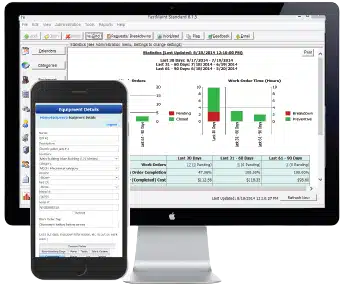
FastMaint CMMS is a computerized maintenance management system (CMMS) offered by Smglobal. It is designed for organizations that need to organize, schedule and track maintenance work for equipment, facilities and other physical assets. The core idea is straightforward: keep maintenance tasks visible, assign them to the right people, and record what was done so that recurring problems and downtime can be reduced.
Who it suits
FastMaint is typically aimed at maintenance managers, facility teams and small to mid-sized operations that want structure without a heavy enterprise rollout. It may appeal to teams moving from spreadsheets or paper logs to a dedicated system.
What it is used for
- Logging and prioritizing work orders
- Scheduling preventive maintenance
- Tracking equipment and asset histories
- Recording repairs, parts and labor
- Reporting on maintenance activity and downtime
Trade-offs
A CMMS like FastMaint adds discipline and searchable records, but it also requires accurate data entry and staff adoption to be useful. Smaller teams may find a full CMMS more than they need, while larger or highly specialized operations may require deeper integrations or customization.
The vendor indicates both one-time purchase and subscription options, plus a free trial. For exact editions, limits and current terms, check FastMaint CMMS directly.
What features does FastMaint CMMS offer for equipment maintenance?
FastMaint CMMS is equipment maintenance software aimed at organisations that need to plan, track and record maintenance work rather than rely on spreadsheets. It is commonly associated with small to mid-sized operations, though the same core features suit larger maintenance teams.
H3 Core maintenance features
- Work order management: create, assign, prioritise and close out maintenance jobs.
- Preventive maintenance scheduling: set recurring tasks by calendar or usage so routine servicing happens on time.
- Asset and equipment records: keep a register of machines with their maintenance history.
- Parts and inventory tracking: monitor spare parts so jobs are not delayed by missing components.
- Reporting: review downtime, workload and maintenance costs to support decisions.
H3 How it is typically used Maintenance planners use it to schedule preventive work; technicians use it to see and update assigned jobs; managers use reports to compare planned versus reactive work. The main trade-off is that a CMMS rewards consistent data entry — if records are incomplete, schedules and reports become less reliable.
Pricing is described as one-time purchase or subscription, with a free trial mentioned, but no figures are given here. For comparison, Fiix and UpKeep are other maintenance platforms, while FastMaint CMMS is the product described above.
How does FastMaint CMMS help reduce downtime and boost productivity?
FastMaint CMMS is equipment maintenance software aimed at organisations that need to plan, track and record maintenance work rather than rely on spreadsheets or memory.
How it targets downtime
- Planned maintenance schedules help teams service assets before failures occur, which typically reduces unplanned stoppages.
- Work orders keep repairs, inspections and follow-up tasks visible, so nothing is forgotten between shifts.
- Asset and equipment records give maintenance staff history and context when a fault appears, which can shorten diagnosis time.
How it supports productivity
- A shared system replaces duplicated paper logs and ad hoc messaging, so technicians and managers work from the same information.
- Reporting on completed and outstanding work helps supervisors spot recurring problems and allocate labour more deliberately.
- Mobile or multi-user access, where offered, lets work be updated from the plant floor instead of waiting for office entry.
Who it suits
Small to mid-sized maintenance teams in manufacturing, facilities, healthcare or fleet operations often value a CMMS that is quicker to adopt than large enterprise suites. The trade-off is depth: very complex, multi-site enterprises may need broader integration and analytics than a focused CMMS provides.
FastMaint is available with one-time or subscription options and a free trial, so buyers can test whether the workflow fits before committing. Compare it with alternatives such as Fiix or Limble CMMS if integration needs are central to your decision.
What are the pricing options for FastMaint CMMS, including one-time purchase and subscription?
FastMaint CMMS is equipment maintenance software aimed at organisations that want to plan, track and control maintenance work rather than rely on spreadsheets. It is generally suited to facilities teams, plant and production engineers, and maintenance managers who need to manage assets, schedules and downtime in one place.
The site presents two broad ways to buy:
- One-time purchase — a perpetual licence model. You pay once for the software and typically own that version. This can appeal to organisations that prefer predictable capital spending and do not want recurring fees, though upgrades and support may be handled separately.
- Subscription — an ongoing payment model, usually per user or per period. This may lower the initial outlay and often includes updates and support while the subscription is active. It suits teams that expect changing headcount or want to spread cost.
A free trial is also mentioned, which lets you evaluate the software before committing to either route. The right choice depends on budget structure, expected growth and how much you value continuous updates versus upfront ownership.
For exact figures and what each plan includes, check the pricing page on FastMaint CMMS, since published prices were not provided here.
Is there a free trial available for FastMaint CMMS?
Yes. FastMaint CMMS offers a free trial, so teams can test the software before committing to a purchase. The site also indicates two purchasing paths: a one-time license or a subscription, which matters for organizations comparing upfront cost against ongoing payments.
FastMaint CMMS
H3: Who it suits
- Facilities and maintenance teams that need to track assets, work orders and preventive maintenance.
- Smaller operations that may prefer a one-time license rather than a recurring subscription.
- Teams wanting to evaluate setup effort and workflow fit during the trial.
H3: What to check during a trial
- Whether asset and equipment records match how you actually organize sites and machines.
- How work orders, schedules and downtime reporting fit your daily routines.
- Which features are included in each licensing option, since one-time and subscription editions may differ.
- Whether the trial limits users, records or time, and what happens to your data afterwards.
The main trade-off is flexibility versus cost structure: a subscription typically spreads payments and may include updates, while a one-time license can reduce recurring fees but may limit ongoing feature access or support terms. Confirm current trial length and edition details directly with the vendor, since these can change.
How does FastMaint CMMS compare to other CMMS software in terms of ratings and user reviews?
FastMaint CMMS is presented as a top-rated equipment maintenance system, but its public ratings and reviews come from a narrower pool than the largest cloud CMMS platforms. That matters if you weigh broad peer feedback heavily: a small vendor can score well among loyal, long-term users while remaining less visible in independent comparison directories.
What shapes the comparison
- Review volume: Widely deployed cloud suites such as Fiix and Limble CMMS typically accumulate more reviews, so averages are more statistically stable.
- Deployment model: FastMaint has historically appealed to organisations wanting on-premise or one-time-purchase options. That audience often reviews differently from teams using purely subscription, mobile-first tools.
- Rating mix: Across CMMS categories, ease of use and mobile apps draw the most praise, while reporting, integrations and implementation cost draw the most criticism. FastMaint's feedback tends to concentrate on core maintenance tracking and value rather than ecosystem breadth.
- Comparators: UpKeep and eMaint appear frequently in head-to-head CMMS write-ups, so buyers often see them alongside FastMaint.
Practical takeaway
Treat star averages as a starting point, not a verdict. Compare review counts, dates and company size against your own operation. If you need extensive third-party integrations or a large partner network, the bigger cloud vendors may show richer review evidence; if you prefer a simpler, optionally on-premise tool, FastMaint's ratings may still be relevant. A free trial, where offered, usually reveals more than any aggregate score.
 Hosting and Email
 Amazon Route 53
 Hosting
 IONOS SE
 Location
 United States
 Pages, Search and Sharing

 All bots


 Registration details

 Identified technologies
User reviews (0)