Website profiles · Technology insights · Alternatives

strflow.app

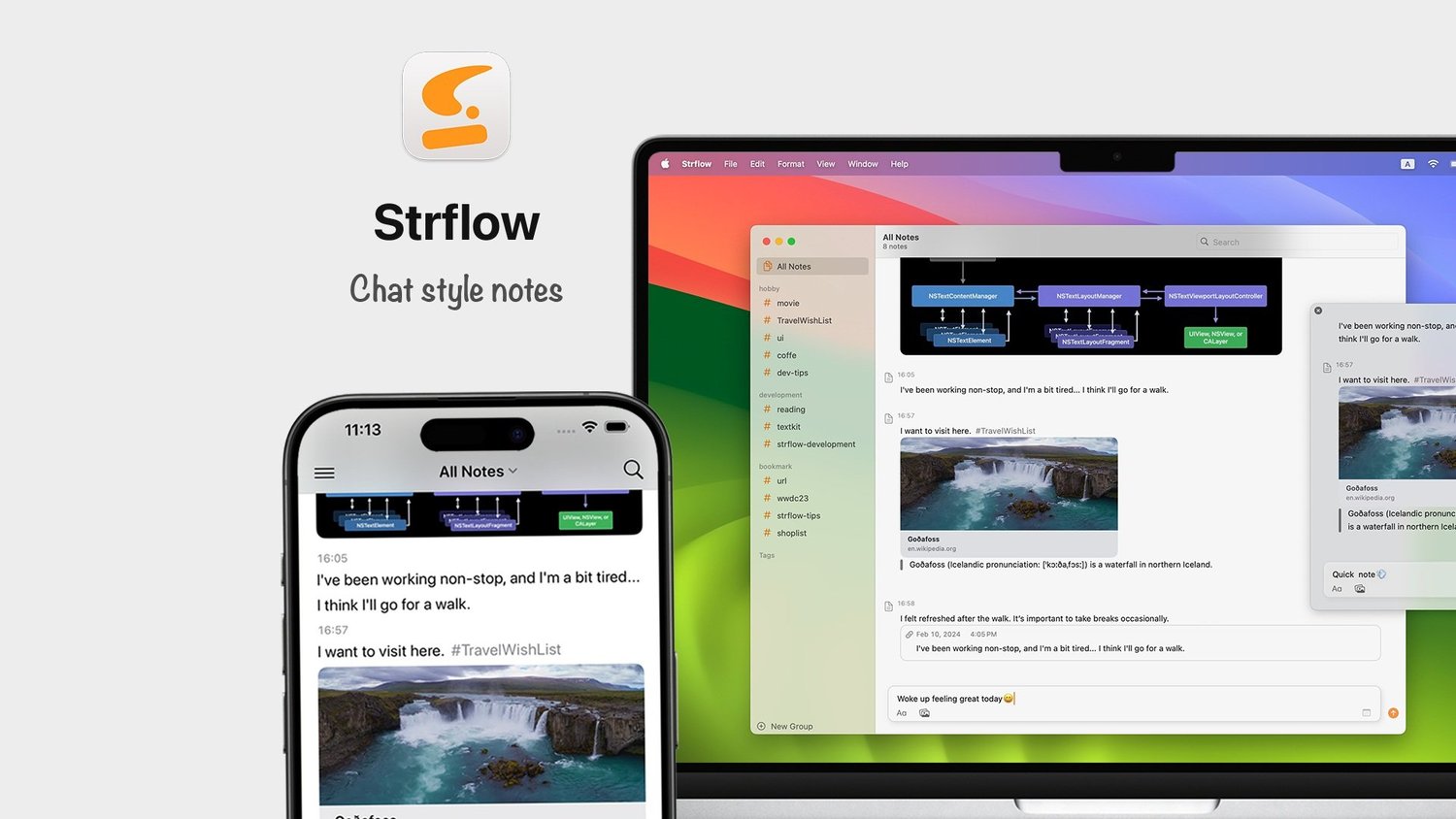
Strflow is a native text-yourself notes app for iPhone, iPad, and Mac. Capture notes and to-dos like chatting in your own timeline.

No paid content found
Visit website
Profile views 2 Outbound visits 0 Normal
Strflow Full homepage screenshot

At a glance

Category
Other
Language
English
Paid-content signal
No paid content foundObserved
Registered
2022
Hosting
Squarespace, Inc.Inferred
HTTPS certificate trusted
PassedObserved
Last updated

Website review

This review may include AI-generated content and is not individually verified. Domain, certificate and other facts come from the observed data on this page.

What is Strflow?

Strflow is a native notes app for iPhone, iPad and Mac that is built around texting yourself. Instead of documents and folders, you open the app, type a thought and send it into a single chat-style timeline that only you see. It is aimed at people who jot short notes and to-dos throughout the day rather than writing long-form documents.

What it actually does

  • Capture: Notes land in a personal timeline, much like a message thread with yourself.
  • Organise: Tags create separate timelines around specific topics, and checklists feed into a dedicated Todo timeline.
  • Remind: Notes can be scheduled for future dates and used as reminders.
  • Quick access: You can start typing right away, capture from the share sheet, or use a shortcut key on macOS.
  • Ownership: Data is end-to-end encrypted with Advanced Data Protection, and everything can be exported as Markdown.

Who it suits, and the trade-off

It fits a reader who wants friction-free capture: a designer noting an idea between meetings, a parent adding "book dentist" while walking, a student saving a link with a tag. Reviews on the site describe this fit directly — App Store reviewer James S. Zhan says he never takes elaborate notes and had struggled to find a non-document app, while reviewer chocogummy calls it "a perfect fit for how my brain works" and mentions a future calendar feature they are waiting for. My read: the chat metaphor is the whole value, so it rewards short, frequent entries and punishes anyone expecting rich text, nested pages or heavy formatting. If your notes are long documents, a document-based app will serve you better; if your problem is that thoughts never get written down, the low-friction timeline is the point.

How to decide

Ask whether you would actually use a single running timeline daily. If yes, start by capturing one week of notes with two or three tags, then check whether the Todo timeline and scheduled reminders replace whatever list app you currently use. If you need structured documents, look elsewhere. For broader note-app comparisons, see Obsidian for linked documents or Bear for Markdown writing.

How does Strflow's chat-style timeline differ from a standard document-based notes app?

Strflow replaces the blank page with a single running feed: you open the app, type, and send, and the note joins an ongoing timeline much like a message thread with yourself. A standard document-based app instead asks you to create or open a named file, then write inside it. That difference shapes how you capture and find things.

Where the two approaches diverge

Aspect Strflow's chat-style timeline Typical document-based app
Starting a note Open and type; it lands in the feed Create or pick a document first
Structure One chronological stream, split into topic timelines with tags Separate files and folders you name and organise
To-dos Checklists collect into a dedicated Todo timeline; notes can be scheduled for future dates as reminders Tasks usually live in the text or a separate checklist feature
Capture routes Share sheet and a macOS shortcut key, plus instant typing Varies, often requiring the app to be opened and a file selected
Leaving Export all notes as Markdown Export options vary by app

Who benefits

The App Store reviewer James S. Zhan describes himself as someone who never takes long, detailed notes and had struggled to find a non-document note app; he calls the chat model a genuine gap-filler for quick thoughts. That matches the design: it suits people who jot many short items — a phone number, a shopping item, a half-formed idea — and dislike deciding where a note belongs before writing it. A document-based app still makes more sense when you write long drafts, need nested sections, or want each project to live in its own file.

The trade-off is organisation. A chronological feed is fast to add to but can grow noisy, so Strflow's tags and separate Todo timeline do the work that folders would do elsewhere. If you rarely tag, expect to scroll.

A practical test

For one week, record every note you take and whether you needed to find it again later. If most were short and retrieved by recency or keyword, a timeline will feel lighter. If most were long and revisited by project, a document app will likely serve you better. As a next step, try Strflow's share sheet and shortcut capture for a few days, then export to Markdown and check whether the feed reads as a usable record. For a conventional alternative, see Bear.

How do I schedule a note in Strflow to use as a reminder?

Strflow turns a scheduled note into a reminder by letting you set a future date on a note, which then resurfaces in your timeline when you need it. The page describes this as scheduling notes for future dates and using them as reminders, grouped alongside the dedicated Todo timeline for checklists. It doesn't spell out the exact tap-by-tap steps, so the practical approach is to write the note, assign it a future date, and treat that date as the moment it should come back to you.

How to think about it in practice

  • Write first, schedule second. Since Strflow is built around capturing a thought the instant it occurs, jot the note as if texting yourself, then attach the future date. This keeps the capture fast and the scheduling deliberate.
  • Use it for time-anchored thoughts, not full task lists. A scheduled note suits things like "check the invoice on the 15th" or "ask about the deposit next week." For repeatable to-dos, the separate Todo timeline is the better home.
  • Rely on tags to find it later. Timelines form around tags, so tagging a scheduled note (for example by project or person) makes it easy to review upcoming items in one place.

Choosing between a scheduled note and a to-do

Need Better fit in Strflow
A thought tied to a specific future date Scheduled note used as a reminder
A checklist of things to complete Todo timeline
A running log by topic Tagged timeline
Long, document-style writing Not the app's focus

The last row matters: reviewers like James S. Zhan (an App Store review quoted on the page) note that Strflow suits people who don't take elaborate, document-based notes. That's his observation about his own habits; my read is that if your reminders need rich formatting or attachments, a scheduled note here will feel thin.

A useful next step: pick one recurring date-based commitment this week, such as a weekly check-in, and schedule a single note for it. See whether the note resurfacing on that date actually prompts you to act. If it does, expand to a handful of dated notes and tag them so they form a reviewable timeline. If you find yourself wanting recurring alarms or shared reminders, that points to a different tool rather than more notes here.

Is Strflow's end-to-end encryption actually private, and how do I export my notes as Markdown?

Strflow's privacy claim rests on two things it states on its page: end-to-end encryption with Advanced Data Protection, and an explicit "inaccessible to us" statement. That combination is a stronger posture than a typical notes app that stores plaintext on a server, because with Advanced Data Protection the encryption keys are tied to your Apple account rather than held by the developer. The practical implication: if you lose access to your Apple account and its recovery methods, recovery is harder—that is the trade-off of keys you control. Treat "100% yours" as a design intent backed by encryption and export, not as an independent audit result; the page does not describe a third-party security review.

Exporting notes as Markdown

The page states you can export all notes as Markdown with "no lock-in." It does not describe the export steps, so the reliable approach is:

  1. Open Strflow's settings or account section and look for an export option.
  2. Choose the full-library export rather than a single note, so tags and the timeline survive.
  3. Save the .md files to a folder you back up separately, such as iCloud Drive or a Git repo.

Advice, not a product feature: run one export early and open a few files in a plain text editor to confirm that tags, checklists and scheduled notes come through in a form you can read. Markdown flattens structure, so checklists may arrive as plain - [ ] lines and scheduled dates may appear as text rather than live reminders.

Who this suits

A concrete reader: someone who jots a thought mid-task and wants it out of their head in seconds, not filed into a document. The chat-style timeline and dedicated Todo timeline fit that. If you write long structured documents with nested sections, a document-based app is a better fit—one reviewer, James S. Zhan, specifically praised Strflow for not being document-based, which is the same trait that limits it for long-form work.

If you want to compare export and encryption approaches before committing, look at Obsidian for local Markdown files you own outright, or Bear for a polished Markdown notes app on Apple platforms.

Which is better for quick capture on macOS—Strflow or Apple Notes?

For pure quick capture on macOS, Strflow is the more focused choice if you want a chat-style, friction-free inbox; Apple Notes is better if you want deep system integration, rich documents and zero extra setup. They solve different problems, so "better" depends on whether you want a fast personal timeline or a full notes workspace.

Where each fits

Strflow is built around texting yourself. You open it, type, and send into a timeline; tags create topic-specific timelines, checklists become a dedicated Todo timeline, and notes can be scheduled for future dates as reminders. Capture is supported from the share sheet and a macOS shortcut key, and notes sync across iPhone, iPad and Mac. The page states end-to-end encryption with Advanced Data Protection and Markdown export with no lock-in. This suits people who dislike document-based apps and want one-line thoughts, links and to-dos out of their head in seconds.

Apple Notes is the safer default for most Mac users: it is already on the system, works with iCloud, and handles long-form notes, folders, attachments, scanning and sharing. If your capture often grows into a document, or you rely on Apple ecosystem features, staying put avoids adding another app.

Practical trade-offs

Consideration Strflow Apple Notes
Capture model Chat-style personal timeline Document/page per note
Best for Short thoughts, to-dos, reminders Long notes, folders, attachments
Structure Tags and a Todo timeline Folders, tags, search
Portability Markdown export stated on page Apple ecosystem formats
Setup Separate app to install and sync Already installed

A reviewer quoted on the site, James S. Zhan, describes it as filling a gap for people who never take long, detailed notes and want to "open the app, type, and send." Another App Store reviewer, chocogummy, praises the lack of distracting options and mentions wanting a future calendar feature. Those are users' impressions; my read is that the minimalist design is the point—it helps if your capture is short and frequent, but it will feel thin if you expect rich formatting or document organization.

How to decide

Try a one-week test: for the next few days, send every fleeting thought through Strflow, and keep anything that needs length, attachments or sharing in Apple Notes. If most of your captures are one or two lines and you keep returning to the timeline, Strflow earns its place as your quick-capture layer. If you find yourself fighting the format or forgetting to open a second app, Apple Notes is the lower-friction answer. A reasonable middle ground is using Strflow as the inbox and exporting to Markdown periodically so nothing is trapped.

Can I use Strflow on iPhone, iPad, and Mac with my notes syncing across all of them?

Yes. Strflow is a native app for iPhone, iPad, and Mac, and its page describes quick sync so you can take notes from any of those devices. Notes you capture on one device appear in your timeline on the others.

What syncing looks like in practice

  • One shared timeline: Notes, to-dos, and scheduled reminders live in the same account across devices, so a thought typed on your iPhone is there when you open your Mac.
  • Fast capture on each device: The app opens to typing instantly, supports the share sheet, and offers a shortcut key on macOS—useful when you want to add something without breaking focus.
  • Privacy during sync: The page states end-to-end encryption with Advanced Data Protection, meaning your notes are private in transit and at rest.
  • No lock-in: You can export all notes as Markdown, so syncing doesn't trap your data inside the app.

A concrete scenario

You jot a grocery list on your iPhone while out, then sit at your Mac later and see it in the same timeline. If you tagged it, you can filter to that topic instead of scrolling everything.

Decision criterion

If you mainly need fast, chat-style capture across Apple devices, this fits well. If you rely on Android, Windows, or a web browser, the page only names iPhone, iPad, and Mac, so check those platforms before committing. For longer, document-style notes, a document-based app may suit you better—Strflow is deliberately built around short, quick entries.

A useful next step: install it on two devices, create a tagged note on one, and confirm it appears on the other before moving your existing notes over.

Related questions

More questions →
How to Capture a Quick Note in Strflow on iPhone, iPad, and Mac

Open Strflow and start typing — that's the fastest path on any of the three devices. From there you have two more capture routes: the share sheet (to send content in from other apps) and a shortcut key on macOS. Notes sync across devices, so a thought captured on your phone is waiting on your Mac. All three methods are described on the Strflow site; the steps below follow that description.

Capture directly in the app

This is the default method and the one the app is built around: it feels like texting yourself.

  1. Open Strflow on your iPhone, iPad, or Mac.
  2. Start typing immediately — there is no document to create or title to fill in first.
  3. Send the note. It lands in your timeline in chat order.

Expected result: the note appears in your personal timeline, and a timeline forms naturally as you keep adding notes.

Common snag: if you're used to document-based apps, you may look for a "new note" button or a save step. Strflow's model is send-first, so treat each entry as a message rather than a file.

Capture from other apps with the share sheet

When the thought starts somewhere else — a link, a snippet, something you're reading — you don't need to switch apps and retype it.

  1. In the other app, open the share sheet.
  2. Choose Strflow as the destination.
  3. Add or adjust the content, then send it.

Expected result: the shared content becomes a note in your timeline, alongside notes you typed directly.

When to use it: this is the better route for capturing material that already exists as text or a link. Typing directly is still faster for a thought that only exists in your head.

Use the macOS shortcut key

On a Mac, Strflow supports a shortcut key so capture doesn't require finding the app window first.

  1. With Strflow set up on your Mac, press the shortcut key.
  2. Type the note.
  3. Send it.

Expected result: the note is captured without breaking your current workflow, and it syncs to your other devices.

Common snag: a global shortcut can collide with one already used by another app or by macOS. If the key doesn't bring up capture, check for a conflict in your keyboard shortcut settings.

What happens to the note after capture

Capturing is only half the job — where the note goes determines whether you'll find it again.

What you capture Where it goes How to find it later
A plain note Your main timeline, in chat order Scroll the timeline
A note with tags A topic-specific timeline Open the timeline for that tag
A checklist item The dedicated Todo timeline Open the Todo timeline
A note scheduled for a future date Used as a reminder Check on or after the scheduled date

Two behaviors are worth knowing before you rely on this:

  • Tags create separate timelines. If you want notes grouped by topic, tag them at capture time rather than sorting later.
  • Scheduling turns a note into a reminder. A note dated in the future isn't just archived — it comes back to you as a reminder, which suits follow-ups better than reference material.

Sync and privacy, briefly

Strflow syncs quickly so notes taken on one device are available on the others. According to the site, data is protected with end-to-end encryption using Advanced Data Protection, and you can export all notes as Markdown — so capture speed doesn't come at the cost of being locked in.

Which method to choose

  • Typing in the app — best for thoughts that occur to you while you already have your device in hand. Fastest, no extra steps.
  • Share sheet — best when the content already exists in another app and you'd otherwise copy and paste.
  • macOS shortcut — best when you're working at your Mac and don't want to leave the current window.

If you're deciding whether Strflow fits your note-taking at all, the pattern to notice is that it's built for short, frequent entries rather than long documents — one App Store reviewer specifically praised it as filling the gap for people who never take elaborate notes. If your notes are long and structured, this capture model will feel like the wrong shape.

How Strflow Protects Your Notes and Lets You Export Them

Strflow protects notes with end-to-end encryption tied to Advanced Data Protection, and it lets you export all notes as Markdown. According to the developer, your data is private and inaccessible to them, and the Markdown export means there is no lock-in. These protections apply to notes captured in the app's chat-style timeline on iPhone, iPad, and Mac.

How the protection works

End-to-end encryption with Advanced Data Protection

Strflow states that it uses end-to-end encryption with Advanced Data Protection. In practice, this means the encryption keys are tied to your Apple account's Advanced Data Protection setting rather than held by the developer. The developer says your data is "completely private and inaccessible to us."

The condition to check before relying on this: Advanced Data Protection is an Apple account-level security feature, and it must be enabled on your Apple account for the encryption described here to apply. If it is not enabled, the end-to-end guarantee described by Strflow does not hold in the same way. Confirm the setting on your Apple account before treating your notes as end-to-end encrypted.

What "inaccessible to us" covers

The developer's claim is that they cannot access your note contents. This is a statement about the app's design, not an independent audit result, so treat it as the vendor's description. The practical takeaway: your notes are not stored in a form the developer can read, provided Advanced Data Protection is active.

How export works

Markdown export, no lock-in

Strflow lets you export all your notes as Markdown. Markdown is a plain-text format that opens in most note apps, text editors, and static site tools, so exported notes are not trapped in Strflow. The developer frames this as "no lock-in — take your data anywhere, anytime."

What to expect from the export

  • Format: Markdown files, readable outside Strflow.
  • Scope: All notes, per the developer's description.
  • Portability: You can move the files into another Markdown-capable app or keep them as plain text.

The site does not detail whether tags, todo states, or scheduled reminder dates are preserved in the Markdown files. If those matter to you, export a small sample first and check how tags and completed todos appear before relying on the export as a full backup.

A practical check before you commit

  1. Enable Advanced Data Protection on your Apple account if you want the encryption described by Strflow.
  2. Write a few test notes with tags and a todo item.
  3. Export to Markdown and open the files in a plain text editor.
  4. Confirm that the content you care about — note text, tags, todo status — survives the round trip.

If the export meets your needs, Strflow's combination of end-to-end encryption and open Markdown export gives you both privacy and an exit path. If tag or todo structure is essential and the export flattens it, plan to keep Strflow as the primary app rather than a temporary one.

How Strflow Organizes Notes, Tags, and To-Dos into Timelines

Strflow organizes everything around a single chat-style timeline: each note you write appears as a message in your own feed, tags split that feed into topic-specific timelines, checklists are pulled into a dedicated Todo timeline, and any note can be scheduled for a future date to act as a reminder. This suits people who want to jot thoughts quickly rather than manage documents, and it requires an iPhone, iPad, or Mac since the app is native to those platforms.

The core structure: one personal timeline

Strflow is built for writing something down the moment it occurs. You open the app, type, and send — the interaction mirrors texting yourself, but the content is treated as notes. As you keep writing, a timeline forms automatically, ordered by when you captured each item. There is no folder tree or document to name and file; the default view is simply your own stream of entries.

This design choice is what reviewers respond to. App Store reviewer James S. Zhan describes struggling for years to find a note-taking app that is not document-based, and calls Strflow's texting-yourself concept "genius" for quick notes and thoughts. The practical consequence: retrieval depends on scrolling your timeline or narrowing it with tags, not on remembering where you saved something.

How tags create topic timelines

Tags are the mechanism for separating subjects without abandoning the single-stream model. When you tag notes, Strflow builds additional timelines centered on those specific topics. In effect, you get one overall personal timeline plus as many focused views as you have active tags.

A workable pattern, for example, is tagging errands, ideas, and meeting follow-ups differently so each becomes its own scrollable thread while still living in the same capture flow. The site does not specify tag syntax, nesting, or how many tags a note can carry, so treat tag behavior as topic grouping rather than a full folder hierarchy.

Checklists and the Todo timeline

Strflow turns your checklists into a dedicated Todo timeline. That means to-do items are not scattered through your general notes feed — they consolidate into one place you can review as a task list. The capture habit stays the same: write the item as you would a note, and the checklist form routes it to the Todo view.

The site does not detail due dates, priorities, recurring tasks, or completion history for todos, so plan on Strflow as a lightweight capture-and-check tool rather than a full task manager with scheduling rules.

Scheduling notes as reminders

Beyond the Todo timeline, Strflow lets you schedule notes for future dates and use them as reminders. This is useful for anything that is not a checkbox task — a thought you want to resurface on a particular day, or a note tied to an upcoming event. The scheduled note returns to your attention at the date you set instead of sitting buried in the timeline.

One reviewer, chocogummy, mentions looking forward to a future calendar feature, which suggests date-based organization is an area the app has been expanding; the site itself only confirms scheduling notes for future dates.

Capture speed across devices

Organization only works if capture is fast, and Strflow supports several entry points: open the app and start typing, add notes through the share sheet, or use a shortcut key on macOS. Notes sync quickly across iPhone, iPad, and Mac, so a thought captured on one device appears in the same timeline on the others.

Ownership, export, and lock-in

Strflow states that data is 100% yours, with end-to-end encryption using Advanced Data Protection, and that your data is private and inaccessible to the developer. All notes can be exported as Markdown, so the timeline structure does not trap your content — you can take it elsewhere at any time. If long-term portability matters to you, this export path is the concrete check to make before committing.

Is this organization right for you?

If you want… Strflow fits Watch for
Fast capture of short thoughts and to-dos Yes — type and send, chat-style Not designed for long, structured documents
Topic separation without folders Yes — tags create topic timelines Tag syntax and limits are not documented on the site
A single consolidated task list Yes — dedicated Todo timeline Due dates and priorities are not described
Reminders for non-task notes Yes — schedule notes for future dates Calendar-style views are not confirmed
Data portability Yes — Markdown export, end-to-end encryption —
Use on Android or Windows No — native to iPhone, iPad, and Mac —

Choose Strflow if your note-taking problem is speed and clutter rather than document depth. If you need rich formatting, nested notebooks, or detailed task scheduling, the timeline model will feel too thin — the site's own framing is quick notes and to-dos, not a document system.

What Is Strflow and What Kind of Note-Taking Does It Offer?

Strflow is a native notes app for iPhone, iPad, and Mac that treats note-taking like texting yourself. Instead of documents and folders, you type into a chat-style timeline, so a quick thought or to-do is captured in the time it takes to send a message. It suits people who want fast, low-friction capture rather than long-form writing, and who want their notes private and portable.

How the note-taking actually works

The core interaction is a single input line in a timeline. You open the app, type, and send — the note lands in your personal feed with a timestamp. That feed becomes a record you can scroll back through.

Timelines and tags

As you write, a timeline forms automatically. Tags let you spin off separate timelines around specific topics, so the same capture habit can feed a work log, a reading list, or a project thread without moving notes between folders.

Todos and scheduled notes

Checklists are collected into a dedicated Todo timeline, which keeps tasks separate from freeform notes. You can also schedule a note for a future date and use it as a reminder — useful for things like "renew the domain on the 12th" that you want to resurface later rather than act on now.

Capture from anywhere

Notes sync across devices, and the app is built for instant entry: open it and start typing, send content in from the share sheet, or use a shortcut key on macOS. The design goal is that capture never requires navigating a structure first.

Privacy and data ownership

Strflow states that your data is 100% yours, backed by end-to-end encryption with Advanced Data Protection, and that your notes are inaccessible to the developer. You can export all notes as Markdown, so there is no lock-in — you can take your data elsewhere at any time.

Who it fits, and who it doesn't

If you… Strflow is…
Jot short thoughts, links, and to-dos throughout the day A good fit — capture is one line and one send
Dislike document-based apps with nested folders A good fit — organization comes from tags and timelines
Want tasks and notes in one place Reasonable — todos get their own timeline, notes stay freeform
Write long structured documents with headings and outlines A poor fit — the model is chat-style snippets, not pages
Need a shared or team workspace Not indicated — the timeline is described as just for you

A reviewer quoted on the site, James S. Zhan, makes the same point from the other direction: as someone who never takes elaborate notes, he had struggled to find a note app that wasn't document-based, and found the open-type-and-send flow the appeal. Another App Store reviewer notes the app is quick to pick up and doesn't distract with too many options, while looking forward to a future calendar feature — so if calendar-style planning is essential today, check the current app version before committing.

Practical check before you switch

Because the value is in the capture habit, the useful test is a week of real use: send yourself the kinds of things you'd normally put in a notes app — a grocery item, a meeting follow-up, a link — and see whether the timeline stays readable once tags and todos accumulate. Then export to Markdown once to confirm the output format works with whatever you'd move to next. If both hold up, the app is doing what it claims; if you find yourself wanting documents and outlines, it's the wrong tool by design.

How Is Strflow Different From Document-Based Note-Taking Apps?

Strflow is built for short, quick capture rather than long-form writing. Instead of creating documents inside folders, you type a note and send it, and it lands in a chat-style timeline. That makes it a better fit if your notes are mostly fleeting thoughts, to-dos, and reminders — and a worse fit if you need structured, page-based documents.

The Core Difference: Capture Model

Document-based apps assume a note is a document: you name it, place it somewhere, and build it out over time. Strflow assumes a note is a message to yourself: you open the app, type, and send.

Dimension Strflow Typical document-based app
Primary unit A short note or to-do A titled document or page
Organization One chronological timeline, plus tag-based timelines Folders, notebooks, nested pages
Entry flow Open, type, send Create, title, choose location, write
Interface Minimal, few options Rich formatting, many panels
Best for Fleeting thoughts, quick to-dos Long notes, structured knowledge

The site describes the app as feeling "like texting yourself, but it's built for notes" — that framing is the whole design premise, not a marketing flourish.

Organization Without Folders

In Strflow, a timeline forms naturally as you jot things down. You don't decide where a note goes before writing it; the chronological order does the filing for you.

When you do need structure, tags create separate timelines centered on specific topics. That gives you topic-based views without the overhead of building and maintaining a folder hierarchy.

Checklists get their own treatment: Strflow turns them into a dedicated Todo timeline, so tasks don't get buried among freeform notes. You can also schedule notes for future dates and use them as reminders.

What this means in practice

  • No filing decision at capture time. You never pause to ask "which notebook does this belong in?"
  • Retrieval is recency-first. You scroll back through your own timeline the way you'd scroll a message thread.
  • Topic views are opt-in. Tags are something you add when useful, not a structure you must maintain.

A Minimalist Interface, Deliberately

The site emphasizes a lightweight, distraction-free feel, and user reviews echo it. One App Store reviewer (James S. Zhan) describes struggling for years to find a note-taking app "that is not document-based," and calls Strflow "minimalist and lightweight." Another reviewer (chocogummy) notes the app "doesn't distract me with too many options."

That's the trade-off in plain terms: fewer options means faster capture, but also less room for formatting, layout control, or complex structures. If you want tables, headings, and cross-linked pages inside a single note, this isn't that kind of tool.

Who It Suits — and Who It Doesn't

A good fit if you:

  • Already text yourself notes and want a dedicated home for that habit
  • Write short entries — a line or two — rather than essays
  • Want to-dos and reminders living alongside your notes
  • Prefer speed over formatting

Probably not a fit if you:

  • Keep long, structured documents with headings and internal links
  • Rely on deep folder hierarchies or a knowledge-base style of organization
  • Need rich text formatting as a core part of note-taking

The site's own framing supports this: Strflow is "built for writing things down the moment a thought occurs," which is a capture-first promise, not a document-authoring one.

Capture Speed Across Devices

Strflow is a native app for iPhone, iPad, and Mac, and the site lists several entry points: open the app and start typing instantly, add notes from the share sheet, or use a shortcut key on macOS. Sync is described as quick, so a note captured on one device is available on the others.

For a document-based workflow, the equivalent step usually involves creating a file and choosing where it lives — a small friction that compounds when you're capturing many small thoughts per day.

Ownership and Portability

Strflow states that data is end-to-end encrypted with Advanced Data Protection, and that your notes are inaccessible to the developer. You can export all notes as Markdown, which the site frames as "no lock-in."

That export path matters for the comparison: Markdown is portable into most document-based tools, so Strflow can serve as a fast capture layer even if you later consolidate long-form work elsewhere.

How to Decide

Ask one question: when a thought arrives, do you want to write a note or open a document? If the honest answer is "just write it down, fast," Strflow's chat-style timeline removes the setup steps that document apps require. If your notes tend to grow into structured pages you revisit and expand, a document-based app will serve you better — and Strflow's Markdown export gives you a clean way to move captured material into one.

Website Overview

Limited stack disclosure and few obvious backend markers suggest a more restrained public footprint. That reduces easy fingerprinting clues but is not proof of overall security. Page metadata, canonical configuration and social previews work together to provide more consistent search and sharing presentation.

Domain and Registration

Transfer-protection status is present, helping reduce the risk of unauthorized domain transfers. The domain has about 4 years of registration history; its current configuration provides more context than age alone. The registrar is Squarespace Domains II LLC., a widely used domain service provider. The domain uses the common .app extension, which is not an independent safety signal.

DNS and Email

The observed email authentication setup is incomplete: DMARC is missing. Nameservers are provided by Google Cloud DNS, indicating managed DNS hosting. MX records point to the Google Workspace email service. DNSSEC is enabled, allowing validating resolvers to authenticate signed DNS data. No CNAME was found; the observed records resolve directly to addresses.

TLS and Certificates

The certificate uses an RSA 2048-bit public key, offering broad client compatibility. The server supplied a complete certificate chain. No organization name is present in the certificate; the available fields are consistent with domain validation. The certificate was issued by Let's Encrypt, commonly associated with automated certificate services. The certificate's total validity is about 89 days, consistent with a short renewal cycle.

HTTP and Browser Security

The response lacks these common security headers: CSP, Referrer-Policy, Permissions-Policy. No X-Powered-By header was found, reducing one common source of backend fingerprinting information. No obvious internal addresses or debug information were found in the headers. The Server header contains the custom value Squarespace. No explicit CDN or WAF marker was found in the response headers.

Technology Stack Analysis

No obvious technology stack is exposed. This may reflect restrained information disclosure, although the underlying technologies remain unknown.

Search and Social Sharing

Twitter Card metadata is configured. The title has 57 characters, within a common display range. A meta description is present, with 131 characters. The observed directives allow indexing and link following. No Generator meta tag is publicly exposed.

Hosting and Email

DNSGoogle Cloud DNS
HostingSquarespace, Inc.
EmailGoogle Workspace
Approximate IP geolocation (inferred; a CDN or proxy may differ from the origin server) United States flagNew York, United States Inferred 198.185.159.144

Registration details

RDAP / WHOIS

RegistrarSquarespace Domains II LLC.
Registered2022-05-22
Expires2027-05-22
Domain statusclient delete prohibited、client transfer prohibited
Nameserversns-cloud-d1.googledomains.com、ns-cloud-d2.googledomains.com、ns-cloud-d3.googledomains.com、ns-cloud-d4.googledomains.com
DNSSECsigned

DNS records

DNS

TypeNameValueTTLPriority
Astrflow.app198.185.159.14414400—
Astrflow.app198.185.159.14514400—
Astrflow.app198.49.23.14414400—
Astrflow.app198.49.23.14514400—
MXstrflow.appaspmx.l.google.com144001
MXstrflow.appalt1.aspmx.l.google.com144005
MXstrflow.appalt2.aspmx.l.google.com144005
MXstrflow.appalt3.aspmx.l.google.com1440010
MXstrflow.appalt4.aspmx.l.google.com1440010
NSstrflow.appns-cloud-d1.googledomains.com21600—
NSstrflow.appns-cloud-d2.googledomains.com21600—
NSstrflow.appns-cloud-d3.googledomains.com21600—
NSstrflow.appns-cloud-d4.googledomains.com21600—
TXTstrflow.appv=spf1 include:_spf.google.com ~all14400—
DSstrflow.app54967 8 2 a082b43186797ede20a070354b3dda0ae6222b113bfb18889a1e5d6c49cbbab31800—

TLS and certificates

TLS / SSL

AssessmentNormal configuration
Supported protocolsTLSv1.2、TLSv1.3
Negotiated protocolTLSv1.3
Certificate subjectstrflow.app
IssuerLet's Encrypt
Valid until2026-12-08T22:36 · Remaining when checked: 43 days
Verification detailsCertificate trust: Passed · Hostname match: Passed

HTTP response headers

HTTP

HeaderValue
content-typetext/html;charset=utf-8
serverSquarespace
strict-transport-securitymax-age=15552000
x-frame-optionsSAMEORIGIN, SAMEORIGIN
x-content-type-optionsnosniff

Identified technologies

Technology stack: Unknown

Pages, Search and Sharing

Meta descriptionStrflow is a native text-yourself notes app for iPhone, iPad, and Mac. Capture notes and to-dos like chatting in your own timeline.
Canonical URLhttps://strflow.app
LanguageEnglish (default)
Twitter Cardsummary
ai2bot 1 allowed · 27 disallowed
  • Allow/api/ui-extensions/
  • Disallow/config
  • Disallow/search
  • Disallow/account$
  • Disallow/account/
  • Disallow/commerce/digital-download/
  • Disallow/api/
  • Disallow/static/
  • Disallow/*?author=*
  • Disallow/*&author=*
  • Disallow/*?tag=*
  • Disallow/*&tag=*
  • Disallow/*?month=*
  • Disallow/*&month=*
  • Disallow/*?view=*
  • Disallow/*&view=*
  • Disallow/*?format=json
  • Disallow/*&format=json
  • Disallow/*?format=page-context
  • Disallow/*&format=page-context
  • Disallow/*?format=main-content
  • Disallow/*&format=main-content
  • Disallow/*?format=json-pretty
  • Disallow/*&format=json-pretty
  • Disallow/*?format=ical
  • Disallow/*&format=ical
  • Disallow/*?reversePaginate=*
  • Disallow/*&reversePaginate=*
ai2bot-dolma 1 allowed · 27 disallowed
  • Allow/api/ui-extensions/
  • Disallow/config
  • Disallow/search
  • Disallow/account$
  • Disallow/account/
  • Disallow/commerce/digital-download/
  • Disallow/api/
  • Disallow/static/
  • Disallow/*?author=*
  • Disallow/*&author=*
  • Disallow/*?tag=*
  • Disallow/*&tag=*
  • Disallow/*?month=*
  • Disallow/*&month=*
  • Disallow/*?view=*
  • Disallow/*&view=*
  • Disallow/*?format=json
  • Disallow/*&format=json
  • Disallow/*?format=page-context
  • Disallow/*&format=page-context
  • Disallow/*?format=main-content
  • Disallow/*&format=main-content
  • Disallow/*?format=json-pretty
  • Disallow/*&format=json-pretty
  • Disallow/*?format=ical
  • Disallow/*&format=ical
  • Disallow/*?reversePaginate=*
  • Disallow/*&reversePaginate=*
aihitbot 1 allowed · 27 disallowed
  • Allow/api/ui-extensions/
  • Disallow/config
  • Disallow/search
  • Disallow/account$
  • Disallow/account/
  • Disallow/commerce/digital-download/
  • Disallow/api/
  • Disallow/static/
  • Disallow/*?author=*
  • Disallow/*&author=*
  • Disallow/*?tag=*
  • Disallow/*&tag=*
  • Disallow/*?month=*
  • Disallow/*&month=*
  • Disallow/*?view=*
  • Disallow/*&view=*
  • Disallow/*?format=json
  • Disallow/*&format=json
  • Disallow/*?format=page-context
  • Disallow/*&format=page-context
  • Disallow/*?format=main-content
  • Disallow/*&format=main-content
  • Disallow/*?format=json-pretty
  • Disallow/*&format=json-pretty
  • Disallow/*?format=ical
  • Disallow/*&format=ical
  • Disallow/*?reversePaginate=*
  • Disallow/*&reversePaginate=*
amazonbot 1 allowed · 27 disallowed
  • Allow/api/ui-extensions/
  • Disallow/config
  • Disallow/search
  • Disallow/account$
  • Disallow/account/
  • Disallow/commerce/digital-download/
  • Disallow/api/
  • Disallow/static/
  • Disallow/*?author=*
  • Disallow/*&author=*
  • Disallow/*?tag=*
  • Disallow/*&tag=*
  • Disallow/*?month=*
  • Disallow/*&month=*
  • Disallow/*?view=*
  • Disallow/*&view=*
  • Disallow/*?format=json
  • Disallow/*&format=json
  • Disallow/*?format=page-context
  • Disallow/*&format=page-context
  • Disallow/*?format=main-content
  • Disallow/*&format=main-content
  • Disallow/*?format=json-pretty
  • Disallow/*&format=json-pretty
  • Disallow/*?format=ical
  • Disallow/*&format=ical
  • Disallow/*?reversePaginate=*
  • Disallow/*&reversePaginate=*
anthropic-ai 1 allowed · 27 disallowed
  • Allow/api/ui-extensions/
  • Disallow/config
  • Disallow/search
  • Disallow/account$
  • Disallow/account/
  • Disallow/commerce/digital-download/
  • Disallow/api/
  • Disallow/static/
  • Disallow/*?author=*
  • Disallow/*&author=*
  • Disallow/*?tag=*
  • Disallow/*&tag=*
  • Disallow/*?month=*
  • Disallow/*&month=*
  • Disallow/*?view=*
  • Disallow/*&view=*
  • Disallow/*?format=json
  • Disallow/*&format=json
  • Disallow/*?format=page-context
  • Disallow/*&format=page-context
  • Disallow/*?format=main-content
  • Disallow/*&format=main-content
  • Disallow/*?format=json-pretty
  • Disallow/*&format=json-pretty
  • Disallow/*?format=ical
  • Disallow/*&format=ical
  • Disallow/*?reversePaginate=*
  • Disallow/*&reversePaginate=*
applebot-extended 1 allowed · 27 disallowed
  • Allow/api/ui-extensions/
  • Disallow/config
  • Disallow/search
  • Disallow/account$
  • Disallow/account/
  • Disallow/commerce/digital-download/
  • Disallow/api/
  • Disallow/static/
  • Disallow/*?author=*
  • Disallow/*&author=*
  • Disallow/*?tag=*
  • Disallow/*&tag=*
  • Disallow/*?month=*
  • Disallow/*&month=*
  • Disallow/*?view=*
  • Disallow/*&view=*
  • Disallow/*?format=json
  • Disallow/*&format=json
  • Disallow/*?format=page-context
  • Disallow/*&format=page-context
  • Disallow/*?format=main-content
  • Disallow/*&format=main-content
  • Disallow/*?format=json-pretty
  • Disallow/*&format=json-pretty
  • Disallow/*?format=ical
  • Disallow/*&format=ical
  • Disallow/*?reversePaginate=*
  • Disallow/*&reversePaginate=*
bytespider 1 allowed · 27 disallowed
  • Allow/api/ui-extensions/
  • Disallow/config
  • Disallow/search
  • Disallow/account$
  • Disallow/account/
  • Disallow/commerce/digital-download/
  • Disallow/api/
  • Disallow/static/
  • Disallow/*?author=*
  • Disallow/*&author=*
  • Disallow/*?tag=*
  • Disallow/*&tag=*
  • Disallow/*?month=*
  • Disallow/*&month=*
  • Disallow/*?view=*
  • Disallow/*&view=*
  • Disallow/*?format=json
  • Disallow/*&format=json
  • Disallow/*?format=page-context
  • Disallow/*&format=page-context
  • Disallow/*?format=main-content
  • Disallow/*&format=main-content
  • Disallow/*?format=json-pretty
  • Disallow/*&format=json-pretty
  • Disallow/*?format=ical
  • Disallow/*&format=ical
  • Disallow/*?reversePaginate=*
  • Disallow/*&reversePaginate=*
ccbot 1 allowed · 27 disallowed
  • Allow/api/ui-extensions/
  • Disallow/config
  • Disallow/search
  • Disallow/account$
  • Disallow/account/
  • Disallow/commerce/digital-download/
  • Disallow/api/
  • Disallow/static/
  • Disallow/*?author=*
  • Disallow/*&author=*
  • Disallow/*?tag=*
  • Disallow/*&tag=*
  • Disallow/*?month=*
  • Disallow/*&month=*
  • Disallow/*?view=*
  • Disallow/*&view=*
  • Disallow/*?format=json
  • Disallow/*&format=json
  • Disallow/*?format=page-context
  • Disallow/*&format=page-context
  • Disallow/*?format=main-content
  • Disallow/*&format=main-content
  • Disallow/*?format=json-pretty
  • Disallow/*&format=json-pretty
  • Disallow/*?format=ical
  • Disallow/*&format=ical
  • Disallow/*?reversePaginate=*
  • Disallow/*&reversePaginate=*
claudebot 1 allowed · 27 disallowed
  • Allow/api/ui-extensions/
  • Disallow/config
  • Disallow/search
  • Disallow/account$
  • Disallow/account/
  • Disallow/commerce/digital-download/
  • Disallow/api/
  • Disallow/static/
  • Disallow/*?author=*
  • Disallow/*&author=*
  • Disallow/*?tag=*
  • Disallow/*&tag=*
  • Disallow/*?month=*
  • Disallow/*&month=*
  • Disallow/*?view=*
  • Disallow/*&view=*
  • Disallow/*?format=json
  • Disallow/*&format=json
  • Disallow/*?format=page-context
  • Disallow/*&format=page-context
  • Disallow/*?format=main-content
  • Disallow/*&format=main-content
  • Disallow/*?format=json-pretty
  • Disallow/*&format=json-pretty
  • Disallow/*?format=ical
  • Disallow/*&format=ical
  • Disallow/*?reversePaginate=*
  • Disallow/*&reversePaginate=*
cohere-ai 1 allowed · 27 disallowed
  • Allow/api/ui-extensions/
  • Disallow/config
  • Disallow/search
  • Disallow/account$
  • Disallow/account/
  • Disallow/commerce/digital-download/
  • Disallow/api/
  • Disallow/static/
  • Disallow/*?author=*
  • Disallow/*&author=*
  • Disallow/*?tag=*
  • Disallow/*&tag=*
  • Disallow/*?month=*
  • Disallow/*&month=*
  • Disallow/*?view=*
  • Disallow/*&view=*
  • Disallow/*?format=json
  • Disallow/*&format=json
  • Disallow/*?format=page-context
  • Disallow/*&format=page-context
  • Disallow/*?format=main-content
  • Disallow/*&format=main-content
  • Disallow/*?format=json-pretty
  • Disallow/*&format=json-pretty
  • Disallow/*?format=ical
  • Disallow/*&format=ical
  • Disallow/*?reversePaginate=*
  • Disallow/*&reversePaginate=*
cohere-training-data-crawler 1 allowed · 27 disallowed
  • Allow/api/ui-extensions/
  • Disallow/config
  • Disallow/search
  • Disallow/account$
  • Disallow/account/
  • Disallow/commerce/digital-download/
  • Disallow/api/
  • Disallow/static/
  • Disallow/*?author=*
  • Disallow/*&author=*
  • Disallow/*?tag=*
  • Disallow/*&tag=*
  • Disallow/*?month=*
  • Disallow/*&month=*
  • Disallow/*?view=*
  • Disallow/*&view=*
  • Disallow/*?format=json
  • Disallow/*&format=json
  • Disallow/*?format=page-context
  • Disallow/*&format=page-context
  • Disallow/*?format=main-content
  • Disallow/*&format=main-content
  • Disallow/*?format=json-pretty
  • Disallow/*&format=json-pretty
  • Disallow/*?format=ical
  • Disallow/*&format=ical
  • Disallow/*?reversePaginate=*
  • Disallow/*&reversePaginate=*
duckassistbot 1 allowed · 27 disallowed
  • Allow/api/ui-extensions/
  • Disallow/config
  • Disallow/search
  • Disallow/account$
  • Disallow/account/
  • Disallow/commerce/digital-download/
  • Disallow/api/
  • Disallow/static/
  • Disallow/*?author=*
  • Disallow/*&author=*
  • Disallow/*?tag=*
  • Disallow/*&tag=*
  • Disallow/*?month=*
  • Disallow/*&month=*
  • Disallow/*?view=*
  • Disallow/*&view=*
  • Disallow/*?format=json
  • Disallow/*&format=json
  • Disallow/*?format=page-context
  • Disallow/*&format=page-context
  • Disallow/*?format=main-content
  • Disallow/*&format=main-content
  • Disallow/*?format=json-pretty
  • Disallow/*&format=json-pretty
  • Disallow/*?format=ical
  • Disallow/*&format=ical
  • Disallow/*?reversePaginate=*
  • Disallow/*&reversePaginate=*
facebookbot 1 allowed · 27 disallowed
  • Allow/api/ui-extensions/
  • Disallow/config
  • Disallow/search
  • Disallow/account$
  • Disallow/account/
  • Disallow/commerce/digital-download/
  • Disallow/api/
  • Disallow/static/
  • Disallow/*?author=*
  • Disallow/*&author=*
  • Disallow/*?tag=*
  • Disallow/*&tag=*
  • Disallow/*?month=*
  • Disallow/*&month=*
  • Disallow/*?view=*
  • Disallow/*&view=*
  • Disallow/*?format=json
  • Disallow/*&format=json
  • Disallow/*?format=page-context
  • Disallow/*&format=page-context
  • Disallow/*?format=main-content
  • Disallow/*&format=main-content
  • Disallow/*?format=json-pretty
  • Disallow/*&format=json-pretty
  • Disallow/*?format=ical
  • Disallow/*&format=ical
  • Disallow/*?reversePaginate=*
  • Disallow/*&reversePaginate=*
google-extended 1 allowed · 27 disallowed
  • Allow/api/ui-extensions/
  • Disallow/config
  • Disallow/search
  • Disallow/account$
  • Disallow/account/
  • Disallow/commerce/digital-download/
  • Disallow/api/
  • Disallow/static/
  • Disallow/*?author=*
  • Disallow/*&author=*
  • Disallow/*?tag=*
  • Disallow/*&tag=*
  • Disallow/*?month=*
  • Disallow/*&month=*
  • Disallow/*?view=*
  • Disallow/*&view=*
  • Disallow/*?format=json
  • Disallow/*&format=json
  • Disallow/*?format=page-context
  • Disallow/*&format=page-context
  • Disallow/*?format=main-content
  • Disallow/*&format=main-content
  • Disallow/*?format=json-pretty
  • Disallow/*&format=json-pretty
  • Disallow/*?format=ical
  • Disallow/*&format=ical
  • Disallow/*?reversePaginate=*
  • Disallow/*&reversePaginate=*
googleother 1 allowed · 27 disallowed
  • Allow/api/ui-extensions/
  • Disallow/config
  • Disallow/search
  • Disallow/account$
  • Disallow/account/
  • Disallow/commerce/digital-download/
  • Disallow/api/
  • Disallow/static/
  • Disallow/*?author=*
  • Disallow/*&author=*
  • Disallow/*?tag=*
  • Disallow/*&tag=*
  • Disallow/*?month=*
  • Disallow/*&month=*
  • Disallow/*?view=*
  • Disallow/*&view=*
  • Disallow/*?format=json
  • Disallow/*&format=json
  • Disallow/*?format=page-context
  • Disallow/*&format=page-context
  • Disallow/*?format=main-content
  • Disallow/*&format=main-content
  • Disallow/*?format=json-pretty
  • Disallow/*&format=json-pretty
  • Disallow/*?format=ical
  • Disallow/*&format=ical
  • Disallow/*?reversePaginate=*
  • Disallow/*&reversePaginate=*
googleother-image 1 allowed · 27 disallowed
  • Allow/api/ui-extensions/
  • Disallow/config
  • Disallow/search
  • Disallow/account$
  • Disallow/account/
  • Disallow/commerce/digital-download/
  • Disallow/api/
  • Disallow/static/
  • Disallow/*?author=*
  • Disallow/*&author=*
  • Disallow/*?tag=*
  • Disallow/*&tag=*
  • Disallow/*?month=*
  • Disallow/*&month=*
  • Disallow/*?view=*
  • Disallow/*&view=*
  • Disallow/*?format=json
  • Disallow/*&format=json
  • Disallow/*?format=page-context
  • Disallow/*&format=page-context
  • Disallow/*?format=main-content
  • Disallow/*&format=main-content
  • Disallow/*?format=json-pretty
  • Disallow/*&format=json-pretty
  • Disallow/*?format=ical
  • Disallow/*&format=ical
  • Disallow/*?reversePaginate=*
  • Disallow/*&reversePaginate=*
googleother-video 1 allowed · 27 disallowed
  • Allow/api/ui-extensions/
  • Disallow/config
  • Disallow/search
  • Disallow/account$
  • Disallow/account/
  • Disallow/commerce/digital-download/
  • Disallow/api/
  • Disallow/static/
  • Disallow/*?author=*
  • Disallow/*&author=*
  • Disallow/*?tag=*
  • Disallow/*&tag=*
  • Disallow/*?month=*
  • Disallow/*&month=*
  • Disallow/*?view=*
  • Disallow/*&view=*
  • Disallow/*?format=json
  • Disallow/*&format=json
  • Disallow/*?format=page-context
  • Disallow/*&format=page-context
  • Disallow/*?format=main-content
  • Disallow/*&format=main-content
  • Disallow/*?format=json-pretty
  • Disallow/*&format=json-pretty
  • Disallow/*?format=ical
  • Disallow/*&format=ical
  • Disallow/*?reversePaginate=*
  • Disallow/*&reversePaginate=*
gptbot 1 allowed · 27 disallowed
  • Allow/api/ui-extensions/
  • Disallow/config
  • Disallow/search
  • Disallow/account$
  • Disallow/account/
  • Disallow/commerce/digital-download/
  • Disallow/api/
  • Disallow/static/
  • Disallow/*?author=*
  • Disallow/*&author=*
  • Disallow/*?tag=*
  • Disallow/*&tag=*
  • Disallow/*?month=*
  • Disallow/*&month=*
  • Disallow/*?view=*
  • Disallow/*&view=*
  • Disallow/*?format=json
  • Disallow/*&format=json
  • Disallow/*?format=page-context
  • Disallow/*&format=page-context
  • Disallow/*?format=main-content
  • Disallow/*&format=main-content
  • Disallow/*?format=json-pretty
  • Disallow/*&format=json-pretty
  • Disallow/*?format=ical
  • Disallow/*&format=ical
  • Disallow/*?reversePaginate=*
  • Disallow/*&reversePaginate=*
img2dataset 1 allowed · 27 disallowed
  • Allow/api/ui-extensions/
  • Disallow/config
  • Disallow/search
  • Disallow/account$
  • Disallow/account/
  • Disallow/commerce/digital-download/
  • Disallow/api/
  • Disallow/static/
  • Disallow/*?author=*
  • Disallow/*&author=*
  • Disallow/*?tag=*
  • Disallow/*&tag=*
  • Disallow/*?month=*
  • Disallow/*&month=*
  • Disallow/*?view=*
  • Disallow/*&view=*
  • Disallow/*?format=json
  • Disallow/*&format=json
  • Disallow/*?format=page-context
  • Disallow/*&format=page-context
  • Disallow/*?format=main-content
  • Disallow/*&format=main-content
  • Disallow/*?format=json-pretty
  • Disallow/*&format=json-pretty
  • Disallow/*?format=ical
  • Disallow/*&format=ical
  • Disallow/*?reversePaginate=*
  • Disallow/*&reversePaginate=*
meta-externalagent 1 allowed · 27 disallowed
  • Allow/api/ui-extensions/
  • Disallow/config
  • Disallow/search
  • Disallow/account$
  • Disallow/account/
  • Disallow/commerce/digital-download/
  • Disallow/api/
  • Disallow/static/
  • Disallow/*?author=*
  • Disallow/*&author=*
  • Disallow/*?tag=*
  • Disallow/*&tag=*
  • Disallow/*?month=*
  • Disallow/*&month=*
  • Disallow/*?view=*
  • Disallow/*&view=*
  • Disallow/*?format=json
  • Disallow/*&format=json
  • Disallow/*?format=page-context
  • Disallow/*&format=page-context
  • Disallow/*?format=main-content
  • Disallow/*&format=main-content
  • Disallow/*?format=json-pretty
  • Disallow/*&format=json-pretty
  • Disallow/*?format=ical
  • Disallow/*&format=ical
  • Disallow/*?reversePaginate=*
  • Disallow/*&reversePaginate=*
mycentralaiscraperbot 1 allowed · 27 disallowed
  • Allow/api/ui-extensions/
  • Disallow/config
  • Disallow/search
  • Disallow/account$
  • Disallow/account/
  • Disallow/commerce/digital-download/
  • Disallow/api/
  • Disallow/static/
  • Disallow/*?author=*
  • Disallow/*&author=*
  • Disallow/*?tag=*
  • Disallow/*&tag=*
  • Disallow/*?month=*
  • Disallow/*&month=*
  • Disallow/*?view=*
  • Disallow/*&view=*
  • Disallow/*?format=json
  • Disallow/*&format=json
  • Disallow/*?format=page-context
  • Disallow/*&format=page-context
  • Disallow/*?format=main-content
  • Disallow/*&format=main-content
  • Disallow/*?format=json-pretty
  • Disallow/*&format=json-pretty
  • Disallow/*?format=ical
  • Disallow/*&format=ical
  • Disallow/*?reversePaginate=*
  • Disallow/*&reversePaginate=*
omgili 1 allowed · 27 disallowed
  • Allow/api/ui-extensions/
  • Disallow/config
  • Disallow/search
  • Disallow/account$
  • Disallow/account/
  • Disallow/commerce/digital-download/
  • Disallow/api/
  • Disallow/static/
  • Disallow/*?author=*
  • Disallow/*&author=*
  • Disallow/*?tag=*
  • Disallow/*&tag=*
  • Disallow/*?month=*
  • Disallow/*&month=*
  • Disallow/*?view=*
  • Disallow/*&view=*
  • Disallow/*?format=json
  • Disallow/*&format=json
  • Disallow/*?format=page-context
  • Disallow/*&format=page-context
  • Disallow/*?format=main-content
  • Disallow/*&format=main-content
  • Disallow/*?format=json-pretty
  • Disallow/*&format=json-pretty
  • Disallow/*?format=ical
  • Disallow/*&format=ical
  • Disallow/*?reversePaginate=*
  • Disallow/*&reversePaginate=*
omgilibot 1 allowed · 27 disallowed
  • Allow/api/ui-extensions/
  • Disallow/config
  • Disallow/search
  • Disallow/account$
  • Disallow/account/
  • Disallow/commerce/digital-download/
  • Disallow/api/
  • Disallow/static/
  • Disallow/*?author=*
  • Disallow/*&author=*
  • Disallow/*?tag=*
  • Disallow/*&tag=*
  • Disallow/*?month=*
  • Disallow/*&month=*
  • Disallow/*?view=*
  • Disallow/*&view=*
  • Disallow/*?format=json
  • Disallow/*&format=json
  • Disallow/*?format=page-context
  • Disallow/*&format=page-context
  • Disallow/*?format=main-content
  • Disallow/*&format=main-content
  • Disallow/*?format=json-pretty
  • Disallow/*&format=json-pretty
  • Disallow/*?format=ical
  • Disallow/*&format=ical
  • Disallow/*?reversePaginate=*
  • Disallow/*&reversePaginate=*
quora-bot 1 allowed · 27 disallowed
  • Allow/api/ui-extensions/
  • Disallow/config
  • Disallow/search
  • Disallow/account$
  • Disallow/account/
  • Disallow/commerce/digital-download/
  • Disallow/api/
  • Disallow/static/
  • Disallow/*?author=*
  • Disallow/*&author=*
  • Disallow/*?tag=*
  • Disallow/*&tag=*
  • Disallow/*?month=*
  • Disallow/*&month=*
  • Disallow/*?view=*
  • Disallow/*&view=*
  • Disallow/*?format=json
  • Disallow/*&format=json
  • Disallow/*?format=page-context
  • Disallow/*&format=page-context
  • Disallow/*?format=main-content
  • Disallow/*&format=main-content
  • Disallow/*?format=json-pretty
  • Disallow/*&format=json-pretty
  • Disallow/*?format=ical
  • Disallow/*&format=ical
  • Disallow/*?reversePaginate=*
  • Disallow/*&reversePaginate=*
tiktokspider 1 allowed · 27 disallowed
  • Allow/api/ui-extensions/
  • Disallow/config
  • Disallow/search
  • Disallow/account$
  • Disallow/account/
  • Disallow/commerce/digital-download/
  • Disallow/api/
  • Disallow/static/
  • Disallow/*?author=*
  • Disallow/*&author=*
  • Disallow/*?tag=*
  • Disallow/*&tag=*
  • Disallow/*?month=*
  • Disallow/*&month=*
  • Disallow/*?view=*
  • Disallow/*&view=*
  • Disallow/*?format=json
  • Disallow/*&format=json
  • Disallow/*?format=page-context
  • Disallow/*&format=page-context
  • Disallow/*?format=main-content
  • Disallow/*&format=main-content
  • Disallow/*?format=json-pretty
  • Disallow/*&format=json-pretty
  • Disallow/*?format=ical
  • Disallow/*&format=ical
  • Disallow/*?reversePaginate=*
  • Disallow/*&reversePaginate=*
youbot 1 allowed · 27 disallowed
  • Allow/api/ui-extensions/
  • Disallow/config
  • Disallow/search
  • Disallow/account$
  • Disallow/account/
  • Disallow/commerce/digital-download/
  • Disallow/api/
  • Disallow/static/
  • Disallow/*?author=*
  • Disallow/*&author=*
  • Disallow/*?tag=*
  • Disallow/*&tag=*
  • Disallow/*?month=*
  • Disallow/*&month=*
  • Disallow/*?view=*
  • Disallow/*&view=*
  • Disallow/*?format=json
  • Disallow/*&format=json
  • Disallow/*?format=page-context
  • Disallow/*&format=page-context
  • Disallow/*?format=main-content
  • Disallow/*&format=main-content
  • Disallow/*?format=json-pretty
  • Disallow/*&format=json-pretty
  • Disallow/*?format=ical
  • Disallow/*&format=ical
  • Disallow/*?reversePaginate=*
  • Disallow/*&reversePaginate=*
adsbot-google 1 allowed · 27 disallowed
  • Allow/api/ui-extensions/
  • Disallow/config
  • Disallow/search
  • Disallow/account$
  • Disallow/account/
  • Disallow/commerce/digital-download/
  • Disallow/api/
  • Disallow/static/
  • Disallow/*?author=*
  • Disallow/*&author=*
  • Disallow/*?tag=*
  • Disallow/*&tag=*
  • Disallow/*?month=*
  • Disallow/*&month=*
  • Disallow/*?view=*
  • Disallow/*&view=*
  • Disallow/*?format=json
  • Disallow/*&format=json
  • Disallow/*?format=page-context
  • Disallow/*&format=page-context
  • Disallow/*?format=main-content
  • Disallow/*&format=main-content
  • Disallow/*?format=json-pretty
  • Disallow/*&format=json-pretty
  • Disallow/*?format=ical
  • Disallow/*&format=ical
  • Disallow/*?reversePaginate=*
  • Disallow/*&reversePaginate=*
adsbot-google-mobile 1 allowed · 27 disallowed
  • Allow/api/ui-extensions/
  • Disallow/config
  • Disallow/search
  • Disallow/account$
  • Disallow/account/
  • Disallow/commerce/digital-download/
  • Disallow/api/
  • Disallow/static/
  • Disallow/*?author=*
  • Disallow/*&author=*
  • Disallow/*?tag=*
  • Disallow/*&tag=*
  • Disallow/*?month=*
  • Disallow/*&month=*
  • Disallow/*?view=*
  • Disallow/*&view=*
  • Disallow/*?format=json
  • Disallow/*&format=json
  • Disallow/*?format=page-context
  • Disallow/*&format=page-context
  • Disallow/*?format=main-content
  • Disallow/*&format=main-content
  • Disallow/*?format=json-pretty
  • Disallow/*&format=json-pretty
  • Disallow/*?format=ical
  • Disallow/*&format=ical
  • Disallow/*?reversePaginate=*
  • Disallow/*&reversePaginate=*
adsbot-google-mobile-apps 1 allowed · 27 disallowed
  • Allow/api/ui-extensions/
  • Disallow/config
  • Disallow/search
  • Disallow/account$
  • Disallow/account/
  • Disallow/commerce/digital-download/
  • Disallow/api/
  • Disallow/static/
  • Disallow/*?author=*
  • Disallow/*&author=*
  • Disallow/*?tag=*
  • Disallow/*&tag=*
  • Disallow/*?month=*
  • Disallow/*&month=*
  • Disallow/*?view=*
  • Disallow/*&view=*
  • Disallow/*?format=json
  • Disallow/*&format=json
  • Disallow/*?format=page-context
  • Disallow/*&format=page-context
  • Disallow/*?format=main-content
  • Disallow/*&format=main-content
  • Disallow/*?format=json-pretty
  • Disallow/*&format=json-pretty
  • Disallow/*?format=ical
  • Disallow/*&format=ical
  • Disallow/*?reversePaginate=*
  • Disallow/*&reversePaginate=*
All bots 1 allowed · 27 disallowed
  • Allow/api/ui-extensions/
  • Disallow/config
  • Disallow/search
  • Disallow/account$
  • Disallow/account/
  • Disallow/commerce/digital-download/
  • Disallow/api/
  • Disallow/static/
  • Disallow/*?author=*
  • Disallow/*&author=*
  • Disallow/*?tag=*
  • Disallow/*&tag=*
  • Disallow/*?month=*
  • Disallow/*&month=*
  • Disallow/*?view=*
  • Disallow/*&view=*
  • Disallow/*?format=json
  • Disallow/*&format=json
  • Disallow/*?format=page-context
  • Disallow/*&format=page-context
  • Disallow/*?format=main-content
  • Disallow/*&format=main-content
  • Disallow/*?format=json-pretty
  • Disallow/*&format=json-pretty
  • Disallow/*?format=ical
  • Disallow/*&format=ical
  • Disallow/*?reversePaginate=*
  • Disallow/*&reversePaginate=*

User reviews (0)

  • No reviews yet.