Website profiles · Technology insights · Alternatives

texturelab.io

Create beautiful procedural materials easily

No paid content found
Visit website
Profile views 5 Outbound visits 1 Normal
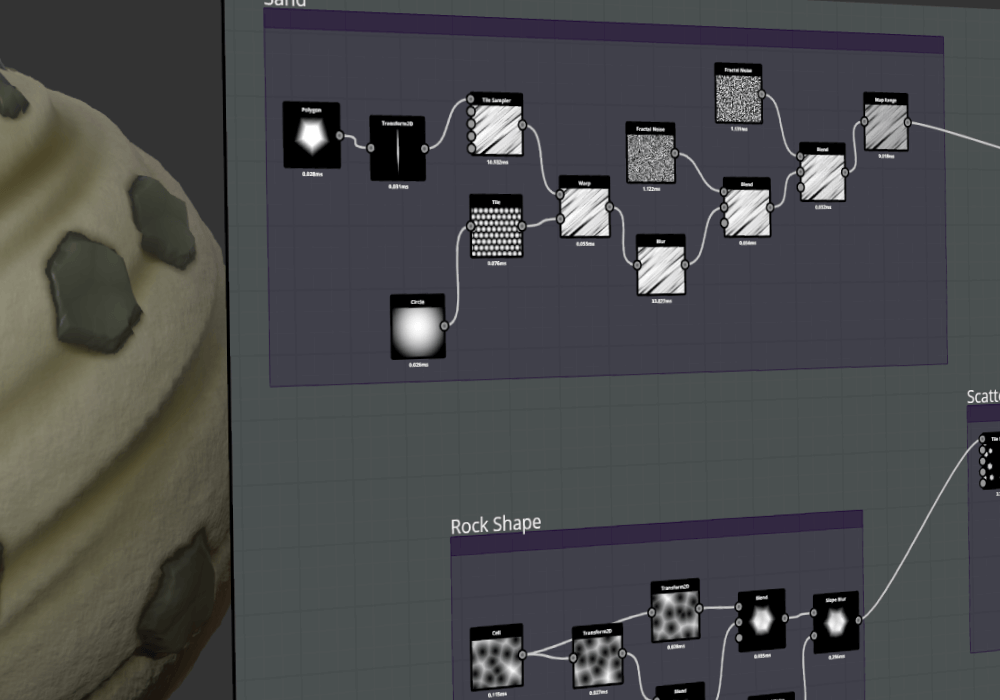
TextureLab Full homepage screenshot

At a glance

Category
Development
Language
English
Paid-content signal
No paid content foundObserved
Registered
Unknown
Hosting
DigitalOcean, LLCInferred
HTTPS certificate trusted
PassedObserved
Last updated

Website review

This review may include AI-generated content and is not individually verified. Domain, certificate and other facts come from the observed data on this page.

What is TextureLab?

TextureLab is a free, open-source tool for creating procedural, tileable, physically based textures through a node-based workflow. Instead of painting texture maps by hand, you build them from shapes, noises and filters wired together in a graph, and the result updates as you change parameters. Its stated goal is to be an accessible alternative for making seamless PBR materials, with nodes designed to run on the GPU and builds for Windows, Linux and Mac.

What that means in practice

  • Node graph with live preview: every step in the graph shows its output, so you can see how a noise or filter affects the material before committing to it.
  • Seamless by default: shapes, noises and filters are built to tile, which matters for anything that repeats across a large surface — floors, walls, terrain, fabric.
  • Resolution-independent: because textures are generated procedurally rather than stored as pixels, you can bake them out at whatever size a project needs. The site frames procedural textures as "the SVGs of the 3D art world," which is a fair way to think about the trade-off: smaller source, flexible output, but you still have to export baked maps for most engines and pipelines.
  • PBR-oriented: materials default toward a metallic physically based rendering workflow, so the outputs line up with standard roughness/metallic/ambient-occlusion style maps.
  • Unity export: the feature list includes exporting textures directly to Unity materials, which shortens the trip from graph to engine for Unity users.

Who it suits

A hobbyist or indie developer who needs a set of consistent, tileable materials and doesn't want a subscription or a heavy learning curve is the clearest fit. Someone already fluent in a mature procedural tool may find TextureLab's appeal is mainly its openness and lighter footprint rather than depth of features. The project describes itself as under heavy development, so expect rough edges and shifting behaviour — a reasonable approach is to use it for prototyping and stylised work first, and keep an eye on the roadmap before making it central to a production pipeline.

Next step

Open the node graph, build one simple material — a noise feeding a colour ramp into a roughness output — and export it into your engine of choice at two different resolutions. That single exercise tells you quickly whether the workflow and output quality match what you need. If you want to compare approaches or get feedback, the community side is active on Discord and itch.io, and contributions run through the project's GitHub repository. For a broader look at procedural material tools, Substance 3D is the established commercial option, and Blender ships a node-based shader editor that covers similar ground for free.

How does TextureLab's node-based workflow work for creating procedural materials?

TextureLab's node-based workflow is a visual, step-by-step system for building materials: you place nodes that each perform one operation, connect their outputs to inputs, and the software evaluates the graph to produce a texture. The page describes it as an "artist friendly node-based workflow" that "gives you a preview at every step," so you can watch the material change as you build rather than writing shader code or painting every layer by hand.

What actually happens in the graph

A typical material is assembled in stages, with each node feeding the next:

  • Sources generate the raw pattern: shapes, noises, and filters are the building blocks named in the feature list.
  • Modifiers transform that pattern — scaling, distorting, masking, or combining several sources.
  • Output converts the final result into a material you can export, with PBR (metallic/physically based) output as the default target.

Because the page states that shapes, noises, and filters are "seamless by default," tiling is handled by the node design itself rather than by a separate cleanup step. That matters when a material has to repeat across a large surface without visible seams.

Why this suits procedural work

The page makes an analogy worth taking seriously: "Procedural textures are the SVGs of the 3D art world." The practical meaning is that the graph stores a recipe, not baked pixels, so you can change resolution after the fact — "Design Once, Use At Any Resolution." A texture authored for a small prop can be re-rendered at higher resolution for a hero asset without rebuilding it.

Two further properties shape how the workflow feels day to day:

  • GPU evaluation. Almost all nodes are built to run on the GPU, so the preview updates as you edit instead of requiring a slow bake each time.
  • Cross-platform. It runs on Windows, Linux, and Mac, and there is direct export to Unity materials, which shortens the path from graph to engine.

Who gets the most from it

If you are… The node workflow helps because… The trade-off
A 3D artist without a coding background Visual preview at every step keeps the material legible You still need to learn what each node does and how to combine them
A technical artist or shader author GPU nodes and procedural output fit into a PBR pipeline It is a different tool than hand-written shaders, not a replacement for them
A Unity developer Direct export to Unity materials removes a manual conversion step The page does not describe support for other engines
A contributor or tinkerer Open source, with a roadmap, issues, and pull requests The project is described as still under heavy development

A concrete way to start

Pick one simple material you already know well — say, a brushed metal or a tiled floor — and try to reproduce it as a small graph: one noise or shape node, one or two modifiers, one output. Watch the preview after each connection. That exercise teaches the node vocabulary faster than reading a full node list, and it exposes where you need community help.

For that help, the page points to a Discord community with weekly challenges, an itch.io community, and a GitHub repository for contributions and bug reports. If you want to see how others approach the same material, the open-source nature means the graphs and discussions are visible rather than locked behind a product. It is also worth comparing the approach with established node-based tools such as Blender, whose shader editor covers similar ground, and SideFX, which is known for procedural workflows — useful reference points for judging whether TextureLab's node set fits your pipeline.

Can TextureLab export textures directly to Unity materials?

Yes. TextureLab lists Unity support as a feature and states that you can export your textures directly to Unity materials, so the tool is aimed at fitting a Unity workflow rather than only producing generic image files.

For a practical workflow, treat that export as the handoff step: build and preview your procedural material in TextureLab, then send it to Unity and verify the result on the target shader. Because the page describes materials as geared toward a metallic physically based rendering workflow, check that the exported maps line up with the Unity shader you actually use—especially metallic, smoothness/roughness and normal conventions—rather than assuming every shader will match automatically.

If Unity is central to your project, this is a meaningful convenience: it reduces manual re-importing and map assignment. If you also work in other engines or need fine control over packing channels, compare the exported output against your own pipeline before committing.

A useful next step is to download TextureLab, create one simple seamless PBR material, export it to Unity, and inspect the material and maps on a test object. For broader context, the official Unity site is Unity.

How does TextureLab compare to paid procedural texturing tools as an open-source alternative?

TextureLab positions itself as an open-source option for procedural, tileable, physically based textures, aimed at artists who want node-based material authoring without licensing fees. Its pitch is closest to paid procedural tools in workflow philosophy—build a graph, preview at each step, export reusable materials—but its differentiators are openness, GPU-accelerated nodes, and cross-platform support for Windows, Linux and Mac.

Where an open-source tool like TextureLab tends to win

  • Cost and access: no purchase barrier, which matters for students, hobbyists, indie teams and anyone running many seats.
  • Extensibility: the project invites contributions, issues and pull requests, so technically minded users can add nodes or fix gaps themselves.
  • Portability: Windows, Linux and Mac support is stated, which helps mixed-OS studios.
  • Workflow fit: node graphs with live previews, seamless-by-default shapes, noises and filters, and PBR-oriented output suit environment, prop and material artists.
  • Engine handoff: Unity material export is listed, useful for game artists iterating on surfaces inside a Unity pipeline.

The trade-offs to expect

Paid procedural suites usually buy you maturity: years of documented edge cases, polished UI, extensive node libraries, training material and responsive commercial support. An open-source project still under heavy development may change, lack tutorials for your exact use case, or require community help when something breaks. For a solo artist on a deadline, that friction can cost more than a license; for a technical artist or a team with time to invest, it can be a net gain.

A practical way to decide

Test TextureLab on one real asset you would normally build in a paid tool—say, a tiling metal panel with rust variation. Judge three things:

Criterion What to check
Output quality Does the exported texture hold up at your target resolution and in-engine lighting?
Iteration speed Can you reach the result faster or slower than your current tool?
Support path Is there an active community answer when a node or export fails?

If it passes on a real asset and your team can absorb occasional rough edges, the open-source route is viable. If it fails on iteration speed or support, keep it as a secondary tool for experimentation.

TextureLab itself points to its Discord and itch.io communities plus a GitHub repository and roadmap; those are the places to gauge activity before committing a production pipeline. You can also compare general expectations against established commercial tools such as Adobe Substance 3D if you need a benchmark for documentation and support depth.

What are the system requirements and supported platforms for running TextureLab?

TextureLab is built to run on Windows, Linux and Mac, and it uses GPU acceleration for almost all of its nodes. Those are the only platform and hardware details the site states directly; it does not publish minimum CPU, RAM, VRAM or OS-version requirements.

What this means in practice

  • Desktop only: The stated platforms are desktop operating systems, so don't expect a browser or mobile version based on the available information.
  • A GPU matters: Because most nodes are designed to run on the GPU, a reasonably capable graphics card will affect how smoothly large node graphs and high-resolution texture previews behave. The site doesn't specify a minimum GPU.
  • Cross-platform flexibility: If you work across Windows, Linux and Mac machines, the same tool is available on each.

How to decide

If your machine handles other GPU-accelerated 3D or image tools comfortably, TextureLab is likely to run acceptably, but that's an inference rather than a published requirement. For anything mission-critical, test it on your own hardware before committing, and check the project's repository or community channels for current build information.

A practical next step: download a build for your platform, open a moderately complex node graph, and watch preview responsiveness at the resolution you actually need. If it stays smooth, your setup is fine for typical work.

How can I contribute to TextureLab's development or join its community?

Contribute to TextureLab by picking the route that matches your skills: code and bug reports go through its GitHub repository, while day-to-day community activity happens on Discord and itch.io. The page lists all three as its contribution and community channels, and notes the project is under heavy development, which means early contributors can still shape its direction.

Ways to get involved

  • GitHub — the main path for development work. The page invites you to post an issue, bug or suggested feature, create a pull request, and view the project roadmap. It also points to the repository if you want to help with development directly.
  • Discord — the community hub. The page describes it as friendly and responsive, and mentions weekly challenges, so it suits artists and developers who want feedback, motivation or quick questions answered.
  • itch.io — a second community space, useful if you prefer following or discussing the project outside Discord.

Which route fits you

If you want to… Start with
Fix or add features in the code GitHub pull request
Report a bug or propose an idea GitHub issue
See what's planned before committing The roadmap on GitHub
Share work, ask questions, join challenges Discord
Follow or discuss the project casually itch.io

A practical next step

Before writing code, read the roadmap and skim open issues so your pull request targets something the maintainers already want. If you are an artist rather than a programmer, the fastest way to become useful is to join Discord, take part in a weekly challenge, and report the rough edges you hit in the node-based workflow — that feedback is often as valuable as a patch on a young tool.

As general advice rather than a claim about this project: open-source 3D tools tend to welcome small, well-scoped contributions (a fixed bug, a clear reproduction case, a documentation tweak) far more readily than large unsolicited rewrites, so start small and ask in the community channel first.

Related questions

More questions →
What Are Procedural Textures and Why Use Them in TextureLab?

Procedural textures are materials generated by rules and node networks rather than painted pixel by pixel. In TextureLab, that means you build a texture by connecting nodes, and the software recalculates the result whenever you change a parameter. This approach is most useful when you need tileable, physically based textures that must hold up at multiple resolutions or be adjusted repeatedly — for example, a stone wall material reused across several scenes. If your goal is a one-off hand-painted look with precise brush control, a bitmap workflow may still fit better.

How procedural texturing differs from painted textures

A painted texture is a fixed grid of pixels. Once you decide it is 2048×2048, that is what you have; scaling it up softens detail, and tiling it usually reveals seams unless you carefully offset and clone edges.

A procedural texture is a set of instructions. TextureLab describes its output as "the SVGs of the 3D art world" — the same logic as vector art, where the definition scales instead of the pixels. The site's tagline, "Procedural Texturing is the Future," frames this as the core reason to use the tool.

Dimension Painted / bitmap texture Procedural texture in TextureLab
What you edit Pixels Node parameters and connections
Resolution Fixed at export size Designed once, usable at any resolution
Tiling Requires manual seam work Seamless by default
Iteration Repaint or patch Change a value, preview updates
Preview After render/export Preview at every step in the node workflow

Why the default seamlessness matters

TextureLab states that shapes, noises, and filters are seamless by default. Seams are one of the most common time sinks in material work: you notice a visible line where the texture repeats, then you spend time blending edges or using offset tricks. When seamlessness is built into the nodes, tiling a floor, wall, or terrain becomes a matter of setting the repeat count rather than fixing the source image.

The practical consequence: you can iterate on a pattern's scale or contrast without reintroducing seams each time.

Resolution independence in practice

Because the texture is generated from rules, the same material can be exported at different sizes for different uses — a small preview for a mobile asset, a large map for a hero surface. You are not locked into the resolution you first chose, and you are not upscaling existing pixels.

This is the "design once, use at any resolution" claim on the site, and it is the main reason to prefer procedural work for assets that will be reused or viewed at varying distances.

What you get in TextureLab specifically

  • Node-based workflow — described as artist friendly, with a preview at every step, so you can see the effect of each change as you build.
  • Seamless by default — shapes, noises, and filters tile without manual seam repair.
  • PBR-ready — materials are geared toward a metallic physically based rendering workflow by default.
  • Hardware accelerated — almost all nodes are built to run on the GPU, which keeps previews responsive as networks grow.
  • Unity support — textures can be exported directly to Unity materials.
  • Cross-platform — runs on Windows, Linux, and Mac.
  • Open source — the project is developed with community contributions and is described as still under heavy development.

When procedural is the better choice

Choose a procedural approach in TextureLab when:

  • The material will tile across a large surface and seams would be visible.
  • You expect to revise the look — color, scale, roughness — after seeing it in context.
  • The same material needs to ship at more than one resolution.
  • You want a PBR metallic workflow without hand-authoring each map.

Consider a painted or scanned texture instead when the surface needs specific, non-repeating detail that is easier to paint than to describe as rules, or when you already have a finished bitmap that meets your needs.

Getting started and getting help

TextureLab is open source, so you can download it and inspect or extend it. The project points to a few places to engage:

  • Discord — a community with weekly challenges, described as welcoming and responsive.
  • itch.io — a community space for the project.
  • GitHub — where you can view the project roadmap, post an issue, bug, or feature suggestion, or create a pull request.

Because the project is under active development, expect the feature set to change; the roadmap and issue tracker are the places to check what is planned or in progress.

What platforms and workflows does TextureLab support?

TextureLab runs on Windows, Linux, and Mac, and it is built around a GPU-accelerated, node-based workflow that produces seamless, PBR-ready textures. It fits best if you work in a metallic physically based rendering (PBR) pipeline and want procedural materials you can reuse at any resolution. It also exports directly to Unity materials, so Unity users get a shorter path from texture to in-engine material.

Platform support

TextureLab is listed as running on all three major desktop operating systems:

  • Windows
  • Linux
  • Mac

That means you are not locked to one OS to author or open your materials. If your team mixes platforms, the same procedural setup is intended to work across them.

Workflow: node-based and artist-friendly

TextureLab uses a node-based workflow, which gives you a preview at every step. Instead of painting a fixed bitmap, you build a graph of shapes, noises, and filters, and adjust parameters until the result looks right.

Key properties of that workflow:

  • Seamless by default — shapes, noises, and filters are tileable, so you do not have to manually fix seams for repeating surfaces.
  • Resolution-independent — procedural textures are described as "the SVGs of the 3D art world." You design once and can use the result at any resolution rather than being stuck with the pixel dimensions you exported.
  • GPU-accelerated — almost all nodes are built to run on the GPU, which matters when you iterate on a graph and want fast feedback.

Why this matters in practice

For example, if you need a tiling metal panel material for a floor, you can build one graph, preview it live, then reuse the same graph at a higher resolution for a close-up shot without re-authoring anything. A bitmap-based workflow would require re-exporting or upscaling and re-checking seams.

Rendering and engine integration

TextureLab is PBR-ready: by default, materials are geared toward a metallic physically based rendering workflow. That aligns with the standard metal/roughness-style material setup used in most modern engines.

It also has Unity support, letting you export your textures directly to Unity materials. If Unity is your target engine, this removes a manual export-and-assign step.

Community and source

TextureLab is open source and still under heavy development, which the project frames as a chance to influence its direction. You can engage through:

  • Discord — community discussion plus weekly challenges
  • itch.io — community presence
  • GitHub — view the project roadmap, post an issue, bug, or feature suggestion, or create a pull request

Is it a fit for you?

Your situation TextureLab fit
You use Windows, Linux, or Mac Supported
You want seamless, tileable textures without manual seam fixing Strong fit
You need one material at multiple resolutions Strong fit (procedural, resolution-independent)
You work in a metallic PBR pipeline Strong fit (PBR-ready by default)
You target Unity Direct export to Unity materials
You want a mature, stable tool Caution — the project states it is still under heavy development

If your workflow depends on a metallic PBR pipeline and you value reusable, resolution-independent materials, TextureLab's platform coverage and node-based approach line up well. If you need a finished, stable product rather than an actively evolving open-source project, treat that development status as the deciding factor.

What is TextureLab?

TextureLab is an open-source, node-based tool for creating procedural, tileable, physically-based textures. It is aimed at artists who want to design a material once and reuse it at any resolution, and it runs on Windows, Linux, and Mac. If you need seamless PBR materials and prefer a visual workflow over hand-painted or photographed textures, it fits that job.

How it works

TextureLab builds materials procedurally rather than by editing pixels directly. You assemble a network of nodes — shapes, noises, and filters — and the result is computed from that network.

Two consequences follow from that design:

  • Seamless by default. The shapes, noises, and filters are tileable, so textures repeat without visible seams.
  • Resolution-independent. The site describes procedural textures as "the SVGs of the 3D art world" — you design once and use the output at any resolution.

Node-based workflow

The workflow is node-based and artist-friendly, with a preview at every step. That means you can see the effect of each node as you build the graph instead of waiting until the end to check the result.

PBR-ready output

Materials are geared by default toward a metallic Physically Based Rendering workflow, so outputs are intended to slot into PBR pipelines rather than being flat color images.

Features at a glance

Feature What it gives you
Node-based workflow Preview at every step while you build
Seamless textures Shapes, noises, and filters are seamless by default
Resolution-independent Design once, use at any resolution
PBR-ready Defaults toward a metallic PBR workflow
Hardware accelerated Almost all nodes are built to run on the GPU
Unity support Export textures directly to Unity materials
Cross-platform Runs on Windows, Linux, and Mac
Open source Development is driven by contributors

Who it is for

  • 3D artists who want tileable PBR materials without painting them by hand.
  • Unity users who want to export textures straight into Unity materials.
  • Contributors and tinkerers — the project is open source and, per the site, still under heavy development, so there is room to influence its direction.

Getting involved

TextureLab has an active community and several ways to contribute:

  • Join the Discord community, which runs weekly challenges.
  • Check out the itch.io community.
  • Contribute on GitHub — view the project roadmap, post an issue, bug, or feature suggestion, or create a pull request.

Because the project is under heavy development, expect the feature set to change; the roadmap and issue tracker are the places to check current status.

How the Node-Based Workflow in TextureLab Works

TextureLab builds materials as a node graph: you place nodes that represent shapes, noises, and filters, connect them to describe how the texture is generated, and watch a preview update at every step. When the graph looks right, you export the result as a texture or as a Unity material. This workflow suits anyone who wants tileable, physically-based textures without painting them by hand, and it assumes you have TextureLab installed on Windows, Linux, or Mac.

What a Node Represents

Each node is one operation in the material's recipe. TextureLab groups them into three broad kinds:

  • Shapes — the base forms a texture is built from.
  • Noises — variation layered on top of shapes.
  • Filters — adjustments applied to whatever flows into them.

Because the nodes are procedural, the output is computed from parameters rather than stored as pixels. That is why the site describes procedural textures as "the SVGs of the 3D art world": the same graph can be rendered at any resolution.

Connecting Nodes to Build a Graph

The graph is the material. You build it by wiring the output of one node into the input of another, so data flows from your source shapes and noises toward the final output.

A simple way to think about the flow:

  1. Start with a shape or noise node as the source.
  2. Feed it into a filter node to adjust it.
  3. Combine or layer additional shapes and noises as needed.
  4. Route the final result to the output so it can be previewed and exported.

The exact node names and port layout are not fixed in the source material, so treat the above as the shape of the workflow rather than a literal menu path. The key mechanic is that every connection changes what the downstream node receives.

Previewing at Every Step

The node-based workflow "gives you a preview at every step." As you add nodes and change their parameters, the preview reflects the current state of the graph, so you can judge each change before moving on. This is the main practical advantage over editing a flat image: you see the effect of a single node in isolation instead of guessing how it contributed to a finished texture.

Seamless and PBR-Ready by Default

Two defaults shape how you build:

  • Seamless by default. Shapes, noises, and filters in TextureLab are seamless, so tileable textures come out of the workflow without extra edge-matching work.
  • PBR-oriented. Materials are geared toward a metallic Physically Based Rendering workflow by default, so the output is intended for PBR pipelines.

Exporting the Result

Once the graph produces the texture you want, you have two export paths described on the site:

  • As a texture, usable at any resolution because the material is procedural.
  • Directly to Unity materials, via the built-in Unity support.

Where the Workflow Fits

If you want to… The node workflow helps because…
Make tileable textures Shapes, noises, and filters are seamless by default
Reuse one material at many resolutions Procedural output is resolution-independent
Feed a PBR pipeline Materials default to a metallic PBR workflow
Work in Unity Textures export directly to Unity materials
Iterate quickly The preview updates at every step

Practical Notes and Common Sticking Points

  • GPU dependence. Almost all nodes are built to run on the GPU, so hardware acceleration is part of the normal experience rather than an optional extra.
  • Platform coverage. It runs on Windows, Linux, and Mac, so the workflow is not tied to one OS.
  • It is still in development. The project describes itself as under heavy development, which means features and behavior can change. If something behaves unexpectedly, the project's own channels are the place to check: the GitHub repository for issues and pull requests, the roadmap for planned work, and the Discord and itch.io communities for questions and weekly challenges.

If you are deciding whether to invest time in the node workflow, the deciding factors are whether you want resolution-independent, seamless, PBR-ready output and whether you are comfortable building materials by connecting operations rather than painting pixels. If both are true, the graph is the fastest path from an idea to an exportable texture.

How to Contribute to or Get Help with TextureLab

TextureLab is an open-source project, so you can contribute code or feedback through its GitHub repository, and get help or connect with other users through its Discord server and itch.io community. The site also notes the project is "still under heavy development," which means contributors can still influence its direction. The exact steps for each channel are below, based on what the TextureLab site states.

Ways to contribute

TextureLab lists three concrete ways to get involved on GitHub:

  • Post an issue, bug, or suggested feature — use this if you find a problem or want to propose something new.
  • Create a pull request — use this if you want to submit code or other changes directly.
  • View the project roadmap — check this before starting, so your contribution aligns with planned development.

Because the project is open source, the site frames contribution as a way to "have a personal hand in the development of this project."

Where to get help and connect

Channel What it's for
Discord Joining the community, asking questions, and taking part in weekly challenges
itch.io Community discussion around the project
GitHub Issues, feature suggestions, pull requests, and the roadmap

The site describes the community as "very welcoming and responsive" and mentions weekly challenges on Discord as an ongoing activity.

Before you contribute

  • Check the roadmap first — it shows what's already planned, so you don't duplicate work.
  • Search existing issues before posting a new one, since bugs or feature ideas may already be tracked.
  • If you're proposing a feature rather than reporting a bug, the site treats it as a "suggested feature" issue.

What this means for you

If you only want help using TextureLab, Discord and itch.io are the intended community channels. If you want to shape the tool itself, GitHub is where issues, pull requests, and the roadmap live — and since development is described as ongoing, feedback submitted now has a stated chance to influence the project.

Website Overview

Limited stack disclosure and few obvious backend markers suggest a more restrained public footprint. That reduces easy fingerprinting clues but is not proof of overall security.

Domain and Registration

Unknown

DNS and Email

The lowest TTL is 30 seconds, supporting rapid record changes at the cost of more frequent lookups. Nameservers are provided by DigitalOcean, indicating managed DNS hosting. MX records point to the Zoho Mail email service. No CNAME was found; the observed records resolve directly to addresses. SPF and DMARC are configured. DKIM status is unknown.

TLS and Certificates

The certificate uses an RSA 4096-bit public key, offering broad client compatibility. The server supplied a complete certificate chain. No organization name is present in the certificate; the available fields are consistent with domain validation. The certificate was issued by Let's Encrypt, commonly associated with automated certificate services. The certificate's total validity is about 89 days, consistent with a short renewal cycle.

HTTP and Browser Security

The response lacks these common security headers: CSP, Referrer-Policy, Permissions-Policy. No X-Powered-By header was found, reducing one common source of backend fingerprinting information. No obvious internal addresses or debug information were found in the headers. Cookie security attributes are unknown. No explicit CDN or WAF marker was found in the response headers.

Technology Stack Analysis

No obvious technology stack is exposed. This may reflect restrained information disclosure, although the underlying technologies remain unknown.

Search and Social Sharing

No homepage canonical URL was detected. If duplicate URLs exist, consolidation may be less explicit. Twitter Card metadata is configured. The title has 10 characters, within a common display range. A meta description is present, with 44 characters. The observed directives allow indexing and link following.

Hosting and Email

DNSDigitalOcean
HostingDigitalOcean, LLC
EmailZoho Mail
Approximate IP geolocation (inferred; a CDN or proxy may differ from the origin server) United States flagSanta Clara, California, United States Inferred 64.23.159.132

Registration details

RDAP / WHOIS

Unknown

DNS records

DNS

TypeNameValueTTLPriority
Atexturelab.io64.23.159.132300—
MXtexturelab.iomx.zoho.com3010
MXtexturelab.iomx2.zoho.com3020
MXtexturelab.iomx3.zoho.com3050
NStexturelab.ions1.digitalocean.com1800—
NStexturelab.ions2.digitalocean.com1800—
NStexturelab.ions3.digitalocean.com1800—
TXTtexturelab.iov=spf1 include:zoho.com ~all30—
TXTtexturelab.iozoho-verification=zb15500690.zmverify.zoho.com30—
DMARC_dmarc.texturelab.iov=DMARC1; p=none; pct=100; rua=mailto:[email protected]; sp=none; aspf=r;30—

TLS and certificates

TLS / SSL

AssessmentNormal configuration
Supported protocolsTLSv1.2、TLSv1.3
Negotiated protocolTLSv1.3
Certificate subjecttexturelab.io
IssuerLet's Encrypt
Valid until2026-12-08T18:09 · Remaining when checked: 54 days
Verification detailsCertificate trust: Passed · Hostname match: Passed

HTTP response headers

HTTP

HeaderValue
content-typetext/html; charset=utf-8
strict-transport-securitymax-age=15552000
x-frame-optionsDENY
x-content-type-optionsnosniff
set-cookieRedacted

Identified technologies

Technology stack: Unknown

Pages, Search and Sharing

User reviews (0)

  • No reviews yet.