Website profiles · Technology insights · Alternatives

textures.neocities.org

Many many textures for you to download for your websites and 3D worlds, all for freeeeeeeeeeeeeeee! :^]

No paid content found
Visit website
Profile views 5 Outbound visits 2 Normal
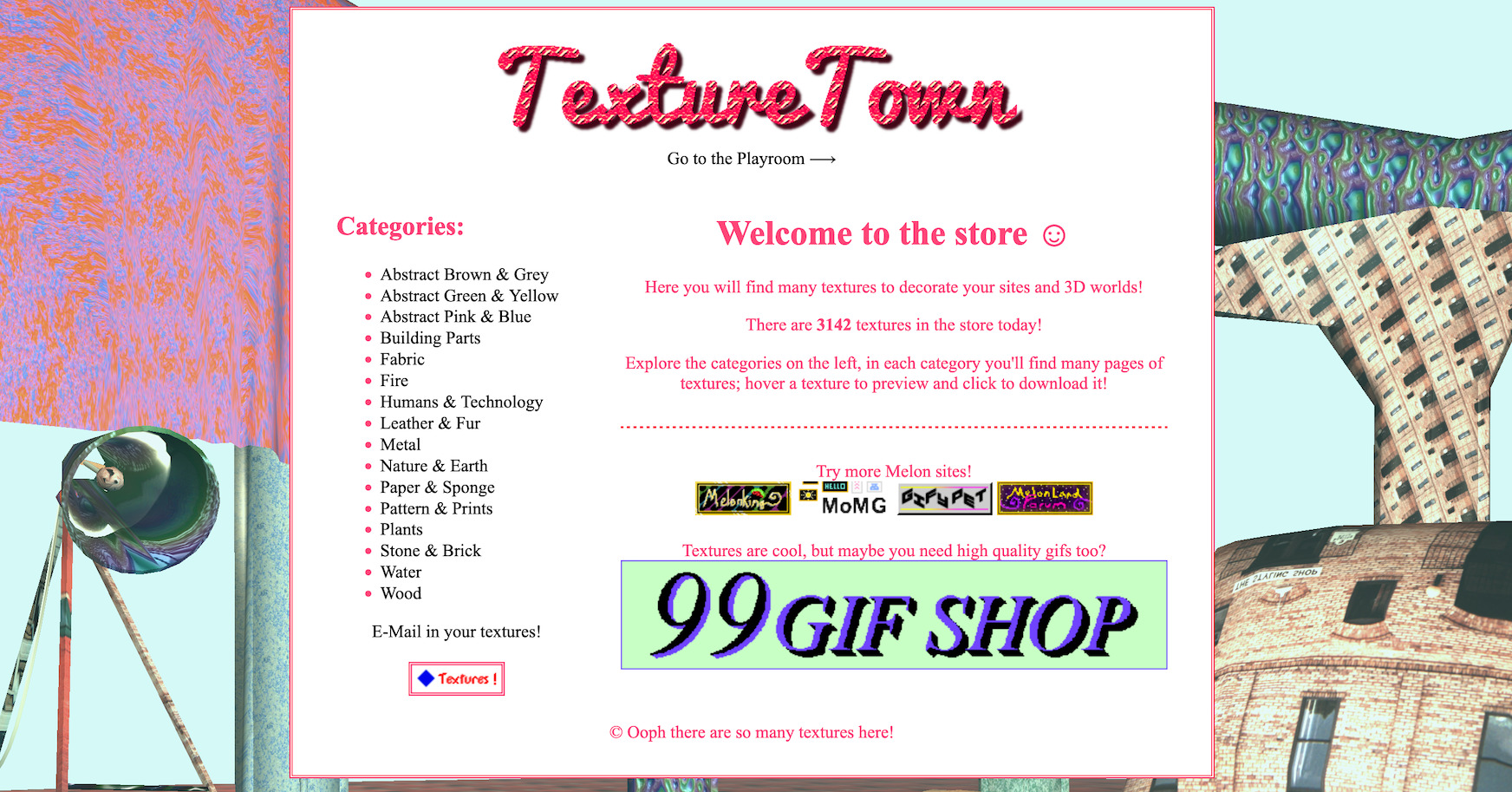
◆ TextureTown ◆ Full homepage screenshot

At a glance

Category
Stock Photos
Language
English
Paid-content signal
No paid content foundObserved
Registered
2013
Hosting
NeocitiesInferred
HTTPS certificate trusted
PassedObserved
Last updated

Website review

This review may include AI-generated content and is not individually verified. Domain, certificate and other facts come from the observed data on this page.

What is TextureTown?

TextureTown is a free, browsable library of downloadable textures for websites and 3D projects. Its own welcome page describes it as a “store” where you can find many textures to decorate sites and 3D worlds, and it lists the current count as 3,867 textures. Despite the shop-like wording, the page presents the collection as free to download.

What you can find there

Textures are organized into broad categories rather than a single searchable list. The categories shown include:

  • Abstract (in several color groupings)
  • Building Parts
  • Fabric
  • Fire & Light
  • Fractals
  • Humans & Technology
  • Leather & Fur
  • Metal
  • Nature & Earth
  • Paper & Sponge
  • Pattern & Prints
  • Plants
  • Stone & Brick
  • Water
  • Wood

Each category contains multiple pages. You hover over a texture to preview it and click to download, which makes the site straightforward for visual browsing but less convenient if you already know exactly what you need.

Who it suits

TextureTown is most useful for hobbyist web designers, game jam participants, students and anyone building low-stakes personal sites or 3D scenes who wants quick, no-cost surface images. It is less suited to production work that requires consistent resolution, licensing documentation, color profiles or technical maps such as normal and roughness textures, since the page evidence does not describe those details.

A practical next step

Start with the category closest to your scene, preview a few options, and download one texture to test in your actual project before collecting a large set. Check how it tiles and how it looks under your lighting; a texture that reads well in a thumbnail can behave differently when repeated across a large surface.

For coders, the site also mentions a TextureTown API for accessing textures programmatically, plus a link to Melon’s Graphics Catalogue for additional graphics. If you want a broader set of free web graphics, OpenGameArt is a well-known community resource for game-ready assets, though its licensing terms vary by submission and should be checked individually.

How can I download textures from TextureTown?

Open the category that matches what you need, hover a tile to preview it, then click the texture to download it. TextureTown organizes its library into browsable categories, so the download flow is: pick a category, page through its textures, preview on hover, click to save.

Categories you can browse

The store lists these groups:

  • Abstract Brown & Grey
  • Abstract Green & Yellow
  • Abstract Pink & Blue
  • Building Parts
  • Fabric
  • Fire & Light
  • Fractals
  • Humans & Technology
  • Leather & Fur
  • Metal
  • Nature & Earth
  • Paper & Sponge
  • Pattern & Prints
  • Plants
  • Stone & Brick
  • Water
  • Wood

Practical notes

Each category spans multiple pages, so check the page navigation if your first screen doesn't show what you want. There's also a "Playroom" and a "Texture of the Day" feature, useful if you'd rather sample one texture at a time than commit to a category. For coders, the site points to a TextureTown API, which is the better route if you want to pull textures programmatically rather than clicking through pages.

A sensible next step: decide your target first. For a 3D scene, start with Stone & Brick, Wood, or Metal for structural surfaces, then add Fabric or Leather & Fur for props. For a website background, Pattern & Prints and Abstract categories tend to tile more predictably. If you need many textures at once, try the API instead of manual downloads. For broader graphic assets beyond textures, the site also mentions Neocities-hosted graphics catalogues, though TextureTown itself is the direct source for the texture library.

Are the textures on TextureTown free to use for commercial projects?

TextureTown presents its texture library as free to download for websites and 3D worlds, but the page itself does not spell out commercial-use rights. The site says "all for freeeeeeeeeeeeeeee!" and invites downloading, yet that wording covers cost, not licensing. Without an explicit license or terms page, you cannot assume commercial use is permitted.

What the page supports

  • The site describes thousands of textures (it states 3,867 at the time of writing) across categories like Abstract, Building Parts, Fabric, Metal, Nature & Earth, Stone & Brick, Water and Wood.
  • It tells visitors to hover to preview and click to download, and offers an API for coders.
  • It asks users to e-mail in their own textures, which suggests a mix of contributed material rather than a single original author.

Why that matters for commercial work

A texture uploaded by a contributor may carry different terms from one made by the site owner. Even when a site offers downloads at no cost, commercial use usually needs a clear statement: attribution requirements, redistribution limits, and whether the texture can be sold as part of a product. None of that appears in the supplied page content.

Practical decision path

If you want to use a TextureTown texture in paid work, treat it as unresolved until you have written permission. A short e-mail to the site's contact address asking "May I use these textures in a commercial project, and do you require credit?" resolves it in one step. Keep the reply.

For commercial projects where you need certainty, consider libraries with explicit licenses, such as Poly Haven (CC0) or ambientCG (CC0). CC0 means no attribution is required and commercial use is allowed, which is simpler for client work. You can also check OpenGameArt, where each asset lists its own license, so you must read the individual entry rather than the site as a whole.

For a personal website, a hobby game or a school project, downloading and crediting the site is low-risk. For anything you sell, license, or hand to a client, get permission first or use a CC0 source.

How do I submit my own textures to TextureTown?

TextureTown invites submissions by email. The site's own instruction on the page is simply “E-Mail in your textures!”, so the submission route is a message to the site owner rather than an upload form or account dashboard.

What to include in the email

Since there is no published submission form, make your message easy to act on:

  • A short subject line naming the site, e.g. “Texture submission – wood planks”.
  • Your textures attached, or a link to a download page you control.
  • The category each texture belongs in, matching the site's existing ones where possible: Abstract, Building Parts, Fabric, Fire & Light, Fractals, Humans & Technology, Leather & Fur, Metal, Nature & Earth, Paper & Sponge, Pattern & Prints, Plants, Stone & Brick, Water, Wood.
  • The licence you're granting. “Free to use” is vague; say whether credit is required and whether commercial use is allowed.
  • How you want to be credited, if at all.

Practical considerations

TextureTown's collection is large and organised by category, so a submission that already fits an existing category is easier to place than one that needs a new one. Tiling textures are the most useful for the stated purposes of website backgrounds and 3D worlds, because they repeat without visible seams; a single non-tiling image is harder to use in either context.

If you don't hear back, the site also points to a graphics catalogue and an API, which suggests the maintainer is comfortable with technical contributors. Coders who want to publish textures programmatically may find the API a better fit than email.

For a broader audience of texture and asset creators, OpenGameArt accepts uploads with explicit licence tagging, which removes the licence ambiguity that email submissions often create.

What is the TextureTown API and how can I use it?

TextureTown's API is the programmatic way to pull its texture library into your own projects instead of downloading files by hand. The site describes it as a way for coders to "access textures," and it also points to a separate "Melon's Graphics Catalogue API" for other graphics. The catalogue itself is large and organized by theme, so the API is best understood as a search-and-retrieve layer over those same categories.

What you can realistically do with it

  • Fetch textures by category or search term. The site's categories include Abstract, Building Parts, Fabric, Fire & Light, Fractals, Leather & Fur, Metal, Nature & Earth, Paper & Sponge, Plants, Stone & Brick, Water and Wood. A typical use is requesting a random wood texture for a level, or a set of stone textures for a wall material.
  • Build a picker or preview tool. Because the site already supports hovering to preview and clicking to download, an API-backed tool can show thumbnails and let a user choose before committing a file to a project.
  • Automate asset pipelines. If you generate many scenes, you can script texture retrieval into a build step rather than curating a folder manually.

Practical example

A small browser game needs a different ground texture per level. Instead of bundling dozens of images, the game requests one texture per level from the API at load time, caches it locally, and falls back to a bundled default if the request fails. A 3D artist might use the same approach to populate a material library in Blender with a script.

How to decide whether to use it

Situation Better choice
One-off texture for a personal site Browse and download manually
Many textures, repeated or randomized API
Offline or latency-sensitive project Download and bundle files
You need a specific look with human judgment Browse categories yourself

The main trade-off is control versus convenience. The API saves time on volume and variety, but you give up the curation you get from browsing; automated picks may not match an art direction. Check the site's own API documentation for request format, rate limits and licensing before wiring it into anything public, and keep a local cache so your project still works if the service is unavailable.

As a next step, open the API page from the TextureTown homepage, make one test request for a category you already know, and compare the result against a manual download to confirm the format and quality fit your pipeline.

What is the Texture of the Day feature?

The Texture of the Day is a rotating spotlight on TextureTown's homepage: one texture from the site's library is singled out as the day's featured pick, shown on the front page under the heading "Behold! Texture of the Day!" It sits alongside the main browsing tools, so it works as a quick daily sample rather than a separate section you have to hunt for.

For a practical use, think of it as a low-effort starting point. If you're building a small site or a 3D scene and don't yet know which look you want, checking the daily pick gives you one concrete texture to react to — you'll quickly learn whether you lean toward stone, fabric, abstract patterns, or something else. From there, the category list (Abstract, Building Parts, Fabric, Fire & Light, Metal, Nature & Earth, Stone & Brick, Wood, and more) lets you browse deeper in the direction that appealed to you.

A few things worth knowing:

  • It changes daily, so it rewards repeat visits rather than being a one-time gallery.
  • It's a feature of the homepage, not a filter or search tool; the full library is browsed through the categories.
  • Hovering a texture previews it, and clicking downloads it, so the daily pick follows the same grab-and-go flow as the rest of the site.

If you want more than one texture a day, skip straight to the categories that match your project, or try the site's API if you're pulling textures into code. For broader inspiration beyond textures, Neocities hosts many personal sites where this kind of decorative asset gets used in context.

Related questions

More questions →
Can I Submit My Own Textures to TextureTown?

Yes. TextureTown accepts user-submitted textures through email. The site's homepage includes an "E-Mail in your textures!" link alongside its category list, which is the stated channel for contributing your own work. If you want your textures to appear in the store next to the existing collection, emailing them in is the route the site provides.

What the site says about submissions

The only submission-related element on the homepage is the line "E-Mail in your textures!", placed near the category navigation. That tells you two things:

  • The submission method is email, not an upload form or account dashboard.
  • The site is open to outside contributions rather than being a closed, single-author collection.

TextureTown describes itself as a store of textures "for you to download for your websites and 3D worlds," and notes the current count as 3867 textures. Submissions are framed as a way to add to that shared pool.

What you can reasonably expect

Question What the site indicates
How do I submit? By email, via the "E-Mail in your textures!" entry
Is there an upload form? Not shown on the homepage
Will my textures be published? The invitation implies they may be added to the store
Is there a fee mentioned? No pricing or payment signals appear on the page
Are there format or size rules? Not stated on the homepage

Because the homepage doesn't spell out file formats, resolution limits, licensing terms, or review timelines, treat those as unknowns until you ask. The practical move is to send a short email that covers the basics a maintainer would need.

A sensible submission email

Since the site gives no template, include the details that make a texture usable in the store:

  • Subject line that says it's a texture submission.
  • What you're sending — how many textures and what they depict (for example, stone, fabric, wood).
  • File format and size — e.g. PNG or JPG, and the pixel dimensions.
  • License or usage terms — state whether others may download and reuse them, and under what conditions.
  • How you want to be credited — a name, handle, or link.
  • Attachments or links — attach the files or point to a download location if they're large.

Keep it brief. The maintainer is deciding whether your textures fit the existing categories, which include Abstract, Building Parts, Fabric, Fire & Light, Fractals, Metal, Nature & Earth, Paper & Sponge, Plants, Stone & Brick, Water, and Wood.

Before you send

A few things worth checking so your submission isn't rejected or ignored:

  1. Match the existing style. Browse a category or two first. The store leans toward tileable, reusable surface textures rather than one-off artwork.
  2. Confirm you have the rights. Only submit textures you created or are otherwise free to share. Don't send copyrighted material you don't own.
  3. Name your files clearly. Descriptive filenames help the maintainer slot them into the right category.
  4. Be patient. The page gives no response time, so don't assume instant publication.

The short version

TextureTown does accept outside textures, and the homepage's "E-Mail in your textures!" link is the way in. There's no documented upload flow, format spec, or license agreement on the page, so your email should carry that information yourself. Send a clear message with your files, their format and size, your usage terms, and how you'd like to be credited — then wait to hear back.

What kinds of textures are available on TextureTown?

TextureTown (textures.neocities.org) organizes its library into named categories rather than a single flat list, and the site states there are 3867 textures in the store today. The categories cover abstract color pairings, building materials, natural surfaces, and a few subject-based groups, so you can usually jump straight to the material family you need instead of scrolling everything. The textures are offered for decorating websites and 3D worlds.

Full category list

Based on the site's category menu, the available groups are:

Category What it suggests you'll find
Abstract Brown & Grey Neutral-toned abstract patterns
Abstract Green & Yellow Abstract patterns in green/yellow
Abstract Pink & Blue Abstract patterns in pink/blue
Building Parts Components of structures
Fabric Cloth and textile surfaces
Fire & Light Glowing, burning, or lit surfaces
Fractals Generated fractal patterns
Humans & Technology Human/tech-themed imagery
Leather & Fur Animal-hide and fur textures
Metal Metallic surfaces
Nature & Earth Ground, soil, and natural terrain
Paper & Sponge Paper and porous absorbent surfaces
Pattern & Prints Repeating patterns and printed designs
Plants Foliage and plant surfaces
Stone & Brick Masonry and rock surfaces
Water Water surfaces
Wood Wood grain and timber surfaces

How the categories are structured

The categories fall into a few loose groups, which helps when you're deciding where to look:

  • Abstract and generated: Abstract Brown & Grey, Abstract Green & Yellow, Abstract Pink & Blue, Fractals, Pattern & Prints.
  • Construction and hard materials: Building Parts, Metal, Stone & Brick, Wood.
  • Natural and organic: Nature & Earth, Plants, Water, Leather & Fur.
  • Surface and craft materials: Fabric, Paper & Sponge.
  • Thematic: Fire & Light, Humans & Technology.

If you're texturing a 3D scene, the material-based categories (Metal, Wood, Stone & Brick, Water, Fabric) map most directly onto common surface types. If you're decorating a website background, the Abstract and Pattern & Prints categories are the more likely starting points.

Browsing and downloading

Each category contains many pages of textures. The site's own instructions describe the interaction: hover over a texture to preview it, then click to download it. There is also a "Texture of the Day" feature on the homepage, and a separate Graphics Catalogue for finding more graphics beyond textures.

For developers

TextureTown exposes an API for programmatic access to the textures, aimed at coders who want to pull assets without browsing manually. The site links to it as the "TextureTown API."

Practical notes

  • The count of 3867 is what the site reports at the time of writing; it can change as textures are added.
  • The site invites submissions — there's an "E-Mail in your textures!" link if you want to contribute your own.
  • Because categories are color- or material-based rather than tagged by use case, expect to browse a few pages within a category before finding a match.
How to Browse and Download Textures on TextureTown

TextureTown (textures.neocities.org) is a free texture library for websites and 3D worlds. To use it, open the site, pick a category from the left-hand list, hover over a texture to preview it, then click to download. The site states there are 3867 textures in the store, and each category spans multiple pages, so browsing is a matter of narrowing by category first, then paging through results.

What you'll find on the site

The homepage ("Welcome to the store") presents the library as a set of categories plus a few extras:

  • Categories: Abstract Brown & Grey, Abstract Green & Yellow, Abstract Pink & Blue, Building Parts, Fabric, Fire & Light, Fractals, Humans & Technology, Leather & Fur, Metal, Nature & Earth, Paper & Sponge, Pattern & Prints, Plants, Stone & Brick, Water, Wood.
  • Texture of the Day: a rotating featured texture on the homepage.
  • Playroom: a separate section linked from the top of the page.
  • Graphics Catalogue: the site points to Melon's Graphics Catalogue for additional graphics.
  • TextureTown API: an option for coders who want to access textures programmatically.
  • Submission: an "E-Mail in your textures!" link for contributing your own.

Step-by-step: browsing and downloading

  1. Open the site. Go to textures.neocities.org. The category list sits on the left side of the page.
  2. Choose a category. Click one that matches your project — for example, Wood for a cabin scene or Stone & Brick for a wall material. Categories are organized by subject and color, so both "what it is" and "what it looks like" are valid ways to pick.
  3. Page through the results. Each category contains many pages of textures. Use the pagination within the category to move through them rather than expecting everything on one screen.
  4. Preview before committing. Hover over a texture to see a preview. This is the intended way to check pattern, scale, and color before downloading.
  5. Click to download. Clicking a texture downloads it. There is no cart or checkout step described on the site — the homepage simply says textures are there "for freeeeeeeeeeeeeeee!"

Expected result: you end up with an image file on your machine that you can drop into a website build or import as a material in a 3D tool.

Choosing a category for common tasks

If you need… Start with
Ground, grass, or terrain surfaces Nature & Earth, Plants
Walls, floors, masonry Stone & Brick, Wood, Building Parts
Soft goods, upholstery, clothing Fabric, Leather & Fur
Sci-fi or tech surfaces Metal, Humans & Technology
Backgrounds, abstract fills Fractals, Pattern & Prints, the Abstract categories
Lighting, glow, flame effects Fire & Light
Water surfaces Water

Practical notes and common snags

  • Preview is hover-based. If you click too fast you may download something you haven't looked at. Hover first, then click.
  • Multi-page categories mean the first screen isn't the whole category. If a category looks thin, check the remaining pages before concluding the texture you want doesn't exist.
  • The API is the shortcut for bulk use. If you're pulling many textures into a project, the TextureTown API is the intended path for coders rather than downloading one by one.
  • Licensing and attribution aren't spelled out in the homepage text. The site presents everything as free to download, but if you need explicit license terms for a commercial project, check the site itself before relying on that.
  • You can contribute. The "E-Mail in your textures!" link is how the site accepts submissions if you want your own textures listed.
How Can Developers Use the TextureTown API?

TextureTown offers an API for developers who want to access its texture library programmatically, but the site itself only points you to a dedicated API page rather than documenting the endpoints inline. If you need textures for automated workflows, dynamic websites, or 3D projects, the API is the intended route — you'll need to visit the API page to get the actual usage details, since the homepage only confirms it exists.

What the Site Tells You

The homepage of TextureTown (textures.neocities.org) includes a short section aimed at coders:

  • "API — Are you a coder? Access textures! Explore the TextureTown API" — this is the only API-related content on the main page.
  • The library itself is described as containing 3867 textures at the time of writing, organized into categories such as Abstract, Building Parts, Fabric, Fire & Light, Fractals, Metal, Nature & Earth, Plants, Stone & Brick, Water, and Wood.
  • Textures are normally browsed by hovering to preview and clicking to download, so the API is the alternative for anyone who doesn't want to do that manually.

Beyond confirming the API exists and linking to it, the homepage does not list endpoints, parameters, authentication, or rate limits.

What You Can Reasonably Expect

Because the site is a free texture store aimed at websites and 3D worlds, an API for "accessing textures" most likely lets you:

  • Retrieve texture listings or metadata (names, categories, possibly preview URLs).
  • Fetch or link to texture files directly instead of downloading them by hand.
  • Integrate textures into a build pipeline, a CMS, or a 3D asset workflow.

These are inferences from the site's stated purpose, not documented features — treat them as things to verify on the API page.

Steps to Get Started

  1. Go to the TextureTown homepage at textures.neocities.org.
  2. Find the "Explore the TextureTown API" link in the coder-oriented section near the bottom of the page.
  3. Open the API page and read the documented endpoints, request format, and any usage conditions.
  4. Test a request against one endpoint (for example, a category listing) and confirm you get usable data back.
  5. Check the response format — whether it returns JSON, direct image URLs, or something else — before wiring it into your project.

Expected result: you should end up with a working request that returns texture data you can use in code. If the API page doesn't load or the link is broken, fall back to manual browsing and downloading.

Common Pitfalls

  • Assuming undocumented behavior. The homepage doesn't state authentication, rate limits, or licensing for API use. Confirm these on the API page before relying on it in production.
  • Skipping the API page. The main site gives no endpoint details, so any guess about the URL structure is likely wrong.
  • Ignoring the manual option. With 3867 textures across clear categories, browsing and downloading may be faster for one-off needs than setting up API calls.
  • Hotlinking without checking. Whether you can link directly to texture files (rather than downloading them) isn't stated on the homepage — verify before embedding URLs in a live site.

When to Use the API vs. Manual Browsing

Situation Better option
One or two textures for a personal site Manual browse and download
Bulk or automated texture retrieval API (after reading its docs)
Dynamic site that pulls textures at runtime API, if hotlinking/usage is permitted
Unsure about licensing or limits Check the API page first, then decide

The API is the right tool when you need textures at scale or inside code, but the homepage alone isn't enough to implement it — the API page is where the actual instructions live.

What Is TextureTown? A Free Texture Library for Websites and 3D Worlds

TextureTown (textures.neocities.org) is a free, browser-based texture library with 3,867 textures at the time of writing, organized into categories like Wood, Stone & Brick, Metal, Fabric, Nature & Earth, and Fractals. You browse by category, hover a texture to preview it, and click to download. It's aimed at people decorating websites and 3D worlds, and the site states the textures are free to download. No account or sign-up step is mentioned on the page.

What you'll find

The homepage lists these categories:

  • Abstract Brown & Grey
  • Abstract Green & Yellow
  • Abstract Pink & Blue
  • Building Parts
  • Fabric
  • Fire & Light
  • Fractals
  • Humans & Technology
  • Leather & Fur
  • Metal
  • Nature & Earth
  • Paper & Sponge
  • Pattern & Prints
  • Plants
  • Stone & Brick
  • Water
  • Wood

Each category holds multiple pages of textures. The site also features a "Texture of the Day" and a "Playroom" section linked from the top of the page.

How browsing and downloading works

  1. Pick a category from the list on the left.
  2. Scroll through the pages of textures in that category.
  3. Hover over a texture to preview it.
  4. Click the texture to download it.

That's the whole loop — there's no cart, no checkout, and no login wall described on the page. The "store" wording in the heading ("Welcome to the store") is stylistic; the page describes downloads as free.

Who it's for

TextureTown suits:

  • Web designers who want background tiles, patterns, or surface textures for a site.
  • 3D artists and hobbyists building worlds in engines or modeling tools that accept image textures.
  • Anyone prototyping who needs a quick, no-account source of surface images.

Because the textures are general-purpose surfaces (wood, stone, metal, fabric, and so on), they work best as repeating or tiling materials rather than as finished illustrations.

Extra options for coders

The site points to two additional resources:

  • Melon's Graphics Catalogue — a linked catalogue for finding more graphics.
  • The TextureTown API — described as a way for coders to access textures programmatically.

If you're pulling textures into a build pipeline or a script rather than downloading by hand, the API is the relevant entry point; the page links to it directly.

Things to check before you rely on it

  • Licensing terms aren't spelled out in the page text provided. The site says textures are free to download, but if you need explicit commercial-use or attribution terms, look for a license or credits page before publishing.
  • Availability can change. The count (3,867) is a snapshot; categories and totals may shift over time.
  • Texture quality and resolution aren't listed per item in the page text, so preview before committing to a texture for print or high-resolution rendering.

If you just need free surface textures for a website or a 3D scene and don't mind browsing by category, TextureTown is a straightforward place to start.

Website Overview

Limited stack disclosure and few obvious backend markers suggest a more restrained public footprint. That reduces easy fingerprinting clues but is not proof of overall security. An established domain and managed infrastructure suggest continuity of operations and may support dependable delivery, although neither guarantees service quality.

Domain and Registration

Registered in 2013, this domain has about 13 years of history. That suggests continuity, although ownership and purpose may have changed. The registrar, MarkMonitor Inc., specializes in corporate domain and brand management, suggesting attention to domain asset protection. Transfer-protection status is present, helping reduce the risk of unauthorized domain transfers. The domain uses the common .org extension, which is not an independent safety signal.

DNS and Email

Nameservers are provided by neocities.org, indicating managed DNS hosting. MX records point to the Proton Mail email service. No CNAME was found; the observed records resolve directly to addresses. SPF and DMARC are configured. DKIM status is unknown. DNSSEC signatures were not detected, so this additional DNS authenticity protection is not confirmed.

TLS and Certificates

The certificate uses an RSA 2048-bit public key, offering broad client compatibility. The server supplied a complete certificate chain. No organization name is present in the certificate; the available fields are consistent with domain validation. The certificate was issued by Let's Encrypt, commonly associated with automated certificate services. The certificate's total validity is about 89 days, consistent with a short renewal cycle.

HTTP and Browser Security

The response lacks these common security headers: X-Content-Type-Options, Referrer-Policy, Permissions-Policy, clickjacking protection. CORS permits any origin to read this response. This is common for public resources; sensitive responses need narrower handling. No X-Powered-By header was found, reducing one common source of backend fingerprinting information. No obvious internal addresses or debug information were found in the headers. The Server header contains the custom value neocities.

Technology Stack Analysis

No obvious technology stack is exposed. This may reflect restrained information disclosure, although the underlying technologies remain unknown.

Search and Social Sharing

No homepage meta description was detected, leaving snippet selection more dependent on page text. No homepage canonical URL was detected. If duplicate URLs exist, consolidation may be less explicit. Open Graph is partially configured; og:type is missing. The title has 15 characters, within a common display range. The observed directives allow indexing and link following.

Hosting and Email

DNSneocities.org
HostingNeocities
EmailProton Mail
Approximate IP geolocation (inferred; a CDN or proxy may differ from the origin server) United States flagUnited States Inferred 23.143.32.13

Registration details

RDAP / WHOIS

RegistrarMarkMonitor Inc.
Registered2013-05-24
Expires2035-05-24
Domain statusclient delete prohibited、server delete prohibited、client transfer prohibited、server transfer prohibited、client update prohibited、server update prohibited
Nameserversns1.neocities.org、ns2.neocities.org
DNSSECunsigned

DNS records

DNS

TypeNameValueTTLPriority
Atextures.neocities.org23.143.32.13300—
AAAAtextures.neocities.org2620:2:6000::a:1300—
MXneocities.orgmail.protonmail.ch30010
MXneocities.orgmailsec.protonmail.ch30020
NSneocities.orgns1.neocities.org300—
NSneocities.orgns2.neocities.org300—
TXTneocities.orgprotonmail-verification=238c06187344e93995b50f60aeb9e9ea6915d25c300—
TXTneocities.orgv=spf1 include:amazonses.com include:spf.improvmx.com include:_spf.protonmail.ch -all300—
DMARC_dmarc.neocities.orgv=DMARC1; p=reject; aspf=s; adkim=s;300—

TLS and certificates

TLS / SSL

AssessmentNormal configuration
Supported protocolsTLSv1.2、TLSv1.3
Negotiated protocolTLSv1.3
Certificate subjectneocities.org
IssuerLet's Encrypt
Valid until2026-12-31T20:36 · Remaining when checked: 77 days
Verification detailsCertificate trust: Passed · Hostname match: Passed

HTTP response headers

HTTP

HeaderValue
content-typetext/html
serverneocities
strict-transport-securitymax-age=31536000; includeSubDomains; preload
content-security-policyupgrade-insecure-requests; default-src 'unsafe-inline' 'unsafe-eval' 'self' data: blob: *
access-control-allow-origin*

Identified technologies

Technology stack: Unknown

Pages, Search and Sharing

Meta descriptionNot detected
Canonical URLNot detected
LanguageEnglish (default)
Twitter CardNot detected

No robots.txt found

No sitemaps found

Recent Updates

  • Website images
  • Screenshots
  • Network details
  • Website Technologies
  • Pages and Search Information
  • TLS and certificates

User reviews (0)

  • No reviews yet.