
 简体中文
简体中文 English
Website review
This review may include AI-generated content and is not individually verified. Domain, certificate and other facts come from the observed data on this page.
What is The Base Mesh?
The Base Mesh is a free, CC0-licensed library of over 1,250 base meshes for 3D work. Its pitch is speed: models come with clean topology, basic UVs, and real-world scale, so you spend less time on setup and more time on creative decisions.
What it's for
- Digital sculpting — start from a clean mesh instead of a primitive.
- Concept art and draw-overs — block out scenes quickly.
- Game prototyping — placeholder assets that can be edited toward final quality.
- High- or low-poly modeling — a starting point you can subdivide or simplify.
Who it suits
3D artists, concept artists, environment artists, VFX compositors, and technical artists who need to block out scenes or test ideas fast. The CC0 license matters for studios and freelancers who want to avoid attribution or licensing friction in commercial work.
Trade-offs to expect
Base meshes are starting points, not finished assets. You'll still need to sculpt detail, texture, and optimize. Real-world scale and basic UVs reduce some setup, but they don't replace art direction or final polish.
Next step
If you're blocking out a scene or prototyping a game level, browse the library for the objects closest to your needs, then assess topology before committing. For a quick test, download a few meshes and try a blockout; that tells you faster than any description whether the topology and scale fit your pipeline.
You can explore the library at The Base Mesh.
Is The Base Mesh really free to use for commercial projects?
Yes. The Base Mesh publishes its library under a CC0 license, and the page states the assets are "100% Free." CC0 is a public-domain dedication: you can copy, modify and redistribute the meshes, including in commercial work, without asking permission or paying a fee.
What that means in practice
- Commercial use: Allowed. Client work, games, product renders and paid courses are all within the license terms.
- Modification: Allowed. Retopologise, sculpt over, bake, or fold meshes into your own kitbash library.
- Redistribution: Allowed, even as part of a sold asset pack, though doing so is usually poor form if you are simply reselling the raw library.
- Attribution: Not required under CC0. Crediting The Base Mesh is still a courteous habit and helps other artists find it.
Where the license is not the whole story
CC0 covers the meshes. It does not cover:
- Trademarks and brands. A generic chair mesh is fine; adding a real logo decal is your responsibility.
- Your platform's rules. Some marketplaces and studios have their own asset-provenance policies that go beyond copyright.
- Third-party material you combine with it. Textures, HDRIs and scanned data carry their own terms.
A sensible workflow
- Keep a short note in your project file recording the source and license of each asset you import. It takes seconds and saves hours during a publisher or client review.
- If you are shipping a game or film, run a quick legal check on any branded elements you add on top of the base meshes.
- For studio pipelines, treat the library as a blockout and prototyping stage, then replace or refine hero assets as needed.
If you want to verify the terms yourself, the license statement is on The Base Mesh and the full legal text is published by Creative Commons.
How do I download and import a base mesh into Blender or other 3D software?
Download the mesh file you want from the library, then import it into your 3D software using that program's standard import command. The Base Mesh offers 1,250+ base meshes under a CC0 license, with clean topology, basic UVs, and real-world scale, so the files are intended to drop into a scene and be used or edited rather than requiring a special plugin.
For Blender specifically, the usual route is:
- Open the library on The Base Mesh and choose a mesh.
- Download the file to a folder you can find again.
- In Blender, go to File > Import and pick the format that matches the downloaded file.
- Select the file and confirm.
- Check the scale and orientation, then move, rotate or scale the mesh into place.
If you are using Maya, 3ds Max, Cinema 4D, Unreal Engine or another tool, the principle is the same: look for Import or Import Asset in the File menu and choose the matching format. The main trade-offs are format and scale. A format that preserves UVs and clean topology is more useful for sculpting or texturing than one that only carries geometry. Because these meshes are described as real-world scale and UV-unwrapped, they are best suited to blockouts, prototyping, draw-overs and as a starting point for high- or low-poly work; you should still expect to adjust the mesh for your own project.
A practical next step: download one mesh first and test the full import path in your software before downloading a large batch. If the scale looks wrong, check your scene units before editing the mesh itself; fixing unit settings is usually faster than rescaling every object.
Which base meshes should I use for digital sculpting versus game prototyping?
For digital sculpting, pick meshes with clean quad topology and enough form to define the silhouette; for game prototyping, prioritize speed and real-world scale so blockouts match final proportions. The Base Mesh is built around exactly that split: its library is described as clean topology, UV unwrapped, and real-world scale, with 1250+ base meshes under a CC0 license.
Digital sculpting
- Start from a mesh that already reads as the subject, then subdivide and refine. Clean topology matters because it holds up when you add detail and later retopologize.
- Real-world scale helps when you need to judge proportion against reference or a character rig.
- Use it for draw-overs and concepting when you want to iterate on shape rather than build from a primitive.
Game prototyping
- Favor speed over final topology. A blockout mesh with basic UVs and correct scale lets you place, measure, and test spaces quickly.
- The page notes use cases including game prototyping and environment blockouts. Alex Frost, a VFX compositor, describes needing placeholder assets for team blockouts, and Gary Philpott, a TA and creative director, notes the meshes are easy to edit from prototype toward final.
- Because scale is consistent, you can drop assets into a level and trust that a door, crate, or character is the right size relative to the player.
How to choose
| Need | Pick | Why |
|---|---|---|
| Sculpting a hero asset | Clean-topology, UV-unwrapped mesh | Supports subdivision and later retopo |
| Blocking out a level | Any real-world-scale mesh | Fast placement, accurate proportions |
| Concept draw-over | Simple, readable mesh | Gives a starting point without visual noise |
| Final game asset | Retopologized version of the blockout | Prototype mesh is a starting point, not a shipping asset |
A practical next step: open the library and filter by the object type you need, then check scale and UVs before downloading. If you are sculpting, start with a mesh close to your final silhouette; if you are prototyping, grab the nearest match and move on.
Can I sell or share models that I create from The Base Mesh assets?
Yes. The Base Mesh publishes its library under a CC0 license, which places the assets in the public domain: you can copy, modify, and redistribute them, including for commercial work. Models you build from these base meshes — sculpted characters, game props, environment pieces — can be sold or shared without asking permission or paying a fee.
That applies to the meshes themselves too, not just your derivatives, though in practice most people use them as starting points rather than final products.
What CC0 means for you
- Commercial use: Selling assets, using them in a game, client work, or a paid tutorial is allowed.
- Sharing: Redistributing the original meshes or your edited versions is allowed.
- No attribution required: You are not obligated to credit The Base Mesh, though it's a reasonable courtesy when you redistribute the raw library.
- No license fees or royalties: Nothing in the stated license creates a payment obligation.
Where people get tripped up
CC0 covers the mesh files. It does not automatically cover things around them:
- Textures, materials, or add-ons you buy elsewhere carry their own licenses. A CC0 mesh with a paid texture set is still bound by the texture's terms.
- Third-party IP in your design. If you sculpt a recognizable branded character or logo onto a base mesh, that's a separate legal question unrelated to the mesh license.
- Platform terms. Some marketplaces have their own rules about how assets were made, even when the underlying license is permissive.
A practical scenario
Say you're a freelance 3D artist blocking out a client's game level. You pull a set of base meshes, adjust proportions, add your own detailing and materials, and deliver the scene. You can invoice the client normally, and the client can ship the game commercially. If you later post the raw base meshes on a free asset site, that's also fine.
Next step
If you're building a pipeline around this library, keep a short internal note recording which meshes you used and where your own textures or third-party assets enter the chain. That makes it trivial to answer a client's licensing question later. For the exact wording, check the license statement on The Base Mesh itself, since that's the authoritative source.
How does The Base Mesh compare to paid asset libraries for blockouts and concept art?
The Base Mesh is a CC0, free library of 1,250+ base meshes aimed squarely at blockouts, sculpting starts, game prototyping and concept draw-overs. Paid libraries usually win on finish and range; The Base Mesh wins on cost, licensing freedom and a consistent, editable starting point. Its own page stresses clean topology, basic UVs and real-world scale, and quotes a creative director calling it a “lifesaver” for environment blockouts and prototyping, a VFX compositor praising it as a starting point across disciplines, and a technical art director noting the meshes are easy to edit from prototype toward final. Those are their observations; my practical read is that this positions the library as a first-pass tool rather than a finished-art shortcut.
Where it fits best
- Blockouts and greyboxing: You need massing, proportion and silhouette fast. Real-world scale means a door, chair or crate drops into a scene at believable size without manual rescaling.
- Sculpting and concepting: Basic UVs and clean topology give you a sane surface to push, retopologise or draw over.
- Prototyping: Placeholder geometry that a team can edit rather than fight.
- Teaching and solo projects: No budget approval, no per-seat licensing.
Trade-offs against paid libraries
| Consideration | The Base Mesh | Typical paid libraries |
|---|---|---|
| Cost and licensing | CC0, free | Subscription or per-asset fees |
| Visual finish | Base meshes; you add detail, materials, wear | Often render-ready with textures and LODs |
| Consistency | Uniform scale and UV conventions | Varies by artist and pack |
| Breadth | 1,250+ general-purpose meshes | Deep, specialist categories and scanned hero assets |
| Support | Community and blog-style updates | Vendor support, documentation, pipelines |
The honest limitation: if a shot needs a hero asset with baked textures, rigging or scan-level detail, you will still buy or build it. The Base Mesh saves the hours before that stage.
A concrete scenario
An environment artist blocking a market street for a pitch: pull stalls, crates, barrels and archways from the library at real-world scale, assemble the layout in an afternoon, then replace only the two or three assets the camera lingers on with paid or custom work. The library absorbs the throwaway 80% of the scene.
Decision criterion
Choose The Base Mesh when speed of iteration and zero licensing friction matter more than final fidelity; choose a paid library when the deliverable must be render-ready or when you need niche categories the free set does not cover. Many studios will reasonably use both.
Next step: browse the library and test three meshes in your own pipeline, checking scale, UV seams and how cleanly they subdivide or retopologise. If you also want polished, textured assets to sit alongside them, compare with established marketplaces such as CGTrader or TurboSquid.
 Fastly
 Google Workspace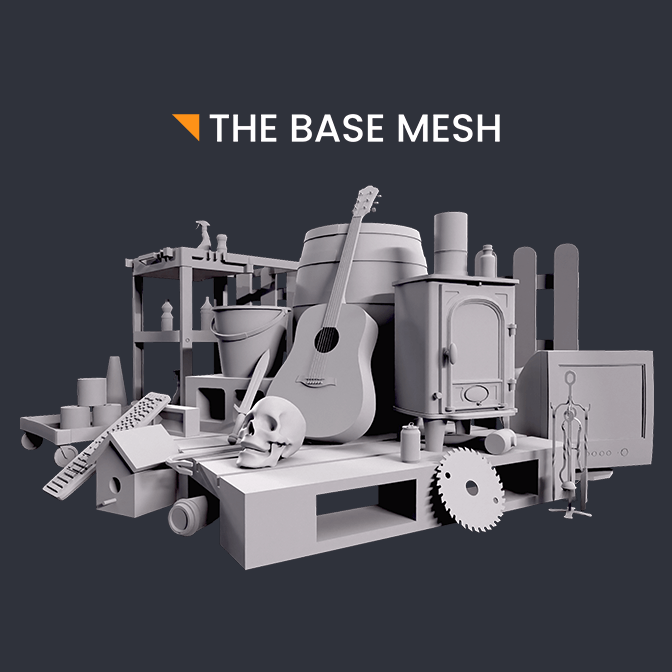

User reviews (0)