
 Visit website
 Updated: 2026-09-30 16:14
 Language: English (default)
 Access: Normal
 Profile views 0
  Outbound visits 0
 Website Review
What is Ascent?
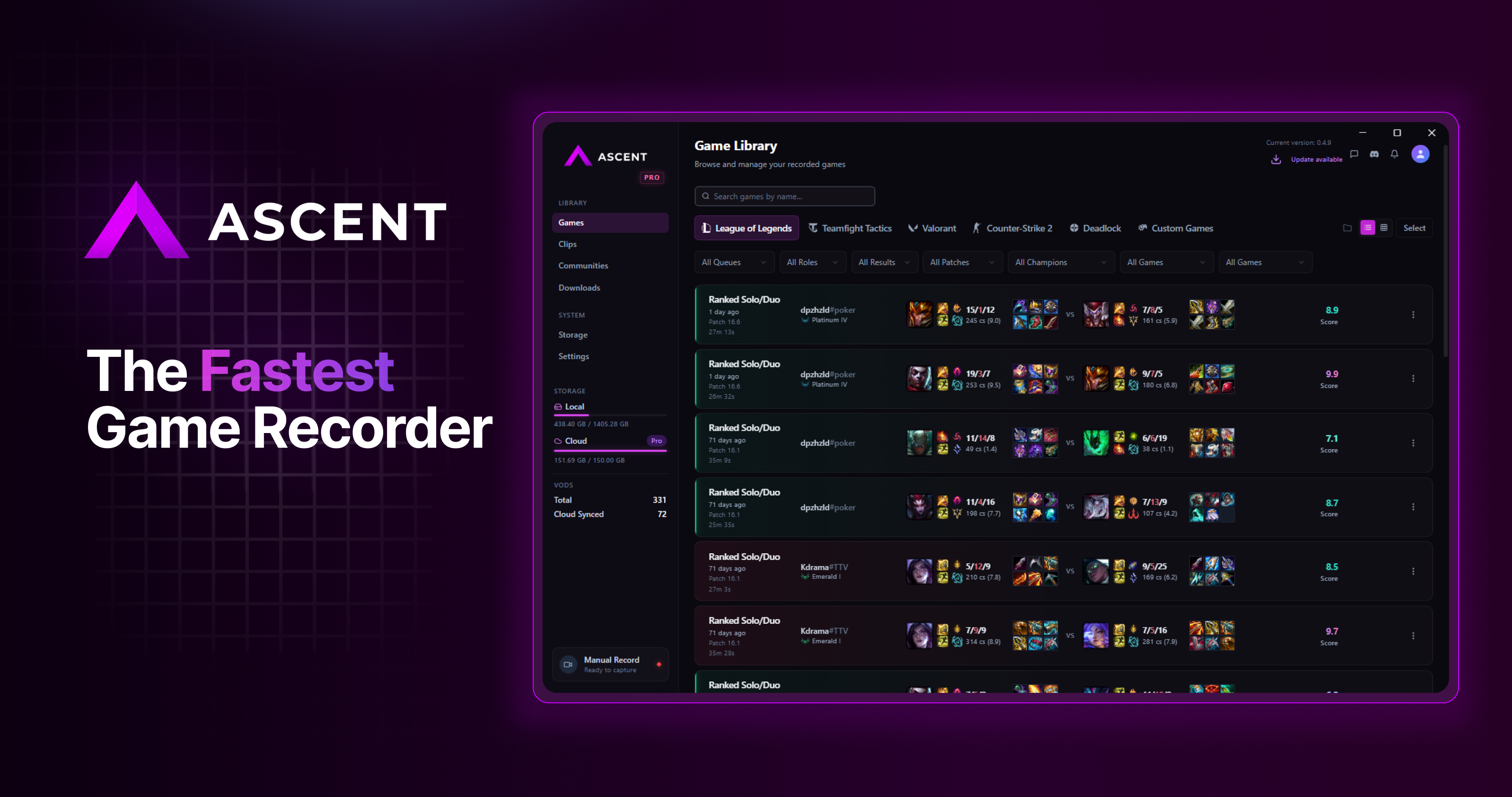
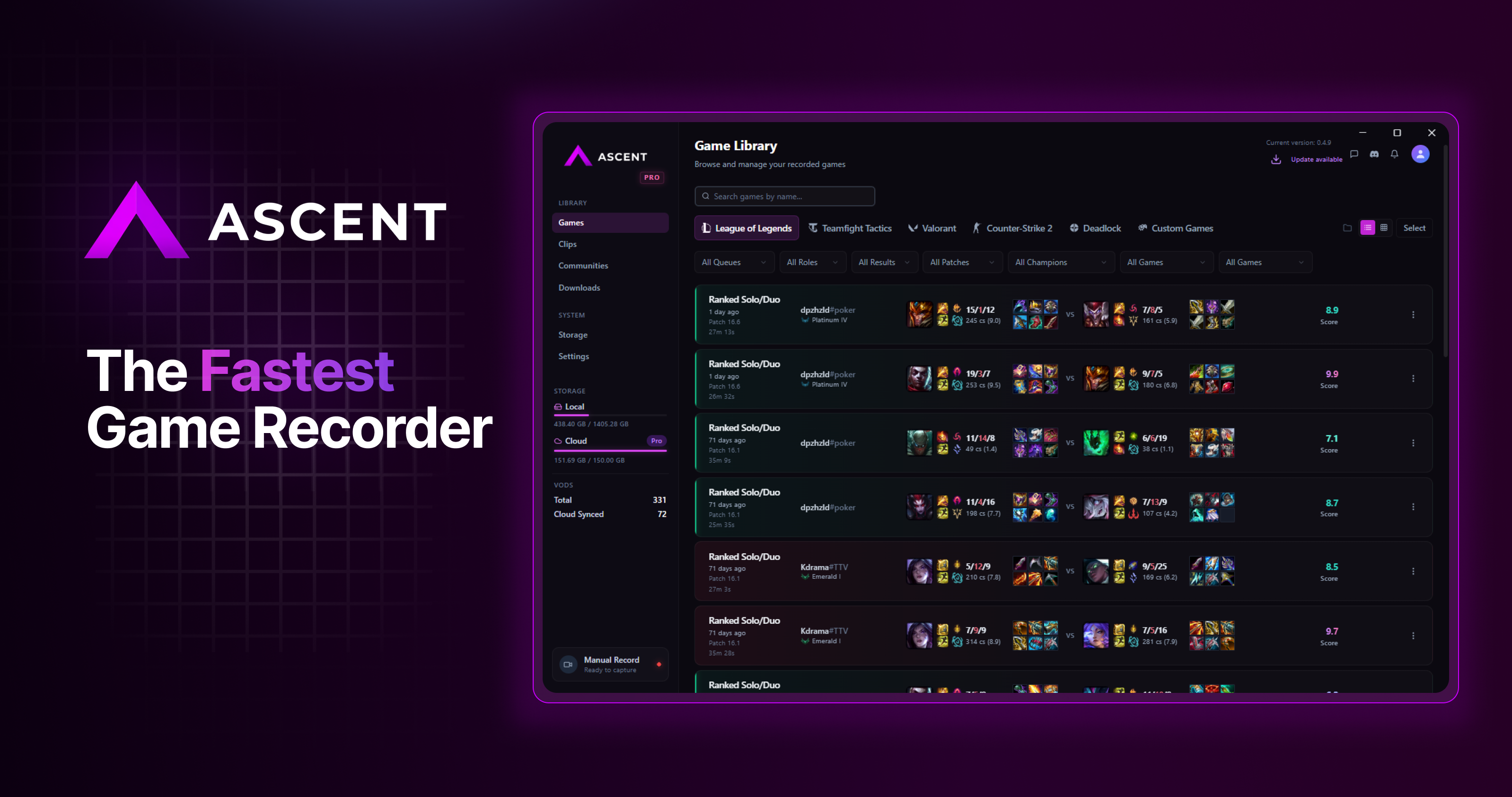
Ascent is a free, lightweight game recorder for Windows 10 and 11, built around automatic capture rather than manual recording. Instead of leaving a recorder running and trimming footage afterward, it records gameplay in the background and surfaces auto-tagged key moments you can review, rate and share. It supports 10,000+ games, including League of Legends, Valorant and CS2.
The product positions itself on performance: it claims zero FPS impact and up to 7x less resource usage than competitors, with no ads and no login required. Recordings are saved to cloud storage (15 GB on the free tier, 250 GB on Pro), and clips can be exported or shared directly from the app.
How it works
- Record — automatic capture during play, without manual start/stop.
- Analyze — game insights, stats and feedback aimed at helping you improve.
- Share — export and share clips with one click.
- Access — an online game library you can reach from anywhere.
Free vs Pro
| Free | Pro (Early Supporter) | |
|---|---|---|
| Automatic recording | Unlimited | Unlimited |
| Cloud storage | 15 GB | 250 GB |
| Game analysis | Included | Included, plus unlimited game reviews |
| Downloading clips | Not listed | Included |
| Extras | No ads, no login | Badge, user number, Discord role |
Pro is described as optional support for the project rather than a feature gate on recording itself.
Who it suits
It fits players who want highlight clips without managing recording software — particularly competitive titles where a recorder running in the background could cost frames. If you need multi-source scenes, overlays or streaming, a full production tool such as OBS Studio is the more flexible choice; Ascent targets quick capture and sharing instead.
Next step: install the free version and play a few sessions in your main game. Check whether the auto-tagged moments actually match the plays you'd want to clip — that, more than the storage tier, determines whether the automatic approach works for you.
How does Ascent automatically record my gameplay highlights?
Ascent records continuously in the background and then marks the moments worth keeping, rather than waiting for you to press a hotkey. According to the page, recording starts automatically with no performance impact, and the app then builds a timeline with auto-tagged key moments. Those tagged moments are what become your clips: you review the timeline, rate your performance, and export or share in one click. The page also lists a game library you can access online from anywhere, and says no login is required.
A practical scenario: you finish a ranked match, open the dashboard, and instead of scrubbing through an hour of footage you look at the auto-tagged moments, keep the ones that matter, and share them. That is the intended loop the page describes — record, analyze, share, access.
What the page does and doesn't say
- It does not explain the detection method (for example, whether tagging is based on kill events, audio cues, or game APIs). Treat "auto-tagged" as the claim, not a confirmed mechanism.
- It lists League of Legends, Valorant, and CS2 alongside 10,000+ supported titles, so multi-game coverage is the selling point rather than deep integration with one title.
- Free tier includes unlimited automatic recording and 15 GB of cloud storage with videos that never expire; Pro is positioned as optional support with extra perks such as unlimited game reviews, downloads, and 250 GB storage. The page quotes $4.99/mo for Pro.
How to decide if it fits you
- Choose it if you want highlight capture without managing recording keys and you mainly play supported competitive titles.
- Look elsewhere if you need manual control over when recording starts and stops, or if you want to inspect the tagging logic before trusting it.
- If storage is your constraint, check whether 15 GB covers your clip volume before assuming the free tier is enough.
Next step: install it, play one session of a game you know well, and compare the auto-tagged moments against the highlights you would have clipped yourself. That single test tells you whether the tagging is accurate enough to rely on. The official site is Ascent.
Will using Ascent lower my FPS or cause lag in games like League of Legends or Valorant?
Ascent is designed to avoid that: its page states "Zero performance impact" and "Zero FPS Drops. Zero Lag.", and claims up to 7x less resource usage than competitors. In practice, that means recording runs in the background while your game keeps rendering at its normal frame rate.
What matters for League of Legends and Valorant
- Both are supported titles, so the recorder is built with them in mind rather than treating them as generic captures.
- Automatic recording means you are not manually starting a capture mid-fight, which is where stutter usually shows up.
- No login is required, so there is no overlay or account process sitting on top of your game.
A realistic test you can run
Play one ranked match with Ascent recording, then one without, and compare your average FPS and any 1% low dips using your GPU driver's performance overlay. If the two runs look the same, the recorder is doing what it claims on your hardware. If you see drops, lower the capture resolution or frame rate before blaming the game.
Trade-offs to keep in mind
- "Zero impact" claims are hardware-dependent: a lightweight recorder on a strong PC behaves very differently from the same tool on an older laptop running a CPU-heavy game.
- Automatic recording fills storage, which is why the free tier includes 15 GB of cloud storage with videos that never expire.
- If you want unlimited game reviews, clip downloads, and 250 GB of storage, Pro is listed at $4.99/mo, though the recorder itself is free forever with no ads.
For comparison against other capture tools, see OBS Project for manual, highly configurable recording, or Medal for another clip-focused option.
How does Ascent compare to Medal or OBS for game recording?
Ascent positions itself differently from both Medal and OBS: it is a lightweight, automatic highlight recorder for Windows 10/11, not a full production suite. The page explicitly frames the comparison around FPS impact, claiming "up to 7x less resource usage than competitors," while also listing "no ads," "no login required," and a free tier with unlimited automatic recording. That combination suggests the intended audience is players who want clips with minimal setup, not streamers building scenes and overlays.
Where each tool tends to fit
- Ascent: Automatic recording of key moments, plus game analysis (stats, feedback, auto-tagged timeline) and one-click sharing. The page mentions 10,000+ supported games and a free tier with 15 GB cloud storage, with an optional Pro tier at $4.99/mo for 250 GB and video downloads.
- Medal: Also built around short social clips and a friends/community feed. It is the closest direct competitor in style, but Ascent's page emphasizes zero ads and no login requirement as differentiators.
- OBS Studio: A manual, scene-based broadcaster and recorder. It is free and open source, but you configure sources, encoders, and hotkeys yourself. It is better for long-form recording, multi-track audio, and streaming than for automatic highlight capture.
Practical trade-offs
| Need | Ascent's stated approach | Typical alternative |
|---|---|---|
| Zero-config clips | Automatic recording, auto-tagged moments | Manual hotkey in OBS |
| Low performance cost | Claims zero FPS drops, 7x less resource use | OBS is efficient but depends on encoder settings |
| Editing/streaming | Not the focus | OBS with plugins or a separate editor |
| Cloud library | 15 GB free, 250 GB Pro | Local storage or third-party cloud |
If you mainly want to review your own ranked matches in League of Legends, Valorant, or CS2 and share a clip without touching settings, Ascent is designed for exactly that. If you need overlays, multiple scenes, or long recordings, OBS remains the more flexible choice. A reasonable next step is to install the free tier, play one session, and check whether the automatic moments match the plays you would have clipped manually; that tells you more than any spec comparison. You can compare directly at Ascent, Medal, and OBS Studio.
Do I need an account or login to use Ascent, and where are my recordings stored?
No account or login is required to use Ascent. The page states this twice: "No login required" and, in the FAQ, "Do I need an account?" is answered by the same claim. You download it for Windows 10/11, record, and the clips land locally.
Where recordings are stored depends on what you do with them:
- On your PC — Recording happens locally, so your raw clips live on your own drive. The page doesn't name the exact folder, so check the app's settings or library view for the save path.
- In the cloud — The free tier includes 15 GB of cloud storage and says cloud videos never expire. Pro raises this to 250 GB. Uploading is what puts clips in your online library, which the page describes as accessible "online, anywhere, anytime."
The practical trade-off: no login keeps setup friction near zero, but anything you want to reach from another device has to be uploaded within your storage cap. If you record long sessions at high resolution, 15 GB fills quickly — a handful of hour-long 1080p captures can approach that. Pro's 250 GB matters mainly for people who keep an archive in the cloud rather than on disk.
A sensible next step: install it, record one short match, and confirm where the local file lands before you rely on it for anything important. If you later want cross-device access, decide whether 15 GB is enough or whether the optional Pro tier is worth it for the larger cap and download of clips.
For comparison, OBS Studio is a fully local, open-source recorder with no cloud tier at all, while Medal centers on a social clip library. Ascent sits between them: local-first recording with an optional cloud library.
What do I get with Ascent Pro for $4.99 per month compared to the free version?
Ascent Pro adds convenience, storage and a few extras on top of an otherwise fully featured free recorder. The free tier already covers unlimited automatic recording, game analysis, 10,000+ supported games and no ads; Pro is positioned as an optional way to support the project and unlock perks rather than a requirement to record.
| Feature | Free | Pro ($4.99/mo) |
|---|---|---|
| Unlimited automatic recording | Yes | Yes |
| Game analysis | Yes | Yes |
| Zero performance impact | Yes | Yes |
| 10,000+ games supported | Yes | Yes |
| No ads | Yes | Yes |
| Cloud storage | 15 GB | 250 GB |
| Cloud videos never expire | Yes | Yes |
| Unlimited game reviews | No | Yes |
| Download videos and clips | Not listed | Yes |
| Early Supporter badge | No | Yes |
| Unique user number | No | Yes |
| Special Discord role | No | Yes |
The practical difference is mostly volume and flexibility. If you record occasionally, clip a few highlights and are happy reviewing them in the browser, the free plan's 15 GB is likely enough. If you record long sessions regularly, want a larger library online or need to download clips for editing and sharing outside Ascent, Pro's 250 GB and download access are the main reasons to upgrade.
One caveat: the page says cloud videos never expire on Free, so Pro is not about keeping your clips alive — it is about having far more room and more ways to use them. If you mainly want to support development and get the badge and Discord role, Pro also serves that purpose.
Next step: check your current disk and cloud usage after a week of recording. If you are bumping against 15 GB or constantly wishing you could pull clips down locally, Pro is the sensible choice; otherwise stay on Free and revisit later.
 Hosting and Email
 Namecheap
 Hosting
 Vercel
 Google Workspace
 Location
 United States
 Pages, Search and Sharing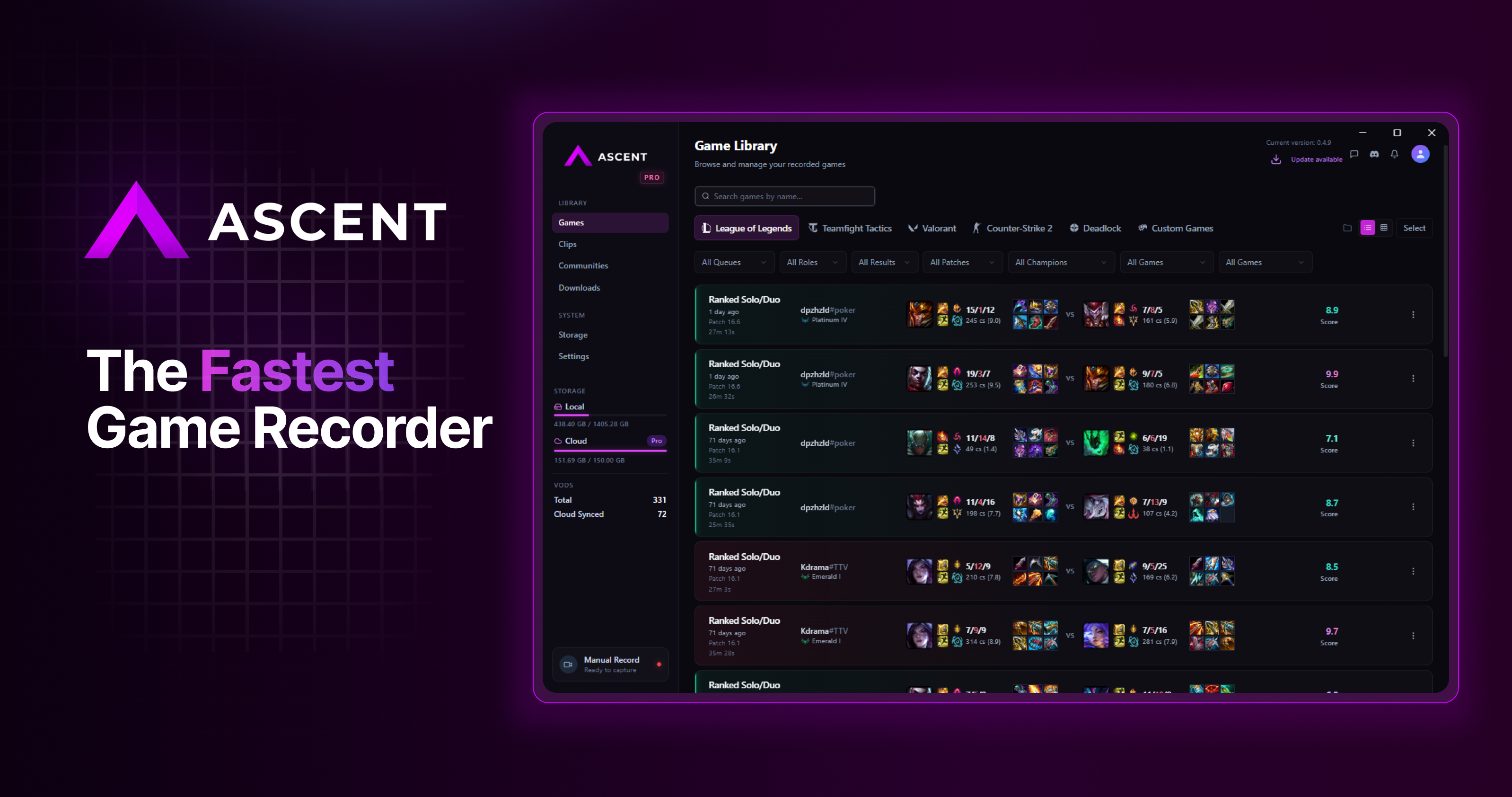



 All bots


 Registration details

 Identified technologies
User reviews (0)