
 简体中文
简体中文 English
Website review
This review may include AI-generated content and is not individually verified. Domain, certificate and other facts come from the observed data on this page.
What is Wideo?
Wideo is a browser-based animated video and presentation maker built around templates, drag-and-drop editing and a stock media library. According to its own site, it has produced more than 79 million videos since 2012 and positions itself as a fast route to professional-looking animation without a production team: pick a template, add your project details and graphics, then export an MP4 or publish directly to Facebook or YouTube.
The platform has expanded beyond template editing into "creative automation." The page describes AI voiceover that turns a written script into narration, AI avatars for presenter-led videos, and tools for producing personalized sales videos at scale. It also advertises a fully white-label option, where an agency or business can offer a video creation platform under its own brand without building the infrastructure.
Who it suits
- Small marketing teams and agencies that need explainer, promo or social videos on a short turnaround and without animation skills.
- Internal communications and training teams producing onboarding, how-to and tutorial content.
- Organizations with repetitive, personalized outreach, such as car dealerships (new arrivals, promotions, financing), non-profits (fundraising and volunteer outreach) and airlines (booking updates and loyalty messaging), which the site lists as target industries.
- Agencies or resellers interested in the white-label offering rather than making videos themselves.
Trade-offs to weigh
Template-driven tools trade creative control for speed. If your brand demands bespoke motion design or unusual formats, a template library can feel constraining; if you mainly need consistent, on-message video at volume, it is a sensible fit. AI voiceover and avatars speed up production but may sound or look generic compared with human talent, so they work best for informational or high-volume content rather than flagship brand films.
A practical next step: open Wideo, pick one real project you need this month (for example, a 60-second product explainer), and test whether an existing template gets you close enough before committing. If template quality and export options fit that single use case, the broader library and automation features are likely to serve you too.
How does Wideo's template-based video maker work from start to finish?
Wideo is built around a template-first workflow: you pick a pre-designed animated template, adapt it with your own text, graphics and media, then export or publish the finished video. According to the site, the process runs in three steps.
The three-step workflow
- Choose a template. Wideo offers hundreds of templates covering marketing, internal communications, social media and more, so the starting point is a design that already has animation and timing built in rather than a blank canvas.
- Enter your project details. You drag and drop graphics, or pull footage from a stock video library the site describes as free, and edit text and scenes to fit your message.
- Share with one click. You can export an MP4 or publish directly to Facebook and YouTube.
The site positions this as "Squarespace or Minted, but for videos"—meaning the value is in a polished starting design, not in frame-by-frame animation.
What sits on top of the templates
Wideo also advertises AI-assisted features: AI avatars, AI voiceover that converts a written script into narration, and tools for generating sales videos at scale. For a small marketing team, the practical combination is a template for layout plus AI voiceover for narration, which removes the need for a recording session. The site also mentions a white-label option for offering a branded video platform to clients, and industry-specific setups for car dealerships, non-profits, airlines, and marketing and advertising teams.
Where templates help and where they constrain
| Situation | Template-based approach (Wideo's model) | Custom animation |
|---|---|---|
| Explainer, promo or onboarding video on a deadline | Fast; design and timing already solved | Slower; needs a designer or animator |
| Consistent series of videos (e.g. weekly promos) | Easy to repeat the same look | Requires a reusable design system |
| Highly distinctive brand visuals | Limited by how far a template can be reshaped | Full control |
| Complex storytelling or unusual transitions | Constrained by template structure | Unconstrained |
If your goal is many short, on-brand videos produced quickly by non-designers, the template route is the sensible fit. If your video is the centerpiece of a campaign and needs a look nobody else has, expect to fight the template.
A concrete scenario
A car dealership wants a short video for each new arrival and each financing promotion. With this workflow, a staff member picks a template, swaps in vehicle photos and offer text, adds an AI voiceover, and exports an MP4 for social channels—repeatable across dozens of vehicles without a production team.
Next step
Before committing, open the template gallery and check whether the categories match your actual use case (explainer, internal comms, tutorial, social ad). Then build one real video end to end—including export—to confirm the editing controls and output quality meet your standards. If you also want to compare approaches, Canva and Animoto offer similar template-driven video creation, and reviewing their template libraries side by side will show which style fits your brand fastest.
How much does Wideo cost, and is there a free plan or trial?
Wideo's page does not list prices. It advertises a free trial ("TRY IT FREE, no credit card required") and links to a separate pricing page, so the exact cost of paid plans has to be checked there. The free offer is presented as a trial rather than a permanent free tier, and the page gives no details on what the trial includes (watermarks, export limits, length caps).
What to expect and how to judge it
- Trial first: use the no-card trial to test the actual workflow — template choice, drag-and-drop editing, stock library, and MP4 export — before committing.
- Check the pricing page for: monthly vs. annual pricing, export resolution and watermark rules, number of videos or minutes allowed, AI avatar and voiceover allowances, and white-label options if you plan to resell.
- Match plan to use case: a small marketing team making social and explainer videos needs far less than an agency selling client videos or a company running personalized sales videos at scale, which the page positions as higher-end uses.
Concrete scenario
If you run a car dealership or nonprofit and want a few promo or outreach videos per month, start the trial, produce one real video end to end, then compare the paid tier's export and seat limits against that output. If you need a branded video product for your own clients, ask specifically about white-label terms and per-client scaling before choosing a plan.
For context on alternatives, Animoto and Vyond also offer template-driven animated video tools with their own trial and pricing structures, which can help you benchmark what a fair price looks like for your volume.
Can I use Wideo's AI avatars and AI voiceover to create sales or marketing videos without filming?
Yes. Wideo's page presents AI avatars and AI voiceover as tools for creating videos from scripts rather than footage: the avatar supplies an on-screen presenter and the voiceover turns written text into narration. Those, combined with its template-based editor, mean you can produce a sales or marketing video without a camera, studio or voice talent.
Where this fits best
- Sales outreach at volume: Wideo's page highlights "personalized AI sales videos at scale," which suits teams sending prospect-specific pitches. A practical example: a short avatar-led clip that names the recipient's company and walks through one relevant offer.
- Marketing and social content: Its marketing use cases cover social media, ads and explainer videos, so scripted avatar videos can fill a content calendar without booking shoots.
- Industries with repetitive messaging: The page lists car dealerships, non-profits, airlines and marketing teams—contexts where the same core message is customized per customer or campaign.
Trade-offs to weigh
Avatar-and-voiceover videos are efficient and consistent, but they read differently from filmed presenters. If your brand depends on a real spokesperson's credibility—leadership announcements, sensitive customer stories—filming may still serve you better. Also check how natural the avatar and voice sound for your audience before committing a campaign to them; the page markets the capability but doesn't let you judge output quality from the description alone.
A useful next step
Pick one recurring video you already make—a product intro or a follow-up sales clip—and rebuild it with an AI avatar and voiceover. Compare it side by side with your filmed version and ask a few customers which feels more trustworthy. That test will tell you where the no-filming approach earns its place in your mix. For alternatives, compare Example only if you have a specific competitor in mind; otherwise start with Wideo's own template library.
How does Wideo's white-label video platform work for agencies or businesses that want to offer video under their own brand?
Wideo's white-label option is aimed at agencies, resellers and businesses that want to sell or distribute video creation under their own brand rather than send clients to Wideo. According to the site, the platform is fully white-labeled, requires no coding or infrastructure, and is built to scale across clients, sales and onboarding—so the client-facing experience carries your brand while Wideo supplies the underlying creation tooling (templates, stock assets, AI avatars and AI voiceover are the capabilities the site emphasizes). Wideo
What that means in practice
- Agency scenario: a marketing agency bundles video production into retainers, letting clients log in to a branded workspace to assemble promos or explainers from templates instead of emailing briefs back and forth.
- Onboarding and sales teams: a company with many small accounts can hand each client a branded portal for welcome videos or product walkthroughs, reducing manual editing.
- Trade-off: you gain speed and a consistent brand surface, but you inherit responsibility for client support and quality control, and your offering is bounded by Wideo's template library and AI features rather than fully bespoke animation.
Decision criteria
Ask whether your clients need self-serve creation or finished deliverables, whether your volume justifies a platform over per-project outsourcing, and whether template-driven output matches your brand standards. The site's own workflow—pick a template, add details and stock footage, export MP4 or publish to Facebook and YouTube—suggests the fit is strongest for repeatable, high-volume content. Wideo
A useful next step is to build one sample client video in a trial account and review it against your brand guidelines before committing; Wideo's pricing page is the place to confirm plan limits. Wideo
How does Wideo compare to other online animated video makers for creating explainer or presentation videos?
Wideo is best suited to teams that want template-driven animated videos and presentations fast, with AI voiceover and avatar options, rather than fine-grained animation control. Its own page frames the workflow as three steps: pick from hundreds of templates, drag in graphics or stock footage, then export MP4 or share to Facebook and YouTube. For an explainer or presentation, that means you can go from script to finished video without touching keyframes—but you trade away the frame-by-frame control that dedicated animation tools offer.
Where Wideo fits, and where it doesn't
| Need | Wideo's fit | What to weigh |
|---|---|---|
| Quick explainer or promo from a template | Strong—templates plus stock library and AI voiceover | Check that the template style matches your brand; template-led output can look generic |
| Presentation-style video with slides and text | Reasonable—positioned for presentations and internal comms | Complex slide logic or data-heavy decks may be easier in a dedicated presentation tool |
| Character or motion-graphics animation | Limited—not the focus | Tools built around timelines and rigging suit custom animation better |
| Volume production across a team | Strong—AI avatars, voiceover and "creative automation" for sales and marketing at scale | Confirm how brand assets and approvals are managed |
| Reselling video as your own product | Distinctive—white-label platform, no coding required | Only relevant if you're building a product, not just making videos |
Compared with general editors like Canva, Wideo leans more heavily on automation and industry-specific solutions (car dealerships, non-profits, airlines, marketing) and on white-labeling. Compared with timeline-based animation software, it gives up control for speed. Canva's broader design ecosystem may suit mixed design-and-video work; Wideo suits repeatable video campaigns.
Next step: pick one explainer you need this month, build it in Wideo's free trial (the page notes no credit card required), and judge whether the template output is on-brand enough before committing. If you need custom character animation or precise timing, test a timeline-based tool on the same script and compare the effort.
 Amazon Route 53
 Cloudflare
 Google Workspace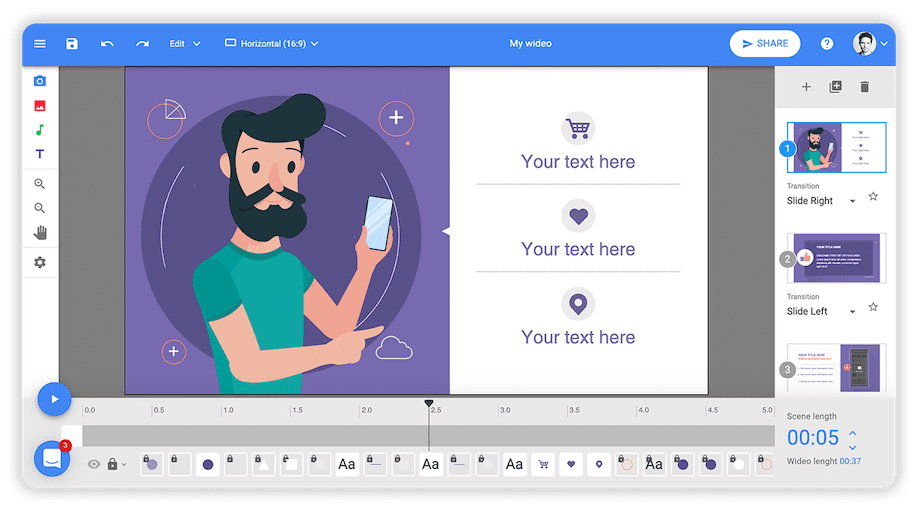

User reviews (0)