Website profiles · Technology insights · Alternatives

yesilhealth.com

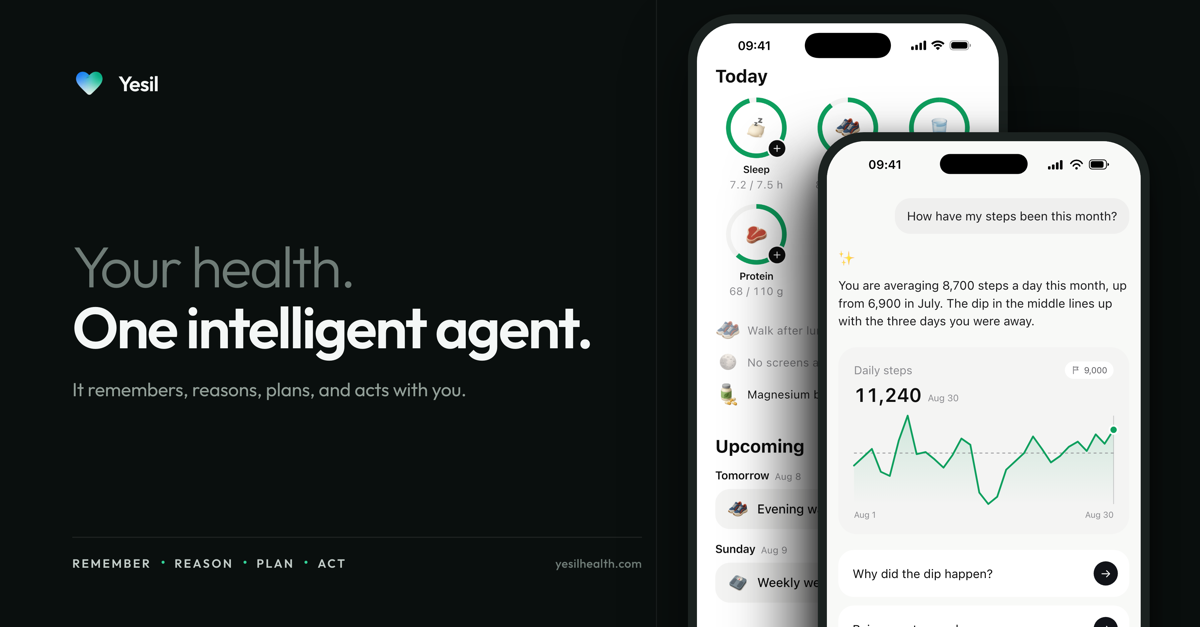
Yesil is a personal health AI app built around a conversational agent called Coach. Instead of giving you a dashboard of numbers to interpret alone, it lets you ask questions in plain language and connects the answers to your own health information: lab results and reports, sleep and activity data, diet and daily logs, and the goals you have set. The stated aim is to move from a single message to a concrete next step.

No paid content found Multilingual
Visit website
Profile views 0 Outbound visits 0 Normal
Yesil — 你的健康, 一个智能体。 Full homepage screenshot

At a glance

Category
Artificial Intelligence
Language
English
Paid-content signal
No paid content foundObserved
Registered
2020
Hosting
CloudflareInferred
HTTPS certificate trusted
PassedObserved
Last updated

Website review

This review may include AI-generated content and is not individually verified. Domain, certificate and other facts come from the observed data on this page.

What is Yesil?

Yesil is a personal health AI app built around a conversational agent called Coach. Instead of giving you a dashboard of numbers to interpret alone, it lets you ask questions in plain language and connects the answers to your own health information: lab results and reports, sleep and activity data, diet and daily logs, and the goals you have set. The stated aim is to move from a single message to a concrete next step.

What it actually does

  • Explains results and reports. You can share a question, photo, or report and get an explanation of what it means, including how values change over time.
  • Turns goals into small plans. A vague intention like "I want to sleep earlier" becomes a draft routine with suggested times, which you can adjust to your schedule.
  • Keeps context across conversations. Stated preferences and background, such as a lactose sensitivity or a fitness goal, are remembered and carried into later answers. You can view, edit, or delete what is stored.
  • Cites research for health questions. When you ask something like whether vitamin D supplements reduce fracture risk, it looks up relevant scientific literature, summarizes the findings, and points out who the study did and did not cover. Sources are openable.
  • Connects to health data. Supported data from Apple Health or Google Health Connect can be viewed alongside measurements and daily entries you add yourself. What is available depends on your device and the permissions you grant.

Who it suits

It fits someone who has health information scattered across apps and paper reports and wants a single place to ask questions about it. It is also useful if you want help converting a general intention into a tracked habit. It is not a diagnostic tool: Yesil states that it does not diagnose, prescribe, or replace medical care, so anyone with an acute symptom or a condition needing clinical judgment should still see a clinician.

Plans and trade-offs

The free tier includes 50 AI operations per month, connection and logging of health data, plan and habit tracking, and manual reminders. Yesil Coach raises this to up to 400 AI operations per month and adds AI-assisted plan updates and memory, plus research and diet analysis with sources. An AI operation covers steps that use AI, such as a message, a research lookup, or a diet analysis; once the quota runs out, logging and existing plans remain viewable. Prices are shown in US dollars and the app advises checking local store pricing and subscription terms before purchase.

The practical trade-off is straightforward: the free tier is enough to test whether conversational health tracking fits your routine, while the paid tier matters mainly if you expect to ask frequent questions or want the research and diet features. A reasonable first step is to download the app, connect one data source, and ask a single real question about a result you already have, then judge whether the answer and the suggested next step are useful to you.

Can Yesil replace a doctor for medical advice or diagnosis?

No. Yesil is built as a health assistant for understanding and organizing information, not for diagnosis or treatment. The site states plainly that it does not diagnose, prescribe, or replace medical care. Its role is narrower and more practical: help you read lab results, track habits, connect data from Apple Health or Google Health Connect, and turn a question into a next step you can follow.

That distinction matters most when symptoms are new, severe, or changing quickly. A tool that summarizes research and remembers your preferences can support a conversation with a clinician, but it cannot examine you, order tests, or take responsibility for a treatment decision. Use it to prepare better questions and keep a clearer record — not to decide whether a symptom is safe to ignore.

Where Yesil fits, and where it doesn't

Situation Reasonable use of Yesil What still needs a clinician
You have a lab report and don't understand the terms Ask for a plain-language explanation and note what to ask about Interpreting results alongside your history, symptoms, and other conditions
You want to build a sleep or eating routine Draft small habits, set reminders, track daily entries Diagnosing a sleep disorder or prescribing treatment
You have a general health question Read a cited study summary, including its limits Judging whether a finding applies to your specific case
You notice a new or worsening symptom Record it so you can describe it accurately Urgent evaluation, diagnosis, and any medication decision

The product's own example is instructive: asked whether vitamin D supplements reduce fracture risk, it summarizes a randomized trial and then notes that participants were not selected for vitamin D deficiency or osteoporosis, so the result doesn't directly apply to those groups. That is useful context for a conversation with your doctor — it is not a personal recommendation.

A practical next step

If you want to use Yesil well, treat it as preparation. Before an appointment, ask it to explain a result you're unsure about, list the questions that follow, and log the symptoms or habits you want to discuss. Then bring that summary to a qualified professional and let them make the call. For general health information from a established medical source, you can also consult Mayo Clinic or NHS.

How does Yesil use my lab results and health data to give personalized answers?

Yesil links the health information you share into one conversation, then uses it as context for its replies. According to the site, you can bring in lab results and reports, sleep and activity, diet and daily logs, and your own questions and goals. If you authorize it, the app also connects supported data from Apple Health or Google Health Connect, and shows that alongside measurements and notes you add yourself. What data is actually available depends on your device and what you permit.

What shapes a personalized answer

  • Your own inputs: questions typed or spoken, photos, and reports you add.
  • Connected data: supported sleep, activity, and similar records, once authorized.
  • Memory: preferences, goals, and details you have shared carry into later conversations. The site says you can view, edit, or delete what is remembered.
  • Retrieved evidence: for health questions, Yesil looks for relevant scientific literature, explains the findings, and notes who the study covered and where the evidence is limited.

A practical example from the site: if you have told it you are lactose intolerant, a later request for a quick breakfast can come back with a lactose-free yogurt, oat, and fruit option. That is memory doing the work, not a fresh restatement of your allergy.

Where lab results fit, and where they do not

The site positions lab results as something to understand and track over time, not something the app diagnoses from. It states that Yesil helps you understand and record health information and does not diagnose, prescribe, or replace medical care. So the realistic use is: you add a report, ask what a value means or how it has changed, and get an explanation plus suggested next steps you can fold into a plan. It is not a second opinion on whether you have a condition.

Two limits are worth keeping in mind. First, personalization is only as good as what you have shared or connected; if you never add a report or a daily log, answers lean on your messages and general evidence. Second, research answers carry their own boundaries — the site's vitamin D and fracture example explicitly says the trial participants were not selected for deficiency or osteoporosis, so the result should not be stretched to those groups. Expect the same caution on your own questions.

A useful next step

Before trusting an answer that depends on your history, open the memory section and check what Yesil has stored about you. Correct anything stale, then ask a question that tests it — for instance, a meal suggestion that would be wrong if an old preference were still on file. If the reply reflects the edit, your context is working as intended. For anything urgent or diagnostic, take the underlying report to a clinician rather than relying on the app's summary.

Yesil is available for iOS and Android, and the site lists a free tier alongside a paid Coach tier; check current store pricing and terms before subscribing.

What do I get with the free plan versus Yesil Coach, and how many AI actions are included?

The free plan includes 50 AI actions per month, plus connected health-data tracking and plan/habit follow-up. Yesil Coach raises that to up to 400 AI actions per month and adds AI-assisted plan updates and memory, sourced research, and diet analysis. Both tiers show the same core app: daily logs, habits, reminders, and connected data from Apple Health or Google Health Connect.

Free vs. Yesil Coach

Free Yesil Coach
AI actions 50 per month Up to 400 per month
Health data connection and daily records Yes Yes
Plans, habits, history, manual reminders Yes Yes
AI-assisted plan updates and memory No Yes
Sourced research and diet analysis No Yes

An "AI action" is a step that uses the AI, such as sending a message, running a research lookup, or analyzing a diet. Once the monthly allowance runs out, records and existing plans remain viewable — you just stop getting new AI responses until the allowance resets or you upgrade.

Which one fits

  • Free suits someone who wants to log sleep, steps, weight, or food and keep a simple habit plan, with occasional questions to the AI.
  • Yesil Coach suits someone who wants the AI to remember context across conversations and update plans as circumstances change, or who asks frequent research and diet questions. The memory feature is the practical difference: it carries stated preferences and goals into later answers, so advice builds on your background instead of starting fresh each time.

A reasonable test: start free, and if you find yourself hitting the 50-action limit before the month ends or repeatedly re-explaining the same context, Coach is the tier that addresses both.

The app is a health-information and tracking tool; it does not diagnose, prescribe, or replace medical care. For anything urgent or clinical, treat its output as something to discuss with a clinician rather than a decision on its own.

Next step: download the app on iOS or Android, ask one question in your own words, and see whether the free monthly allowance matches your actual usage pattern.

How does Yesil find and show scientific sources for its health answers?

Yesil answers a health question by searching for relevant scientific literature and showing the source alongside its reply, rather than presenting a conclusion on its own. The site describes the response as including the paper behind the answer, a plain-language explanation of what the study found, and notes on who was studied and where the evidence is limited.

What the source display includes

According to the page, an answer to a question such as whether vitamin D supplements reduce fracture risk comes with:

  • A citation to the study, shown as a journal, year, and study type (the example is a randomized clinical trial in NEJM, 2022).
  • Author and publication details, plus a DOI that opens the paper.
  • An explanation of the result in ordinary language.
  • Caveats about the study population, so you can judge whether the finding applies to you.

The stated purpose is to let you read the answer and then check the source yourself, including the methods and results.

Whose observation this is

The fracture example is Yesil's own demonstration on its site, based on a real paper, not an independent review or a user's experience. So treat it as an illustration of the intended format, not as evidence that every answer will be this well sourced. The practical test is to open the cited paper and confirm that the summary matches the abstract and that the study population resembles your situation.

How to use this in practice

If you are weighing a decision, read the citation before acting on the summary. Ask three things: what kind of study it is, who was included, and whether the outcome measured is the one you care about. A trial in generally healthy older adults, for instance, does not settle the question for someone with a diagnosed deficiency.

Yesil states it does not diagnose, prescribe, or replace medical care, so the sources are there to inform a conversation with a clinician, not to end it. A reasonable next step is to bring the cited paper, or its DOI, to your doctor and ask how the findings apply to your history.

How do I connect Apple Health or Google Health Connect, and what happens to the data I share?

Connecting Apple Health or Google Health Connect is done inside the Yesil app, and you control what is shared. According to the product page, Yesil can connect to Apple Health and Google Health Connect, then show supported health data alongside measurements and daily logs you add yourself. The page also states that available data depends on your device and the permissions you grant.

How the connection works

  1. Download Yesil on iPhone or Android.
  2. Open the app and start the connection to Apple Health or Google Health Connect.
  3. Review the permission screen and choose which data types to share.
  4. Yesil then displays supported data, such as sleep, steps, weight or water intake, next to your own daily records.

What happens to the data you share

The page describes the shared data as part of your personal health picture inside Yesil. It is combined with information you add and with what you tell the app in conversation. Yesil uses that context to give personalized support, for example when discussing sleep, habits, lab results or nutrition.

Two practical points stand out:

  • You choose what to share. The permissions are yours to set, and the page notes that available data depends on your device and authorization.
  • You can review and edit what the app remembers. Yesil says preferences, goals and important details you share carry into later conversations, and that you can view, edit or delete remembered information.

A useful way to decide what to connect

Connect the data types that match the question you are trying to answer. If you want to work on sleep, sharing sleep and activity data is more useful than sharing everything. If you are tracking a lab result or a weight goal, connect only the relevant measurements.

A reader scenario: someone who wants to improve their sleep could connect sleep and step data, add a nightly wind-down habit, and then ask Yesil how their sleep has changed over time. The app can then refer to both the connected data and the habit history in one conversation.

What Yesil is not

The page is clear that Yesil helps you understand and record health information. It does not diagnose, prescribe or replace medical care. For a new symptom, a worrying lab result or a medication question, use Yesil to prepare questions and organize information, then take those questions to a clinician.

If you want to see how the app presents connected data and plans before committing, the page offers examples and a free start with 50 AI actions per month.

Related questions

More questions →
What Health AI Can and Can't Do for You

Health AI can help you understand lab results, track daily habits, connect health data from your phone, and turn a question into a concrete next step. It cannot diagnose conditions, prescribe medication, or replace a doctor. Tools like Yesil Health AI are built for the first job, not the second — and knowing where that line sits is what makes them useful rather than risky.

What a health AI agent actually does

A health AI agent is a conversational tool that pulls your scattered health information into one place and responds to plain-language questions. On Yesil, that covers four practical jobs:

  • Understanding results — ask what a lab value means or how it has changed over time.
  • Tracking habits — log sleep, activity, diet, weight, water, and daily notes.
  • Connecting data — link Apple Health or Google Health Connect so supported measurements sit alongside what you add yourself.
  • Turning goals into steps — describe an aim like "sleep on a regular schedule" and get a small, scheduled action instead of generic advice.

The output is a plan or an explanation, not a verdict. When you ask about vitamin D and fracture risk, for example, Yesil looks up relevant scientific literature and explains what the study found, who was studied, and where the evidence is limited — with a link to the paper so you can check the methods yourself.

What it can't do

Yesil states plainly that it does not diagnose, prescribe, or replace medical care. It helps you understand and record health information. That distinction matters in practice:

Task Health AI A clinician
Explain what a lab value means Yes Yes
Tell you whether you have a condition No Yes
Suggest a small habit to try Yes Sometimes
Prescribe or adjust medication No Yes
Flag when to seek care Generally Yes

If a question is about diagnosis or treatment, the tool's role is to help you prepare better questions for a professional — not to answer them for you.

How personalization actually works

Advice improves as you share more, and it carries across conversations through memory. If you tell the agent you're lactose intolerant, a later request for a quick breakfast recommendation will account for it — for example, suggesting lactose-free yogurt with oats and fruit.

Two things follow from this:

  1. You control what's shared. Data access depends on what you authorize, and available data depends on your device. You can view, edit, or delete what the agent remembers.
  2. Thin input means generic output. A tool that knows nothing about you can only give general information. The value comes from the context you provide.

How to start with one message

  1. Download the app. Yesil is available on iOS and Android, and you can start free.
  2. Ask in your own words. Type a question, or add a photo or report. You don't need medical vocabulary.
  3. Review the answer and its sources. For research-backed questions, open the cited paper to see study design and limitations.
  4. Pick a next step. If a suggestion fits, add it to your plan; the app tracks habits, daily progress, and upcoming reminders.

A worked example from the product: a user says they want to sleep on a regular schedule but keep delaying bedtime. The agent proposes one small step — choosing a wind-down time, building a short evening routine, and noting how you feel in the morning — then sets it as a plan item at, say, 22:30.

Free vs. paid: what the difference comes down to

Free Yesil Coach
Price $0/month $14.99/month or $99.99/year
AI operations 50/month Up to 400/month
Data connection and logging Yes Yes
Plan, habit, and history tracking Yes Yes
Manual reminders Yes Yes
AI-assisted plan updates and memory — Yes
Sourced research and diet analysis — Yes

"AI operations" means steps that use AI — messages, research lookups, or diet analysis. When your quota runs out, logging and existing plans remain viewable. Prices are shown in USD; check your local store for regional pricing and subscription terms before purchasing.

Before you connect your data

  • Decide what you're comfortable sharing. Authorization is yours to grant, and you can revoke or edit it.
  • Remember that supported data depends on your device and the permissions you give.
  • Treat memory as a feature you manage, not a black box — review and correct it when something is wrong.

The honest summary: a health AI agent is a strong tool for organizing, explaining, and acting on health information you already have. It is a poor substitute for a clinician when the question is what's wrong or what to do about a diagnosis. Start with one real question, see how the answer holds up against its sources, and let that tell you whether it fits how you manage your health.

What Can an AI Health Agent Actually Do for You (and What It Can't)?

An AI health agent is a conversational tool that helps you understand health information, track daily habits, and turn goals into small actionable steps. It is not a doctor: it does not diagnose, prescribe, or replace medical care. Yesil, the agent described on yesilhealth.com, is a concrete example — it reads lab results, connects data from Apple Health or Google Health Connect, remembers your context across conversations, and cites scientific literature when answering health questions. It fits people who want help interpreting results and building routines, not people seeking a medical decision.

What an AI health agent can do

Understand your results and spot changes over time

You can share lab results, reports, or photos of documents, and ask what they mean. The agent also helps you see how a value or habit shifts across weeks or months, rather than looking at one snapshot.

Turn a vague goal into a concrete plan

This is where the conversational format matters. A goal like "I want to sleep earlier but keep staying up" becomes a specific plan: choose a wind-down time (for example 22:30), build a short evening routine, and log how you feel in the morning. The plan and reminders are set according to your choices.

Remember your context

Preferences, goals, and important details you share carry into later conversations. In the site's example, the agent remembers a lactose sensitivity and later suggests a lactose-free breakfast without being reminded. You can view, edit, or delete what it remembers.

Answer health questions with sources

When you ask a health question, the agent looks up relevant scientific literature and explains the findings, including who the study covered and where the evidence is limited. The site's example asks whether vitamin D supplements reduce fracture risk; the answer cites a 2022 NEJM randomized trial (LeBoff et al., 387:299–309, DOI: 10.1056/NEJMoa2202106) and notes that participants were not selected for vitamin D deficiency or osteoporosis, so the result does not directly apply to those groups. You can open the original paper to check the methods and results yourself.

Consolidate scattered health data

With your authorization, it connects supported data from Apple Health or Google Health Connect and shows it alongside measurements and daily logs you add yourself — sleep, steps, weight, water intake, and similar records in one place. What is available depends on your device and what you choose to share.

What it can't do

  • It does not diagnose or prescribe. Yesil states plainly that it helps you understand and record health information and does not replace medical services.
  • It does not make medical decisions for you. It explains research and uncertainty; it does not tell you whether to take a treatment.
  • It does not remove the need to check sources. The agent cites literature and explains limitations, but reading the linked paper is still your job when a decision matters.

How it differs from a plain health-tracking app

Dimension Typical tracking app AI health agent (Yesil example)
Input Manual entries, fixed fields Conversation, plus photos and reports
Output Charts and logs Explanations, plans, reminders, cited research
Memory Per-entry data Preferences and background carried across chats
Evidence None Links to scientific literature with stated limits
Scope Recording Understanding, planning, and recording

The key difference is that a tracking app stores numbers, while an agent connects them through dialogue — your question, the answer, and the resulting plan live in one thread.

Practical considerations before you start

  • Free tier: Yesil Free costs $0 per month and includes 50 AI operations per month, plus data connection, logging, plan/habit tracking, and manual reminders. When the quota runs out, your records and existing plans remain viewable.
  • Paid tier: Yesil Coach is $14.99/month, or $99.99 when you choose the annual plan. It adds up to 400 AI operations per month, AI-assisted plan updates and memory, and sourced research plus diet analysis. Prices are shown in USD; check your local store for local pricing and subscription terms before buying.
  • What counts as an AI operation: messages, research, and diet analysis are examples of steps that use AI. Logging and viewing existing plans do not.
  • Platforms: iOS and Android. Apple Health and Google Health Connect connect supported data according to your authorization.
  • Privacy control: You decide what to share, and you can view, edit, or delete what the agent remembers.

If your goal is to understand your own health information, build sustainable routines, and see where the evidence stands, an AI health agent is a reasonable starting point. If you need a diagnosis or a treatment decision, start with a clinician instead.

What Is an Intelligent Health Agent and What Can It Actually Do for You?

An intelligent health agent is an AI assistant that connects the health information you already have — lab results, daily habits, symptoms, and goals — into one ongoing conversation, rather than leaving each piece in a separate app. Yesil, a health AI agent available on iOS and Android, is one example: it reads lab results, tracks sleep, diet, and activity, answers health questions with cited scientific literature, and turns goals into small tracked steps. It is built for people who want help understanding and organizing their health information, not for anyone seeking a diagnosis or treatment plan — Yesil states it does not diagnose, prescribe, or replace medical care.

What an intelligent health agent actually does

The core idea is continuity. A standard health app stores data; a chatbot answers one question at a time. An intelligent health agent does both and remembers context between conversations.

Yesil's stated capabilities include:

  • Understanding results — reading lab results and reports you share, including photos
  • Tracking change over time — showing how values shift across entries
  • Finding actions that fit you — turning a goal into a concrete next step
  • Scheduling tracking and reminders — habits, daily progress, and upcoming reminders in one place
  • Answering questions with sources — searching scientific literature and explaining findings, including study limitations

You can connect Apple Health or Google Health Connect so supported data (sleep, steps, weight, water intake, and similar) sits alongside measurements and daily notes you add yourself. What's available depends on your device and what you authorize.

How it differs from a health app or a plain chatbot

Dimension Typical health app Plain chatbot Intelligent health agent (Yesil)
Data input Manual logging Typed questions only Messages, photos, reports, connected device data
Memory Per-entry Usually resets Remembers preferences, goals, and shared context across conversations
Answers Charts and trends Uncited text Literature-based answers with openable sources and stated uncertainty
Follow-through Static reminders None Plans, habits, and reminders you can adjust
Boundaries Varies Varies Explicitly no diagnosis or prescribing

The memory point matters most in practice. Yesil's own example: if you've told it you're lactose intolerant, a later request for a quick breakfast recommendation accounts for that — you don't re-explain your background each time. You can view, edit, or delete what it remembers.

The sourcing point is the second differentiator. Asked whether vitamin D supplements reduce fracture risk, Yesil's example answer cites a 2022 NEJM randomized trial (LeBoff et al., 387:299–309) and notes that participants weren't selected for vitamin D deficiency or osteoporosis, so the result doesn't transfer directly to those groups. That kind of limitation note is what separates an evidence-based agent from a confident-sounding answer.

What it will not do

Yesil states plainly that it helps you understand and record health information and does not diagnose, prescribe, or substitute for medical care. Treat any output as something to discuss with a clinician, not as a conclusion. This boundary is standard for consumer health AI and worth checking in any agent you consider.

What to confirm before you start

  • Free tier: $0 per month, 50 AI operations per month, plus connected data, plan/habit tracking, and manual reminders. AI operations include steps that use AI, such as messages, research, or diet analysis. When the quota runs out, records and existing plans remain viewable.
  • Paid tier: Yesil Coach at $14.99/month or $99.99/year (annual). Adds up to 400 AI operations per month, AI-assisted plan updates and memory, and sourced research and diet analysis. Prices are shown in USD; check your local store price and subscription terms before buying.
  • Platforms: iOS and Android.
  • Data control: You choose what to share; connected data depends on your device and authorization.
  • Not a time-limited trial: Free is a standing monthly allowance, not a trial that expires.

Getting started

  1. Download Yesil from the App Store or Google Play and start free.
  2. Ask your first question in your own words, or add a photo or report.
  3. Review the suggested next step and add the ones that fit into your plan.

If you want a sense of the interaction style first, Yesil offers in-app examples — for instance, telling it you keep delaying sleep, and receiving a small wind-down plan (relaxation start time, a short evening routine, morning mood logging) that you can adjust to your schedule.

An intelligent health agent is worth trying if your problem is scattered information and unclear next steps. It is not the right tool if you need a diagnosis, a prescription, or urgent care.

What Does "Evidence-Based AI" Actually Mean in a Health App?

Evidence-based AI in a health app means the tool ties its answers to real scientific literature you can open and check, rather than generating a plausible-sounding reply from the model alone. You can tell the difference by looking for a named source (study, journal, year, and ideally a DOI), a plain-language summary of what the study found, and an explanation of the study's limits. This matters when you want to understand a health question without mistaking a confident answer for a verified one. It does not mean the AI can diagnose, prescribe, or replace a clinician.

The core distinction: grounded answers vs. model guesses

A standard chatbot produces text by predicting what sounds right. An evidence-based health AI is designed to retrieve relevant research and explain it, so the answer is anchored to something outside the model.

On Yesil, for example, the app describes asking a health question and having it "查找相关科学文献,清楚地解释研究结果" — find relevant scientific literature and explain the findings clearly. The answer also shows what the study covered and where the evidence is limited.

The practical test is simple: can you open the source and read the study yourself? If the answer comes with a citation you can access, you can judge it. If it comes with no source, you're trusting the model's fluency.

How to check whether a health AI answer is actually grounded

Use the same checks you'd apply to any health claim.

1. Is there a named, openable source?

Look for the study title, authors, journal, and year. A DOI is a strong signal because it points to a specific paper rather than a vague reference.

In the Yesil example, the answer to "Does vitamin D supplementation reduce fracture risk?" cites:

  • NEJM · 2022
  • Supplemental Vitamin D and Incident Fractures in Midlife and Older Adults
  • LeBoff et al. · 387:299–309
  • DOI: 10.1056/NEJMoa2202106

That's a checkable citation. You can open the paper and see the methods and results for yourself.

2. Does it summarize what the study actually found?

The example answer states that in this trial, vitamin D did not reduce fractures compared with placebo in generally healthy middle-aged and older adults. That's a specific finding tied to a specific study — not a general claim that "vitamin D is good for bones."

3. Does it explain the limits?

This is the part most health content skips. The same answer notes that participants were not selected for vitamin D deficiency or osteoporosis, so the results don't directly apply to those groups.

That caveat is what separates evidence-based explanation from a headline. A study's conclusion only applies to the population and conditions it studied.

4. Does it flag uncertainty?

Look for language that distinguishes "this study found X" from "X is true for you." An evidence-based tool should tell you when the evidence is mixed, limited, or not applicable to your situation.

Why the limits matter as much as the conclusion

A study result is a statement about a group under specific conditions. Applying it to yourself requires knowing whether you resemble that group.

Take the vitamin D example. If you have diagnosed osteoporosis or a confirmed deficiency, a trial of generally healthy adults doesn't answer your question. The AI stating that limitation is doing real work — it stops you from over-reading a result.

This is also where you should slow down. When an answer says "this doesn't apply to people like you," that's a signal to bring the question to a clinician rather than act on the study alone.

What evidence-based AI still cannot do

Even with good citations, there are hard boundaries. Yesil's own FAQ is direct: it helps you understand and record health information, and it does not diagnose, prescribe, or replace medical care.

So evidence-based AI is useful for:

  • Understanding what a study found and how strong it is
  • Getting a plain-language explanation of research you could otherwise not parse
  • Seeing where evidence is uncertain or doesn't fit your situation
  • Preparing better questions for a clinician

It is not a substitute for:

  • Diagnosis
  • Prescription or treatment decisions
  • Personalized medical judgment about your specific case

A practical checklist before you trust an answer

Check What good looks like Red flag
Source Named study, journal, year, DOI No citation, or "studies show"
Finding Specific result from that study Vague general claim
Limits Population and conditions stated Conclusion presented as universal
Uncertainty Mixed or limited evidence acknowledged Overconfident single answer
Scope Says it doesn't diagnose or prescribe Implies it can replace a clinician

If an answer passes the first four rows but fails the last, treat it as information to discuss with a professional — not a decision to act on.

How to use this in practice

When you ask a health AI a question, read the answer in this order: the conclusion, then the source, then the limits. If the source is openable, open it. If the limits are stated, check whether they include you. If the tool is clear about what it can't do, you know where its role ends and your clinician's begins.

That's what "evidence-based" should buy you: not certainty, but a traceable path from your question to real research — and an honest account of where that research stops applying.

What Is Clinical AI — and How Is It Different From a Consumer Health AI App?

Clinical AI is artificial intelligence built for clinical use — helping clinicians diagnose, choose treatments, read images, or draft documentation — and it is typically regulated as a medical tool. A consumer health AI app is different: it is built for you as an individual, and it helps you understand lab results, track habits, and ask health questions. The two can look similar in a chat window, but they differ in who uses them, what they claim to do, and whether a regulator has reviewed them. If you are trying to decide which kind of tool you are looking at, the fastest test is to ask: is this claiming to support a medical decision, or to help me understand and organize my own health information?

What "clinical AI" means

Clinical AI refers to AI systems used in clinical settings. That usually means the intended user is a clinician or a health system, not a patient acting alone. Typical uses include:

  • Diagnostic support — flagging likely conditions from symptoms, labs, or history
  • Medical imaging — detecting or prioritizing findings on scans and pathology slides
  • Treatment decision support — suggesting options based on guidelines and patient data
  • Clinical documentation — drafting notes, coding, or summaries for the care team

The defining feature is not the technology but the intended medical purpose. When a system is marketed to diagnose, treat, or prevent disease, regulators such as the FDA generally treat it as a medical device and require review before it can be used in care. That review is what separates clinical AI from a general-purpose chatbot with medical knowledge.

How consumer health AI differs

Consumer health AI is designed for personal use. Yesil, for example, describes itself as a health agent that helps you read lab results, log daily habits, and ask questions — bringing your health information together in one conversation. Its stated role is to help you understand and record health information, not to diagnose, prescribe, or replace medical care.

That boundary is the core difference. A consumer app may cite real research — Yesil, for instance, shows answers with links to scientific literature and explains the limits of the evidence — but citing a study is not the same as applying it to your specific case under clinical supervision.

Dimension Clinical AI Consumer health AI (e.g., Yesil)
Primary user Clinicians, health systems Individuals
Intended purpose Diagnose, treat, support clinical decisions Understand, record, and discuss your health info
Regulatory status Often regulated as a medical device Generally not a diagnostic or treatment tool
Output Clinical recommendations for professionals Explanations, tracking, and next-step suggestions
Stated limits Varies by cleared use Does not diagnose, prescribe, or replace care

How to tell which one you are looking at

You do not need to read a regulatory filing to make this call. Look for a few signals:

  1. Who is it for? If the marketing speaks to doctors, hospitals, or "clinical workflows," it is aimed at clinical use. If it speaks to you about your own results and routines, it is consumer-facing.
  2. What does it claim to do? Words like "diagnose," "detect," "treat," or "clinical decision support" point to clinical AI. Words like "understand," "track," "organize," or "ask questions" point to a consumer tool.
  3. Has it been reviewed? A clinical AI product will usually reference regulatory clearance or a specific cleared indication. A consumer app typically states plainly that it does not diagnose or replace medical care.
  4. What happens to the output? Clinical AI output feeds into a professional's decision. Consumer AI output feeds into your own understanding and next steps.

If a product is vague on all four, treat it as a general assistant rather than a clinical tool.

Where a consumer health AI fits — and where it stops

A consumer health agent is useful precisely because it does not try to be clinical. Yesil's own description draws the line: it helps you understand and record health information and does not diagnose, prescribe, or substitute for medical services. In practice that means it can help you:

  • Make sense of a lab report in plain language
  • See how a measurement changes over time
  • Turn a vague goal into a small, trackable habit
  • Prepare better questions before a appointment

It stops at the point where a medical judgment is required. For anything involving a diagnosis or a treatment decision, the appropriate step is to consult a clinician — a consumer app's output is best used as a way to understand your information and communicate about it, not as a substitute for professional care.

The practical takeaway

"Clinical AI" is a category defined by medical purpose and regulatory oversight, not by how smart the model sounds. A consumer health AI like Yesil sits on the other side of that line by design: it helps you understand, track, and discuss your health, and it explicitly does not diagnose or replace care. When you evaluate any health AI, check the intended user, the claimed purpose, and whether it has been reviewed for clinical use — those three questions will tell you which category you are actually dealing with.

Website Overview

An established domain and managed infrastructure suggest continuity of operations and may support dependable delivery, although neither guarantees service quality. Page metadata, canonical configuration and social previews work together to provide more consistent search and sharing presentation.

Domain and Registration

Registered in 2020, this domain has about 6 years of history. That suggests continuity, although ownership and purpose may have changed. Transfer-protection status is present, helping reduce the risk of unauthorized domain transfers. The domain uses the common .com extension, which is not an independent safety signal.

DNS and Email

Nameservers are provided by Cloudflare, indicating managed DNS hosting. MX records point to the hostinger.web.tr email service. CAA records restrict which certificate authorities are authorized to issue certificates. No CNAME was found; the observed records resolve directly to addresses. SPF and DMARC are configured. DKIM status is unknown.

TLS and Certificates

The public key uses EC with 256 bits. The server supplied a complete certificate chain. No organization name is present in the certificate; the available fields are consistent with domain validation. The certificate was issued within the Google Trust Services cloud or CDN ecosystem. The certificate's total validity is about 90 days, consistent with a short renewal cycle.

HTTP and Browser Security

X-Powered-By exposes backend information: Next.js. The response lacks these common security headers: HSTS, CSP. The cf-ray response header indicates a CDN or caching proxy in the delivery path. No obvious internal addresses or debug information were found in the headers. The Server header identifies cloudflare without an exact version.

Technology Stack Analysis

The public page identifies Next.js, Cloudflare without precise versions, leaving fewer clues for version-specific scanning.

Search and Social Sharing

Open Graph is partially configured; og:type is missing. Twitter Card metadata is configured. JSON-LD includes Organization data, helping describe the organization as an entity. The page declares 10 language or regional alternatives using hreflang. The title has 20 characters, within a common display range.

Hosting and Email

DNSCloudflare
HostingCloudflare
Emailhostinger.web.tr
Approximate IP geolocation (inferred; a CDN or proxy may differ from the origin server) Location unknown Inferred 104.21.46.136

Registration details

RDAP / WHOIS

RegistrarHOSTINGER operations, UAB
Registered2020-02-17
Expires2029-02-17
Domain statusclient transfer prohibited
Nameserversdahlia.ns.cloudflare.com、simon.ns.cloudflare.com
DNSSECunsigned

DNS records

DNS

TypeNameValueTTLPriority
Ayesilhealth.com104.21.46.136300—
Ayesilhealth.com172.67.139.45300—
AAAAyesilhealth.com2606:4700:3033::6815:2e88300—
AAAAyesilhealth.com2606:4700:3037::ac43:8b2d300—
MXyesilhealth.commx1.hostinger.web.tr3005
MXyesilhealth.commx2.hostinger.web.tr30010
NSyesilhealth.comdahlia.ns.cloudflare.com86400—
NSyesilhealth.comsimon.ns.cloudflare.com86400—
TXTyesilhealth.combrevo-code:41f2f759c45cab73fe2a0f6c326f983c300—
TXTyesilhealth.comgoogle-site-verification=Fqhzp5N7kWetrlB5IiYPBLF9T9qmSR3SnlQ3aJA987Q300—
TXTyesilhealth.comgoogle-site-verification=f379wlxbKU2P_z5ZlfBejpTkaTNTp_U5PgQ12nMePGA300—
TXTyesilhealth.commailerlite-domain-verification=dc2f0c615f2d55be33e99dccc382e26fb88b4cd3300—
TXTyesilhealth.comv=spf1 include:_spf.mail.hostinger.com a mx include:_spf.mlsend.com ~all300—
CAAyesilhealth.com0 issue "comodoca.com"300—
CAAyesilhealth.com0 issue "digicert.com; cansignhttpexchanges=yes"300—
CAAyesilhealth.com0 issue "globalsign.com"300—
CAAyesilhealth.com0 issue "letsencrypt.org"300—
CAAyesilhealth.com0 issue "pki.goog; cansignhttpexchanges=yes"300—
CAAyesilhealth.com0 issue "sectigo.com"300—
CAAyesilhealth.com0 issue "ssl.com"300—
CAAyesilhealth.com0 issuewild "comodoca.com"300—
CAAyesilhealth.com0 issuewild "digicert.com; cansignhttpexchanges=yes"300—
CAAyesilhealth.com0 issuewild "globalsign.com"300—
CAAyesilhealth.com0 issuewild "letsencrypt.org"300—
CAAyesilhealth.com0 issuewild "pki.goog; cansignhttpexchanges=yes"300—
CAAyesilhealth.com0 issuewild "sectigo.com"300—
CAAyesilhealth.com0 issuewild "ssl.com"300—
DMARC_dmarc.yesilhealth.comv=DMARC1; p=none; rua=mailto:[email protected]3600—

TLS and certificates

TLS / SSL

AssessmentNormal configuration
Supported protocolsTLSv1.2、TLSv1.3
Negotiated protocolTLSv1.3
Certificate subjectyesilhealth.com
IssuerGoogle Trust Services
Valid until2027-01-03T19:26 · Remaining when checked: 81 days
Verification detailsCertificate trust: Passed · Hostname match: Passed

HTTP response headers

HTTP

HeaderValue
content-typetext/html; charset=utf-8
cache-controlpublic, max-age=60, s-maxage=300, stale-while-revalidate=86400
servercloudflare
x-frame-optionsSAMEORIGIN
x-content-type-optionsnosniff
referrer-policystrict-origin-when-cross-origin
permissions-policycamera=(), microphone=(), geolocation=(), interest-cohort=()

Identified technologies

Next.jsCloudflare

Pages, Search and Sharing

Meta description读懂检验结果、记录日常习惯,或提出心中的疑问。通过一段对话,把健康信息串联起来。
Canonical URLhttps://yesilhealth.com/zh
LanguageEnglish (default) · Multilingual
Twitter Cardsummary_large_image
All bots 1 allowed · 2 disallowed
  • Allow/
  • Disallow/api/
  • Disallow/_next/

User reviews (0)

  • No reviews yet.