
 twistedwave.com
 Paid content
Categories: Music & Audio
TwistedWave is a fast, powerful and easy-to-use audio editor for Mac, Windows, iPhone, iPad and online. Record, edit, master, batch process and convert audio.
 Visit website
 Updated: 2026-09-27 21:48
 Language: English (default)
 Access: Normal
 Profile views 8
 Outbound visits 2
Related questions
More questions →How Does AI Audio Transcription Work and What Affects Its Accuracy?
AI audio transcription converts speech into text by combining signal processing with machine learning models trained on huge amounts of paired audio and text. In practice, the pipeline runs through several stages: audio preprocessing, acoustic and language modeling, punctuation and formatting, and—if enabled—speaker diarization and summarization. Accuracy is not a single fixed number; it depends on recording quality, accents, background noise, overlapping speech, vocabulary, and how well the chosen language is supported. This article explains each stage and the practical factors that move accuracy up or down, so you can judge when automated transcription is enough and when human review still matters.
The core pipeline: from sound wave to readable text
1. Audio preprocessing
Before any speech recognition happens, the file is normalized and cleaned up. Typical steps include:
- Resampling to a consistent sample rate (commonly 16 kHz for speech models).
- Channel handling: mono conversion or selecting the dominant channel when stereo tracks differ.
- Noise reduction and gain normalization to bring quiet speakers up and steady loud peaks.
- Voice activity detection (VAD) to find where speech actually occurs and skip silence.
Good preprocessing improves everything downstream. A clean, consistent input gives the model less to compensate for.
2. Speech recognition (acoustic + language modeling)
Modern systems use neural networks—often transformer-based—that map short audio frames to probable words or subword units. Two components work together:
- The acoustic model estimates which sounds were spoken.
- The language model estimates which word sequences are plausible in the target language.
The decoder combines both to produce the most likely transcript. This is why context matters: a model that "knows" a phrase is common will favor it over a phonetically similar but unlikely alternative.
3. Punctuation, casing, and formatting
Raw recognition output is a stream of words. A separate step adds:
- Sentence boundaries and punctuation.
- Capitalization of proper nouns and sentence starts.
- Number, date, and currency formatting.
These are learned from text data, so they follow the conventions of the training material rather than any single style guide.
4. Speaker diarization
Diarization answers "who spoke when." The system extracts voice characteristics (embeddings) from each speech segment, clusters similar segments, and assigns labels like Speaker 1, Speaker 2. It works best when speakers sound distinct and don't talk over each other. Overlapping speech and similar voices are the main failure modes.
5. Summaries and derived outputs
Once a transcript exists, summarization models condense it into key points, action items, or topics. Because summaries are generated from the transcript, any transcription error can propagate into the summary. Speaker labels also let a summary attribute statements to the right person—if diarization was accurate.
What actually affects accuracy
Accuracy varies widely by conditions. The table below summarizes the main factors and their typical effect.
| Factor | Why it matters | Practical impact |
|---|---|---|
| Audio quality / bitrate | Low bitrate or clipping destroys phonetic detail | Major |
| Background noise | Music, traffic, chatter mask speech | Major |
| Microphone distance | Far-field audio is reverberant and quiet | Major |
| Accents and dialects | Training data may underrepresent them | Moderate to major |
| Overlapping speech | Models struggle to separate simultaneous voices | Major for diarization |
| Speaking rate | Very fast speech blurs word boundaries | Moderate |
| Domain vocabulary | Jargon, names, acronyms are rare in training data | Moderate to major |
| Language coverage | Less-resourced languages have weaker models | Major |
| Audio length / consistency | Mixed conditions within one file | Moderate |
Language coverage and multilingual models
A system advertising "54+ languages" does not mean equal quality in all of them. High-resource languages (English, Spanish, French, German) usually have more training data and better accuracy. Lower-resource languages may show more errors, especially with specialized terms. Multilingual models can handle code-switching—mixing languages in one conversation—but results depend on how much mixed-language data the model saw. If your content is in a less common language, test a sample before committing.
Domain-specific vocabulary
Names, product terms, medical or legal jargon, and acronyms are frequent error sources because they're rare in general training text. Many tools let you supply a custom vocabulary or keyword list to bias the decoder. This is one of the highest-leverage fixes you can apply.
Practical steps to improve your results
- Record well. Use a close microphone, a quiet room, and a consistent setup. This single step often matters more than any setting.
- Use one speaker per channel when possible; it makes diarization trivial and more reliable.
- Add a custom vocabulary for names, brands, and technical terms.
- Choose the correct language explicitly rather than relying on auto-detection, especially for short clips.
- Review the transcript against the audio for high-stakes content.
- Check speaker labels if attribution matters; correct them before generating summaries.
A simple quality-check template
For any important recording, run this quick pass:
- [ ] Does the transcript match the audio in the first two minutes?
- [ ] Are proper nouns and numbers correct?
- [ ] Are speaker labels consistent and correctly assigned?
- [ ] Do punctuation and paragraph breaks aid readability?
- [ ] Does the summary reflect the actual discussion, not just keywords?
When human review is still needed
Automated transcription is fast and increasingly accurate, but certain situations call for a human pass:
- Legal, medical, or financial records where a single word changes meaning.
- Heavily accented or overlapping speech in noisy environments.
- Highly technical content with dense jargon.
- Anything published under your name where errors carry reputational cost.
A common workflow is machine transcription first, then targeted human editing—this captures most of the speed benefit while controlling risk.
Choosing a tool: what to compare
When evaluating transcription software, compare on the dimensions that match your use case:
- Language support for your specific languages, not just the headline count.
- Speaker detection quality if you need attributed transcripts.
- Custom vocabulary support.
- Export formats (SRT, VTT, DOCX, JSON) for your downstream tools.
- Summarization if you want derived outputs.
- Pricing model—check the vendor's current pricing page, since plans and rates change.
Sonix, for example, positions itself around transcription in 54+ languages with AI summaries and speaker detection, and offers a free trial without a credit card. Verify current features and pricing directly on its site, as these details evolve.
Bottom line
AI transcription works by cleaning audio, recognizing speech with acoustic and language models, then adding punctuation, speaker labels, and summaries. Accuracy is driven less by the model alone and more by your recording conditions, language, vocabulary, and whether speakers overlap. Improve the input, supply domain terms, and reserve human review for high-stakes content—and you'll get reliable results from automated transcription in most everyday cases.
How the Mac, Windows, iPhone/iPad, and Online Versions of TwistedWave Differ
TwistedWave ships as four separate editions — Mac, Windows, iPhone/iPad, and Online — and each one is described as a complete TwistedWave audio editor rather than a stripped-down companion. The practical difference comes down to plugin and driver support, portability, and whether you install anything at all: Mac adds Audio Unit and VST support, Windows adds VST and ASIO support, iPhone/iPad is built for recording and editing away from a desk, and the Online version runs in a browser with nothing to download. If you only need to record and edit, any of them will do; if you depend on specific plugins or low-latency audio hardware, the desktop editions are the ones to compare.
Platform comparison at a glance
| Platform | What it is | Notable support | Install required |
|---|---|---|---|
| Mac | Native editor for macOS | Audio Unit & VST plugins | Yes |
| Windows | Editor for Windows 10 & 11 | VST plugins and ASIO | Yes |
| iPhone & iPad | Portable recording and editing | — | Yes (app) |
| Online | Browser-based editor | — | No |
The site describes each option as a complete editor, so the choice is about environment and workflow rather than missing core features.
Mac: native editing with Audio Unit and VST
The Mac edition is presented as a powerful native editor with Audio Unit and VST support. That combination matters if your mastering chain relies on plugins built for macOS — Audio Units in particular are the format many Mac-native effects and instruments ship in, and VST support covers the cross-platform plugins that don't offer an AU build.
Choose this edition if you work primarily on a Mac and want your existing plugin collection available inside the editor. The site lists a free 30-day trial for the Mac version.
Windows: VST and ASIO for Windows 10 & 11
The Windows edition is described as the same fast editor, targeting Windows 10 and 11, with VST and ASIO support. ASIO is the piece that distinguishes it from a generic Windows audio setup: it's the driver standard used by audio interfaces that need low-latency input and output, which matters when you're recording rather than just editing.
Choose this edition if you're on Windows 10 or 11 and either use VST plugins or record through an interface that relies on ASIO drivers.
iPhone & iPad: recording and editing anywhere
The mobile edition is framed as a portable home studio — record and edit anywhere, described as a studio in your pocket. It's the edition to pick when the recording happens away from your computer: voice memos, interviews, or pickup lines recorded on location.
What the site does not claim for this edition is the plugin and driver support listed for Mac and Windows, so treat it as the capture-and-edit option rather than a replacement for a desktop mastering setup.
Online: nothing to download or install
The Online edition runs straight from your browser. That makes it the fastest way to test whether TwistedWave fits your workflow, and the practical choice on a machine where you can't install software — a borrowed computer, a locked-down work machine, or a Chromebook-style setup.
Because it's browser-based, it's also the edition least likely to integrate with locally installed plugins or audio interface drivers. Use it for editing and conversion tasks where you don't need your desktop plugin chain.
How to decide
Work through these in order:
- Do you need your plugins? If yes, go to Mac (Audio Unit/VST) or Windows (VST). If no, the mobile and online editions remain viable.
- Do you record through an audio interface? On Windows, ASIO support is the relevant factor; on Mac, the native editor is the desktop option.
- Where does the recording happen? If it's away from a desk, iPhone/iPad covers capture and editing on the spot.
- Can you install software on this machine? If not, the Online edition is the only one that requires no download or install.
Trying before committing
The site offers a fully functional 30-day trial, and the Online edition can be run immediately without downloading anything. If you're undecided between desktop editions, the trial is the way to confirm that your specific plugins or interface drivers behave as expected — that's the detail a feature list can't settle for you.
What to Know Before Buying TwistedWave
TwistedWave offers a fully functional 30-day free trial and a 90-day money-back guarantee, so you can evaluate the editor before committing. Purchases go through the order page at twistedwave.com/purchase. The main decision is which platform version fits your workflow, since Mac, Windows, iPhone/iPad, and the online editor are each complete editors but differ in plugin support and portability.
Try Before You Buy
TwistedWave's own site states two risk-reducing options:
- Free 30-day trial — described as fully functional, so you can test recording, editing, effects, and export on your own files before paying.
- 90-day money-back guarantee — applies after purchase, giving a longer window than the trial alone.
You can also run the editor online in a browser with nothing to download or install, which is useful for a quick check of whether the interface suits you before downloading a desktop build.
Which Platform Should You Buy?
Each platform is a complete TwistedWave audio editor, but the feature emphasis differs:
| Platform | Notable strengths | Best if you… |
|---|---|---|
| Mac | Native editor with Audio Unit & VST support | Work mainly on a Mac and want plugin-based mastering |
| Windows | Same fast editor for Windows 10 & 11, with VST and ASIO support | Need low-latency audio input or VST plugins on Windows |
| iPhone & iPad | Record and edit anywhere | Want a portable setup for voice memos and field recording |
| Online | Runs in the browser, no install | Need occasional editing on a machine you don't control |
If your work depends on specific plugins, check that the platform you choose supports the plugin format you use — Audio Unit on Mac, VST and ASIO on Windows. The online version is the least likely to match a plugin-heavy desktop workflow.
What You're Buying Into
The feature set is the same across platforms in broad strokes, and it's worth confirming these matter for your projects before purchase:
- Recording — press record and drop markers on the fly, aimed at podcasts and voice-over.
- Mastering — equalize, compress, and limit using hundreds of Audio Unit and VST plugins in effect stacks.
- Format support — read and write wav, aiff, mp3, mp4, flac, ogg, and many more.
- Batch processing — apply effects, fades, and conversions across thousands of files or whole folder hierarchies at once.
- Quality ceiling — up to 32-bit / 192 kHz, multichannel editing, and ZTX time-stretch and pitch-shift.
- Speech recognition — the file's speech is synced with a script, so selecting words selects the audio and vice versa; positioned for audiobooks and long recordings.
- Video sync — open a movie and the picture follows the sound; cut, reverse, or slow the audio and matching frames follow, then save the movie with the edited soundtrack.
If batch processing or speech recognition is your main reason for buying, test those specifically during the trial rather than assuming the general editing experience covers them.
Practical Buying Steps
- Run the online editor or download the trial for your platform.
- Test the one or two features you actually need — plugin stacks, batch conversion, speech recognition, or video sync.
- Confirm the platform supports your plugin format and audio interface (ASIO on Windows, Audio Unit on Mac).
- If satisfied, order at twistedwave.com/purchase.
- Keep the 90-day money-back window in mind if a workflow problem only appears later.
The trial and guarantee are the two facts that make this a low-risk evaluation; the platform choice is the decision that's hardest to reverse later.
What Is TwistedWave and What Can You Do With It?
TwistedWave is an audio editor for recording, editing, mastering, batch processing, and converting audio. It runs as a native app on Mac, Windows, iPhone, and iPad, and also directly in a browser with nothing to download. If your work ranges from quick voice memos to finished audiobooks, it's built to cover that span — and you can evaluate it through a free 30-day trial before buying.
What TwistedWave actually is
At its core, TwistedWave is a single editor that appears on every major platform. The site describes each version as "a complete TwistedWave audio editor," so you're not getting a stripped-down mobile companion — you're getting the same toolset adapted to the device.
That matters if you move between a desk and a phone. You can record on an iPhone or iPad, then continue editing on a Mac or Windows machine, or run everything in the browser when you're on a computer that isn't yours.
Core things you can do
Record
Open TwistedWave and press record. You can drop markers on the fly, which is useful for podcasts and voice-over sessions where you want to flag good takes or segment boundaries without stopping.
Edit and master
The editor supports equalization, compression, and limiting through Audio Unit and VST plugins arranged in flexible effect stacks. On Mac you get Audio Unit and VST support; on Windows you get VST and ASIO support. The site claims "hundreds" of compatible plugins, so if you already own a plugin collection, it likely carries over.
Convert formats
TwistedWave reads and writes dozens of formats, including wav, aiff, mp3, mp4, flac, and ogg. If your deliverable spec is unusual, check the format list before committing — the site names these as examples rather than an exhaustive list.
Batch process
You can apply effects, fades, and conversions across thousands of files — or entire folder hierarchies — in one pass. This is the feature that separates an editor from a production tool: if you regularly deliver 50 episodes or 500 voice files with the same processing chain, batch processing removes the repetitive part.
Features aimed at specific workflows
| Feature | What it does | Who it's for |
|---|---|---|
| Speech recognition | Recognizes speech in your file and syncs it with a script; selecting words selects the audio, and vice versa | Audiobooks and long recordings |
| Video sync | Open a movie and the picture plays with the sound; cut, reverse, or slow the audio and matching frames follow | Anyone editing audio against picture |
| ZTX time-stretch and pitch-shift | Best-in-class time-stretch and pitch-shift | Music, post-production, tempo changes |
| High-resolution editing | Up to 32-bit / 192 kHz, multichannel | Mastering and professional delivery |
The speech-recognition sync is the standout for long-form spoken audio. Instead of scrubbing through hours of narration to find an error, you find it in the text and the audio selection follows. The same works in reverse when you hear a problem and want to locate the words.
Performance characteristics
TwistedWave advertises instant zoom and scrub even on multi-hour files, with effects running in the background while you keep working. That combination — responsiveness on long files plus non-blocking processing — is the practical difference between an editor you tolerate and one you use for a four-hour session.
Platform-by-platform breakdown
- Mac — Native editor with Audio Unit and VST support. Free 30-day trial.
- Windows — The same editor for Windows 10 and 11, with VST and ASIO support.
- iPhone & iPad — Record and edit anywhere; the site calls it "a portable home studio in your pocket."
- Online — Runs in the browser with nothing to download or install.
If you need low-latency recording with an audio interface, the Windows ASIO support and Mac's native audio stack are the relevant details. If you just need to trim a file on a borrowed laptop, the online version covers it.
Trying it before you decide
TwistedWave offers a fully functional 30-day trial, plus a 90-day money-back guarantee on purchases. The trial is the right first step: run a real project through it — a batch conversion, a long recording, or a plugin chain you already use — rather than testing with a short clip. Performance on multi-hour files and batch jobs is where the tool either fits your workflow or doesn't, and those are exactly the things a five-minute test won't reveal.
Pricing details aren't covered in the material available here, so check the purchase page for current terms before deciding.
What Can TwistedWave's Batch Processing Do?
TwistedWave can apply effects, fades, and format conversions across thousands of files—or entire folder hierarchies—in a single operation. That makes it a reasonable fit when you have a large, uniform audio job: converting a delivery of WAV masters to MP3, normalizing a folder of interview recordings, or adding consistent fades to a set of clips. If your work is one-off editing of a single file, batch processing adds little; the value shows up when the same operation has to happen many times.
What a batch job can include
Based on TwistedWave's own description of the feature, a batch run can combine:
- Effects — the same processing chain applied to every file, using the editor's effect stacks
- Fades — consistent fade-in/fade-out treatment across a set of files
- Conversions — reading and writing between formats such as wav, aiff, mp3, mp4, flac, and ogg
Because effects and conversions can be combined in one pass, a typical job might be "take this folder of 24-bit WAVs, apply EQ and limiting, then export as MP3"—without opening each file individually.
Where it fits in the workflow
Batch processing is one of several capabilities in the same editor, alongside recording, editing, mastering, and conversion. In practice this matters because you can build and test a processing chain on a single file first, confirm it sounds right, then run that same chain across the whole set. The batch step is the last stage of a job you've already validated, not a separate tool with its own logic.
It also pairs naturally with the editor's speed characteristics: TwistedWave describes effects as running in the background while you keep working, and zooming/scrubbing as instant even on multi-hour files. For batch work, the relevant implication is that a long queue doesn't necessarily lock you out of doing something else.
When batch processing is the right choice
| Situation | Batch processing helps? |
|---|---|
| Hundreds or thousands of files needing the same treatment | Yes — this is the core use case |
| Whole folder hierarchies with consistent structure | Yes — folders can be processed as a unit |
| Mixed, file-by-file creative decisions | No — do those individually |
| A single file with unique edits | No — not worth the setup |
What to verify before relying on it
The exact set of supported effects and formats can vary by version and platform, so confirm the specific effects and output formats you need against the version you're using rather than assuming the full list applies everywhere. TwistedWave is available on Mac, Windows, iPhone/iPad, and in the browser, and each platform is described as a complete editor—but feature parity across platforms isn't something the site states, so if batch processing is central to your work, check it on the platform you'll actually use.
A practical way to test fit: take a representative folder from your real workload, build the effect-and-conversion chain you'd want, and run it. If the output matches what you'd have produced by hand, the batch feature is doing its job.
Website Overview
Identifiable technologies and additional version or configuration signals make the service easier to fingerprint, which may help targeted scanners narrow their checks. An established domain and managed infrastructure suggest continuity of operations and may support dependable delivery, although neither guarantees service quality.
Domain and Registration
Registered in 2007, this domain has about 19 years of history. That suggests continuity, although ownership and purpose may have changed. Transfer-protection status is present, helping reduce the risk of unauthorized domain transfers. The domain uses the common .com extension, which is not an independent safety signal.
DNS and Email
The lowest TTL is 60 seconds, supporting rapid record changes at the cost of more frequent lookups. Nameservers are provided by Amazon Route 53, indicating managed DNS hosting. MX records point to the Fastmail email service. No CNAME was found; the observed records resolve directly to addresses. SPF and DMARC are configured. DKIM status is unknown.
TLS and Certificates
The public key uses EC with 256 bits. The server supplied a complete certificate chain. No organization name is present in the certificate; the available fields are consistent with domain validation. The certificate was issued by Let's Encrypt, commonly associated with automated certificate services. The certificate's total validity is about 89 days, consistent with a short renewal cycle.
HTTP and Browser Security
The Server header exposes the software version: nginx/1.24.0 (Ubuntu). This makes version-targeted checks easier, but is not proof of an exploitable vulnerability. The response lacks these common security headers: Permissions-Policy. No X-Powered-By header was found, reducing one common source of backend fingerprinting information. No obvious internal addresses or debug information were found in the headers. No explicit CDN or WAF marker was found in the response headers.
Technology Stack Analysis
The public page identifies nginx 1.24.0, with exact versions exposed for 1 technologies. These details can narrow vulnerability checks, although exposure alone is not a vulnerability.
Search and Social Sharing
Twitter Card metadata is configured. The title has 51 characters, within a common display range. A meta description is present, with 158 characters. The observed directives allow indexing and link following. No Generator meta tag is publicly exposed.
 Hosting and Email
 Amazon Route 53
 Hosting
 OVH SAS
 Fastmail
 Location
 Canada
 Pages, Search and Sharing
| Meta description | TwistedWave is a fast, powerful and easy-to-use audio editor for Mac, Windows, iPhone, iPad and online. Record, edit, master, batch process and convert audio. |
|---|---|
| Canonical URL | https://twistedwave.com/ |
| Language | English (default) |
| Twitter Card | summary_large_image |
Social Sharing Preview
7 fields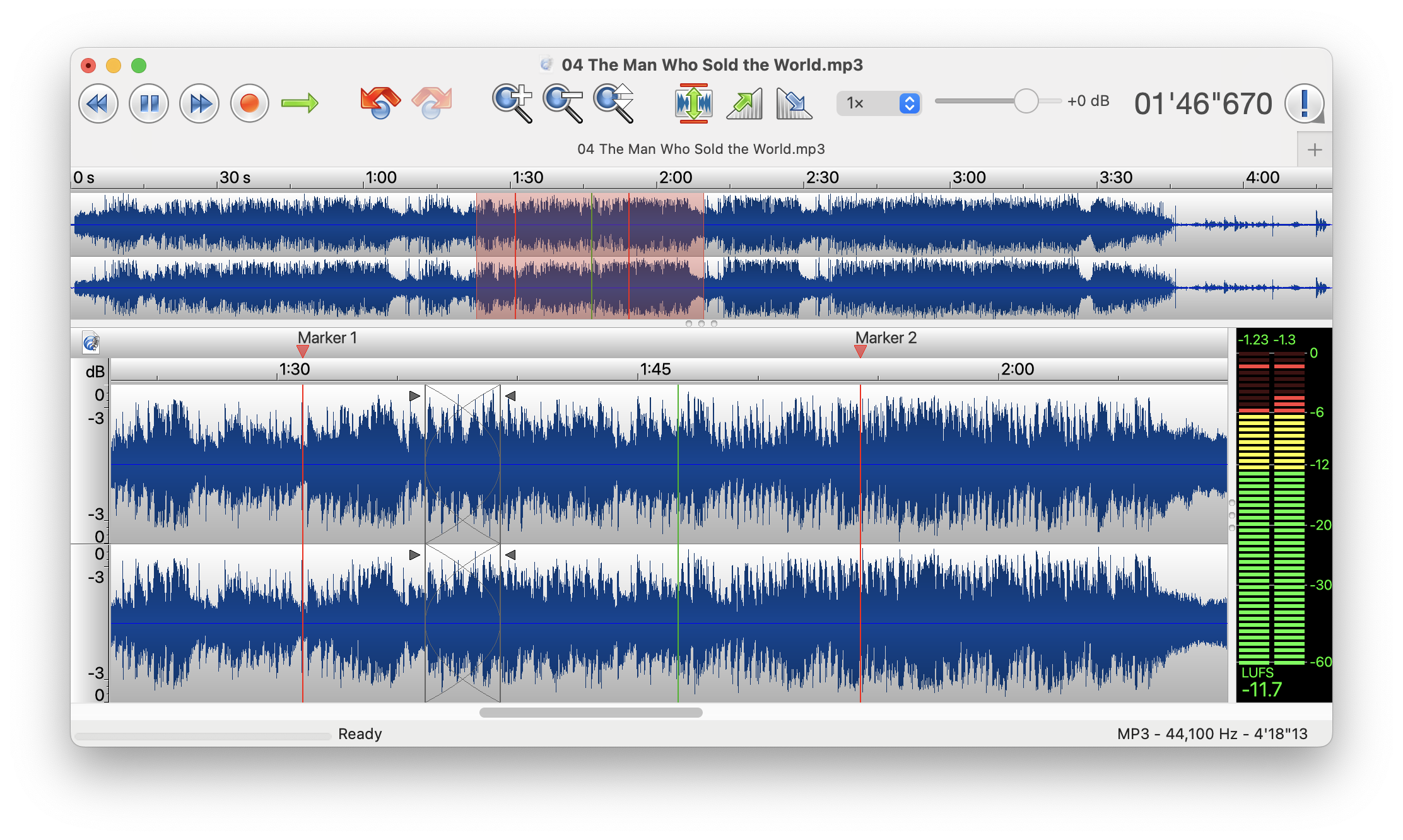
Sharing metadata
| og:url | https://twistedwave.com/ |
|---|---|
| og:type | website |
| og:image | https://twistedwave.com/images/[email protected]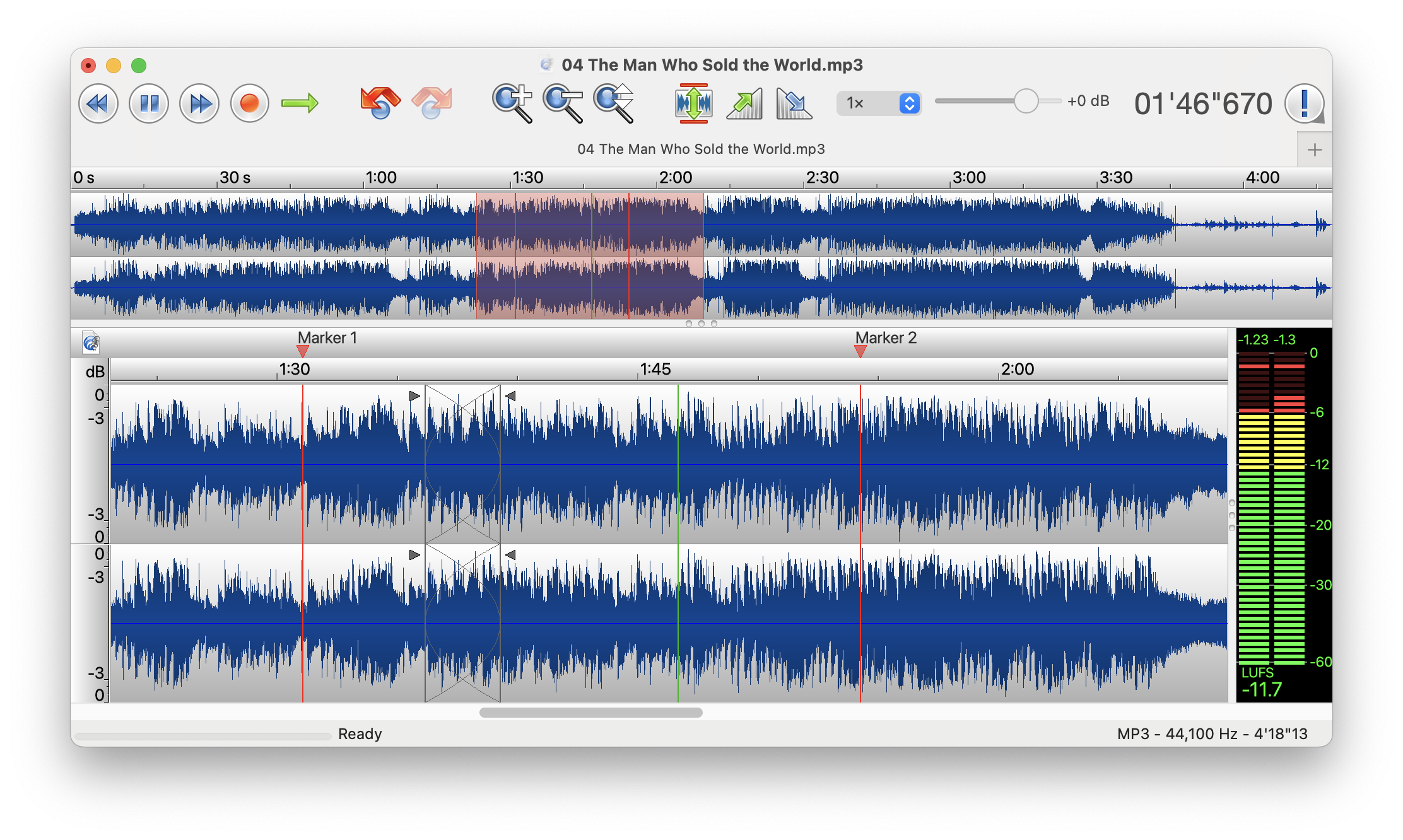 |
| og:title | TwistedWave, a fast, powerful and easy audio editor |
| og:site_name | TwistedWave |
| og:description | Record, edit, master, batch process and convert audio on Mac, Windows, iPhone, iPad and online. |
| twitter:card | summary_large_image |
robots.txt (opens in a new tab)
0 rulesNo rules found
No matching rules.
Sitemaps
0No sitemaps found
 Registration details RDAP / WHOIS
| Registrar | OVH sas |
|---|---|
| Registered | 2007-04-22 |
| Expires | 2028-04-22 |
| Domain status | client delete prohibited、client transfer prohibited |
| Nameservers | ns-1406.awsdns-47.org、ns-2045.awsdns-63.co.uk、ns-306.awsdns-38.com、ns-918.awsdns-50.net |
| DNSSEC | unsigned |
 DNS records
| Type | Name | Value | TTL | Priority |
|---|---|---|---|---|
| A | twistedwave.com | 192.99.98.109 | 79250 | — |
| MX | twistedwave.com | in1-smtp.messagingengine.com | 60 | 10 |
| MX | twistedwave.com | in2-smtp.messagingengine.com | 60 | 20 |
| NS | twistedwave.com | ns-1406.awsdns-47.org | 172800 | — |
| NS | twistedwave.com | ns-2045.awsdns-63.co.uk | 172800 | — |
| NS | twistedwave.com | ns-306.awsdns-38.com | 172800 | — |
| NS | twistedwave.com | ns-918.awsdns-50.net | 172800 | — |
| TXT | twistedwave.com | google-site-verification=33YeyZ3UQjnqIVEuOVJoA0EMr_eG7vx-juf54vOE6cM | 3600 | — |
| TXT | twistedwave.com | v=spf1 include:amazonses.com include:mail.zendesk.com include:spf.messagingengine.com mx -all | 3600 | — |
| DMARC | _dmarc.twistedwave.com | v=DMARC1;p=quarantine;fo=1 | 3600 | — |
 TLS and certificates
| Assessment | Normal configuration |
|---|---|
| Supported protocols | TLSv1.2、TLSv1.3 |
| Negotiated protocol | TLSv1.3 |
| Certificate subject | twistedwave.com |
| Issuer | Let's Encrypt |
| Valid until | 2026-12-09T18:21 · Remaining when checked: 72 days |
| Verification details | Certificate trust: Passed · Hostname match: Passed |
 HTTP response headers
| Header | Value |
|---|---|
| content-type | text/html |
| server | nginx/1.24.0 (Ubuntu) |
| strict-transport-security | max-age=31556900; includeSubDomains; preload |
| content-security-policy | default-src 'self'; block-all-mixed-content; form-action 'self'; style-src 'self'; connect-src 'self' https://*.twistedwave.com https://twistedwave.com https://checkout.stripe.com https://api.stripe.com; script-src 'self' https://*.twistedwave.com/ https://checkout.stripe.com https://js.stripe.com; worker-src 'self'; img-src data: 'self' https://*.stripe.com; font-src data: 'self'; media-src 'self' https://s3.amazonaws.com; object-src 'self'; frame-src 'self' https://checkout.stripe.com https://js.stripe.com https://hooks.stripe.com; report-uri https://twistedwave.com/report_uri |
| x-frame-options | SAMEORIGIN |
| x-content-type-options | nosniff |
| referrer-policy | strict-origin-when-cross-origin |
 Identified technologies
Recent Updates
- Website images
- Screenshots
- Network details
- Website Technologies
- Pages and Search Information
- HTTP Response Information
- TLS and certificates
- DNS Information
- Domain Registration
- Website profile
- Website Description
- Website Name
- Website profile
- Website Description
- Website Name
User reviews (0)