Website profiles · Technology insights · Alternatives

acetaggen.com

Free prompt system for SUNO AI. Structured 12-step Tag Builder, 3,200+ verified tags, 100-point Prompt Scorer, and a rich research blog with deep-dive articles, guides, tips and power tricks. All free, no signup.

No paid content found
Visit website
Profile views 14 Outbound visits 14 Normal
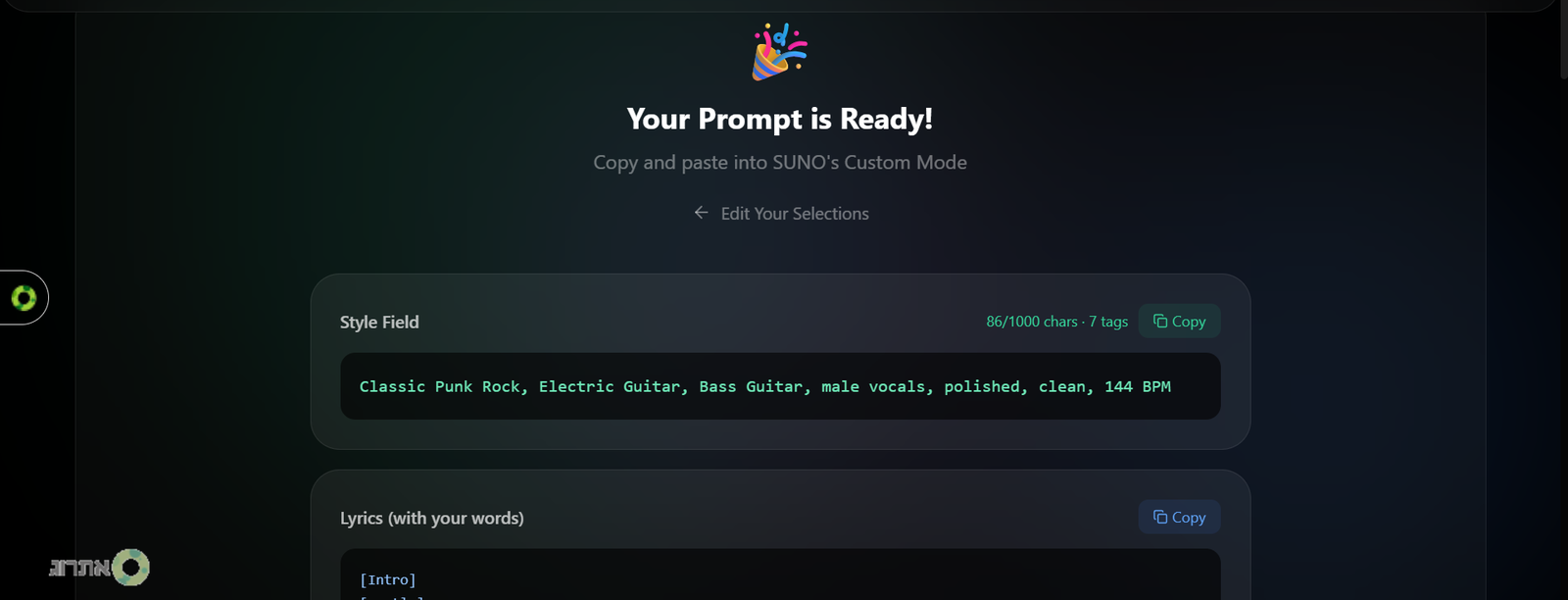
AceTagGen Full homepage screenshot

At a glance

Category
Artificial Intelligence
Language
English
Paid-content signal
No paid content foundObserved
Registered
2026
Hosting
VercelInferred
HTTPS certificate trusted
PassedObserved
Last updated

Website review

This review may include AI-generated content and is not individually verified. Domain, certificate and other facts come from the observed data on this page.

What is AceTagGen?

AceTagGen is a free, browser-based prompt-building tool for SUNO AI music generation. Its goal is to replace guesswork with structure: instead of typing a loose style description and accepting whatever the model averages out, you assemble a prompt from organized, searchable tag categories before you hit generate.

The core of the product is a 12-step Tag Builder that walks you through prompt construction, with a character counter, line-level control, and collision detection that flags tags likely to conflict. A 100-point Prompt Scorer grades what you've built. The tag library is the main draw: 3,200+ verified tags spanning 16 genre families, 1,700+ sub-genres, 430+ instruments, 300+ bracket tags, 190+ moods, 180+ vocal styles, 170+ production tags, and 75+ sound effects. It's all free and requires no signup.

Who it's for

  • SUNO users who keep getting "close but not quite" results and want to steer genre, dynamics and vocals deliberately.
  • People who think in specifics — "90s grunge" rather than "rock" — and want a vocabulary for that.
  • Beginners who don't yet know which tags exist or which ones fight each other.

The trade-off

Structured building takes longer than a one-line prompt, and a 12-step flow can feel heavy if you just want a quick draft. The payoff is repeatability: once you've built a prompt that works, you can reuse and adjust it instead of re-rolling. If you mostly generate casually, the overhead may not be worth it; if you're producing tracks with a fixed sonic target, it likely is.

Next step

Start with the Tag Builder on a single song you already know well — pick the sub-genre first, then layer dynamics and vocal style — and run the scorer before generating. Compare the output against your previous unstructured attempts to see whether the extra specificity actually moved the result. For broader context on how these tools fit together, see SUNO.

How does AceTagGen improve SUNO AI prompts compared to using SUNO alone?

AceTagGen improves SUNO results by turning vague directions into structured, specific prompts before you generate. Instead of describing a vibe and accepting whatever the model averages out, you assemble a prompt from defined choices—sub-genre, instruments, moods, vocals, and production—so the output matches a target sound rather than a statistically safe one.

What changes in practice

  • Sub-genre precision over broad labels. The site organizes 16 genre families into 1,700+ sub-genres, so you pick a narrow cluster (e.g., "90s grunge" rather than "rock"). Narrow clusters push SUNO toward a specific sound instead of blending several.
  • Dynamic control. Bracket tags like [Build-up], [Drop], [Breakdown], and [Final Peak] are placed line-by-line. This addresses the common problem where a chorus never really lifts because one energy level runs through the track.
  • Vocal anchoring. 180+ vocal styles are set at the style level and reinforced per line, which helps keep verse 1 and verse 2 on the same voice instead of drifting.
  • Structured building and scoring. A 12-step tag builder with live collision detection, a character counter, and a 100-point prompt scorer let you see conflicts and weak spots before generating.

A concrete comparison

Situation SUNO alone With AceTagGen
Genre direction "rock" "90s grunge" sub-genre
Section energy One flat level Line-level [Build-up], [Drop], [Breakdown]
Vocal consistency Drifts between verses Anchored style, reinforced per line
Prompt quality check Guesswork 100-point scorer before generating

When it helps most

If you already get close-but-not-quite results and can hear the difference between "close" and "what you wanted," the structured approach is worth trying. If you only need a quick demo and don't care about matching a specific reference, the extra steps add little.

A useful next step: pick one song you've been trying to recreate, write down its sub-genre, energy arc, and vocal character, then build that as a single prompt and compare it against your previous attempt.

For broader context on AI music tools, see SUNO and ACE Studio.

How do I use the 12-step Tag Builder to create a prompt for my song?

The 12-step Tag Builder is a structured form: instead of typing one long style string, you answer twelve successive prompts, and the tool assembles them into a SUNO-ready tag set. Each step narrows one axis of the song — genre family, sub-genre, mood, vocal style, instrumentation, production and so on — so that by the final step your prompt describes one specific sound cluster rather than a general direction. AceTagGen's own framing is that SUNO averages thousands of similar songs when a prompt is vague, so the builder exists to remove that averaging by anchoring each axis explicitly.

A practical way to run the twelve steps

  • Start with the broadest axis (genre family) and work down to the narrowest (per-line bracket tags). Deciding "90s grunge" before "distorted baritone guitar" keeps the later choices coherent.
  • Treat the tag library as a menu, not a checklist. With several thousand verified tags, the temptation is to stack many per step; each extra tag dilutes the ones around it.
  • Use the character counter as a hard constraint, not a target. Fill it because the song needs the detail, not because space exists.
  • Watch the collision detection. It flags combinations that pull in opposing directions — a tag set that asks for both a lo-fi bedroom texture and a stadium-sized production will fight itself before you ever hit generate.
  • Finish in the Song Editor, where bracket tags such as build-ups, drops and breakdowns can be placed line by line. This is where dynamic shape comes from; the style level alone tends to produce one flat energy across the track.

Where the scorer fits

The 100-point Prompt Scorer is a checking pass, not a writing pass. Build first, then score, then read the weak categories rather than chasing a perfect number. A prompt that scores well but describes a song you don't want is still the wrong prompt.

A decision rule

If you can't name the sub-genre, stop and pick one before continuing. Vague genre entries are the single biggest source of "close but not it" results, because everything downstream — instruments, vocal, production — gets chosen to match a category that was never pinned down.

For background on how SUNO interprets tags and why some combinations behave unexpectedly, the site's research blog is the natural next stop: AceTagGen.

What are the most common mistakes when writing SUNO prompts, and how can I avoid them?

The most common SUNO prompt mistakes are vagueness, overloading one prompt with everything at once, and ignoring structure. SUNO fills gaps with the statistical average of its training data, so anything you don't specify gets decided for you — often producing a technically fine track that isn't the one you heard in your head.

The recurring mistakes

  • Genre too broad. Writing "rock" or "electronic" pulls SUNO toward the median of that whole cluster. Naming a specific sub-genre narrows which sound cluster the model draws from.
  • No dynamic instructions. If every section carries the same energy description, verses don't breathe and choruses don't land. Tension-and-release needs to be stated, not assumed.
  • Vocal style left implicit. Without an anchored vocal description, tone can drift between verse 1 and verse 2 — close, but not identical.
  • Kitchen-sink prompts. Stacking every tag you like creates collisions: contradictory moods, instruments that fight, or a style that muddles the genre anchor.
  • Ignoring the character limit. Truncated prompts lose whatever came last, which is often your structural instructions.
  • No section mapping. Tags applied globally rather than line-by-line leave SUNO to decide where the drop or breakdown belongs.

How to avoid them

  1. Decide the intent first — the specific feeling and reference point — then translate it into tags rather than starting from a tag list.
  2. Anchor one clear genre or sub-genre, then add only tags that support it.
  3. Assign structural and dynamic tags to specific sections instead of the whole prompt.
  4. Lock the vocal style once, then reinforce it where sections change.
  5. Check for collisions before generating: two mood tags that contradict each other will average out into neither.

A practical test: read your prompt back and ask what SUNO still has to guess. Each remaining guess is a place the output can drift.

AceTagGen is built around exactly this workflow — a structured tag builder with collision detection, a character counter, line-level control and a prompt scorer, plus a searchable tag library covering genres, sub-genres, instruments, moods, vocal styles and production terms. It's free and requires no signup, so it works as a pre-flight check even if you prefer writing prompts by hand. See AceTagGen.

For broader grounding in how these models respond to text, the general documentation from the tool you're using is worth reading alongside any tag library, since prompt behaviour changes between model versions.

How does the 100-point Prompt Scorer evaluate my SUNO prompt and help me improve it?

The 100-point Prompt Scorer is a diagnostic layer that sits on top of AceTagGen's 12-step Tag Builder. Rather than rewriting your prompt for you, it grades it against the same axes SUNO responds to — so you can see which parts of your intent are anchored and which are still vague enough that the model will fall back on its training-data average.

What it is checking, in practice

  • Specificity of style and sub-genre. A prompt that says "rock" leaves SUNO to pick a cluster; one that names a sub-genre narrows the target. The scorer rewards the narrower choice.
  • Structural and dynamic signals. Bracket tags like build-ups, drops and breakdowns tell the model when energy should rise and fall. A prompt with no tension-and-release instructions tends to produce one flat energy level across the track.
  • Vocal consistency. Vocal style set once at the Style level and reinforced per line scores better than a single mention, because it reduces drift between verses.
  • Coverage and collisions. The builder's live collision detection flags tags that fight each other; the scorer reflects that, so a high tag count with contradictory instructions won't score well.

How to use the score to improve

Treat it as a checklist, not a grade. If you lose points on structure, add bracket tags line-by-line in the Song Editor rather than piling more style adjectives into the Style field. If you lose points on vocal anchoring, lock the vocal style once and repeat it where the vocal actually enters. Re-score after each change so you can see which edit moved the number — that tells you which axis your prompt was weakest on.

A concrete scenario

You want a 90s grunge track with a chorus that lands. You start with "grunge, distorted guitars, powerful chorus." The scorer likely flags weak dynamic control and thin vocal anchoring. You then pick the specific sub-genre from the 16 genre families, add [Build-up] before the chorus and [Drop] at its start, and set one vocal style at the Style level with a per-line reminder. The score rises because each change addresses a distinct axis, not because the prompt got longer.

Decision criterion

Use the scorer when you already know the song in your head and want the prompt to match it. Skip it when you are deliberately exploring and want SUNO to surprise you — a low score on a loose prompt is not a failure, it is a different intent.

Next step: build one prompt, note the score, change exactly one axis, and re-score. Two or three rounds will show you which axis your writing habit usually neglects. You can start at AceTagGen.

Can I use AceTagGen tags and structure to control dynamic changes like build-ups and drops in my song?

Yes. AceTagGen is built around exactly that use case: it treats dynamic shape as something you specify before generating, not something you hope the model infers. Its page describes tension-and-release bracket tags such as [Build-up], [Drop], [Breakdown] and [Final Peak], assigned line by line in a Song Editor, alongside a 12-step Tag Builder, a character counter, collision detection and a prompt quality score.

How the control actually works

  • Structure first, then dynamics. You pick genre family and sub-genre (the site claims 16 families and 1,700+ sub-genres), then place bracket tags at the lines where energy should change. This is the practical difference between "make it epic" and telling the model where the peak occurs.
  • Line-level placement is the key lever. A drop only reads as a drop if the section before it is quieter or sparser. Put [Build-up] on the last two lines of a pre-chorus, [Drop] on the first line of the chorus, and [Breakdown] after chorus two — that gives the model a contrast map rather than a single mood word.
  • Vocal anchoring supports it. The site lists 180+ vocal styles, set at style level and reinforced per line, which helps keep the same voice across quiet and loud sections instead of drifting between takes.
  • Collision detection is worth using here. Dynamic tags fight with each other and with dense production tags. If you stack [Breakdown] next to a wall-of-sound production tag, you are asking for two incompatible things.

A concrete test you can run in ten minutes

  1. Write a short prompt with one genre tag and no dynamics. Generate it.
  2. Reuse the same prompt, adding [Build-up] before the chorus and [Drop] on the chorus entry.
  3. Compare chorus loudness, entry impact and whether verse two matches verse one.

If step 3 shows no change, the issue is usually tag density, not the concept — strip production tags until the dynamic tags have room to act.

Trade-offs to weigh

This approach rewards planning. If you like generating twenty loose variations and picking a favourite, a structured 12-step builder will feel slow. It also cannot guarantee results: bracket tags are instructions the model weighs, not automation, so treat every output as a draft to regenerate or edit. The site states everything is free with no signup, so testing costs you time rather than money.

For background on how prompting and section tags are generally discussed, see Suno and GitHub for community tooling. If you want a second opinion on structuring a track before you prompt, Reddit communities are useful, though quality varies by thread.

Related questions

More questions →
What Are Music Tags and How Do They Shape an AI-Generated Song?

Music tags are structured descriptors — genre, sub-genre, mood, instrument, vocal style, production quality — that you feed an AI music model to anchor its output to a specific sound instead of letting it fall back on the statistical average of its training data. In SUNO, tags are the difference between a prompt that gives the model "a direction" and one that specifies intent. AceTagGen organizes this into a 12-step Tag Builder with 3,200+ verified tags across 16 genre families, 1,700+ sub-genres, 430+ instruments, 190+ moods, 180+ vocal styles, and 170+ production tags — all free, no signup required.

Why untagged prompts produce generic results

When you give SUNO a vague prompt, the model averages thousands of similar songs and returns the statistically safest path. AceTagGen calls this the "Slot Machine Effect": without precise anchors, SUNO falls back to the median of its training data. You spin, you take what lands.

Three specific failure modes follow from this:

  • Dynamic flatness. The chorus doesn't explode, the verses don't breathe. Without tension-and-release instructions, one energy level runs the whole track.
  • Vocal drift. Verse 1 and verse 2 come out close but not identical. Without an anchored vocal style, tonal consistency slips between sections.
  • Intent lost in translation. You heard a specific song in your head; you got a pleasant song that's close. As AceTagGen puts it, "close" is a different song.

The underlying mechanism: SUNO responds to every axis you specify, and fills in the rest from its training distribution. Tags are how you claim those axes.

The main tag categories

AceTagGen's research maps SUNO's tag space into distinct categories. Each one controls a different dimension of the output:

Category Scale What it controls
Genre families 16 Broad sonic territory
Sub-genres 1,700+ Exact sound cluster within a family
Instruments 430+ Arrangement and timbre
Moods 190+ Emotional register
Vocal styles 180+ Voice character and delivery
Production tags 170+ Mix, texture, era, fidelity
Bracket tags 300+ Structural and dynamic events
Sound effects 75+ (4 categories) Specific sonic accents

The critical distinction is sub-genre precision. "Rock" is not a tag that lands anywhere specific. "90s grunge" and "modern post-rock" hit completely different clusters in SUNO's model. The sub-genre is where intent becomes actionable.

How tags combine into a coherent prompt

Tags don't work as a flat list. They layer:

  1. Sub-genre sets the sound cluster.
  2. Mood narrows the emotional register within that cluster.
  3. Instruments define the arrangement.
  4. Vocal style anchors the voice — locked at the Style level and reinforced per-line in the Song Editor, so one voice carries across the whole track.
  5. Production tags set era, fidelity, and texture.
  6. Bracket tags control dynamics line-by-line: [Build-up], [Drop], [Breakdown], [Final Peak]. Your chorus lands because you told it to.

AceTagGen's 12-step system includes live collision detection (flagging tags that conflict), a character counter, line-level control, and a quality score — so you can see whether your combination is coherent before you generate.

A practical starting workflow

Before you click generate:

  1. Pick your sub-genre first. Not the family — the specific cluster. This is the highest-leverage decision.
  2. Add mood and production tags that match the era and feel you're after.
  3. Specify instruments rather than leaving arrangement to the model.
  4. Lock a vocal style at the Style level, then reinforce it per section.
  5. Place bracket tags at the structural moments where you want energy to shift — build-ups, drops, breakdowns, final peaks.
  6. Check for collisions and run a quality score before committing.

The goal is that before you click generate, your prompt is already the song you intended — not a direction the model will interpret on your behalf.

AceTagGen's Tag Builder, scorer, and research blog are all free with no signup, and the scorer is open-source on npm.

What Are Prompts in AI Music Generation and How Do They Control the Song?

A prompt in an AI music tool like SUNO is the full set of instructions you hand the model before it generates audio — not just a one-line description, but genre and sub-genre tags, mood, instruments, vocal style, production tags, and bracket tags that mark what happens at each section of the track. The prompt is the only lever you have over the output, so its precision decides whether you get the song you heard in your head or a statistically average song that's merely close. This applies to anyone generating music with SUNO-style tools; the more axes of the song you specify, the less the model has to guess.

Why a vague prompt produces a generic song

When you give SUNO a loose direction like "a sad rock song," the model averages thousands of similar songs in its training data and returns the statistically safest path. Your intent becomes a rough hint and the AI fills in everything else. AceTagGen's research frames this as the slot machine effect: without precise anchors, SUNO falls back to the median of its training data — you spin and take what lands.

Three specific failures follow from that:

  • Dynamic flatness. The chorus doesn't really explode and the verses don't really breathe. Without tension-and-release instructions, one energy level runs the whole track.
  • Vocal drift. Verse 1 and verse 2 come out close but not identical. Without an anchored vocal style, tonal consistency slips between sections.
  • Intent lost in translation. You heard a specific song; you got a pleasant song that's close. As the source puts it, "close" is a different song.

The analogy the site uses: it's like ordering food without seeing the menu. You'll get something edible — maybe not what you craved.

The building blocks of an effective prompt

A structured prompt surfaces every axis SUNO actually responds to. Based on AceTagGen's tag system, the components break down like this:

Component What it controls Example scale in the system
Genre / sub-genre tags The exact sound cluster 16 genre families → 1,700+ sub-genres
Mood tags Emotional register 190+ moods
Instrument tags Arrangement and texture 430+ instruments
Vocal style tags Voice consistency across the track 180+ vocal styles
Production tags Mix, era, and sonic character 170+ production tags
Bracket tags Section-by-section dynamics 300+ bracket tags
Sound effects Accents and atmosphere 75+ across 4 categories

The key insight is sub-genre precision. "Rock" is not a useful anchor — "90s grunge" and "modern post-rock" hit completely different clusters in SUNO's model. Naming the sub-genre is what pulls the output toward the sound you actually want instead of the average of everything labeled rock.

How bracket tags add line-by-line dynamic control

Bracket tags are the mechanism for tension and release. Instead of hoping the chorus lands, you tell the model to make it land by placing tags like [Build-up], [Drop], [Breakdown], and [Final Peak] at specific points — assigned line-by-line in a song editor. This is what separates a track with one flat energy level from one that breathes: verses that pull back, a chorus that opens up, a bridge that breaks down.

Vocal anchoring works the same way. You lock a vocal style at the Style level, then reinforce it per line in the song editor, so one voice carries across the whole track instead of drifting between sections.

Weak prompt vs. structured prompt

Weak prompt:

A sad rock song about losing someone

What happens: SUNO averages its training data, picks a mid-tempo generic rock backing, an unremarkable vocal, and one energy level for the whole track. The result is pleasant and forgettable.

Structured prompt:

Sub-genre: 90s grunge / slowcore blend Mood: melancholic, restrained, building Instruments: detuned electric guitar, brushed drums, low cello Vocal: breathy male tenor, close-mic, consistent across all sections Production: warm analog, slight tape saturation Structure with bracket tags: [Intro - sparse guitar] [Verse 1 - restrained] [Build-up] [Chorus - full band, open] [Breakdown - cello only] [Final Peak - layered vocals]

What happens: every axis is anchored, so the model has almost nothing left to guess. The chorus lands because you instructed the build; the voice stays consistent because you locked it; the dynamics move because the bracket tags told them to.

What this means for how you write prompts

The prompt is not a wish — it's a specification. The more of SUNO's responsive axes you fill in with precise tags, the closer the output gets to your intent, and the less you rely on re-rolling generations until something decent lands. Start with sub-genre precision to fix the sound cluster, anchor vocal style to stop drift, and use bracket tags to control energy section by section. Everything else — mood, instruments, production — narrows the result further.

AceTagGen organizes this into a 12-step tag builder with live collision detection, a character counter, line-level control, and a 100-point prompt scorer, drawing on 3,200+ verified tags. The site describes the tool as free with no signup and no paywall, and notes an open-source scorer on npm plus a research blog.

Why SUNO AI Songs Drift From Your Intent (and How to Fix Your Prompts)

SUNO AI drifts from your intent because it generates by probability, not by design: given a loose direction, it averages thousands of similar training songs and returns the statistically safest result. The fix is to stop treating your prompt as a hint and start treating it as a structure — precise sub-genre anchors, line-level dynamic tags, and a locked vocal style. The approach below comes from AceTagGen's SUNO research system, which maps 3,200+ verified tags, 1,700+ sub-genres across 16 genre families, 430+ instruments, 190+ moods, and 180+ vocal styles into a 12-step builder with a 100-point prompt scorer.

The four failure modes behind "close but not it"

AceTagGen frames the gap between plain SUNO and structured prompting as "probability-based creation vs. intent-based production." Four specific symptoms show up:

  • The slot machine effect. Without precise anchors, SUNO falls back to the median of its training data. You spin, you take what lands.
  • Dynamic flatness. The chorus doesn't really explode and the verses don't really breathe. Without tension-and-release instructions, one energy level runs the whole track.
  • Vocal drift. Verse 1 and verse 2 come out close but not identical. Without an anchored vocal style, tonal consistency slips between sections.
  • Intent lost in translation. You heard a specific song in your head and got a pleasant song that's close — but "close" is a different song.

The site's own analogy: it's like ordering food without seeing the menu. You'll get something edible, maybe not what you craved.

Fix 1: Replace vague genres with sub-genre anchors

"Rock" is a direction, not a target. SUNO's model contains distinct sound clusters, and a broad genre word lets it pick whichever cluster is most common.

The concrete move is to go one or two levels deeper:

Instead of Use Why it matters
rock 90s grunge Hits a different cluster than modern post-rock
rock modern post-rock Same family, completely different output
electronic (specific sub-genre from the 1,700+ list) Pins the exact sound cluster rather than the family average

AceTagGen organizes this as 16 genre families branching into 1,700+ sub-genres, so you can locate the exact cluster rather than guessing at a label.

Fix 2: Control dynamics with bracket tags, line by line

Dynamic flatness happens because nothing in the prompt tells SUNO where energy should rise and fall. The fix is bracket tags assigned at the line level:

  • [Build-up] — raise tension into a section
  • [Drop] — release it
  • [Breakdown] — pull energy down
  • [Final Peak] — land the last chorus

The principle is tension-and-release: your chorus lands because you told it to, not because the model guessed. AceTagGen's builder supports line-level control plus live collision detection and a character counter, so tags don't fight each other or overflow the prompt.

Fix 3: Anchor the vocal so it doesn't drift between sections

Vocal drift is a consistency problem, and it needs two layers of reinforcement:

  1. Lock the vocal style at the Style level. With 180+ vocal styles available, pick one and state it once as a global anchor.
  2. Reinforce it per line in the song editor. This keeps verse 1 and verse 2 in the same voice instead of merely similar ones.

One voice across the whole track is the goal; a style-level tag alone often isn't enough to hold it.

Fix 4: Translate the song in your head into explicit structure before generating

The last failure mode is the hardest because it happens before you type anything. The song you imagine has a specific sub-genre, a specific dynamic shape, and a specific voice — but if none of that is written down, SUNO fills the gaps with averages.

Before you click generate, your prompt should already describe the song you intended: sub-genre anchor, dynamic tags placed where the energy changes, and a locked vocal style. AceTagGen's 100-point Prompt Scorer exists to check that completeness before generation rather than after.

What this costs you

According to the site, the full system — 12-step Tag Builder, 3,200+ tags, 100-point scorer, and research blog — is free with no signup and no paywall, and the scorer is open-source on npm. No pricing, payment, or login requirements are stated beyond that, so treat "free, no signup" as the site's claim rather than an assumption you can extend to anything else.

When this approach is worth it

Use structured prompting when you have a specific song in mind and "close" isn't good enough — particularly for tracks where the chorus needs to hit, the vocal needs to stay consistent, or the genre needs to be exact rather than approximate. If you're just exploring ideas and any pleasant result is fine, plain SUNO is faster. The moment you find yourself regenerating repeatedly hoping to land on the right sound, that's the signal to switch from direction-giving to structure-building.

How to Build a SUNO AI Song Prompt That Matches Your Intent

A vague prompt gives SUNO a direction, and the model returns the statistically safest average of thousands of similar songs. To get the song you actually heard in your head, you have to convert that idea into concrete, structured axes before you generate: a precise sub-genre, a mood, an anchored vocal style, specific instruments, production tags, and line-level dynamic instructions. AceTagGen's approach is built exactly around this — a 12-step Tag Builder with 3,200+ verified tags, live collision detection, a character counter, line-level control, and a quality score, all free with no signup. The steps below work whether you use that tool or build the prompt by hand.

Why your prompt drifts in the first place

The site frames the problem as "probability-based creation vs. intent-based production." Without precise anchors, four things go wrong:

  • The slot machine effect — SUNO falls back to the median of its training data, so you take whatever lands.
  • Dynamic flatness — the chorus doesn't explode and the verses don't breathe, because nothing told them to. One energy level runs the whole track.
  • Vocal drift — verse 1 and verse 2 come out close but not identical, because no vocal style is anchored across sections.
  • Intent lost in translation — you get a pleasant song that's close. As the site puts it, "close" is a different song.

The fix is to stop treating the prompt as a hint and start treating it as a spec.

Step 1: Pin the sub-genre, not the genre

Broad labels hit broad clusters. The site's example is direct: not "rock" — "90s grunge" vs. "modern post-rock" land in completely different clusters in SUNO's model. AceTagGen organizes its tag library into 16 genre families covering 1,700+ sub-genres, so the job is to walk down from family to the exact sound cluster you mean.

Input: your rough genre idea. Action: pick the narrowest sub-genre that still describes the song. Expected result: SUNO draws from a tighter slice of its training data instead of averaging across the whole family.

Step 2: Lock the vocal style at the style level

Vocal drift happens when the vocal description only lives in one section. The site's fix is to anchor the vocal style at the Style level and reinforce it per line in the Song Editor, drawing from 180+ vocal styles. One voice then carries across the whole track.

Input: how the vocal should sound (range, delivery, texture). Action: set it once as a global style anchor, then repeat or reference it on individual lines where the delivery changes. Expected result: verse 1 and verse 2 stay tonally consistent instead of slipping apart.

Step 3: Assign dynamics line by line with bracket tags

This is the step most people skip, and it's the one that fixes dynamic flatness. Instead of hoping the chorus lands, you tell it to. Bracket tags like [Build-up], [Drop], [Breakdown], and [Final Peak] get assigned line by line, so tension and release are explicit rather than implied. AceTagGen's library includes 300+ bracket tags for this.

A simplified structure might look like:

[Intro - sparse]
[Build-up]
[Chorus - full energy]
[Breakdown]
[Final Peak]

Input: where the song should rise and fall. Action: place a bracket tag at each transition point, at the line level. Expected result: the chorus actually explodes and the verses actually breathe, because each section has an explicit energy instruction.

Step 4: Specify instruments and production

These are separate axes from genre and mood, and SUNO responds to them separately. The tag library covers 430+ instruments and 170+ production tags, plus 190+ moods and 75+ sound effects across 4 categories. Fill these in as concrete choices rather than leaving them to the model's defaults.

Axis What to decide Why it matters
Sub-genre Exact sound cluster Narrows the training-data slice
Mood 190+ options Sets emotional register independently of genre
Vocals 180+ styles, anchored globally Prevents vocal drift
Instruments 430+ options Controls arrangement, not just vibe
Production 170+ tags Controls texture and mix character
Dynamics Bracket tags, line-level Creates tension and release
Sound effects 75+ across 4 categories Adds specific moments, not ambience

Step 5: Score the prompt before you generate

A prompt can be internally contradictory — a mood tag that fights the sub-genre, a production tag that fights the vocal style. AceTagGen runs live collision detection as you build, plus a character counter and a 100-point Prompt Scorer (the scorer is open-source on npm). The point is to catch weak spots before you click generate, when the prompt is already the song you intended.

Input: your assembled prompt. Action: run it through the scorer and read the collision warnings. Expected result: you fix contradictions and thin spots while they're still cheap to fix.

What "done" looks like

Before generating, check that every axis is filled with a specific choice rather than a default: narrow sub-genre, explicit mood, anchored vocal style, named instruments, production tags, and line-level bracket tags for dynamics. If any axis is still vague, that's where the model will average you out.

The whole system — 3,200+ verified tags, 16 genre families, 1,700+ sub-genres, 430+ instruments — is free with no signup and no paywall, and there's a research blog if you want the reasoning behind the tag structure.

What Are Style Tags in SUNO AI and How Do They Shape the Song?

Style tags are the descriptors in a SUNO prompt that tell the model which sound cluster to draw from — genre, sub-genre, mood, instrumentation, vocal style, and production character. They shape the song because SUNO generates by averaging similar training songs: without precise tags, you get the statistically safest result, not the one you intended. Use specific tags when you already know the sound you want; skip them only if you're fine with SUNO picking the median for you.

What Each Style Tag Controls

Style tags aren't one thing — they're several independent axes you can set separately. AceTagGen organizes its tag library across these categories, which maps cleanly onto what each tag actually does to the output:

Tag category What it steers Example scale in AceTagGen's library
Genre family / sub-genre The core sound cluster 16 families, 1,700+ sub-genres
Mood Emotional register 190+ moods
Instrumentation Which instruments carry the track 430+ instruments
Vocal style Voice type and delivery 180+ vocal styles
Production Mix and sonic character 170+ production tags
Sound effects Textural accents 75+ across 4 categories
Bracket tags Section-level dynamics 300+ bracket tags

The key point: these are separate dials. Setting genre doesn't set mood, and setting mood doesn't anchor the vocal. If you only fill one, SUNO fills the rest by averaging.

Why Vague Tags Produce Generic Songs

SUNO responds to direction, but a broad direction collapses into the middle of its training data. AceTagGen describes this as the "slot machine effect": without precise anchors, the model falls back to the median of thousands of similar songs. You give it a hint, it hands you the safest path.

The practical consequence is that "rock" and "90s grunge" don't land in the same place. "Rock" spans decades and sub-genres, so the model averages across all of them. "90s grunge" narrows to a specific sound cluster. The same logic applies to "modern post-rock" — it hits a different cluster than either. Specificity is what moves the output from close to intended.

Three failure modes follow from imprecise tags:

  • Dynamic flatness — without tension-and-release instructions, one energy level runs the whole track. The chorus doesn't explode; the verses don't breathe.
  • Vocal drift — verse 1 and verse 2 come out similar but not identical, because no vocal style is anchored across sections.
  • Intent lost in translation — you heard a specific song in your head and got a pleasant song that's close. As the source puts it, "close" is a different song.

How to Stack and Order Style Tags

The goal is to cover every axis SUNO responds to before you generate, so nothing is left to averaging. A workable order:

  1. Sub-genre first. Pick the narrowest accurate label, not the family. "90s grunge," not "rock."
  2. Mood next. This sets the emotional register the sub-genre alone doesn't specify.
  3. Instrumentation. Name the instruments that should carry the track, so the model doesn't default to whatever's typical for the genre.
  4. Vocal style. Lock this at the style level so one voice carries the whole track — this is what prevents vocal drift between sections.
  5. Production character. Set the mix and sonic texture last, since it colors everything above it.
  6. Bracket tags for dynamics. Assign section-level tags like [Build-up], [Drop], [Breakdown], and [Final Peak] line by line so the chorus lands on purpose rather than by chance.

AceTagGen's builder adds live collision detection (flagging tags that conflict), a character counter, line-level control, and a 100-point prompt scorer — useful checks before you commit, since conflicting tags on the same axis can cancel each other out.

What to Verify After Generating

Style tags set intent, but the output still needs a check. Listen for the three failure modes above: flat dynamics across sections, a vocal that shifts between verses, and a genre that reads as generic rather than specific. If any appear, the fix is almost always a more precise tag on the relevant axis — a narrower sub-genre, an explicit vocal style, or missing bracket tags for tension and release.

The tooling described here is free and requires no signup, with the scorer published open-source on npm, so you can test tag combinations without a paywall.

Website Overview

Several search or sharing settings need attention. Together they may make snippets, preview images or preferred URLs less consistent across platforms. An active inbound-mail setup with incomplete authentication may leave the domain more open to impersonation. Provider hosting alone does not close that gap.

Domain and Registration

The domain was registered less than a year ago and has limited historical evidence to assess. Transfer-protection status is present, helping reduce the risk of unauthorized domain transfers. The registrar is Cloudflare, Inc., a widely used domain service provider. The domain uses the common .com extension, which is not an independent safety signal.

DNS and Email

The observed email authentication setup is incomplete: DMARC is missing. Nameservers are provided by Cloudflare, indicating managed DNS hosting. MX records point to the Cloudflare Email Routing email service. No CNAME was found; the observed records resolve directly to addresses. DNSSEC signatures were not detected, so this additional DNS authenticity protection is not confirmed.

TLS and Certificates

The public key uses EC with 256 bits. The server supplied a complete certificate chain. No organization name is present in the certificate; the available fields are consistent with domain validation. The certificate was issued by Let's Encrypt, commonly associated with automated certificate services. The certificate's total validity is about 89 days, consistent with a short renewal cycle.

HTTP and Browser Security

The response lacks these common security headers: CSP, X-Content-Type-Options, Referrer-Policy, Permissions-Policy, clickjacking protection. CORS permits any origin to read this response. This is common for public resources; sensitive responses need narrower handling. No X-Powered-By header was found, reducing one common source of backend fingerprinting information. The cf-ray response header indicates a CDN or caching proxy in the delivery path. No obvious internal addresses or debug information were found in the headers.

Technology Stack Analysis

The public page identifies Next.js, Google Analytics, Cloudflare, Vercel without precise versions, leaving fewer clues for version-specific scanning.

Search and Social Sharing

The meta description has 212 characters and may be shortened in search results. No homepage canonical URL was detected. If duplicate URLs exist, consolidation may be less explicit. Twitter Card metadata is configured. The title has 43 characters, within a common display range. The observed directives allow indexing and link following.

Hosting and Email

DNSCloudflare
HostingVercel
EmailCloudflare Email Routing
Approximate IP geolocation (inferred; a CDN or proxy may differ from the origin server) Location unknown Inferred 104.21.36.251

Registration details

RDAP / WHOIS

RegistrarCloudflare, Inc.
Registered2026-04-11
Expires2027-04-11
Domain statusclient transfer prohibited
Nameserverscurt.ns.cloudflare.com、lola.ns.cloudflare.com
DNSSECunsigned

DNS records

DNS

TypeNameValueTTLPriority
Aacetaggen.com104.21.36.251300—
Aacetaggen.com172.67.201.158300—
AAAAacetaggen.com2606:4700:3030::ac43:c99e300—
AAAAacetaggen.com2606:4700:3031::6815:24fb300—
MXacetaggen.comroute2.mx.cloudflare.net30010
MXacetaggen.comroute3.mx.cloudflare.net30048
MXacetaggen.comroute1.mx.cloudflare.net30050
NSacetaggen.comcurt.ns.cloudflare.com86400—
NSacetaggen.comlola.ns.cloudflare.com86400—
TXTacetaggen.comv=spf1 include:_spf.mx.cloudflare.net ~all300—

TLS and certificates

TLS / SSL

AssessmentNormal configuration
Supported protocolsTLSv1.2、TLSv1.3
Negotiated protocolTLSv1.3
Certificate subjectacetaggen.com
IssuerLet's Encrypt
Valid until2026-11-06T06:49 · Remaining when checked: 36 days
Verification detailsCertificate trust: Passed · Hostname match: Passed

HTTP response headers

HTTP

HeaderValue
content-typetext/html; charset=utf-8
cache-controlpublic, max-age=0, must-revalidate
servercloudflare
strict-transport-securitymax-age=63072000
access-control-allow-origin*

Identified technologies

Next.jsGoogle AnalyticsCloudflareVercel

Pages, Search and Sharing

Meta descriptionFree prompt system for SUNO AI. Structured 12-step Tag Builder, 3,200+ verified tags, 100-point Prompt Scorer, and a rich research blog with deep-dive articles, guides, tips and power tricks. All free, no signup.
Canonical URLNot detected
LanguageEnglish (default)
Twitter Cardsummary_large_image
All bots 1 allowed · 0 disallowed
  • Allow/

User reviews (0)

  • No reviews yet.