Website profiles · Technology insights · Alternatives

atheos.io

Atheos is an open source, web-based, cloud IDE and code editor with minimal footprint and requirements, built on top of Codiad by Fluidbyte

No paid content found
Visit website
Profile views 8 Outbound visits 0 Normal
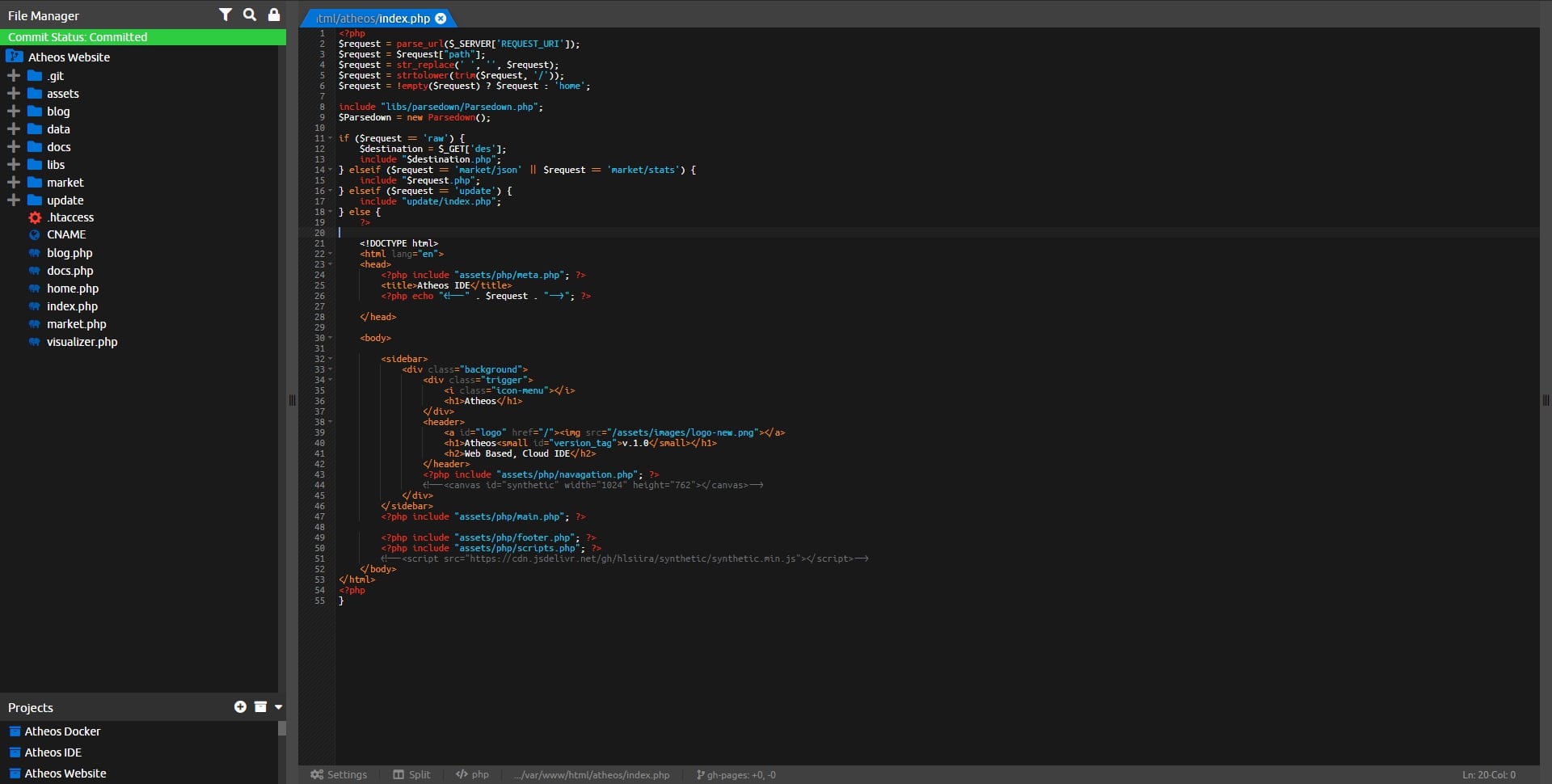
Atheos Cloud IDE Full homepage screenshot

At a glance

Category
Development
Language
English
Paid-content signal
No paid content foundObserved
Registered
2019
Hosting
Akamai Connected CloudInferred
HTTPS certificate trusted
PassedObserved
Last updated

Website review

This review may include AI-generated content and is not individually verified. Domain, certificate and other facts come from the observed data on this page.

What is Atheos Cloud IDE?

Atheos Cloud IDE is a self-hosted, browser-based code editor and development environment. You install it on your own web server; you then open it in a browser and edit files directly on that machine. It is open source and built on top of Codiad, with a deliberately small footprint: the page states it needs only Apache2, PHP 7+ (tested on 5.4, but developed on PHP 7), and read/write access to a few directories and a config file — no database. It works in Chrome, Firefox and IE9+, though development focuses on Chrome.

Its appeal is the opposite of a heavy desktop IDE. If you already have a server or VPS and want to edit code from any machine without installing an editor, Atheos fits that niche. It is also a reasonable option for small teams who want shared access to a codebase without adopting a full platform like GitLab or a managed cloud workspace.

What it offers

  • Support for 40+ languages, syntax colour themes, smart auto-complete and advanced search
  • A plugin library and marketplace, plus error checking and notifications
  • Multiple user support and real-time collaborative editing
  • Split editor panes, a file/project manager on the left, editors in the centre, and a hidden right panel for system and plugin controls
  • LocalStorage redundancy and quick-download backups
  • i18n language support and an easily customised source

Trade-offs to weigh

Consideration What it means for you
Self-hosted You control the data, but you also handle installation, updates, backups and server security
Minimal requirements Runs on modest hosting and needs no database, but you get fewer built-in services than a full platform
Browser-based Access from anywhere, but you depend on a stable connection and a modern browser
Smaller ecosystem Lightweight and customisable, but fewer integrations and less polish than mainstream cloud IDEs

A practical next step

If you have a server with Apache2 and PHP, clone the source into a web-accessible directory, make the required directories and config file writable, and load it in your browser. Before committing real work, test one project: check that file permissions behave as expected, that your language gets useful auto-complete, and that backups are recoverable. If you need managed infrastructure, built-in CI or a large extension marketplace, a hosted alternative such as GitHub Codespaces or GitLab may suit you better; if you want a self-hosted editor with minimal overhead, Atheos is the more direct fit.

How do I install Atheos on my own server?

Install Atheos by placing its source files in a web-accessible directory, making a few paths writable, and opening it in a browser. There is no database step.

Basic install path

  1. Confirm the server has Apache2, PHP 7+ (PHP 5.4 has been tested, but active development targets PHP 7), and read/write access where needed.
  2. Upload or git clone the Atheos source into a directory your web server can serve.
  3. Make the directories and config file mentioned in the installation instructions writable.
  4. Load the Atheos URL in a modern browser. Chrome, Firefox, and IE9+ are listed as working, with Chrome being the main development browser.

The official project is Atheos Cloud IDE, and you can check its GitHub presence for current source and changes.

What makes this different from typical self-hosted IDEs

Aspect Atheos approach
Database None required
Server stack Apache2 + PHP 7+
Install style Copy/clone files, set permissions, browse
Browser need Modern browser; Chrome is primary
Customization Open source and easily modified

A practical decision criterion

Choose this route if you want a lightweight, browser-based editor on hardware you already control and you prefer avoiding database setup. If you need heavier language tooling, container orchestration, or a large extension ecosystem, compare against a fuller self-hosted IDE before committing.

For a concrete scenario: a small team on a single VPS could clone Atheos into a virtual host, set write permissions on the config and a couple of directories, and start editing shared project files without provisioning MySQL. The trade-off is that you manage PHP, Apache, permissions, and updates yourself, and the feature set grows through its plugin library rather than a massive built-in toolchain.

Next step

Read the installation instructions included in the source before uploading, since the exact writable paths and config file are named there. If permissions are wrong, the app will typically fail at startup rather than during editing, so verify those first.

What are the server requirements to run Atheos?

Atheos runs on a deliberately minimal server stack: a web server (Apache2 is what the page names), PHP 7 or newer, and read/write access to a few directories plus a config file. There is no database requirement and no other server components to install. The page notes it was tested on PHP 5.4 but that active development targets PHP 7, so plan on PHP 7+ for anything you intend to keep updated.

What that means in practice

  • Any basic shared host or small VPS with Apache and PHP 7+ can host it — no MySQL/PostgreSQL provisioning, no separate service to keep running.
  • Installation is file-based: upload or git clone the source into a web-accessible directory, make the listed directories and config file writable, then open it in a browser.
  • Client side, it works in modern Chrome, Firefox, and IE9+, though the page says development happens mostly in Chrome, so that's the safest browser to test against.

Trade-off to weigh

The tiny footprint is the selling point, but it also means Atheos inherits the security posture of a plain PHP app on your own server: you're responsible for keeping PHP patched, restricting who can reach the install, and managing write permissions carefully. If you don't want to run a server at all, a hosted editor is the simpler path — for example GitHub's built-in web editor or Visual Studio Code for the Web — while a self-hosted tool like Atheos makes more sense when code must stay on your own infrastructure.

Next step

Check your host's PHP version before installing: run php -v over SSH, or check the PHP version selector in your hosting control panel. If it's below 7, either switch the PHP version or pick a different host, since that's the one requirement most likely to block you.

Can multiple users collaborate in Atheos in real time?

Yes. Atheos lists real-time collaborative editing as a feature, alongside multiple user support. That means more than one person can work in the same editor session and see changes as they happen, rather than passing files back and forth.

H3 What collaboration looks like in practice

The page describes a three-panel layout: a left panel for the file and project manager, a split-able center panel where editors live, and a hidden right panel for system and plugin controls. Combined with multiple user support and collaborative editing, this points to a shared workspace model — several people opening the same project, editing in the center panels, and using the file manager to navigate a common file tree.

Two related features matter for teams:

  • Quick-Download backups — useful when you want a snapshot before a risky refactor or a handoff.
  • LocalStorage redundancy — helps protect unsaved work if a browser or connection drops mid-session.

H3 Who this suits

Atheos is a self-hosted, browser-based IDE with a small footprint: Apache2, PHP 7+ (tested working on PHP 5.4, with active development on PHP 7), basic read/write access, and no database. That makes it a reasonable fit for a small team that already runs its own server and wants a shared coding environment without provisioning a database or heavy infrastructure. It is a weaker fit if you need enterprise-grade access control, audit trails, or guaranteed support — the project is open source and maintained by a small team, with development driven by its maintainer and collaborators.

H3 A concrete scenario

Say three developers are fixing a bug in a shared PHP project. One opens the file manager, locates the relevant file, and starts editing in a center panel. A second joins the same session, splits the editor to view a related file side by side, and makes a change. The third reviews the diff in the shared view. Before deploying, someone grabs a quick-download backup. If a laptop dies mid-edit, LocalStorage redundancy may recover the unsaved buffer.

H3 Next step

Confirm the collaboration behavior in your own setup before relying on it: install Atheos on a test server, open the same project from two browsers or machines, and check whether edits appear live and how conflicts are handled. If you need a comparison point, GitHub hosts the project's source and issue tracker, which is the fastest place to see how collaborative editing is currently implemented and reported.

How does Atheos compare to desktop code editors like VS Code?

Atheos is best understood as a browser-based alternative to desktop editors, not a feature-for-feature replacement. It runs on your own server (Apache2, PHP 7+, no database) and you reach it through Chrome, Firefox or IE9+, so the editing environment travels with the server rather than with your laptop. VS Code is a locally installed desktop application that works offline and stores its extensions and settings on your machine.

The practical difference shows up in three areas:

  • Setup and hosting. Atheos asks you to upload or git clone source files into a web-accessible directory, make a few paths and a config file writable, then load it in a browser. VS Code is a download-and-run install. If you want zero server administration, Atheos is the heavier lift.
  • Footprint and speed. Atheos describes itself as small-footprint with minimal requirements, aimed at fast, interactive development without the overhead of larger desktop editors. That matters on low-powered hardware or when you switch between machines and only need a browser.
  • Collaboration and reach. Multiple user support and real-time collaborative editing are built into the product description, which is unusual for a lightweight editor. In VS Code, comparable live collaboration generally comes through extensions or separate services.

Where desktop editors typically retain an edge: deep extension ecosystems, integrated debuggers, terminal tooling, and mature language servers. Atheos lists 40+ language support, a plugin library and marketplace, error checking, smart auto-complete, split editors, 20+ syntax themes and i18n support, but breadth of third-party tooling is the usual trade-off against a smaller project.

A concrete scenario: a small team with a shared staging server wants several people editing the same PHP codebase from any browser, including a locked-down machine where they cannot install software. Atheos fits that shape well. A developer working on a large TypeScript monorepo with debuggers, test runners and offline flights will usually be happier in VS Code.

If you are deciding, test one real task first: clone Atheos onto a server you control, open a project you already know, and try the plugin marketplace plus a collaborative session with a colleague. If the editing flow and plugin coverage hold up for your language, the browser model is a genuine advantage. Project updates are published on GitHub, and the maintainer, Liam Siira, notes that Atheos is his main coding environment and welcomes use-case emails. For comparison, see Visual Studio Code.

How can I support the development of Atheos?

Support Atheos development through the maintainer's own channels: GitHub Sponsors and BuyMeACoffee, both linked from the project page. Liam Siira, the maintainer, states Atheos is his main coding environment and that he has no plans to switch, so support goes toward ongoing bug fixes and features rather than a one-off donation drive. He also explicitly welcomes emails describing real-world use cases, which costs nothing and helps him prioritize.

Practical ways to help

  • Financial support: GitHub Sponsors suits recurring contributions; BuyMeACoffee suits one-time tips.
  • Non-financial support: Report bugs and send detailed use-case emails, contribute code or plugins, improve documentation and translations (the project advertises i18n support), or answer other users' questions.
  • If you use it at work: Ask whether your team can direct a small sponsorship budget, since the project is open source and self-hosted.

Choosing your route

Your situation Best fit
Want ongoing, visible sponsorship GitHub Sponsors
Prefer a casual one-time tip BuyMeACoffee
No budget, but technical skills Code, plugin or documentation contributions
Just a user Send use-case feedback and bug reports

A useful next step: open the project's GitHub repository, check the issue tracker for open bugs, and pick one concrete task — a reproducible bug report, a translation file, or a plugin — before deciding whether to also sponsor. That combination tends to help small self-hosted projects more than money alone.

Related questions

More questions →
What Are the Server Requirements and Installation Steps for Atheos Cloud IDE?

Atheos runs on a minimal server stack: Apache2, PHP 7+ (with basic read/write access), and no database. To install it, upload or git clone the source into a web-accessible directory, make a few directories and a config file writable, then load the app in your browser. If your host meets those conditions, setup is essentially a file copy plus a permissions change — no database creation, no extra server components.

Server requirements

Requirement Detail
Web server Apache2
PHP PHP 7+ (active development targets PHP 7; tested to work on PHP 5.4)
File access Basic read/write access for the web server
Database None required
Other server components None required
Browser Modern browsers including Chrome, Firefox, and IE9+ (mostly developed in Chrome)

The "no database" point is the one that most changes your setup plan: there is nothing to provision in MySQL/PostgreSQL, and no connection credentials to configure before first launch.

Installation steps

  1. Get the source. Upload or git clone the latest source files into a directory your web server can access.
  2. Set write permissions. Ensure a few directories and a config file are writeable by the web server. The exact list is documented in the installation instructions inside the source.
  3. Load Atheos in your browser. Point your browser at the directory you deployed to. There is no database and no other server components to install first.

The project's own guidance is to read the installation instructions within the source for the specifics, so treat the permission list as something to confirm from the files you download rather than assume.

What you get after install

Atheos is a web-based IDE framework built on top of Codiad, designed for fast, interactive development without the overhead of larger desktop editors. Documented features include:

  • Support for 40+ languages
  • Plugin Library & Marketplace
  • Error checking & notifications
  • Multiple user support
  • Editor screen splitting
  • LocalStorage redundancy
  • Advanced searching tools
  • Smart auto-complete
  • Real-time collaborative editing
  • 20+ syntax color themes
  • i18n language support
  • Quick-download backups
  • Completely open-source and easily customized

The interface

Atheos is organized into three panels:

  • Left panel — file and project manager
  • Center panel — split-able area where editors reside
  • Right panel (hidden) — system, plugin, and other controls

Common sticking points

  • Permissions are the usual failure point. If the config file or the required directories aren't writeable, the app won't initialize correctly. Re-check this before troubleshooting anything else.
  • PHP version. PHP 7+ is where development happens; PHP 5.4 is only noted as tested. If you're on an older PHP, expect a rougher experience.
  • Browser choice. Chrome is the primary development target, so if something behaves oddly in another browser, verify in Chrome first.

Support and project status

Atheos is maintained by Liam Siira, who states it is his main coding environment with no plans to switch, and that bugs and features are addressed as quickly as possible. Support channels mentioned are GitHub Sponsors and a BuyMeACoffee page; the maintainer also welcomes emails about use cases. Latest changes and news are published on GitHub.

What Are Open-Source UI Element Libraries and How Do They Differ From UI Frameworks?

An open-source UI element library is a collection of individual, ready-made interface pieces—buttons, cards, inputs, toggles, loaders—that you copy into your own project and adapt. A UI framework, by contrast, is a structured system of components, conventions, and often a theming layer that governs how your whole interface is built. The practical difference: an element library gives you a snippet; a framework gives you a way of working. If you need a polished button in ten minutes, reach for the element library. If you're building a 40-screen product with a team, you probably want the framework.

What "open-source UI element library" actually means

The term gets used loosely, so it helps to separate the parts:

  • Open-source: the code is publicly available, and the license tells you what you may do with it—copy, modify, redistribute, or use commercially.
  • UI element: a single, self-contained piece of interface, usually small enough to read in one sitting. A button with hover states, a pricing card, a search field.
  • Library: a browsable, searchable collection of those elements, typically contributed by many different people.

On a site like Uiverse, elements are shared by a community and written in plain CSS or Tailwind. You find one you like, copy the markup and styles, paste them into your project, and adjust colors, spacing, and text to fit. There's no package to install and no build step required—which is exactly the appeal, and also the source of most of the confusion.

Element library vs. UI framework: the core differences

Dimension Open-source UI element library UI framework / design system
Unit of reuse A single snippet you copy A component you import or call
Installation None; paste into your code Package install, config, sometimes a provider
Consistency Depends on you; each element may look different Enforced by shared tokens and APIs
Theming Manual edits per element Central theme/config file
Updates You own the copy; no upstream updates Version bumps bring fixes and changes
Accessibility Varies per contributor; must be checked Usually tested and documented
Best for Prototypes, landing pages, small sites, one-off needs Multi-page apps, teams, long-lived products
Learning curve Low—read the CSS Higher—learn the API and conventions

The table isn't a verdict. It's a map of trade-offs. Element libraries win on speed and freedom; frameworks win on consistency and maintenance.

Licensing and attribution: what to check before you paste

This is where people get into trouble, and it's worth slowing down for.

  1. Find the license. Every element or collection should state one. Common open-source licenses include MIT, Apache-2.0, and BSD. Some projects use copyleft licenses like GPL, which can impose obligations if you redistribute your code.
  2. Understand what the license permits. MIT and Apache-2.0 are permissive: you can typically use the code in commercial and closed-source projects. Copyleft licenses may require you to release derivative source under the same terms.
  3. Check attribution requirements. Permissive licenses usually require you to keep the copyright notice and license text somewhere in your project. That's a real obligation, not a formality.
  4. Look for per-element terms. On community sites, the site's overall terms and the individual contributor's stated wishes may differ. If a contributor asks for credit, honor it.
  5. When in doubt, ask or avoid. If a snippet has no license at all, you don't have clear permission to reuse it. Treat "no license" as "not open source," even if the code is publicly visible.

This article is general information, not legal advice. For commercial products with real exposure, have someone qualified review the licenses you're relying on.

How to use a community element in your project: a practical workflow

Here's a repeatable process that avoids most of the usual mess.

1. Start from a real need, not a browsing session

Decide what you need first—"a compact primary button with a loading state"—then search. Browsing aimlessly produces a pile of pretty snippets that don't fit together.

2. Copy the smallest version that works

Take the markup and the styles. Strip anything you don't need: demo wrappers, extra animations, decorative layers. Less code means fewer surprises.

3. Convert it to your conventions

If your project uses design tokens or CSS variables, replace hard-coded values:

/* Before: hard-coded */
.button { background: #4f46e5; border-radius: 8px; }

/* After: token-based */
.button { background: var(--color-primary); border-radius: var(--radius-md); }

This one step is what keeps a copied element from looking like a foreign object in your UI.

4. Check accessibility before you ship

Community elements vary widely here. Verify at minimum:

  • Keyboard focus is visible and the element is reachable by Tab.
  • Color contrast meets WCAG AA (4.5:1 for normal text).
  • Interactive elements use semantic HTML (<button>, not a clickable <div>).
  • Form inputs have associated labels.
  • Motion respects prefers-reduced-motion.

5. Test in context

Paste it into a real page with real content. Long labels, small screens, and dark mode break more copied elements than anything else.

6. Note where it came from

Keep a short comment or an internal credits file: source, license, date. Future you—and your legal reviewer—will be grateful.

Where element libraries genuinely shine

  • Prototypes and demos: you need something clickable today, not a design system.
  • Landing pages and marketing sites: a handful of distinctive elements, each custom.
  • Filling gaps: your framework lacks one specific component, and you don't want to build it from scratch.
  • Learning: reading well-made CSS is one of the fastest ways to improve.
  • Small projects: a personal site doesn't need a theming architecture.

Where they fall short

  • Consistency at scale: ten elements from ten contributors rarely look like one product.
  • Maintenance: you own every copy. When your design changes, you edit each one.
  • Accessibility debt: you inherit whatever the contributor did or didn't do.
  • No upstream fixes: a bug fixed in the original won't reach your copy.
  • Integration friction: different naming conventions, different units, different assumptions about resets.

When to choose which

Choose an element library when the scope is small, the timeline is short, or you need a few distinctive pieces rather than a whole system.

Choose a framework or design system when multiple people build multiple screens over months, when consistency is a product requirement, or when accessibility and theming need to be guaranteed rather than checked.

A hybrid works well for many teams: adopt a framework for the structural components—forms, navigation, layout—and borrow individual elements for the places where you want personality. Just route every borrowed element through the same token and accessibility checks, so it lands as part of your system rather than beside it.

The short version: open-source UI element libraries are a fast, flexible way to get good-looking interface pieces into a project. They are not a substitute for a design system, and the license and accessibility details are the part worth reading carefully.

What Does a Postal Code API Return? Fields, Formats, and Common Use Cases

A postal code API returns structured location data for a given ZIP Code or Canadian postal code. A typical response includes the code itself, city, state or province, county, latitude/longitude, and — where available — ZIP+4 detail. More complete services add time zone, area codes, boundary geometry, and demographic fields. You send a code (or an address), and the API sends back a machine-readable record you can store, validate, or display.

This article explains what those responses contain, how requests are usually shaped, and where postal code data fits into real applications.

First, clear up the word "code"

The keyword "code" is overloaded, and that causes real confusion for developers:

  • Postal code — the ZIP Code (U.S.) or postal code (Canada) that identifies a delivery area.
  • API key — the credential you use to authenticate your requests. It is not postal data.
  • Source code — the program you write to call the API.

When someone searches for "postal code API code," they usually want example request/response code for a postal code service. The rest of this article treats it that way.

What a postal code API actually returns

Response fields vary by provider and endpoint, but the core set is fairly consistent. A single-code lookup commonly returns:

Field Example Notes
Postal code 90210 The code you queried
City Beverly Hills May be one of several acceptable place names
State / Province CA Two-letter abbreviation
County Los Angeles Useful for tax, territory, and reporting logic
Latitude / Longitude 34.0901, -118.4065 Usually the centroid of the area
ZIP+4 90210-1234 Present only when a specific delivery segment is known
Time zone America/Los_Angeles Helps with scheduling and display
Area codes 310, 424 Regional phone context

Richer datasets add 90+ fields: boundaries, population, income, elevation, and more. You rarely need all of them — request only what your application uses.

A representative JSON response

{
  "postal_code": "90210",
  "city": "Beverly Hills",
  "state": "CA",
  "county": "Los Angeles",
  "latitude": 34.0901,
  "longitude": -118.4065,
  "timezone": "America/Los_Angeles",
  "area_codes": ["310", "424"]
}

XML responses carry the same information in tag form. Choose based on what your stack parses most easily; JSON is the common default.

Common request patterns

Most postal code APIs support four patterns. Knowing which one you need prevents wasted calls.

1. Lookup by code

You have a code and want its details. This is the simplest and fastest call.

GET /lookup?code=90210

2. Reverse lookup by address

You have a street address and want to confirm or complete the code. This is the pattern behind checkout address validation.

GET /validate?street=...&city=...&state=...

3. Radius search

You have a center point and want all codes within a distance. Useful for store locators and delivery zones.

GET /radius?code=90210&miles=10

4. Batch validation

You have a file of addresses and want them cleaned in bulk. Batch endpoints trade latency for throughput and usually have their own limits.

Handling missing and ambiguous matches

Real data is messy. Plan for these cases:

  • No match — the code doesn't exist or the address is malformed. Return a clear error rather than a silent empty object.
  • Multiple matches — a city name may map to several codes, or a code may span several acceptable city names. Decide whether to pick the primary or return a list.
  • Partial match — the street is valid but the ZIP+4 isn't. Fall back to the 5-digit code.
  • Stale data — codes are added, retired, and reassigned. Refresh your dataset on a regular schedule.

A practical rule: validate at the point of entry, store the normalized result, and never re-derive it later from raw user input.

Practical use cases

  • Checkout address validation — catch typos before shipping, reduce failed deliveries.
  • Shipping zone lookup — map a code to a zone, carrier route, or rate table.
  • Data enrichment — append county, coordinates, or demographics to existing records.
  • Store and service locators — radius search to find nearby branches or coverage areas.
  • Territory and tax logic — county and boundary data drive jurisdiction rules.

Licensing and data-source considerations

Postal code data originates with national authorities — USPS in the United States and Canada Post in Canada. Providers license and repackage it, which is why accuracy, update frequency, and field coverage differ between services. Before committing:

  • Confirm the data source and how often it refreshes.
  • Check whether ZIP+4 and boundary data are included or sold separately.
  • Review usage limits and whether batch processing is allowed.
  • Read the license terms for redistribution and storage.

Pricing and plan details change, so check the provider's current documentation rather than relying on secondhand figures.

Getting started

  1. Decide which request pattern you need (lookup, reverse, radius, or batch).
  2. Pick the fields you'll actually store.
  3. Write a small test call and inspect the raw response.
  4. Add error handling for no-match and ambiguous cases.
  5. Cache results where the same codes repeat.

A postal code API is ultimately a translation layer: you give it a code or an address, and it gives back structured location facts. Understand the fields, match them to your use case, and handle the messy edges — that's most of the work.

What Is Atheos Cloud IDE?

Atheos is an open-source, web-based IDE and code editor that runs on your own server. It is built on top of Codiad by Fluidbyte and is designed for fast, interactive development without the overhead of a large desktop editor. If you have a minimal server setup (Apache2, PHP 7+, and basic read/write access) and want a browser-based coding environment you control, Atheos is aimed at you. It requires no database.

What Atheos Is

Atheos describes itself as a "web-based IDE framework with a small footprint and minimal requirements." You install it on a server you manage, then access it through a modern browser. The project is completely open-source and easily customized.

Key characteristics from the project:

  • Self-hosted: Runs on your own server, not a vendor's cloud.
  • Minimal requirements: Apache2, PHP 7+, and basic R/W access. No database.
  • Small footprint: Designed to avoid the overhead of larger desktop editors.
  • Open-source: Source is freely available and customizable.

Core Features

Atheos lists a broad feature set:

Feature What it provides
Language support 40+ languages
Plugin Library & Marketplace Extend functionality
Error checking & notifications In-editor feedback
Multiple user support More than one user
Editor screen splitting Split-able center panel
LocalStorage redundancy Backup of editor state
Advanced searching tools Search across files
Smart auto-complete Code completion
Real-Time Collaborative editing Work with others live
Syntax color themes 20+ themes
Quick-Download backups Download backups
i18n Language Support Internationalization

The project also emphasizes maximum editor screen space and a dedicated team of collaborators.

Requirements

Atheos needs a minimal server installation:

  • Apache2
  • PHP 7+ (active development targets PHP 7; it has been tested on PHP 5.4)
  • Basic read/write access
  • No database

It works in modern browsers including Chrome, Firefox, and IE9+, though it is mostly developed in Chrome.

Getting Started

The installation process is intentionally simple:

  1. Upload or git clone the latest source files into a directory your web server can access.
  2. Ensure a few directories and a config file are writeable.
  3. Load Atheos in your browser.

There is no database and no other server components required. The project points to installation instructions within the source for more detail.

Interface

Atheos consists of three panels:

  • Left panel: File and project manager.
  • Center panel: Where editors reside; it is split-able.
  • Right panel (hidden): System, plugin, and other controls.

Who It Is For

Atheos suits developers who:

  • Want a browser-based IDE they host and control themselves.
  • Prefer a lightweight tool over a heavy desktop editor.
  • Have a server with Apache2 and PHP 7+ available.
  • Want open-source software they can customize.
  • Value features like real-time collaboration, plugin extensions, and multi-language support.

It is less suited to users who want a fully managed cloud service with no server setup, or who need a database-backed platform.

Project Support

The project is maintained by Liam Siira, who states Atheos is his main coding environment with no plans to switch. Support options include GitHub Sponsors and a BuyMeACoffee page. The maintainer also welcomes emails about use cases.

What Features and Interface Does Atheos Cloud IDE Offer?

Atheos is a self-hosted, browser-based IDE with a deliberately small footprint. Its interface is built around three panels, and its feature set covers multi-language editing, collaboration, and customization. It is a reasonable fit if you want a lightweight cloud editor running on your own server with no database, and a poor fit if you need a fully managed hosted service or heavy desktop-editor tooling.

Interface layout: three panels

Atheos organizes the screen into three regions:

Panel Position What it holds
Left Always visible File and project manager
Center Splittable Editor panes where files are opened
Right Hidden by default System, plugin, and other controls

Two layout details matter in practice. The center panel can be split, so you can view and edit more than one file side by side. The right panel is hidden until you open it, which is how Atheos maximizes editor screen space — a stated design goal rather than an incidental choice.

Editing features

The editor itself is where most of the day-to-day work happens:

  • Language support — 40+ languages.
  • Smart auto-complete — completion suggestions as you type.
  • Advanced searching tools — search across your project rather than one file at a time.
  • Error checking & notifications — problems surface in the editor instead of only at runtime.
  • Editor screen splitting — multiple editing panes in the center panel.
  • 20+ syntax color themes — switchable color schemes.
  • LocalStorage redundancy — editor state is kept in browser storage, which reduces the chance of losing work if the connection or tab drops.
  • i18n language support — the interface itself can be localized.

Collaboration and multi-user use

Atheos supports multiple users and real-time collaborative editing, so more than one person can work in the same environment at once. This is the feature that most distinguishes it from a single-user code editor: it assumes a shared server instance rather than one developer's local machine.

Extensibility and customization

  • Plugin Library & Marketplace — install additional functionality rather than patching the core.
  • Completely open-source with easily customized source, so you can modify behavior directly.
  • Quick-download backups — pull down a copy of your work from the interface.
  • Runs on your own server — you control the host and the data.

What it requires to run

The minimal requirements are part of the feature story, because they determine whether the interface is even reachable:

  • Apache2 and PHP 7+ (PHP 5.4 has been tested, but active development targets PHP 7).
  • Basic read/write access to a few directories and a config file.
  • No database.
  • A modern browser — Chrome, Firefox, or IE9+. Development happens mostly in Chrome, so that is the safest choice.

Installation follows from those requirements: upload or git clone the source into a web-accessible directory, make the required directories and config file writable, then load Atheos in your browser. There are no other server components to install.

Choosing it or not

Pick Atheos if you want a small, database-free IDE you host yourself, value the split editor and hidden control panel for screen space, and need multi-user or real-time collaboration on a shared instance. Look elsewhere if you need a vendor-hosted service with no server setup, or if your workflow depends on the deep tooling of a full desktop editor — Atheos is explicitly designed to avoid that overhead, which is a trade-off, not a free upgrade.

Website Overview

Identifiable technologies and additional version or configuration signals make the service easier to fingerprint, which may help targeted scanners narrow their checks. An established domain and managed infrastructure suggest continuity of operations and may support dependable delivery, although neither guarantees service quality.

Domain and Registration

Registered in 2019, this domain has about 7 years of history. That suggests continuity, although ownership and purpose may have changed. Transfer-protection status is present, helping reduce the risk of unauthorized domain transfers. The registrar is Cloudflare, Inc, a widely used domain service provider. The domain uses the common .io extension, which is not an independent safety signal.

DNS and Email

Nameservers are provided by Cloudflare, indicating managed DNS hosting. MX records point to the Fastmail email service. No CNAME was found; the observed records resolve directly to addresses. SPF and DMARC are configured. DKIM status is unknown. DNSSEC signatures were not detected, so this additional DNS authenticity protection is not confirmed.

TLS and Certificates

The certificate uses an RSA 2048-bit public key, offering broad client compatibility. The server supplied a complete certificate chain. No organization name is present in the certificate; the available fields are consistent with domain validation. The certificate was issued by Let's Encrypt, commonly associated with automated certificate services. The certificate's total validity is about 89 days, consistent with a short renewal cycle.

HTTP and Browser Security

The Server header exposes the software version: Apache/2.4.68 (Ubuntu). This makes version-targeted checks easier, but is not proof of an exploitable vulnerability. The response lacks these common security headers: HSTS, CSP, Permissions-Policy. No X-Powered-By header was found, reducing one common source of backend fingerprinting information. No obvious internal addresses or debug information were found in the headers. No explicit CDN or WAF marker was found in the response headers.

Technology Stack Analysis

The public page identifies Apache 2.4.68, with exact versions exposed for 1 technologies. These details can narrow vulnerability checks, although exposure alone is not a vulnerability.

Search and Social Sharing

No homepage canonical URL was detected. If duplicate URLs exist, consolidation may be less explicit. Twitter Card metadata is configured. The title has 16 characters, within a common display range. A meta description is present, with 139 characters. The observed directives allow indexing and link following.

Hosting and Email

DNSCloudflare
HostingAkamai Connected Cloud
EmailFastmail
Approximate IP geolocation (inferred; a CDN or proxy may differ from the origin server) United States flagAtlanta, Georgia, United States Inferred 172.105.155.154

Registration details

RDAP / WHOIS

RegistrarCloudflare, Inc
Registered2019-09-25
Expires2027-09-25
Domain statusclientTransferProhibited https://icann.org/epp#clientTransferProhibited
Nameserversphil.ns.cloudflare.com、princess.ns.cloudflare.com
DNSSECunsigned

DNS records

DNS

TypeNameValueTTLPriority
Aatheos.io172.105.155.154300—
MXatheos.ioin1-smtp.messagingengine.com30010
MXatheos.ioin2-smtp.messagingengine.com30020
NSatheos.iophil.ns.cloudflare.com86400—
NSatheos.ioprincess.ns.cloudflare.com86400—
TXTatheos.iov=spf1 include:spf.messagingengine.com ?all300—
DMARC_dmarc.atheos.iov=DMARC1; p=quarantine; rua=mailto:[email protected]300—

TLS and certificates

TLS / SSL

AssessmentNormal configuration
Supported protocolsTLSv1.2、TLSv1.3
Negotiated protocolTLSv1.3
Certificate subjectwww.atheos.io
IssuerLet's Encrypt
Valid until2026-11-11T10:04 · Remaining when checked: 41 days
Verification detailsCertificate trust: Passed · Hostname match: Passed

HTTP response headers

HTTP

HeaderValue
content-typetext/html; charset=UTF-8
serverApache/2.4.68 (Ubuntu)
x-frame-optionsSAMEORIGIN
x-content-type-optionsnosniff
referrer-policyno-referrer-when-downgrade

Identified technologies

Apache 2.4.68

Pages, Search and Sharing

Meta descriptionAtheos is an open source, web-based, cloud IDE and code editor with minimal footprint and requirements, built on top of Codiad by Fluidbyte
Canonical URLNot detected
LanguageEnglish (default)
Twitter Cardsummary_large_image
All bots 0 allowed · 0 disallowed

User reviews (0)

  • No reviews yet.