
 简体中文
简体中文 English
Website review
This review may include AI-generated content and is not individually verified. Domain, certificate and other facts come from the observed data on this page.
What is Business Phone Systems, VoIP, Cloud and Managed Technology Solutions used for?
Businessphonesdirect.com is a vendor site for buying and supporting business phone systems—especially VoIP—alongside related IT services. It is aimed at small and medium-sized organizations that need help choosing, installing and maintaining office telephony rather than just a product listing.
What the site covers
- Phone systems and VoIP: Business telephones and VoIP systems from manufacturers, with consultation, installation and maintenance offered as part of the process.
- Zultys VoIP systems: The site highlights Zultys as a fit for small-to-medium companies moving into VoIP, positioned around advanced calling features at a relatively low cost.
- Managed IT services: Support for the wider IT infrastructure that the phone system connects to, useful when telephony and general IT are handled by the same provider.
- Backup and cloud: Cloud and backup services listed alongside the phone offerings.
- Music on hold and equipment resale: Smaller add-ons, including selling used equipment.
Who it suits
A practical reader is an office manager at a 20–50 person firm replacing an aging PBX. They need someone to assess the existing wiring and network, install handsets, and stay available for faults. A site that bundles phones, installation, maintenance (the CTAP programs mentioned) and managed IT matches that need better than a pure hardware store.
Trade-offs to weigh
| Approach | Strengths | Watch for |
|---|---|---|
| Bundled vendor (phones + IT + support) | One point of contact; integration with existing infrastructure | Less leverage on individual component pricing |
| Separate phone and IT suppliers | Best-of-breed choices per area | Coordination burden when faults cross boundaries |
Next step
Before requesting a quote, list your current handset count, sites, internet circuit quality and must-have features such as call recording or conferencing. Ask explicitly which items are covered by maintenance and which are billed separately, and confirm whether the Zultys option fits your size and growth plans.
How do I choose between a traditional phone system and a VoIP system for my small business?
Choose based on how much of your calling still depends on copper lines and on-site hardware. A VoIP system is usually the better fit for a small business that already has reliable internet and wants lower long-term costs, easier moves and adds, and features like voicemail-to-email or softphone apps. A traditional system makes more sense if your location has unstable internet, you need to keep existing analog lines or handsets, or you want minimal change to how staff already work.
Business Phone Systems, VoIP, Cloud and Managed Technology Solutions frames the trade-off plainly: VoIP is described as the route to feature-rich phones and lower cost long term, while the same provider also sells traditional phone systems, so the decision is presented as a fit question rather than one option being universally right. The site's Zultys VoIP offering is positioned for small-to-medium companies getting started with VoIP, with a customized quote rather than published pricing.
A practical comparison
| Question | Traditional system | VoIP system |
|---|---|---|
| Where the intelligence sits | On-site PBX or key system | Provider platform or cloud service |
| Internet dependency | Low for basic calls | High; call quality tracks your connection |
| Adding or moving extensions | Often a technician visit | Usually configuration, sometimes self-service |
| Features (voicemail-to-email, apps) | Limited or add-on | Typically included or cheap to add |
| Upfront vs ongoing cost | Higher equipment, lower monthly | Lower hardware, recurring subscription |
| Best for | Sites with weak internet or heavy analog use | Offices with solid broadband and growth plans |
What to check before deciding
- Your connection. Run a speed and stability test at peak hours. If calls would share a congested line, budget for a dedicated circuit or keep a traditional fallback.
- Your line contracts. Note termination fees and notice periods on existing analog or ISDN lines; these often decide the timing more than the technology does.
- Your call patterns. High-volume inbound sales or support benefits most from VoIP routing and reporting; a few handsets making local calls may not.
- Your staff and site. Multi-site or remote workers favor VoIP; a warehouse with older analog devices may need adapters or a hybrid setup.
- Support model. Ask who handles installation, maintenance and integration with your IT, since VoIP shifts phone problems onto the network team.
A concrete example: a five-person design studio with fibre broadband and two remote contractors would likely gain more from VoIP—one number ringing laptops and desk phones, voicemail arriving by email—than from a new on-site PBX. A plumbing firm with a workshop, a poor connection and existing analog handsets may reasonably keep its current system and revisit VoIP when broadband improves.
As a next step, write down your monthly line and maintenance spend, your contract end dates, and a speed-test result from a busy hour. Share those three things with a supplier and ask for a quote covering both options, including installation and support, so you compare total cost over three years rather than sticker price.
What should I consider when getting a customized quote for a Zultys VoIP system?
To get a useful Zultys VoIP quote, define your call volumes, site layout and growth plans before asking for pricing, then ask the vendor to price installation, training and ongoing maintenance separately. This site positions Zultys for small-to-medium companies and offers a "customized quote," so expect a configuration-based proposal rather than a list price.
What to prepare before requesting a quote
- Seat count and call patterns: number of extensions, concurrent calls, and whether you need call recording, queues or auto-attendant.
- Locations and network: single office or multiple sites; whether your internet and cabling can support VoIP, or whether upgrades are needed.
- Migration: what happens to existing numbers, handsets and contracts, and who handles porting.
- Support terms: the site mentions consultation, installation, maintenance and CTAP programs, so ask what each covers and for how long.
- Hardware vs. softphone mix: desk phones, conference rooms and remote workers change the equipment line.
- Total cost view: hardware, licenses, installation, training, monthly support and any cloud backup add-ons.
Questions that sharpen the comparison
- Which items are one-time and which recur monthly?
- What is included in maintenance, and what is billed per incident?
- Can the system scale by adding licenses without replacing core equipment?
- What are the contract length and exit terms?
- Who owns the hardware and configuration data?
A practical next step
Build a one-page brief with seat count, sites, must-have features, budget range and desired go-live date, then request the customized quote against that brief. Ask for two versions—a baseline and one with growth headroom—so you can see the cost of flexibility. For broader market context, compare with Zultys and, if you want alternative vendor quotes, RingCentral or Nextiva.
How does managed IT services support my existing phone and cloud infrastructure?
Managed IT services support existing phone and cloud infrastructure by taking over day-to-day monitoring, maintenance and troubleshooting so your phone system and cloud services keep running without internal staff having to manage them. On Business Phone Systems, VoIP, Cloud and Managed Technology Solutions, managed IT sits alongside phone systems, VoIP, backup and cloud as one of the core service areas, and the site notes that phone installations can be integrated with your larger IT infrastructure. That integration is the practical link: the same provider that understands your phone setup can also watch over the network and cloud services it depends on.
Where the support shows up in practice
- Phones and VoIP: keeping call quality stable, handling configuration changes and resolving faults, including on Zultys VoIP systems the site highlights for small and medium-sized companies.
- Cloud and backup: the site lists Backup & Cloud as a separate service, which matters because cloud-hosted phone features and data backups share the same connectivity and uptime requirements.
- Ongoing care: the site describes CTAP programs for maintenance and care after installation, covering consultation, installation and maintenance as parts of one process.
A concrete scenario
A 30-person office runs a VoIP phone system and stores files in the cloud. Without managed support, one staff member becomes the accidental phone administrator and backup checker. With managed IT, patching, monitoring and fault response are handled for them, and changes such as adding extensions or adjusting call routing go through a provider already familiar with the setup.
How to decide
Managed IT is the better fit when you lack in-house IT staff, run several connected systems (phones, network, cloud, backup), or want a single point of contact for faults. It is less compelling if you already have a capable IT team and only need occasional phone maintenance.
As a next step, list the systems that touch your phones — internet connection, network switches, cloud storage, backup — and ask a provider which of these their managed service actually covers, since "managed IT" can mean monitoring only or full hands-on administration.
What is involved in the consultation, installation, and maintenance process for a business phone system?
A business phone system project usually runs through four stages: consultation, design and quotation, installation and configuration, then ongoing maintenance. The consultation defines how many users and sites you have, which features matter (call routing, voicemail-to-email, call recording, conferencing), whether you keep an on-premises PBX or move to hosted VoIP, and how the phones must connect to your existing network and IT setup. Installation covers number porting, handset and softphone setup, call-flow configuration and testing; maintenance covers moves/adds/changes, firmware and software updates, fault response, and reviewing call quality and usage over time.
Business Phone Systems, VoIP, Cloud and Managed Technology Solutions describes exactly this span: help with "any part of the process — consultation, installation, maintenance and care," including integration with your wider IT infrastructure, and it offers Zultys VoIP systems aimed at small and medium-sized companies. That makes it a reasonable fit if you want one provider to handle phones and the network underneath them, and a customized quote rather than a fixed online price.
What to prepare before the consultation
- A user count by location, plus any remote or mobile workers.
- Current contract end dates, number porting details and existing cabling.
- Must-have features versus nice-to-haves, and a budget range.
- Who internally owns IT, and whether they can support the new system.
Trade-offs to weigh
| Option | Strengths | Watch-outs |
|---|---|---|
| On-premises PBX | More control; can suit sites with strong internal IT | Capital cost, hardware refresh, maintenance burden |
| Hosted VoIP | Lower upfront cost, easier remote working, features updated by provider | Depends on internet quality; recurring per-user fees |
| Managed service add-on | One point of contact for phones plus network | Less flexibility if you want to mix vendors |
A practical next step is to ask any candidate for a written scope covering cutover and porting timelines, what maintenance includes (response times, on-site versus remote), training for staff, and how they will test call quality on your network before go-live. Compare two or three quotes against that same scope rather than headline price alone.
How can I sell my used business phone equipment to this company?
The page lists a Sell Your Equipment option alongside its phone systems, managed IT, backup and cloud, and music-on-hold services. That is the route to use: the company presents itself as a buyer of used business phone equipment as well as a seller and installer of phone and VoIP systems. The page does not spell out the selling process, so the practical step is to contact the company directly and ask what it needs from you before it will make an offer.
What to prepare before you get in touch
- An inventory with model numbers. List each handset, control unit, expansion module, headset or accessory separately. Model numbers matter more than brand names alone, because value varies sharply within a manufacturer's range.
- Condition notes. Say whether equipment was working when removed, whether it has been tested since, and whether there is any cosmetic damage. Photographs of labels and ports help.
- Quantities and completeness. State how many units of each item you have and whether power supplies, cables and manuals are included.
- Provenance. Whether the equipment came from a single office, was in light use, or has been in storage matters to a reseller.
- Your timeline and location. Ask whether pickup, shipping or drop-off applies, and who covers transport.
A realistic reader scenario
Suppose a 30-person office moves to a hosted phone service and leaves behind a cabinet of desk phones and a control unit. Rather than storing them indefinitely, the office manager photographs each model, counts the handsets, notes that two have cracked casings, and sends that list to the company asking for an offer and for shipping instructions. That single message is more useful than a vague "do you buy old phones?" query, because it lets the buyer judge quickly.
Decision criteria
Sell if the equipment is recent, standard across a manufacturer's line, and in tested working order. Expect little or nothing for very old analogue sets, single odd units, or equipment that cannot be tested. If the company declines, compare with specialist refurbishers or resellers who focus on your brand; a local IT asset-disposal firm is another option when data-bearing devices are involved.
Next step
Ask the company two questions in your first message: which brands and models it currently buys, and what condition and quantity thresholds apply. If your phones are part of a broader move to VoIP, it is worth asking in the same conversation whether trade-in value can be applied against a new system, since the company sells Zultys VoIP systems and related services. For background on VoIP options generally, see Zultys.
 GoDaddy
 Amazon CloudFront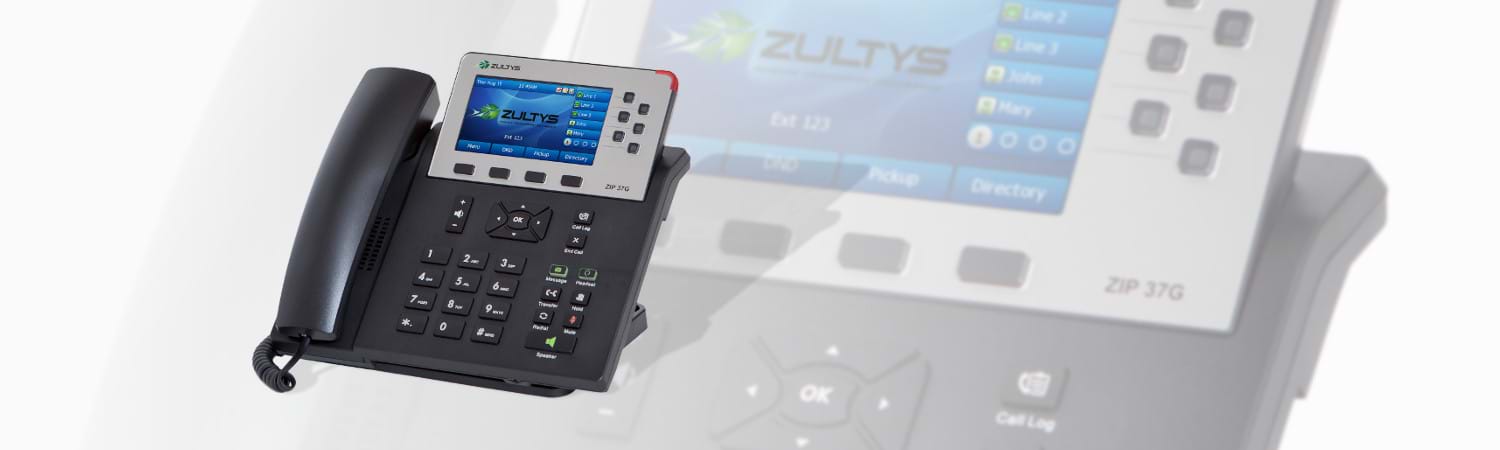
User reviews (0)