Website profiles · Technology insights · Alternatives

decorai.io

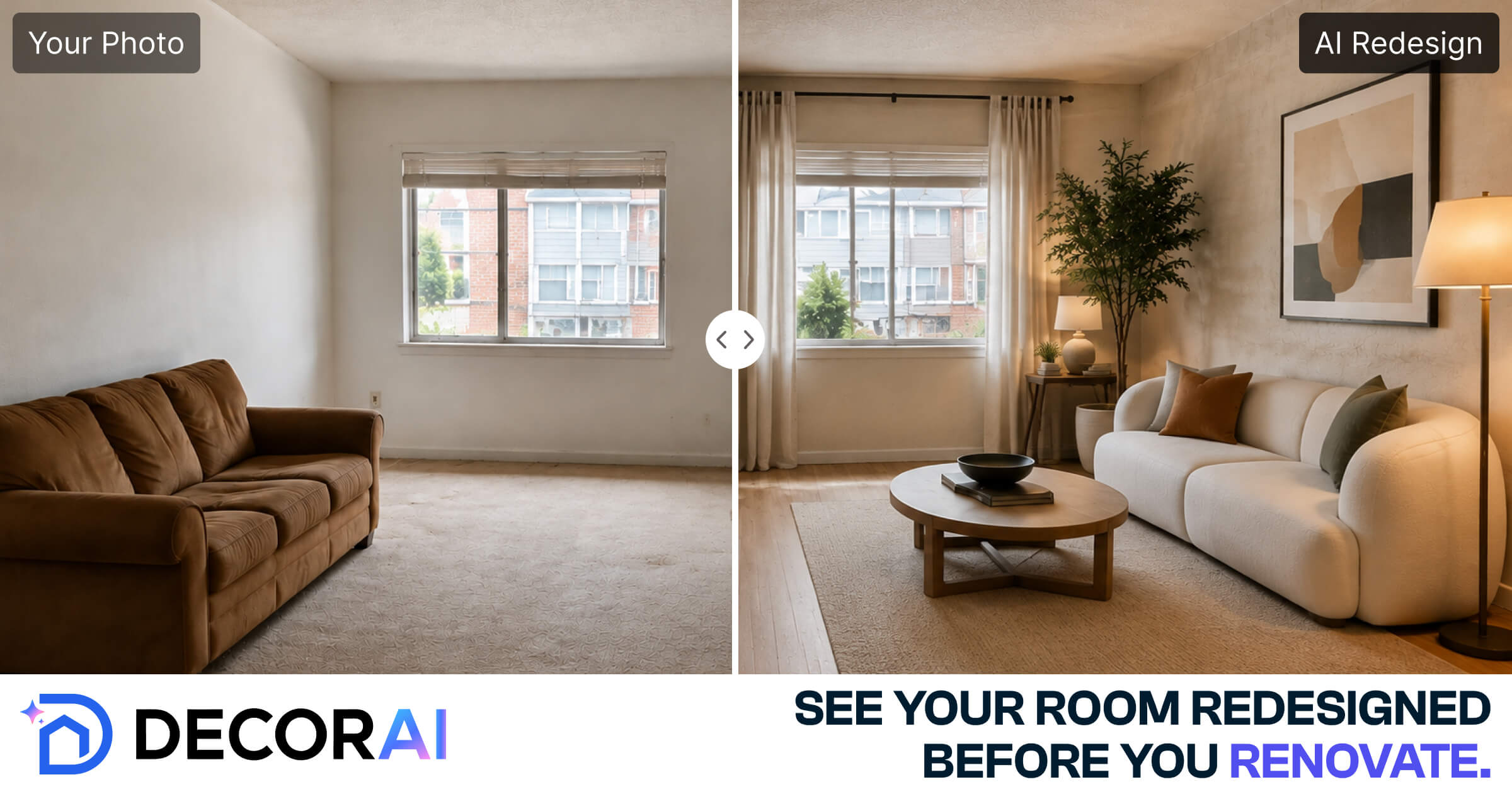
Upload a photo of any room, kitchen, exterior, or garden and get a photorealistic AI redesign in seconds. No design experience needed.

Paid content Multilingual
Visit website
Profile views 0 Outbound visits 0 Normal
DecorAI Full homepage screenshot

At a glance

Category
Design & Creativity
Language
English
Paid-content signal
Paid contentObserved
Registered
Unknown
Hosting
CloudflareInferred
HTTPS certificate trusted
PassedObserved
Last updated

Website review

This review may include AI-generated content and is not individually verified. Domain, certificate and other facts come from the observed data on this page.

What is DecorAI?

DecorAI is a web-based AI tool that redesigns interior and exterior spaces from a photo. You upload an image of a room, kitchen, bedroom, bathroom, exterior, garden or other space, choose a style, and it produces a photorealistic redesign in about 30 seconds. According to the site, it includes 175+ design styles and covers 129+ space types, with no design skills, software or downloads required.

Who it suits

The page positions it for a wide range of users, from people planning their own home to professionals who need quick visual options:

  • Homeowners, renters and DIY renovators testing ideas before committing to purchases or work.
  • Interior designers, stagers and real estate agents producing fast concept visuals for clients or listings.
  • Builders, remodelers and landscapers showing clients possible directions for a space.
  • Airbnb hosts and property managers exploring furnishing or refresh options.

What the site emphasizes

Listed features include 3 free designs to start, unlimited designs on paid plans, four designs per click, 4x upscaling, no watermarks, commercial use, and private photos. These are the product's stated capabilities; how well the output matches a real renovation still depends on the photo quality and the style chosen.

A practical next step

If you are considering a kitchen or living-room refresh, upload a well-lit, wide-angle photo of the current space and try two or three distinct styles. Compare the results as idea starters rather than final plans, then use the strongest direction to guide measurements, materials and quotes from contractors.

How do I get my first AI redesign using a photo of my room?

Upload a photo of the room, choose a style, and generate the redesign. DecorAI describes this as a three-step process that takes about 30 seconds, with 175+ styles covering interiors, exteriors and gardens. The site says no design skills or software installation are needed, and it offers three free designs to start.

A practical first run

  1. Photograph the whole room. Stand in a corner or doorway, hold the phone level and turn on the lights. Include the floor and ceiling edges where possible.
  2. Remove visual clutter. Tidy loose objects or crop them out; the AI reads the existing furniture and layout as part of the scene.
  3. Pick one style that matches a real decision. If you are choosing paint and furniture, start with a style close to your taste rather than an extreme one, so the result stays useful.
  4. Generate and compare. The site advertises four designs per click, so judge them side by side: which one keeps your room's proportions and light, and which merely looks impressive?
  5. Use the result as a brief, not a blueprint. Note the colours, materials and furniture shapes you like, then check whether those items fit your actual room dimensions.

Who gets the most from it

  • Homeowners and renters can test a repaint or furniture layout before spending money. Renters should focus on changes they are allowed to make.
  • Real estate agents, stagers and Airbnb hosts can show a room's potential quickly, though any listing image should be clearly labelled as a concept, not a photo of the property as it stands.
  • Designers and remodelers can use it for early mood boards, then move to measured drawings for the actual build.

The trade-off is speed versus precision: an AI redesign suggests a look but does not verify measurements, structural constraints or product availability. Treat the first output as a conversation starter, then shortlist two directions and price the changes before committing.

Can I use DecorAI redesigns for real estate listings or client presentations?

Yes. DecorAI is built for exactly these uses: the site lists real estate agents, property managers, home stagers and interior designers among its intended audiences, and states that commercial use is included and results come without watermarks. You upload a photo of a room, kitchen, exterior or garden, pick from 175+ styles, and get a photorealistic redesign in about 30 seconds. Three free designs let you test the output quality before committing.

How each audience would use it

  • Real estate agents: Redesign a dated living room or kitchen photo to show buyers the potential of a listing, or refresh exterior shots for marketing. Fast turnaround matters when a listing goes live on short notice.
  • Interior designers and stagers: Produce quick concept visuals for a client meeting before investing in detailed renders. Treat them as conversation starters, not final deliverables.
  • Property managers and Airbnb hosts: Show owners or guests how a unit could look after furnishing or a refresh, without a photo shoot.

Practical cautions

  • Label AI visuals as concepts. In most markets, presenting an AI-altered image as the actual condition of a property can mislead buyers or clients. Caption them as "redesign concept" or "potential vision."
  • Check local rules. Some MLSs and advertising regulators have rules about altered listing images; confirm before publishing.
  • Verify fidelity. AI output can move walls or change window placement, so review each image against the real space before showing it to anyone making a decision.

For broader guidance on presenting property visuals, see National Association of Realtors.

Next step: run one real listing photo through a style close to the property's target buyer, then compare it side by side with the original to judge whether the result is accurate enough to publish.

Does DecorAI offer a free trial, and what do paid plans include?

Yes. DecorAI offers a free starting point of three designs before any payment, and its paid tier is presented as a single plan that unlocks the full toolset rather than a ladder of feature-limited tiers.

What the free start covers

According to the site, you can upload a photo of a room, kitchen, exterior or garden, pick a style, and generate a photorealistic redesign without design skills or installed software. The three free designs let you test whether the output style suits your space before committing.

What the paid plan adds

The page's feature comparison lists these as included with the paid plan:

  • Unlimited designs
  • 175+ design styles and 129+ space types
  • Four designs generated per click
  • 4x upscaling for higher-resolution output
  • No watermarks
  • Commercial use rights
  • Private handling of your uploaded photos
  • Works on any device, results in about 30 seconds

Who each option suits

The free designs fit a homeowner or renter testing one room, or a DIY renovator curious about a single concept. The paid plan makes more sense for people producing images repeatedly or commercially: interior designers and stagers building client mood boards, real estate agents and Airbnb hosts preparing listing visuals, or contractors and furniture retailers showing options. Commercial use rights and watermark-free output are the practical dividing lines for that group.

A useful next step

Run one real photo of your own space through the free designs and judge the realism and style fit first. If you need multiple variations per project or clean images for clients or listings, the paid plan's unlimited output and commercial terms are the deciding factors. Current pricing is listed on DecorAI.

How realistic are the AI-generated redesigns compared to traditional 3D renders?

DecorAI's own page presents its output as "photorealistic" redesigns of an uploaded photo, produced in about 30 seconds, with 4x upscaling and four designs per click. That is a fast visualisation of a real space, not the same product as a traditional 3D render, which is built from a measured model and can be inspected from any angle.

Where the two approaches differ

Aspect Photo-based AI redesign (as described by DecorAI) Traditional 3D render
Starting point A photo of the existing room, kitchen, exterior or garden A modelled space with dimensions and materials
Realism Convincing surface look and lighting on the photographed room Physically consistent geometry, but stylised unless carefully lit
Speed Seconds per set of options Hours to days of modelling and rendering
Viewpoints Essentially the camera angle you uploaded Any angle, walkthroughs, fly-throughs
Accuracy to real products Style-level, not a specific sofa or tile you can order Can match exact furniture and finishes
Best use Quick direction, client moodboards, listing and staging visuals Construction, procurement, client sign-off on detail

The practical trade-off: AI output tends to look more "real" at a glance because it works from your actual photograph, including your windows, ceiling height and light. A 3D render is more truthful about what can be built, but often looks flatter or more artificial unless heavily produced.

A concrete scenario

A homeowner deciding whether to repaint a living room and replace a sofa can upload a phone photo, pick a style, and compare four versions in under a minute — enough to rule options in or out before spending on samples. A kitchen fitter quoting cabinetry needs dimensions and specific door fronts, so a render or measured drawing remains the right tool at that stage.

How to judge realism for yourself

Use the three free designs DecorAI offers to test a room you know well, then check three things: whether wall lines and window positions stay put, whether shadows fall consistently, and whether materials read as plausible up close rather than only in a thumbnail. If those hold, the images work well for early decisions; if you need to specify products or verify buildability, pair them with a measured render.

Are my uploaded photos kept private, and can I use the results commercially?

Yes. DecorAI states that your photos stay private and that commercial use is included in its plan. Both points appear in the product's own feature list, so treat them as the vendor's stated terms rather than an independently verified guarantee.

What this means in practice

  • Privacy: The site says "Your Photos Stay Private." For a real client project, it is still worth reading the full privacy policy and any data-retention details before uploading sensitive images, such as an occupied home or an unpublished listing.
  • Commercial use: "Commercial Use Included" suggests you can use generated redesigns in client work, marketing or listings. If you are a designer, stager or agent billing clients, confirm the licence terms cover your specific use (for example, resale or advertising).

Who cares most

User Why it matters
Interior designers and stagers Client photos and commercial deliverables are core to the work
Real estate agents and Airbnb hosts Listing images are public and commercially used
Homeowners and renters Personal photos of private spaces
Photographers Images may carry their own rights

Next step

Before a paid client project, upload a non-sensitive test photo, generate a redesign, and check the privacy and licence wording on the DecorAI pricing page alongside the site's policy pages. If the terms are unclear for your use case, ask the vendor directly in writing.

Related questions

More questions →
What Types of Spaces and Design Styles Does DecorAI Support?

DecorAI supports 129+ space types and 175+ design styles, covering interiors (living rooms, kitchens, bedrooms, bathrooms), exteriors, and gardens. You upload a photo of the space, pick a style, and get a photorealistic redesign in about 30 seconds. It's built for anyone from homeowners and renters to interior designers, real estate agents, and contractors—no design skills or software required.

Spaces DecorAI Covers

The platform groups its 129+ space types into three broad categories:

Category Examples from the site
Interior rooms Living room, kitchen, bedroom, bathroom
Exterior Building exteriors
Outdoor / landscape Gardens

The homepage also names a wider set of use cases beyond the core rooms, including offices and workplaces, restaurants and cafés, retail stores, hotels and hospitality spaces, and pools and outdoor builds. These are listed among the audiences the tool is "built for," so treat them as supported scenarios rather than a guarantee that every niche space type produces equally strong results.

Who it's designed for

The site lists a long roster of user types, which is a useful signal of the range of spaces it aims to handle:

  • Residential: homeowners, renters, DIY renovators, house flippers, property investors
  • Professional: interior designers, architects, home builders, contractors, remodelers, home stagers
  • Real estate: agents, property managers, property photographers, property developers
  • Hospitality & commercial: Airbnb hosts, hotel and hospitality designers, restaurant and café owners, retail store designers, office and workplace designers
  • Trade & retail: furniture retailers, kitchen and bathroom designers, cabinet makers, flooring and tile retailers, lighting showrooms, garden centres

If your space falls outside these categories—say, a highly unusual industrial structure—it's worth testing with the free designs before committing.

Design Styles: 175+ Options

DecorAI advertises 175+ AI design styles, described as "175 AI Design Styles for Every Home." The site doesn't publish a full style list on the pages reviewed, so the practical move is to open the app and browse the style picker directly. With that many options, you can generally expect coverage across common directions like modern, minimalist, traditional, and similar residential aesthetics—but confirm the specific style you want inside the tool rather than assuming.

How the Space-and-Style Match Works

The workflow is three steps, and the style choice is the main creative input:

  1. Upload a photo of the room, kitchen, exterior, or garden.
  2. Choose a style from the 175+ options.
  3. Generate — the AI returns a photorealistic redesign in roughly 30 seconds.

Each click produces 4 designs, so you can compare variations of the same style before deciding. A 4x upscaling feature is included for higher-resolution output, and results come with no watermarks.

A concrete example

Suppose you're an Airbnb host with a dated living room. You photograph the room, upload it, and select a style. Within about 30 seconds you get four photorealistic versions of that same room in the new style. You can then repeat with a different style to compare directions—useful for deciding on a refresh before spending on furniture or renovation.

Practical Conditions to Know Before You Start

  • Free entry point: You can start with 3 free designs, which is enough to test whether your space type and preferred style are well supported.
  • No setup: Nothing to download or install; it works on any device.
  • Privacy: The site states your photos stay private.
  • Commercial use: Included, which matters if you're an agent, stager, or designer producing client-facing visuals.
  • One plan, every tool: The feature list (unlimited designs, 175+ styles, 129+ spaces, 4x upscaling, 4 designs per click, no watermarks) is presented as included rather than tiered—but check the pricing page for current plan details, since the reviewed pages don't specify limits or costs.

Quick Decision Guide

  • Your space is a standard room, exterior, or garden → well within the advertised 129+ types; start with the 3 free designs.
  • You need a specific style → browse the 175+ style picker in the app first; the site doesn't publish the full list.
  • You're producing client or listing visuals → commercial use and no watermarks are included, and 4 designs per click speeds up comparison.
  • Your space is unusual or commercial-niche → test one free design before relying on it for a project.
What Does DecorAI's Free Trial Include and What Do Paid Plans Add?

DecorAI lets you generate 3 free designs before paying, which is enough to test the output quality on your own photo. Paid plans add unlimited designs, watermark removal, 4x upscaling, four designs per click, and commercial use rights. The site does not publish prices on the pages reviewed here, so check the Pricing page for current plan costs and any differences between tiers.

What the Free Trial Covers

The free trial is a usage allowance rather than a separate product tier. According to DecorAI's site, starting free gives you:

  • 3 designs to generate from your uploaded photos
  • Access to the full style library while generating those designs — the site advertises 175+ styles and 129+ space types
  • The same three-step workflow paid users follow: upload a photo, pick a style, get a photorealistic redesign in about 30 seconds
  • No software to download or install; it runs in the browser on any device

What the free designs do not appear to include, based on the feature list that distinguishes paid access: watermark-free output, 4x upscaling, four designs per click, and commercial use rights. Treat those as paid-plan features unless the Pricing page says otherwise.

A Practical Way to Spend the 3 Free Designs

Because the allowance is small, use it to answer the question you actually care about: does the AI preserve the structure of your space?

  1. Design 1 — your real room. Upload a photo of the room you intend to redesign and pick a style close to what you want. Check whether walls, windows, and furniture placement stay recognizable.
  2. Design 2 — a hard case. Use a room with awkward features (odd angles, small windows, clutter). This shows how the tool handles spaces that aren't showroom-perfect.
  3. Design 3 — a different space type. If you also care about exteriors or gardens, test one of those, since results can vary by category.

Expected result: after three generations you'll know whether the realism and style range meet your bar before committing to a plan.

What Paid Plans Add

The site's feature comparison lists these as included capabilities:

Capability Free trial Paid plans
Designs 3 to start Unlimited
Watermarks Not listed as removed No watermarks
Resolution Standard 4x upscaling
Designs per generation Not specified 4 designs per click
Commercial use Not listed Included
Styles and space types 175+ styles, 129+ spaces Same library
Platforms Browser, any device Browser, any device

The headline paid benefits are volume (unlimited designs), presentation quality (no watermarks, 4x upscaling), speed (four options per click instead of iterating one at a time), and licensing (commercial use).

Who Each Tier Fits

  • Homeowners and renters doing a one-off refresh: the 3 free designs may be enough to visualize a single room. Upgrade only if you want clean, high-resolution images to share with a contractor or partner.
  • DIY renovators comparing options: four designs per click and unlimited generations matter more here, since you'll likely test many styles for the same space.
  • Interior designers, stagers, real estate agents, and photographers: commercial use rights and watermark-free, upscaled output are the deciding features. The site explicitly lists these professions among its users, and commercial use is only listed under paid access.
  • Airbnb hosts and property managers: unlimited designs help when you're refreshing multiple listings; the free allowance runs out quickly across several properties.

Limits to Confirm Before Paying

The reviewed pages don't state prices, billing periods, or whether plan tiers differ beyond the features above. Before upgrading:

  • Open the Pricing page and check the cost per plan and billing cycle.
  • Confirm whether "unlimited designs" has any fair-use cap.
  • Confirm the commercial use terms in writing if you plan to use output for client work or listings.

If your only goal is to see whether AI redesign suits your taste, the 3 free designs answer that without any payment. If you need clean, high-resolution, licensable images at volume, the paid feature set — not the price — is what you're buying, so verify the price last.

Are My Uploaded Photos Private and Can I Use DecorAI Results Commercially?

DecorAI states that your photos stay private and that commercial use is included with its paid plan. The free trial (3 designs) is best treated as a way to test output quality, not as a license for client-facing or commercial work. For anything you publish, sell, or hand to a client, confirm the current terms on DecorAI's pricing page and any linked terms before you rely on them.

What the site says about privacy

DecorAI's feature list includes "Your Photos Stay Private" alongside "No Watermarks" and "Commercial Use Included." These are product claims, not a published privacy policy. The page does not spell out retention periods, whether images are used for model training, or how deletion works.

Practical reading: the claim tells you the intended default, but it is not a substitute for the actual policy. If you are uploading photos of occupied homes, client properties, or anything under an NDA, check the privacy policy and terms linked from the site before uploading, and get client consent where the property is not yours.

What the site says about commercial use

"Commercial Use Included" appears in the same feature block, and the site lists a separate pricing page. The page evidence does not specify which plan tier carries the commercial license, whether the free trial outputs are covered, or any restrictions on resale or redistribution.

So the safe sequence is:

  1. Open the pricing page and identify which plan includes commercial use.
  2. Confirm whether the 3 free designs are excluded from commercial rights.
  3. Keep a record of the plan and terms in effect when you generate images you intend to use commercially.

Who this matters for

The site names a long list of professional users, and those are exactly the cases where licensing matters most:

Use case Why the license question matters
Real estate listings and property marketing Images are published publicly to sell or rent a property
Designer client proposals and mood boards Output is delivered to a paying client
Airbnb and rental listings Images represent a commercial booking
Home staging and remodeling portfolios Images promote a service
Furniture, flooring, and lighting retailers Images may be used in sales material

For personal use—planning your own renovation, testing paint or furniture ideas—the privacy claim is the main thing to check, and the commercial license is largely irrelevant.

How to verify before you commit

  • Read the pricing page for the plan that includes commercial use, and note whether the free trial is excluded.
  • Look for a privacy policy or terms of service link and check image retention and training-use language.
  • Test with a non-sensitive photo first: upload a sample room, generate a design, and confirm the output has no watermark and looks usable at the resolution you need.
  • For client work, get written consent from the property owner before uploading their photos, regardless of what the platform claims.

The short answer

Privacy: DecorAI advertises private photos, but the specific policy terms are not on the page reviewed here—verify them before uploading sensitive images. Commercial use: advertised as included, tied to a paid plan, with the free trial's status unconfirmed. Treat both as claims to confirm on the official pricing and policy pages, not as guarantees.

How to Use DecorAI to Redesign a Room From a Photo

DecorAI turns a photo of a room, kitchen, exterior, or garden into a photorealistic redesign in about 30 seconds. You upload a photo, pick a style, and the AI generates the new look — no design skills, software download, or install required. You can start with 3 free designs before deciding whether to continue.

What You Need Before Starting

  • A clear photo of the space you want to redesign (room, kitchen, bedroom, bathroom, exterior, garden, and other space types are supported).
  • A browser or the DecorAI app — it works on any device.
  • A style direction in mind, though you can browse the 175+ available styles if you don't have one.

Step-by-Step: From Photo to Redesign

1. Upload your photo

Open the DecorAI app and upload a photo of the space. The site states it covers 129+ space types, so interiors, exteriors, and gardens all work. A well-lit, unobstructed photo gives the AI the clearest starting point.

2. Choose a design style

Select from the 175+ styles included in the platform. If you're unsure, pick a style close to your goal — the point is to give the AI a clear direction rather than a vague one.

3. Generate and review

The redesign is produced in roughly 30 seconds. The platform generates 4 designs per click, so you get several options to compare in one pass rather than one at a time.

4. Refine and export

Results are photorealistic and come without watermarks, per the site. A 4x upscaling option is included for higher-resolution output. Commercial use is included in the plan, which matters if you're a designer, agent, or stager using the images professionally.

What You Get in One Plan

Feature Detail
Free start 3 free designs
Styles 175+
Space types 129+
Speed Results in ~30s
Output per click 4 designs
Upscaling 4x
Watermarks None
Commercial use Included
Privacy Your photos stay private
Software Nothing to download or install

Common Sticking Points

  • Blurry or cluttered photos limit how convincing the redesign looks — the AI can only work from what's in the image.
  • Style mismatch: if the first result isn't right, change the style rather than re-uploading the same photo with no new direction.
  • Free tier limits: the 3 free designs are a trial; ongoing use requires a plan. Check the pricing page for current terms before relying on it for a project.

Who This Fits

DecorAI is built for homeowners, renters, interior designers, architects, real estate agents, home stagers, remodelers, and similar roles — anyone who needs to visualize a space quickly without design software. If you need a fast visual starting point rather than a measured, build-ready plan, the photo-to-redesign flow covers that task in under a minute per attempt.

What Is DecorAI and What Does It Do?

DecorAI is an AI-powered interior and exterior design tool: you upload a photo of a room, kitchen, bedroom, bathroom, exterior, or garden, choose a style, and it generates a photorealistic redesign in about 30 seconds. It's built for people with no design experience, but it also serves designers, real estate agents, stagers, contractors, and other property professionals. Its value is fast visual exploration — seeing what a space could look like — not producing construction plans or handling purchases.

How It Works

The workflow is deliberately short. According to the site, it's three steps:

  1. Upload a photo of the space you want to redesign — any room, kitchen, exterior, or garden.
  2. Choose a style from the 175+ available design styles.
  3. Get a photorealistic redesign in roughly 30 seconds.

Nothing needs to be downloaded or installed, and it works on any device. The output is a rendered image, so you can compare directions before committing to a real renovation, a listing photo refresh, or a client presentation.

What It Covers

DecorAI is not limited to living rooms. The site lists 129+ space types, including:

Space category Examples
Interior rooms Living room, kitchen, bedroom, bathroom
Exterior House exteriors
Outdoor Gardens

That breadth is the main reason it appeals to both homeowners and professionals — the same tool can handle a single room refresh or an exterior and garden concept.

Who It's For

The site explicitly names a wide range of users, which tells you a lot about intended use cases:

  • Homeowners and renters — visualize a remodel or a rental makeover before spending money.
  • Interior designers, architects, and 3D visualization artists — generate concept directions quickly.
  • Real estate agents, property managers, home stagers, and photographers — produce attractive visuals for listings and marketing.
  • Builders, contractors, remodelers, and house flippers — align with clients or buyers on a look early.
  • Specialty trades and retailers — kitchen and bathroom designers, cabinet makers, flooring and tile retailers, lighting showrooms, garden centres, and furniture retailers.
  • Hospitality and commercial — restaurant, cafe, retail store, hotel, and office designers.

If your task is "show someone what this space could become," DecorAI fits. If your task is "produce a buildable plan or buy the furniture," it doesn't — it's a visualization layer, not a design-document or procurement service.

Key Features to Know Before You Start

The site's feature list includes several details worth checking against your needs:

  • 175+ styles and 129+ space types included in the plan.
  • 4 designs per click — you get multiple variations from one generation, which helps when comparing options.
  • 4x upscaling for higher-resolution output.
  • No watermarks on results.
  • Commercial use included — relevant if you're producing images for listings, client decks, or marketing.
  • Privacy — the site states your photos stay private.
  • No design skills required and nothing to install.

Pricing and Getting Started

The site offers 3 free designs to start, so you can test the quality on your own photo before committing. Paid tiers and feature comparisons are listed on the pricing page (decorai.io/pricing). Because plan limits and current prices can change, check that page directly for the latest terms rather than relying on secondhand summaries.

A practical way to evaluate it: upload one photo of a space you actually care about — your own living room, a listing you're marketing, or a client's kitchen — and generate a few styles. Judge the realism and whether the variations give you a usable direction. That single test will tell you more than any feature list about whether DecorAI fits your workflow.

Website Overview

Page metadata, canonical configuration and social previews work together to provide more consistent search and sharing presentation.

Domain and Registration

Unknown

DNS and Email

Nameservers are provided by Cloudflare, indicating managed DNS hosting. MX records point to the migadu.com email service. CAA records restrict which certificate authorities are authorized to issue certificates. No CNAME was found; the observed records resolve directly to addresses. SPF and DMARC are configured. DKIM status is unknown.

TLS and Certificates

The public key uses EC with 256 bits. The server supplied a complete certificate chain. No organization name is present in the certificate; the available fields are consistent with domain validation. The certificate was issued within the Google Trust Services cloud or CDN ecosystem. The certificate's total validity is about 90 days, consistent with a short renewal cycle.

HTTP and Browser Security

The response lacks these common security headers: HSTS, CSP, Permissions-Policy. No X-Powered-By header was found, reducing one common source of backend fingerprinting information. The cf-ray response header indicates a CDN or caching proxy in the delivery path. No obvious internal addresses or debug information were found in the headers. The Server header identifies cloudflare without an exact version.

Technology Stack Analysis

The public page identifies WordPress, Cloudflare without precise versions, leaving fewer clues for version-specific scanning.

Search and Social Sharing

Twitter Card metadata is configured. JSON-LD includes Organization data, helping describe the organization as an entity. The page declares 9 language or regional alternatives using hreflang. The title has 50 characters, within a common display range. A meta description is present, with 134 characters.

Hosting and Email

DNSCloudflare
HostingCloudflare
Emailmigadu.com
Approximate IP geolocation (inferred; a CDN or proxy may differ from the origin server) Location unknown Inferred 104.21.44.40

Registration details

RDAP / WHOIS

Unknown

DNS records

DNS

TypeNameValueTTLPriority
Adecorai.io104.21.44.40300—
Adecorai.io172.67.194.204300—
AAAAdecorai.io2606:4700:3032::6815:2c28300—
AAAAdecorai.io2606:4700:3035::ac43:c2cc300—
MXdecorai.ioaspmx1.migadu.com30010
MXdecorai.ioaspmx2.migadu.com30020
NSdecorai.iojihoon.ns.cloudflare.com86400—
NSdecorai.iokiki.ns.cloudflare.com86400—
TXTdecorai.iobrevo-code:edf3f5cde34072af12975f1cc7354ed4300—
TXTdecorai.iogoogle-site-verification=E-ymMWy51H-d-U3vKSNu9Oakd-7laOd9EvcgAEO9EWI300—
TXTdecorai.iogoogle-site-verification=ku7S9Fg0JFC2E1iOWB41iBh1gDEcI76742wahk9lfyA300—
TXTdecorai.iohosted-email-verify=uzkd64pv300—
TXTdecorai.iov=spf1 include:amazonses.com include:spf.migadu.com ~all300—
CAAdecorai.io0 issue "comodoca.com"300—
CAAdecorai.io0 issue "digicert.com; cansignhttpexchanges=yes"300—
CAAdecorai.io0 issue "globalsign.com"300—
CAAdecorai.io0 issue "letsencrypt.org"300—
CAAdecorai.io0 issue "pki.goog; cansignhttpexchanges=yes"300—
CAAdecorai.io0 issue "sectigo.com"300—
CAAdecorai.io0 issue "ssl.com"300—
CAAdecorai.io0 issuewild "comodoca.com"300—
CAAdecorai.io0 issuewild "digicert.com; cansignhttpexchanges=yes"300—
CAAdecorai.io0 issuewild "globalsign.com"300—
CAAdecorai.io0 issuewild "letsencrypt.org"300—
CAAdecorai.io0 issuewild "pki.goog; cansignhttpexchanges=yes"300—
CAAdecorai.io0 issuewild "sectigo.com"300—
CAAdecorai.io0 issuewild "ssl.com"300—
DMARC_dmarc.decorai.iov=DMARC1; p=quarantine; rua=mailto:[email protected]300—

TLS and certificates

TLS / SSL

AssessmentNormal configuration
Supported protocolsTLSv1.2、TLSv1.3
Negotiated protocolTLSv1.3
Certificate subjectdecorai.io
IssuerGoogle Trust Services
Valid until2027-01-08T10:01 · Remaining when checked: 78 days
Verification detailsCertificate trust: Passed · Hostname match: Passed

HTTP response headers

HTTP

HeaderValue
content-typetext/html; charset=UTF-8
cache-controlno-store, s-maxage=0
servercloudflare
x-frame-optionsSAMEORIGIN
x-content-type-optionsnosniff
referrer-policysame-origin

Identified technologies

WordPressCloudflare

Pages, Search and Sharing

Meta descriptionUpload a photo of any room, kitchen, exterior, or garden and get a photorealistic AI redesign in seconds. No design experience needed.
Canonical URLhttps://decorai.io/
LanguageEnglish (default) · Multilingual
Twitter Cardsummary_large_image
All bots 1 allowed · 13 disallowed
  • Allow/wp-admin/admin-ajax.php
  • Disallow/wp-admin/
  • Disallow/wp-login.php
  • Disallow/xmlrpc.php
  • Disallow/wp-content/plugins/
  • Disallow/wp-content/cache/
  • Disallow/wp-content/upgrade/
  • Disallow/wp-content/backup/
  • Disallow/cgi-bin/
  • Disallow/trackback/
  • Disallow/comments/
  • Disallow/author/
  • Disallow/search/
  • Disallow/?s=
gptbot 2 allowed · 5 disallowed
  • Allow/
  • Allow/wp-admin/admin-ajax.php
  • Disallow/wp-admin/
  • Disallow/wp-login.php
  • Disallow/xmlrpc.php
  • Disallow/search/
  • Disallow/?s=
oai-searchbot 2 allowed · 5 disallowed
  • Allow/
  • Allow/wp-admin/admin-ajax.php
  • Disallow/wp-admin/
  • Disallow/wp-login.php
  • Disallow/xmlrpc.php
  • Disallow/search/
  • Disallow/?s=
chatgpt-user 2 allowed · 5 disallowed
  • Allow/
  • Allow/wp-admin/admin-ajax.php
  • Disallow/wp-admin/
  • Disallow/wp-login.php
  • Disallow/xmlrpc.php
  • Disallow/search/
  • Disallow/?s=
claudebot 2 allowed · 5 disallowed
  • Allow/
  • Allow/wp-admin/admin-ajax.php
  • Disallow/wp-admin/
  • Disallow/wp-login.php
  • Disallow/xmlrpc.php
  • Disallow/search/
  • Disallow/?s=
claude-user 2 allowed · 5 disallowed
  • Allow/
  • Allow/wp-admin/admin-ajax.php
  • Disallow/wp-admin/
  • Disallow/wp-login.php
  • Disallow/xmlrpc.php
  • Disallow/search/
  • Disallow/?s=
claude-searchbot 2 allowed · 5 disallowed
  • Allow/
  • Allow/wp-admin/admin-ajax.php
  • Disallow/wp-admin/
  • Disallow/wp-login.php
  • Disallow/xmlrpc.php
  • Disallow/search/
  • Disallow/?s=
anthropic-ai 2 allowed · 5 disallowed
  • Allow/
  • Allow/wp-admin/admin-ajax.php
  • Disallow/wp-admin/
  • Disallow/wp-login.php
  • Disallow/xmlrpc.php
  • Disallow/search/
  • Disallow/?s=
perplexitybot 2 allowed · 5 disallowed
  • Allow/
  • Allow/wp-admin/admin-ajax.php
  • Disallow/wp-admin/
  • Disallow/wp-login.php
  • Disallow/xmlrpc.php
  • Disallow/search/
  • Disallow/?s=
perplexity-user 2 allowed · 5 disallowed
  • Allow/
  • Allow/wp-admin/admin-ajax.php
  • Disallow/wp-admin/
  • Disallow/wp-login.php
  • Disallow/xmlrpc.php
  • Disallow/search/
  • Disallow/?s=
google-extended 2 allowed · 5 disallowed
  • Allow/
  • Allow/wp-admin/admin-ajax.php
  • Disallow/wp-admin/
  • Disallow/wp-login.php
  • Disallow/xmlrpc.php
  • Disallow/search/
  • Disallow/?s=
applebot-extended 2 allowed · 5 disallowed
  • Allow/
  • Allow/wp-admin/admin-ajax.php
  • Disallow/wp-admin/
  • Disallow/wp-login.php
  • Disallow/xmlrpc.php
  • Disallow/search/
  • Disallow/?s=
amazonbot 2 allowed · 5 disallowed
  • Allow/
  • Allow/wp-admin/admin-ajax.php
  • Disallow/wp-admin/
  • Disallow/wp-login.php
  • Disallow/xmlrpc.php
  • Disallow/search/
  • Disallow/?s=
meta-externalagent 2 allowed · 5 disallowed
  • Allow/
  • Allow/wp-admin/admin-ajax.php
  • Disallow/wp-admin/
  • Disallow/wp-login.php
  • Disallow/xmlrpc.php
  • Disallow/search/
  • Disallow/?s=
facebookbot 2 allowed · 5 disallowed
  • Allow/
  • Allow/wp-admin/admin-ajax.php
  • Disallow/wp-admin/
  • Disallow/wp-login.php
  • Disallow/xmlrpc.php
  • Disallow/search/
  • Disallow/?s=
bytespider 2 allowed · 5 disallowed
  • Allow/
  • Allow/wp-admin/admin-ajax.php
  • Disallow/wp-admin/
  • Disallow/wp-login.php
  • Disallow/xmlrpc.php
  • Disallow/search/
  • Disallow/?s=
ccbot 2 allowed · 5 disallowed
  • Allow/
  • Allow/wp-admin/admin-ajax.php
  • Disallow/wp-admin/
  • Disallow/wp-login.php
  • Disallow/xmlrpc.php
  • Disallow/search/
  • Disallow/?s=
cohere-ai 2 allowed · 5 disallowed
  • Allow/
  • Allow/wp-admin/admin-ajax.php
  • Disallow/wp-admin/
  • Disallow/wp-login.php
  • Disallow/xmlrpc.php
  • Disallow/search/
  • Disallow/?s=
cohere-training-data-crawler 2 allowed · 5 disallowed
  • Allow/
  • Allow/wp-admin/admin-ajax.php
  • Disallow/wp-admin/
  • Disallow/wp-login.php
  • Disallow/xmlrpc.php
  • Disallow/search/
  • Disallow/?s=
mistralai-user 2 allowed · 5 disallowed
  • Allow/
  • Allow/wp-admin/admin-ajax.php
  • Disallow/wp-admin/
  • Disallow/wp-login.php
  • Disallow/xmlrpc.php
  • Disallow/search/
  • Disallow/?s=
duckassistbot 2 allowed · 5 disallowed
  • Allow/
  • Allow/wp-admin/admin-ajax.php
  • Disallow/wp-admin/
  • Disallow/wp-login.php
  • Disallow/xmlrpc.php
  • Disallow/search/
  • Disallow/?s=
youbot 2 allowed · 5 disallowed
  • Allow/
  • Allow/wp-admin/admin-ajax.php
  • Disallow/wp-admin/
  • Disallow/wp-login.php
  • Disallow/xmlrpc.php
  • Disallow/search/
  • Disallow/?s=
diffbot 2 allowed · 5 disallowed
  • Allow/
  • Allow/wp-admin/admin-ajax.php
  • Disallow/wp-admin/
  • Disallow/wp-login.php
  • Disallow/xmlrpc.php
  • Disallow/search/
  • Disallow/?s=
timpibot 2 allowed · 5 disallowed
  • Allow/
  • Allow/wp-admin/admin-ajax.php
  • Disallow/wp-admin/
  • Disallow/wp-login.php
  • Disallow/xmlrpc.php
  • Disallow/search/
  • Disallow/?s=

User reviews (0)

  • No reviews yet.