Website profiles · Technology insights · Alternatives

fenced.ai

Monitor your child's online activity with fenced.ai and keep them safe from online threats with fenced.ai, the best parental control software which you can trust.

Paid content
Visit website
Profile views 5 Outbound visits 1 Normal
fenced Full homepage screenshot

At a glance

Category
Artificial Intelligence
Language
English
Paid-content signal
Paid contentObserved
Registered
2020
Hosting
CloudflareInferred
HTTPS certificate trusted
PassedObserved
Last updated

Website review

This review may include AI-generated content and is not individually verified. Domain, certificate and other facts come from the observed data on this page.

What is fenced.ai?

fenced.ai is a parental control and device-monitoring service. Its own description frames it as software for watching a child's online activity and responding to online threats, and the site extends the same idea to two other audiences: schools monitoring institution-owned devices and employers monitoring company-provided devices.

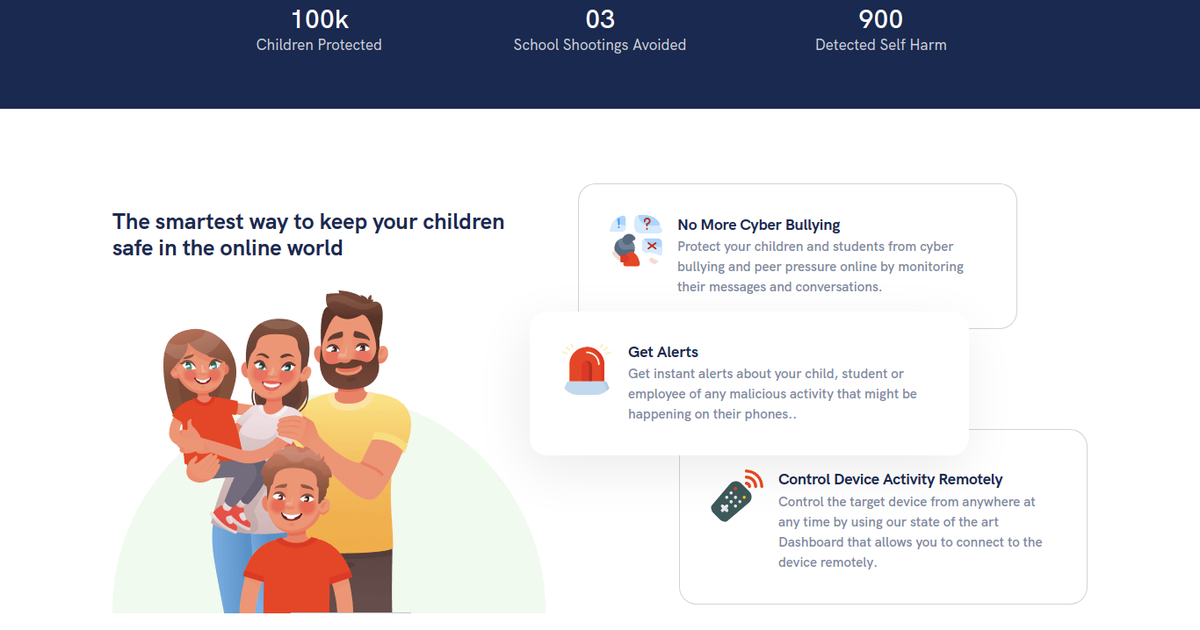
The core job is visibility plus alerts. The page highlights monitoring messages and conversations for cyberbullying, instant alerts about malicious activity, and remote device control through a dashboard. It also presents a school use case (creating a managed learning environment on institution-owned devices) and an employee use case (seeing how company devices are used), so it is best understood as monitoring software with several deployment contexts rather than a child-only tool.

Who it is for

  • Parents who want ongoing oversight of a child's phone or internet use, including screen-time limits and alerts.
  • Schools that issue devices and want real-time activity monitoring on them.
  • Employers managing company-owned devices used by mobile employees.

Trade-offs to weigh

  • Monitoring is most defensible when the device is owned by the parent, school or employer and the person using it knows it is monitored. Covert monitoring of an adult's personal phone raises legal and trust problems that vary by jurisdiction.
  • Alerts and dashboards create work: someone has to review them and decide what warrants a conversation versus a restriction.
  • A parent testimonial on the page describes using it to keep screen time in check after concerns about gaming and grades, which is one parent's account, not a guarantee. Another reviewer reports that data stopped loading into the dashboard after working fine initially — a reminder to test reliability during any trial period before relying on it.

Next step: check whether the devices you want to cover are supported and whether the monitoring you need (messages, screen time, remote control) matches the plan you would choose. Start at fenced.

How does fenced.ai help parents monitor their child's online activity?

fenced.ai is a parental control and monitoring tool aimed mainly at parents, but the same dashboard is also marketed to schools and employers. For parents, its core promise is visibility: install it on a child's device, then watch internet and message activity from a remote dashboard and receive alerts when something looks risky.

What parents can actually do with it

  • Monitor messages and conversations to catch cyberbullying or peer pressure, according to the site's feature descriptions.
  • Get instant alerts about potentially malicious or suspicious activity on the child's phone.
  • Control the device remotely from the dashboard rather than only reviewing activity after the fact.
  • Enforce screen-time limits — one parent testimonial on the page describes using it to cap daily screen time after a digital detox.

Where it fits in practice

Think of it as an oversight tool for a specific problem, not a set-and-forget app. A parent worried about a sudden drop in grades, late-night phone use or a child being targeted in group chats would install it, check the dashboard regularly and act on alerts. The site's parent testimonial from Andrea Renolds describes exactly that pattern: gaming crowding out schoolwork and health, followed by ongoing screen-time limits.

Trade-offs to weigh

The same capability that makes it useful can damage trust if a child or teen discovers covert monitoring. Decide in advance whether you will tell your child the app is installed, what you will do with what you find, and which alerts are worth acting on versus ignoring. The page also includes a critical testimonial from Ammy Chin noting that the app worked and then data stopped loading into the dashboard — a reminder that any monitoring tool depends on the device staying connected and the app staying functional, and that you should verify it is actually reporting before relying on it.

Next step

Before subscribing, open fenced and check the pricing page and the feature list for the specific platforms your child uses (Android, iOS, or both), since coverage and what can be monitored often differ by device type. If you mainly want screen-time limits rather than message monitoring, a narrower built-in tool like Apple Screen Time or Google Family Link may be enough; if you need message and alert coverage across several devices, a dedicated product like fenced.ai is the more relevant category.

Can fenced.ai be used by schools to monitor student devices?

Yes. fenced.ai explicitly markets a school solution: the site describes installing it on institution-owned devices and monitoring activity on those devices in real time, with the aim of maintaining a "digitally sound learning environment." The same platform is also pitched to parents and to employers for company-issued devices, so the school use case sits alongside those rather than being a separate product line.

H3 What schools would actually use it for

  • Monitoring messages and conversations to catch cyberbullying or peer pressure, based on the features listed on the page
  • Instant alerts when something potentially harmful appears on a monitored device
  • Remote control of device activity from a dashboard, so staff do not need physical access to each device
  • Real-time visibility across multiple institution-owned devices from one place

H3 Practical considerations before committing

  • Ownership and consent matter most. The school scenario on the page assumes devices owned by the institution. Monitoring a student's personal phone is a different legal and ethical situation, and in many places requires clear notice and consent from parents or guardians.
  • Decide who sees the data. A dashboard that surfaces private messages needs a written policy on which staff can access it, how long it is retained, and how incidents are escalated.
  • Expect false positives. Alerts about "malicious activity" or self-harm risk are signals, not verdicts; someone has to review them.
  • Test the dashboard before rolling out widely. One testimonial on the site from Ammy Chin praises the alerts but also reports a period where no data loaded into the dashboard, which is a reminder to confirm reliability on your own network and device mix during a pilot.

H3 A useful next step Run a small pilot: pick one year group or one set of loaner devices, install it, and compare what the dashboard reports against what teachers already observe over a few weeks. Decide in advance what would make you expand or stop. For general guidance on evaluating monitoring tools, see Common Sense Media and the FTC; for the vendor's own plan details, check fenced directly, since pricing and feature tiers are not something to assume from the homepage.

How can employers use fenced.ai to monitor employee devices?

Employers use fenced.ai as a monitoring and control tool for company-owned devices, not personal phones. According to the site, you install it on devices your organization provides, then track how those devices are being used from a remote dashboard. The stated aim is visibility into work-time activity and the ability to act on it, rather than blanket surveillance of whatever an employee does on their own hardware.

What the site says employers can do

  • Install fenced.ai on institution- or company-owned devices.
  • Monitor activity occurring on those devices in real time.
  • Control the device remotely from a centralized dashboard.
  • Receive instant alerts when activity matches something flagged as malicious or concerning.

A practical rollout

  1. Define the scope: which roles get company devices, and what counts as acceptable use.
  2. Tell employees in writing what is monitored, why, and when (for example, during work hours only).
  3. Install and configure the app on those specific devices.
  4. Assign someone to review alerts and dashboard activity on a regular schedule.
  5. Document how alerts are handled so monitoring leads to a consistent response, not ad hoc decisions.

H3. Trade-offs to weigh Monitoring can deter misuse of company equipment and speed up incident response. It can also damage trust, raise privacy and legal questions, and generate alert fatigue if too much is flagged. Decide in advance whether you need full activity visibility or only alerts for specific risks, and check what local law requires for employee monitoring and consent.

For comparison, employers sometimes look at broader workforce tools such as Teramind, while parental-control products like Qustodio target families instead. Fenced.ai's own framing spans parents, schools and employers, so confirm with the vendor that the employee-monitoring features you need are included in the plan you choose.

What features does fenced.ai offer to protect against cyberbullying?

fenced.ai's cyberbullying protection centers on monitoring a child's messages and conversations and then flagging harmful activity through alerts. The page presents this as one of its core safety functions: parents, schools, or employers install it on a device, and the dashboard surfaces what is happening there.

The specific features tied to cyberbullying

  • Message and conversation monitoring — the stated purpose is to catch cyberbullying and peer pressure in a child's or student's messages.
  • Instant alerts — notifications when the system detects malicious or concerning activity on the monitored phone.
  • Remote device control — a dashboard that lets you act on the device from anywhere, rather than only reading reports after the fact.
  • Screen-time oversight — one parent testimonial describes keeping daily screen time in check after a digital detox, which is adjacent to but not the same as bullying detection.

H3. Who it is built for The same monitoring approach is packaged for three audiences: parents watching a child's phone, schools managing institution-owned devices for a digitally sound learning environment, and employers overseeing company-issued devices. For cyberbullying specifically, the parent and school use cases are the relevant ones; the employee version is about device usage, not peer harassment.

H3. A practical scenario Say your 13-year-old has gone quiet after school and you suspect a group chat has turned hostile. With message monitoring and alerts enabled, you would get a notification pointing you to the conversation, then use the dashboard to review it and decide whether to restrict the app or device. Because the tool watches messages rather than only web history, it can catch bullying that happens inside chat apps — the place most of it occurs.

H3. What to weigh before relying on it Monitoring messages is intrusive, and its value depends on your child not knowing how to route around it or move to a device you have not installed it on. Alerts also flag activity; they do not tell you intent, so expect to interpret context yourself. One reviewer on the page, Ammy Chin, praised the alerting for suspicious activity, while another, Andrea Renolds, described using it mainly for screen-time limits — a reminder that the tool is broader than bullying alone. A third testimonial reports the dashboard stopped loading data, so plan a quick trial on your own devices before committing.

A sensible next step: check the pricing page at fenced to see what the subscription covers, and compare it with dedicated parental-control options such as Common Sense Media reviews before installing anything on a child's phone.

How much does a fenced.ai subscription cost?

fenced.ai does not publish specific subscription prices on its homepage. The site links to a dedicated pricing page, which is where you would find the current plans and costs: fenced.

What you can determine before checking the pricing page

  • The product is sold as a subscription, so expect recurring billing rather than a one-time purchase.
  • fenced.ai positions itself for three audiences: parents, schools and employers, and pricing may differ by use case or by the number of devices covered.
  • Because the homepage emphasizes monitoring messages, alerts and remote device control, the plan you need may depend on how many child or student devices you want to cover and which monitoring features you require.

Practical next step

Open the pricing page and compare plans by device count and included features, not just the headline number. A plan that covers one device may look cheaper than a family or school plan but cost more per device once you add the devices you actually need. If you are a parent monitoring one or two phones, check whether the entry plan includes alerts and message monitoring; if you are a school or employer, ask directly about institutional or bulk-device terms, since those are often quoted separately rather than listed on a public page.

For context on how this category of software is priced, other parental control services such as Qustodio and Bark publish tiered subscription pricing by number of devices or children, which makes them useful comparison points when you evaluate fenced.ai's quote.

Related questions

More questions →
Why fenced.ai Might Show No Data in the Dashboard

If your fenced.ai dashboard suddenly stops showing data, the most likely causes are a broken connection between the target device and the dashboard, an app that is no longer running or reporting on that device, or an account/subscription state that has interrupted monitoring. The fastest path is to confirm the target device is online and the app is still installed and active, then check your account status, and finally contact official support if data still does not load. One user review on the fenced.ai site describes exactly this situation: "The application worked fine then suddenly, no any kind of data was loaded into my dashboard" — so this is a known user-reported symptom rather than a one-off glitch.

What "no data" usually means

fenced.ai is described as a monitoring and control program: you install it on a device, and activity from that device is reported to a remote dashboard you can access from anywhere. That architecture matters for troubleshooting, because the dashboard itself does not collect anything — it only displays what the installed app sends. If nothing is arriving, the problem is almost always upstream of the dashboard.

The site's own description of the product supports this: it is installed "on the device owned by your institution" (for schools) or on "your employees' devices" / your child's smartphone, and you then "monitor all the activities occurring on the devices in real-time." Real-time monitoring depends on a live link, so any break in that link shows up as an empty dashboard.

Check these in order

1. Is the target device online and powered on?

Monitoring data can only be reported while the device has connectivity. A device that is off, in airplane mode, out of battery, or on a dead Wi-Fi/cellular connection will produce no new data. Confirm the device is on and connected before assuming the software failed.

2. Is the fenced.ai app still installed and running?

This is the most common real-world cause. If the app was uninstalled, force-stopped, restricted by battery-saving settings, or had its permissions revoked, it stops reporting. Reopen the app on the target device and confirm it is active rather than suspended in the background.

3. Has the device changed in a way that breaks monitoring?

A new phone, a factory reset, an OS update, or a change of device owner can all interrupt the link between the app and your dashboard. If the child, student, or employee switched devices, the app needs to be set up again on the new one.

4. Is your account or subscription in a valid state?

fenced.ai has a pricing page and uses a subscription model, so an expired or lapsed subscription is a plausible reason monitoring stops. Log in to your account and confirm the subscription tied to that device is still active. (The site does not publish specific plan prices or terms in the material available here, so check the pricing page directly for current details.)

5. Is it a dashboard-side or temporary issue?

Sometimes the device is fine and the problem is on the reporting side. Try logging out and back in, refreshing the dashboard, or checking from a different browser or network. If other devices on the same account still report data, the issue is isolated to one device; if none report, it points to the account or service side.

Quick diagnostic table

Symptom Likely cause First action
No data from one device only App stopped, device offline, or permissions revoked Check device online status and reopen the app
No data from any device Account/subscription issue or service-side problem Verify subscription status, then contact support
Data stopped after a device change App not reinstalled on new device Reinstall and reconfigure on the new device
Data stopped after an update OS update broke background permissions Re-grant permissions and disable battery restrictions

When to contact support

If the device is online, the app is installed and running, permissions are granted, and your subscription is active — but the dashboard still shows nothing — the issue is beyond what you can fix locally. At that point, contact fenced.ai support directly with the device type, when the data stopped, and what you have already checked. The user review quoted above shows this symptom can occur even after the app "worked fine," which is exactly the kind of case support needs to investigate on their end.

A reasonable expectation to set

Because fenced.ai depends on a live link between an installed app and a remote dashboard, occasional gaps are possible whenever that link is interrupted — by connectivity, device settings, updates, or account state. Treat "no data" as a signal to verify the chain from device to dashboard rather than as proof the product has failed. Working through the checks above in order resolves most cases; the remainder are for official support.

How much does fenced.ai cost and how do you subscribe?

fenced.ai does not publish its prices on the pages available here, so the only reliable way to get current numbers is its own Pricing page at https://fenced.ai/pricing/. The site clearly operates on a paid subscription model — "subscribe" and "pricing" appear as pricing signals, and a dedicated Pricing link is present — but no dollar amounts, plan tiers, or billing periods are shown in the material available. Treat any figure you see elsewhere as unverified until you confirm it on that page.

What is confirmed about fenced.ai pricing

Item Status from available site information
Pricing page exists Yes — linked as "Pricing" (https://fenced.ai/pricing/)
Subscription model Yes — "subscribe" appears among pricing signals
Specific prices Not stated
Plan tiers Not stated
Billing period (monthly/annual) Not stated
Free trial or free tier Not stated
Payment methods accepted Not stated

Because none of the cost details are published in the source material, do not assume the product is free, that a trial exists, or that a particular payment method works. Confirm each of these on the Pricing page or with fenced.ai support before committing.

Who the subscription covers

fenced.ai is positioned as one product with three audiences, and this matters for pricing because plans are often scoped by use case:

  • Parents — monitor a child's internet use and take action when needed.
  • School — install on institution-owned devices and monitor activity in real time.
  • Employees — install on company-provided devices to see how they are being used.

If you are buying for a school or a business, ask specifically whether pricing is per device, per seat, or per institution, since the site describes installing the software on devices owned by the institution or company. For parents, ask how many devices one subscription covers before you pay.

How to subscribe

The site does not expose a checkout flow in the material available, so the practical path is:

  1. Open https://fenced.ai/pricing/ and read the current plans.
  2. Match the plan to your use case (parent, school, or employee monitoring) and confirm the device count it includes.
  3. Check whether a trial, demo, or refund window applies — the homepage offers a "View Demo," which is useful for evaluating the dashboard before paying.
  4. Complete sign-up/subscription through the Pricing page, then install the app on the target device(s) as instructed.

Expected result: you should end up with an active subscription tied to a dashboard account, and the app installed on each device you intend to monitor. If the Pricing page does not clearly state device limits or billing terms, contact support before entering payment details.

What to verify before you buy

  • Current price and billing cycle — only from the Pricing page; prices change and are not mirrored here.
  • Device coverage — how many phones or computers one subscription monitors.
  • Platform support — confirm the app runs on your child's or institution's device type.
  • Cancellation and refund terms — not stated in the available information.
  • Reliability expectations — one user review on the site reports the app "worked fine then suddenly, no any kind of data was loaded into my dashboard," so test the dashboard during any trial period rather than assuming continuous data flow.

Bottom line

fenced.ai is a subscription product with a public Pricing page, but the actual cost, plan structure, and payment options are not disclosed in the information available here. Go to https://fenced.ai/pricing/ for the authoritative numbers, confirm device limits and terms for your specific use case (parent, school, or employer), and use the demo to validate the dashboard before committing to a paid plan.

Who Can Use fenced.ai Besides Parents?

fenced.ai is not only for parents. According to the site, it serves three distinct groups: parents, schools, and employers. The core difference between them is whose device the software is installed on and whose activity is being monitored — a child's personal phone, a school-owned device, or a company-issued device.

The three user groups

User group Who is monitored Whose device it's installed on Stated purpose
Parents Their children The child's device Watch internet use and take action to protect kids from online danger
Schools Students Devices owned by the institution Create and manage a "digitally sound learning environment"
Employers Employees Company-provided devices See how employees use company devices

The site frames parents as "the source of advice that influences their kid's understanding of appropriate and inappropriate digital behavior," which is why the parent use case centers on oversight and intervention rather than pure surveillance.

What each scenario actually does

For parents

fenced.ai lets you keep an eye on your kids' internet use so you can act when needed. The site's own testimonials describe two concrete patterns:

  • Screen-time control — one parent describes a "complete digital detox" and then keeping daily screen time in check after grades and health declined from gaming.
  • Alert-based monitoring — another parent (a single mother) says the app monitors her child's online activity and sends alerts for suspicious activity, so she can focus on work.

For schools

fenced.ai is described as a monitoring and control program for building a digitally sound learning environment. You install it on institution-owned devices and monitor activity on those devices in real time. The key constraint: the device belongs to the school, not the student.

For employers

Installed on company-provided devices, it lets you see how employees are using those devices — framed around managing employees who are on the move.

Shared capabilities across all three

The site lists the same core features regardless of audience:

  • Cyberbullying protection — monitoring messages and conversations to catch cyberbullying and peer pressure.
  • Instant alerts — notifications about malicious activity on the monitored phone.
  • Remote device control — a dashboard that connects to the target device so you can control activity from anywhere.

The site also displays aggregate figures — "100k Children Protected," "03 School Shootings Avoided," and "900 Detected Self Harm" — though it does not explain how these are measured.

What to check before choosing your scenario

  1. Device ownership. For schools and employers, the model assumes the device is institution- or company-owned. If you're a parent, the device is your child's.
  2. Who receives the alerts. The site says alerts go to the person running the monitoring — parent, school, or employer — but doesn't detail per-role permissions.
  3. Pricing and plan differences by role. The site links to a pricing page, but the provided material doesn't state prices or whether parent, school, and employee plans differ in cost. Check the pricing page directly before deciding.
  4. Reliability caveat. One testimonial notes the app "worked fine then suddenly, no any kind of data was loaded into my dashboard" — worth knowing that dashboard data loading has been reported as an issue by at least one user.

If your situation is "I'm a parent watching my own child's phone," the parent path fits. If you're responsible for a set of institution- or company-owned devices, the school or employer path is the intended one — the deciding factor is who owns the hardware, not who wants the oversight.

What Is fenced.ai and What Does It Do?

fenced.ai is a monitoring and parental-control platform that lets you see what's happening on a device you're responsible for — a child's phone, a school-owned device, or a company-issued device — and act on it remotely. It fits parents who want visibility into their kids' online activity, schools managing institution-owned devices, and employers overseeing company hardware. If you need covert surveillance of an adult's personal device without consent, this isn't the tool for that.

What fenced.ai actually does

The site describes three core capabilities:

  • Message and conversation monitoring — surfaces messages and conversations so you can spot cyberbullying, peer pressure, or other harmful exchanges.
  • Instant alerts — notifies you when malicious or suspicious activity appears on the monitored device.
  • Remote device control — a dashboard that lets you connect to the target device from anywhere and manage its activity.

The stated goal is prevention: catching risks like cyberbullying and self-harm signals early enough to intervene. The homepage cites figures of 100k children protected, 900 detected self-harm cases, and 3 school shootings avoided.

Who it's built for

fenced.ai markets itself to three distinct audiences, which is unusual for a parental-control product:

Audience What they monitor Why
Parents A child's phone Online safety, screen-time and behavior issues
Schools Institution-owned devices A "digitally sound learning environment," real-time activity oversight
Employers Company-provided devices Visibility into how work devices are used

The key condition across all three: the device is one you own or are responsible for. For schools and employers, the site specifically frames it as installing on devices owned by the institution or company.

What the evidence supports — and what it doesn't

The homepage and its headings confirm the monitoring, alerting, and remote-control functions, plus the three audience segments. A pricing page exists (fenced.ai/pricing/), so the product is a paid subscription — but the homepage doesn't state prices, plan tiers, or whether a free trial is offered. Check the pricing page directly before assuming cost.

One user review on the page is worth noting for expectations: a reviewer (Ammy Chin) praised the monitoring and alerts but reported that "suddenly, no any kind of data was loaded into my dashboard." That's a single account, not a pattern, but it's a reminder that any monitoring tool depends on the device staying connected and the app staying functional — plan for the possibility of gaps.

How to decide if it fits

Ask three questions:

  1. Whose device is it? If it's your child's, your school's, or your company's, it's in scope. If it's someone else's personal device, it isn't.
  2. Do you need alerts or just records? fenced.ai emphasizes real-time alerts, which suits active intervention rather than after-the-fact review.
  3. Can you accept a subscription? The product is subscription-based; confirm current pricing and terms on the pricing page.

If you want a concrete test: install it on one device, watch whether alerts arrive as expected over a week, and confirm the dashboard loads reliably before committing to broader use.

What Features Does fenced.ai Offer for Monitoring a Child's Online Activity?

fenced.ai is a parental control and monitoring tool that lets you keep an eye on a child's internet use so you can act when something looks wrong. Based on the site's own description, its core capabilities are monitoring messages and conversations, sending instant alerts about suspicious activity, and letting you remotely control the target device from a dashboard. If you need a confirmed, item-by-item feature list, the site points you to an "Explore All Features" section rather than spelling everything out on the homepage.

What the site says it does

The homepage frames fenced.ai around three monitoring and control functions:

  • Monitor messages and conversations — the stated purpose is to help you spot cyberbullying and peer pressure by watching your child's messages and chats.
  • Send instant alerts — you get notified when malicious or suspicious activity happens on the monitored phone.
  • Control device activity remotely — a dashboard lets you connect to the target device from anywhere and at any time to manage its activity.

The site also describes the product as a way to "keep an eye on your kids' internet use" so you can "take necessary action, when needed." That is the general promise; the specific menu of controls lives behind the "Explore All Features" link.

Who it's built for

The same monitoring approach is offered to three audiences, which tells you how the tool is positioned:

Audience Stated use
Parents Watch a child's internet use and act to protect them from potential danger
Schools Install on institution-owned devices and monitor activity in real time to keep a digitally sound learning environment
Employers Install on company-provided devices to see how employees use them

For a parent, the relevant point is that the parent-facing version is the same monitoring-and-control model, aimed at a child's device.

What you can expect in practice

The homepage backs its claims with counters — "100k Children Protected," "03 School Shootings Avoided," and "900 Detected Self Harm" — and with parent testimonials. One parent describes using it to keep screen time under check after a digital detox; another, a single mother, says it helps her monitor her child's online activity and sends alerts for suspicious activity so she can focus on work.

One testimonial is worth reading as a caution: a user reports the app "worked fine then suddenly, no any kind of data was loaded into my dashboard." That is a single account, not a documented pattern, but it flags that dashboard data loading is the kind of thing to verify during any trial before you rely on it.

How to confirm the full feature set

The homepage does not publish a complete feature list, so treat the three functions above as the confirmed core and check the rest directly:

  1. Open the site's "Explore All Features" section to see the full list of monitoring and control options.
  2. Check the Pricing page (linked as "Pricing") for plan details and what each tier includes.
  3. Use Get Started or View Demo if you want to see the dashboard before committing.

Because the site does not state pricing, free access, or login requirements on the homepage, don't assume any of those — confirm them on the pricing page and during sign-up.

Bottom line

fenced.ai covers the essentials a parent would look for: message monitoring, instant alerts, and remote device control through a dashboard, with separate versions for parents, schools, and employers. What it does not do on the homepage is list every feature or its price, so the deciding step is to open "Explore All Features" and the Pricing page and match the confirmed list against what you actually need to monitor.

Website Overview

The available information shows a mix of normal operation and configuration gaps. Depending on how the website is used, these gaps may affect secure access or the consistency of its public presentation.

Domain and Registration

Transfer-protection status is present, helping reduce the risk of unauthorized domain transfers. The domain has about 5 years of registration history; its current configuration provides more context than age alone. The registrar is NameCheap, Inc., a widely used domain service provider. Registration contact information is publicly available through RDAP. The domain uses the common .ai extension, which is not an independent safety signal.

DNS and Email

Nameservers are provided by Cloudflare, indicating managed DNS hosting. MX records point to the migadu.com email service. CAA records restrict which certificate authorities are authorized to issue certificates. No CNAME was found; the observed records resolve directly to addresses. SPF and DMARC are configured. DKIM status is unknown.

TLS and Certificates

The public key uses EC with 256 bits. The server supplied a complete certificate chain. No organization name is present in the certificate; the available fields are consistent with domain validation. The certificate was issued within the Google Trust Services cloud or CDN ecosystem. The certificate's total validity is about 90 days, consistent with a short renewal cycle.

HTTP and Browser Security

The response lacks these common security headers: HSTS, CSP, X-Content-Type-Options, Referrer-Policy, Permissions-Policy. No X-Powered-By header was found, reducing one common source of backend fingerprinting information. The cf-ray response header indicates a CDN or caching proxy in the delivery path. No obvious internal addresses or debug information were found in the headers. The Server header identifies cloudflare without an exact version.

Technology Stack Analysis

The public page identifies Google Tag Manager, Cloudflare without precise versions, leaving fewer clues for version-specific scanning.

Search and Social Sharing

The meta description has 162 characters and may be shortened in search results. Twitter Card metadata is configured. JSON-LD includes Organization data, helping describe the organization as an entity. The title has 57 characters, within a common display range. The observed directives allow indexing and link following.

Hosting and Email

DNSCloudflare
HostingCloudflare
Emailmigadu.com
Approximate IP geolocation (inferred; a CDN or proxy may differ from the origin server) Location unknown Inferred 104.21.22.98

Registration details

RDAP / WHOIS

RegistrarNameCheap, Inc.
Registered2020-12-23
Expires2026-12-23
Domain statusclient transfer prohibited
Nameservershunts.ns.cloudflare.com、paris.ns.cloudflare.com
DNSSECunsigned

DNS records

DNS

TypeNameValueTTLPriority
Afenced.ai104.21.22.98300—
Afenced.ai172.67.204.42300—
AAAAfenced.ai2606:4700:3033::6815:1662300—
AAAAfenced.ai2606:4700:3033::ac43:cc2a300—
MXfenced.aiaspmx1.migadu.com300010
MXfenced.aiaspmx2.migadu.com300020
NSfenced.aihunts.ns.cloudflare.com86400—
NSfenced.aiparis.ns.cloudflare.com86400—
TXTfenced.aiSendinblue-code:e13e686010ef9850054cecb138559e8c300—
TXTfenced.aigoogle-site-verification=8j6CckXpTolhgOGCB0g77y_RTcW6MEc58EbJn_0Ivs0300—
TXTfenced.aigoogle-site-verification=M_cY5ZjY3rY_EdRcV9oeFuCpbMzIQr9ALX1-8WKeFeo300—
TXTfenced.aigoogle-site-verification=POZyHrkLv4pQSs8BT3I2ibyiZzJcpEk_lYBlRgijDW8300—
TXTfenced.aihosted-email-verify=n5b9vhhd300—
TXTfenced.aipinterest-site-verification=edfe6c05f3dc1689c4b2315aabc13c8e300—
TXTfenced.aiv=spf1 include:spf.migadu.com -all300—
TXTfenced.aiv=spf1 include:spf.sendinblue.com mx ~all300—
CAAfenced.ai0 issue "comodoca.com"3600—
CAAfenced.ai0 issue "digicert.com; cansignhttpexchanges=yes"3600—
CAAfenced.ai0 issue "letsencrypt.org"3600—
CAAfenced.ai0 issue "pki.goog; cansignhttpexchanges=yes"3600—
CAAfenced.ai0 issue "ssl.com"3600—
CAAfenced.ai0 issuewild "comodoca.com"3600—
CAAfenced.ai0 issuewild "digicert.com; cansignhttpexchanges=yes"3600—
CAAfenced.ai0 issuewild "letsencrypt.org"3600—
CAAfenced.ai0 issuewild "pki.goog; cansignhttpexchanges=yes"3600—
CAAfenced.ai0 issuewild "ssl.com"3600—
DMARC_dmarc.fenced.aiv=DMARC1; p=none; rua=mailto:[email protected]300—

TLS and certificates

TLS / SSL

AssessmentNormal configuration
Supported protocolsTLSv1.2、TLSv1.3
Negotiated protocolTLSv1.3
Certificate subjectfenced.ai
IssuerGoogle Trust Services
Valid until2026-11-19T02:10 · Remaining when checked: 45 days
Verification detailsCertificate trust: Passed · Hostname match: Passed

HTTP response headers

HTTP

HeaderValue
content-typetext/html; charset=utf-8
servercloudflare
x-frame-optionsSAMEORIGIN
set-cookieRedacted

Identified technologies

Google Tag ManagerCloudflare

Pages, Search and Sharing

Meta descriptionMonitor your child's online activity with fenced.ai and keep them safe from online threats with fenced.ai, the best parental control software which you can trust.
Canonical URLhttps://fenced.ai/
LanguageEnglish (default)
Twitter Cardsummary
All bots 0 allowed · 1 disallowed
  • Disallow/admin

User reviews (0)

  • No reviews yet.