
 简体中文
简体中文 English
Website review
This review may include AI-generated content and is not individually verified. Domain, certificate and other facts come from the observed data on this page.
What is Funeral Papers?
Funeral Papers is an online service that writes and designs the printed and digital materials for a funeral or memorial. You describe the person once, and it produces a printable program and memorial card, prayer cards and bookmarks, a tribute video, a memorial web page, plus an obituary and a eulogy. The obituary, eulogy and memorial page are free; the printed items are paid, with a single payment starting from $22 and no account required.
What you actually get
- Program and memorial card — a folded four-page program and a flat card with the same cover, drawn from 205 designs in four arrangements, with your photograph placed for you.
- Obituary — written in short, medium and long versions, each showing its word count against typical newspaper lengths, plus a death notice.
- Eulogy — a speech in your voice, matched to the time you have, with a teleprompter-style scroll timed at about 130 words a minute so you can read it from a phone.
- Memorial page — a public page anyone can find by searching the name, where you approve messages and guests can indicate whether they are coming.
- Prayer cards and bookmarks, and a tribute video included in the complete set.
Who it suits, and the trade-offs
It fits families organising a service at short notice, and people who find the writing hardest — the obituary and eulogy are the parts most often dreaded. One person can gather the details and share the results with relatives rather than coordinating several tools.
The trade-off is that generated wording follows templates. A eulogy that reads smoothly may still miss the private jokes and odd details that make a tribute land, so treat the draft as a starting point and edit in your own specifics. A public memorial page also means the service details are discoverable by anyone searching the name, which is helpful for people nobody thought to contact but worth knowing if the family wants privacy.
If you are comparing options, look at what a funeral home includes with its package, since many provide program templates or design help as part of their service. Funeral Papers is worth trying first for the free obituary and eulogy, because you can judge the writing quality before paying for printing.
How does Funeral Papers create a personalized funeral program and memorial card?
Funeral Papers builds a personalized program and memorial card from a single description of the person. You tell the site about them once, and it places your photograph into a chosen design and lays out the service details. The program is a folded four-page booklet; the same cover art is reused as a flat memorial card, so the two pieces match.
How the personalization works
- One input, many outputs. The details you enter feed the program, the memorial card, the obituary, the eulogy and a memorial page, rather than being retyped for each.
- Design choice. Page evidence lists 205 designs, each available in four arrangements, with the photograph positioned for you.
- Cover wording. The examples show variations such as "In loving memory of," "Celebrating the life of" and "In God's care," each paired with the name and dates.
- Proof before paying. You can see the cover as it will print before purchase, and the site states a single payment from $22 with no account required.
- Print-ready output. The result is ready to print in minutes, which suits a family working against a service date.
What to weigh
The speed and consistency are the draw: one description produces a coordinated set. The trade-off is that design decisions are largely made for you, so a family wanting unusual layout control may find the arrangements limiting. The free eulogy, timed at roughly 130 words a minute with an on-screen scroll, is a separate aid from the printed pieces.
A practical next step: gather the full name, birth and death dates, service time and location, a photograph, and the order of service before you start. Then choose a design and check the printed cover preview against those details. If several relatives are contributing, agree on the wording of the cover line first, since it appears on both the program and the card.
For broader context on arranging a service, see Funeral Papers.
Can I write and deliver a eulogy if I'm not a confident public speaker?
Yes. The site is built around exactly that situation: you supply the details once, and the eulogy comes back written in your voice, at the length you can actually speak, with a phone-teleprompter view that scrolls at the pace it was timed for. That last part matters more than the writing. Most nervous speakers fail on pacing, not wording — they rush, lose their place, then panic. A script timed to your own delivery removes the guesswork.
What helps most, in order
- A fixed pace. The site's example runs at 130 words a minute, which is a calm, readable speed for a service. If you know you speak faster when anxious, ask for a shorter version rather than trying to slow yourself down live.
- A length you can finish. Three to five minutes is a normal, respectful eulogy. A 400-word script at that pace is roughly three minutes. Longer is not more loving; it is more exposed.
- A structure you can remember. Opening (who you are, your relationship), two or three concrete memories, one closing line. Concrete beats poetic — the site's sample eulogy works because of the tomatoes and the casseroles, not because of fine language.
- A rehearsal out loud, standing. Twice, ideally in the room or a similar one. This is the step people skip and the one that does the most work.
If you would rather not deliver it at all
That is a legitimate choice, and worth deciding early rather than on the day. Options: ask the celebrant or officiant to read it, have a family member read it while you stand beside them, or print it in the order of service so people read it themselves. You can also record it — the site produces a tribute video, so a recorded spoken tribute is a natural fit if you would rather your words be heard than performed. If you do hand it over, brief the reader on names and pronunciation beforehand.
Practical decision criteria
| Situation | Sensible approach |
|---|---|
| Comfortable speaking, short notice | Write with the tool, rehearse twice, deliver yourself |
| Nervous but want to speak | Short script, phone teleprompter, stand near a supportive person |
| Very anxious or likely to break down | Have someone read it; you stand with them or sit with family |
| Large or formal service | Keep it shorter and simpler; the room's size amplifies nerves |
| Contentious family dynamics | Stick to memories, avoid editorialising; the written version keeps you on script |
One more thing worth knowing: the eulogy and obituary are described as free, while the printed program, cards and video sit behind a one-off payment starting from $22 — so you can write and rehearse the words before committing to anything printed. If you want a second opinion on tone, Funeral Papers is the tool in question; for guidance on structure and length conventions, FuneralWise is a long-standing independent resource.
How do I set up a memorial page so friends and family can share messages and RSVP?
A memorial page on Funeral Papers is built from the same details you enter once for the program, so the practical setup is to start the person's profile, then use the memorial page section to publish it. The page shows the name, dates, service time and location, and it lets visitors leave messages that you approve before they appear. Guests can also indicate whether they are coming, so the family gets a rough headcount without chasing individual replies. The page itself is described as free, and it is designed to be found by anyone who searches the person's name, which matters for people nobody thought to contact directly.
A realistic setup sequence
- Enter the person's name, dates, and service details in the main profile.
- Open the memorial page section and confirm the wording that will be public.
- Turn on message approval so nothing appears until a family member reviews it.
- Enable the attendance option if you want an RSVP count alongside the messages.
- Share the page link in the places you already use — family group chats, the funeral home's listing, or a text to close friends.
What to decide before you publish
| Decision | Why it matters |
|---|---|
| Who approves messages | Keeps the page warm and on-tone, but needs one or two reliable people checking it |
| Whether to show who is coming | Helpful for catering and seating, though some guests prefer to attend quietly |
| How much service detail to include | A full address and time helps out-of-town guests; a private service may need less |
| Whether to link the obituary | The obituary comes in short, medium, long, and death-notice versions, so you can match the newspaper's length and reuse the same facts |
If you want a second place for the same information, a page on Everloved or ForeverMissed follows a similar pattern of messages plus service details, and families sometimes use one of those alongside the Funeral Papers page rather than instead of it. The trade-off is duplication: two pages mean two sets of messages to check, so pick one as the main page and point people to it.
A useful next step is to write the first message yourself — a short note with the service details and a line about the person — so early visitors see the tone you want and know what to say.
What obituary lengths does Funeral Papers offer, and how do I choose the right one?
Funeral Papers offers the obituary in three lengths — short, medium and long — plus a separate death notice. Each option shows its word count against the usual newspaper lengths, so you can see before you commit whether it fits the space you're buying or the publication you have in mind. The obituary is written free: you tell the site about the person once, and the text is emailed to you.
Choosing between them
The decision is usually driven less by how much you loved the person than by where the notice will appear and who needs to see it.
| Option | Typical use | What to weigh |
|---|---|---|
| Death notice | A factual announcement for a newspaper's paid notices column | Cheapest and shortest, but it names dates and service details rather than telling a life story |
| Short obituary | Small local papers, workplace notices, quick online listings | Fits tight word limits; you'll have to leave out most anecdotes |
| Medium obituary | The standard family submission to a regional paper | Balances facts, survivors and one or two telling details |
| Long obituary | A fuller tribute, a family website, or a paper that allows extended submissions | More room for story, but higher cost if the paper charges by the inch or word |
A practical test: write down the one anecdote you would most want a stranger to read — the casseroles left without a knock, the tomatoes talked to at six in the morning. If that anecdote survives in the short version, the short version is enough. If cutting it feels like losing the person, move up a length.
Where the obituary sits alongside everything else
The obituary is one part of a set that also includes the funeral program and memorial card, prayer cards and bookmarks, a eulogy written in your voice and timed to the length you have, and a free memorial page where people can search the name, leave messages you approve, and say whether they are coming. Because the site asks for the person's details once and reuses them, the obituary, eulogy and program stay consistent with each other — useful when several relatives are each handling a different piece.
If you are also placing a notice with a newspaper, check that paper's current word limits and deadline first, then pick the length that matches. For families who want the fuller story preserved somewhere without paying per word, a long obituary on the memorial page and a short one in print is a common and sensible split.
What do I get for the $22 one-time payment, and is a subscription required?
The $22 one-time payment covers the Complete Funeral Set: a folded four-page funeral program, a matching flat memorial card, a poster, and a tribute video. You do not need an account, and there is no subscription — it is a single payment. You can see the cover exactly as it will print before you pay, and the materials are ready to print within minutes of entering the person's details once.
Several related items are free rather than part of the paid set:
- The obituary, in short, medium and long versions plus a death notice, each showing its word count against typical newspaper lengths.
- The eulogy, written in your voice and emailed to you, with a teleprompter-style scroll timed at roughly 130 words per minute and a pause control.
- The memorial page, which anyone searching the name can find so people outside the immediate circle can still attend. You approve every message, and guests can indicate whether they are coming.
Design choices sit inside the paid set: 205 program designs, each offered in four arrangements, with your photograph placed for you.
How to decide
The paid set is the right purchase if you need printed materials in hand quickly and want the design handled rather than assembling a program yourself in a word processor. The free tools are worth using regardless, since the obituary and eulogy are the parts most people find hardest to write under time pressure.
A practical next step: start with the free obituary and eulogy so you have the wording settled, then preview the program cover before deciding on the $22 set. If you only need a memorial page for sharing service details, that costs nothing. If you are comparing options, Funeral Papers is the product described here; general-purpose design tools and print shops are the usual alternative if you would rather build the program yourself.
 Cloudflare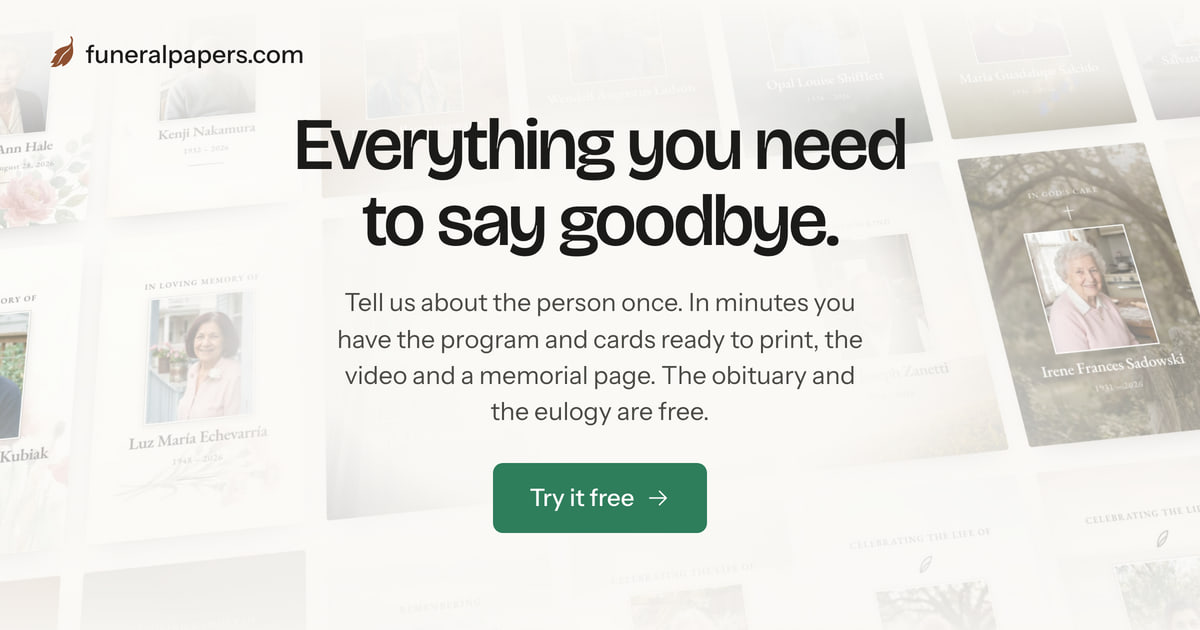

User reviews (0)