
 简体中文
简体中文 English
Website review
This review may include AI-generated content and is not individually verified. Domain, certificate and other facts come from the observed data on this page.
What is GitNotifier?
GitNotifier is a Slack app that delivers GitHub pull request activity to your Slack direct messages instead of a shared channel. Its focus is code review flow: knowing when you have been asked to review, when a teammate comments or approves, when CI fails on a branch, and when a PR is ready to merge. The product is in public beta and is aimed at engineering teams that already live in Slack and GitHub.
What it does in practice
- Review requests: sends you a DM when someone requests your review, including PR title, repository, branch and line-change counts.
- Comment and approval activity: alerts you when someone comments on or approves a PR, so threads do not stall unnoticed.
- CI/CD failure alerts: flags when a merge breaks the default branch workflow or when a check fails on a branch.
- Act from Slack: reply to PR comments, add emoji reactions, and merge with one click when checks pass, without opening GitHub.
- Review digest: a scheduled summary of PRs waiting on your review, useful after time away or at the start of a day.
Who it suits
A developer who reviews several PRs a day benefits most, because the DM model keeps review requests and CI failures out of noisy shared channels. A PM or founder can also use it narrowly, filtering down to merged or released work, as one testimonial on the site describes. Teams that already rely on the official GitHub Slack integration may find the review-oriented actions and digest more targeted.
Trade-offs to weigh
DM-based notifications reduce channel noise but put the burden on each person to tune what reaches them; if everyone wants a shared audit trail, a channel-based setup may fit better. One-click merge from Slack is convenient, yet teams with strict approval or branch-protection rules should confirm it respects their existing GitHub settings. Since the product is in public beta, expect the feature set to keep changing.
A practical next step: install it for one team or repo first, route only review requests and CI failures to DMs for a week, and judge whether review turnaround actually improves before rolling it out more widely.
How do I set up GitNotifier to receive GitHub pull request notifications in Slack?
GitNotifier delivers GitHub pull request activity to your Slack direct messages rather than a shared channel, and setup follows the usual Slack app plus GitHub authorization pattern. The exact click path is not spelled out in the site material, so treat the steps below as the standard sequence for this class of tool and confirm each screen as you go.
Setup outline
- Start from GitNotifier. Open GitNotifier and choose the option to connect Slack. The site notes a public beta is available now, so expect onboarding to be self-serve.
- Authorize Slack. Pick your workspace and approve the requested permissions. GitNotifier needs to send you direct messages and, per the page, let you reply and react to comments from Slack.
- Connect GitHub. Authorize the GitHub side and select which repositories or organizations GitNotifier may watch. Scope this narrowly at first — a single active repo is enough to judge whether the signal-to-noise ratio suits you.
- Choose notification types. The page lists the events it covers: review requests, comments and emoji reactions, CI/CD failures, merges that break the default branch, and a scheduled digest of PRs awaiting your review. Turn on the ones you actually act on.
- Test it. Ask a teammate to request your review on a small PR, or open one yourself against a branch you control, and confirm the DM arrives.
What to expect once it works
Notifications arrive as Slack DMs from the GitNotifier app, not as channel posts. From the message you can reply to a comment, add an emoji reaction, and merge in one click when checks pass — the page shows all three in its example thread. A review digest arrives on a schedule rather than in real time.
A practical first-week check
If you are a reviewer on a busy team, the failure mode is not missing notifications but drowning in them. Start with review requests, CI failures on the default branch, and the digest. Add comment-level alerts only if you are actively shepherding a PR. If you are a PM or founder, the testimonials on the page suggest filtering down to merged and released events — one quoted user, Matthias Hausberger, describes doing exactly that.
For teams already deep in Slack, Slack and GitHub both offer their own notification paths; GitNotifier's stated difference is routing to personal DMs with in-place actions instead of a shared channel. Judge it on whether that reduces your review turnaround, not on feature count.
Can I reply to and react to GitHub comments directly from Slack with GitNotifier?
Yes. GitNotifier is built around exactly that workflow: when a GitHub comment arrives, you can reply to it and add emoji reactions from inside Slack, without switching to the browser. The page also lists one-click merge from Slack once checks pass, so comment interaction sits alongside review and merge actions rather than being an isolated feature.
What this looks like in practice
A typical loop for a reviewer:
- A teammate comments on your PR; GitNotifier sends you a Slack DM.
- You read the comment in Slack and reply there.
- You react with an emoji to signal acknowledgement or approval.
- When checks pass, you merge from Slack.
Because notifications land in DMs rather than a shared channel, this suits people who want PR activity without a busy #engineering channel filling up. The trade-off is that threaded discussion stays partly in Slack, so teammates who live in GitHub may not see your reaction unless it syncs back as a GitHub reaction — worth confirming on your own PR before making it a team convention.
Who benefits most
- Reviewers on call or in meetings who can clear a quick reply from Slack instead of opening GitHub.
- Engineering leads who want a short review digest rather than live noise.
- Non-engineers such as PMs — a testimonial on the page from founder Matthias Hausberger notes he filters to merges and releases only, which shows the filtering matters as much as the reply feature.
A useful next step
Set up GitNotifier on one active repository, then test the full loop on a throwaway PR: leave a comment, reply from Slack, react, and check what appears on GitHub. If reactions don't surface as GitHub reactions the way your team expects, keep replies in Slack for quick acknowledgements and reserve substantive review discussion for GitHub. If your team already works comfortably inside GitHub's own notification and review tools, GitHub may be enough and GitNotifier's value will hinge on how much time you spend in Slack.
How does GitNotifier help reduce notification noise compared to the official GitHub Slack app?
GitNotifier's core claim is that it moves GitHub pull request activity into your Slack direct messages instead of a shared channel, so the people who care about a PR get notified without broadcasting every event to the whole team. The official GitHub integration for Slack is channel-oriented: you pick a channel, subscribe it to a repository, and the channel fills with issues, PRs, comments and CI events that may only matter to one or two people. GitNotifier inverts that default by treating the DM as the unit of delivery.
Where the noise reduction actually comes from
- Personal targeting rather than channel broadcast. Review requests, approvals and comments arrive in the reviewer's or author's DMs. Teammates who are not involved never see them.
- Event selection over event mirroring. The page highlights specific notifications: review requests, comments and replies, emoji reactions, default-branch CI failures, and a scheduled digest of PRs waiting on you. A generic repo feed carries far more than that.
- Acting without switching context. You can comment, react and merge from Slack when checks pass, which reduces the "open GitHub, check, come back" loop that makes notification volume feel worse than it is.
- A digest as a backstop. Instead of a ping per PR, the review digest batches everything waiting on you into one scheduled summary.
Choosing between them
| Situation | Better fit |
|---|---|
| Team wants a shared, searchable record of repo activity in a channel | Official GitHub Slack app |
| Reviewers and authors want only their own PR events, in DMs | GitNotifier |
| You need broad repo coverage across issues, releases and discussions | Official GitHub Slack app |
| You mainly need review requests, approvals, CI failures and merge actions | GitNotifier |
| You want to batch "PRs waiting on me" into one message | GitNotifier's review digest |
The trade-off is visibility. A DM-based model means PR activity is less discoverable to people who were not explicitly involved, so you still need some shared surface for team-level awareness. If your team currently has a busy #engineering channel where PR chatter drowns out discussion, GitNotifier is worth testing; if you rely on that channel as a lightweight audit trail, keep it and add GitNotifier only for the reviewers who are being pinged too often.
A practical next step: pick one squad, connect a single repository, and run it for a week alongside your existing channel notifications. Compare how many messages each person received against how many they actually acted on. If the DM count is a fraction of the channel count with no missed reviews, roll it out further.
How much does GitNotifier cost and what are the differences between its pricing plans?
GitNotifier's page shows a "Simple pricing" section and a "Public Beta available now!" banner, but it does not publish actual prices or a feature-by-feature plan comparison. So the honest answer to "how much does it cost" is: the site doesn't say, and anyone quoting a number is guessing.
What the page does establish about the product's shape:
- It sends GitHub pull request activity into Slack DMs rather than a shared channel.
- Alerts cover review requests, PR comments and emoji reactions, CI/CD failures on the default branch, and a scheduled digest of PRs waiting on you.
- You can reply to comments and merge from Slack once checks pass.
How to treat the missing pricing
Since no plan tiers, seat rules or free-tier limits are listed, treat cost as something you confirm directly with the vendor before rolling it out. Practical things to pin down:
- Per-seat vs per-workspace billing — this changes the math a lot between a 5-person team and a 200-person org.
- What the beta implies — beta products often mean free or discounted access now with a paid tier later, so ask what happens to your setup when it exits beta.
- Notification volume limits — if digests and CI alerts are capped, heavy repos could hit ceilings.
- Slack plan dependency — DM-based notifications are lighter on Slack than channel spam, but your Slack tier still governs app and message history limits.
Who should care
A small team drowning in a shared #engineering channel gets the clearest win, because the DM model directly targets that noise. A PM who only wants merge and release signals is also well served, as one of the testimonials on the page notes — that's founder Matthias Hausberger's observation, not a general guarantee. If your team already lives happily in GitHub's own notifications, the switching cost may not be worth it.
Next step: open the pricing page on the site and, if it's still empty, email the team with your team size and repo count to get a straight quote. Compare that against GitHub's built-in Slack integration and Slack's own GitHub app before committing, since both cover part of this ground at no extra product cost.
Can GitNotifier alert me when a merge breaks the default branch CI/CD pipeline?
Yes. GitNotifier is built to send you a Slack DM when a merge breaks the default branch CI. Its own example notification reads "🔥 Your default branch workflow lint failed on roostly-org/design-system," which is exactly the failure-after-merge case you're asking about. This matters because a broken default branch blocks everyone: new branches inherit the failure, releases stall, and the person who merged may not be watching the pipeline.
How this fits into a review workflow
GitNotifier's approach is to push PR activity into Slack direct messages rather than a shared channel. Beyond CI failure alerts, the page describes these notification types:
- A DM when someone requests your review
- Comments and emoji reactions you can reply to from Slack
- Approval notifications
- A one-click merge from Slack once checks pass
- A scheduled digest of PRs waiting on your review
So the CI alert is one signal among several, not a standalone monitoring product.
What to check before relying on it
A merge-breaks-main alert is only useful if it reaches the right person fast. Decide two things first:
- Who should get it. If only the merger is notified, a failure at 6pm may sit until morning. Consider whether your team needs a shared fallback channel for default-branch failures, even if routine PR noise stays in DMs.
- Which workflows count. A lint failure on main is annoying; a failed deploy or test suite is urgent. Confirm you can scope alerts to the workflows that actually gate your default branch, or you'll train people to ignore them.
GitNotifier is in public beta, and the page lists "Simple pricing" without publishing figures, so treat cost and plan limits as something to confirm directly.
A practical next step
Pick one repository with an active default-branch pipeline and run GitNotifier alongside your current setup for a week. Break main deliberately once, then note how long it takes the alert to arrive and whether the person who can fix it sees it. If the alert lands in a DM nobody reads, route default-branch failures to a channel instead. For teams already living in Slack, GitHub's own Slack integration is the obvious comparison point, and Slack documents its app directory if you want to weigh alternatives.
 Cloudflare
 Vercel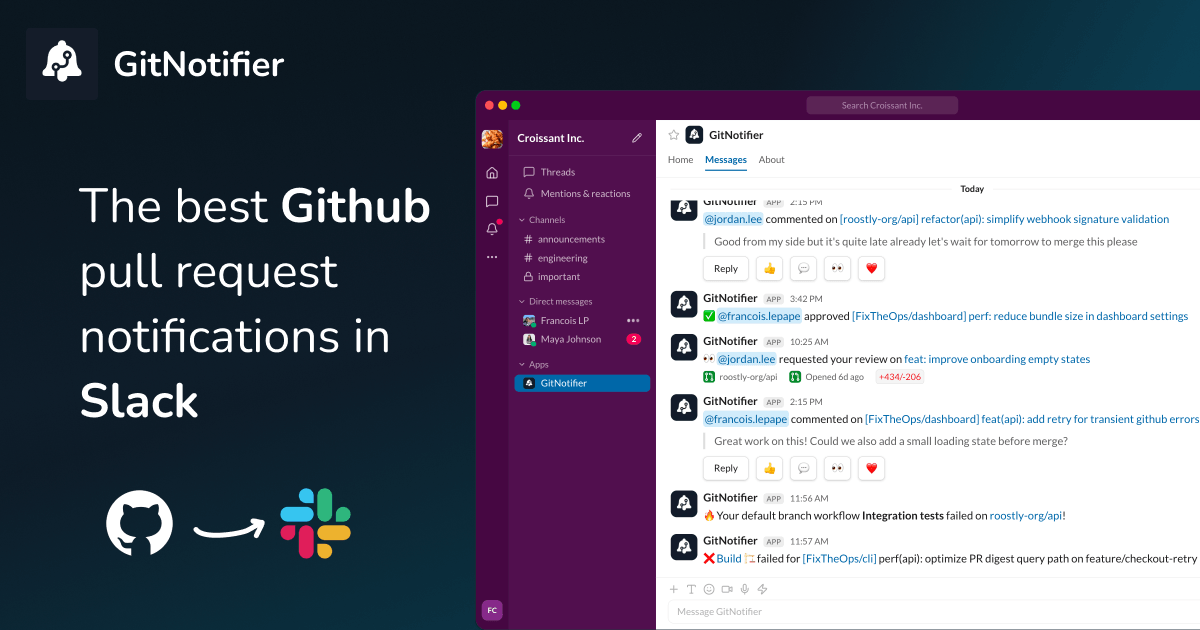

User reviews (0)