Website profiles · Technology insights · Alternatives

gotohuman.com

Approve and revise critical steps in your AI workflows. Ensure AI-generated content is on-brand, messages to customers are accurate, and high-stakes decisions are made by humans.

Paid content
Visit website
Profile views 1 Outbound visits 10 Normal
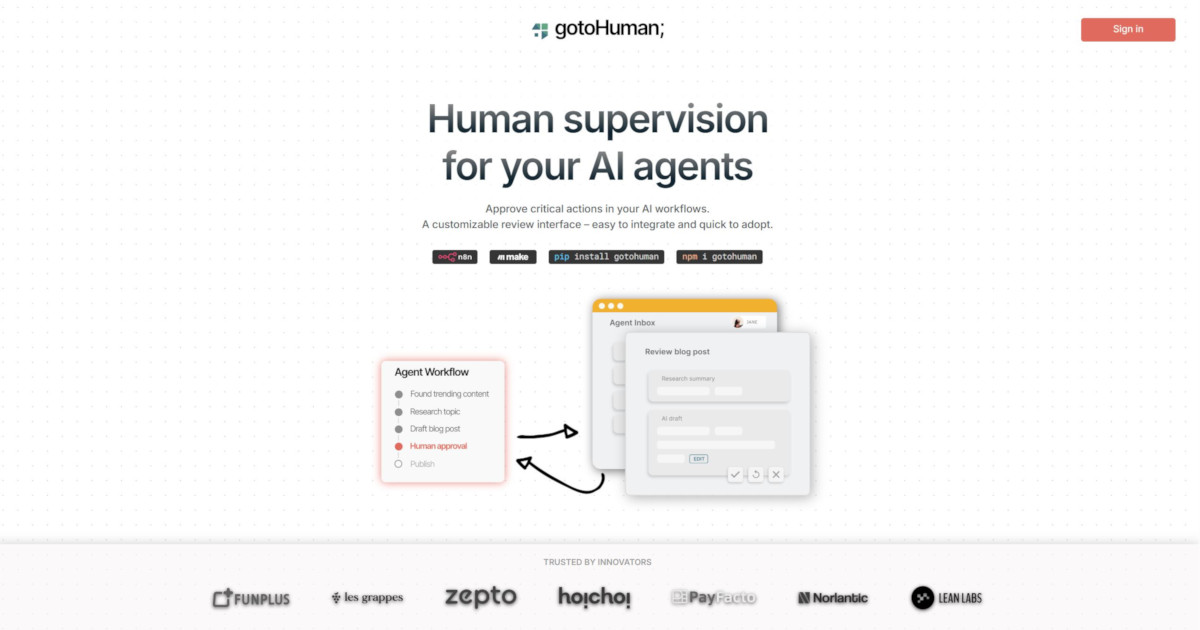
gotoHuman Full homepage screenshot

At a glance

Category
Artificial Intelligence
Language
English
Paid-content signal
Paid contentObserved
Registered
2024
Hosting
CloudflareInferred
HTTPS certificate trusted
PassedObserved
Last updated

Website review

This review may include AI-generated content and is not individually verified. Domain, certificate and other facts come from the observed data on this page.

What is gotoHuman?

gotoHuman is a human-in-the-loop platform for AI workflows: it lets an AI process pause and request a person to approve, edit or otherwise weigh in on a step before the workflow continues. The site describes it as platform-agnostic and quick to set up, with a no-code editor for defining review types.

How it fits into a workflow

  1. Set up a review type in a no-code editor, specifying what content is shown and what input is captured.
  2. Send a review request from your AI workflow through an integration, referencing the review type and passing the relevant content.
  3. A human reviews the item in the Agent Inbox or via a notification.
  4. The workflow resumes when the completed review is sent back via webhook.

What reviewers can do

  • See pending items in a shared Agent Inbox, or receive email digests and Slack notifications.
  • Work with text, images, markdown, JSON, buttons and checkboxes.
  • Edit AI output in place, or choose from offered options.
  • Trigger retries to regenerate an artifact, and in some cases edit the prompt itself.
  • Compare versions of a generated artifact before approving.
  • Move across multiple review steps in a longer workflow, with manual triggers available to start runs.

Who it suits

It is aimed at teams building AI automations where errors are costly or visible: customer-facing messages, brand-sensitive content, and high-stakes decisions. The trade-off is deliberate friction — every gated step adds human latency, so it pays off where a wrong output costs more than a short wait. For fully automated, low-risk tasks, the review layer adds overhead without much benefit.

A practical next step: list the steps in your workflow where a bad output would be expensive to fix later, and start by putting a review type on just those rather than on every step. The site's pricing page is at gotoHuman.

How do I integrate gotoHuman with my existing AI workflow or automation platform?

Integrate gotoHuman by treating it as a human-review step that your workflow calls out to, rather than a tool that runs your automation. The pattern on gotoHuman's own site has four stages: define a review type, send a review request from your workflow, let a person approve or edit it, then receive the result back via webhook so the workflow continues.

The integration loop

  1. Create a review type in gotoHuman's no-code editor. Choose what reviewers see (text, images, markdown, JSON) and what input you need back (selections, edits, buttons, checkboxes).
  2. Send a request from your automation using one of gotoHuman's integrations, referencing that review type and passing the content to be checked.
  3. A human reviews it in the Agent Inbox or via an email digest or Slack notification. They can edit outputs in place, or trigger a retry to regenerate an artifact with an adjusted prompt.
  4. Your workflow resumes when the completed review arrives at a webhook endpoint, carrying the reviewer's feedback.

What this suits

This fits event-driven or long-running workflows where a step must pause for a person: AI-drafted customer messages that need accuracy checks, on-brand content approval, or high-stakes decisions you don't want fully automated. Because review types are configured separately from the calling system, the same review can be requested from different automation platforms. The trade-off is latency and volume: every request waits on a human, so reserve it for steps where an error is costly, and keep routine steps automated.

Practical setup notes

  • Start with one review type. Pick your highest-risk output, such as outbound customer email, and wire a single request-and-webhook path before expanding.
  • Decide notifications deliberately. The Agent Inbox suits teams who work through a queue; Slack or email digests suit reviewers who shouldn't live in another dashboard.
  • Handle the wait state. Your automation must persist until the webhook returns, so confirm your platform supports long-running or resumable runs.
  • Use retry and versioning for generative steps. Letting reviewers edit the prompt or compare artifact versions is more useful than a bare approve/reject when outputs vary.

Next step

Check gotoHuman's documentation for the integration matching your platform, then build a test review type and send one request end to end—including the webhook callback—before rolling it into production. If you also evaluate general automation tools, compare them at n8n or Make.

When should I use a retry loop or prompt editing instead of manually correcting an AI output?

Use a retry loop when the AI's output is wrong in a way the model can plausibly fix with another attempt—a bad tone, a hallucinated detail, an off-brand phrasing. Use prompt editing when the reviewer can see why it went wrong and the fix belongs in the instructions rather than the text. Manually correct the output when the content is nearly right and the reviewer's judgment is faster than another generation cycle.

gotoHuman frames these as three distinct controls: Retry & Change Prompts lets reviewers loop back to the AI step, and where "1-click retries don't cut it," they can edit the prompt itself, passed along in the request. Field-level editing sits alongside as the direct-fix option, and artifact versioning lets reviewers compare generated versions before approving. That combination suggests the practical rule: retry for variance, prompt editing for recurring or systemic errors, manual edit for one-off polish.

A decision rule

  • Retry if the same prompt has produced good outputs before and this one is an outlier. Cheap, keeps the human out of the writing.
  • Edit the prompt if two retries reproduce the same mistake, or if the error is structural (wrong audience, missing constraint, wrong format). Fixing the output hides a defect that will recur on every future run.
  • Correct manually if the change is small and local—a name, a date, a single sentence—and the reviewer already knows the right answer.

Trade-offs

Retries cost latency and tokens, and can loop without converging. Prompt edits improve the workflow permanently but need a reviewer who understands the prompt, not just the content—so restrict that control to senior reviewers or a defined role. Manual edits are fastest per item but leave the underlying prompt unfixed, so the same correction reappears next week.

A concrete case: a customer-message workflow where the AI writes a refund confirmation. If it's merely stiff, retry. If it keeps omitting the refund timeline, edit the prompt to require it. If one message has the wrong order number, just fix it inline.

As a next step, pick your three most frequent correction types from the past month and assign each to retry, prompt edit, or manual fix; anything landing in prompt edit twice should become a standing instruction. Teams weighing a review layer can compare approaches at gotoHuman.

What are the pricing plans and what limits apply to each tier?

The supplied page information does not include the pricing plans or the limits for each tier. It only confirms that gotoHuman publishes a pricing page at gotoHuman, where the current tiers and their usage limits should be listed.

For a quick decision, check that page for three things: what counts toward a limit (reviews, seats or workflow runs), whether limits reset monthly, and which features such as Slack notifications, retry loops or multi-step reviews are restricted to higher tiers.

How do reviewers receive and manage review requests through the Agent Inbox, email, and Slack?

Reviewers receive work in three ways: a shared Agent Inbox inside gotoHuman, email digests, and Slack notifications. The Agent Inbox is the management surface; email and Slack are alerting channels that point reviewers to a pending item.

How each channel works

  • Agent Inbox: All items needing input appear in one place, whether assigned to a specific reviewer or to the whole team. Reviewers pick items up from there and act on them directly.
  • Email: Reviewers can turn on email digests, so pending reviews arrive as a periodic summary rather than one message per request.
  • Slack: Reviewers can opt into Slack notifications. Per the site, these can optionally include short-lived public links, so someone can open and handle a review without a full sign-in flow.

What reviewers actually do with a request

Once a review is opened, reviewers work inside a review type built with the no-code editor. They can approve or edit content such as text, images, markdown, and JSON, or respond through buttons and checkboxes. For AI-generated output, editing can be enabled so fixes happen in place. Where a simple fix isn't enough, retry controls let reviewers send the item back to the AI step to regenerate, and checkpoints let them compare versions before approving. Completed reviews return to the workflow via webhook.

Choosing a channel

Channel Best for Trade-off
Agent Inbox Teams handling a steady queue of reviews Requires reviewers to check in; no push alert on its own
Email digest Reviewers who prefer a batched overview Less immediate for urgent, high-stakes items
Slack Fast triage and time-sensitive approvals Notification volume can grow; public links expire

A practical starting point: route routine, on-brand content checks to the Agent Inbox with a daily email digest, and reserve Slack alerts for customer-facing messages or high-stakes decisions where a delay is costly. For a concrete scenario, a content team could let Slack ping a editor when a customer email draft needs sign-off, while bulk product descriptions wait in the inbox for a morning batch review.

How can I set up a no-code review type to capture and approve different content formats?

In gotoHuman, a no-code review type is the reusable template that defines what reviewers see and what input they return to your workflow. You build it once in the no-code editor, then every review request references that type and passes in the content to be checked. The review type itself is where you choose the content fields (text, images, markdown, JSON) and the input controls (buttons, checkboxes, selections, editing), so one type can cover a whole category of approvals rather than a single item.

Step-by-step setup

  1. Create the review type in the no-code editor. Name it for the decision it supports, e.g. "Customer reply approval" or "Product image check."
  2. Add content fields for each format reviewers need to see—text, markdown, images, JSON—matching the material your AI step actually produces.
  3. Add input fields for the decision you need back: approve/reject buttons, checkboxes, or selection lists. Turn on in-place editing where reviewers should fix AI output directly instead of just flagging it.
  4. Enable retry controls on fields if you want reviewers to send work back to the AI step for regeneration, or allow prompt editing when a one-click retry isn't enough.
  5. Send a review request from your workflow through an integration, referencing the review type and including the relevant content.
  6. Handle the webhook that fires when the review completes, so your workflow continues with the reviewer's feedback.

Choosing the right configuration

Need Configure
Approve or reject AI-generated copy Text or markdown field with approve/reject buttons and editing on
Check visual assets Image field plus selection or checkbox inputs
Validate structured data JSON field with in-place editing
Compare generated versions before deciding Artifact versioning with checkpoint navigation
Multi-stage approvals Multiple review types linked as sequential steps with workflow metadata

Practical example

A support team generating draft replies could create one "Reply approval" type: a markdown field for the draft, an editable text field for corrections, and approve/reject buttons. The workflow sends each draft as a request, reviewers work through pending items in the Agent Inbox or via email/Slack notifications, and the webhook returns the edited reply for sending.

Decision criterion

Start with the smallest set of fields that captures the decision you actually need. Add editing or retry controls only where reviewers regularly change output—extra controls slow review and complicate the webhook payload your workflow must handle. For related platforms, see Zapier for workflow automation and Slack for notification routing.

Related questions

More questions →
What Review and Editing Capabilities Does gotoHuman Give Human Reviewers?

gotoHuman gives reviewers a structured inbox where they can approve, edit, retry, and compare AI-generated outputs before a workflow continues. The capabilities apply when you have set up a review type and your workflow sends a review request that references it; reviewers then work in the Agent Inbox or through email/Slack notifications, and completed reviews return to your workflow via webhook.

Review types define what reviewers see and can change

Review types are built in a no-code editor and determine both the content under review and the input captured from the reviewer. According to gotoHuman's feature descriptions, a review type can include fields for:

  • Text
  • Images
  • Markdown
  • JSON
  • Inputs such as buttons and checkboxes

This means the same platform can handle a content approval (text or markdown), a visual check (images), or a structured data review (JSON), with selection controls where a simple choice is enough.

In-place editing of AI outputs

Reviewers are not limited to approve/reject. gotoHuman offers editing tools that let reviewers fix content on the spot, and you can turn on editing per field so selections can also be corrected. The site positions this specifically for AI-generated outputs: reviewers correct wording, formatting, or details directly in the review rather than sending feedback back in a separate message.

Retry loops: send work back to the AI step

When editing is not enough, gotoHuman provides retry controls on fields. A reviewer can loop back to the AI step to regenerate an entire artifact. Where a one-click retry is insufficient, you can pass the prompt along in the request so reviewers can edit the prompt itself before regenerating. This turns the review step into an iteration step rather than a single pass/fail gate.

Checkpoints for comparing generated versions

Checkpoints let reviewers navigate between different generated versions of an artifact, so they can iterate, compare, and then approve. Combined with retries, this supports a workflow where several AI attempts exist and a human picks the best one.

Multi-step navigation and workflow context

For workflows with multiple review steps or manual triggers, gotoHuman provides navigation across the review steps of a single workflow run, plus workflow metadata so reviewers can see how steps are linked. This matters when a reviewer's decision at one checkpoint affects what happens next.

How a review reaches a reviewer

  1. Setup: create a review type in the no-code editor, defining content fields and captured input.
  2. Send request: your workflow requests a review through an integration, referencing the review type and including the relevant content.
  3. Human review: reviewers find pending items in the Agent Inbox (assigned to them or the team) or open them via notification options—email digests or Slack notifications, which can optionally include short-lived public links.
  4. Handle webhook: the completed review is sent back to your workflow via webhook so it can continue with the feedback.

The practical constraint to plan for: the editing, retry, and checkpoint features depend on how you configure the review type and what you pass in the request (for example, passing the prompt to enable prompt editing). Decide which of these controls each review step needs before building it, so reviewers get the right actions at the right checkpoint.

What is gotoHuman and what does it do?

gotoHuman is a platform for putting a human review and approval step inside an AI workflow. You define what needs checking, your AI workflow sends a review request, a person approves or edits the output in an inbox, and the result comes back to the workflow via webhook so it can continue. It fits teams that already automate a task but want a person to sign off on brand-sensitive content, customer-facing messages, or high-stakes decisions before the output is used.

The core loop

The product is built around four steps, as described on the site:

  1. Set up a review type. Using a no-code editor, you define the kind of content to be reviewed and the input to capture.
  2. Send a request. Your AI workflow requests a human review through one of the integrations, referencing the review type and including the relevant content.
  3. Human review. Reviewers find pending items in the Agent Inbox or open them directly through a notification.
  4. Handle the webhook. Completed reviews are sent back to your workflow via webhook, carrying the feedback so the workflow can continue.

The practical takeaway: gotoHuman is not where your AI logic lives. It is the review layer that sits between an AI step and whatever happens next.

What reviewers can do

The review step is more than a yes/no gate. Depending on how you configure the review type, reviewers can:

  • Review any content — fields for text, images, markdown, and JSON, plus input controls such as buttons and checkboxes.
  • Edit in place — turn on editing so reviewers fix AI-generated output on the spot rather than sending it back for another round.
  • Retry with AI — enable retry controls on a field to loop back to the AI step and regenerate an artifact; where one-click retries aren't enough, reviewers can edit the prompt itself.
  • Compare versions — checkpoints let reviewers move between generated versions of an artifact, then iterate, compare, and approve.
  • Navigate multi-step runs — for workflows with several review steps or manual triggers, reviewers get navigation across the steps of a single run.

Notifications and the inbox

Reviews don't require reviewers to sit in a dashboard. Pending items appear in the Agent Inbox, whether assigned to an individual or to the whole team. Email digests and Slack notifications are available, and if you opt in, notifications can include short-lived public links. This matters for event-driven and long-running workflows, where a human needs to be pulled in only when the workflow reaches a point that requires input.

Where it fits

gotoHuman describes itself as platform-agnostic, easy to set up, and quick for a team to adopt — the review layer is separate from the tool that runs your AI. That makes it a reasonable option when:

  • Your AI output goes to customers or the public and needs an accuracy or brand check.
  • A decision is high-stakes enough that a person must make the final call.
  • Your workflow is long-running or event-driven and needs to pause for input at specific points.
  • You want reviewers to correct output directly instead of bouncing it back to engineering.

It is a weaker fit if you want a fully automated pipeline with no human step, or if your review needs are so simple that a single approval prompt inside your existing tooling would do.

What to check before adopting

The site lists a Pricing page, but the supplied material does not state prices, plan limits, or whether a free tier exists — confirm those directly before committing. Also verify that your workflow tool has a matching integration for sending requests and receiving webhooks, since the whole loop depends on those two connections.

What to Consider When Evaluating gotoHuman for Supervising AI Agents

gotoHuman is a human-in-the-loop platform for AI workflows: it lets a workflow pause at a critical step, send the content to a person for approval or editing, and then resume with that feedback via webhook. It fits teams that already run AI agents or automations and need a human checkpoint before an action is finalized — for example, before an AI-drafted customer message goes out or before a high-stakes decision is executed. It is not a model or agent builder itself; it is the review layer around one.

Start with the decision you need humans to make

Before comparing tools, define the checkpoint. gotoHuman's model is built around review types: a no-code definition of what content is being reviewed and what input should be captured. That maps well to decisions like:

  • Approve or reject an AI-generated output
  • Edit text, images, markdown, or JSON before it is used
  • Choose among generated versions of an artifact
  • Send work back to the AI step for regeneration

If your need is only logging or monitoring, a review platform adds overhead. If a wrong output carries real cost — customer-facing messages, brand-sensitive content, consequential decisions — the checkpoint is the reason to adopt it.

Check integration and workflow fit

gotoHuman describes itself as platform-agnostic, and the documented flow is integration-based: your workflow sends a review request referencing a review type, and completed reviews come back to your workflow via webhook. Two things to verify against your stack:

  1. Outbound request: can your agent or automation call one of the listed integrations to create a review request, and pass along all relevant content (including prompts, if you want reviewers to edit them)?
  2. Inbound webhook: can your workflow receive the completed review and continue? Event-driven and long-running workflows are the stated use case, so confirm your orchestration can pause and resume rather than only run synchronously.

If your workflow cannot accept a webhook callback, the loop back to the AI step will need custom work.

Assess setup effort and team adoption

The platform emphasizes a no-code review-type editor and quick team adoption. In practice, evaluate:

  • Review type design: how many distinct review types you need, and whether the available field types (text, images, markdown, JSON, buttons, checkboxes) cover the content you actually review.
  • Reviewer experience: reviewers work from an Agent Inbox that collects items assigned to them or to the whole team, with email digests and Slack notifications available. If your reviewers live in Slack, that reduces the change-management burden; if they don't, the inbox becomes a new tool they must check.
  • Editing vs. selection: editing can be enabled per field so reviewers fix content in place. Decide whether your reviewers should correct outputs or only approve/reject — the former needs clearer guidance on what "on-brand" means.

Understand the iteration controls

Beyond approve/edit, gotoHuman documents retry loops and checkpoints: reviewers can trigger a retry to regenerate an artifact, edit the prompt when a one-click retry isn't enough, and navigate between generated versions to compare before approving. These matter if your AI output quality varies and a single pass/fail decision is too coarse. Multi-step workflows with several review steps are also supported, with navigation across the steps of a run and workflow metadata visible to reviewers.

Review documentation and pricing before committing

The site links to documentation and a pricing page, and the pricing page is the place to confirm plan limits and any seat or usage constraints — the available material does not state prices, so don't assume a free tier or unlimited reviewers. A sensible evaluation sequence:

  1. Read the documentation for the integration you would use and confirm the request/webhook contract.
  2. Build one review type for your highest-risk checkpoint and run a single end-to-end test with a real workflow.
  3. Confirm notification behavior with the actual reviewers (inbox vs. email digest vs. Slack).
  4. Check the pricing page against your expected review volume and team size.

When gotoHuman is a good fit — and when it isn't

Consideration Good fit Look elsewhere
Need Human approval/editing before AI actions finalize No human checkpoint required
Architecture Workflow can send requests and receive webhooks No way to pause/resume or accept callbacks
Review content Text, images, markdown, JSON, selections Highly specialized review UI you must build
Team Reviewers can adopt an inbox plus Slack/email Reviewers need deep integration into an existing internal tool
Iteration You want retries, prompt edits, version comparison Single approve/reject is sufficient

The deciding factor is usually the webhook round-trip: if your workflow can pause, request a review, and resume on callback, gotoHuman covers the review layer without custom UI work. If it can't, budget for that integration effort before evaluating the rest.

How does gotoHuman's human-in-the-loop review process work step by step?

gotoHuman is a platform for inserting human review steps into AI workflows: you define a review type once, your workflow sends a review request when it needs a decision, a reviewer approves or edits the output in an inbox or via notification, and the result returns to the workflow through a webhook. This four-step loop fits event-driven or long-running AI workflows where a human must approve, correct, or regenerate AI output before it moves forward. You'll need a gotoHuman account, a review type, and a workflow that can call an integration and receive a webhook.

Step 1: Create a review type with the no-code editor

A review type defines what the reviewer sees and what input gets captured. In the no-code editor, you choose the content fields (text, images, markdown, JSON) and the input controls (buttons, checkboxes, selections) appropriate to the decision.

Design choices worth making here:

  • Select vs. edit — if reviewers should only pick an option, offer selections; if they should fix AI-generated copy, turn on editing for that field.
  • Retry controls — enable retry on fields so a reviewer can loop back to the AI step and regenerate the whole artifact instead of hand-editing it.
  • Prompt editing — where a one-click retry isn't enough, pass the prompt along in the request so reviewers can change it.

The expected result is a reusable review type your workflow can reference by name.

Step 2: Send a review request from your AI workflow

From the workflow, request a human review using one of gotoHuman's integrations. The request references the review type and includes all relevant content the reviewer needs — the generated text, the source data, or the artifact version.

This is the point where the workflow pauses and waits. Because the platform is described as platform-agnostic, the integration you use depends on how your workflow is built; the constant is that the request carries the review type reference plus the content payload.

Step 3: A reviewer handles the item

Reviewers find pending items in the Agent Inbox, which collects everything needing input — whether assigned to them personally or to the whole team. Alternatively, they can open a review directly from a notification.

Notification options:

  • Email digests for batched review
  • Slack notifications for in-channel alerts
  • Short-lived public links, available if you opt in, for reviewers without direct platform access

Inside the review, the reviewer approves, selects, or edits content in place. For multi-step workflows, reviewers get navigation across the review steps of a single run, and artifact versioning lets them compare generated versions before approving.

Step 4: The completed review returns via webhook

When the review is completed, gotoHuman sends the result to your workflow via webhook, including the feedback the reviewer provided. The workflow resumes and continues with that input — approved content moves on, edited content replaces the original, or a retry signal sends the step back to the AI.

What the loop looks like end to end

Step Who acts Action Output
1 You (builder) Create review type in no-code editor Reusable review definition
2 AI workflow Send request via integration with content Pending review item
3 Reviewer Approve, select, or edit in inbox or notification Completed review with feedback
4 Platform → workflow Webhook delivers result Workflow continues

Common sticking points

  • Webhook not resuming the workflow — confirm your workflow is actually listening for the completion event and that the review type referenced in the request matches the one you built.
  • Reviewer can't edit — editing is a per-field setting; if a field was configured as selection-only, reviewers can only choose.
  • Retries regenerate too much — retry loops regenerate the entire artifact, so scope which fields carry retry controls.
  • Notification links expiring — public links are intentionally short-lived; for recurring reviewers, the Agent Inbox or Slack is more reliable.

For teams deciding whether this fits: gotoHuman is aimed at AI builders who need approval gates on customer-facing messages, brand-sensitive content, or high-stakes decisions. If your workflow can call an integration and accept a webhook, the loop is four steps and no custom review UI to build.

How Reviewers Get Notified and Find Pending Reviews in gotoHuman

Reviewers in gotoHuman find pending work in one place — the Agent Inbox — and can be alerted to it through email digests or Slack notifications. The inbox collects every item that needs human input, whether the review was assigned to a specific person or to the whole team. From a notification, a reviewer can open the review directly instead of navigating to the inbox first.

Where pending reviews appear

gotoHuman is built around the idea that AI workflows should pause and request human input when a step is critical. The platform describes its review flow in four stages:

  1. Setup review — an admin creates a review type with a no-code editor, defining the content to be reviewed and the input to capture.
  2. Send request — the AI workflow requests a human review through an integration, referencing the review type and including the relevant content.
  3. Human review — reviewers find pending reviews in the Agent Inbox or open them directly via a notification.
  4. Handle webhook — completed reviews are sent back to the workflow via webhook so it can continue with the feedback.

The inbox is the central destination. According to the site, reviewers "find all items that need input in their inbox — whether reviews were assigned to them or to the whole team." That means assignment doesn't fragment the queue: personal and team-level reviews surface in the same place.

Notification options

gotoHuman offers several ways to alert reviewers that something is waiting:

Channel What it does
Agent Inbox Always-available list of all pending reviews, individual and team-assigned
Email digests Periodic email summaries of pending items
Slack notifications Alerts delivered into Slack
Short-lived public links Optional links included in notifications, if the team opts in

The public links are worth noting: they are described as short-lived and opt-in, so they suit quick access from a notification without requiring a full sign-in flow for every reviewer. Whether they fit your security posture depends on the sensitivity of the content being reviewed — for high-stakes decisions, you may prefer reviewers to open items through the inbox or a standard notification.

Opening and acting on a review

Once a reviewer reaches an item, the review itself is designed for in-place correction rather than just approval. Review types can capture text, images, markdown, and JSON, and can gather input through buttons, checkboxes, and similar fields. Reviewers can select options or turn on editing to fix AI-generated content on the spot.

For cases where editing isn't enough, gotoHuman adds iteration controls:

  • Retry loops — reviewers can trigger a retry on a field so the AI step regenerates the artifact.
  • Prompt editing — where a one-click retry won't do, the prompt can be passed along in the request so reviewers can change it.
  • Checkpoints — reviewers can navigate between generated versions of an artifact to compare and approve.

This matters for notification design: a Slack or email alert isn't just "something needs approval" — the reviewer may need to compare versions or send work back for regeneration, so opening the item is usually the start of a short review session, not a single click.

A practical setup sequence

If you're configuring this for a team, a workable order is:

  1. Create the review type in the no-code editor, choosing the fields and input controls reviewers will see.
  2. Wire your AI workflow to send review requests through an integration, referencing that review type.
  3. Decide on notification channels — enable email digests, Slack notifications, or both — and decide whether to opt in to short-lived public links.
  4. Confirm the webhook that returns completed reviews to your workflow is receiving feedback correctly.
  5. Test with a sample request: verify it appears in the Agent Inbox for both an individually assigned reviewer and a team-assigned one, and that the notification opens the correct item.

The main thing to check in step 5 is assignment behavior — the site states the inbox covers both individual and team assignments, so a quick test confirms your team sees what you expect before you rely on it in production.

Choosing between channels

There's no single right notification setup; it depends on how your reviewers work.

  • Inbox only suits teams that check a queue on a schedule and want a single source of truth.
  • Email digests help reviewers who aren't in the tool all day but need a periodic nudge.
  • Slack notifications fit teams already working in Slack who want alerts where they already are.
  • Public links reduce friction for occasional reviewers, provided the content sensitivity allows it.

For high-stakes decisions — the kind gotoHuman is explicitly aimed at, such as customer messages and on-brand content — the safer default is to have reviewers open items through the inbox or an authenticated notification, and treat public links as a convenience for lower-sensitivity reviews.

Website Overview

Several search or sharing settings need attention. Together they may make snippets, preview images or preferred URLs less consistent across platforms.

Domain and Registration

Transfer-protection status is present, helping reduce the risk of unauthorized domain transfers. The domain has about 2 years of registration history; its current configuration provides more context than age alone. The registrar is Porkbun LLC, a widely used domain service provider. The domain uses the common .com extension, which is not an independent safety signal.

DNS and Email

Nameservers are provided by Cloudflare, indicating managed DNS hosting. MX records point to the IONOS Mail email service. SPF and DMARC are configured. DKIM status is unknown. TXT records include verification markers for Google. Such markers may also remain after a service stops being used. DNSSEC signatures were not detected, so this additional DNS authenticity protection is not confirmed.

TLS and Certificates

The public key uses EC with 256 bits. The server supplied a complete certificate chain. No organization name is present in the certificate; the available fields are consistent with domain validation. The certificate was issued within the Google Trust Services cloud or CDN ecosystem. The certificate's total validity is about 90 days, consistent with a short renewal cycle.

HTTP and Browser Security

The response lacks these common security headers: X-Content-Type-Options, Referrer-Policy, Permissions-Policy. No X-Powered-By header was found, reducing one common source of backend fingerprinting information. The cf-ray response header indicates a CDN or caching proxy in the delivery path. No obvious internal addresses or debug information were found in the headers. The Server header identifies cloudflare without an exact version.

Technology Stack Analysis

The public page identifies Webflow, Google Analytics, Cloudflare without precise versions, leaving fewer clues for version-specific scanning.

Search and Social Sharing

The meta description has 178 characters and may be shortened in search results. No homepage canonical URL was detected. If duplicate URLs exist, consolidation may be less explicit. Twitter Card metadata is configured. The title has 56 characters, within a common display range. The observed directives allow indexing and link following.

Hosting and Email

DNSCloudflare
HostingCloudflare
EmailIONOS Mail
Approximate IP geolocation (inferred; a CDN or proxy may differ from the origin server) United States flagUnited States Inferred 198.202.211.1

Registration details

RDAP / WHOIS

RegistrarPorkbun LLC
Registered2024-03-28
Expires2027-03-28
Domain statusclient delete prohibited、client transfer prohibited
Nameserversemily.ns.cloudflare.com、terin.ns.cloudflare.com
DNSSECunsigned

DNS records

DNS

TypeNameValueTTLPriority
Acdn.webflow.com198.202.211.1300—
AAAAcdn.webflow.com2620:cb:2000::1300—
MXgotohuman.commx00.ionos.de30010
MXgotohuman.commx01.ionos.de30020
NSgotohuman.comemily.ns.cloudflare.com86400—
NSgotohuman.comterin.ns.cloudflare.com86400—
TXTgotohuman.comfirebase=gotohuman300—
TXTgotohuman.comgoogle-site-verification=Jk_GZMzRCdG_BI24CGcwrF29htakz0uDz4IE_RrUCd8300—
TXTgotohuman.comv=spf1 include:_spf-eu.ionos.com include:_spf.firebasemail.com ~all300—
TXTgotohuman.comzone-ownership-verification-487ca0f574930ded6386b711b00073aaf99ea4e4fa245d95b7052d17a8524a13300—
CNAMEwww.gotohuman.comcdn.webflow.com3600—
DMARC_dmarc.gotohuman.comv=DMARC1; p=quarantine; sp=quarantine; adkim=r; aspf=r; rua=mailto:[email protected]300—

TLS and certificates

TLS / SSL

AssessmentNormal configuration
Supported protocolsTLSv1.2、TLSv1.3
Negotiated protocolTLSv1.3
Certificate subjectwww.gotohuman.com
IssuerGoogle Trust Services
Valid until2026-11-28T05:50 · Remaining when checked: 36 days
Verification detailsCertificate trust: Passed · Hostname match: Passed

HTTP response headers

HTTP

HeaderValue
content-typetext/html; charset=utf-8
servercloudflare
strict-transport-securitymax-age=31536000
content-security-policyframe-ancestors 'self'
x-frame-optionsSAMEORIGIN

Identified technologies

WebflowGoogle AnalyticsCloudflare

Pages, Search and Sharing

Meta descriptionApprove and revise critical steps in your AI workflows. Ensure AI-generated content is on-brand, messages to customers are accurate, and high-stakes decisions are made by humans.
Canonical URLNot detected
LanguageEnglish (default)
Twitter Cardsummary_large_image

No rules found

User reviews (0)

  • No reviews yet.