
 简体中文
简体中文 English
Website review
This review may include AI-generated content and is not individually verified. Domain, certificate and other facts come from the observed data on this page.
What is JustSketchMe?
JustSketchMe is a browser-based pose reference tool for artists, made by Herman and Simon-Kai. It lets you arrange 3D characters into poses and scenes, then use them as reference while you draw or paint. The site describes it as a way to "give depth to your characters," and it is available as a web app plus apps for iOS, Mac, Windows and Android.
What you can do with it
- Pose characters and build dynamic scenes, with many characters and props to choose from.
- Work from a full pose library, or fine-tune details such as intricate hand posing.
- Adjust dynamic lights and extreme perspective to get the camera angle and shadows you need.
Who it suits
It is aimed at character artists, illustrators and comic or storyboard creators who struggle to invent believable anatomy and perspective from memory. If you already have a photo-reference workflow or a life-drawing habit, this is a different trade-off: you gain control over angle, lighting and body type, but you lose the texture and imperfection of real reference.
A practical next step
Open the web app and try one pose that normally gives you trouble — a foreshortened arm, a twisted torso, a hand gripping an object. Rotate the camera and adjust the light until the silhouette reads clearly, then sketch from that view. If the free toolset is enough for your needs, you may not need a paid tier; if you rely on it daily, compare what the paid plan adds on the JustSketchMe pricing page before committing.
How can I use JustSketchMe to create dynamic character poses for my artwork?
JustSketchMe is a browser-based posing tool for artists who need reference figures rather than drawing from imagination. You open the web app, arrange a 3D character into a pose, and use that as a visual reference while you draw or paint. The site describes it as a way to "give depth to your characters," with dozens of characters, hundreds of props, a full pose library, hand posing, dynamic lights and adjustable perspective. It also runs on iOS, Mac, Windows and Android, so you can pose on a tablet or desktop depending on where you work.
A practical workflow
- Start from the pose library. Rather than building a figure from scratch, load a pose close to what you need — a fighting stance, a seated slump, a reaching gesture — then adjust from there.
- Rough in the big shapes first. Set the overall spine, hip and shoulder angles before touching fingers or facial details. Dynamic poses usually read from the torso and weight distribution, not the extremities.
- Push the perspective. Use the camera controls to view the figure from a low or high angle. Foreshortening is one of the hardest things to invent, and rotating the camera gives you a concrete reference for it.
- Set the lighting. Dynamic lights let you see where shadows fall across the form, which helps when you are shading a dramatic scene rather than a flat, evenly lit one.
- Add props and scene elements. Props help anchor a pose — a character gripping a sword or leaning on a railing reads differently than one floating in empty space.
- Pose the hands last. Hands are a common weak point; the tool's hand posing features are worth using once the body is settled.
- Rotate and re-check. Spin the camera around the figure to confirm the pose holds up from multiple angles before committing to your drawing.
Who it suits
| Situation | How JustSketchMe helps |
|---|---|
| You need a quick gesture reference | Pose library plus adjustable joints gets you a usable figure in minutes |
| You struggle with foreshortening | Camera rotation gives you real perspective on limbs and torsos |
| You are blocking a multi-character scene | Multiple characters and props let you stage interactions |
| You draw on a tablet | Mobile and desktop apps mean you can pose wherever you sketch |
| You need a specific real model | A generic 3D figure will not match a particular person's likeness |
A concrete example
Suppose you are drawing a character mid-leap, sword raised. Load a jumping or lunging pose, tilt the camera low so the figure looms, angle the torso and rear leg to show the arc of motion, then add the sword prop and rotate the hand around the grip. Turn on a strong side light to see how the raised arm casts shadow across the face. Rotate the camera a quarter turn to check the silhouette still reads before you start your final drawing.
Next step
Decide what you actually need: a fast gesture reference, a perspective study, or a staged scene. If it is the first two, the pose library and camera controls will carry most of your work. If it is the third, spend your time on props and lighting. If you need a specific real person's proportions or a highly stylised anatomy, treat this as a starting point and adjust proportions yourself.
You can try the web app directly at JustSketchMe and check the pricing page if you want to know what the paid tier adds.
Is JustSketchMe free, or what are the pricing options?
JustSketchMe is not purely a free tool: it offers a free way to try the web app, but full use depends on a paid plan. The site lists a dedicated Pricing page, and the product is positioned as a pose-reference tool for artists rather than a one-off download.
The clearest way to decide is to check the official pricing page, because tiers and limits can change. In practice, you are comparing:
- Free access: good for testing whether the posing workflow suits you.
- Paid access: intended for artists who need the full pose library, props, lighting and scene tools regularly.
Who should pay: illustrators, comic artists and animators who use pose reference daily will likely get more value than someone who only needs an occasional reference. A student sketching once a week might start free; a freelancer building dynamic scenes across projects is the stronger candidate for a paid plan.
Next step: open the official pricing page at JustSketchMe and compare the free limits against the features you actually need, especially pose library access and export or scene options.
Can I access JustSketchMe on my mobile device or tablet?
Yes. JustSketchMe is built to run in a web browser, so you can open it on a phone or tablet without installing anything first, and it also offers dedicated iOS and Android apps if you prefer a native experience. Its own site lists iOS, Mac, Windows and Android among the ways to use it.
What that means in practice
- Phone or tablet via browser: the quickest route. Useful when you're away from your desk and want to check a pose idea or adjust a scene.
- iOS and Android apps: better for regular use on a tablet, where a touch-friendly app tends to feel more stable than a browser tab and is easier to return to mid-project.
- Desktop (Mac/Windows): still the most comfortable option for long posing sessions, since a mouse and larger screen make fine adjustments to hands, limbs and camera angles easier.
A realistic scenario
Say you're drawing on a tablet and want a reference for a figure reaching upward. You could open the web app on the same device, pose the character, then keep the reference beside your canvas. If you often switch between tablet and laptop, the browser version is the more flexible choice because the same tool is available on both.
How to decide
- Choose the browser if you want zero installation and use several devices.
- Choose the app if you work mainly on one phone or tablet and want quicker access.
- Keep desktop for detailed work like intricate hand posing, dynamic lighting or extreme perspective, where precision matters more.
A sensible next step: open the web app on your tablet first and try posing one character. If the touch controls feel awkward for the detail you need, install the mobile app or move to a desktop for that stage of the work.
What types of characters and props are available in JustSketchMe?
JustSketchMe offers a built-in library of poseable characters and props rather than a single fixed model. According to the site, you can work with "dozens of characters" and "hundreds of props," and the library covers full-body posing, intricate hand posing, dynamic scenes, dynamic lighting, and extreme perspective JustSketchMe.
What that means in practice
The character range appears designed for figure and scene reference: multiple body types and characters you can arrange into compositions, plus a large prop set for building environments around them. The emphasis on hand posing and perspective suggests the tool is aimed at artists who need more than a static mannequin — for example, drawing a character reaching for an object, gripping a weapon, or sitting in a chair at a dramatic angle.
Who it suits
- Illustrators and comic artists who need quick reference for anatomy, gesture, and camera angle.
- Storyboard and concept artists blocking out multi-character scenes with props.
- Hobbyists who want to avoid photographing themselves or hunting for stock reference.
Trade-off to weigh
A large library is only useful if you can find and adjust what you need quickly. Before committing, open the web app and test whether the characters and props you actually draw — specific creatures, vehicles, or period objects — are represented, and whether the posing controls feel responsive for hand and finger detail.
Next step: browse the gallery to see what other artists have made with the available characters and props, then check the pricing page to see which tier unlocks the full library JustSketchMe.
How does JustSketchMe compare to using live models or other pose reference tools?
For most artists, JustSketchMe is a fast, low-commitment alternative to booking a live model and a more controllable alternative to photo-reference sites. Its pitch is a browser-based posing tool with a library of characters and props, adjustable lighting, and camera perspective, so you can build a specific scene rather than hunt for an image that almost matches. That trade-off is the core of the comparison: you gain control and speed, and you give up the anatomical realism, texture, and unpredictable detail that a real body or a photograph provides.
Where it fits against the alternatives
| Approach | Best for | Main trade-off |
|---|---|---|
| JustSketchMe | Blocking out poses, testing camera angles, hands and perspective, quick iteration | Stylized figures; you still need real-world observation to avoid stiff or generic anatomy |
| Live model | Gesture, weight, skin tone, subtle muscle and fabric behavior | Cost, scheduling, a model can't hold extreme poses long |
| Photo reference sites | Realistic lighting, texture, clothing folds, ethnic and body diversity | You're limited to what was shot; hard to match your exact angle or character |
| Posing apps generally | Repeatable, adjustable figures with saved scenes | Figure quality and prop libraries vary a lot between tools |
JustSketchMe's page emphasizes "dozens of characters," "hundreds of props," a full pose library, intricate hand posing, dynamic lights, and extreme perspective, and it runs in the web app as well as on iOS, Mac, Windows, and Android. That combination points to a workflow tool: you pose, light, and frame a shot, then use it as a reference while you draw or paint. It is not a substitute for studying how a real body balances, compresses, or catches light.
How to decide
If your problem is "I can't find a reference of a character reaching up at this exact angle with this prop," a posing tool solves it directly. If your problem is "my figures look flat and weightless," a life-drawing session or a photo set with strong lighting will teach you more. Many artists use both: a posing app for composition and difficult angles, and live or photographic reference for realism and texture.
A practical test: pick one pose you currently find hard, such as a foreshortened arm holding an object. Recreate it in JustSketchMe, note what you had to guess, then check that guess against a mirror, a photo, or a model. The gaps you find tell you which reference source you actually need for that piece. If you want to compare options, look at JustSketchMe alongside a photo-reference library such as PoseManicas or Line of Action, which offer timed drawing practice from real figures.
 Cloudflare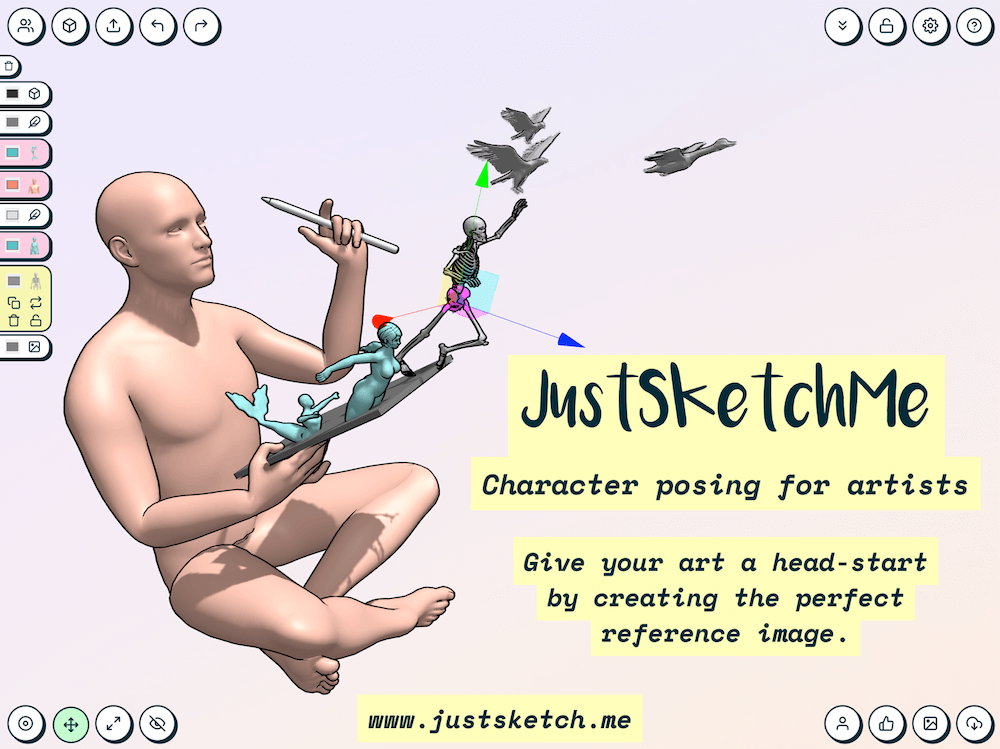

User reviews (0)