
 简体中文
简体中文 English
Website review
This review may include AI-generated content and is not individually verified. Domain, certificate and other facts come from the observed data on this page.
What is Lunatask?
Lunatask is an all-in-one, encrypted productivity app that combines a to-do list, habit tracker, mood and life tracking, journaling and notes in one place. Its pitch is less about adding features and more about reducing the overhead of managing them: the task system is designed to reschedule and surface work for you, so you spend time doing tasks rather than reorganizing lists.
What it actually covers
- Tasks: Kanban-style boards, a Must/Should/Want prioritization method, the Eisenhower Matrix, timers and work-in-progress limits.
- Calendar and time blocking: connect Google, Outlook or iCloud calendars to see meetings beside your tasks, then drag tasks and habits into the gaps. It also supports joining Zoom, Google Meet and Teams calls and creating notes from event templates.
- Habits: daily and weekly habits with customizable recurrence, current and record streaks, and reminder notifications.
- Well-being tracking: mood, emotion, energy and stress tracking over time, intended to show how habits affect how you feel.
- Notes and journaling: Markdown notes, notebooks, templates, PIN-protected notebooks and note sharing, plus journal entries with integrated mood tracking.
Who it suits
The strongest fit is someone who currently juggles a task manager, a habit app, a mood journal and a notes app, and wants one encrypted home for all of it. The well-being tracking is unusual in this category and makes it a reasonable choice for people who want to connect their daily habits to their mood. Someone who only needs a plain shared task list for a team may find the personal-reflection features beside the point.
A practical next step
Pick your single biggest pain point — constant rescheduling, inconsistent habits, or untracked mood and stress — and check whether Lunatask's corresponding feature matches how you already work before committing. The official site, Lunatask, lists pricing and a free starting option, and the page notes that a major 3.0 version is in development, which is worth knowing if you plan to rely on it long-term.
How does Lunatask's encrypted security protect my tasks and notes?
Lunatask presents encryption as a core property of the app rather than an optional add-on: its to-do list, notes, and journaling are all described as encrypted, and notes and journal entries can be locked behind a PIN for an extra layer of privacy. In practical terms, that matters most for the material people tend to keep in a tool like this — meeting notes, personal reflections, mood and stress logs, and lists of goals — which you would not want sitting in plain text.
What the page actually promises, and what it doesn't
| Area | What Lunatask states | What it leaves open |
|---|---|---|
| Tasks | Encrypted to-do list | The exact encryption model (e.g., end-to-end vs. at-rest) is not spelled out on the page |
| Notes | Encrypted notes and notebooks, Markdown support, PIN-protected notebooks | Whether sharing a note weakens encryption for that note |
| Journaling | PIN protection for entries, integrated mood tracking | How PIN protection relates to the underlying encryption |
| Well-being data | Mood, emotion, energy and stress tracking | Whether this data is covered by the same encryption as notes |
The honest reading: the page establishes that encryption exists and that PINs add privacy on top, but it does not detail the technical model. If your threat model is "I don't want my task list readable by the service," that distinction is worth confirming before you commit sensitive material.
A concrete scenario
Suppose you keep a notebook of one-to-one meeting notes with direct reports, plus a journal entry each evening about stress levels. The PIN-protected notebook keeps the meeting notes out of casual view if someone picks up your unlocked laptop; the encrypted journal plus mood tracking keeps a running record you can review against habit streaks. The trade-off is friction: PINs mean re-entry, and the value of the well-being tracking depends on you actually logging consistently, which is a habit in itself.
Next step
Decide first what you are protecting against — a shared device, a service provider, or both — then check the documentation and pricing pages at Lunatask for the specifics of the encryption model before moving sensitive journals into it. If you only need task management, a lighter tool may suit you better; if the appeal is combining tasks, habits, mood and encrypted notes in one place, that combination is the reason to choose it.
How can I use Lunatask's time blocking to plan my day around calendar events?
Lunatask approaches time blocking by putting your calendar and your task list on the same surface. You connect a calendar (the page lists Google, Outlook and iCloud), so meetings and calls appear alongside your tasks. You then drag planned tasks and habits onto the calendar to fill the gaps between events. The stated goal is to plan realistic work into the time you actually have, rather than a list that ignores your day.
A practical way to plan a day
- Connect your work and personal calendars first. Lunatask supports several calendar sources, so connect both if your day mixes meetings and personal commitments. This prevents you from blocking focus time over an event you forgot about.
- Review the day's fixed events before adding tasks. Look at the actual gaps—a 30-minute slot between calls is a different planning unit from a two-hour block.
- Drag in only what fits. Place your highest-priority task into your largest uninterrupted gap and short admin tasks into smaller ones. Habits can be blocked the same way, which helps if you want, say, a daily walk to survive a meeting-heavy day.
- Use the task-prioritisation features to decide what earns a slot. The page mentions a Must/Should/Want method and an Eisenhower Matrix, plus work-in-progress limits and timers. These help you avoid overfilling the calendar, which is the most common failure mode in time blocking.
- Add meeting notes as you go. The page says you can create notes for events from templates and join Zoom, Google Meet and Teams calls from the app, so meeting prep and follow-up notes can live next to the event.
Who this suits, and the trade-offs
This setup fits people whose days are shaped by external meetings but who still need to protect focused work—consultants, managers, freelancers juggling client calls. It is less useful if your calendar is already empty and your problem is simply deciding what to do; the prioritisation methods matter more there than the calendar layer.
Two trade-offs are worth knowing. First, time blocking works only if you re-block when the day slips; Lunatask's "forgiving" task philosophy is designed to reduce the guilt of rescheduling, but you still have to do the rescheduling. Second, the calendar integration shows events and lets you place tasks, but the page does not describe two-way syncing of your blocked tasks back to external calendars—so check that in the app before relying on it to communicate your plan to colleagues.
If you want to compare approaches, Todoist and ClickUp also offer calendar views and time blocking, while Reclaim specialises in automatically scheduling tasks around meetings. Lunatask's distinguishing angle is combining that planning with encrypted notes, habit tracking and mood journaling in one place.
Next step: connect one calendar, block tomorrow's two most important tasks into real gaps, and at day's end note which blocks held. That single experiment tells you whether the drag-and-drop model matches how your days actually move.
How does Lunatask's mood and energy tracking show how my habits affect my well-being?
Lunatask connects habit tracking and well-being tracking inside one app, so the same daily entries can be reviewed side by side. The page describes a mood and emotion tracker, an energy-level tracker, and a stress tracker, alongside daily and weekly habits with streaks and reminders. The practical effect: when you log how you feel on a given day, you can compare that against whether you completed your habits that day, rather than keeping two separate records and guessing at the link.
What that looks like in practice
- Same-day view: a habit is checked off and a mood or energy rating is logged in the same place, so patterns are visible without cross-referencing apps.
- Trend over time: streaks and a history of mood, energy, and stress entries let you look for stretches where low energy or high stress lines up with missed or completed habits.
- Journaling as context: the journaling feature includes integrated mood and emotion tracking and customizable entry templates, so a written note can sit next to the numbers and explain why a day looked the way it did.
Where it stops short
The page presents tracking and visibility, not analysis. Nothing described computes correlations, scores your habits, or tells you which habit is helping. Reading the pattern is your job: pick one habit, log mood and energy daily for two or three weeks, then look at whether the habit days differ from the missed days. That is general advice about how to use tracking data, not a described Lunatask feature.
Who benefits most
People who already suspect a habit (sleep routine, exercise, screen time) affects their mood but have no record to check it against, and who want the record to stay private—the app is positioned as encrypted, with PIN protection for journal entries and notebooks. Someone who only wants a plain mood log with no tasks or habits attached will find the surrounding task machinery unnecessary.
A useful next step
Before committing, decide what you will compare: for example, "energy rating on days I walk vs. days I don't." Then check the app's own documentation at Lunatask for how mood, energy, and stress entries are recorded and reviewed, so you know whether the history view supports the comparison you have in mind.
What are the pricing plans and free tier limits for Lunatask?
Lunatask's page evidence does not list its pricing plans or the limits of its free tier. The page only links to a separate pricing page and shows a "Get Started for Free" button, which confirms a free option exists but not what it includes. For actual plan names, prices and free-tier caps, check Lunatask's pricing page directly.
What the page does establish is the feature set a plan would cover: an encrypted to-do list, habit tracker, journaling, mood/energy/stress tracking, notes and calendar time-blocking. If you are weighing a paid upgrade, the practical question is which of those you would use daily. Someone who mainly needs a task list may find the free tier sufficient; someone relying on habit streaks, journaling with PIN protection or calendar time-blocking has more reason to compare paid tiers.
As a next step, list the two or three features you would actually depend on (for example, calendar sync or PIN-protected notebooks), then confirm on the pricing page that your intended tier includes them before committing.
Can I use Lunatask to track relationships and anniversaries with friends and family?
Yes. Lunatask explicitly includes a relationship-tracking feature aimed at friends and family: the page describes keeping track of everything related to the people close to you and avoiding missed anniversaries, framed as a personal "CRM" for maintaining relationships.
What that looks like in practice
- People records: Store details about friends and family in one place so birthdays, anniversaries and shared context aren't scattered across notes and memory.
- Reminders through tasks: Because the core is a to-do list, relationship follow-ups (a call, a gift, an anniversary) can live as tasks alongside everything else, with the app's scheduling and calendar features helping them surface at the right time.
- Context in notes: Encrypted notes and notebooks can hold meeting-style notes, gift ideas or shared memories, and PIN-protected notebooks add privacy for sensitive entries.
Who benefits most
Someone who already struggles to keep up with a wide circle of people — several friend groups, extended family, recurring occasions — gains the most from consolidating this in one app. If you only need a simple birthday reminder, a calendar alone may be enough; the value here comes from combining reminders, notes and habit-style tracking.
Trade-offs to weigh
The relationship features sit inside a broader productivity system (tasks, habits, mood tracking, journaling). That's efficient if you want one encrypted home for personal logistics, but it means more setup than a dedicated contacts app. Mood and journaling features are separate from relationship tracking, so don't expect automatic insights about your relationships themselves.
Next step
List the people and occasions you most often miss, then decide whether you want them as recurring tasks, notes, or both. If you're comparing options, Notion is a general-purpose workspace some people use for lightweight personal CRM setups, though it isn't purpose-built for this. Check Lunatask's own documentation for how relationship entries and anniversaries are actually created before committing.
 Cloudflare
 Netlify
 Google Workspace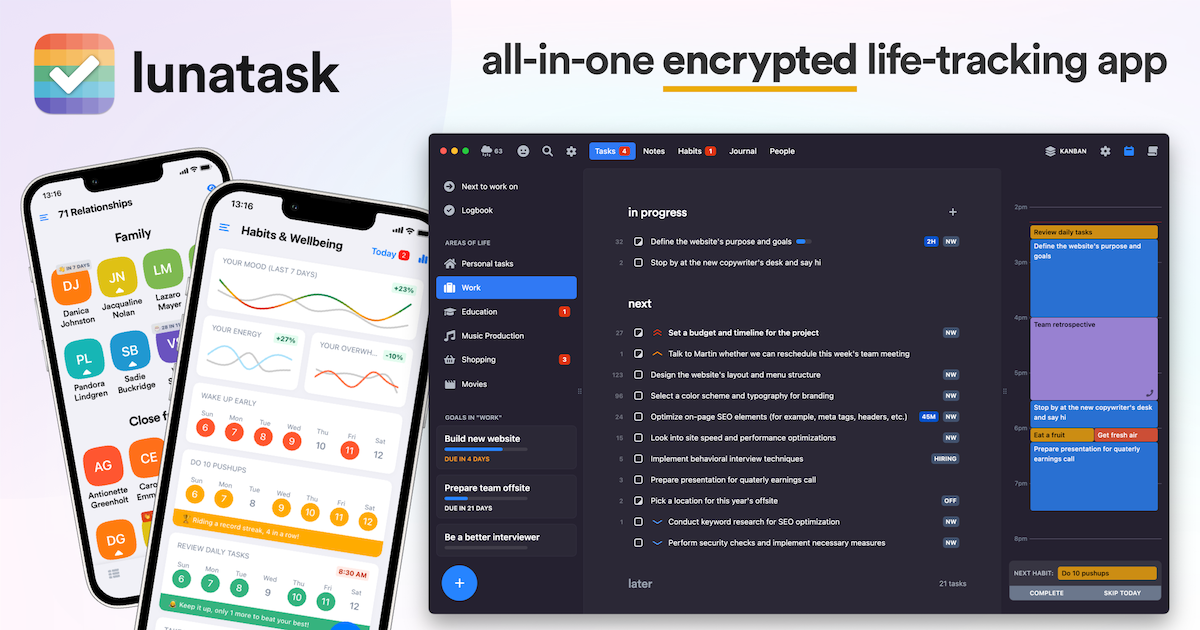
User reviews (0)