Website profiles · Technology insights · Alternatives

neighborbrite.com

AI-powered inspiration for your yard. Just tap the area to landscape and get design inspiration!

No paid content found Multilingual
Visit website
Profile views 11 Outbound visits 12 Normal
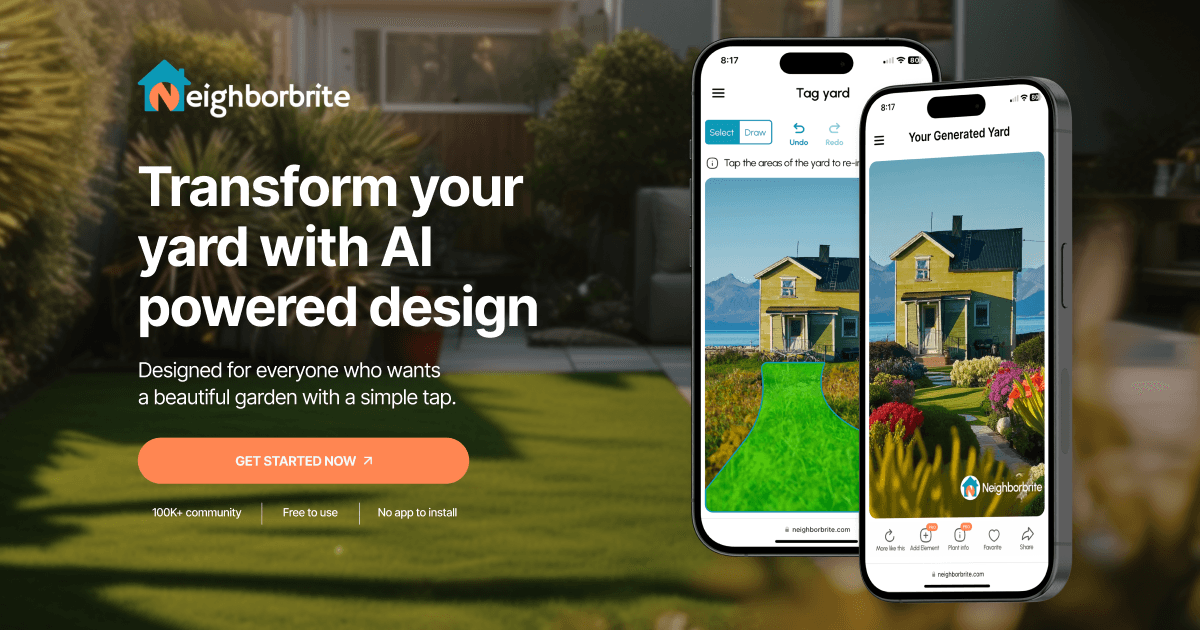
Neighborbrite Full homepage screenshot

At a glance

Category
Design & Creativity
Language
English
Paid-content signal
No paid content foundObserved
Registered
2022
Hosting
Amazon CloudFrontInferred
HTTPS certificate trusted
PassedObserved
Last updated

Website review

This review may include AI-generated content and is not individually verified. Domain, certificate and other facts come from the observed data on this page.

What is Neighborbrite?

Neighborbrite is a web-based AI landscape design tool. You upload a photo of your yard, and it generates garden design ideas on top of that photo. It is aimed at homeowners who want visual inspiration without hiring a designer or learning complex software.

How it works, in three steps

  1. Upload a photo of your yard — this becomes the base image.
  2. Pick a style (for example, Cottage, Modern or Desert) or describe your own direction in words.
  3. Get a rendered design idea you can share with friends or family.

What the toolbox covers

  • Choose a style — a guided plan from a ready-made look, covering style, plants and layout.
  • Describe your dream yard — a guided plan based on your own written direction.
  • Magic edit — quick changes to any area of the image.
  • Add elements — plants plus structures such as pergolas, fire pits, fencing and water features.
  • Erase elements — circle an object and remove it.
  • Identify plants — select plants in a photo and get their names.
  • High resolution and auto enhance — sharper, clearer images, described as suited to print.

Who it suits

A useful fit if you are early in a project and want to see options before spending money on plants or contractors, or if you want a visual to discuss with a landscaper. It is less suited to detailed planting plans, soil and drainage questions, or anything needing site measurements and local climate rules.

Practical trade-offs

  • Fast and low-commitment: the site presents a design in about two minutes, with no app to install.
  • Output is inspiration, not a buildable plan. Treat renders as a starting point, then verify plant choices with a local nursery or extension service.
  • Photo quality drives results, so take a straight-on shot in even light.
  • Some tools are marked as Pro or Business, so expect part of the toolbox to sit behind a higher tier.

Next step

Photograph one area — a front bed or a bare corner — rather than the whole yard. Pick two contrasting styles and compare the renders side by side; the difference usually clarifies what you actually want before you buy anything. Neighborbrite itself is at Neighborbrite.

How do I design my yard with Neighborbrite?

Upload a photo of your yard, tap the area you want to change, choose a style or write your own description, then refine the result with the editing tools. That is the core loop described on Neighborbrite: photo first, then guided choices, then tweaks.

The basic steps

  1. Upload a photo of your yard. The site says this photo becomes the foundation for your custom design, so a clear, well-lit shot taken from the angle you care about most works better than a wide snapshot full of clutter.
  2. Select a style. Ready-made looks such as cottage, modern or desert give you a guided plan covering style, plants and layout when you do not want to make every decision yourself.
  3. Or describe your own direction. Instead of picking a preset, you can write something like "low-maintenance color with a curved bed and native plants" and get a plan built around that brief.
  4. Edit the result. Magic edit changes a selected area, add elements lets you place plants or hardscape items, and erase elements removes objects you do not want.
  5. Finish and share. Higher-resolution output and auto enhance are aimed at producing a cleaner image you can show to family, a contractor or a nursery.

Which tool to reach for

Your goal Tool described on the page
Fast starting point Choose a style
Specific vision in mind Describe your dream yard
Fix one small area Magic edit
Add plants or structures Add elements
Remove something Erase elements
Sharper, print-ready image High resolution
Better lighting and clarity Auto enhance
Name plants already in a photo Identify plants

Some tools are labelled as part of a paid tier on the page, while choosing a style is presented as the entry point. Treat the labels as a rough guide to what is gated rather than a price list.

A realistic scenario

Say your back garden is a plain lawn with a tired fence. You photograph it from the kitchen door, pick a style close to what you already like, then use add elements to test a curved border and a small seating area. If the result feels crowded, magic edit lets you rework just that corner instead of starting over. You end up with a picture you can take to a garden centre or landscaper as a starting conversation, not a construction drawing.

What to keep in mind

  • The output is visual inspiration. It will not tell you soil type, sun exposure, hardiness zone or whether a plant will survive your winters.
  • Use identify plants on an existing photo if you want to keep plants you already have and work around them.
  • Check plant choices against a local nursery or extension service before buying, especially for anything labelled native or low-maintenance.

Start with one photo and one style, and change only one thing at a time so you can tell which edit actually improved the design.

Can I try Neighborbrite for free?

Yes. Neighborbrite lets you start free: the page presents a "Start free" option, and the core workflow—uploading a yard photo, picking a style, and getting design inspiration—is described as taking about two minutes with no app to install. You can work in the browser, which lowers the barrier if you just want to see what your yard could look like before committing to anything.

What free access realistically covers

Based on the page's tool list, the entry point is the guided "Choose a style" flow: you upload a photo, select a ready-made look (cottage, modern, desert, and so on), and receive a plan with style, plants, and layout suggestions. That is enough to test whether the AI output matches your taste and whether the photo quality you can provide produces usable results.

Several tools are labeled "Pro" or "Business" on the page—describing your own dream yard in free text, magic edit, adding elements from a plant and hardscape library, erasing objects, plant identification, high-resolution export, and auto enhance. Treat those labels as signals that deeper editing and print-ready output sit beyond the free entry point, though the page does not state exact limits or prices.

A practical way to decide

  1. Pick one real photo of a problem area—a bare front bed or a plain backyard corner.
  2. Run the free styled design and judge two things: does the layout respect your actual space, and are the suggested plants plausible for your climate?
  3. If the concept is close but details are wrong, that is the moment paid editing tools become worth considering. If the concept is off entirely, no amount of editing will fix the underlying direction.

For context on styles and plant choices before you upload, RHS and Gardeners' World offer reliable planting guidance that helps you evaluate whether the AI's suggestions are sensible.

What garden styles and plants can I choose from in Neighborbrite?

Neighborbrite's style and plant choices work on two levels: ready-made styles for a guided plan, and individual plant/element placement for finer control. According to the site, styles include Cottage, Modern and Desert, and the element library lists 5,000+ plants plus hardscape items such as pergolas, fire pits, fencing and water features.

H3 What the style options do Choosing a style gives you a guided plan covering style, plants and layout, so it suits someone who wants a coherent look without making every decision. The "Describe your dream yard" route instead builds a plan from your own description — the site's example is "Low-maintenance color with a curved bed and native plants" — which is better if you already know the mood or constraints you want.

H3 What the plant and element tools add

  • Add elements: place plants or structures into the image, e.g. a shrub by the house. This is the closest thing to picking individual species.
  • Identify plants: select plants in a photo and get their names — useful for matching an existing bed or checking what a neighbour's planting actually is.
  • Magic edit / Erase elements: adjust or remove items after the plan is generated, so you can iterate rather than restart.
  • High resolution / Auto enhance: finishing tools for print-ready or clearer images.

H3 A practical way to decide Start with one style plan for the overall structure, then use Add elements and Identify plants to swap in species suited to your climate and maintenance level. If you want a second opinion on plant names or hardiness, compare against a plant database such as RHS or a regional extension service before buying anything.

Next step: upload one clear, wide photo of your yard, generate a Cottage or Desert plan depending on your climate, then use Identify plants on your existing greenery so the new planting fits what is already there.

Can I edit my yard photo with Neighborbrite to add or remove elements?

Yes. Neighborbrite's page describes two editing tools for exactly this: Add elements, which lets you place items such as plants, pergolas, fire pits, fencing or water features, and Erase elements, where you circle an object and remove it. Both are listed as Pro tools, alongside Magic edit for quick changes to any area of your image.

A practical way to judge whether that is enough depends on what you actually want to change:

  • Adding things: useful if you want to test a shrub against the house, a seating area, or a fence line before committing. The page mentions a library of 5,000+ plants plus hardscape and feature items.
  • Removing things: useful for seeing how a yard looks without an old shed, a dead shrub, or clutter. You select the object and it is removed from the image.
  • Tidying the result: Auto enhance improves lighting and clarity, and High resolution prepares a sharper image for print. These are listed as Business tools.

A reasonable next step is to start from a clear, well-lit photo taken straight on rather than at a steep angle, since edits like placing a shrub or erasing an object depend on the photo's perspective looking believable. If your goal is a rough visual check of a few ideas, the add-and-erase tools cover that; if you need a measured planting plan or contractor-ready drawings, treat the output as inspiration and confirm details separately.

For comparison, Neighborbrite focuses on photo-based AI editing, while Horti and Gardyn sit in the broader home-garden space if you want to see how other tools frame the same task.

Is Neighborbrite suitable for professional landscaping businesses?

Yes, with caveats. Neighborbrite is built around fast, AI-generated visual concepts from a photo of a yard, and its own page positions some tools for business use: High resolution is labeled "Business" for preparing a sharp image for print, and Auto enhance is also labeled "Business" to improve lighting and clarity. That makes it plausible as a client-facing visualization and mood-boarding tool, not as a replacement for CAD, site surveying, or construction documentation.

Where it fits a landscaping business

  • Client conversations: Upload a photo of the client's yard, pick a ready-made style (Cottage, Modern, Desert), or describe a direction such as "low-maintenance color with a curved bed and native plants," and get a plan-style image in minutes. Useful for winning alignment before committing to a full design fee.
  • Iterating on feedback: Magic edit changes a specific area from a prompt, Add elements places items from a catalog of 5,000+ plants plus pergolas, fire pits, fencing, and water features, and Erase elements removes objects by circling them. This is the loop most designers actually need when a client says "move the bed" or "lose the shed."
  • Plant identification: Identify plants lets you select plants in a photo and get names — handy during a site walk or when reading a client's existing planting.
  • Presentation output: High resolution and Auto enhance address the print-and-clarity step for proposals or boards.

Where it does not fit

The page describes inspiration and visualization, not measured drawings, grading, irrigation, or permit-ready plans. Treat the output as a concept image. Anything with dimensions, quantities, or installation detail still needs your own documentation. AI-generated plant choices also need a horticultural sanity check for your climate and site conditions — the tool suggests, you verify.

Practical next step

Run one real project through it: upload a current client's yard photo, generate two or three style directions, and see whether the images speed up the approval conversation or just add rework. If you bill for design time, compare the hours saved in early concepting against the cost of your plan tier. For broader context on how AI visualization sits alongside established design tools, see Houzz and Landscape Institute.

Related questions

More questions →
How Do You Create a Landscape Design with Neighborbrite?

Neighborbrite turns a photo of your yard into a design concept in about two minutes, using a three-step flow: upload a photo, pick a style (or describe your own), then view the result. It runs in the browser — no app to install — and starts free, so you can try the basic flow before deciding whether the Pro and Business tools are worth it. The steps below cover the core flow plus the editing tools you can use afterward.

Before you start

  • A photo of the yard area you want to redesign. The site uses your photo as the foundation for the design, so framing matters more than camera quality.
  • A browser. Neighborbrite runs on the web and requires no installation.
  • An account if you want to save or share work — the site shows a "Sign in on the web" option alongside "Start free."

Step 1: Upload a photo of your yard

Upload a photo of your yard. Neighborbrite uses it as the base layer for the generated design.

Practical notes:

  • Shoot the area you actually want changed. A wide shot of one bed or one lawn section produces a more usable result than a photo of the whole property.
  • Keep the angle roughly level. The design is drawn onto your photo, so a tilted or heavily obstructed view limits what the tool can show.
  • If you plan to compare options, use the same photo each time so the only variable is the style.

Step 2: Select a style and customize the details

The site offers two starting points:

Path What you give it What you get back
Choose a style A ready-made look (examples shown include Cottage, Modern, and Desert) A guided plan covering style, plants, and layout
Describe your dream yard (Pro) Your own written direction, e.g. "Low-maintenance color with a curved bed and native plants" A complete plan built from your description

If none of the preset styles fit, the description route is the way to steer the result toward your own constraints — plant preferences, maintenance level, or a specific layout idea.

Step 3: View, refine, and share the design

Once the design is generated, you can share the new outdoor space with friends and family. If the first result is close but not right, the toolbox lets you adjust rather than start over:

  • Magic edit (Pro) — make quick changes to any area of the image by describing them, e.g. "Add a flower bed."
  • Add elements (Pro) — place items from a library of 5,000+ plants plus pergolas, fire pits, fencing, and water features. Example use: place a shrub by the house.
  • Erase elements (Pro) — circle an object and remove it.
  • Identify plants (Pro) — select plants in a photo and get their names.
  • High resolution (Business) — prepare a sharp image for print.
  • Auto enhance (Business) — improve lighting and clarity.

What the free flow covers vs. what needs Pro or Business

The three-step core flow — upload, choose a style, get inspiration — is the free entry point. The editing and finishing tools are labeled on the site as follows:

  • Free / core: upload a photo, choose a style, generate and share a design.
  • Pro: describe your dream yard, magic edit, add elements, erase elements, identify plants.
  • Business: high resolution, auto enhance.

The site does not publish prices on the page reviewed here, so check the current plan details in the app before assuming what a Pro or Business upgrade costs.

Common snags

  • The design ignores part of your yard. Usually a framing problem — re-upload a photo centered on the area you care about.
  • The style is right but the planting isn't. Switch to the describe-your-own-yard path and name the plant types or maintenance level you want.
  • You want to keep several versions. Sign in so designs are tied to your account rather than the session.

Is it worth trying?

If you want a fast visual starting point before committing to a real landscaping project, the free three-step flow costs you one photo and about two minutes. If you need to iterate on specific elements — swap a shrub, remove a fence, name an existing plant — the Pro tools are what make that possible. The site reports a community of 800K+ registered users across 170+ countries, which is a signal of active use rather than a measure of output quality; judge the results on your own yard photo.

What Is Neighborbrite and What Can It Do for Your Yard?

Neighborbrite is a web-based AI landscape design tool that turns a photo of your yard into a visual garden plan. You upload a photo, pick a style or describe what you want, and the tool generates design inspiration you can share or refine. It's aimed at homeowners who want to see ideas before committing to plants, layouts, or hardscaping — and you can start free with no app to install.

How it works

The core flow is three steps, and it's designed to take about two minutes:

  1. Upload photo — You start by uploading a photo of your yard. Neighborbrite uses it as the foundation for your custom design.
  2. Select style — You explore garden styles and customize details to match your vision.
  3. Get inspiration — You see your yard reimagined and can share the result with friends and family.

The site positions this as "designed for everyone who wants a beautiful garden with a simple tap," so no design background is required.

The toolbox: what each tool does

Beyond the basic style picker, Neighborbrite offers a set of tools. Some are free to try, and several are marked Pro or Business on the site.

Tool What it does Tier shown
Choose a style Guided plan from a ready-made look (e.g., Cottage, Modern, Desert) —
Describe your dream yard Guided plan from your own written direction Pro
Magic edit Make quick changes to any area of your image Pro
Add elements Choose from 5,000+ plants, plus pergolas, fire pits, fencing, water features, and more Pro
Erase elements Circle and remove an object Pro
High resolution Prepare a sharp image for print Business
Auto enhance Improve lighting and clarity Business
Identify plants Select plants in a photo and get their names Pro

What the guided tools actually produce

  • Choose a style gives you a guided plan covering style, plants, and layout from a ready-made look.
  • Describe your dream yard takes your own description — the site's example is "Low-maintenance color with a curved bed and native plants" — and returns a complete plan.
  • Magic edit works on a prompt basis; the example shown is adding a flower bed, with a before-and-after result.
  • Add elements lets you place specific items, such as putting a shrub by the house.
  • Erase elements lets you select an object and remove it from the image.

Who it's for

Neighborbrite fits you if you want:

  • A quick visual starting point before spending money on plants or contractors
  • To test multiple styles (cottage, modern, desert, and others) against your actual yard photo
  • A way to communicate a direction to a landscaper or partner
  • Plant identification from a photo

It's less suited to someone who needs a measured, buildable construction plan, since the output is described as design inspiration and guided plans rather than engineering drawings.

Community and scale

The site reports a community of 800K+ registered users, 20M+ designs generated, and users in 170+ countries. It also shows before-and-after examples from real community yards, which is useful for judging whether the output style matches what you're hoping for.

Getting started

You can begin on the web — there's a "Get Started Now" entry point and a "Start free" option, and the site notes there's no app to install. Sign-in is available on the web. If you want the more advanced editing tools (magic edit, add/erase elements, plant ID) or print-ready output, expect those to sit behind the Pro and Business tiers shown on the toolbox.

A practical first step: upload one clear, well-lit photo of the area you want to change, try the free style option to see the quality of the result, then decide whether the Pro tools are worth it for your project.

What Design Tools and Features Does Neighborbrite Offer?

Neighborbrite is a web-based AI landscape design tool that turns a photo of your yard into a redesigned image. Its toolbox covers two starting paths — pick a ready-made style or describe your own vision — plus editing tools for changing, adding, and removing elements, and finishing tools for image quality and plant identification. It suits homeowners who want fast visual inspiration from a photo rather than a measured, buildable plan.

Two ways to start a design

Both options produce a guided plan, but they differ in how much direction you supply.

Tool What you provide What you get
Choose a style A photo and a ready-made look (examples shown include Cottage, Modern, and Desert) A guided plan covering style, plants, and layout
Describe your dream yard (Pro) A photo and your own written description A guided plan built from your direction

The site's example prompt for the second option is "Low-maintenance color with a curved bed and native plants." The workflow is the same in both cases: upload a photo of your yard, select or describe the design direction, then view the result. Neighborbrite states the whole process takes about 2 minutes.

Editing tools for changing a design

Once you have a design, these tools let you adjust it without starting over.

  • Magic edit (Pro) — make quick changes to any area of your image. The example given is adding a flower bed, shown as a before-and-after.
  • Add elements (Pro) — place items from a library of 5,000+ plants, plus pergolas, fire pits, fencing, water features, and more. The example is placing a shrub by the house.
  • Erase elements (Pro) — circle an object in the image and remove it; the site shows a selected object marked as removed.

These three are the practical core of iterating on a design: Magic edit for prompt-based changes, Add elements for placing specific objects, and Erase elements for taking things out.

Finishing and identification tools

  • High resolution (Business) — prepares a sharp image for print.
  • Auto enhance (Business) — improves lighting and clarity, shown as a before-and-after.
  • Identify plants (Pro) — select plants in a photo and get their names.

Note the tier labels: High resolution and Auto enhance are marked Business, while Magic edit, Add elements, Erase elements, Describe your dream yard, and Identify plants are marked Pro. Choose a style appears without a Pro or Business tag.

What the platform reports about itself

Neighborbrite lists 800K+ registered users, 20M+ designs generated, and users in 170+ countries. It runs in the browser — the site states there is no app to install — and offers a "Start free" entry point alongside web sign-in. The page does not publish pricing details, so treat the Pro and Business labels as feature tiers rather than confirmed costs.

How to decide if it fits your task

  • If you want quick visual inspiration from a photo of your existing yard, the Choose a style path is the lowest-effort starting point.
  • If you have a specific look in mind, Describe your dream yard lets you write it out instead of picking from presets.
  • If you need to iterate on details — swap a plant, add a fire pit, remove a shed — the editing tools are where most of the practical work happens.
  • If you need print-quality output or plant names, check whether High resolution, Auto enhance, or Identify plants are available to you, since they carry tier labels.

What Neighborbrite does not claim to provide is a measured, construction-ready plan; its outputs are described as design inspiration and guided plans. For anything requiring dimensions, grading, or permitting, you would still need a separate professional step.

Who Is Neighborbrite For and What Do Users Say About It?

Neighborbrite is an AI landscape design tool aimed at homeowners who want a better-looking yard without hiring a designer or learning design software. The site describes it as "designed for everyone who wants a beautiful garden with a simple tap," and it reports 800K+ registered users across 170+ countries who have generated 20M+ designs. If you can upload a photo of your yard and pick a style, you're the intended user. If you need construction documents, grading plans, or contractor-ready specs, this is not that tool.

Who it's built for

The stated audience is people who want design inspiration, not professional plans. That shows up in how the product is framed:

  • No design skills required. The workflow is upload a photo, select a style, get a result — the site claims "your dream garden in 2 minutes."
  • No app to install. It runs on the web, with a "Sign in on the web" entry point.
  • Beginners and casual users first. The homepage leads with simplicity ("with a simple tap") rather than precision or CAD-style control.

It fits these situations well:

  • You have a photo of your yard and want to see what different styles would look like in it.
  • You want to explore options before committing money to plants, hardscape, or a contractor.
  • You want to share a visual with a partner, family member, or landscaper to align on direction.

It fits these situations poorly:

  • You need a plan a contractor can build from without interpretation.
  • You need site-specific engineering (drainage, retaining walls, permits).
  • You want to design without a photo — the process starts from an uploaded image.

What users actually get: the toolbox

The site lists its tools in two tiers. The free entry point is style-based design; most editing tools are marked Pro, and two are marked Business.

Tool What it does Tier shown
Choose a style Guided plan from a ready-made look (e.g., Cottage, Modern, Desert) Free
Describe your dream yard Guided plan from your own written direction Pro
Magic edit Make quick changes to any area of your image Pro
Add elements 5,000+ plants plus pergolas, fire pits, fencing, water features Pro
Erase elements Circle and remove an object Pro
Identify plants Select plants in a photo and get their names Pro
High resolution Prepare a sharp image for print Business
Auto enhance Improve lighting and clarity Business

The site does not publish prices on the pages reviewed here, so treat "free" as referring to the starting flow ("Start free") rather than the whole toolbox. Assume the Pro and Business tools sit behind a paid tier until you check.

The three-step workflow

The site describes the core process in three steps, and the expected result at each stage is worth knowing before you start:

  1. Upload photo. Your yard photo becomes the foundation for the design. Expect the output to be constrained by what's visible in the image — a partial or low-quality photo limits what the AI can work with.
  2. Select style. You browse garden styles and customize details. This is where you steer the result; the more specific your direction (the "Describe your dream yard" tool uses prompts like "low-maintenance color with a curved bed and native plants"), the closer the output should match your intent.
  3. Get inspiration. You see the rendered yard and can share it. This is inspiration output, not a build plan.

What the community examples suggest

The site shows before-and-after pairs from its community rather than testimonials with names or ratings. That's a meaningful limitation: you can see visual results, but you can't read detailed user opinions, complaints, or comparisons on the pages reviewed. The community numbers (800K+ users, 20M+ designs, 170+ countries) are the site's own figures.

What the before-and-afters do tell you: the tool is oriented toward visual transformation of an existing photo, and the examples are presented as real community submissions. If you want to judge quality, the before-and-after gallery is the most concrete evidence available — look for whether the "after" images preserve your yard's actual structure (slope, existing trees, hardscape) or replace it wholesale.

How to decide

Choose Neighborbrite if you want fast visual inspiration from a photo of your own yard and you're comfortable with the free starting flow plus paid tools for editing. Skip it if you need buildable plans, or if you'd rather not upload a photo to get started.

A practical test: upload one photo, run the free style flow, and see whether the result reflects your actual space. If it does, the Pro editing tools (add/erase elements, plant identification) are the natural next step. If the result looks generic, the paid tools are unlikely to fix a mismatch in the underlying approach.

Website Overview

Page metadata, canonical configuration and social previews work together to provide more consistent search and sharing presentation.

Domain and Registration

Transfer-protection status is present, helping reduce the risk of unauthorized domain transfers. The domain has about 4 years of registration history; its current configuration provides more context than age alone. The registrar is GoDaddy.com, LLC, a widely used domain service provider. The domain uses the common .com extension, which is not an independent safety signal.

DNS and Email

The lowest TTL is 60 seconds, supporting rapid record changes at the cost of more frequent lookups. Nameservers are provided by Amazon Route 53, indicating managed DNS hosting. MX records point to the Google Workspace email service. No CNAME was found; the observed records resolve directly to addresses. SPF and DMARC are configured. DKIM status is unknown.

TLS and Certificates

The certificate uses an RSA 2048-bit public key, offering broad client compatibility. The server supplied a complete certificate chain. No organization name is present in the certificate; the available fields are consistent with domain validation. The certificate was issued within the Amazon cloud or CDN ecosystem. The certificate is valid for about 197 days in total, with 137 days remaining.

HTTP and Browser Security

The response lacks these common security headers: CSP, Permissions-Policy. No X-Powered-By header was found, reducing one common source of backend fingerprinting information. The x-cache, via response header indicates a CDN or caching proxy in the delivery path. No obvious internal addresses or debug information were found in the headers. The Server header contains the custom value AmazonS3.

Technology Stack Analysis

The public page identifies Next.js, Amazon CloudFront without precise versions, leaving fewer clues for version-specific scanning.

Search and Social Sharing

Twitter Card metadata is configured. JSON-LD includes Organization data, helping describe the organization as an entity. The page declares 6 language or regional alternatives using hreflang. The title has 40 characters, within a common display range. A meta description is present, with 96 characters.

Hosting and Email

DNSAmazon Route 53
HostingAmazon CloudFront
EmailGoogle Workspace
Approximate IP geolocation (inferred; a CDN or proxy may differ from the origin server) United States flagSeattle, Washington, United States Inferred 18.160.10.107

Registration details

RDAP / WHOIS

RegistrarGoDaddy.com, LLC
Registered2022-07-18
Expires2027-07-18
Domain statusclient delete prohibited、client renew prohibited、client transfer prohibited、client update prohibited
Nameserversns-1108.awsdns-10.org、ns-1582.awsdns-05.co.uk、ns-254.awsdns-31.com、ns-775.awsdns-32.net
DNSSECunsigned

DNS records

DNS

TypeNameValueTTLPriority
Aneighborbrite.com18.160.10.10760—
Aneighborbrite.com18.160.10.2260—
Aneighborbrite.com18.160.10.2360—
Aneighborbrite.com18.160.10.5260—
AAAAneighborbrite.com2600:9000:250a:1a00:17:479b:80c0:93a160—
AAAAneighborbrite.com2600:9000:250a:400:17:479b:80c0:93a160—
AAAAneighborbrite.com2600:9000:250a:5000:17:479b:80c0:93a160—
AAAAneighborbrite.com2600:9000:250a:8400:17:479b:80c0:93a160—
AAAAneighborbrite.com2600:9000:250a:9a00:17:479b:80c0:93a160—
AAAAneighborbrite.com2600:9000:250a:a200:17:479b:80c0:93a160—
AAAAneighborbrite.com2600:9000:250a:bc00:17:479b:80c0:93a160—
AAAAneighborbrite.com2600:9000:250a:f600:17:479b:80c0:93a160—
MXneighborbrite.comsmtp.google.com3001
MXneighborbrite.comtvzkiea2fohu7zghibua7aemskxbnrydou6plbaya4c4pep3xf4a.mx-verification.google.com30015
NSneighborbrite.comns-1108.awsdns-10.org172800—
NSneighborbrite.comns-1582.awsdns-05.co.uk172800—
NSneighborbrite.comns-254.awsdns-31.com172800—
NSneighborbrite.comns-775.awsdns-32.net172800—
TXTneighborbrite.comMS=ms879630383600—
TXTneighborbrite.comahrefs-site-verification_bfa769dd0df2b7eab84bf5880ed61761513fef17feec5f44ca07039ab3813f8e3600—
TXTneighborbrite.comgoogle-site-verification=AnsRjB5lP0EmdUtKQjHbcDlGO7XF1XnoSPkNa2nYomM3600—
TXTneighborbrite.comresend-domain-verification=a780386a5b5feea75e504130a57ce8523600—
TXTneighborbrite.comv=spf1 include:_spf.google.com include:sendgrid.net ~all3600—
DMARC_dmarc.neighborbrite.comv=DMARC1; p=none300—

TLS and certificates

TLS / SSL

AssessmentNormal configuration
Supported protocolsTLSv1.2、TLSv1.3
Negotiated protocolTLSv1.3
Certificate subjectneighborbrite.com
IssuerAmazon
Valid until2027-02-15T23:59 · Remaining when checked: 137 days
Verification detailsCertificate trust: Passed · Hostname match: Passed

HTTP response headers

HTTP

HeaderValue
content-typetext/html
cache-controlpublic, max-age=0, must-revalidate
serverAmazonS3
strict-transport-securitymax-age=31536000
x-frame-optionsDENY
x-content-type-optionsnosniff
referrer-policystrict-origin-when-cross-origin

Identified technologies

Next.jsAmazon CloudFront

Pages, Search and Sharing

Meta descriptionAI-powered inspiration for your yard. Just tap the area to landscape and get design inspiration!
Canonical URLhttps://neighborbrite.com/
LanguageEnglish (default) · Multilingual
Twitter Cardsummary_large_image
All bots 1 allowed · 0 disallowed
  • Allow/

User reviews (0)

  • No reviews yet.