Website profiles · Technology insights · Alternatives

nsynthsuper.withgoogle.com

An experimental physical interface for the NSynth machine learning algorithm.

No paid content found
Visit website
Profile views 1 Outbound visits 0 Normal
NSynth Super Full homepage screenshot

At a glance

Category
Artificial Intelligence
Language
English
Paid-content signal
No paid content foundObserved
Registered
2008
Hosting
Google LLCInferred
HTTPS certificate trusted
PassedObserved
Last updated

Website review

This review may include AI-generated content and is not individually verified. Domain, certificate and other facts come from the observed data on this page.

What is NSynth Super?

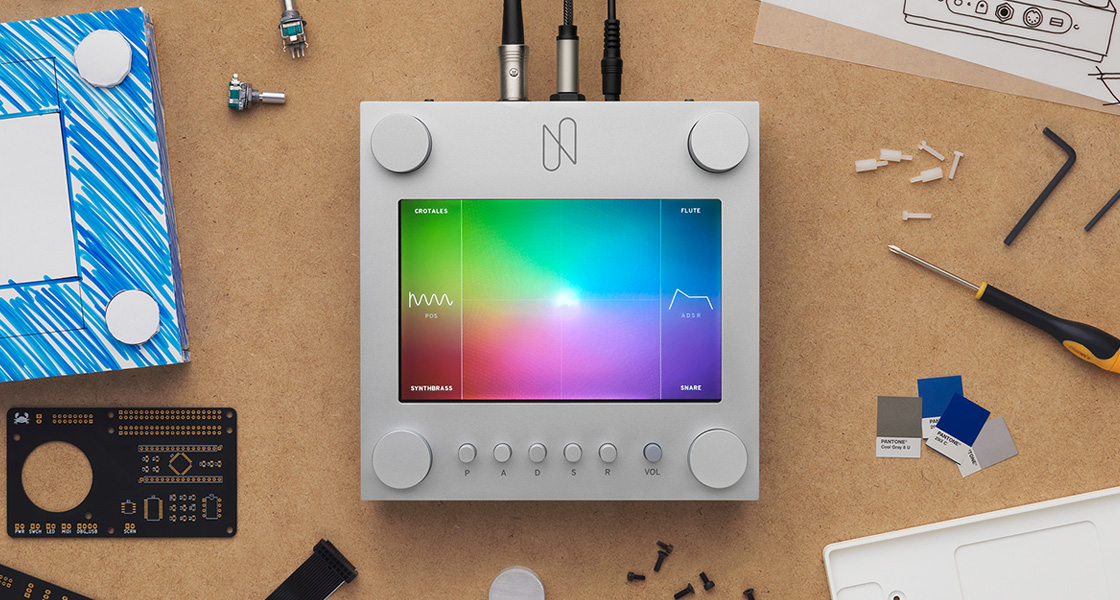
NSynth Super is an experimental physical instrument from Google's Magenta research project, made in collaboration with Google Creative Lab, that lets musicians play sounds generated by the NSynth machine-learning algorithm. It is an open-source prototype rather than a finished commercial product: the page describes an "experience prototype" shared with a small group of musicians to see how they would use it creatively.

The key idea is that NSynth does not blend or mix existing recordings. It uses a deep neural network to learn the acoustic characteristics of sounds and then synthesizes a genuinely new sound from them — the site's example is something that is part flute and part sitar at once.

How it works in practice

  • Four source sounds per dial. Each dial is assigned four source sounds, and the musician chooses which sounds to explore between.
  • Touchscreen navigation. Dragging a finger across the touchscreen moves through the generated sounds that carry the acoustic qualities of those four sources.
  • A large precomputed library. For this experiment, 16 original sounds across 15 pitches were recorded in a studio and fed into NSynth; the resulting 100,000-plus sounds were precomputed and loaded into the prototype.

Who it suits

It is aimed at musicians and sound designers curious about machine-learning timbres, and at developers or researchers interested in open-source musical interfaces. Because it is a prototype, expect an exploratory tool for finding unusual sounds rather than a gig-ready instrument with a polished workflow.

As a next step, listen to the demo film on the project page and note which source-sound pairings interest you — that will tell you quickly whether the four-source, touchscreen model fits how you like to shape sound. For background on the algorithm itself, see Magenta.

How does NSynth Super let me combine four source sounds into a new playable sound?

NSynth Super gives you a touchscreen surface where four source sounds sit at the corners. Dragging your finger across that surface moves you between them, and the instrument plays a newly synthesized sound shaped by the acoustic qualities of all four. The key distinction is that the sounds aren't blended or layered like a conventional sampler or crossfader: the NSynth algorithm generates a new sound that borrows characteristics from the sources, so a position between them can sound part flute and part sitar rather than like two recordings played at once.

What the controls do

  • Four dials each hold one of your source sounds, so you choose which four sounds define the space you explore.
  • The touchscreen is the performance surface: your finger's position selects where in that four-sound space the current note sits.
  • The pitch input (the keyboard-style interface) sets the note you're playing, so the same touchscreen position produces that new sound at different pitches.

The prototype's sounds were prepared in advance: 16 studio-recorded source sounds across 15 pitches were run through NSynth, producing over 100,000 generated sounds loaded into the instrument. That means exploration is fast and immediate, but you're choosing from a fixed prepared set rather than feeding in your own samples live.

A concrete way to try it

Assign four deliberately contrasting sources — say a bowed string, a breathy flute, a metallic percussion hit and a low drone — then play a slow melody while sweeping from the string corner toward the flute corner. Listen for where the attack softens and the sustain changes character; those transition zones are where the synthesized middle ground is most audible and where the instrument differs most from a blend.

Trade-offs to weigh

The appeal is genuinely new timbres and a tactile, exploratory playing style that rewards moving around the surface rather than hitting fixed presets. The limits follow from the same design: you work within the prepared sound set, the four-source frame constrains how far a single gesture can travel, and results depend on picking sources with distinct acoustic profiles — four similar sounds will produce a narrow, less interesting space. For a fuller picture of the algorithm behind it, see Magenta and Google Experiments.

What is the difference between how NSynth generates sound and how traditional synthesizers blend sounds?

NSynth generates a new sound rather than mixing existing ones. According to the project's own description, the algorithm uses a deep neural network to learn the characteristics of sounds and then synthesize an entirely new sound from their acoustic qualities. The page's example is a sound that is "part flute and part sitar all at once" — not a flute layered or crossfaded with a sitar, but a single new timbre built from both.

A traditional synthesizer, by contrast, typically combines or blends its sources: you mix oscillator waveforms, layer samples, or crossfade between patches, and you still hear the contributing parts. NSynth's output is described as a synthesis from learned characteristics, so the source sounds inform the result without being audible as separate layers.

What this means in practice

  • If you want recognizable layering — a pad plus a choir, with control over each level — a conventional synth or sampler is the direct tool.
  • If you want hybrid timbres — an instrument that sits between two or four sources and doesn't quite exist — NSynth's approach is the point. On NSynth Super, four source sounds are assigned to a dial, and you move across the touchscreen to explore the in-between sounds.
  • If you want reproducibility — traditional synthesis is deterministic and easy to recall; a learned model's output depends on the trained model and the source sounds fed in.

The trade-off is control versus novelty. Blending gives you predictable, tweakable components; NSynth gives you sounds you couldn't have dialed in by hand, at the cost of the fine-grained control a conventional synth offers over each layer.

A useful next step: pick two sounds you'd normally layer, then ask whether you want to hear both (blend) or hear something that is neither (synthesize). For the latter, the project page at NSynth Super explains how the source sounds and touchscreen navigation work, and the broader research is documented under Magenta.

Can I build my own NSynth Super, and what open-source materials are available?

Yes—NSynth Super was released as an open-source experimental instrument, so building your own is the intended path. Google's project page presents it as an open-source experimental instrument and notes that the pictured unit was an experience prototype shared with a small group of musicians, not a retail product. The build materials (hardware design files, software, and instructions) are published through the project's open-source repositories rather than sold as a kit.

What the project provides

  • Hardware design: The physical interface is documented as open hardware, covering the enclosure, control layout (four dials plus a touchscreen), and electronics. You source and fabricate parts yourself.
  • Software: The code that runs the instrument and connects it to precomputed NSynth sounds is open source, so you can inspect and modify it.
  • Sound content: For the prototype, 16 source sounds across 15 pitches were recorded and run through NSynth to precompute over 100,000 sounds, which were then loaded onto the device. The instrument works by assigning four source sounds to each dial and letting you drag across the touchscreen to explore sounds that combine the acoustic qualities of those four sources—synthesis of new sounds, not simple blending.

Practical considerations before you start

  • This is a build project, not a purchase. Expect to order components, fabricate or 3D-print an enclosure, and flash software. Skills in electronics assembly and basic Linux/command-line work help considerably.
  • Sound generation is precomputed. The prototype plays back a precomputed library rather than running NSynth live, so you'll be working within the supplied sound set unless you generate your own.
  • Documentation ages. Open-source hardware projects often depend on specific parts and software versions; check that components are still available and that the code runs on a current setup before committing to a bill of materials.

A sensible first step

Read the build documentation and repository on the project site first, then price the bill of materials and confirm part availability. If you mainly want to play with NSynth sounds rather than build hardware, the underlying algorithm is separately available through Google's Magenta project (Magenta) and the original NSynth release, which may be a lower-effort route to experimenting with the sound model before taking on the full instrument build.

How was the NSynth Super experience prototype tested with musicians, and what did they learn?

The prototype was shared with a small community of musicians so the team could observe how they might use it in their creative process. According to the project page, the goal was to understand real creative use rather than to run a formal benchmark: musicians were given an open-source experimental instrument that plays more than 100,000 precomputed NSynth sounds, built from 16 source sounds recorded across 15 pitches, and each dial was assigned four source sounds to explore between on the touchscreen. The page does not report specific findings, quotes or measured results from that testing, so any claim about what musicians concluded would go beyond what is documented.

What the setup implies for testing

The design points to a particular kind of evaluation. Because the sounds were precomputed and loaded into the prototype, the sessions could focus on playability and discovery—how quickly a musician finds a usable sound, whether the four-source dial layout makes sense in performance, and whether the results feel like new instruments rather than blends. The small, invited group suggests qualitative feedback and iterative refinement, not statistical validation.

A practical way to judge it

If you are considering building or adapting the open-source instrument, treat the prototype as a starting point for your own trial. Pick four source sounds with clear contrasts (for example, a bowed string, a flute, a plucked instrument and a voice), then test whether you can reach a playable sound within a minute and whether it holds up in a short improvisation. That tells you more about fit for your workflow than the prototype's own testing can.

For context on the underlying algorithm and related tools, see Magenta and Google Experiments.

What kinds of source sounds and pitches were used to create the 100,000+ precomputed sounds?

The precomputed library was built from 16 original source sounds, each recorded across 15 pitches in a studio. Those recordings were fed into the NSynth algorithm ahead of time, producing more than 100,000 new sounds that were then loaded onto the NSynth Super prototype. The page describes the sources only in those terms—it does not name the individual instruments or list the specific pitch range.

What this means in practice

  • Diversity came from the 16 sources, not from live input. A player isn't feeding new audio into the model; they're navigating a fixed map of sounds derived from that original set.
  • The 15 pitches per source give the library its pitch coverage. That's why the output count is so large: 16 sources × 15 pitches, multiplied by the many interpolated combinations the algorithm generates between source sounds.
  • Each dial held 4 source sounds. Dragging across the touchscreen moves between new sounds that carry the acoustic qualities of those four sources—so the character of a given corner of the interface depends entirely on which four recordings were assigned to it.

A useful way to think about it: if you're evaluating whether such an instrument suits your work, the question isn't "how many sounds are there" but "which 16 timbres are in the set, and do they sit close enough together to blend musically?" A flute-to-sitar blend is the page's own example of the kind of hybrid it aims for.

For background on the underlying algorithm and related tools, see Magenta and Google Experiments.

Related questions

More questions →
How Does the NSynth Algorithm Generate New Sounds?

NSynth uses a deep neural network to learn the acoustic characteristics of individual sounds, then synthesizes a completely new sound from those learned qualities rather than blending or mixing the originals. The result can be something that is, in Google Magenta's own example, "part flute and part sitar all at once"—a single new timbre that inherits traits of both sources without being a mashup of the two recordings.

What Makes NSynth Different from Blending

The distinction matters if you are trying to understand why NSynth Super sounds unlike a sampler or a crossfade tool.

Approach What happens to the audio Result
Blending / combining Two or more recordings are mixed or crossfaded You hear both sources layered or fading between each other
NSynth synthesis A neural network learns each sound's characteristics and generates new audio from them You hear one new sound carrying acoustic qualities of the sources

With blending, the source recordings remain audible as separate ingredients. With NSynth, the algorithm produces audio that did not exist in either input—the sources contribute qualities, not layers.

How the Algorithm Works, Step by Step

  1. Collect source sounds. Sounds are recorded and fed into the model. In the NSynth Super experiment, 16 original source sounds across a range of 15 pitches were recorded in a studio.
  2. Learn sound characteristics. A deep neural network learns the characteristics of those sounds rather than storing them as playable samples.
  3. Synthesize new sounds. The algorithm generates entirely new sounds using the acoustic qualities it learned from the originals.
  4. Precompute for performance. Because generation is computationally heavy, the outputs are calculated ahead of time. For NSynth Super, that produced over 100,000 new sounds, which were then loaded into the instrument.

That last step is the practical bridge between the algorithm and an instrument: the model does the generation work in advance, and the player explores the results in real time.

How This Plays Out in NSynth Super

NSynth Super is the physical interface built around this algorithm—an open source experimental instrument created by Magenta in collaboration with Google Creative Lab. It gives musicians access to the precomputed sounds from four source sounds at a time:

  • Each dial is assigned four source sounds.
  • Turning the dials selects which source sounds to explore between.
  • Dragging a finger across the touchscreen navigates the new sounds that combine the acoustic qualities of those four sources.

So the algorithm's job is to generate the sound space; the instrument's job is to let a musician move through it. The experience prototype was shared with a small community of musicians to understand how they might use it in their creative process.

What to Keep in Mind

  • It is an experiment, not a product line. NSynth Super is described as part of Magenta's ongoing research into how machine learning tools can help artists create art and music in new ways. The prototype pictured on the site was a limited experience build.
  • The sound set is fixed at build time. Since sounds are precomputed, the palette you play is the one generated from the recorded sources—not an infinite live synthesis.
  • "New sound" is the point. If you want to layer or morph familiar recordings, conventional samplers do that directly. NSynth is for timbres that sit between your sources in a way mixing cannot produce.

For musicians, the takeaway is that NSynth treats sound design as a learned property rather than a editing operation: you choose sources, and the network invents the territory between them.

How to Get an NSynth Super

NSynth Super is not a product you can buy. It is an open source experimental instrument, and the pictured experience prototype was shared only with a small community of musicians. The site's own "How can I get an NSynth Super?" section is the definitive place to check what is currently offered. If you want to play with the NSynth algorithm itself, the practical route is to use the open source materials rather than expect a finished device.

What NSynth Super actually is

NSynth Super is an experimental physical interface for the NSynth algorithm, created by Magenta (a research project within Google) in collaboration with Google Creative Lab. It is described as an open source experimental instrument that lets musicians make music using new sounds generated by NSynth from four different source sounds.

That description matters for anyone trying to obtain one: the project is framed as an ongoing experiment, not a commercial release.

Why there is no simple "buy" button

The site explains that the experience prototype was shared with a small community of musicians to better understand how they might use it in their creative process. In other words, the hardware shown on the page was a limited experience prototype used for research, not a retail product.

The site does not list pricing, a store, or a general availability date. Treat any claim that you can simply order one as unsupported unless the site's own section says otherwise.

Your realistic options

Goal What to do What to expect
Understand current availability Read the "How can I get an NSynth Super?" section on nsynthsuper.withgoogle.com The site's own statement is the authoritative answer
Build or explore the instrument Use the open source materials the project points to You supply hardware and assembly yourself; this is an experimental build, not a consumer device
Use the sounds without the hardware Explore the NSynth algorithm output through the interfaces Magenta has published You get the generated sounds, not the physical dial-and-touchscreen experience

What the instrument does, if you do get access

For context on what you would be working with: 16 original source sounds across a range of 15 pitches were recorded in a studio and input into the NSynth algorithm to precompute new sounds. The outputs, over 100,000 new sounds, were loaded into the experience prototype. Each dial was assigned four source sounds; musicians select the source sounds with the dials and drag a finger across the touchscreen to navigate sounds that combine the acoustic qualities of the four sources.

NSynth itself does not blend or combine sounds — it synthesizes an entirely new sound using the acoustic qualities of the originals, so you could get something part flute and part sitar at once.

Common sticking points

  • Expecting a purchasable synth. The page describes an experiment and a prototype, not a product line.
  • Assuming open source means ready-made. Open source here refers to the instrument project; building and running it is a hands-on effort.
  • Looking for a price. No pricing information is provided on the site, so do not assume it is free or paid — check the site's own section for the current answer.

Start with the "How can I get an NSynth Super?" section on the site, then decide whether the open source route or the software-only route fits what you actually want to do.

What Is NSynth Super?

NSynth Super is an experimental physical instrument for making music with sounds generated by NSynth, a machine learning algorithm. It was created by Magenta — a research project within Google that explores how machine learning tools can help artists create art and music in new ways — in collaboration with Google Creative Lab. It is open source, and it was shared as an experience prototype with a small community of musicians to understand how they might use it in their creative process. It is not a commercial product, so the site presents it as an ongoing experiment rather than something you can simply buy and play.

What the instrument actually does

NSynth Super gives musicians a hands-on way to explore more than 100,000 sounds produced by the NSynth algorithm. Instead of combining or blending existing sounds, NSynth synthesizes an entirely new sound from the acoustic qualities of its inputs — the site's example is a sound that is part flute and part sitar at once.

The prototype is built around four source sounds at a time:

  • Dials select which source sounds you want to explore between. Each dial is assigned 4 source sounds.
  • A touchscreen lets you drag your finger across it to navigate the generated sounds that combine the acoustic qualities of those 4 source sounds.

How the sounds were made

For this experiment, 16 original source sounds across a range of 15 pitches were recorded in a studio and then input into the NSynth algorithm to precompute the new sounds. The outputs — over 100,000 new sounds — were then loaded into the experience prototype. That precomputation step is why the instrument can respond as a playable interface rather than generating each sound live.

Who it is for

NSynth Super sits at the intersection of two audiences:

  • Musicians who want to play with timbres that don't exist in physical instruments, and who are comfortable with an experimental interface rather than a finished product.
  • Builders and researchers interested in the open source design and in how Magenta approached making algorithm output playable.

Because the experience prototype was shared with only a small community of musicians, the site frames it as a study of creative use, not a released instrument with a support path.

How to get one

The site addresses this directly in its "How can I get an NSynth Super?" section, but the supplied page content does not include that answer. What is confirmed is that the instrument is open source and experimental. For availability details, check that section of the site directly rather than assuming it can be purchased.

How Does NSynth Super Work as an Instrument?

NSynth Super is an open-source experimental instrument that lets musicians play new sounds generated by the NSynth machine learning algorithm. It works by precomputing more than 100,000 sounds from 16 recorded source sounds, loading them into a physical prototype, and letting a performer choose four source sounds with dials and then sweep a finger across a touchscreen to move between the generated results. It is a research experience prototype from Magenta, a research project within Google, made in collaboration with Google Creative Lab—not a commercial product.

What the instrument actually is

NSynth Super is described on the site as "an experimental physical interface for the NSynth algorithm." The experience prototype was shared with a small community of musicians to understand how they might use it in their creative process. That framing matters: the device exists to explore a way of playing machine-generated sound, not to serve as a finished synth.

The sound pipeline, step by step

1. Source sounds are recorded

For this experiment, 16 original source sounds across a range of 15 pitches were recorded in a studio. These are the raw acoustic inputs the system draws from.

2. NSynth generates new sounds

The recordings were input into the NSynth algorithm to precompute new sounds. The outputs—over 100,000 new sounds—were then loaded into the prototype.

3. Dials select the ingredients

Each dial is assigned 4 source sounds. Using the dials, musicians select the source sounds they want to explore between.

4. The touchscreen navigates the results

Dragging a finger across the touchscreen navigates the new sounds, which combine the acoustic qualities of the 4 source sounds.

Stage Input Action Result
Recording 16 source sounds, 15 pitches Studio recording Acoustic source material
Generation Source recordings Run through NSynth Over 100,000 precomputed sounds
Selection 4 source sounds per dial Turn dials A chosen sound neighborhood
Performance Finger on touchscreen Drag across surface Playable navigation of generated sounds

Why it sounds different from a sampler or a blend

The site is explicit that NSynth does not combine or blend the original sounds. Instead it synthesizes an entirely new sound using the acoustic qualities of the originals—so, in the site's example, you could get a sound that is part flute and part sitar at once. On NSynth Super, that synthesis happens ahead of time: the 100,000-plus sounds are precomputed and loaded, and the instrument's job is to let you move through them smoothly rather than to generate them live.

What a session looks like in practice

A musician sets the dials to pick which four source sounds to explore between, then drags a finger across the touchscreen to travel through the generated sounds that sit between those sources. The dials define the space; the touchscreen is where you play within it. Because the sounds are precomputed, navigation is the performance gesture—closer to steering through a mapped terrain of timbres than to turning knobs on a traditional synth.

How to get one

The site addresses this directly under "How can I get an NSynth Super?" and describes the instrument as open source. The page does not state a price, a purchase channel, or availability details, so treat those as unconfirmed rather than assuming the instrument is free or orderable. If you want to pursue it, the productive path is to start from the project's own open-source materials rather than from retail expectations.

Who this is for

NSynth Super suits musicians and technologists interested in how machine learning changes sound design and performance—people who want to feel out an interface for navigating generated timbres. It is less suited to anyone seeking a finished, supported instrument with documented pricing and distribution; the site presents it as an ongoing experiment, and the prototype reached only a small community of musicians.

Website Overview

An established domain and managed infrastructure suggest continuity of operations and may support dependable delivery, although neither guarantees service quality. Page metadata, canonical configuration and social previews work together to provide more consistent search and sharing presentation.

Domain and Registration

Registered in 2008, this domain has about 17 years of history. That suggests continuity, although ownership and purpose may have changed. The registrar, MarkMonitor Inc., specializes in corporate domain and brand management, suggesting attention to domain asset protection. Transfer-protection status is present, helping reduce the risk of unauthorized domain transfers. The domain uses the common .com extension, which is not an independent safety signal.

DNS and Email

Nameservers are provided by google.com, indicating managed DNS hosting. MX records point to the Google Workspace email service. CAA records restrict which certificate authorities are authorized to issue certificates. No CNAME was found; the observed records resolve directly to addresses. SPF and DMARC are configured. DKIM status is unknown.

TLS and Certificates

The public key uses EC with 256 bits. The server supplied a complete certificate chain. No organization name is present in the certificate; the available fields are consistent with domain validation. The certificate was issued within the Google Trust Services cloud or CDN ecosystem. The certificate's total validity is about 83 days, consistent with a short renewal cycle.

HTTP and Browser Security

The response lacks these common security headers: HSTS, X-Content-Type-Options, Referrer-Policy, Permissions-Policy, clickjacking protection. No X-Powered-By header was found, reducing one common source of backend fingerprinting information. No obvious internal addresses or debug information were found in the headers. The Server header contains the custom value Google Frontend. No explicit CDN or WAF marker was found in the response headers.

Technology Stack Analysis

The public page identifies Google Tag Manager without precise versions, leaving fewer clues for version-specific scanning.

Search and Social Sharing

Open Graph is partially configured; og:description is missing. Twitter Card metadata is configured. The title has 12 characters, within a common display range. A meta description is present, with 77 characters. The observed directives allow indexing and link following.

Hosting and Email

DNSgoogle.com
HostingGoogle LLC
EmailGoogle Workspace
Approximate IP geolocation (inferred; a CDN or proxy may differ from the origin server) United States flagUnited States Inferred 172.217.215.141

Registration details

RDAP / WHOIS

RegistrarMarkMonitor Inc.
Registered2008-11-17
Expires2027-11-17
Domain statusclient delete prohibited、client transfer prohibited、client update prohibited、server delete prohibited、server transfer prohibited、server update prohibited
Nameserversns1.google.com、ns2.google.com、ns3.google.com、ns4.google.com
DNSSECunsigned

DNS records

DNS

TypeNameValueTTLPriority
Ansynthsuper.withgoogle.com172.217.215.141300—
AAAAnsynthsuper.withgoogle.com2607:f8b0:4002:c06::8d300—
MXwithgoogle.comsmtp.google.com3000
NSwithgoogle.comns1.google.com345600—
NSwithgoogle.comns2.google.com345600—
NSwithgoogle.comns3.google.com345600—
NSwithgoogle.comns4.google.com345600—
TXTwithgoogle.comfacebook-domain-verification=grvh0y1sh19l2awkxy0909kw92fjfc3600—
TXTwithgoogle.comgoogle-site-verification=0tZpnZItmpDQU-IfX71DTRTxIclz2crLzHya9LOVmzw3600—
TXTwithgoogle.comgoogle-site-verification=8u2c2bUIzlcjY7kr9OJ0q1xBD1ejtXF01UCB6reDgl43600—
TXTwithgoogle.comgoogle-site-verification=HM1-ZPqYlqzSzTBn7eGNvu7pTJNklUQx0qlCdmQChR43600—
TXTwithgoogle.comgoogle-site-verification=tClzrPsg85Ei2Ff1HY9irGaAHeL_6yteQt_Ns9CR4Mw3600—
TXTwithgoogle.comv=spf1 include:_spf.ip.bluestatedigital.com include:_spf.a.bluestatedigital.com include:_spf.google.com include:mktomail.com ~all3600—
CAAwithgoogle.com0 issue "pki.goog"86400—
DMARC_dmarc.withgoogle.comv=DMARC1; p=none; rua=mailto:[email protected]300—

TLS and certificates

TLS / SSL

AssessmentNormal configuration
Supported protocolsTLSv1.2、TLSv1.3
Negotiated protocolTLSv1.3
Certificate subject*.appspot.com
IssuerGoogle Trust Services
Valid until2026-12-21T18:37 · Remaining when checked: 58 days
Verification detailsCertificate trust: Passed · Hostname match: Passed

HTTP response headers

HTTP

HeaderValue
content-typetext/html
cache-controlpublic, max-age=600
serverGoogle Frontend
content-security-policyimg-src 'self' https://i.ytimg.com https://www.google-analytics.com blob:; default-src 'self' 'unsafe-inline' https://www.google-analytics.com https://*.google-analytics.com https://www.gstatic.com https://www.youtube.com *.googleapis.com *.googleusercontent.com; script-src 'self' 'unsafe-inline' https://www.google-analytics.com https://*.google-analytics.com https://www.gstatic.com https://www.youtube.com *.googletagmanager.com; style-src 'self' 'unsafe-inline' https://www.gstatic.com fonts.googleapis.com; font-src 'self' https://fonts.gstatic.com;

Identified technologies

Google Tag Manager

Pages, Search and Sharing

Meta descriptionAn experimental physical interface for the NSynth machine learning algorithm.
Canonical URLhttps://nsynthsuper.withgoogle.com
LanguageEnglish (default)
Twitter Cardsummary
All bots 1 allowed · 0 disallowed
  • Allow/

User reviews (0)

  • No reviews yet.