Website profiles · Technology insights · Alternatives

overloop.com

Find verified B2B contacts, personalize email and social outreach, and manage your sales prospecting workflow with Overloop.

Paid content Multilingual
Visit website
Profile views 2 Outbound visits 1 Normal
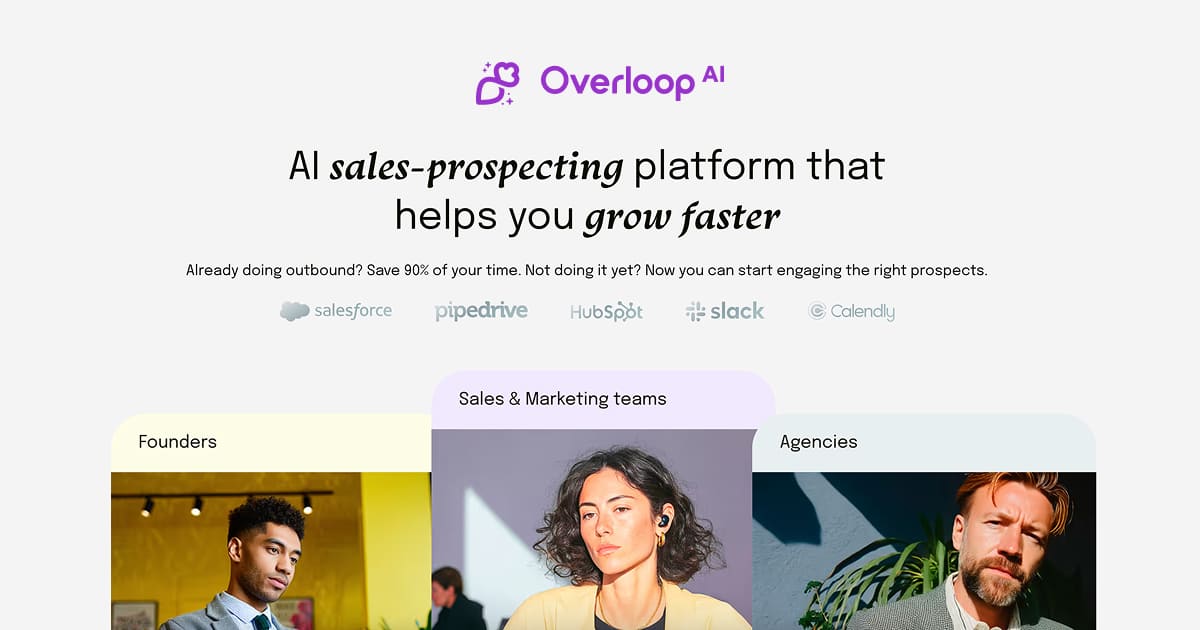
Overloop Full homepage screenshot

At a glance

Category
Artificial Intelligence
Language
English
Paid-content signal
Paid contentObserved
Registered
2000
Hosting
FastlyInferred
HTTPS certificate trusted
PassedObserved
Last updated

Website review

This review may include AI-generated content and is not individually verified. Domain, certificate and other facts come from the observed data on this page.

What is Overloop?

Overloop is an AI sales prospecting platform: it finds B2B contacts that match a target profile, fills in their contact details, runs email and LinkedIn outreach, and follows up automatically. You build and approve the campaign; the platform handles the sending and the chasing, and replies land in a shared inbox.

What it actually does

  • Prospecting and data. You describe the kind of buyer you want — the site's example search is "Sales leaders UK," narrowed to heads of sales at B2B software companies with 11–200 employees in the United Kingdom — and Overloop returns matching people with job titles, organizations and email addresses.
  • Sequenced outreach. Campaigns combine channels: an AI-written email goes out immediately, then after a two-day wait the prospect gets a LinkedIn message if already connected, or a connection request if not, with branches that exit the sequence when someone replies.
  • Reply handling. The inbox shows replies alongside the prospect's title, company and campaign, and drafts answers for you to edit before sending — useful when a prospect like "Alex Chen, Head of Sales" asks for a sample session and you want a fast, personal response.

Who it suits

Small sales teams and founder-led outbound where nobody has time to assemble lists, write first-touch emails and remember follow-ups. It is less suited to teams that need deep CRM configuration or highly bespoke multi-touch plays, since the value here is speed and automation rather than customization.

Practical next step

Before committing, run one narrow search that mirrors your real best customer — one industry, one seniority, one geography — and check whether the contacts and email addresses returned are ones you would genuinely email. The site advertises a 7-day free trial, so use that window to test data quality and reply rates on a small send rather than loading your whole market at once. If you are comparing options, established alternatives include HubSpot for teams that want prospecting inside a full CRM, Apollo.io for a large contact database, and lemlist for multichannel sequences.

How does Overloop find verified B2B contacts and their email addresses?

Overloop sources prospects from a search you define, then enriches them with contact details and keeps that data in sync as you run campaigns. According to the page, it "finds prospects that fit your business, gets their contact details and connects your offer to what's happening at their company." The sourcing panel shows filters such as job title, industry, company size and country — for example "Head of Sales," B2B software, 11–200 employees, United Kingdom — and the resulting prospect list includes a name, job title, organization and email address. The page describes these as verified B2B contacts, and the prospect table shows a work email for each person alongside their current campaign.

What the workflow looks like in practice

  1. Define a search. You set firmographic and role filters (title, industry, headcount, geography) to build a target list.
  2. Overloop attaches contact data. Each sourced prospect arrives with an email address and company context, so you don't paste rows into a separate enrichment tool.
  3. You review the campaign. The page explicitly says "You review the campaign. Overloop handles the outreach and follow-ups," so the human check happens before anything sends.
  4. Outreach runs across channels. Sequences combine AI-written email with LinkedIn steps — connection requests, messages, and conditional branches like "If the prospect is connected on LinkedIn."
  5. Replies land in one inbox. The inbox view shows responses with an AI-drafted reply you edit before sending, which is where a lot of the manual triage normally goes.

Where verification actually matters

"Verified" is doing real work here, but it's worth being precise about what it buys you. A verified address reduces hard bounces, which protects sender reputation — that matters most if you're sending cold email at volume from a domain you care about. It does not guarantee the person is interested, still in the role, or the right buyer. Job changes and layoffs create stale records even in well-maintained databases, so a sync step and a periodic re-check are part of the job, not a nice-to-have.

A concrete scenario: a two-person sales team selling into UK mid-market software companies. They'd build a saved search for "Head of Sales" at 11–200 employee B2B software firms, review the generated list, cut anyone obviously off-target, then let the sequence run email plus LinkedIn with a two-day wait between touches. The time saved is mostly in list building and follow-up scheduling; the judgment calls — who to exclude, what the first line should say — stay with the rep.

Trade-offs to weigh

  • Convenience vs. control. Bundling sourcing, enrichment and sequencing into one tool is faster, but you're trusting its database coverage for your niche. Thin coverage in a specialized industry means you'll still need another source.
  • AI drafting vs. deliverability. Personalized copy at scale helps reply rates, but generic-feeling AI output can hurt them. Use the draft as a starting point, not a finished product.
  • Free trial as the real test. The page offers a 7-day free trial and a "Start free" plan option. The honest evaluation is to run one real campaign against your actual target market and measure bounce rate and reply rate, not to judge the interface.

If you're comparing options, Hunter and Apollo are commonly used for contact finding, and lemlist for sequencing — the useful comparison is coverage in your specific market and how much manual cleanup each leaves you.

Can Overloop automate LinkedIn outreach alongside email campaigns?

Yes. Overloop is built around running LinkedIn and email touches inside one campaign flow, not as two separate tools. The product description names "Email and LinkedIn outreach," and the page shows a branching sequence where a prospect receives an AI-written email, then — if they are connected on LinkedIn — a LinkedIn message, with a connection request and campaign exit as alternative paths. Replies land in a shared inbox where you can draft a response with AI and edit it before sending.

What the automation actually covers

  • Sourcing: Overloop finds contacts matching criteria such as job title, company type, headcount and country — the page shows a "Sales leaders UK" search narrowed to Head of Sales, B2B software, 11–200 employees, United Kingdom.
  • Sequencing: Steps are ordered with waits (for example, "Wait 2 days") and conditional branches based on whether the prospect is already connected on LinkedIn.
  • Follow-ups: The platform handles follow-up sends after you approve the campaign.
  • Reply handling: Responses appear in the inbox with AI-drafted replies you review before sending.

Where a human still decides

The page is explicit that "You review the campaign" and "You're in control." In practice that means approving the sequence, the messaging and the AI drafts rather than letting it run unsupervised. The branching logic also assumes your LinkedIn connection data is accurate — if a prospect's connection status is wrong, they may get a message path you didn't intend.

Choosing between this and a LinkedIn-only tool

Situation Overloop fits A dedicated LinkedIn tool may fit better
You want email and LinkedIn in one sequence Yes — single campaign with both channels No — usually separate workflows
You need multi-step conditional logic Yes — branches on connection status Varies
You mainly send connection requests at volume Possible, but not the focus Often stronger
You want AI-drafted replies in one inbox Yes Sometimes absent

A practical test: pick one segment you already sell to, build a two-step sequence (email, then LinkedIn message for connected prospects), and watch whether reply handling in the shared inbox saves you time. If your outreach is almost entirely LinkedIn connection requests, compare against a LinkedIn-first tool before committing.

How does Overloop personalize outreach based on company news or job changes?

Overloop’s page presents personalization as part of a broader AI prospecting workflow rather than a single standalone feature. The stated approach is to find prospects who fit your business, get their contact details, and connect your offer to what’s happening at their company. In practice, that means the platform is designed to surface company or role context and use it when drafting outreach, while still leaving the final campaign under your review.

What the page supports

  • Company context: The page says Overloop connects your offer to “what’s happening at their company.” That is the signal most relevant to news-based personalization, such as a funding round, product launch, expansion or leadership change.
  • Role and title targeting: The sourcing example filters for “Head of Sales” at B2B software companies with 11–200 employees in the United Kingdom. Job changes and role shifts fit naturally into this kind of title-and-company targeting.
  • Prospect-level data: The prospects view shows job title, organization and email, so personalization can be anchored to the person’s role and employer rather than only a generic first name.
  • AI-assisted drafting: In the inbox example, Overloop shows an “AI draft · review before sending” reply. The same review-first pattern is relevant for personalized outreach: the system can draft, but you approve or edit.
  • Multi-channel sequence: The campaign flow shows AI email, a two-day wait, then LinkedIn message or connection request depending on whether the prospect is connected. Personalization can therefore carry across email and LinkedIn rather than stopping at one channel.
  • Your voice, your rules: The page states, “Your voice. Your rules. You’re in control.” Treat that as a control claim: use it to check how much of the draft you can edit, what tone settings exist, and whether you can exclude certain news or job-change triggers.

How to use it for news or job changes

  1. Build a prospect list around a trigger, such as a new VP Sales hire or a company that recently raised funding.
  2. Review the matched contact details and company context before launching.
  3. Let Overloop draft the first email or LinkedIn message using that context.
  4. Edit the draft so the news reference sounds like something you would actually say.
  5. Add follow-ups and a LinkedIn step, then monitor replies in the inbox.

Practical trade-offs

Personalization based on company news or job changes works best when the trigger is recent and clearly relevant to your offer. A new sales leader at a growing B2B software company is a stronger signal for a sales tool than a generic company anniversary. The risk is over-automation: if every message opens with the same news hook, prospects will notice. Use Overloop’s review step to vary the angle, and keep the trigger specific to the person’s role.

For teams already using a separate CRM or data provider, compare how Overloop handles sync and contact freshness. The page mentions keeping prospect data in sync and lists integrations, so check whether your existing stack is covered before relying on it as the single source of truth.

Next step

Start with one narrow segment, such as “Head of Sales at B2B software companies with 11–200 employees in the UK,” add a recent company or job-change trigger, and run a small campaign. Review the AI drafts before sending, then compare reply quality against a non-personalized control. That will show whether the news and job-change context is specific enough to earn a response. You can see plan options at Overloop.

Does Overloop integrate with CRM tools like Salesforce or HubSpot?

Yes. Overloop's own product page describes keeping prospect data in sync as part of the workflow, and lists integrations among its main navigation areas, so CRM syncing is a supported part of the platform rather than an add-on you bolt on later. The page does not spell out which named CRMs are covered, so confirm your specific system before committing.

What the page supports

  • Data sync as a stated capability: "Keep your prospect data in sync" appears as a headline benefit, which in practice means contacts, campaign membership and reply status flowing between Overloop and your CRM.
  • An integrations area: The interface shows Integrations alongside Prospects, Campaigns, Inbox, Reports and Workflows, suggesting connections are managed in one place rather than per-campaign.
  • Outreach across email and LinkedIn: Because campaigns mix both channels, a CRM sync matters most for logging LinkedIn touches that would otherwise stay invisible to your sales team.

Why the sync matters in practice

Picture a sales leader running a "Sales leaders UK" sourced list through an AI email step, a two-day wait, then a LinkedIn connection request with a branch for prospects already connected. Replies land in the Overloop inbox, including "not the right time, maybe next quarter" and "could you share a few dates?" If those outcomes never reach your CRM, your pipeline reporting is wrong and the "maybe next quarter" contacts get lost.

A two-way sync fixes three concrete things: deduplication when a prospect already exists in your CRM, activity history so account owners see the LinkedIn and email touches, and lifecycle stage so a positive reply creates or updates an opportunity.

How to check your stack

  1. Open the Integrations area in a free trial and search for Salesforce or HubSpot by name.
  2. If your CRM is listed, test with a small campaign: add 10 known contacts, run one send, and confirm the activity and reply status appear on the CRM record.
  3. If your CRM is not listed, check whether a webhook or API option exists, or whether Zapier-style middleware is your intended bridge.
  4. Ask what syncs by default versus what needs mapping, and whether sync runs both ways.

For a broader view of the category, HubSpot and Salesforce both document their own integration ecosystems, which is useful for judging what "integration" should include. If your team lives in one of those CRMs, verify the connection in the trial before you build campaigns around it.

How much does Overloop cost and what is included in the free trial?

Overloop does not publish specific prices in the page evidence provided, so any exact figure would be a guess. What the page does confirm is that there is a 7-day free trial and that you start by picking a plan. For actual numbers, check the pricing page linked from the site: Overloop.

What the free trial appears to cover

Based on the product description, the trial gives you access to the same core workflow the paid product is built around:

  • Prospect sourcing — finding contacts that match criteria such as job title, organization, company size and location (the page shows an example search for "Sales leaders UK" in B2B software, 11–200 employees).
  • Contact details — retrieving email addresses for those prospects.
  • Campaign building — creating multi-step outreach sequences.
  • Email and LinkedIn outreach — the page explicitly lists both channels as part of the trial.
  • Automated follow-ups — sequences with waits and conditional branches, for example sending an email, waiting two days, then sending a LinkedIn message only if the prospect is connected.
  • Inbox and replies — viewing responses and drafting replies, with the page showing an AI draft that you review before sending.
  • Reports and integrations — listed as navigation items alongside prospects, campaigns and workflows.

What "included" does not tell you

A trial length and a feature list do not answer the questions that usually decide cost:

  • How many prospects or credits you can source during the trial.
  • Whether email sending limits or connected mailbox counts affect the price.
  • Whether LinkedIn automation is bundled or a higher-tier feature.
  • What happens to your data and campaigns when the trial ends.

A practical way to decide

If you are evaluating Overloop for a small sales team, treat the trial as a test of one real campaign rather than a tour. Before it expires, run a single sequence end to end: source a list of 50–100 prospects matching your actual ideal customer profile, launch an email-plus-LinkedIn sequence, and see how many replies land in the inbox and how usable the AI drafts are. Then compare the plan tiers on the pricing page against the volume you actually consumed — that number, not the headline price, tells you whether the cost makes sense.

For a broader comparison of prospecting tools before committing, official sites such as HubSpot and Apollo publish their own pricing and trial terms.

Related questions

More questions →
How Overloop Integrates With Other Sales Tools and Keeps Data in Sync

Overloop is an AI sales prospecting platform that finds B2B contacts, runs email and LinkedIn outreach, and manages replies in one place. Its integration and sync story is best understood as two layers: a native Integrations area for connecting the tools you already use, and an internal data model that keeps prospects, campaigns, and replies consistent across the platform. The site confirms the Integrations section exists and that "Keep your prospect data in sync" is a stated capability, but it does not publish a named list of integration partners or sync frequency details on the pages reviewed here — so treat specific connector availability as something to verify in-app or with the vendor before committing.

What "data in sync" means inside Overloop

The product centers on a single prospect record. From the page evidence, each prospect row carries:

  • Name
  • Job title
  • Organization
  • Email
  • Current campaign

Because campaigns, the inbox, and reports all read from that same record, a prospect who replies in the Inbox shows up against the campaign they were sourced into, and reporting reflects the same state. This is the practical meaning of "keep your prospect data in sync": you are not maintaining separate lists for sourcing, sending, and replies.

The workflow shown on the page also demonstrates conditional logic that depends on shared state — for example, a sequence that sends an AI email immediately, waits two days, and then branches based on whether the prospect is connected on LinkedIn. That branching only works if LinkedIn status and campaign status live in the same system.

How integrations fit into the workflow

The navigation includes an Integrations entry alongside Prospects, Campaigns, Inbox, Reports, and Workflows. That tells you integrations are a first-class part of the product rather than an afterthought, but the reviewed page does not enumerate which CRMs, calendars, or data providers are supported.

A reasonable way to evaluate fit before signing up:

  1. Start the 7-day free trial (the page states "7-day free trial" and "Start free trial," and the pricing page is linked at /pricing).
  2. Open the Integrations area and check whether your CRM, calendar, and enrichment source are listed.
  3. Create a test campaign with a small prospect list and confirm that a reply in the Inbox updates the prospect's campaign status.
  4. Check whether prospect fields you care about (job title, organization, email) survive a round trip to and from your CRM.

If a connector you need is missing, the sync benefit is reduced to whatever manual export/import you build around it.

Where sync actually saves time

The page's own framing is "Less time preparing to sell. More time talking to prospects." The sync payoff shows up in three places:

Task Without sync With Overloop's shared record
Sourcing to outreach Re-enter contacts in a sending tool Prospects move into campaigns directly
Reply handling Check a separate inbox, update CRM by hand Replies land in Inbox tied to the campaign
Reporting Reconcile numbers across tools Reports read the same prospect/campaign data

The AI draft feature is a good example of shared context: when a prospect replies, Overloop drafts a response ("AI draft · review before sending") that references the thread, and you edit or send it. That only works because the reply, the prospect, and the campaign are one connected record.

Limits to check before you rely on it

  • No published connector list on the reviewed pages. Confirm your specific CRM and calendar are supported.
  • Sync direction and frequency are not stated. Whether Overloop is the source of truth or mirrors your CRM matters for how you avoid duplicate records.
  • Pricing and plan-gated integrations are not detailed here. The page links to /pricing; check whether integrations sit behind a specific plan.
  • LinkedIn actions depend on connection state. The conditional sequence assumes Overloop can see whether a prospect is connected — verify how that status is determined.

Practical recommendation

If your main need is a single place where sourcing, email/LinkedIn outreach, replies, and reporting share one prospect record, Overloop's design matches that goal, and the Integrations area is where you confirm it plugs into your stack. Use the 7-day free trial to test one real campaign end to end — source a small list, connect your CRM, send, reply, and check that the CRM reflects the change. Decide based on whether that round trip is clean, since the reviewed pages confirm the capability but not the specific connectors or sync mechanics.

What Is Overloop and What Does It Do?

Overloop is an AI sales prospecting platform. It finds B2B prospects that match your business, retrieves their contact details, and runs email and LinkedIn outreach and follow-ups on your behalf. You review the campaign; Overloop handles the sending. It's built for sales teams and founders who want to spend less time preparing to sell and more time talking to prospects. A 7-day free trial is available, and pricing is listed on the site.

The problem it addresses

Manual prospecting breaks into a repetitive loop: search for leads, verify emails, write a sequence, send, chase non-responders, log replies. Overloop's stated goal is to remove that manual work — "Less time preparing to sell. More time talking to prospects." The platform connects your offer to what's happening at a prospect's company, so outreach is tied to context rather than a generic blast.

Core capabilities

Prospect sourcing

You define a target — for example, "Sales leaders UK," or Head of Sales at B2B software companies with 11–200 employees in the United Kingdom. Overloop returns matching prospects with job title, organization, and email, and shows which campaign each one is in.

Campaign automation

Campaigns run multi-step sequences across channels. A typical flow shown in the product:

  1. Send an AI-written email immediately.
  2. Wait 2 days.
  3. If the prospect is connected on LinkedIn, send a LinkedIn message; if not, send a connection request.
  4. Exit the campaign based on the branch taken.

This branching logic means the same campaign adapts to whether a prospect is already reachable on LinkedIn, instead of treating every contact identically.

Reply management and AI drafting

Replies land in a unified inbox, where you see the prospect's title, company, campaign, and message. When you respond, Overloop drafts a reply for you to edit before sending — for example, proposing specific call times. You stay in control: the draft is reviewed, not auto-sent.

Data sync

Prospect data stays in sync across the workflow, so campaign membership and contact records don't drift apart as sequences run.

What "you're in control" means in practice

The platform's framing is "Your voice. Your rules." Concretely, that shows up as: you review the campaign before it goes out, you approve or edit AI-drafted replies, and branching rules (like the LinkedIn connection check) are configured rather than guessed. Automation covers the sending and follow-up; judgment stays with you.

Who it fits

Overloop suits teams running outbound at volume who want sourcing, sequencing, and reply handling in one place rather than stitched across separate tools. If your outreach is low-volume and highly bespoke, or if you only need a contact database without automation, the campaign and inbox layers may be more than you need.

To evaluate it, the practical first step is the 7-day free trial: build one campaign against a real target segment, let it run a few days, and judge the reply quality and the time saved on follow-ups.

How Overloop Automates Email and LinkedIn Outreach

Overloop automates outreach by letting you build multi-step campaigns that mix email and LinkedIn actions, then running the sending and follow-up for you. You source prospects, review the campaign, and Overloop handles the sequence — including conditional branches like waiting a set number of days or checking whether a prospect is connected on LinkedIn. It also drafts replies with AI that you review before sending. This fits teams that want to run coordinated email + LinkedIn prospecting without manually tracking each touch. Note that the site advertises a 7-day free trial; check the pricing page for current plan limits.

Building a multi-step campaign

A campaign is a sequence of steps, each with a channel (email or LinkedIn) and a timing rule. From the site's example flow:

  • Step 1 — AI email: sends immediately.
  • Step 2 — Wait 2 days: a delay step before the next action.
  • Step 3 — Conditional branch: If the prospect is connected on LinkedIn → send a LinkedIn message; if not → send a LinkedIn connection request.
  • Exit: either path can end the campaign.

This structure lets one campaign cover both channels and adapt to each prospect's LinkedIn status instead of forcing everyone down the same path.

How the automation runs

  1. Source prospects. Overloop finds prospects that fit your business and gets their contact details. The example sourcing query is "Sales leaders UK," filtered to Head of Sales, B2B software, 11–200 employees, United Kingdom.
  2. Create the campaign. Add your steps, channels, delays, and branches as above.
  3. Review before launch. The site states you review the campaign; Overloop then handles outreach and follow-ups.
  4. Replies land in one inbox. Responses from email and LinkedIn are managed together, so the workflow stays continuous rather than split across tools.

AI-assisted replies

When a prospect responds, Overloop drafts a reply you can edit before sending. In the example, a prospect (Alex Chen, Head of Sales, B2B software) replies to a Q4 outreach campaign, and the AI draft reads: "Great to hear, Alex. Would Tuesday or Wednesday afternoon work for a 20-minute call?" You can edit the draft or send it as-is. The inbox shows replies from multiple prospects with timestamps, and the draft is labeled "review before sending" — so the AI proposes, you decide.

What stays under your control

The site's framing is "Your voice. Your rules. You're in control." In practice this means:

  • You define the sequence and the branch conditions.
  • You review the campaign before it sends.
  • You review AI-drafted replies before they go out.

Overloop executes the repetitive parts — sending, waiting, following up, and checking LinkedIn connection status — while the judgment calls stay with you.

Choosing this approach

Overloop suits you if you want email and LinkedIn outreach coordinated in one place, with conditional logic and AI drafting, and you're comfortable reviewing campaigns and replies rather than sending fully autonomously. If you only need single-channel email blasts, or you don't want a review step in the loop, the multi-step branching model may be more than you need. Start with the free trial to test whether the campaign builder and inbox match your workflow before committing to a plan.

What pricing plans and free trial options does Overloop offer?

Overloop offers a free trial and multiple paid plans. The site states a 7-day free trial, and the homepage includes the call to action "Pick a plan. Start free." with a link to its pricing page. Exact prices, seat limits, and feature caps are not listed on the homepage, so you need to open the pricing page to see current numbers.

What the site confirms

Item What the site says
Free trial 7-day free trial
Plan selection "Pick a plan. Start free."
Pricing details Available via the Pricing link (overloop.com/pricing)
Outreach channels covered Email and LinkedIn outreach

The homepage does not publish dollar amounts, per-seat rates, or which features sit behind which tier. Treat any specific price you see elsewhere as unverified until you check the pricing page directly.

What the trial covers

The trial is framed around the full prospecting workflow shown on the homepage, not a single feature:

  • Sourcing prospects — search by criteria such as job title, industry, company size, and country (the example on the page uses "Sales leaders UK," 100% Head of Sales, B2B software, 11–200 employees, United Kingdom).
  • Contact details — the platform returns email addresses for matched prospects.
  • Campaigns — build multi-step sequences that mix email and LinkedIn actions with wait steps and conditional branches (for example, send an email, wait 2 days, then send a LinkedIn message only if the prospect is connected).
  • Inbox and replies — replies land in a shared inbox, with AI-drafted responses you review and edit before sending.
  • Reports and workflows — track campaign performance and connect other tools via integrations.

Because the trial is 7 days, the practical question is whether you can run a real campaign inside that window. If your list-building and copywriting take longer than a few days, plan to have your prospect criteria and message drafts ready before you start.

How to decide between plans

The homepage does not break down tiers, so use the pricing page to compare on these dimensions:

  1. Contact or credit volume — how many verified contacts or email lookups you get per month.
  2. Seats — how many people on your team can log in and work campaigns.
  3. Channel coverage — whether email and LinkedIn outreach are both included at your tier.
  4. Automation depth — whether conditional steps, wait times, and multi-step sequences are available.
  5. Integrations — whether your CRM or data tools connect at that level.

If your team is one or two people running a single outbound motion, a lower tier is usually enough. If several reps need their own campaigns and shared inbox access, check seat limits before committing.

Common sticking points

  • Trial length vs. setup time. Seven days is short if you are starting from scratch. Have your ideal customer profile and first sequence drafted first.
  • "Start free" wording. The site says "Start free" and "7-day free trial." It does not state that any plan is permanently free, so do not assume a free tier exists beyond the trial.
  • Prices not on the homepage. Any figure you need must come from the pricing page, since the homepage only signals that plans exist.
  • Verification scope. The homepage shows email addresses for prospects but does not specify verification guarantees or bounce handling per plan — confirm this on the pricing page or with sales.

Next step

Open overloop.com/pricing, note the contact volume, seat count, and channel coverage for each tier, then start the 7-day trial with a prepared prospect list and one live sequence so you can judge results before the trial ends.

How does Overloop help find and verify B2B contacts?

Overloop is an AI sales prospecting platform that finds prospects matching your criteria, retrieves their contact details, and connects them to outreach campaigns. According to the site, it sources prospects, gets their contact details, and links your offer to what's happening at their company — then you review the campaign while Overloop handles outreach and follow-ups. This fits teams doing B2B email and LinkedIn prospecting who want sourcing and verification handled in one workflow rather than across separate tools.

Sourcing prospects by target criteria

Overloop's sourcing works from a saved search you define. The page shows a "Sourcing" panel with these filters applied together:

  • Job title / role — e.g. "Head of Sales"
  • Industry — e.g. "B2B software"
  • Company size — e.g. "11–200 employees"
  • Location — e.g. "United Kingdom"

The example search is labeled "Sales leaders UK" and returns a list of matching people. Each result row carries the fields Overloop uses downstream: name, job title, organization, email, and current campaign. So the search output isn't just a name list — it's structured prospect data ready to attach to a campaign.

Getting and verifying contact details

When Overloop sources a prospect, it retrieves the contact details as part of the same step. In the example table, every sourced prospect has an email populated (e.g. [email protected], [email protected]), and several are already assigned to a campaign ("Q4 outreach"). The site describes this as finding prospects that fit your business and getting their contact details, with the goal of "verified B2B contacts" per the platform description.

Practical note: the emails shown on the page use .example domains, so they're illustrative of the data structure rather than real verified addresses. Treat the verification claim as the platform's stated function; confirm deliverability on your own list before sending.

Syncing prospect data into campaigns

Sourcing and outreach are connected rather than separate. Once prospects exist, they flow into campaigns, and the page shows a multi-step sequence:

  1. AI email — sends immediately
  2. Wait 2 days
  3. If the prospect is connected on LinkedIn — yes/no branch
  4. LinkedIn message (if connected) or LinkedIn connection request (if not)
  5. Exit campaign

This is where "keep your prospect data in sync" matters: the same prospect record drives both email and LinkedIn steps, and replies land in an Inbox. The Inbox example shows replies from named prospects with an AI-drafted response you review and edit before sending — the site frames this as "Your voice. Your rules. You're in control."

What this means in practice

If your task is "build a list of UK sales leaders at 11–200 person B2B software companies and start outreach," Overloop's flow is: define the search filters → get the prospect list with contact details → assign prospects to a campaign → let the sequence run email and LinkedIn steps → handle replies from the Inbox. The value is fewer handoffs between a sourcing tool and a sending tool.

Two conditions to check before committing: whether the contact data meets your deliverability standards, and whether the LinkedIn branching matches how your team actually sequences channels. The site offers a 7-day free trial with email and LinkedIn outreach, and a pricing page is linked — verify current plan limits and pricing there, since the page doesn't state them.

Website Overview

An established domain and managed infrastructure suggest continuity of operations and may support dependable delivery, although neither guarantees service quality. Page metadata, canonical configuration and social previews work together to provide more consistent search and sharing presentation.

Domain and Registration

Registered in 2000, this domain has about 25 years of history. That suggests continuity, although ownership and purpose may have changed. Transfer-protection status is present, helping reduce the risk of unauthorized domain transfers. The registrar is Gandi SAS, a widely used domain service provider. The domain uses the common .com extension, which is not an independent safety signal.

DNS and Email

Nameservers are provided by Cloudflare, indicating managed DNS hosting. MX records point to the Google Workspace email service. No CNAME was found; the observed records resolve directly to addresses. SPF and DMARC are configured. DKIM status is unknown. TXT records include verification markers for Google, Meta. Such markers may also remain after a service stops being used.

TLS and Certificates

The public key uses EC with 256 bits. The server supplied a complete certificate chain. No organization name is present in the certificate; the available fields are consistent with domain validation. The certificate was issued within the Google Trust Services cloud or CDN ecosystem. The certificate's total validity is about 90 days, consistent with a short renewal cycle.

HTTP and Browser Security

The response lacks these common security headers: X-Content-Type-Options, Referrer-Policy, Permissions-Policy. CORS permits any origin to read this response. This is common for public resources; sensitive responses need narrower handling. No X-Powered-By header was found, reducing one common source of backend fingerprinting information. The cf-ray, x-cache, x-served-by, via response header indicates a CDN or caching proxy in the delivery path. No obvious internal addresses or debug information were found in the headers.

Technology Stack Analysis

The public page identifies Webflow, Google Tag Manager, Cloudflare, Fastly without precise versions, leaving fewer clues for version-specific scanning.

Search and Social Sharing

Twitter Card metadata is configured. JSON-LD includes Organization data, helping describe the organization as an entity. The page declares 7 language or regional alternatives using hreflang. The title has 40 characters, within a common display range. A meta description is present, with 124 characters.

Hosting and Email

DNSCloudflare
HostingFastly
EmailGoogle Workspace
Approximate IP geolocation (inferred; a CDN or proxy may differ from the origin server) Location unknown Inferred 104.26.12.213

Registration details

RDAP / WHOIS

RegistrarGandi SAS
Registered2000-12-19
Expires2026-12-19
Domain statusclient transfer prohibited
Nameserverscody.ns.cloudflare.com、eva.ns.cloudflare.com
DNSSECunsigned

DNS records

DNS

TypeNameValueTTLPriority
Aoverloop.com104.26.12.213300—
Aoverloop.com104.26.13.213300—
Aoverloop.com172.67.68.1300—
AAAAoverloop.com2606:4700:20::681a:cd5300—
AAAAoverloop.com2606:4700:20::681a:dd5300—
AAAAoverloop.com2606:4700:20::ac43:4401300—
MXoverloop.comaspmx.l.google.com3001
MXoverloop.comalt1.aspmx.l.google.com3005
MXoverloop.comalt2.aspmx.l.google.com3005
MXoverloop.comalt3.aspmx.l.google.com30010
MXoverloop.comalt4.aspmx.l.google.com30010
MXoverloop.commzbahubvsua44gzaemdc5qrfqcssi5mi377bjuidf3i6breoum7a.mx-verification.google.com30015
NSoverloop.comcody.ns.cloudflare.com86400—
NSoverloop.comeva.ns.cloudflare.com86400—
TXToverloop.comSendinblue-code:86450e82a75a066e0eda1c05fe4da16c300—
TXToverloop.comfacebook-domain-verification=95fjb7tocq8kt04igv4yhjr9q20nmm300—
TXToverloop.comgoogle-site-verification=GwNp6GN6YpASGcIzE1FUPL1zcK3rDapi4e9lTYlNc4w300—
TXToverloop.comhubspot-developer-verification=MTIwNjYzYjItZjJkOS00YzIwLTk4NzAtYzRlMDQxM2RiZmM5300—
TXToverloop.comstripe-verification=b14e565769d6b03d9f838bc83211bc035b34403f4430ada040bada6a633fbf9b300—
TXToverloop.comtwilio-domain-verification=fbf3b77df2d7845165ee4e80d7efb191300—
TXToverloop.comv=spf1 a mx include:spf.mtasv.net include:_spf.google.com include:spf.mandrillapp.com include:spf.sendinblue.com include:sendgrid.net -all300—
DMARC_dmarc.overloop.comv=DMARC1; p=quarantine; sp=quarantine; rua=mailto:[email protected]; pct=100300—

TLS and certificates

TLS / SSL

AssessmentNormal configuration
Supported protocolsTLSv1.2、TLSv1.3
Negotiated protocolTLSv1.3
Certificate subjectoverloop.com
IssuerGoogle Trust Services
Valid until2026-12-22T03:59 · Remaining when checked: 68 days
Verification detailsCertificate trust: Passed · Hostname match: Passed

HTTP response headers

HTTP

HeaderValue
content-typetext/html; charset=utf-8
cache-controlmax-age=600
servercloudflare
strict-transport-securitymax-age=31536000; includeSubDomains; preload
content-security-policyframe-ancestors 'self'
x-frame-optionsSAMEORIGIN
access-control-allow-origin*

Identified technologies

WebflowGoogle Tag ManagerCloudflareFastly

Pages, Search and Sharing

Meta descriptionFind verified B2B contacts, personalize email and social outreach, and manage your sales prospecting workflow with Overloop.
Canonical URLhttps://overloop.com
LanguageEnglish (default) · Multilingual
Twitter Cardsummary_large_image
All bots 4 allowed · 57 disallowed
  • Allow/developers/agents$
  • Allow/developers/agents/$
  • Allow/developers/campaign-reporting$
  • Allow/developers/campaign-reporting/$
  • Disallow/*?*page=*
  • Disallow/*?*campaign=*
  • Disallow/*?*utm_source=*
  • Disallow/*?*utm_medium=*
  • Disallow/*?*utm_campaign=*
  • Disallow/*?*utm_content=*
  • Disallow/*?*utm_term=*
  • Disallow/*?*utm_device=*
  • Disallow/*?*utm_keyword=*
  • Disallow/*?*utm_matchtype=*
  • Disallow/*?*utm_gp=*
  • Disallow/*?*utm_sq=*
  • Disallow/*?*utm_partner=*
  • Disallow/*?*utm_expid=*
  • Disallow/*?*utm_s=*
  • Disallow/*?*via=*
  • Disallow/*?*r=*
  • Disallow/*?*ref=*
  • Disallow/*?*referral_origin=*
  • Disallow/*?*source=*
  • Disallow/*?*coupon_code=*
  • Disallow/*?*partner_key=*
  • Disallow/*?*kuid=*
  • Disallow/*?*kref=*
  • Disallow/*?*sub1=*
  • Disallow/*?*gsxid=*
  • Disallow/*?*gspk=*
  • Disallow/*?*__hstc=*
  • Disallow/*?*__hssc=*
  • Disallow/*?*__hsfp=*
  • Disallow/*?*hubs_content=*
  • Disallow/*?*hubs_content-cta=*
  • Disallow/*?*fb_comment_id=*
  • Disallow/*?*=undefined*
  • Disallow/*?*query=*
  • Disallow/*?*tp=*
  • Disallow/*?*post_type=*
  • Disallow/*?*sfns=*
  • Disallow/*?*origin=*
  • Disallow/*?*_ga*
  • Disallow/book-demo?*
  • Disallow/privacy?*
  • Disallow/security?*
  • Disallow/terms?*
  • Disallow/legal?*
  • Disallow/jobs?*
  • Disallow/press?*
  • Disallow/contact?*
  • Disallow/developers/
  • Disallow/integrations/collections/
  • Disallow/product/
  • Disallow/professional-services/
  • Disallow/design/
  • Disallow/categories/
  • Disallow/store/
  • Disallow/companies/
  • Disallow/book/
chatgpt-user 1 allowed · 0 disallowed
  • Allow/
gptbot 1 allowed · 0 disallowed
  • Allow/
oai-searchbot 1 allowed · 0 disallowed
  • Allow/
perplexitybot 1 allowed · 0 disallowed
  • Allow/
claudebot 1 allowed · 0 disallowed
  • Allow/
bravebot 1 allowed · 0 disallowed
  • Allow/
google-extended 1 allowed · 0 disallowed
  • Allow/

Recent Updates

  • Website images
  • Screenshots
  • Network details
  • Website Technologies
  • Pages and Search Information
  • TLS and certificates

User reviews (0)

  • No reviews yet.