Website profiles · Technology insights · Alternatives

photonix.org

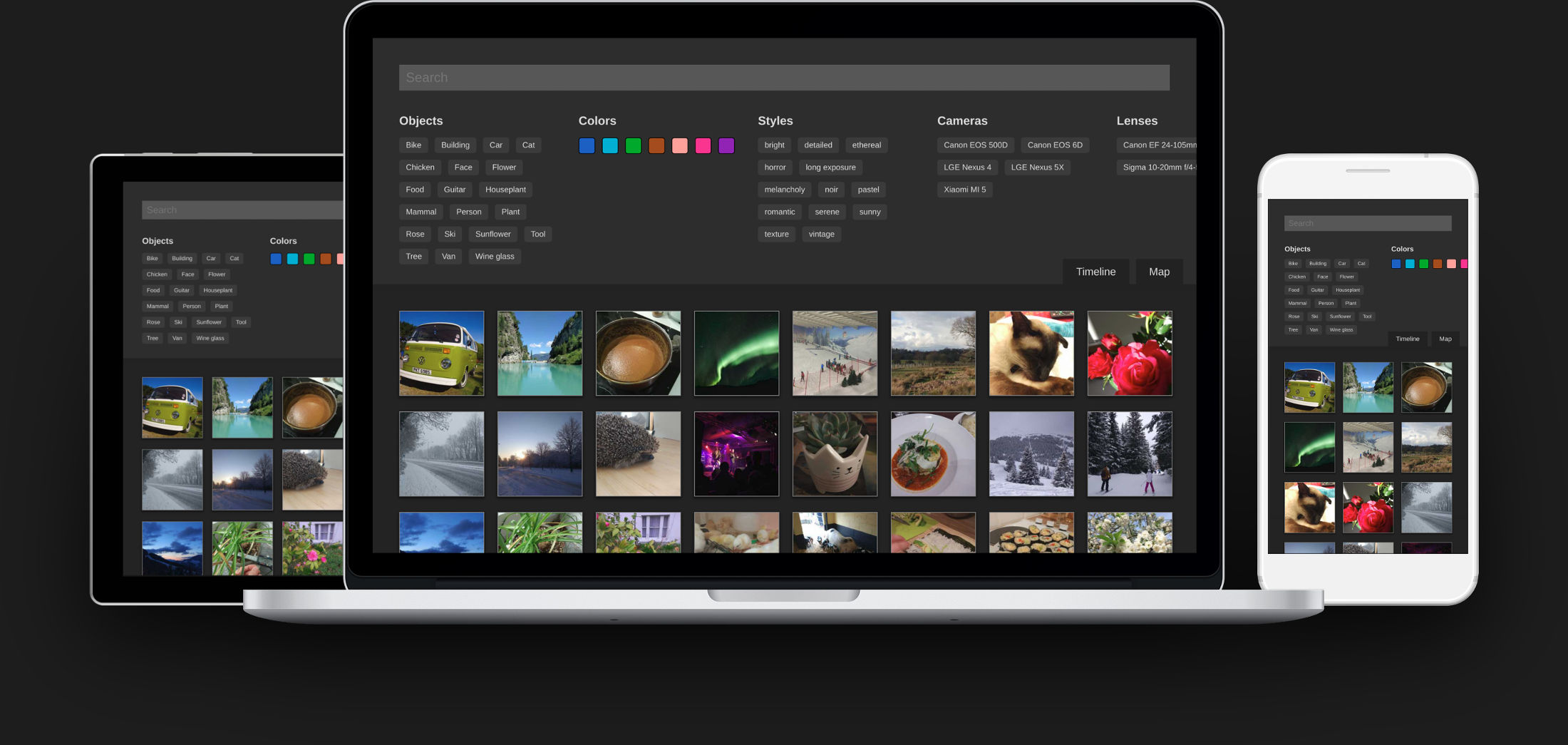
Photonix is a photo management application that solves a lot of problems. Once set up it will ingest all the photos in your collection and start building up an image database of everything you could want to search and filter by. It makes your entire collection available to you, whichever device you’re using — as long as you can get to a web browser.

No paid content found
Visit website
Profile views 8 Outbound visits 12 Normal
Photonix Photo Manager Full homepage screenshot

At a glance

Category
Development
Language
English
Paid-content signal
No paid content foundObserved
Registered
2019
Hosting
Hetzner Online GmbHInferred
HTTPS certificate trusted
PassedObserved
Last updated

Website review

This review may include AI-generated content and is not individually verified. Domain, certificate and other facts come from the observed data on this page.

What is Photonix Photo Manager?

Photonix Photo Manager is a self-hosted, browser-based photo management application. It ingests your existing photo collection into a searchable image database, then adds tags and metadata so you can find pictures by content rather than remembering folder names. You reach it from any device with a web browser, which means the library lives on your own machine or server instead of inside a phone or cloud service.

Its main features, as described on the site, include:

  • Image organizer built around tagging. A photo can carry many tags but only one category, which the project argues is more flexible than sorting everything into descriptive folders.
  • Smart filtering to narrow a large library down to a specific photo or album.
  • Automatic analysis: face recognition, object detection, location awareness and color analysis, with more algorithms planned.
  • RAW and edited-file handling, aimed at photographers who keep both.

Who it suits

The site pitches Photonix at keen and professional photographers — people who download from a camera, edit in Lightroom, Darktable or Photoshop, and then struggle to retrieve those files later. It is explicitly positioned as a complement to editing software, not a replacement: it stays out of your existing import-edit-save routine and helps when you need to find something again. If your phone snaps already live happily in iCloud Photo Library or Google Photos but your SLR files feel poorly managed, that is the gap it targets.

The trade-off is setup and maintenance. Because it is self-hosted, you provide the server and storage, and you are responsible for backups and upgrades — a real consideration if your library is large or irreplaceable. It also asks you to commit to tagging and categories to get the most from it, rather than relying on folders.

A practical next step

Before installing anything, try the live demo linked from the homepage and test it against your own habits: search for a person, a place and an object you know are in your collection, and see whether the results match how you'd actually look for them. If you want a hosted alternative to compare against, Google Photos is the obvious consumer benchmark, though it treats RAW workflows and local ownership very differently. If the demo convinces you, the site's installation instructions are the next stop.

How does Photonix compare to Google Photos or iCloud Photo Library for managing professional SLR and RAW files?

Photonix is aimed at a different job than Google Photos or iCloud Photo Library. It is positioned as a self-hosted photo management application that ingests your existing collection and builds a searchable image database, rather than as a cloud service tied to a phone or consumer account. For professional SLR and RAW workflows, that distinction matters more than any individual feature.

Where Photonix fits a professional workflow

The site describes Photonix as trying to stay invisible to your existing process — downloading from the camera, editing, saving — and then be there when you need to find a photo again. That is essentially the role of a catalogue or digital asset manager sitting behind Lightroom, Darktable or Photoshop, not a replacement for the editor itself. The page explicitly notes that professional photographers spend a lot of time editing and that those photos and associated RAW files need to be retrievable later.

Its main features include an image organizer built around tagging rather than folders, plus face recognition, object detection, location awareness and color analysis. The site argues a single photo can carry many tags but only one category, so tagging beats deciding on a descriptive folder name.

How the three compare in practice

Aspect Photonix Google Photos iCloud Photo Library
Hosting model Self-hosted, accessed via web browser Google's cloud Apple's cloud
Primary audience on the page Keen/professional photographers, SLR workflows General consumer snaps Apple device users
Organizing model Tags plus categories in a database Albums, automatic grouping Albums, automatic grouping
Search and filtering Smart filtering, face/object/location/color algorithms Strong automatic search and recognition Good on-device search
RAW handling Framed around retrieving RAW files alongside edits Not the focus Not the focus

The trade-off is control versus convenience. Google Photos and iCloud Photo Library are effortless and work well for phone photos, but the page itself suggests that managing professional SLR files in those services feels like "a much less slick affair." Photonix asks you to set it up and run it, in exchange for keeping your library on your own terms and searching it from any browser.

A concrete scenario

Suppose you shoot a wedding, edit selects in Lightroom, and keep the RAW files on a NAS. Months later a client asks for "the ones near the water at sunset." In Google Photos or iCloud, that request depends on how those services indexed your uploads, and large RAW sets are awkward to manage there. In Photonix, the same request leans on location, color and object filtering across a database you control.

Next step

Before committing, check the demo and installation instructions on Photonix Photo Manager, and decide based on one question: do you want a cloud service that manages your photos for you, or a self-hosted catalogue that keeps professional RAW files retrievable on your own hardware? If it is the latter, Photonix is the closer match.

What are the system requirements and installation steps to set up Photonix on my own server?

Photonix is self-hosted, so "requirements" are mostly about the machine you run it on and how you reach it, not about a desktop installer. The page itself points to a dedicated installation instructions page rather than listing specs, so treat the exact steps and supported versions as something to confirm there before you commit a server.

What the page does tell you

  • It is a photo management application you set up yourself, then leave running.
  • After setup it ingests your existing collection and builds a searchable image database.
  • You access your whole collection through a web browser, from any device.
  • It leans on face recognition, object detection, location awareness and colour analysis to make filtering fast.
  • It is aimed at keen photographers whose existing workflow is camera → download → edit → save, with Photonix sitting alongside that rather than replacing the editor.
  • There is a live demo and a mailing list for the 1.0 release, which suggests the project is still pre-1.0 and moving.

Practical requirements to plan for

Because the details live on the installation page, use these as the questions to answer there:

  • Container runtime or native install. Self-hosted photo tools of this type are usually deployed with Docker and Docker Compose, sometimes with a database service alongside. Check which the instructions assume.
  • Storage. Your original files plus a database plus generated thumbnails and derived data. Budget noticeably more disk than the raw photo folder.
  • CPU and RAM for analysis. Face recognition, object detection and colour analysis are compute-heavy, and they run over your whole library. A low-power NAS may work but will be slow on first ingest.
  • Database. Expect a real database server rather than flat files, which affects backup strategy.
  • Network access. Since the interface is browser-based, decide whether it stays on your LAN or is exposed. If exposed, put it behind HTTPS and authentication rather than a bare port.
  • Backups. Keep your originals in a separate, independent backup. The database is regenerable; the photos are not.

A realistic first run

Pick a spare machine or VM, follow the installation instructions, and point it at a copy of a few hundred photos rather than your entire archive. Watch how long ingest and analysis take and how much disk is consumed. That tells you whether your hardware is adequate before you commit the full library.

Decision criterion

If you want a browser-accessible, searchable index over a large personal or professional collection and you are comfortable running a server, this fits. If you want something that works without any server administration, or you need a mature, stable release today, the pre-1.0 status and self-hosting burden are the trade-offs to weigh.

For comparison, other self-hosted options include Immich and PhotoPrism, while Nextcloud covers photos as part of a broader file platform.

How does Photonix use face recognition, object detection, and color analysis to improve photo search?

Photonix uses those algorithms to turn your photo library into a searchable image database rather than a set of folders. The page describes face recognition, object detection, location awareness and color analysis as “a growing set of other algorithms” that can save time, and its smart filtering is meant to get you to a photo or album quickly. In practice, that means you can search by who is in a photo, what is in it, where it was taken, or its dominant colors, instead of remembering filenames or folder names.

H3 How the pieces fit together

  • Face recognition: groups photos by the people who appear in them, so you can pull up a person without manual tagging.
  • Object detection: identifies things in the frame, so you can search for a subject rather than a date or folder.
  • Color analysis: lets you filter by color, which is useful when you remember the look of an image but not its metadata.
  • Location awareness: adds place-based filtering alongside the visual signals.

The page frames this as an add-on to your existing workflow: you keep downloading and editing photos as usual, and Photonix ingests the collection and becomes the place you go when you need to find something again. It also explains its tagging model — a photo can have many tags but only one category — which is why it favors tags over descriptive folder names.

H3 A practical scenario A wedding or event photographer comes home with thousands of RAW files, edits selects, and later needs “the shot of the couple laughing under the string lights.” Date and folder browsing is slow; a search combining a person, an object or scene, and a warm color cast gets much closer. The trade-off is that recognition is probabilistic: faces may be missed, objects mislabeled, and colors skewed by editing, so treat results as a filter to narrow down, not a guarantee. The page also notes Photonix is aimed at keen photographers and is browser-accessible from any device.

Next step: run a small test set through the live demo, then compare it with a mainstream alternative such as Google Photos or a desktop catalog like Adobe Lightroom to see whether algorithm-based search actually matches how you look for photos.

Can I try Photonix without installing it, and what does the live demo include?

Yes. The site offers a live demo linked from its main navigation and homepage, so you can evaluate Photonix in a browser before committing to an installation.

H3 What the demo lets you assess

  • The web interface itself: Photonix is designed to be reached from any device with a browser, so the demo is the quickest way to judge whether that interface suits you.
  • Search and filtering behaviour, which is the core of the product's pitch. The homepage describes smart filtering plus face recognition, object detection, location awareness and colour analysis as the main ways to re-find photos.
  • The tag-and-category model. Photonix treats tags as many-per-photo and categories as one-per-photo, which is a different mental model from folder-based organising, and it is easier to feel that difference than to read about it.

H3 What the demo does not replace The demo is a hosted sample, not your library. It cannot tell you how Photonix handles your own RAW files alongside edited JPEGs, how long ingestion of a large collection takes, or how well recognition performs on your subjects and locations. Those depend on your hardware and your setup, and the site points to separate installation instructions for that stage.

H3 A practical way to use it Try one concrete task you actually repeat, such as finding a photo by a person's face or by a place, and note how many clicks it takes. If the demo handles that convincingly, install it and ingest a small, representative subset of your collection first, then compare the same task against your current tool. If you are weighing alternatives, the general-purpose options many photographers already use are Google Photos and Apple iCloud Photos, while darktable and Adobe Lightroom sit on the editing side. Photonix's stated aim is to stay out of that editing workflow rather than replace it, so judge it as the retrieval layer that sits after your editor, not as a competitor to it.

Is Photonix free to use, and what are the pricing or subscription options?

Photonix does not present itself as a paid subscription service. Its own site describes it as a photo management application you set up yourself, with installation instructions and a live demo, and it asks visitors to join a mailing list for the version 1.0 release. That points to self-hosted software rather than a monthly plan, but the page does not state a price, a free tier, or any subscription terms, so treat "free" as unconfirmed until you check the project's own documentation and release notes.

What the site does make clear is the intended trade-off: you run it, and in exchange your collection stays under your control and is reachable from any device with a web browser. The features it highlights are database-driven — tags, categories, face recognition, object detection, location awareness and color analysis — which is the kind of indexing that usually costs money as a cloud subscription elsewhere.

If cost is your deciding factor, work through this before committing:

  • Check the documentation for licence and hosting requirements, since self-hosting still means paying for a machine, storage and backups.
  • Compare against hosted libraries you may already pay for, such as Google Photos or Apple iCloud Photos, where the fee buys convenience rather than software.
  • Consider desktop catalogues with one-off licences, such as Adobe Lightroom or the free darktable, if you mainly edit RAW files.
  • Run the live demo first, then install it on a spare machine with a small folder of photos to see whether the ingest and search actually fit how you work.

A practical scenario: a keen photographer with years of SLR files on external drives wants face and object search without uploading everything to a cloud account. Photonix is aimed at exactly that person, provided they are willing to maintain the server.

Related questions

More questions →
What Is Photonix Photo Manager?

Photonix Photo Manager is a self-hosted photo management application that ingests your existing photo collection and builds a searchable image database from it. It is aimed at keen photographers who already have a download-edit-save workflow and want a better way to find photos again later. Once it is set up, you reach your whole collection through a web browser on whatever device you are using — there is no dedicated desktop or mobile app described on the site.

What problem it is trying to solve

The project's own framing is that images "end up as just files and folders on a hard drive — never to be seen again." Photonix positions itself as the retrieval layer that sits alongside your existing editing tools rather than replacing them. The stated aim is to be "invisible to your existing process (downloading photos from your camera, editing and saving) but to be there whenever and wherever you need to find a photo again."

That matters most if you already use something like Lightroom, Darktable, or Photoshop for editing and find that your management side is weaker — the site specifically calls out the gap between consumer services (iCloud Photo Library, Google Photos, Picasa) and the messier reality of managing professional SLR files and associated RAW files.

How it works

The core mechanism is a database built on top of your files:

  1. You set Photonix up and point it at your collection.
  2. It ingests the photos and starts building an image database.
  3. That database is what you search and filter against, rather than browsing folders.

Because the metadata lives in a database, filtering is fast. The site describes "smart filtering" as the way you get to the photo or album you need.

Tagging versus folders

Photonix argues for tags over folder names. The distinction it draws:

  • A single photo can have many tags.
  • A photo can only be in a single category.

The reasoning is that deciding on one descriptive folder name forces a lossy choice, while tagging lets you attach as much useful information as possible to each photo.

Automated analysis

Beyond manual tagging, the site lists a set of algorithms that run over your collection:

  • Face recognition
  • Object detection
  • Location awareness
  • Color analysis
  • "a growing set of other algorithms"

These are presented as time-savers — the point being that you do not have to tag everything by hand to make it findable.

Who it is for

The site states it "could work well for you if you're a keen photographer." The clearest fit is someone who:

  • Shoots with an SLR and keeps RAW files alongside edits
  • Already has an editing workflow they are happy with
  • Has a large enough collection that finding an old photo is genuinely slow
  • Is comfortable running and setting up a self-hosted application

If your needs are met by a phone-centric cloud service and you never deal with RAW files, the problem Photonix solves is probably not your problem.

Trying it before installing

The site offers a live demo and separate installation instructions, so you can evaluate the interface and filtering before committing to a setup. It also asks visitors to join a mailing list for notification of the version 1.0 release — which indicates the project was pre-1.0 at the time this material was written, so expect the feature set to be moving.

One practical note on access: the browser-based model means availability depends on reaching the running instance. The site does not describe a hosted service, pricing, or account requirements, so treat deployment and access as things you set up yourself rather than something provided.

Who Is Photonix Photo Manager Designed For?

Photonix Photo Manager is aimed at keen photographers — particularly those shooting with SLR or other professional-grade cameras — who already have a photo editing workflow and need a better way to find those photos again later. It is not positioned as a replacement for your editor; the stated goal is to stay invisible to your existing process (downloading from the camera, editing, saving) while making the whole collection searchable and reachable from any device with a web browser.

The core audience

The site describes the target user directly: "We think Photonix could work well for you if you're a keen photographer." The problem it addresses is specific — edited photos and their associated RAW files are time-consuming to produce, so they should be easy to retrieve afterwards.

That points to a few concrete user profiles:

  • SLR / professional camera shooters who keep RAW files alongside edited exports and need both to be findable.
  • Photographers with a large existing collection who want it ingested into a searchable image database rather than left as files and folders on a hard drive.
  • People who edit in Lightroom, Darktable or Photoshop and want more value out of that editing time by being able to locate the results quickly.
  • Users who want browser-based access to their entire collection across devices, rather than being tied to one machine.

Who it is probably not for

The page frames Photonix against tools like iCloud Photo Library, Google Photos and Picasa, noting that those may handle daily snaps but feel less slick for managing professional SLR image files. If your needs are limited to casual phone photos and you are happy with a consumer cloud library, Photonix's emphasis on RAW files, tagging and self-managed organization is more than you need.

It is also worth noting the project's own status signal: the site asks visitors to sign up to a mailing list to be notified of the version 1.0 release, which suggests it is pre-1.0 and still maturing. A live demo is offered, and installation instructions exist for those who want to go further — so evaluating it before committing is straightforward.

What it actually does for that audience

Once set up, Photonix ingests your collection and builds an image database you can search and filter. The features it highlights are the ones that matter for retrieval rather than editing:

Capability What it means for a photographer
Tagging Each photo can carry many tags, unlike a single category or folder name
Smart filtering Gets you to a specific photo or album without browsing folders
Face recognition Finds people across the collection
Object detection Searches by what is in the image
Location awareness Filters by where a photo was taken
Color analysis Searches or filters by color
Browser access Whole collection available on any device with a web browser

The tagging model is the key design choice: a photo can have many tags but only one category, which the site argues is better than deciding on a descriptive folder name. That is the mechanism behind the fast filtering — a database of tags and detected attributes rather than a folder hierarchy.

How to decide

If you recognize yourself in the description — you shoot RAW, you edit in a dedicated editor, and your main frustration is re-finding finished work — Photonix is designed for exactly that gap. The practical next steps the site offers are trying the live demo and, if it fits, following the installation instructions. If your collection is mostly casual snapshots already well served by a consumer photo library, the fit is weaker.

How Does Photonix Organize and Search My Photos?

Photonix organizes photos by building a searchable image database instead of relying on folder names. Once set up, it ingests your existing collection, attaches useful information to each photo, and lets you search or filter that database from any device with a web browser. This approach suits photographers who already have a download-edit-save workflow and mainly need a faster way to find photos again later.

The core idea: a database, not folders

Photonix treats your collection as an image database rather than a set of directories. According to the project, once it is set up it will "ingest all the photos in your collection and start building up an image database of everything you could want to search and filter by."

That distinction matters because folders force one location per photo. A database lets one photo carry many pieces of information at once, so the same image can surface through several different searches.

Tagging instead of folder naming

The project's stated position is that each photo should be tagged with as much useful information as possible. It draws a clear line between tags and categories:

  • Tags — a single photo can have many tags.
  • Categories — a photo can only be in a single category.

Because of this, Photonix argues tagging is better than trying to invent one descriptive folder name to store a photo in. In practice, you stop asking "which folder does this belong to?" and start attaching every relevant label, then let the database do the retrieval.

Smart filtering and automated analysis

Search and filtering are what the database is for. Photonix describes a growing set of algorithms that do the sorting work for you, including:

  • Face recognition
  • Object detection
  • Location awareness
  • Color analysis

These feed the filtering system so you can get to the photo or album you need. The project's own framing is that this "smart filtering" plus the algorithm set "can save you a lot of time" compared with manually digging through files.

Access from any device

Photonix makes your entire collection available "whichever device you're using — as long as you can get to a web browser." So the organizing and searching happen against the central database, and the client is just a browser rather than a specific desktop app tied to one machine.

Where it fits in an existing workflow

Photonix aims to be invisible to your current process — downloading photos from your camera, editing, and saving — but to be there whenever and wherever you need to find a photo again. The project specifically notes that professional photographers spend a lot of time editing, so it matters that the edited photos and their associated RAW files can be easily retrieved later. It positions itself as an alternative for people who find that iCloud Photo Library, Google Photos, or Picasa handle daily snaps but manage professional SLR files less smoothly.

How to evaluate it for your own collection

  1. Try the live demo linked from the site to see the search and filtering behavior before committing.
  2. Check whether your existing folder structure and file types (including RAW) match what you need to retrieve.
  3. If the demo fits, follow the project's installation instructions to set up your own instance.
  4. Note that Photonix describes itself as pre-1.0: the site asks visitors to join a mailing list to be notified of the version 1.0 release, so treat it as software still approaching its first major release.

The site does not publish pricing details in the material available, so cost and licensing terms are not something to assume either way — verify them directly if that affects your decision.

How to Try or Install Photonix Photo Manager

You can try Photonix without installing anything by opening the live demo linked from the project's home page, and you can install it yourself by following the installation instructions the site points to. Both paths start at photonix.org, where the navigation includes Home, Demo, FAQs, Blog, and Documentation. The site also asks visitors to sign up for a mailing list to be notified about the version 1.0 release.

Try It First: The Live Demo

The fastest way to evaluate Photonix is the demo. The home page states plainly: "Try live demo now." That link is the intended entry point for anyone who wants to see the interface and features before committing to a setup.

What you can expect to see in the demo, based on the described feature set:

  • Smart filtering across your collection, so you can narrow down to a specific photo or album.
  • Face recognition and object detection to find images by who or what is in them.
  • Location awareness and color analysis as additional search dimensions.
  • Tagging as the primary organizing model — the site explains that a single photo can carry many tags, while it belongs to only one category, which is why tagging is preferred over descriptive folder names.

The demo is the right choice if you are a keen photographer who wants to confirm the search and filtering behavior matches how you already work — downloading from a camera, editing, and saving — before you invest time in a server.

Install It Yourself

If the demo convinces you, the next step is self-hosting. The home page directs readers who have "already tried out the demo and want to take the next step" to the project's installation instructions. Those instructions live in the Documentation section of the site.

Photonix is a web application: once it is set up, it ingests the photos in your collection and builds an image database you can search and filter. The site's stated design goal is that your entire collection becomes available from any device, "as long as you can get to a web browser." That has a practical implication for planning your setup — you are running a server that other devices reach over a browser, not a desktop-only catalog.

Because the input material does not include the installation steps themselves, treat the Documentation section as the authoritative source for prerequisites, commands, and configuration. Do not assume a one-click installer or a hosted plan; the site describes self-installation and a demo, and nothing in the available material states pricing or a sign-in requirement for either.

Stay Informed About Version 1.0

Photonix is not yet at a 1.0 release. The home page asks visitors to join a mailing list "so we can notify you of our version 1.0 release and other important news." The stated terms: your details are not passed to any other party, and you can unsubscribe at any time.

This matters if you are deciding between adopting now and waiting. Subscribing costs nothing described here and gives you a release signal, which is useful if you would rather install a stable version than track a pre-1.0 project.

Other Resources on the Site

Beyond the demo and documentation, the navigation offers:

Resource Use it for
FAQs Common questions about how Photonix works
Blog Project news and updates
Documentation Installation instructions and reference material
Demo Hands-on trial without installing

Who This Fits

The site is explicit about its audience: "We think Photonix could work well for you if you're a keen photographer." It positions itself against two common situations — daily snaps handled by iCloud Photo Library, Google Photos, or Picasa, versus professional SLR files (including RAW) that feel less well managed. If you already spend time in Lightroom, Darktable, or Photoshop, the pitch is that Photonix stays out of that editing workflow but makes the results easy to retrieve later.

A reasonable sequence: open the demo, test whether smart filtering and tagging match how you think about your library, then read the installation instructions and subscribe to the mailing list if you want to be told when 1.0 arrives.

Website Overview

An established domain and managed infrastructure suggest continuity of operations and may support dependable delivery, although neither guarantees service quality.

Domain and Registration

Registered in 2019, this domain has about 7 years of history. That suggests continuity, although ownership and purpose may have changed. Transfer-protection status is present, helping reduce the risk of unauthorized domain transfers. The registrar is NameCheap, Inc., a widely used domain service provider. The domain uses the common .org extension, which is not an independent safety signal.

DNS and Email

Nameservers are provided by hetzner.de, indicating managed DNS hosting. MX records point to the epixstudios.co.uk email service. No CNAME was found; the observed records resolve directly to addresses. SPF and DMARC are configured. DKIM status is unknown. TXT records include verification markers for Google. Such markers may also remain after a service stops being used.

TLS and Certificates

The certificate uses an RSA 2048-bit public key, offering broad client compatibility. The server supplied a complete certificate chain. No organization name is present in the certificate; the available fields are consistent with domain validation. The certificate was issued by Let's Encrypt, commonly associated with automated certificate services. The certificate's total validity is about 89 days, consistent with a short renewal cycle.

HTTP and Browser Security

The response lacks these common security headers: HSTS, CSP, Permissions-Policy. No X-Powered-By header was found, reducing one common source of backend fingerprinting information. No obvious internal addresses or debug information were found in the headers. The Server header identifies nginx without an exact version. No explicit CDN or WAF marker was found in the response headers.

Technology Stack Analysis

The public page identifies jQuery, nginx without precise versions, leaving fewer clues for version-specific scanning.

Search and Social Sharing

The meta description has 351 characters and may be shortened in search results. Twitter Card metadata is configured. JSON-LD includes Organization data, helping describe the organization as an entity. The title has 22 characters, within a common display range. The observed directives allow indexing and link following.

Hosting and Email

DNShetzner.de
HostingHetzner Online GmbH
Emailepixstudios.co.uk
Approximate IP geolocation (inferred; a CDN or proxy may differ from the origin server) Germany flagFalkenstein, Saxony, Germany Inferred 91.98.8.202

Registration details

RDAP / WHOIS

RegistrarNameCheap, Inc.
Registered2019-02-05
Expires2027-02-05
Domain statusclient transfer prohibited
Nameservershelium.ns.hetzner.de、hydrogen.ns.hetzner.com、oxygen.ns.hetzner.com
DNSSECunsigned

DNS records

DNS

TypeNameValueTTLPriority
Aphotonix.org91.98.8.202300—
MXphotonix.orgmail.epixstudios.co.uk30010
NSphotonix.orghelium.ns.hetzner.de3600—
NSphotonix.orghydrogen.ns.hetzner.com3600—
NSphotonix.orgoxygen.ns.hetzner.com3600—
TXTphotonix.orggoogle-site-verification=B7l9u7KOcvSLxNi7kM_JPYvwdjX3px6ICsXx4KeA6PI300—
TXTphotonix.orgv=spf1 include:spf.mailjet.com a mx ~all300—
DMARC_dmarc.photonix.orgv=DMARC1; p=reject; rua=mailto:[email protected];300—

TLS and certificates

TLS / SSL

AssessmentNormal configuration
Supported protocolsTLSv1.2、TLSv1.3
Negotiated protocolTLSv1.3
Certificate subjectphotonix.org
IssuerLet's Encrypt
Valid until2026-11-05T12:36 · Remaining when checked: 35 days
Verification detailsCertificate trust: Passed · Hostname match: Passed

HTTP response headers

HTTP

HeaderValue
content-typetext/html; charset=utf-8
cache-controlno-cache, public
servernginx
x-frame-optionsDENY
x-content-type-optionsnosniff
referrer-policysame-origin

Identified technologies

jQuerynginx

Pages, Search and Sharing

Meta descriptionPhotonix is a photo management application that solves a lot of problems. Once set up it will ingest all the photos in your collection and start building up an image database of everything you could want to search and filter by. It makes your entire collection available to you, whichever device you’re using — as long as you can get to a web browser.
Canonical URLhttps://photonix.org/
LanguageEnglish (default)
Twitter Cardsummary
All bots 0 allowed · 2 disallowed
  • Disallow/matomo.php
  • Disallow/landing/

User reviews (0)

  • No reviews yet.