
 简体中文
简体中文 English
Website review
This review may include AI-generated content and is not individually verified. Domain, certificate and other facts come from the observed data on this page.
What is ponytail 5?
Ponytail 5 is a ruleset that changes how an AI coding agent behaves, pushing it to write the least code that works rather than the most code it can justify. It installs into your existing agent setup, so you keep the same agent and the same tasks; the difference is in what the agent reaches for when solving them.
What it actually changes
The core idea is a ladder of escalation. Before writing anything, the agent checks whether the request needs to exist at all, then whether the codebase already has it, then the standard library, then the platform, then an installed dependency, then a one-liner — and only then writes the minimum that works, plus a small test if the logic is risky.
The page's own example is a date picker: without Ponytail, an agent hand-built a calendar at 335 lines; with it, the answer was a 10-line file using the browser's built-in control, staying in React because the repo is React.
Reported benchmark results
On 39 tasks (feature tickets, tasks with hidden checks, open-ended build requests) with five runs each, the site reports roughly half the lines of code, about 45% fewer output tokens, about a quarter lower cost, and around 40% faster, with correctness checks passing at 96–97%. Treat these as the vendor's own measurements on its own task set — useful as a direction, not a guarantee for your repo.
Review and audit
Beyond generation, it adds two review commands: one reads the code your change touches rather than only the diff, and reports bugs, security issues, load behavior, missing tests and speed, with each finding explaining what the code does, what breaks, and the fix. A separate audit applies the same to a whole repository.
Who it suits
- Teams already using an AI coding agent who keep getting bloated diffs and unnecessary dependencies.
- Maintainers who care more about reviewable, minimal changes than about generated volume.
- Anyone working in a codebase where the platform or standard library already covers most requests.
Where to be careful
Aggressive minimalism can cut the wrong corner. The site states that validation, error handling, security and accessibility are never simplified away, but you should verify that on your own tasks — especially anything involving money, auth or parsing, where "one line" is rarely enough. It also presumes your agent follows rulesets reliably; weaker models may not.
Next step
Pick three recent tickets your agent handled and rerun them with Ponytail installed, then compare diff size and whether the result still passes your tests. If the savings show up without new bugs, it is doing its job; if you find missing edge-case handling, tighten the rules before rolling it out broadly.
How do I install ponytail 5 in my AI coding agent?
Installation is deliberately minimal: the site's own copy says "Install in two lines," and the header carries an Install link alongside How it works, Review, Benchmark, Merch and Stories. That is the full extent of what the page states about setup, so treat the exact commands as something you read off the site rather than something to guess at.
What the two lines likely cover
Ponytail 5 is a ruleset, not a library you import. The page describes it as something that "makes your AI coding agent write the least code that works," and the benchmark is framed as "Same agent. Same tasks." So the install almost certainly wires instructions into your agent's configuration rather than adding a runtime dependency to your project. Practically, that means:
- A rules file the agent reads on every task — the ladder of "Does this need to exist? → reuse it → standard library → platform → installed dependency → one line → the minimum that works."
- Two slash commands,
/ponytail-reviewfor a change and/ponytail-auditfor a whole repo, which the Review section describes as reading the code your change touches, not just the diff.
A sensible order of operations
- Open the Install page on ponytail 5 and copy the two lines verbatim.
- Run them in the repository where you actually want the behavior, not globally, so you can compare against a clean checkout.
- Pick one real task — the site's own examples are "Make the exporter pluggable," "Format a price," "Cache API responses," "Add a date picker" — and run it once with the ruleset active and once without.
- Run
/ponytail-reviewon the resulting diff before you merge anything.
How to judge whether it took
The site's headline benchmark is Opus 5.5 on 39 tasks, five runs each, reporting 53% fewer lines, 45% fewer output tokens, 26% lower cost and 41% faster, with hidden correctness and safety checks passing at 96%/96%/97%. Those are the vendor's numbers on its own task set, so don't expect them to transfer to your codebase. A better personal check is the before/after example: a "add a date picker" request produced 335 hand-built lines without Ponytail versus a 10-line file built on the browser's native control with it. If your first task comes back as a hand-rolled implementation of something the platform already provides, the ruleset isn't being read — check that the config file landed where your agent looks, and that the agent is loading it on the current session rather than a cached one.
The one thing worth watching: the page is explicit that "validation, error handling, security and accessibility are never simplified away," and that 98% of risky logic ships with a test versus 68% without. If you see the code shrink but tests disappear alongside it, something is off in how the rules were applied.
How much code, time, and money does ponytail 5 actually save compared to no skill?
Ponytail 5 is a ruleset that constrains an AI coding agent to write the least code that works. According to the benchmark on its own page, running Opus 5.5 across 39 tasks (five runs each) with no skill as the 100% baseline, Ponytail 5 produced:
| Metric | No skill | Ponytail 5 | Change |
|---|---|---|---|
| Lines of code | 100% | 47% | −53% |
| Output tokens | 100% | 55% | −45% |
| Cost | 100% | 74% | −26% |
| Time | 100% | 59% | −41% |
Correctness was held roughly level: hidden correctness and safety checks passed at 96% / 96% / 97%, and 98% of risky logic shipped with a test (versus 68% without Ponytail). The page states that validation, error handling, security and accessibility are never simplified away.
How to read those numbers
The savings come from a "first rung that holds" ladder: skip the request if it isn't needed, reuse existing code, use the standard library, use the platform, use an installed dependency, collapse to one line, and only then write the minimum that works. The date-picker example illustrates the effect: a hand-built calendar came to 335 lines without Ponytail, while Ponytail 5 answered with one 10-line file built on the browser's native control.
Two caveats worth applying to your own work. First, the figures are a geometric mean of per-task medians on one agent and one task set, so your repo and ticket mix will shift them — treat them as a direction, not a quote for your project. Second, the token and cost reductions track the code reduction; if your tasks are mostly debugging or configuration rather than new code, expect less.
A practical next step
Pick five recent tickets your agent handled and count lines added, tokens, and wall-clock time. Then rerun the same five with the ruleset installed and compare medians rather than single runs. That gives you a defensible local saving figure and shows whether the "minimum that works" habit holds up on your codebase.
How does ponytail 5 decide whether to skip, reuse, or build a feature?
Ponytail 5 uses a fixed escalation ladder rather than a judgment call: it reads the code first, traces the real flow, then climbs from the cheapest option to the most expensive, stopping at the first rung that holds.
The ladder
- Does this need to exist? If no, skip it.
- Is it already in this codebase? If yes, reuse it.
- Does the standard library do it? If yes, use it.
- Does the platform have it? If yes, use it.
- Does an installed dependency solve it? If yes, use it.
- Can it be one line? Then write one line.
- Only then: build the minimum that works, plus one test if the logic branches, loops, parses, or touches money or security.
The page's own example makes the trade-off concrete. Asked to add a date picker to a React repo, the default agent hand-built a calendar at a median of 335 added lines. Ponytail reached for the browser's built-in date input instead: one 10-line file, still React, because the surrounding repo is React. The skip/reuse decision is about the capability, not the framework.
What the ladder is really optimizing
Each rung trades a little specificity for a lot less code to own. Reusing what's already in the repo keeps conventions consistent and adds no dependency. The standard library and platform rungs are the biggest wins in practice, because browser and language features are already tested, already loaded, and already maintained by someone else. Installed dependencies come next, since they cost nothing new to ship. Writing fresh code is last because it is the only rung that creates something your team must debug, upgrade and review forever.
The cost of climbing wrong is asymmetric. Skipping something that does need to exist breaks a feature. Building something the platform already provides leaves you with hundreds of lines that look productive and quietly rot. Ponytail biases toward the second failure on purpose.
Where it stops being lazy
The ladder is not "cut everything." Validation, error handling, security and accessibility are explicitly never simplified away, and the page reports 98% of risky logic shipping with a test versus 68% without. So the rule is: cut code, not correctness. A one-line date picker still needs its input validated; a parser still gets a test.
How to use this on your own work
Before assigning a feature, ask which rung the requirement actually sits on, not which rung your agent defaults to. Concretely: if the answer is "the platform has it," write that into the ticket so the agent does not reinvent it. If the answer is "we already have it," name the existing module. Then treat any diff that lands above the necessary rung as a review finding, which is roughly what the tool's own review step does — it reads the code the change touches, not just the diff, and reports bugs, security, load, missing tests and cuttable code together.
For teams, the practical decision criterion is simple: pick the lowest rung that satisfies the acceptance test, and require a test whenever the chosen rung contains logic. If a lower rung would pass the same test, the higher one is waste.
What does the /ponytail-review command check that a normal diff review misses?
/ponytail-review widens the scope from the diff to the code the change touches. A normal diff review sees only added and removed lines, so it can miss problems that the change exposes elsewhere: a caller that now passes a value the function no longer expects, an error path that was always broken but only becomes reachable now, a security check that lives in a file the diff never mentions.
What it looks at beyond the diff
- Bugs in surrounding code that the change interacts with, not just the new lines.
- Security issues in the touched paths.
- Real load — how the code behaves under actual traffic or data volume, rather than at the scale of a test fixture.
- Missing tests for the new or altered logic.
- Speed implications of the change.
- What to cut — the original review's job, kept but no longer the only one.
Each finding is reported with four things: what the code does, what goes wrong, how to fix it, and the consequence of leaving it alone. That structure matters because it separates a real defect from a style preference; a finding you can't act on is noise.
/ponytail-audit applies the same lens to the whole repository rather than one change.
When this is worth running
Use it when a change touches shared code — a utility, an auth path, a data model — where the blast radius is larger than the diff. For a self-contained new file with no callers yet, a plain diff read is usually enough and faster.
A practical next step: run /ponytail-review on your next change to a shared module, and check whether its findings cluster in files the diff didn't touch. If they do, that's the gap it's built to close.
Can ponytail 5 still produce tested, secure code if it writes less?
Yes, according to the site's own materials. Ponytail 5 is built around the claim that less code does not mean less correctness: the page reports 96% / 96% / 97% pass rates on hidden correctness and safety checks across its benchmark, and states that validation, error handling, security and accessibility are never simplified away. It also reports that 98% of risky logic ships with a test, versus 68% without it. Those are vendor-reported figures from a described benchmark of Opus 5.5 on 39 tasks, five runs each, so treat them as the product's own evidence rather than independent verification.
The mechanism is a "first rung that holds" ladder rather than aggressive deletion. Before writing anything, the ruleset asks whether the request needs to exist, whether the codebase already does it, whether the standard library or platform covers it, whether an installed dependency solves it, and whether it fits in one line — only then writing the minimum that works, plus a test if the logic branches, loops, parses, or touches money or security. The date-picker example illustrates the trade-off: 335 hand-built lines become a 10-line file built on the browser's native control, which is less code but also less customisation surface.
Where the trade-off lands
- Good fit: teams whose agents over-build features, add needless dependencies, or skip tests on branchy logic. The review command reads the code your change touches, not just the diff, covering bugs, security, load, missing tests and speed.
- Watch for: native platform controls and standard-library answers can constrain design or behaviour compared with a hand-rolled version. "Least code that works" is a policy, not a guarantee — you still own the correctness checks for your domain.
A practical next step: pick one recent ticket where your agent produced a bloated diff, run it again under Ponytail, and compare lines added, test coverage on the risky branch, and whether the simpler approach still meets your requirements. If the leaner version fails a real requirement, that failure tells you where the ruleset needs an exception — which is more useful than trusting the headline numbers.
 Cloudflare
 Google Workspace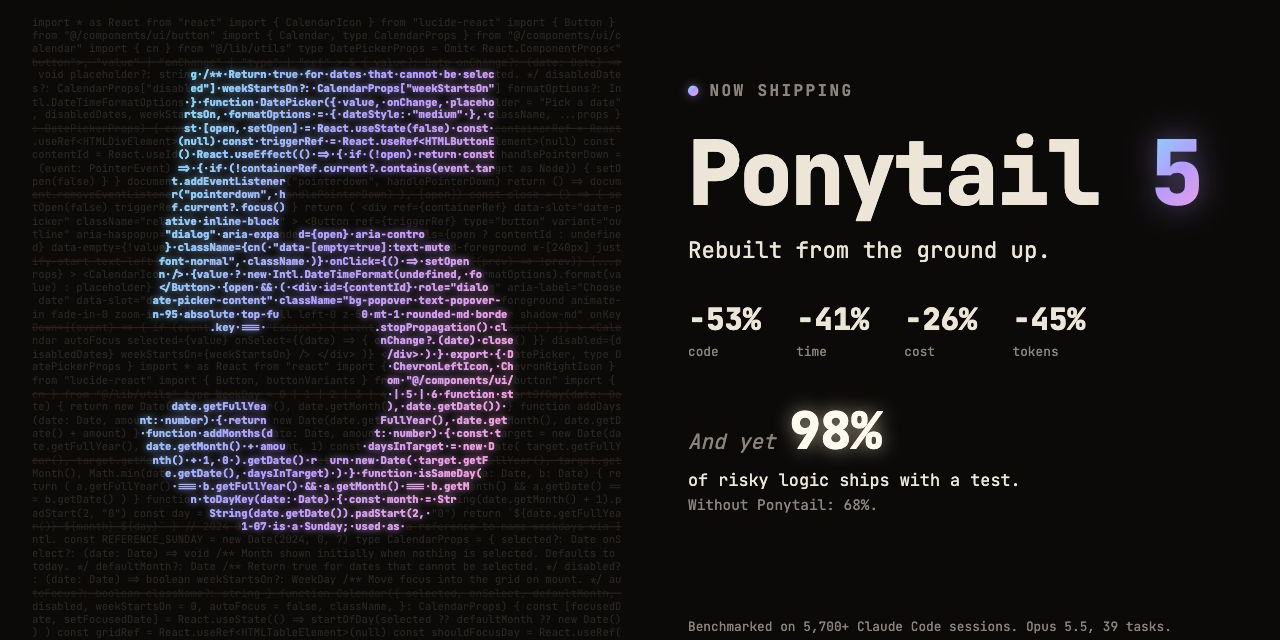
User reviews (0)