Website profiles · Technology insights · Alternatives

prompy.me

Discover curated GPT-5 AI prompts to create stunning visuals and streamline your UI, branding, and creative workflows.

No paid content found
Visit website
Profile views 0 Outbound visits 0 Normal
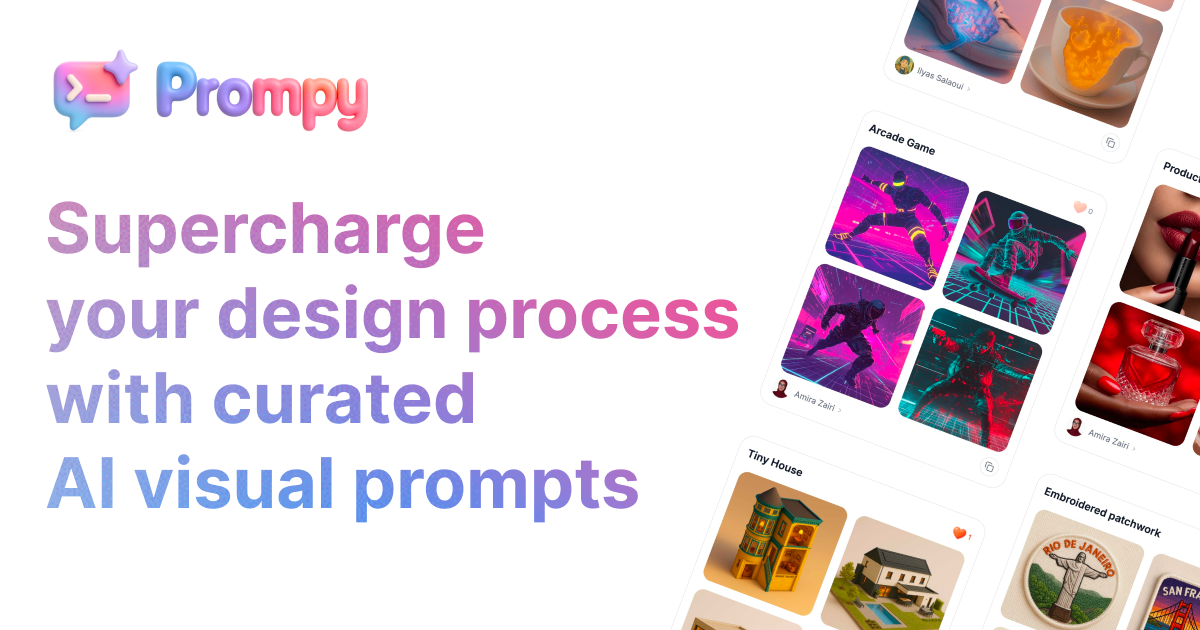
Prompy Full homepage screenshot

At a glance

Category
Artificial Intelligence
Language
English
Paid-content signal
No paid content foundObserved
Registered
Unknown
Hosting
VercelInferred
HTTPS certificate trusted
PassedObserved
Last updated

Website review

This review may include AI-generated content and is not individually verified. Domain, certificate and other facts come from the observed data on this page.

What is Prompy?

Prompy is a curated library of ready-to-use AI prompts aimed at creative and design work. According to the site, it collects "hand-picked GPT-5 visual prompts" for UI, branding, marketing, and broader creative workflows, with a stated focus on helping UI/UX designers, marketing strategists, and communication agencies generate ideas faster and reduce creative guesswork. The page also references ChatGPT-4o prompts, so treat the model labels as the site's own framing rather than a guarantee that every prompt fits one specific model.

In practice, it works like a prompt catalog: you browse, find a prompt that matches your task, and adapt it to your own project. The site organizes content around "Top creators," "Trending words," and a "Discover Prompts for Your Creative Workflow" section, which suggests discovery is driven by browsing and search terms rather than a structured course.

Who it suits

  • Designers needing a starting point: useful when you want a prompt scaffold for UI concepts or visual styles instead of writing one from scratch.
  • Marketers and agencies: handy for quickly producing prompt variations for campaign visuals or branding directions.
  • Beginners to prompting: curated prompts lower the barrier, though you still need to judge whether the output fits your brief.

Trade-offs to weigh

  • Convenience vs. originality: ready-made prompts save time but can push results toward common, generic outputs; plan to edit prompts with your own brand and audience details.
  • Curation vs. coverage: a curated set is easier to scan but narrower than building your own tested prompt library.
  • Model naming: prompt quality depends on the model and version you actually use, so test prompts in your own tool.

Next step: pick one real task you have this week, such as a landing-page hero concept, find the closest prompt, and rewrite it with your product name, audience, and constraints before generating. If you want to compare approaches, general prompt guidance from OpenAI can help you refine what you find.

How do I use a Prompy prompt to generate a UI design mockup?

Choose a Prompy prompt written for UI work, copy it into your AI image or design tool, then replace its placeholder text with your product's specifics before generating. Prompy's page describes its collection as ready-to-use visual prompts for UI/UX designers, marketers and agencies, aimed at speeding up idea generation and reducing creative guesswork, so the prompt is a starting point rather than a finished brief.

A practical workflow

  1. Pick the closest prompt category. Prompy groups prompts around UI, branding, marketing and creative workflows; start with a UI or web-design prompt rather than a general art prompt.
  2. Fill in the placeholders. Swap generic words for your product type, audience, brand tone and screen being designed (for example, a checkout page or a dashboard).
  3. Add layout constraints. State the screen size or aspect ratio, key components (navigation, cards, form fields), and whether you want mobile or desktop framing.
  4. Generate several variations. Run the same prompt two or three times to compare directions, then refine the strongest one with small edits.
  5. Treat the result as a concept, not a spec. A generated mockup is useful for exploring layout, hierarchy and mood; spacing, accessibility and component behavior still need a real design tool.

Example prompt structure

A concrete starting point you can adapt:

"Mobile checkout screen for a sustainable skincare brand, soft neutral palette, large product thumbnail, clear order summary, single primary button, generous whitespace, clean sans-serif type, flat UI style, portrait phone frame."

This gives the model a screen type, brand context, palette, required elements and format—details a generic "design a checkout page" prompt leaves out.

What to watch for

Generated UI mockups often produce plausible-looking but impractical text, inconsistent spacing and controls that don't map to real components. Use them in early ideation and stakeholder conversations, then rebuild the chosen direction in Figma or your design system. If you need more control over layout, pair the Prompy prompt with a wireframe sketch or a reference screenshot described in words.

For broader prompt libraries and comparison, PromptBase and FlowGPT also host community prompt collections, though their UI-specific coverage differs from Prompy's design-focused curation.

Which Prompy prompts work best for creating branding visuals like logos or color palettes?

For logo and color-palette work, start with Prompy's branding-category prompts that specify the deliverable, style constraints and output format, rather than broad "design a logo" prompts. The page frames its collection as hand-picked GPT-5 visual prompts for UI, branding and marketing workflows, aimed at designers, marketing strategists and agencies who want faster idea generation. That positioning suggests the most useful prompts are the ones written as briefs—naming the brand, audience, mood and constraints—not open-ended requests.

What to look for in a branding prompt

  • Logos: prompts that ask for multiple distinct concepts, a described style (minimal, geometric, wordmark), and a request to explain the reasoning behind each mark. Text-to-image tools handle lettering poorly, so treat logo output as concept direction to refine in vector software.
  • Color palettes: prompts that state the brand's personality, industry and any fixed colors, and ask for named swatches with hex values and a short rationale for each. Pairing palettes with a use case (primary, accent, background) makes them easier to apply.
  • Brand systems: prompts that generate a logo, palette and type pairing together, so the pieces feel coherent rather than assembled from separate sessions.

A practical test

Pick one prompt, run it with your real brand details, and judge the output on whether the palette survives on a website header and a packaging mockup—not just whether it looks good in isolation. If a prompt gives generic results, add constraints: audience, competitor references to avoid, and the medium where the visual will appear.

For broader inspiration alongside Prompy, Dribbble and Behance show finished branding work, while Coolors is useful for adjusting palettes once you have a direction.

Can I use Prompy prompts for marketing campaign visuals, and how do they compare to writing prompts from scratch?

Yes. Prompy is explicitly aimed at marketing and branding visuals as well as UI and design work: its page describes hand-picked GPT-5 visual prompts for "UI, branding, marketing, and more," and names marketing strategists and communication agencies among its intended users. So a campaign-visual use case fits the site's stated purpose.

Where a curated library helps

A small marketing team needing a batch of ad concepts, social tiles or moodboard directions can start from an existing prompt instead of a blank page. The page frames this as reducing "creative guesswork" and speeding up idea generation — most valuable when you need volume and a consistent starting structure, and least valuable when the campaign hinges on a very specific brand voice or proprietary visual system.

Curated prompts vs. writing from scratch

Curated prompts (Prompy) Writing from scratch
Starting speed Fast; structure already exists Slower; you define style, format and constraints
Fit to your brand Needs adaptation to your guidelines Built around your brief from the start
Consistency across a campaign Easier to reuse one prompt as a template Depends on how disciplined your own template is
Learning value Shows how effective prompts are phrased Teaches you the model's behaviour directly
Risk Generic or off-brand output if used unedited More iteration before the first usable result

Practical next step

Pick one live campaign and try both routes on the same brief: adapt one Prompy prompt and write one from scratch. Judge the outputs on brand fit, iteration count and time to a usable visual. If the curated version gets you to a strong draft in fewer rounds, treat it as a template and swap in your brand specifics; if not, your own prompt is the better base. For broader prompt-craft reference, OpenAI publishes official guidance on structuring prompts.

How do I adapt a curated GPT-5 visual prompt to match my own project's style or brand guidelines?

Adapt a curated prompt by treating it as a starting structure, not a finished instruction: keep the parts that define the visual task, then rewrite the style, palette, tone and constraints to match your brand. The prompt library at Prompy organizes prompts by use case such as UI, branding and marketing, which makes it easier to pick a starting point close to your project before editing.

A practical adaptation method

  1. Separate task from style. Identify what the prompt asks the model to produce (a landing page mockup, a logo concept, a social visual) versus how it should look (colors, typography, mood). Keep the task wording; replace the style wording.
  2. Insert brand specifics explicitly. Name your primary and accent colors, typeface character (e.g. "geometric sans-serif"), spacing density, imagery style and any motifs you use consistently. Models follow concrete descriptors better than adjectives like "modern" or "premium."
  3. Add constraints as negatives or limits. State what to avoid—stock-photo look, gradients, drop shadows, text-heavy layouts—and any format requirements such as aspect ratio or component set.
  4. Anchor with references you can describe. Instead of pasting someone else's work, describe the qualities you want ("flat illustration with two-tone palette, generous whitespace, rounded 8px corners").
  5. Iterate in small steps. Change one variable per run so you can tell which instruction produced which result, then save the version that works as a reusable template.

Example

A curated prompt might say: "Design a SaaS dashboard hero section in a bold, colorful style." For a conservative finance brand, rewrite it as: "Design a SaaS dashboard hero section for a business banking product. Palette: navy #1B2A4A, white, one muted teal accent. Typography: humanist sans-serif, tight but legible. Layout: left-aligned headline, single primary button, restrained illustration, no gradients or 3D elements. Aspect ratio 16:9."

Choosing what to keep

Prompt element Keep as-is Rewrite for brand
Deliverable type (UI screen, poster, icon set) Usually Only if scope changes
Composition and layout logic Often When brand grid or hierarchy differs
Color and typography Rarely Almost always
Mood adjectives Sometimes Replace with concrete descriptors
Technical constraints (ratio, format) As needed Match your channel requirements

If you work across several brands, keep one master prompt per deliverable type and swap only a short "brand block" of colors, type and tone at the top. That keeps results consistent while making each adaptation quick.

What should I check before relying on a Prompy prompt for client-facing design work?

Before using a Prompy prompt on client work, verify four things: the license and commercial-use terms, whether the prompt is reproducible, the output's originality, and the client's own AI and IP policies. Prompy is a prompt library for UI, branding, and marketing visuals (Prompy), so the prompt is a starting point, not a deliverable you can hand over unchecked.

What to check

  • Rights to the prompt and outputs. Confirm the site's terms allow commercial use and modification. Prompt collections often license the text differently from the images you generate with it; check both.
  • Reproducibility. Re-run the prompt yourself and note the model and version. Model updates and settings change results, so a prompt that "worked" may not reproduce later. Save the exact prompt, model, date, and settings in your project file.
  • Originality and similarity. Before delivery, run a reverse-image or similarity check on generated visuals. Generated output can echo recognizable styles, logos, or existing work. For brand work, also check trademark conflicts.
  • Client disclosure. Many client contracts and brand guidelines now require disclosure of AI-assisted work. Ask early rather than at handoff.
  • Prompt quality and fit. Library prompts are generic by design. Test whether the prompt gives you control over layout, type, and color, or only a mood. Replace vague style words with your brand's specifics.
  • Data handling. Don't paste client-confidential briefs, unreleased product names, or personal data into prompts unless the tool's data terms allow it.

A practical test before committing

Take one real client brief and run the Prompy prompt alongside your normal process. Compare time saved, number of usable iterations, and how much manual cleanup the output needs. If the prompt saves iteration time but every result needs heavy retouching, treat it as an ideation aid rather than a production tool.

Quick comparison

Check Why it matters Fail action
Commercial license Determines if you can bill for the output Use only for internal exploration
Reproducibility Protects you when clients request revisions Archive prompt, model, settings
Originality check Reduces IP and trademark risk Rework or discard the output
Client AI policy Contract compliance Disclose or get written approval
Confidentiality Protects client data Anonymize the brief before prompting

For broader prompt libraries to compare coverage and terms, see PromptBase and Awesome ChatGPT Prompts.

Related questions

More questions →
What Are ChatGPT Prompts and How Do You Write Them for Better Visual Design Results?

A ChatGPT prompt is the instruction you give the model to produce an output; for visual design work it should specify the goal, subject, style, constraints, and output format in one clear request. Prompy, a prompt collection site, frames its library as "curated GPT-5 AI prompts for stunning design results" aimed at UI/UX designers, marketing strategists, and communication agencies who want to speed up idea generation and reduce creative guesswork. The structure below applies whether you write prompts yourself or adapt curated ones.

What a ChatGPT Prompt Actually Contains

A useful prompt has five parts. Leaving any of them out is the most common reason results feel generic.

Part What it answers Example fragment
Goal What the output is for "a landing page hero concept"
Subject What is shown "a fintech mobile app dashboard"
Style Visual direction "flat illustration, muted blue palette"
Constraints What to avoid or fix "no stock-photo people, max three colors"
Output format How to deliver it "describe layout, then list color hex codes"

For conversational prompts ("explain this error"), goal and subject are usually enough. For visual output, style and constraints do most of the work — they are what separate a usable design direction from a vague mood.

How Visual Prompts Differ from General Chat Prompts

General prompts tolerate ambiguity because you can reply and correct. Visual prompts are harder to fix after the fact: if the style is underspecified, the model fills the gap with its most average interpretation. Prompy's premise reflects this — it curates "ready-to-use visual prompts that streamline idea generation," implying that reusable, specific prompts outperform improvised ones.

Two practical differences:

  • Specificity is front-loaded. Put style and constraints early rather than appending them as an afterthought.
  • Output format matters more. Ask for a structured deliverable (layout description, palette, component list) so you can act on it, not just admire it.

A Reusable Structure for Design Prompts

Use this template and swap the bracketed parts:

Act as a [role, e.g. UI designer].
Create [goal] for [subject].
Style: [2–3 style descriptors + palette].
Constraints: [what to avoid; limits on elements/colors].
Output: [format — e.g. layout sections, color codes, component names].

Example for a branding task:

Act as a brand designer.
Create three logo direction concepts for a small coffee roastery.
Style: minimal line work, warm earth tones.
Constraints: no gradients, must work in one color.
Output: one paragraph per concept, then a one-line rationale for each.

The expected result is three distinct directions you can react to, not a single polished answer — which is what makes iteration fast.

Common Failure Modes and How to Rewrite Them

  • Vague description. "Make it modern" gives the model nothing to anchor on. Rewrite as "clean sans-serif type, generous whitespace, two-color palette."
  • Conflicting constraints. "Minimalist but highly detailed" pulls in two directions. Pick the priority and demote the other to a secondary note.
  • Missing reference style. Without a named style or era, output drifts to the average. Add one concrete anchor ("Swiss poster layout," "soft neumorphism").
  • No output format. You get prose you can't use. Always state the deliverable shape.

Iterate, Then Save What Works

Treat each prompt as a test: change one variable at a time (style, then constraints, then format) so you know what caused the improvement. When a prompt reliably produces usable output, save it with a short note on what it is for and which variables you tuned — that saved version becomes your starting point next time, and is the same logic behind curated prompt libraries like Prompy's.

If you are choosing between writing from scratch and using a curated collection: write your own when the task is specific to your brand or product, and start from curated prompts when you need a fast baseline for a common format such as UI concepts or marketing visuals.

What Are Visual Prompts and How Do You Write Them for Better Design Results?

A visual prompt is a text description of the image or design you want an AI model to produce. It works best when it specifies subject, style, composition, color, lighting, medium, and constraints in concrete terms, and when you iterate on the output rather than expecting one perfect first attempt. This applies to UI mockups, branding concepts, marketing visuals, and AI art. Prompy.me, for example, curates ready-to-use GPT-5 and ChatGPT-4o visual prompts for UI/UX designers, marketing strategists, and communication agencies, which illustrates the intended use: accelerating idea generation and reducing creative guesswork rather than replacing design judgment.

What Makes a Prompt "Visual"

All prompts are text, but a visual prompt is written to control what the eye sees. A general text prompt might ask for "a landing page concept"; a visual prompt specifies the layout, palette, typography feel, imagery style, and mood so the output is usable as a design reference.

Dimension General text prompt Visual prompt
Goal Information or copy An image, layout, or visual direction
Specificity Topic-level Subject, style, composition, color, light, medium
Typical use Writing, analysis UI concepts, branding, marketing visuals, AI art
Success test Accurate content Whether the output can guide a real design decision

Visual prompts are the right tool when you need to explore look-and-feel quickly: UI/UX layout directions, brand moodboards, campaign imagery, or art concepts. They are a poor fit when the task is purely verbal or when exact production specs (pixel dimensions, brand hex codes) must be guaranteed.

The Reusable Prompt Structure

Build every visual prompt from six slots. Not all are required each time, but naming them keeps you from writing vague requests.

  1. Subject — what is depicted, and its role (hero image, dashboard, logo mark).
  2. Style — visual language: flat, editorial, brutalist, soft 3D, hand-drawn.
  3. Composition — framing and layout: centered, rule of thirds, grid, negative space, where text sits.
  4. Color and light — palette and lighting direction: muted pastels, high-contrast, soft window light.
  5. Medium and output — photo, vector illustration, UI mockup, poster.
  6. Constraints — what to avoid or fix: no gradients, no stock-photo people, leave space for a headline.

A filled example for a UI concept:

A mobile banking app home screen, clean editorial style, card-based grid with generous negative space, deep navy and warm off-white palette, soft top-down light, flat UI mockup, no photographic imagery, leave the top third empty for a greeting.

The same six slots work for a brand moodboard or an AI art piece; only the vocabulary changes.

How to Improve a Prompt That Misses

Treat the first output as a diagnosis, not a verdict. Read what went wrong, then change one variable at a time so you know what caused the improvement.

  • Too generic output → add the missing slot. If the image feels anonymous, the style and composition slots were probably empty.
  • Wrong mood → replace abstract adjectives ("modern," "beautiful") with observable ones ("matte textures, thin sans-serif type, cool gray shadows").
  • Cluttered result → add constraints about negative space and what to exclude.
  • Conflicting instructions → check for contradictions such as "minimalist" alongside "rich ornamental detail." Pick one direction.
  • Style-word stacking → listing ten style references dilutes all of them. Keep two or three that agree.

A practical loop: generate, note the single biggest gap, edit one slot, regenerate. Two or three rounds usually converge; if it does not, the brief itself is underspecified.

Common Failure Modes

  • Vague subject — "a nice website" gives the model nothing to anchor on.
  • Adjective inflation — "stunning, modern, premium, sleek" are not visual instructions.
  • Constraint conflicts — asking for both photorealistic and illustrated output.
  • Ignoring the use case — a prompt for a hero banner needs different framing than one for an icon set; state the destination.
  • No iteration — expecting the first generation to be final.

Where to Start

If you are new to visual prompting, pick one real task — a landing page concept, a logo direction, a campaign image — and write it against the six slots before generating anything. Prompy.me's curated collection is a reasonable reference point for seeing how professional prompts are structured for UI, branding, and marketing workflows, but the skill transfers: once you can name subject, style, composition, color, medium, and constraints, you can write and refine visual prompts for any model or project.

What Is Web Design and What Does It Actually Involve?

Web design is the planning of a website's layout, navigation, content structure, and visual style before and alongside development. It answers what goes where, how people move through it, and how it looks and feels — not just how it is coded. It applies whether you are commissioning a site, building one yourself, or hiring a studio such as Fuel180 Creative, a New Jersey multimedia development facility whose in-house services include design, internet site development, e-marketing, social media, interactive development, video production, animation, and presentation design.

Where web design sits among related disciplines

Web design overlaps with several fields but is not identical to any of them.

Discipline Core question Typical output
Web design What should the site look like and how should it be organized? Sitemap, wireframes, mockups, style guide
Web development How does it work in code? Front-end and back-end implementation
UX design How does the experience feel end to end? Research, user flows, usability testing
Branding What does the organization stand for visually and verbally? Logo, palette, voice, brand guidelines

A designer may handle UX and branding tasks, and a developer may make design decisions during implementation. The distinction matters mainly for scoping: if you hire for "web design" only, confirm whether research, copywriting, and coding are included.

The core phases of a web design project

1. Discovery and goals

Define who the site serves, what visitors should do, and how success is measured. Outputs often include a written brief, competitor review, and success metrics such as inquiries, signups, or time on page.

2. Information architecture

Organize content into a hierarchy. The deliverable is usually a sitemap showing pages and their relationships, plus navigation labels. This is where you decide whether services, products, or resources get top-level placement.

3. Wireframes

Low-fidelity layouts that show structure without final visuals — where the headline, call to action, and supporting content sit on each page type. Wireframes are cheap to change, so review them carefully before visual design begins.

4. Visual design

Typography, color, imagery, spacing, and component styling are applied to the approved structure. A style guide or design system documents the rules so future pages stay consistent.

5. Handoff to development

The designer delivers mockups, assets, specifications, and interaction notes. Development then builds the site, and design review continues during implementation to catch issues that only appear in a browser.

Key decisions you will be asked to make

  • Responsive layout — how the design adapts across phone, tablet, and desktop. Designing only for desktop is a common and costly pitfall.
  • Typography and color — how many typefaces and colors, and whether they meet contrast requirements for readability.
  • Accessibility — whether the design works for keyboard users, screen readers, and people with low vision. Retrofitting accessibility later is harder than designing for it.
  • Performance trade-offs — large hero images, video backgrounds, and web fonts look impressive but add load time. Decide what is worth the cost.
  • Content and conversion goals — the design should serve the content you actually have, not placeholder text that never gets replaced.

Typical deliverables and how to evaluate them

Deliverable What to check
Sitemap Does every important page have a home, and are labels clear to outsiders?
Wireframes Is the primary action obvious on each page type?
Mockups Do they reflect real content lengths, not idealized short text?
Style guide Could a new designer produce a consistent page from it?
Prototype Can you click through the main user journey without confusion?

Common pitfalls

  • Designing for desktop first and treating mobile as an afterthought.
  • Skipping discovery, so the site reflects internal preferences rather than visitor needs.
  • Ignoring content: a beautiful layout collapses when real headlines and product descriptions are longer than the mockup.
  • Losing conversion focus — every page should make the next step clear.
  • Treating design as finished at handoff, when many issues surface only during development.

If you are commissioning work, ask which phases are included, what deliverables you will receive, and who owns the files afterward. Those three answers prevent most misunderstandings before a project starts.

What Are AI Prompts and How Do You Use Them for Better Visual Results?

An AI prompt is the text instruction you give a generative model to produce an output—for visual work, that means describing the image, UI screen, or brand asset you want. Prompts work best when they specify subject, style, composition, and constraints, and when you refine them iteratively rather than expecting one perfect attempt. This guide explains how prompts shape results and how to write, test, and improve them for design and art tasks.

What an AI prompt actually does

A prompt is not a search query and not a command with guaranteed behavior. It is conditioning input: the model interprets your words against its training and generates the most plausible output consistent with them. That has three practical consequences:

  • Specificity narrows the output space. "A website hero section" leaves nearly everything open; "a website hero section for a fintech app, dark navy background, single product screenshot on the right, bold sans-serif headline on the left" constrains layout, palette, and content.
  • Ambiguity gets resolved by the model's defaults. If you don't state a style, aspect ratio, or level of detail, the model picks for you—often a generic, mid-detail look.
  • Wording matters, but not magically. Related phrasings usually produce related results; small word changes shift emphasis rather than transform output. Iteration, not incantation, is the reliable lever.

Prompy.me, a prompt library site, frames its collection as "ready-to-use visual prompts" for UI/UX designers, marketing strategists, and communication agencies, aimed at speeding up idea generation and reducing creative guesswork. That framing is a useful signal: curated prompts are starting points, not finished answers.

The components of an effective visual prompt

Most strong visual prompts combine five elements. Not every prompt needs all five, but knowing which you've omitted tells you what the model will decide for you.

Component What it controls Example phrasing
Subject What is depicted "a mobile banking dashboard screen"
Style and medium Visual language "flat vector illustration, muted palette"
Composition Layout and framing "centered card, generous whitespace, 16:9"
Context and audience Who it's for, tone "for a B2B SaaS onboarding flow"
Constraints What to include or avoid "no stock-photo people; max three colors"

A compact example combining them:

A mobile banking dashboard screen for a B2B SaaS onboarding flow, flat vector style, muted blue and gray palette, centered card layout with generous whitespace, three key metrics visible, no photographic elements.

Compare that to "banking app design." The first gives the model a target you can evaluate against; the second gives it room to guess.

How to iterate and refine prompts

Treat prompting as a loop with a clear evaluation step, not a one-shot request.

  1. Write a baseline prompt with the components above.
  2. Generate and inspect the output against your intent—not against "does it look nice," but against "does it match the brief."
  3. Change one variable at a time. If the layout is wrong, adjust composition language; if the mood is wrong, adjust style and palette. Changing everything at once makes it impossible to learn what worked.
  4. Record what changed and what improved. A short log of prompt versions and outcomes turns trial and error into a reusable method.
  5. Reuse the winning structure. Once a prompt reliably produces the style you want, keep its skeleton and swap the subject for the next asset.

This is the same discipline described in general prompt-engineering guidance: state the task, provide context, specify the format, and refine based on observed output. For visual work, add the evaluation habit of checking against a written brief rather than a feeling.

Prompt types differ by use case

The same five components get weighted differently depending on what you're making.

UI and web design prompts

Prioritize layout, component inventory, and constraints. You want the model to produce something structurally usable: screen type, element hierarchy, spacing language, and platform (mobile vs. desktop). Vague aesthetic words like "modern" add little; concrete layout instructions add a lot.

Branding prompts

Prioritize tone, audience, and consistency. Brand assets need to feel like they belong together, so include palette, typography character, and the emotional register you're targeting. Generate several variations from the same prompt skeleton to test whether the direction holds up.

AI art and illustration prompts

Prioritize style, medium, and composition. Art prompts tolerate—and often benefit from—more evocative language about mood, lighting, and reference genres. Still name your constraints (aspect ratio, level of detail, elements to exclude) so the output fits its intended use.

Common prompt mistakes and fixes

  • Too vague. "Make it look good" gives the model nothing to aim at. Fix: name the specific quality—clean, dense, playful, minimal—and pair it with a concrete element.
  • Stacking contradictory instructions. "Minimalist but highly detailed" pulls in two directions. Fix: decide which one leads and express the other as a secondary constraint.
  • Changing many variables at once. You can't tell what caused the improvement. Fix: one change per iteration.
  • Skipping constraints. Unwanted elements appear because you never excluded them. Fix: add an explicit "avoid" clause.
  • Expecting one prompt to be final. Fix: plan for two or three refinement rounds as normal, not as failure.
  • Ignoring the brief. A beautiful output that misses the audience or format is still wrong. Fix: evaluate against written requirements first, aesthetics second.

Where curated prompt libraries fit

Libraries like Prompy.me collect prompts aimed at design workflows—UI, branding, marketing—so you can start from a tested structure instead of a blank page. They're most useful for learning the shape of an effective prompt and for quickly producing first drafts. They're least useful if you paste them unchanged and accept the output: the value comes from adapting the structure to your specific brief and iterating from there. Treat any library prompt as a template to modify, and keep your own log of what you changed and why.

What Is AI Charge Capture and How Does It Turn Documentation into Billable Codes?

AI charge capture is software that reads clinical documentation and produces coded, bill-ready charges automatically. Instead of a provider or coder manually translating a visit note into CPT and ICD-10 codes, the system extracts the relevant details from the note and selects codes for review or submission. It fits teams that already document visits in an EHR or EMR and want to reduce missed charges, manual coding searches, and claim delays — MediMobile's Genesis is one example of this category, positioned as an automated medical coding and charge capture solution.

How AI charge capture differs from manual charge entry

Manual charge capture depends on a person remembering to log the encounter, then finding the right codes by hand. That creates three predictable failure points:

  1. Encounters get missed — billable work falls through the cracks when a busy provider moves to the next patient.
  2. Coding takes time — manual searches and reviews slow coders down.
  3. Claims get delayed — late or incorrect charges affect reimbursement.

AI charge capture targets all three by making code selection part of the documentation workflow rather than a separate step after it.

The workflow: from EMR documentation to bill-ready charges

The mechanism MediMobile describes is deliberately narrow: providers document their visits in their EMR, and the system handles the rest. In practice that means:

  • Input: the clinical note the provider already writes during or after the visit.
  • Action: AI coding reads that documentation and generates CPT and ICD-10 code selections.
  • Output: coded charges that are ready for billing, with a charge review step available for coding teams.

The stated result is that documentation turns into CPT and ICD-10 codes "instantly," so encounters are captured before revenue slips away. The provider's job ends at documentation; the coding and charge creation happen downstream.

How the AI selects CPT and ICD-10 codes

The platform describes AI-assisted coding that produces "coded, bill-ready charges from documentation," paired with cleaner charge review and fewer manual searches for coding teams. Two things are worth separating here:

  • Code generation — the system proposes CPT and ICD-10 codes based on what the note contains.
  • Charge review — a human-facing step where coding teams check and clean up those charges before they move toward billing.

That review layer matters because it keeps a person in the loop on code selection rather than treating AI output as final. The source does not specify the model, accuracy rates, or whether any codes bypass review, so treat "autonomous" coding as a spectrum and confirm the review policy with any vendor.

Who each part of the platform serves

MediMobile frames the product around three roles, which is a useful way to check whether a tool fits your team:

Role What the platform provides
Providers Mobile tools to manage patients and capture charges without extra friction
Coding teams AI-assisted coding and charge review with fewer manual searches
RCM leaders Visibility into missed charges, coding progress, and revenue workflows

If your bottleneck is providers forgetting to log encounters, the provider-side capture matters most. If it's coder throughput, the AI coding and review layer is the relevant piece.

Where charge capture connects to the rest of the revenue cycle

Charge capture is one link in a longer chain, and the platform's other features show where it plugs in:

  • MIPS reporting — quality measures are tracked inside the same workflow, so reporting doesn't require a separate data pull.
  • Integrations — connections to EHR, billing, and data workflows, which is what allows charges to move toward billing without re-entry.
  • Reporting and analytics — visibility into missed charges and coding progress for revenue cycle leaders.

The practical takeaway: evaluate AI charge capture by how well it hands off to coding review and billing, not just by whether it generates codes.

Common failure points to check before adopting

The problems MediMobile names — missed encounters, slow manual coding, delayed claims — are the same things to test against in a demo. Ask specifically:

  • Does the system capture encounters from the EMR automatically, or does someone still trigger each one?
  • How are generated CPT and ICD-10 codes reviewed, and who signs off?
  • What happens to a charge the AI can't confidently code?
  • How do charges flow into billing, and what integration work is required?

MediMobile lists "Service Levels & Pricing" and a demo request as the next steps, but the source does not publish prices or plan details, so cost and contract terms have to come from the vendor directly.

Website Overview

The available information shows a mix of normal operation and configuration gaps. Depending on how the website is used, these gaps may affect secure access or the consistency of its public presentation.

Domain and Registration

Unknown

DNS and Email

The lowest TTL is 60 seconds, supporting rapid record changes at the cost of more frequent lookups. Nameservers are provided by vercel-dns.com, indicating managed DNS hosting. CAA records restrict which certificate authorities are authorized to issue certificates. No CNAME was found; the observed records resolve directly to addresses. No MX record was found. A conventional explicit inbound-mail route is not configured.

TLS and Certificates

The certificate uses an RSA 2048-bit public key, offering broad client compatibility. The server supplied a complete certificate chain. No organization name is present in the certificate; the available fields are consistent with domain validation. The certificate was issued by Let's Encrypt, commonly associated with automated certificate services. The certificate's total validity is about 89 days, consistent with a short renewal cycle.

HTTP and Browser Security

X-Powered-By exposes backend information: Next.js. The response lacks these common security headers: CSP, X-Content-Type-Options, Referrer-Policy, Permissions-Policy, clickjacking protection. No obvious internal addresses or debug information were found in the headers. The Server header contains the custom value Vercel. No explicit CDN or WAF marker was found in the response headers.

Technology Stack Analysis

The public page identifies v0.dev, Next.js, Vercel without precise versions, leaving fewer clues for version-specific scanning.

Search and Social Sharing

The Generator tag identifies v0.dev, making the publishing system easier to fingerprint. The canonical URL points to another host: https://prompy.me. Search engines may consolidate indexing signals there. Twitter Card metadata is configured. The title has 54 characters, within a common display range. A meta description is present, with 118 characters.

Hosting and Email

DNSvercel-dns.com
HostingVercel
EmailUnknown
Approximate IP geolocation (inferred; a CDN or proxy may differ from the origin server) United States flagUnited States Inferred 216.150.1.193

Registration details

RDAP / WHOIS

Unknown

DNS records

DNS

TypeNameValueTTLPriority
Awww.prompy.me216.150.1.1931800—
Awww.prompy.me216.150.1.651800—
NSprompy.mens1.vercel-dns.com86400—
NSprompy.mens2.vercel-dns.com86400—
CAAprompy.me0 issue "letsencrypt.org"60—
CAAprompy.me0 issue "pki.goog"60—
CAAprompy.me0 issue "sectigo.com"60—

TLS and certificates

TLS / SSL

AssessmentNormal configuration
Supported protocolsTLSv1.2、TLSv1.3
Negotiated protocolTLSv1.3
Certificate subject*.prompy.me
IssuerLet's Encrypt
Valid until2027-01-01T10:32 · Remaining when checked: 73 days
Verification detailsCertificate trust: Passed · Hostname match: Passed

HTTP response headers

HTTP

HeaderValue
content-typetext/html; charset=utf-8
cache-controlpublic, max-age=0, must-revalidate
serverVercel
strict-transport-securitymax-age=63072000

Identified technologies

v0.devNext.jsVercel

Pages, Search and Sharing

Meta descriptionDiscover curated GPT-5 AI prompts to create stunning visuals and streamline your UI, branding, and creative workflows.
Canonical URLhttps://prompy.me
LanguageEnglish (default)
Twitter Cardsummary_large_image
All bots 1 allowed · 3 disallowed
  • Allow/
  • Disallow/admin/
  • Disallow/dashboard/
  • Disallow/api/

User reviews (0)

  • No reviews yet.