Website profiles · Technology insights · Alternatives

purrli.com

Not just a cat purr, but a cat purring next to you. Purrli recreates the sound and the presence of a cat, online. It's soothing, it's free, and it's purrfect!

Paid content
Visit website
Profile views 6 Outbound visits 0 Normal
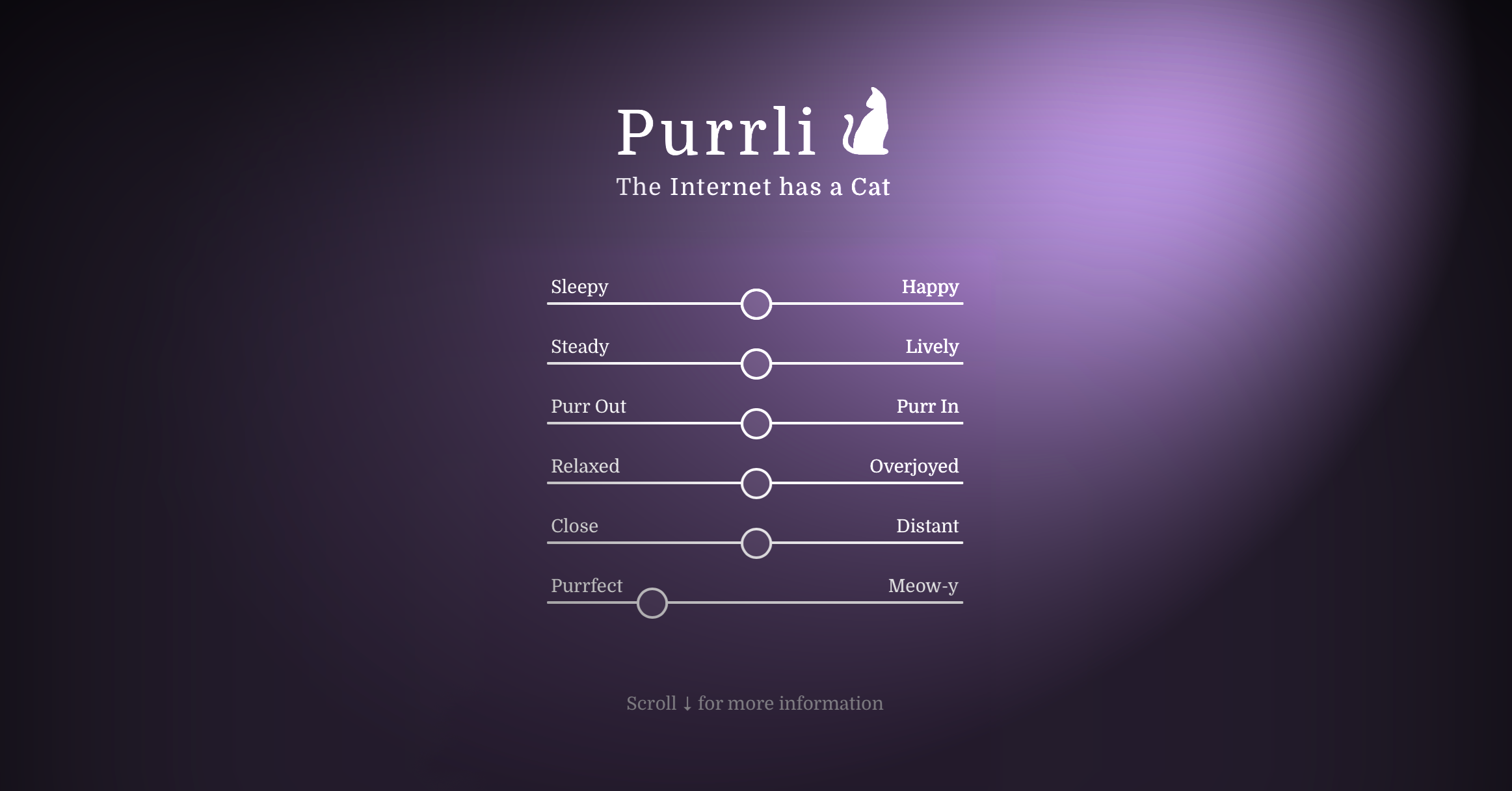
The Internet has a Cat! Meet Purrli, the Online Cat Purr Generator. Full homepage screenshot

At a glance

Category
Other
Language
English
Paid-content signal
Paid contentObserved
Registered
2017
Hosting
One.com A/SInferred
HTTPS certificate trusted
PassedObserved
Last updated

Website review

This review may include AI-generated content and is not individually verified. Domain, certificate and other facts come from the observed data on this page.

What is Purrli?

Purrli is a free, ad-free website that generates the sound of a cat purring beside you. Rather than looping one clip, it uses a custom sound engine modeled on real purrs, with the purr shifting subtly over time so it feels alive rather than mechanical. The stated aim is to recreate both the sound and the sense of a cat's presence, which is why it also occasionally meows or calls for attention.

What you can actually do with it

  • Play a continuous purr as background sound while working, reading, or falling asleep.
  • Adjust the character of the purr with sliders labeled Sleepy, Happy, Steady, Lively, Relaxed, Overjoyed, Close, Distant, Purr Out, Purr In, and Purrfect.
  • Use Wall Paper Mode or Picture Mode, and upload your own picture so there's something cat-like on screen as well as in your ears.
  • Leave the attention-seeking slider low if you don't want to be interrupted mid-task.

The site lists two main use cases: anxiety relief and stress control, and sleep. That matches how people typically use ambient sound — as a masking layer against distracting noise, or as a wind-down cue at bedtime. The purr's low frequencies are the point, so the site notes that headphones or external speakers are required; tiny phone or laptop speakers can't reproduce them properly.

How it differs from a plain purr loop

Purrli A simple purr audio loop
Variation Purr changes over time Identical repeat
Interaction Sliders shape mood, distance, rhythm None
Extras Meows, wallpaper and picture modes None
Cost Free, no ads, optional donation Varies

A practical example: if you share a flat and need to block out street noise while studying, set a steady, close purr at moderate volume through headphones. If you're using it to fall asleep, a slower, more distant purr through a speaker tends to sit further back in your attention.

Purrli comes from the maker of myNoise, a free online background noise generator at myNoise, and the foreword describes Purrli as the better purr engine he wanted to build after that site's earlier "Furry Friend" generator. Donations, processed via PayPal, unlock bonus features. If you want to try it, start with the default purr and headphones, then nudge the sliders until the purr sits at the edge of your awareness rather than in the middle of it.

How does Purrli recreate the presence of a cat?

Purrli recreates a cat's presence mainly through sound rather than through a visual or interactive pet. Its own description says it uses a custom sound engine modelled after real purrs, and that the purr changes delicately over time so the experience feels more real and lively. In practice, that means you are not hearing one static loop of a purr; you are hearing a continuous purr with small variations in rhythm, depth and intensity, which is closer to how a real cat sounds when it is resting nearby.

The site also mimics a cat's behaviour by calling for your attention. That is a deliberate part of the presence effect: a real cat is not a passive background object, and Purrli occasionally makes itself noticed. The page warns that if you adjust the last slider, you may get nagged in the middle of your work — a small but telling detail, because it means the "presence" includes a degree of interruption, not just a soothing drone.

Several controls shape how close or distant that presence feels. The page lists sliders and labels such as Sleepy, Happy, Steady, Lively, Purr Out, Purr In, Relaxed, Overjoyed, Close and Distant. These let you move the imagined cat from a relaxed, sleepy companion to a livelier one, and from close by to further away. That is the core of the illusion: the cat is not shown, but its mood and distance are suggested through sound.

A practical note from the site: headphones or external speakers are required, because tiny mobile phone or laptop speakers cannot reproduce the low frequencies of a cat purr. If you try Purrli on a phone speaker and find it thin or unconvincing, that is a hardware limitation rather than a failure of the sound design.

For a concrete use case, imagine working at a desk in a quiet room. You open Purrli, choose a steady, relaxed purr, set the distance fairly close, and leave it running. The changing purr gives the room a sense of another living creature being present without demanding anything from you. If you want the opposite — a cat you can hear but not feel crowded by — move the distance control further away and reduce the liveliness.

The trade-off is that Purrli is an audio-only recreation. It cannot provide warmth, weight or the visual feedback of a real cat, and the occasional attention-seeking call may be unwelcome if you need unbroken concentration. The page also mentions support through donations that unlock bonus features, so some extras sit behind that option.

Next step: open Purrli with headphones, start with a relaxed and steady purr, then adjust the distance control until the cat feels as present as you want it to be.

Can Purrli help with anxiety, stress, or sleep?

Yes, Purrli is explicitly positioned for that. Its own page lists "Anxiety Relief and Stress Control" and "Sleep" among its use cases, and the premise is that a purring cat is a comforting sound that can soothe and calm you when you're stressed. The site also acknowledges that the sound alone isn't the whole effect — it tries to recreate the presence of a warm, cuddly cat alongside the sound, using a custom engine modelled on real purrs that shifts subtly over time rather than looping one static clip.

What it actually offers for these uses

  • A purr that varies: sliders let you shape the purr's character and distance, so you can push it close and prominent or keep it faint and background-level.
  • An element of unpredictability: like a real cat, it will occasionally call for your attention. The site warns about the final slider if you don't want to be interrupted mid-work — worth knowing before you set it and walk away.
  • Headphones or external speakers: the page states these are required, because tiny phone or laptop speakers can't reproduce the low frequencies of a purr. If you plan to use it for sleep, that's a practical constraint on how you play it.

How to decide whether it fits you

Your situation Reasonable fit?
You find cat purrs genuinely soothing and want a near-continuous ambient sound Good fit — that's the core design
You want steady, unchanging masking noise for focus Weaker fit — the variation and occasional "meow for attention" work against total predictability
You're playing audio through a phone or laptop's built-in speakers Not workable as described — low frequencies won't come through
You want a sleep sound you can leave running Plausible, but set the attention/meow slider low first and test it for a night

A useful next step: run it for one full work session with headphones before trusting it overnight. If the shifting purr and occasional attention-seeking break your concentration rather than settle it, that's your answer — and if you want a plain, non-purring ambient generator instead, the same designer's earlier project is at myNoise.

What equipment do I need to hear Purrli properly?

You need headphones or external speakers. Purrli's own player warns that tiny mobile phone or laptop speakers are not compatible with the low frequencies of a cat purr, so the built-in speakers on those devices will make the sound thin or inaudible. Purrli

Practical setup

  • Headphones are the simplest option and work well for sleep, focus or anxiety relief, since the purr stays close and private.
  • External speakers suit room-filling background ambience, but check that they can reproduce low bass; small portable speakers often cannot.
  • A stable connection and a browser are all the software you need — Purrli runs in the page, with no app install mentioned.

A concrete scenario

If you want a purring presence beside you while you read or fall asleep, plug in over-ear headphones, set the purr to a steady, close, relaxed character, and leave the "attention" slider low so the virtual cat does not meow for you mid-task. The site notes that the final slider controls how often Purrli calls for attention, so that is the one to adjust if you are easily distracted.

Next step

Before committing, test on your actual device: play Purrli at a low volume for a minute. If you hear a soft rumble rather than a tinny hiss, your setup is adequate; if not, switch to headphones or larger speakers.

How can I support Purrli and what bonus features do patrons get?

Support Purrli by making a donation through the site's support option (PayPal is the payment platform shown on the page). The site is free and ad-free, and donations are described as the way to keep it running. Donors are rewarded with bonus features, and there is a separate "Patron Login" area for returning supporters.

The page names one bonus explicitly — "More purrs for PatrRRRrons" — but does not list the full set of patron perks in the material available, so treat any specific feature list as something to confirm on the site after donating rather than something to assume in advance.

A practical way to decide: if you use Purrli only occasionally as background sound, the free player is likely enough; if it has become part of your sleep or focus routine, donating mainly buys you the ability to keep an ad-free tool alive, with bonus purrs as the extra. If you want to know exactly what you get before paying, log in or check the patron section first.

For related free ambient and focus audio, you can also look at myNoise, the background noise generator by the same developer, which the Purrli page credits as the origin of its cat purr idea.

What troubleshooting options are available if Purrli isn't working?

Purrli's help content points mainly to audio-hardware and browser-related checks rather than a long error-code list. The most explicit fix on the page is about output devices.

Start with the most likely culprit: speakers or headphones

The site states that headphones or external speakers are required, because tiny mobile-phone or laptop speakers cannot reproduce the low frequencies of a cat purr. If Purrli seems silent, thin or "not working", plug in headphones or connect external speakers first, then reload the player and raise the volume.

Other practical checks

  • Browser audio permission and mute state: confirm the tab isn't muted and that the browser is allowed to play sound.
  • Volume and slider settings: Purrli uses several sliders for purr character and presence. A slider pulled to an extreme can make the sound very quiet or very sparse, which can look like a failure. Reset to a middle position and test.
  • The attention-seeking slider: the page warns that the last slider controls how often the virtual cat calls for attention. If you don't want to be interrupted mid-work, leave that slider low; if you hear unexpected meows, that is the setting to adjust rather than a fault.
  • Reload and re-try: if the player loads but stays silent, refresh the page and start playback again, since browser audio contexts often need a fresh user interaction.
  • Donation/payment redirect issues: if a support payment appears to hang, the page shows a "payment is being processed, you will be redirected" message, so give it a few seconds before retrying.

A quick decision path

Symptom First thing to try
No sound at all Headphones or external speakers, then unmute the tab
Sound is faint or tinny External speakers; laptop/phone speakers can't carry the low purr frequencies
Purr feels unnatural or too quiet Move the character sliders back toward the middle
Sudden meows during work Lower the final attention slider
Player frozen after a click Reload the page and restart playback

Next step

If none of these help, use the site's own troubleshooting section and contact route from the player page, and describe your device, browser and whether you're on speakers or headphones — that detail is the one the site itself treats as decisive.

Related questions

More questions →
What Are Ambient Sounds and How Can They Help You Relax or Focus?

Ambient sounds are continuous background noises—rain, wind, ocean waves, a coffee shop hum—that you play at low volume to mask the sharper, more distracting sounds around you. They help because the brain is drawn to sudden, irregular noises (a door slam, a colleague's conversation, a ringing phone) far more than to steady, predictable ones. On a site like Noises Online, you pick the sounds you like, blend their relative levels, and use them to boost focus, deepen meditation, or fall asleep. The approach works without expensive gear such as active noise-cancelling headphones, since everything runs in a web browser.

What counts as an ambient sound

An ambient sound is any steady, non-threatening background noise that fills the acoustic space rather than demanding attention. The word "noise" carries a negative connotation, but ambient sounds are often pleasant—the ocean, rain, or a summer field.

The key distinction is predictability:

Distracting noise Ambient sound
Pattern Sudden, irregular Continuous, steady
Effect Pulls attention Blends into background
Examples Traffic horns, talking, notifications Rain, waves, wind, coffee shop

Because ambient sounds are steady, your brain stops tracking them after a short while. That frees attention for whatever you actually want to do.

How ambient sounds help you relax or focus

The core mechanism is masking: you use noises you like to cover the noises you dislike. This is the idea behind an online background noise machine.

  • For focus: Masking removes the unpredictable sounds that trigger attention shifts, so you stay on task longer.
  • For relaxation and sleep: A steady sound gives your mind something neutral to rest on, which can quieten racing thoughts. The site explicitly lists falling asleep at night as a use case.
  • For meditation: A consistent sound bed makes it easier to settle without silence feeling oppressive.
  • For tinnitus: The site lists masking your tinnitus as one of its purposes—ambient sound can reduce the contrast between the tinnitus and a quiet room.

The concept is simple and works extremely well, and it doesn't require expensive equipment.

Common ambient sound types and when to use them

Noises Online draws on original recordings—not stock sounds—covering rain, wind, coffee, ocean, sea, and waves. Matching the sound to the task helps:

  • Rain — steady and dense; good for sleep and for masking speech.
  • Ocean / sea / waves — slow swells with a natural rhythm; good for relaxation and meditation.
  • Wind — smooth and continuous; good for long focus sessions.
  • Coffee shop — mid-range chatter and clatter; good for productivity when you want a sense of company.

You can combine several at once. Adjusting their relative levels lets you reach a well-balanced background noise rather than a single flat layer.

How to choose and set up your ambient sound

  1. Pick one or two sounds that you find pleasant, not just neutral. Liking the sound matters, because you'll hear it for a long stretch.
  2. Set the volume low—just enough to cover the distracting sounds, not enough to become the main event. The site recommends headphones for the best experience.
  3. Balance the layers. If you use more than one sound, raise or lower each until no single one stands out.
  4. Save your setup. The player includes a "Save current setup" option under User Sets, so you can return to a configuration you like.
  5. Use the controls to fine-tune tone and liveliness, and try the Free Audio Loop if you want a continuous sample.
  6. Verify it's working: after a few minutes you should notice the outside distractions less, without feeling like you're actively listening to the sound itself.

Practical tips and things to watch for

  • Headphones help. The site notes the experience is best with headphones, which also keeps the sound from bothering others.
  • Don't overdo the volume. Loud ambient sound becomes its own distraction and, over long periods, is harder on your ears.
  • Give it a few minutes. Masking works gradually; judging it in the first 30 seconds undersells it.
  • Match sound to goal. Denser sounds (rain, coffee) mask speech better; slower sounds (waves) suit winding down.
  • Expect a cost to run, not to use. Noises Online is free to use, but the site states it isn't free to maintain—hosting and CDN costs are covered by donations, which you can make at myNoise if you want to support it.
  • If you want more control, the same creator runs myNoise, which offers far more noises and deeper customization, including taking your hearing thresholds into account. Its complexity can discourage newcomers, which is why Noises Online exists as a simpler alternative with the same audio quality.
What Is Ambient Noise and How Can It Help You Relax or Focus?

Ambient noise is steady background sound—rain, lofi music, or similar textures—that fills a room without demanding your attention. It helps relaxation and focus because the brain stops tracking sudden, unpredictable sounds and settles onto a consistent backdrop. You can use a generator like Ambicular to play built-in music or upload your own audio file, then adjust volume and track choice to match whether you're working or winding down.

Ambient noise vs. distracting noise

The difference is not loudness but predictability.

Ambient noise Distracting noise
Pattern Continuous, even Sudden, intermittent
Attention Fades into background Pulls attention repeatedly
Examples Rain, lofi loops, steady hum Notifications, nearby conversation, traffic bursts
Effect Masks small disruptions Creates new disruptions

A dripping tap is quiet but distracting because each drop is a new event. Rain is louder but easier to ignore because it never surprises you. That predictability is the whole mechanism.

Why lofi and rain work for focus and relaxation

Both types of sound occupy the same "attention space" that stray noises would otherwise grab.

  • Masking. Steady sound covers up small, sharp sounds—a keyboard, a door, a distant siren—so your brain gets fewer interruptions to process.
  • No information to follow. Lofi loops and rain have no lyrics, no plot, and no sudden changes. There's nothing to actively listen for, so attention drifts back to the task or to rest.
  • A consistent cue. Playing the same soundscape at the same time each day builds an association: this sound means work, or this sound means sleep.

For focus, the goal is a sound that's interesting enough to cover distractions but boring enough not to compete with your thinking. For winding down, the goal is the opposite of stimulation—slow, low, and predictable.

How to use Ambicular

Ambicular is an ambient sound generator that lets you play its music or upload your own audio file.

  1. Open the generator. You'll see the playback controls and the option to play the built-in music.
  2. Choose a source. Play the provided music, or upload an audio file from your device to use your own soundscape.
  3. Start playback. Press play and let the sound run in the background.
  4. Adjust the volume. Set it low—just loud enough to cover the room, not loud enough to become the thing you're listening to.
  5. Reload if needed. The page notes a reload option, useful if playback stalls or you want to reset the session.

The expected result is a continuous background layer you stop noticing within a minute or two. If you're still aware of the sound after that, it's usually too loud or too varied.

Matching the sound to the task

  • Deep work or study: lofi or a steady rain loop, low volume, no lyrics. Start it before you begin so it becomes part of the environment rather than a mid-task change.
  • Winding down or sleep: slower, lower, and more repetitive sounds. Keep the volume below conversation level.
  • Noisy shared spaces: rain or similar broadband sound works better than music, because it masks speech without adding words your brain will try to parse.
  • Short breaks: silence or a very quiet track can help you reset, so the ambient sound still signals "work mode" when it returns.

Common pitfalls

  • Volume creep. Turning it up to cover a loud environment defeats the purpose—you now have two loud things competing. Fix the environment or use a more masking-heavy sound instead.
  • Choosing tracks with variation. Music with vocals, dynamics, or sudden drops becomes the distraction. Prefer loops with a flat profile.
  • Using it for everything. If ambient noise plays all day, it stops being a cue for anything. Reserve it for specific modes.
  • Expecting instant results. The benefit comes from the sound fading from awareness. Give it a few minutes before deciding it isn't working.
  • Ignoring your own response. Some people focus better in near-silence. If ambient noise keeps pulling you in, that's useful information—try a different texture or none at all.

The practical takeaway: pick one steady sound, keep it quiet, and use it consistently for either focus or rest—not both at once.

What Are Relaxing Sounds and How Can They Help You Unwind?

Relaxing sounds are steady, low-intensity audio patterns—nature recordings, ambient noise, or a cat's purr—that mask disruptive background noise and give your attention something neutral to rest on. They can help with stress, sleep, and focus, but the effect depends on matching the sound and the playback setup to your situation. One concrete example is Purrli, a free, ad-free online cat purr generator that models its sound on real purrs and changes over time to feel more like a live animal.

How relaxing sounds work

The core mechanism is masking plus predictability. Sudden noises—a door, a notification, traffic—pull your attention because they're unpredictable. A steady sound raises the floor of what you notice, so those spikes stand out less. A purr adds a second layer: it's rhythmic and low-frequency, closer to a slow breathing pattern than to a flat hiss.

Purrli's own description frames it this way: the sound of a purring cat is "one of the most comforting sounds available" and can help soothe and calm you when you're stressed. It also notes that the sound alone isn't the whole story—the presence of a warm, cuddly cat matters too, which is why Purrli tries to recreate both the sound and the presence of a virtual cat through a custom sound engine modelled after real purrs.

Why "alive" sounds differ from static noise

A fixed loop of white noise is easy to tune out, and once you notice the loop point it can become irritating. Purrli's purr "delicately changes over time," which is meant to keep the experience feeling real and lively. The trade-off is that a livelier sound is less predictable—and predictability is part of what makes masking work. If you want maximum consistency for sleep, a steady sound may suit you better; if a flat hiss feels sterile, a varying purr may hold your attention more comfortably.

Common types and where each fits

Type Character Often used for Watch out for
Cat purr (e.g., Purrli) Rhythmic, low-frequency, varies over time Winding down, light background presence, pet-like comfort Low frequencies need adequate speakers or headphones
Nature sounds (rain, waves, forest) Broadband, gentle variation Sleep, reading, meditation Some recordings have sudden peaks (thunder, birds)
White / pink noise Flat, constant Sleep, blocking speech and traffic Can feel harsh; loop points become noticeable
Ambient / background noise generators Adjustable, often layered Focus, open offices, tinnitus masking Too many layers can become distracting

Purrli sits in a specific niche: it isn't a general noise generator but a single-purpose one built because the developer's earlier background-noise engine, myNoise, couldn't produce a convincing purr. According to the site's story, user requests for a purring cat kept arriving, and the original "Furry Friend" generator on myNoise drew over a million views—but the developer considered its sound limited by that engine, which led to building Purrli as a dedicated replacement.

Practical setup: what actually matters

Playback hardware

Purrli states plainly that headphones or external speakers are required, because tiny mobile phone or laptop speakers are not compatible with the low frequencies of a cat purr. This is the single most common reason a purr sounds thin or inaudible: the speaker simply can't reproduce the low end. If you're on a phone or a slim laptop, plug in headphones or connect a speaker before judging the sound.

Volume and duration

Keep the sound just below the level where you'd have to raise your voice to talk over it. Loud enough to mask, quiet enough to ignore. For sleep, set a timer or a volume you can leave running; for focus, a slightly higher level helps cover speech.

Adjusting a "live" purr

Purrli exposes sliders for the purr's character—states like Sleepy, Happy, Steady, Lively, and controls for Purr Out / Purr In, Relaxed / Overjoyed, and Close / Distant. The site warns about the last slider: just like a real cat, Purrli will call for your attention, so be careful adjusting it if you don't want to be nagged in the middle of your work. In practice, that means the "attention-seeking" end of the range is a feature for companionship and a nuisance for concentration—pick accordingly.

Choosing a resource

Purrli describes itself as a free website that runs without ads, and it accepts donations through PayPal; donors get bonus features, and there's a patron login area. The site lists use cases including anxiety relief and stress control, and sleep. If you want a single, no-cost, ad-free purr with no account required for the basic player, that fits. If you need layered, adjustable broadband noise for an office, a general generator like myNoise (referenced on the page) is the broader tool.

For any relaxing-sound source, check three things before committing:

  • Cost and ads — does the free tier stay usable, or does it interrupt?
  • Login requirement — can you play without an account?
  • Hardware fit — does the sound depend on frequencies your device can't produce?

Quick troubleshooting

  • Can't hear the purr clearly — switch to headphones or external speakers; phone and laptop speakers can't handle the low frequencies.
  • It keeps distracting you — move the attention/companionship slider toward the calm end, or switch to a steady noise.
  • It feels fake or repetitive — try a generator with time-varying sound, or layer a second quiet sound underneath.
  • It stops helping after a while — rotate sounds; the masking effect weakens as you habituate to any single one.
What Is Purrli and How Can a Cat Purr Generator Soothe You?

Purrli is a free, ad-free online cat purr generator that recreates both the sound and the "presence" of a cat purring next to you. It suits anyone who wants a soothing background sound for stress relief, sleep, or focus — but you'll need headphones or external speakers, because phone and laptop built-in speakers can't reproduce the low frequencies of a purr.

What Purrli actually is

Purrli is a website built around a custom sound engine modelled after real cat purrs. Rather than looping one fixed audio clip, it generates a purr that changes delicately over time, aiming to feel as real and lively as possible.

The site describes the appeal plainly: the sound of a purring cat is one of the most comforting sounds available and can help soothe and calm you down when you're stressed. It also acknowledges that it isn't only the sound that matters — it's the presence of a warm, cuddly cat. Purrli tries to recreate both.

A few things worth knowing before you try it:

  • It's free and runs without ads. The site says support comes from donations, and donors get bonus features.
  • It behaves a little like a real cat. Purrli will occasionally call for your attention. The site warns you to be careful with the last slider if you don't want to be nagged in the middle of your work.
  • Headphones or external speakers are required. The site states directly that tiny mobile phone or laptop speakers are not compatible with the low frequencies of a cat purr.

How the sound engine works

The core mechanism is a generative purr rather than a static recording. The purr shifts gradually over time, which is what keeps it from sounding like a repeating loop.

You shape the result with sliders that control characteristics such as:

  • Mood and energy — labelled states like Sleepy, Happy, Steady, Lively, Relaxed, and Overjoyed
  • Purr in and Purr out — the breathing-like rhythm of the purr
  • Distance — Close or Distant, which changes how near the cat feels
  • Extra cat sounds — including a meow option

There are also display modes beyond the player itself: a Wall Paper Mode, a Picture Mode, and the option to upload your own picture.

What you can use it for

The site lists its own use cases, and two stand out:

Use case How Purrli fits
Anxiety relief and stress control A continuous, gently varying purr as a calming sound
Sleep A steady low-frequency background that masks other noise
Background noise while working Ambient sound that doesn't demand attention — unless you raise the attention-seeking slider

If your goal is relaxation or focus, start with a slower, steadier setting and a closer distance, then adjust. If you want something more animated, the livelier moods and the meow option add variation.

A short history, and why it exists

Purrli's origin story is worth knowing because it explains the design intent. The developer also made myNoise, a free online background noise generator, and kept receiving requests for a purring cat. The myNoise audio engine wasn't designed for that kind of sound, so an early version called "Furry Friend" was built there instead. It was popular — the site says it reached over a million views — but the developer was never fully satisfied with it, hearing shortcomings from the limits of the myNoise engine. Purrli is the purpose-built replacement.

Getting started

  1. Open the Purrli site and put on headphones or connect external speakers.
  2. Dismiss the headphone warning if it appears.
  3. Set the mood and energy slider to a calm setting such as Sleepy or Relaxed.
  4. Adjust Purr In / Purr Out to control the rhythm of the purr.
  5. Set distance to Close if you want the cat to feel nearby, or Distant for a softer background.
  6. Leave the attention-seeking slider low if you're working; raise it if you want the cat to occasionally meow for attention.
  7. Optionally switch to Wall Paper Mode or Picture Mode, or upload your own picture.

Common snags

  • You can't hear it well on a phone or laptop speaker. This isn't a bug — the low frequencies simply don't reproduce on tiny drivers. Use headphones or external speakers.
  • The cat interrupts you. That's the attention slider. Turn it down.
  • It sounds repetitive. Check whether you've locked the purr into one setting; the engine is designed to vary over time, so give it a moment.
  • You want more features. The site notes that donations are rewarded with bonus features, and there's a patron login for supporters.
What Is Purrli and How Does an Online Cat Purr Generator Work?

Purrli is a free, ad-free website that generates the sound of a cat purring next to you, built to recreate both the sound and the sense of presence of a real cat. It suits people who want a soothing background sound for stress relief, anxiety control, or falling asleep. To hear it properly you need headphones or external speakers, because the low frequencies of a cat purr do not come through tiny phone or laptop speakers.

What Purrli actually is

Purrli describes itself as "The Internet has a Cat" — a virtual cat whose purr is produced by a custom sound engine modelled after real purrs. The goal is not a single looping audio clip but an experience that feels alive: the purr changes delicately over time, and like a real cat, Purrli will occasionally call for your attention.

The site grew out of a request pattern on myNoise, a free online background noise generator by the same developer. Users kept asking for a purring cat, but the myNoise audio engine was not designed for that kind of sound. After spending more time explaining why a cat purr "wouldn't work" than it would take to build one, the developer created a purr generator for myNoise called "Furry Friend." It drew over a million views, but the developer considered it limited by the myNoise engine — Purrli is the purpose-built replacement.

How the purr generator works

Purrli runs a custom sound engine rather than playing a fixed recording. According to the site, the engine is modelled after real purrs and the purr shifts subtly as it plays, which is what keeps it from sounding like a stuck loop.

You shape the sound through on-screen sliders and controls. The page lists these states and parameters:

  • Mood/character sliders: Sleepy, Happy, Steady, Lively
  • Breathing controls: Purr Out, Purr In
  • Intensity/energy: Relaxed, Overjoyed
  • Distance: Close, Distant
  • Extra sounds: Purrfect, Meow-y

The "Close" to "Distant" control is what creates the impression of a cat sitting right beside you versus somewhere else in the room. The site also warns that one slider controls how often the cat calls for attention — adjust it carefully if you don't want to be interrupted mid-task.

Display modes

Beyond the player itself, Purrli offers presentation options named on the page:

  • Wall Paper Mode
  • Picture Mode
  • Upload Your Picture

Uploading your own picture lets you pair the purr with an image of your own cat or a chosen photo, which reinforces the "presence" part of the experience rather than just the audio.

What you need to use it

The single hard requirement stated on the site is audio hardware:

Headphones, or external speakers required: tiny mobile phone or laptop speakers are not compatible with the low frequencies of a cat purr.

If you try Purrli on a phone or laptop with only built-in speakers, expect a thin or inaudible result — that is a hardware limitation, not a setting you can fix in the player. Plug in headphones or connect external speakers first.

What it is used for

The site names two primary use cases directly:

  • Anxiety relief and stress control — the sound of a purring cat is described as one of the most comforting sounds available, able to soothe and calm you when stressed.
  • Sleep — the continuous, slowly changing purr works as a sound to fall asleep to.

It also fits general background-noise use: a steady ambient sound that masks distractions while you work or rest. Because the purr varies over time instead of repeating identically, it tends to wear less on the ear than a short loop.

Cost and access

Purrli is described on its own page as a free website that runs without ads. The site accepts donations, and donating is rewarded with bonus features. There is also a patron tier — the page includes a "More purrs for PatrRRRrons" section and a "Patron Login" — and PayPal appears as a payment platform. The page does not state a price for any tier, so treat the bonus features as donation-linked rather than as a published paid plan.

Quick start

  1. Open Purrli in a browser.
  2. Put on headphones or connect external speakers — this step is required, not optional.
  3. Start the purr and set the mood sliders (Sleepy through Lively) to taste.
  4. Use Close/Distant to decide whether the cat feels beside you or elsewhere in the room.
  5. Lower the attention-seeking slider if you don't want the cat to interrupt your work.
  6. Optionally switch to Wall Paper Mode or Picture Mode, or upload your own picture.
  7. Leave it running as background sound for focus, stress relief, or sleep.

Common snags

  • You can barely hear it. Almost always the speaker problem — switch to headphones or external speakers.
  • The cat keeps interrupting. That is the attention slider; turn it down.
  • It sounds repetitive. Check that you are on the live player rather than a static recording, and vary the mood and distance sliders to change the character of the purr.

Website Overview

An established domain and managed infrastructure suggest continuity of operations and may support dependable delivery, although neither guarantees service quality. Several search or sharing settings need attention. Together they may make snippets, preview images or preferred URLs less consistent across platforms.

Domain and Registration

Registered in 2017, this domain has about 9 years of history. That suggests continuity, although ownership and purpose may have changed. The domain uses the common .com extension, which is not an independent safety signal.

DNS and Email

The observed email authentication setup is incomplete: DMARC is missing. Nameservers are provided by one.com, indicating managed DNS hosting. MX records point to the one.com email service. DNSSEC is enabled, allowing validating resolvers to authenticate signed DNS data. No CNAME was found; the observed records resolve directly to addresses.

TLS and Certificates

The public key uses EC with 256 bits. The server supplied a complete certificate chain. No organization name is present in the certificate; the available fields are consistent with domain validation. The certificate was issued by Let's Encrypt, commonly associated with automated certificate services. The certificate's total validity is about 89 days, consistent with a short renewal cycle.

HTTP and Browser Security

X-Powered-By exposes backend information: PHP/8.2.34. The response lacks these common security headers: HSTS, CSP, X-Content-Type-Options, Referrer-Policy, Permissions-Policy. The via response header indicates a CDN or caching proxy in the delivery path. CORS permits the specified origin https://purrli.com. No obvious internal addresses or debug information were found in the headers.

Technology Stack Analysis

The public page identifies jQuery, Apache, PHP without precise versions, leaving fewer clues for version-specific scanning.

Search and Social Sharing

The title has 67 characters and may be truncated in search results. No homepage canonical URL was detected. If duplicate URLs exist, consolidation may be less explicit. Open Graph is partially configured; og:type is missing. Twitter Card metadata is configured. A meta description is present, with 158 characters.

Hosting and Email

DNSone.com
HostingOne.com A/S
Emailone.com
Approximate IP geolocation (inferred; a CDN or proxy may differ from the origin server) Denmark flagCopenhagen, Capital Region, Denmark Inferred 46.30.213.109

Registration details

RDAP / WHOIS

RegistrarOne.com A/S
Registered2017-05-26
Expires2027-05-26
Domain statusactive
Nameserversns01.one.com、ns02.one.com
DNSSECsigned

DNS records

DNS

TypeNameValueTTLPriority
Apurrli.com46.30.213.1093600—
AAAApurrli.com2a02:2350:5:10b:806d:caf4:ca02:cb973600—
MXpurrli.commx1.pub.mailpod8-cph3.one.com1080010
MXpurrli.commx2.pub.mailpod8-cph3.one.com1080010
MXpurrli.commx3.pub.mailpod8-cph3.one.com1080010
NSpurrli.comns01.one.com14400—
NSpurrli.comns02.one.com14400—
TXTpurrli.comv=spf1 include:_custspf.one.com ~all7200—
DSpurrli.com23500 13 2 9a6431cd754ba94576273ae398bd8ec7eb897516373200cc1ec3198253bb087586400—

TLS and certificates

TLS / SSL

AssessmentNormal configuration
Supported protocolsTLSv1.2、TLSv1.3
Negotiated protocolTLSv1.3
Certificate subject*.purrli.com
IssuerLet's Encrypt
Valid until2026-11-17T09:40 · Remaining when checked: 42 days
Verification detailsCertificate trust: Passed · Hostname match: Passed

HTTP response headers

HTTP

HeaderValue
content-typetext/html; charset=UTF-8
serverApache
x-frame-optionsSAMEORIGIN
access-control-allow-originhttps://purrli.com

Identified technologies

jQueryApachePHP

Pages, Search and Sharing

Meta descriptionNot just a cat purr, but a cat purring next to you. Purrli recreates the sound and the presence of a cat, online. It's soothing, it's free, and it's purrfect!
Canonical URLNot detected
LanguageEnglish (default)
Twitter Cardsummary_large_image

No robots.txt found

No sitemaps found

User reviews (0)

  • No reviews yet.