Website profiles · Technology insights · Alternatives

rainbowhunt.com

Online generator of relaxing sounds of rain. Free rainy sounds for background rain.

No paid content found
Visit website
Profile views 5 Outbound visits 0 Normal
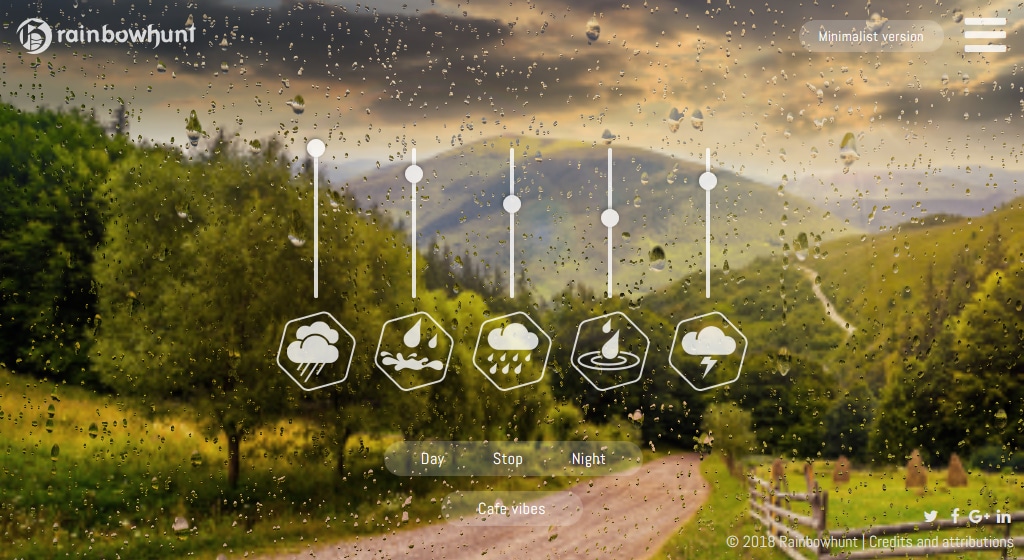
Rainbow Hunt Full homepage screenshot

At a glance

Category
Resources & Utilities
Language
English
Paid-content signal
No paid content foundObserved
Registered
2016
Hosting
A2 Hosting, Inc.Inferred
HTTPS certificate trusted
PassedObserved
Last updated

Website review

This review may include AI-generated content and is not individually verified. Domain, certificate and other facts come from the observed data on this page.

What is Rainbow Hunt?

Rainbow Hunt is a free browser-based rain sound generator. Open the site, and it plays continuous rain noise for sleeping, studying, or masking background distractions — no download or account needed to start.

The page shows a few practical controls:

  • Drops with minus and plus buttons, so you can make the rain sparser or heavier.
  • Day and night modes, which likely change the sound character or scene.
  • Timer to stop the sound automatically, useful if you want it to fade out after you fall asleep.
  • Minimalist version for a stripped-down interface, plus a note that a WebGL-capable browser is required for the main view.

There are also signals pointing to premium sounds and a PC software option, so the free web generator appears to be one part of a broader set of offerings. Treat those as paid extras rather than requirements for basic use.

A good next step: if you want steady noise for focus, start with the default rain and nudge the drops down until the sound sits behind your work instead of competing with it. If you need it only for a nap, set the timer first so you are not woken by rain still playing an hour later.

Can I use Rainbow Hunt offline without an internet connection?

No — Rainbow Hunt is a browser-based rain sound generator, so you need an internet connection to load and use it. Nothing in the site's page evidence describes an offline mode, downloadable audio files, or a service worker that would cache the generator for offline use. The page does mention a "PC software" option, which suggests a separate desktop product exists, but the web version itself is not presented as working without a connection.

What this means in practice

  • On a laptop or phone browser: open the site while you have Wi-Fi or mobile data. If your connection drops mid-session, expect the audio to stop or the page to fail on reload.
  • On a plane, train, or during an outage: the browser version is not a reliable choice. You'd want rain audio stored locally on your device instead.
  • If you want a desktop option: the site references PC software, so check that page directly for whether it runs offline and what it costs. The site mentions "premium" and "premium sounds," so assume some options may be paid — verify on the site rather than assuming.

A practical workaround

If your main use case is sleeping or studying without dependable internet, record or download rain audio once while online and play it from your device's local storage. That gives you the same background-noise effect with no connection dependency. For a quick session at home on stable Wi-Fi, the browser version is simpler and needs no setup.

How to decide

Situation Browser version Local/downloaded audio
Stable home Wi-Fi, quick study session Good fit Unnecessary
Flight, commute, spotty signal Not suitable Better fit
You want controls like drops and timer Available in-browser Depends on your player
You want zero setup Good fit Requires one-time download

As a next step, if offline use matters to you, open Rainbow Hunt once while connected and check the "PC software" and "Premium sounds" links to see whether a downloadable option fits your needs.

How do I set a sleep timer for rain sounds on Rainbow Hunt?

Rainbow Hunt's rain generator includes a built-in Timer control, and that's the feature you want for falling asleep to rain without leaving audio running all night. The timer sits alongside the other on-screen controls, so you don't need an account or a separate app to use it.

Setting the timer

  1. Open Rainbow Hunt and start your rain sound.
  2. Find the Timer option in the controls (use show ui if the interface is hidden).
  3. Choose how long you want the rain to play.
  4. Leave the tab open. The timer counts down and stops the sound for you.

The page also offers a Minimalist version and a stop sounds control, so if you'd rather fade out manually, you can simply hit stop when you're drowsy.

Practical notes for sleep use

  • Keep the tab active. Browser timers and audio generally behave best when the tab stays open and the device isn't set to aggressively sleep.
  • Set the timer slightly longer than your usual fall-asleep time — most people drift off within 15–45 minutes, so a 30- or 60-minute window covers the gap without running all night.
  • Volume matters more than duration. A low, steady level masks traffic and household noise; a loud one keeps your attention on the sound itself.
  • If you wake mid-night, you can restart the rain and reset the timer rather than leaving it looping indefinitely.

When a different tool fits better

A browser page is convenient but depends on your device staying awake. If you want rain that runs offline, on a dedicated speaker, or through a phone's native sleep features, a downloadable or app-based option may suit you better. The page itself points to a PC software option and Premium sounds, which are worth checking if you use rain nightly rather than occasionally.

For a first try, set a 30-minute timer tonight at low volume and see whether you're asleep before it stops — that tells you whether 30 minutes is your number or whether you need a longer window.

What is the difference between the standard and minimalist versions of Rainbow Hunt?

The standard version is the interactive, WebGL-based view: it renders falling drops you can see and adjust, with on-screen controls to hide or show the interface and to change the number of drops. The minimalist version is a stripped-back alternative that drops the visual scene and focuses on the sound itself.

H3 Practical differences

  • Visuals: Standard shows an animated rain scene; minimalist is audio-first, so it uses less graphics processing and is friendlier to older laptops, phones or low-power tablets.
  • Controls: Standard exposes UI toggles and a drops count (+/-). Minimalist keeps things simple, which suits people who just want rain noise without fiddling.
  • Compatibility: The page explicitly points to the minimalist version when WebGL isn't supported, so it's the fallback for browsers or devices that can't render the main scene.

H3 Which to pick

  • Choose standard if you like a visual rain scene, want to tune drop density, or are using a capable device while studying or relaxing.
  • Choose minimalist if you're on battery, an older machine, or a browser without WebGL, or if you find moving visuals distracting while sleeping or working.

Both are aimed at the same job — free background rain sound for sleep, study or focus. A useful next step: open Rainbow Hunt, start with the standard version, set a timer, then switch to minimalist for a night and compare how well each keeps you focused or asleep.

Which premium rain sounds are available and how much do they cost?

Premium rain sounds are listed as a feature on Rainbow Hunt, but the page doesn't show which specific sounds are included or what they cost. The only pricing signal in the page evidence is the word "premium" itself; there are no prices, plans or payment options displayed in the material provided.

What the page does show

  • A free rain sound generator with volume-style controls for "drops" and a timer.
  • Day and night modes, plus a minimalist version for browsers without WebGL support.
  • Separate entries for "Premium sounds" and "PC software," suggesting these are distinct from the free browser experience.

How to find the actual premium details

Visit Rainbow Hunt directly and look for a premium or pricing link near the "Premium sounds" entry. If no price appears there, treat the premium offering as something to confirm on the site before relying on it.

Practical decision criterion

If you only need steady background rain for sleep or study, the free generator plus timer likely covers it. Consider premium only if you specifically want extra sound variety or offline/desktop use — and only once you can see a concrete price and sound list.

How can I adjust the rain intensity or add background sounds on Rainbow Hunt?

On Rainbow Hunt, rain intensity is adjusted with the drops control: use the − and + buttons next to “drops” to make the rainfall lighter or heavier. The interface also includes hide ui / show ui to clear the screen while keeping the sound running, plus a Timer › stop sounds option to end playback automatically.

For background sounds, the visible controls point to Premium sounds rather than a free mixer, so treat extra layers as a paid/optional feature. The page also mentions PC software and a minimalist version, which is useful if the main WebGL view does not work in your browser.

A practical setup for studying: start with a moderate drops level, hide the UI, and set the timer for your session length. If you need extra sound layers, check the premium option; if you only need steady rain, the free drops control is enough.

Related questions

More questions →
What Is Rain Noise and How Can You Use a Free Rain Sound Generator for Sleep or Study?

Rain noise is a continuous background sound made of raindrops, used to mask distracting sounds and create a steady listening environment for sleep or study. On Rainbow Hunt, a browser-based rain sound generator, you can play free rain sounds, adjust the number of drops, set a timer, and switch between day and night scenes. It works without installing anything, but the main version needs a browser that supports WebGL; if yours does not, the site offers a minimalist version instead.

What rain noise actually does

Rain noise is not a single sound but a dense mix of many small, random drops. That randomness is the point: it has no melody, no lyrics, and no sudden changes, so your attention is not pulled toward it. Instead, it covers up sharper sounds — traffic, conversations, keyboard clicks, a fridge humming — that are more likely to interrupt sleep or break concentration.

This is why rain noise is usually described as background sound rather than music. You are not listening to it; you are listening through it.

How to use the Rainbow Hunt rain generator

The site is a rain simulator you run in the browser. The controls listed on the page are:

  • drops with - and + buttons — adjust how many raindrops are heard, which changes the density of the sound
  • Timer — set the sound to stop after a period of time
  • Day / Night — switch the visual scene
  • hide ui / show ui — hide the interface so only the rain remains
  • Minimalist version — a lighter alternative if the main version will not load

Steps

  1. Open the generator in your browser.
  2. If you see a message that your browser does not support WebGL, use the minimalist version link instead.
  3. Press play to start the rain.
  4. Use - or + under drops to find a density you like. Fewer drops sound like light rain; more drops sound like heavy, steady rain.
  5. Set the Timer if you want the sound to stop on its own.
  6. Choose Day or Night depending on the scene you prefer.
  7. Use hide ui to remove the controls from view once you have your settings.

Expected result: continuous rain sound plays in the background while you sleep or work, and stops when the timer ends.

Common snags

  • Nothing plays or the page looks broken. The page states your browser may not support WebGL. Switch to the minimalist version.
  • The rain feels too busy or too thin. This is what the drops control is for — it is the main way to shape the sound.
  • You want it to run all night. Use the Timer rather than leaving it unlimited, so it does not play past when you need it.

Free web version vs. premium and PC software

The page lists Premium sounds and PC software alongside the free browser generator. Based on what the site shows, the free version is the online rain simulator with the drops control, timer, and day/night scenes. The premium and PC options are separate offerings; the page does not state their price, features, or whether they require an account, so treat those as things to check on the site itself rather than assume.

Option What the page shows Best if
Free browser generator Rain sounds, drops control, timer, day/night, hide UI You want rain noise now, with no install
Minimalist version A fallback when WebGL is unsupported Your browser cannot run the main version
Premium sounds Listed as an option, details not given You want more than the free set — verify on site
PC software Listed as an option, details not given You prefer a desktop app — verify on site

Practical settings for sleep and study

For sleep: use a lower-to-medium drop density, set the Timer to run a bit past your usual fall-asleep time, and pick the Night scene. The goal is a sound steady enough that you stop noticing it.

For study or work: a slightly higher drop density tends to mask speech and keyboard noise better. Skip the timer if you want it running through a work block, and use hide ui so the controls are not a visual distraction.

For both: set your volume just loud enough to cover the room, not loud enough to become the thing you are listening to. If you find yourself adjusting drops repeatedly, pick one setting and leave it — the point of rain noise is that it stops demanding decisions.

What Are Free Rain Sounds and How Can You Use Them for Sleep or Study?

Free rain sounds are browser-playable rain recordings or generated rain noise that you can run as background audio without paying. They suit sleep, study, relaxation, or masking distracting environmental noise. On Rainbow Hunt, for example, you can open the rain sound generator in a browser, adjust the number of drops, set a timer, and hide the interface so only the sound remains. The main conditions: your browser must support WebGL for the full version, and you need an internet connection to load the page.

What counts as a free rain sound generator

A rain sound generator is a web tool that produces rain noise on demand rather than playing a single fixed audio file. You control it through on-screen settings. Based on the Rainbow Hunt page, the available controls include:

  • Drops – / +: changes the density of the rain, from light drizzle to heavier rainfall.
  • Timer: stops the sound automatically after a set period, useful when you want to fall asleep without leaving audio running all night.
  • Hide UI / Show UI: removes the controls from view so the screen stays clean while the sound continues.
  • Minimalist version: a lighter fallback if the main version does not run.
  • Day / Night: switches the visual scene.
  • Premium sounds and PC software: optional upgrades listed alongside the free generator.

The page also notes a Stop sounds control, so you can end playback directly.

How to use it for sleep or study

The steps are the same for both goals; only the settings differ.

  1. Open the rain sound generator in your browser.
  2. If the full version does not load, follow the page's prompt to use the minimalist version.
  3. Set drops to your preferred intensity. For sleep, a lower, steadier density is usually easier to ignore. For study, a slightly denser rain can mask more background talk and keyboard noise.
  4. Set the Timer if you want playback to stop on its own — helpful for sleep, optional for study.
  5. Press Hide UI so the controls do not distract you.
  6. Adjust your device volume, then leave the tab running.
  7. Use Stop sounds when you are done.

Expected result: continuous rain noise plays in the background while you sleep or work, and stops either when the timer ends or when you press stop.

Choosing settings by task

Goal Drops setting Timer Interface
Falling asleep Lower density Set it so audio stops after you drift off Hidden
Studying or reading Medium to higher density Optional Hidden
Masking nearby noise Higher density Not needed Hidden or visible
Short relaxation break Any Short timer Either

These are starting points, not fixed rules — the right density is the one you stop noticing.

Common snags and how to handle them

  • The full version will not load. The page states that a WebGL-capable browser is required and points you to the minimalist version. Use that fallback instead of troubleshooting the main view.
  • You want silence after a set time. Use the Timer rather than relying on remembering to stop playback.
  • The controls distract you. Hide the UI once your settings are in place.
  • You need more than rain. The page lists Premium sounds and PC software as separate options; the free generator itself covers rain noise.

What you get and what you do not

The free rain sound generator gives you adjustable rain noise, a timer, and a distraction-free view in the browser. It does not remove the need for a working browser or an internet connection, and it does not include the premium sounds or desktop software shown on the same page. If basic, controllable rain noise is what you need for sleep or study, the free version covers it.

What Is Background Rain Noise and How Do You Use a Free Online Generator for Sleep or Study?

Background rain noise is a continuous, steady rain sound played at low volume to mask distracting noises while you sleep or study. You can use a free browser-based generator like Rainbow Hunt to start it in seconds: open the page, press play, adjust the number of drops, and set a timer if you want it to stop on its own. This works best when you want steady masking sound without downloading an app — and you have a browser that supports the generator's visuals.

What background rain noise actually does

Background rain noise is not about the rain itself. It works because steady, broadband sound raises the "floor" of what you can hear, so sharper sounds — a door closing, traffic, a roommate talking — stand out less against it. Rain is convenient because it has no melody, lyrics, or sudden changes that pull your attention.

Two practical consequences follow:

  • Consistency matters more than realism. A steady loop masks better than a track with thunder claps or volume swings.
  • Volume should sit under your attention, not on top of it. If you have to raise your voice over it, it is too loud for study.

Starting a free rain sound generator

Rainbow Hunt is an online rain sound generator with a minimalist version and software controls for drops and a timer. The general steps for this kind of browser generator:

  1. Open the generator page in your browser.
  2. Start playback using the play control.
  3. Adjust intensity — Rainbow Hunt exposes a "drops" control with - and +, so you can move between lighter and heavier rain.
  4. Set a timer if you want the sound to stop after you fall asleep (the page lists a Timer control).
  5. Hide the interface if the on-screen controls distract you — the page offers "hide ui" and "show ui".

Expected result: continuous rain sound with no track changes, running until you stop it or the timer ends.

Choosing settings for sleep vs. study

Goal Intensity Volume Timer
Sleep Medium to heavy, steady Low, just audible Set it so sound stops after you're asleep
Study Light to medium Low enough to ignore Optional; use if you want a defined session
Masking speech or traffic Medium to heavy Just below the noise you're masking Not required

For study, a lighter rain is usually easier to tune out. For sleep, heavier rain covers more of the sharp sounds that wake people up.

Common problems and how to handle them

  • No sound at all. Check the browser tab is not muted, the system volume is up, and playback has actually started.
  • The page shows a WebGL error. Rainbow Hunt's page states "Sorry, your browser doesn't support WebGL!" and points to a minimalist version. If you see this, use that minimalist version instead of the main visual interface.
  • The visuals are distracting. Use "hide ui" so only the sound remains.
  • Sound stops earlier than expected. Check whether a timer is active.
  • You want it on your computer rather than in a browser. The page lists "PC software" and "Premium sounds" as separate options; the free browser generator is the no-install route.

What to check before relying on it

  • Browser support. If WebGL is unavailable, plan on the minimalist version.
  • Whether you need offline use. A browser generator depends on the page being open; if you need sound without a connection, that is a different setup.
  • Cost expectations. The site references "Premium sounds" and "PC software" alongside the free generator, so treat the free browser version as the starting point and check the page for what the premium options include.
What Are Rainy Sounds and How Can You Use a Free Rain Sound Generator?

Rainy sounds are continuous recordings or simulations of rainfall used as background audio for sleep, studying, or relaxation. You can use a free browser-based generator like Rainbow Hunt to play them instantly: open the page, adjust the drop intensity, optionally set a timer, and leave the tab running. This works well when you want steady background noise without installing anything; if you need more sound variety or an offline option, the same site points to premium sounds and PC software as alternatives.

What rainy sounds are and why people use them

Rainy sounds are audio that mimics rainfall — either recorded from real storms or generated as a continuous noise texture. Because rain is broadband and fairly steady, it tends to mask sudden background noises (traffic, conversations, keyboard clicks) that interrupt sleep or concentration.

Typical uses:

  • Sleep: a consistent sound floor makes it harder for small noises to wake you.
  • Studying or deep work: masking variable noise reduces the number of times your attention gets pulled away.
  • Relaxation: rain is a common "safe" ambient sound that many people find calming.

The key property is consistency. A generator that plays an unbroken rain texture is more useful for these purposes than a track that loops with an obvious gap.

How to use the Rainbow Hunt rain sound generator

Rainbow Hunt is described as an online generator of relaxing rain sounds, free to use in the browser. The page evidence shows a minimalist interface with a small set of controls.

Basic steps

  1. Open the generator page in your browser. The site notes it uses WebGL, so a modern browser with WebGL support is required.
  2. Start the rain sound. The controls include stop sounds, which indicates playback is toggled from the interface.
  3. Adjust intensity with the drops control. The interface shows drops - +, so you can decrease or increase the density of the rain.
  4. Set a timer if you want it to end on its own. A Timer › control is present, useful if you're falling asleep and don't want audio running all night.
  5. Hide the interface when you're done adjusting. The hide ui / show ui controls let you clear the screen and leave just the sound running.

What each control does

Control What it changes When to use it
drops - + Density/intensity of the rain sound Lighter rain for quiet focus, heavier for stronger masking
Timer › When playback stops Sleep sessions where you don't want all-night audio
hide ui / show ui Whether the on-screen controls are visible After setup, to keep the screen clean
stop sounds Ends playback When you're finished

Verifying it's working

After starting playback, confirm two things: you hear a continuous rain texture with no obvious loop point, and the intensity changes noticeably when you move the drops control. If you set a timer, check that playback actually stops at the end rather than continuing.

Common snags

  • "Sorry, your browser doesn't support WebGL!" — this message appears when the browser can't run the WebGL version. The page directs you to a minimalist version as a fallback, so use that instead.
  • No sound at all — check the tab isn't muted and your system output is set correctly; browser tabs are muted independently of system volume.
  • Sound stops when you switch tabs — some browsers throttle background tabs. Keep the tab active or in its own window if this happens.

When to look beyond the free browser version

The free browser generator covers the core need: continuous rain noise for sleep, study, or background masking, with intensity and timer controls. Consider the alternatives the site lists when:

  • You want more than rain. The page references Premium sounds and a Day / Night distinction, suggesting additional or varied sound options beyond the free rain generator.
  • You want it without a browser. PC software is offered as a separate option, which suits people who'd rather not keep a browser tab open or want it available offline.
  • You need it running for long, unattended sessions. Desktop software is generally more predictable than a browser tab for all-night playback.

The page mentions premium as a keyword but does not state prices, so treat premium sounds and PC software as separate offerings to evaluate on the site itself rather than assuming they're free.

Quick decision guide

  • Just want rain noise now, free, in a browser: use the generator, set drops to taste, set a Timer for sleep, then hide ui.
  • Browser shows a WebGL error: switch to the minimalist version.
  • Want extra sound variety or an offline/desktop option: look at the premium sounds and PC software options on the same site.
What Is a Rain Simulator and How Do You Use One Online for Sleep or Study?

A rain simulator is an interactive web tool that generates adjustable rain sounds in your browser, rather than playing a fixed audio file. You can use one for sleep, studying, or masking background noise by opening the page, adjusting the drop density, and optionally setting a timer. On Rainbow Hunt, the simulator runs in the browser and requires WebGL; if your browser doesn't support WebGL, the site points you to a minimalist version instead. The site lists free rain sounds alongside premium sounds and PC software, so some options may sit behind a paid tier.

How a Rain Simulator Differs from a Rain Sound File

A static rain recording gives you one fixed loop. A simulator lets you change the sound itself:

  • Drop density — Rainbow Hunt exposes a drops - + control, so you can make the rain sparser or heavier.
  • Visual and interface modes — the page includes hide ui / show ui, a minimalist version, and Day / Night options.
  • Timer — a Timer › stop sounds control lets the audio stop on its own instead of running indefinitely.

That adjustability is the main reason to pick a simulator over a plain MP3: you can match the rain to your room, your headphones, and how long you plan to sleep or work.

Using It for Sleep, Study, or Background Noise

The steps are the same regardless of your goal:

  1. Open the rain simulator page in a browser that supports WebGL.
  2. Set the drop density with the drops - + control. Lower density suits quiet reading; higher density masks more environmental noise.
  3. Choose a mode — Day or Night — and hide the interface if you don't want controls on screen.
  4. Set the Timer if you want the sound to stop after you fall asleep or finish a study block.
  5. Leave the tab open. The sound plays as background rain noise while you work or rest.

For studying, a timer plus moderate drop density keeps the sound consistent across a session. For sleep, a timer avoids the audio running all night, and the Night mode reduces screen brightness if you're looking at the display.

Controls and Options You'll See

Control What it does
drops - + Adjusts rain drop density
hide ui / show ui Shows or hides the interface
Timer › stop sounds Stops audio after a set period
Day / Night Switches display mode
Minimalist version A lighter fallback interface
Premium sounds Additional sounds listed separately from free ones
PC software A desktop option listed on the site

If WebGL Isn't Supported

Rainbow Hunt shows a message — "Sorry, your browser doesn't support WebGL!" — when the main simulator can't run. The page then directs you to a minimalist version. If you hit this, try a current version of a major browser, or use the minimalist fallback. The site also lists PC software as an alternative if you'd rather not rely on the browser at all.

Free vs. Premium and Offline Options

The site separates free rain sounds from premium sounds and PC software, so treat the free tier as the default and check the premium listing if you want more. Nothing on the page indicates that premium content is free, so assume paid options exist where labeled. If you need offline playback or don't want a browser dependency, the PC software entry is the relevant alternative to check.

Quick Answer

Use a rain simulator when you want controllable rain noise rather than a fixed loop. Rainbow Hunt gives you drop density, a timer, day/night modes, and a minimalist fallback, with WebGL required for the main version. Start with the free sounds, adjust density to your task, set a timer for sleep or study sessions, and switch to the minimalist version or PC software if your browser can't run the full simulator.

Website Overview

An established domain and managed infrastructure suggest continuity of operations and may support dependable delivery, although neither guarantees service quality. Page metadata, canonical configuration and social previews work together to provide more consistent search and sharing presentation.

Domain and Registration

Registered in 2016, this domain has about 10 years of history. That suggests continuity, although ownership and purpose may have changed. Transfer-protection status is present, helping reduce the risk of unauthorized domain transfers. The registrar is NameCheap, Inc., a widely used domain service provider. The domain uses the common .com extension, which is not an independent safety signal.

DNS and Email

The observed email authentication setup is incomplete: DMARC is missing. Nameservers are provided by a2hosting.com, indicating managed DNS hosting. MX records point to the rainbowhunt.com email service. No CNAME was found; the observed records resolve directly to addresses. DNSSEC signatures were not detected, so this additional DNS authenticity protection is not confirmed.

TLS and Certificates

The certificate uses an RSA 2048-bit public key, offering broad client compatibility. The server supplied a complete certificate chain. No organization name is present in the certificate; the available fields are consistent with domain validation. The certificate was issued by Let's Encrypt, commonly associated with automated certificate services. The certificate's total validity is about 89 days, consistent with a short renewal cycle.

HTTP and Browser Security

The response lacks these common security headers: CSP, Referrer-Policy, Permissions-Policy. No X-Powered-By header was found, reducing one common source of backend fingerprinting information. No obvious internal addresses or debug information were found in the headers. The Server header contains the custom value LiteSpeed. No explicit CDN or WAF marker was found in the response headers.

Technology Stack Analysis

The public page identifies jQuery without precise versions, leaving fewer clues for version-specific scanning.

Search and Social Sharing

Twitter Card metadata is configured. The title has 60 characters, within a common display range. A meta description is present, with 83 characters. The observed directives allow indexing and link following. No Generator meta tag is publicly exposed.

Hosting and Email

DNSa2hosting.com
HostingA2 Hosting, Inc.
Emailrainbowhunt.com
Approximate IP geolocation (inferred; a CDN or proxy may differ from the origin server) United States flagDetroit, Michigan, United States Inferred 70.32.23.71

Registration details

RDAP / WHOIS

RegistrarNameCheap, Inc.
Registered2016-02-07
Expires2027-02-07
Domain statusclient transfer prohibited
Nameserversns1.a2hosting.com、ns2.a2hosting.com、ns3.a2hosting.com、ns4.a2hosting.com
DNSSECunsigned

DNS records

DNS

TypeNameValueTTLPriority
Arainbowhunt.com70.32.23.7114400—
MXrainbowhunt.commail.rainbowhunt.com144000
NSrainbowhunt.comns1.a2hosting.com86400—
NSrainbowhunt.comns2.a2hosting.com86400—
NSrainbowhunt.comns3.a2hosting.com86400—
NSrainbowhunt.comns4.a2hosting.com86400—
TXTrainbowhunt.com709cdb9ec1ee34699915b2b7676a4ae20ed6e47a14400—
TXTrainbowhunt.comv=spf1 +a +mx +ip4:70.32.23.71 include:spf.a2hosting.com ~all14400—

TLS and certificates

TLS / SSL

AssessmentNormal configuration
Supported protocolsTLSv1.2、TLSv1.3
Negotiated protocolTLSv1.3
Certificate subjectrainbowhunt.com
IssuerLet's Encrypt
Valid until2026-12-27T08:34 · Remaining when checked: 86 days
Verification detailsCertificate trust: Passed · Hostname match: Passed

HTTP response headers

HTTP

HeaderValue
content-typetext/html
cache-controlmax-age=3600, must-revalidate
serverLiteSpeed
strict-transport-securitymax-age=63072000; includeSubDomains
x-frame-optionsSAMEORIGIN
x-content-type-optionsnosniff

Identified technologies

jQuery

Pages, Search and Sharing

Meta descriptionOnline generator of relaxing sounds of rain. Free rainy sounds for background rain.
Canonical URLhttps://rainbowhunt.com
LanguageEnglish (default)
Twitter Cardsummary_large_image
All bots 0 allowed · 0 disallowed

User reviews (0)

  • No reviews yet.