
 简体中文
简体中文 English
Website review
This review may include AI-generated content and is not individually verified. Domain, certificate and other facts come from the observed data on this page.
What is Shared Holiday Homes?
Shared Holiday Homes is a coordination tool for groups who share a holiday house — family members, friends, or co-owners. Its purpose is to replace the messy mix of group chats, scattered emails and informal "I thought you booked it" arrangements with a single place to manage who stays when and who looks after the property.
What it actually does
Based on the site, the core pieces are:
- A shared calendar for the whole house, so bookings are visible to everyone and double bookings are avoided.
- Booking rules, including rules for peak seasons, so priority isn't decided by who asks first or loudest.
- Members management, letting you invite family, friends and co-owners into one shared space.
- Tasks, so recurring jobs like boiler servicing aren't left to an assumption that someone else handled it.
- Documents, keeping things like WiFi details, insurance and pump instructions in one place instead of buried in inboxes.
- Usage tracking, useful for co-owners who need to see how the house is being shared over time.
Who it suits
It fits households where several people or families share one property and the same arguments recur each year — the Easter conversation about who has which week, or the scramble for peak summer dates. It's less obviously aimed at a single owner renting commercially to strangers; the language throughout is about families, friends and co-owners.
A practical way to judge it
Think about your last three disputes or near-misses over the house. If they were about dates, jobs or missing information, this is the problem it targets. If your group already runs smoothly on a shared calendar and a group chat, the benefit will be smaller. The site mentions a free trial, so the sensible next step is to set up your actual house — your real members, your real peak-season rules — and see whether the calendar alone resolves the annual argument.
How do I stop double bookings when family and friends share a holiday home?
Use a single shared calendar that everyone can see and book from, rather than a group chat where the last message wins. The core problem is that WhatsApp threads and email chains are conversational, not authoritative: two people can each believe they claimed the same week, and nobody can prove otherwise later. A calendar of record fixes that because a booked week is visibly taken the moment it is booked.
Shared Holiday Homes is built around exactly this scenario for families, friends and co-owners. Its page describes the intended outcome as "one calendar for the whole house — no double bookings, no buried WhatsApp claims," with calendar, guides, documents and tasks grouped in one place. It also lists the failure modes it targets: double-booked weeks from an unfindable message, peak weeks going to whoever asks first or loudest, and the same awkward Easter conversation every year. Those are the symptoms of a coordination gap, not a scheduling one.
What actually prevents double bookings
- One calendar everyone can see. Availability and confirmed stays live in the same view, so a week is either free or taken.
- Booking rules for peak periods. Set who may book high-demand weeks and under what conditions, so allocation is decided in advance rather than in the moment.
- A booking that creates a record. When someone reserves a week, it is logged, not merely mentioned in passing.
- Named responsibility. Boiler servicing, WiFi and insurance details need an owner, not an assumption that someone else handled it.
- Documents in one place. Instructions and policy details that currently sit across inboxes belong somewhere the whole group can find them.
Choosing between options
| Approach | Works when | Main trade-off |
|---|---|---|
| Shared digital calendar plus a written booking rule | The group is small and reasonably cooperative | Depends on everyone actually using it |
| Purpose-built shared-home tool | Multiple families or co-owners, peak-week contention, maintenance to track | Needs initial setup and invitations |
| Group chat only | Very occasional use, one household | No record; disputes recur |
A practical first step: write down your peak weeks and the rule for allocating them before you invite anyone. Decide whether it is rotation, seniority, first-come, or a lottery — and put that rule where the calendar lives. The tool matters less than the rule being visible and the booking being recorded in one place.
How can I set up booking rules for peak weeks so the same people don't always get first pick?
A shared calendar alone won't fix a peak-week problem; the rules behind it will. The practical goal is to make access to high-demand weeks predictable and equal, rather than first-come or loudest-voice.
Turn the policy into rules before the season opens
Decide as a group, in writing, how peak weeks are allocated, then configure the calendar so those decisions are enforced rather than remembered. Common approaches:
- Rotation by year. Each household gets first choice of the main peak week on a rotating cycle, so no one family always wins the summer or Easter slot.
- Priority tiers. Give each household one "first pick" week per year; after that, requests go into a second round. This caps how much any single family can claim.
- Lottery for contested weeks. Where demand exceeds supply, everyone who wants the week enters a draw, with losers moved to the top of the queue next year.
- Booking windows. Open peak-week booking to one group at a time (for example, co-owners first, then extended family), with clear dates for each round.
- Usage caps. Limit each household to a set number of peak nights per season, tracked automatically rather than estimated.
Make it work in practice
Shared Holiday Homes is built around exactly this: one calendar for the whole house, with members, booking rules and usage tracked so the person managing the property isn't refereeing a group chat. Its page describes inviting family, friends and co-owners, setting booking rules for peak seasons, and keeping guides, documents and tasks alongside the calendar — so the boiler service or WiFi instructions don't get lost either.
A few habits that make any rule set stick:
- Publish the rules once, in the tool, not in chat. If the rule lives in a message thread, it will be contested.
- Confirm the rotation a year ahead. People plan flights early; ambiguity is what causes the argument.
- Let the calendar be the single source of truth. If a stay isn't in it, it isn't booked.
- Review after one full cycle. If one household still ends up with the best weeks, the rotation interval is too long.
Next step
Before the next peak season, hold a short call with everyone who uses the house, agree on one of the models above, and enter the rules and the coming year's allocations into the calendar. If you're comparing tools for this, Shared Holiday Homes is designed for the family-and-co-owner case; general-purpose shared calendars can hold bookings but won't enforce rotation or track who has had which peak week.
How do I keep maintenance tasks and documents like WiFi, insurance and boiler servicing in one place?
Shared Holiday Homes is designed for exactly this problem: it gives a shared house one calendar plus separate areas for guides, documents and tasks, so the WiFi password, insurance policy and boiler service record live alongside the booking schedule instead of scattered across inboxes and group chats.
How the pieces fit together
- Tasks — recurring jobs such as boiler servicing can be assigned to a named person rather than left to whoever notices. The page's own framing is the common failure mode: "boiler servicing that everyone assumed someone else owned."
- Documents — the site lists "WiFi, insurance and pump instructions" as the kind of material that otherwise ends up spread across email threads.
- Guides — practical instructions for the house sit in the same place, useful for guests who arrive before the regulars do.
- Calendar and booking rules — peak weeks are allocated by rule rather than by who asks first or loudest.
A workable setup routine
- Create one task per recurring obligation and give each a named owner, not "the family."
- Upload the insurance policy, WiFi details and appliance manuals once, then link them from the relevant task.
- Add a short arrival guide covering bins, heating and the water stopcock.
- Set peak-season booking rules before the annual argument, not after it.
What to weigh
The value here is coordination, not accounting: it suits families, friend groups and co-owners who already share a property informally and need a single source of truth. If you need rent splitting, tax reporting or formal co-ownership accounting, check whether the product covers that before committing — the page evidence centres on members, booking rules, usage, tasks, guides and documents. The site mentions a free trial, so the sensible next step is to load one real property, invite two or three people, and see whether the group actually uses it during a peak booking period. If the group won't log in, no tool will fix the underlying disagreement.
For a broader comparison of shared-calendar approaches, Google Calendar handles scheduling but not documents or task ownership, and Notion can hold documents and tasks but needs manual setup for booking rules.
Is Shared Holiday Homes free to try, and what does it cost for a shared family holiday home?
Shared Holiday Homes is positioned as a free-to-try tool for coordinating a shared family holiday home, and the site signals a free trial alongside its pricing information. The public page evidence doesn't list specific prices or plan tiers, so treat any figure you see at signup as the authoritative number rather than something you can infer from the marketing copy.
What you actually get
The product centres on one shared calendar for the whole house, with supporting areas for members, booking rules, usage, guides, documents and tasks. That combination matters more than the price for most families: the value is in removing double bookings, making peak-week rules explicit, and keeping boiler servicing, WiFi, insurance and pump instructions in one place instead of scattered across inboxes and group chats.
How to judge the cost
- Compare against your real alternative. If you currently lose a peak week each year to a WhatsApp race, or pay someone to chase maintenance, a modest subscription can be cheaper than the friction.
- Count the households, not the beds. Cost-effectiveness improves as more families or co-owners share the same house.
- Check what the trial includes. Confirm whether booking rules, documents and tasks are all available during the trial, since those are the features that solve the arguments.
- Test one peak season. Set up next Easter or summer in the trial, invite everyone, and see whether the calendar alone ends the annual "who booked what" conversation.
For a family of four sharing one house, the deciding question is whether the tool replaces a recurring argument and a scattered paper trail. If it does, the subscription is usually easy to justify; if your group already runs smoothly on a single shared spreadsheet, the free trial is the right way to find out before committing.
A practical next step: start the trial, add the house, invite every co-owner, and enter your peak-week rules first. That single setup tells you more about fit than any pricing page.
Can co-owners and multiple families use it to manage a beach house together?
Yes. Shared Holiday Homes is explicitly built for exactly that arrangement: a single beach house used by co-owners, several families, or a mix of both. The site describes one shared calendar for the whole house, plus places for members, booking rules, guides, documents and tasks — the four things that usually get lost in group chats and inboxes.
What it handles well for a shared beach house
- One calendar, one source of truth. Instead of "I thought your sister had that week," everyone sees what's booked. The site's stated aim is no double bookings and no buried WhatsApp claims.
- Peak-season fairness. Booking rules let you define how peak weeks are allocated, which addresses the recurring "same awkward Easter conversation" problem. One quoted family of four said they stopped arguing about who booked what and when.
- Shared responsibility, not just shared dates. Tasks cover things like boiler servicing that everyone assumed someone else owned. Documents hold WiFi, insurance and pump instructions that would otherwise be scattered across inboxes.
- Members and usage visibility. The person who ends up managing the house can see who's in the group and how the property is being used, rather than chasing people individually.
Where it fits and where it doesn't
| Situation | Fit |
|---|---|
| Co-owners splitting a beach house | Strong — members and booking rules are core features |
| Extended family sharing one property | Strong — quoted users describe exactly this |
| Two or three friends with a joint rental | Workable if you're willing to set rules up front |
| A single owner renting commercially to strangers | Not the target — this is coordination among people who already share the house |
| Groups unwilling to agree rules | Weak — the tool formalises decisions, it doesn't make them for you |
The trade-off is setup effort. Booking rules and member lists only help if the group actually agrees on them; a household that won't discuss peak-week allocation will still have the same argument, just with a tidier calendar. The site's testimonials come from co-owning couples, a family of four, and beach house co-owners — a self-selected group who wanted the structure.
Practical next step
Before signing up, write down two things: who counts as a member, and how the three or four most contested weeks each year get allocated. If your group can agree on those in one sitting, this kind of shared calendar will save you the annual argument. If you can't, resolve that first — no tool fixes it.
For a broader sense of how shared-property groups coordinate, Airbnb is aimed at paying guests rather than co-owners, so it won't replace this.
 Cloudflare
 Fastly
 Lark Mail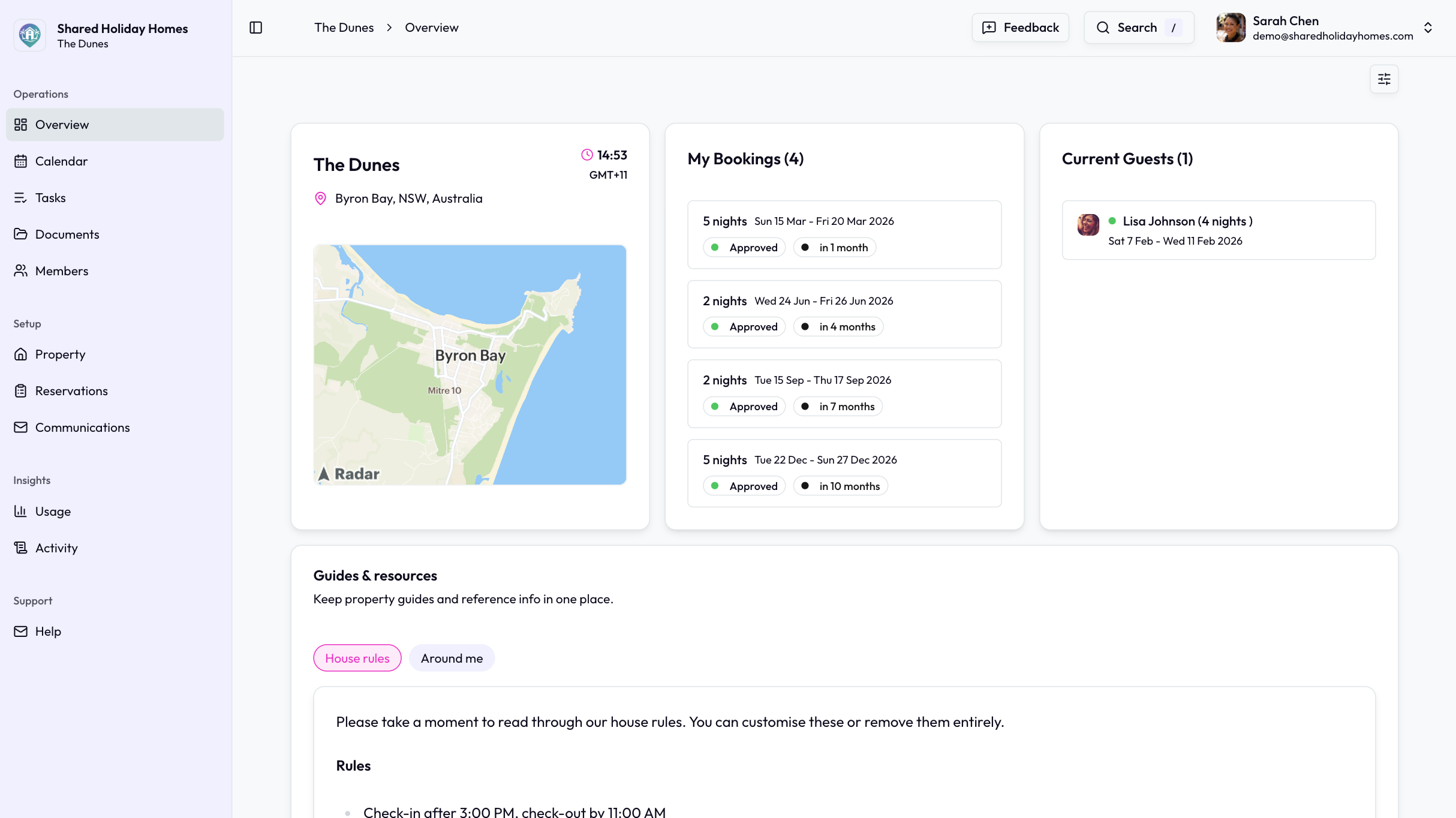

User reviews (0)