Website profiles · Technology insights · Alternatives

streak.com

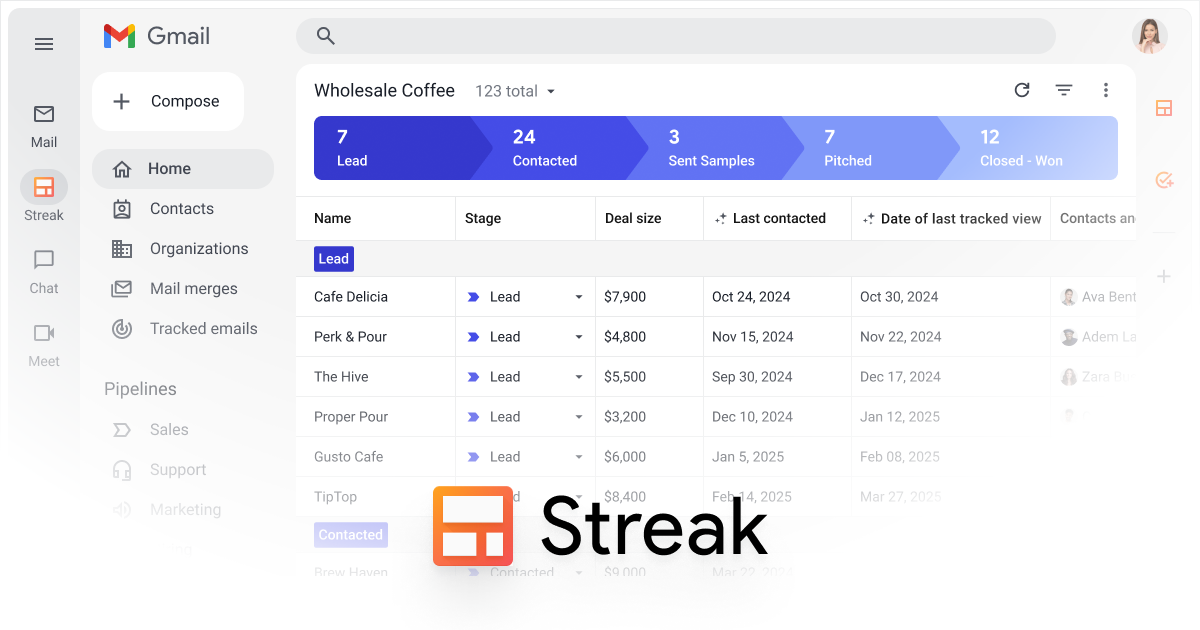
Manage sales and customer relationships directly inside Gmail. Streak is the CRM your team will actually use—integrated, smart, and loved by 750,000+ users.

Paid content
Visit website
Profile views 10 Outbound visits 14 Normal
Streak Full homepage screenshot

At a glance

Category
Business Services
Language
English
Paid-content signal
Paid contentObserved
Registered
1996
Hosting
CloudflareInferred
HTTPS certificate trusted
PassedObserved
Last updated

Website review

This review may include AI-generated content and is not individually verified. Domain, certificate and other facts come from the observed data on this page.

What is Streak?

Streak is a customer relationship management (CRM) tool that runs directly inside Gmail rather than as a separate app you have to open alongside your inbox. Its core pitch is that sales and customer data live where your team already works, so logging emails, tracking deals and managing contacts happens in the same place you read and send mail.

What it actually does

According to the product page, Streak turns Gmail into a home for customer relationships. Key capabilities include:

  • Automated email logging — inbox activity fills in the CRM automatically, giving the team context on every deal without manual data entry.
  • Pipeline and deal tags in your inbox — you can see which pipeline and stage each email belongs to.
  • AI-assisted data entry and Q&A — natural-language questions answered from deal history, plus "magic columns" that surface real-time data points to prioritize work.
  • Standard CRM features — contact and company management, task tracking, mail merge, funnel reports, custom permissions, data validation and direct integrations.

Who it suits

Teams that already run on Gmail and struggle to get people to update a traditional CRM. The page is explicit that most CRMs fail because they pull people out of flow to "log" data; Streak's answer is to remove that step. If your sales process happens largely over email, that's a strong fit. If your team works mainly in Outlook, or needs deep marketing automation, this isn't the tool for it.

Trade-offs to weigh

The Gmail-native design is both the strength and the constraint. You get adoption and zero context-switching, but you're tied to Google's ecosystem and to the inbox as your primary interface — which can feel cramped for complex reporting or large data sets. The page also leans heavily on AI features, so it's worth testing how well those handle your actual deal history before committing.

Next step

If you're evaluating it, start with a small pilot: connect one pipeline, invite two or three reps, and see whether the automatic logging captures enough to make pipeline reviews useful without anyone manually updating records. Compare that effort against HubSpot or Pipedrive if you need a standalone CRM with broader marketing tooling.

How does Streak work directly inside Gmail?

Streak treats Gmail as the CRM interface rather than a separate app you have to visit. Instead of copying email threads into another system, your pipeline, deal stages and contact history sit alongside the messages you already send and receive in your inbox.

What that looks like in practice

  • Pipeline and deal tags in your inbox — each email can show which pipeline and stage it belongs to, so you can see deal status without opening a dashboard.
  • Automated team-wide email logging — sent and received messages are captured for the team automatically, so colleagues can see the full context of a deal thread.
  • Contact and company lists — built and edited collaboratively from within Gmail.
  • Task and follow-up tracking — reminders and assignments are managed where the conversation lives.
  • Native-feeling extras — calling from Streak with one-click note-taking, mail merge to a contact list, custom permissions per pipeline, data-validation rules and funnel reports.

Where the "smart" layer fits

Streak also leans on inbox activity to reduce manual upkeep: it fills in deal data automatically, lets you ask questions in natural language against your deal history, and uses "magic columns" to surface real-time signals on which deals deserve attention. Treat those as convenience features that work best when your team's email activity is already consistent — they reflect what's happening in Gmail, not a separate data-entry habit.

The trade-off to weigh

The core pitch is adoption: because the CRM lives where people already work, teams are more likely to keep it updated. The cost is that your CRM is only as good as your Gmail usage — if deals move through calls, spreadsheets or other channels, that activity won't appear unless someone logs it. For sales teams whose primary motion is email, that's a strong fit. For teams coordinating heavily outside email, it's worth testing whether the inbox-centric view gives you enough.

Next step: open a real deal thread in Gmail and check whether the pipeline stage, contact details and next task are visible without leaving the conversation. If they are, the workflow will likely stick; if you find yourself reaching for a separate tool, evaluate that gap first. You can compare plans at Streak.

How much does Streak cost?

Streak does not publish a single flat price; it uses tiered plans, and the free tier is the main entry point. The site's own pricing page is the authoritative place to check current numbers: Streak.

How to think about the cost

  • Start free. Streak is positioned as "free to try," so the practical first step is to run it on one real pipeline before paying anything.
  • Paid tiers scale by seats and features. Expect the usual CRM pattern: per-user pricing that rises as you add automation, reporting and admin controls.
  • Cost depends on team size, not just plan. A five-person sales team and a fifty-person support team will land in very different places even on the same tier.

Who should care about which tier

Situation What to weigh
Solo founder or small team testing Gmail-based CRM Whether the free limits cover your contact and pipeline volume
Growing sales team needing shared pipelines and reporting Per-seat cost vs. the value of shared visibility
Larger org needing permissions and data validation Admin and customization features, which usually sit higher up

A practical next step

Open the pricing page, note the per-user rate for the tier that includes pipeline reporting and permissions, then multiply by the number of people who will actually log in. If that number is uncomfortable, test the free tier with two or three users first and see whether the "it lives in Gmail" approach actually gets adoption — that adoption is the real cost saving, since an unused CRM wastes both license fees and setup time.

Can Streak replace my existing CRM or work alongside it?

Streak can do both, but the choice depends on how much of your current CRM you actually rely on. Streak is a full CRM built directly into Gmail: pipelines and deal stages live in your inbox, contacts and companies are managed collaboratively, and it covers standard CRM functions like task management, mail merge, funnel reports, custom permissions and data validation. For a team whose sales process runs through email, that's enough to replace a separate CRM outright — and the page's core argument is that because it sits where work already happens, it avoids the "nobody logs anything" problem that plagues standalone tools.

Working alongside an existing CRM is the more realistic path if another system is already the system of record for finance, support, marketing or a large historical database. In that setup, Streak handles the inbox-side work — pipeline visibility, follow-ups, team-wide email logging, AI-assisted data entry — while your incumbent CRM keeps whatever it does that Streak doesn't. The trade-off is duplication: two places where deal data can drift apart, and someone has to decide which one wins when they disagree.

How to decide

  • Replace if email is where deals actually move, your team is small to mid-sized, and your current CRM is mostly a reporting obligation nobody enjoys. Migration effort and any historical reporting you depend on are the main costs.
  • Run alongside if you have deep integrations, compliance requirements or years of records elsewhere. Accept the sync overhead and define clearly which system owns which fields.
  • Start narrow if you're unsure: pilot Streak with one team or one pipeline before committing either way.

A practical next step is to list the three things your current CRM does that you'd genuinely miss — say, quoting, territory rules or a specific integration. If Streak's feature set covers them, replacing is plausible. If not, plan for coexistence and test how well data moves between the two before rolling it out.

For broader context on the category, see Salesforce and HubSpot. Streak publishes its own plan details at Streak.

How do I get my sales team to actually adopt Streak?

The most reliable way to get a sales team using Streak is to make it the path of least resistance rather than a separate tool they have to remember. Because Streak lives inside Gmail, the adoption strategy is less about training people on a new system and more about showing them that their existing inbox now does CRM work for them.

Start with one workflow, not the whole CRM. Pick a single pain point the team already complains about — for example, not knowing who replied last or losing track of follow-ups. Set up one pipeline with a few stages and let reps work deals from their inbox for a week. Once they see pipeline and stage tags on real emails, the value is self-evident.

Let the CRM fill itself. Streak's page describes automated team-wide email logging and AI-assisted data entry, so the pitch to a skeptical rep is "you don't have to log anything." Reinforce that: if you ask people to duplicate work manually, they will quietly stop.

Practical rollout steps

  • Choose a pipeline owner who configures stages, tags and custom permissions before launch.
  • Import or build contact and company lists collaboratively so no one starts from zero.
  • Use mail merge and task assignment for a real campaign in week one — visible wins beat demos.
  • Set data validation rules early so pipelines stay uniform as more people join.
  • Review funnel reports in a team meeting so reps see their own numbers reflected back.

Who this suits and who it doesn't. Teams already living in Gmail, especially small and mid-sized sales groups, will adopt fastest. Teams standardized on Outlook or a heavily customized enterprise CRM with complex forecasting needs may find the inbox-first model limiting and should weigh that trade-off before committing.

A useful decision criterion: if your team's real work happens in email, adoption will come from removing steps, not adding training. If it happens elsewhere, expect resistance.

For a broader comparison of inbox-based versus standalone CRM approaches, see Streak and, for the mainstream alternative, HubSpot.

What can Streak's AI do with my email and deal data?

Streak's AI works on top of the email and deal activity your team already generates in Gmail, rather than asking people to maintain a separate CRM database. According to the product page, three capabilities stand out:

  • AI data entry keeps deals up to date without manual logging, using inbox activity to fill in records.
  • Natural-language questions return instant answers drawn from your entire deal history.
  • Magic columns surface realtime data points so important deals rise to the top.

The practical effect is that the CRM reflects what is actually happening in email threads — pipeline stage, contact activity, follow-ups — instead of depending on someone remembering to update fields. Streak also lists standard CRM functions alongside this: pipeline and deal tags in the inbox, automated team-wide email logging, contact and company lists, custom permissions per pipeline, task assignment, mail merge, and funnel reports.

Who this suits: sales or account teams already living in Gmail who have struggled to get colleagues to adopt a standalone CRM. The trade-off is the same as any inbox-native tool — its value is tied to Gmail, so teams on Outlook or wanting a system independent of their email client should weigh that first.

A concrete test: take one active deal, ask a natural-language question about its history, and check whether the AI's answer matches what you know from the thread. If it does, the data entry and prioritization features are likely to save real time.

Next step: review the feature list and pricing before committing a team. See Streak for details. For comparison, HubSpot and Pipedrive are standalone CRM options if inbox dependence is a concern.

Related questions

More questions →
How to Try Streak and Find Its Pricing

You can start using Streak for free by installing it from streak.com into Gmail, and you can review paid plan details on the dedicated pricing page at streak.com/pricing. This applies if you use Gmail in a desktop browser and want a CRM that lives inside your inbox rather than in a separate tool.

Start with the free trial

Streak's site states "Free to try," so you can evaluate it before committing to a paid plan. The trial runs inside Gmail, which means there's no separate app to download or new interface to learn.

Steps to get started:

  1. Go to streak.com.
  2. Choose your desktop browser when prompted ("What's your desktop browser?").
  3. Install the Streak extension for that browser.
  4. Open Gmail. Streak appears as part of your inbox.
  5. If you're a first-time user, follow the "First time using Streak?" prompt to set up your first pipeline.

Expected result: your Gmail inbox now shows Streak's pipeline and deal tools alongside your normal email.

Find pricing details

Pricing lives on its own page:

  • URL: https://www.streak.com/pricing
  • Linked from the main site under the "Pricing" label

The homepage does not list plan tiers or prices, so the pricing page is the place to compare options. The site does not state prices directly on the homepage, so check that page for current figures rather than relying on secondhand numbers.

See it in action first

If you want a quick preview before installing, the site offers a "See Streak in 30 seconds!" demo with a replay option. This is useful if you're deciding whether the Gmail-native approach fits your team before you add the extension.

What you get once you're in

Streak is built around the idea that your CRM should live where you already work. Key capabilities shown on the site:

Area What it does
Gmail integration Turns Gmail into the home for all your relationships
Email logging Automated team-wide logging so everyone sees full context on every deal
Pipeline and deal tags Shows which pipeline and stage each email belongs to
AI data entry Keeps deals up to date without manual entry
Natural language questions Get instant answers from your deal history
Magic columns Surfaces important deals with realtime data points
Standard CRM features Contact management, task management, mail merge, funnel reports, custom permissions, data validation, direct integrations, and calling from Streak

Who this fits

Streak is aimed at teams that have struggled to get adoption with traditional CRMs. The site's own framing: most CRMs "don't get used" because they pull people out of flow to log data, while Streak stays in the inbox so teams actually use it. It reports being trusted by 4,000+ companies and 750,000+ professionals, with a 4.5 rating from 6.6K+ reviews.

If your team works primarily out of Gmail and wants pipeline visibility without a separate login, the free trial is the fastest way to test that fit. If you need to compare cost tiers first, go straight to streak.com/pricing.

What Is Streak? A Gmail-Native CRM Explained

Streak is a CRM that runs entirely inside Gmail, so your sales and customer data live in the same place your team already reads and writes email. It's built for teams that want pipeline tracking, contact management, and reporting without switching to a separate app. According to Streak's own site, it's used by 750,000+ professionals and 4,000+ companies, and it's free to try.

The core idea: CRM where the work already happens

Most CRMs fail for a simple reason: people don't log into them. Streak's pitch is that it removes that step by living in the inbox.

The site puts it directly: "Streak lives in your inbox. The place where you do all your work. It's always there, so your team actually uses it."

That single design choice drives everything else:

  • No separate login or tab — you work in Gmail, and Streak's pipeline and deal views appear alongside your email.
  • Automatic email logging — team-wide email activity is captured without manual entry, so the CRM fills itself in.
  • Context stays attached — each email shows which pipeline and stage it belongs to, so you see where a deal stands while reading the thread.

What you can actually do with it

Streak covers the standard CRM surface area, plus a few inbox-specific features. Based on the site's feature list:

Capability What it does
Pipeline & deal tags Track which pipeline and stage each email belongs to
Contact management Collaboratively build contact and company lists
Mail merge Send personalized emails to a contact list
Task management Track follow-ups and assign tasks to team members
Funnel reports Build reporting views tailored to your workflow
Custom permissions Set permissions per pipeline
Data validation Create rules to keep pipelines consistent
Calling Dial and start taking notes in one click
Direct integrations Out-of-the-box connectors to popular apps

The "smart" layer: automation and AI

Streak's second claim is that it uses your team's inbox activity to fill itself out and suggest next steps. The site highlights three specific mechanisms:

  • AI data entry — keeps deals up to date without manual data entry.
  • Natural-language questions — ask questions in plain language and get answers from your entire deal history.
  • Magic columns — surface important deals using real-time data points.

If your main frustration with a traditional CRM is stale data and manual logging, this is the part worth testing first.

Who it's for — and who it isn't

Streak fits well if:

  • Your team runs on Gmail and lives in the inbox all day.
  • You've tried a standalone CRM and struggled to get people to keep it updated.
  • You want pipeline visibility without adding another tool to the stack.

It may not fit if:

  • Your team doesn't use Gmail as its primary email client.
  • You need a CRM that's independent of your email provider.
  • You're looking for something outside the sales/customer-relationship use case.

How to evaluate it

  1. Go to streak.com and start the free trial (the site lists "Free to try" and "Get started").
  2. Connect it to a Gmail account you actually use for deals.
  3. Create one pipeline and move a few real emails through stages to see how logging and tagging feel.
  4. Test the AI features — ask a natural-language question about a deal and check whether the answer matches what you know.
  5. Check the pricing page for plan limits before rolling it out to a team.

The honest test isn't whether the features exist — it's whether your team keeps using it after week two. That's the exact problem Streak is designed around.

How Streak Integrates With Gmail

Streak runs as a CRM layer inside the Gmail interface you already use, rather than as a separate app you have to visit. According to Streak's own site, it "lives in your inbox" so that email activity, deal tracking, and contact data stay in one place. This fits teams that work primarily out of Gmail and want CRM data to update from normal email use instead of manual logging. It is not a standalone CRM with its own separate inbox.

What "Gmail-native" actually means

Streak is built directly into Gmail. The site describes it as "integrated directly into Gmail" and positions the inbox as "the home for all your relationships." In practice, this means the CRM surfaces appear alongside your email rather than in a different browser tab or app.

The stated goal is adoption: Streak argues most CRMs go unused because they pull people out of their workflow, while an inbox-based CRM is "always there, so your team actually uses it."

The core integration points

Streak's page lists these specific capabilities:

  • Automated team-wide email logging — gives everyone the full context on every deal without manual entry.
  • Pipeline and deal tags in your inbox — shows which pipeline and stage each email belongs to.
  • AI data entry — keeps deals current without manual data entry.
  • Natural-language questions — get instant answers from your entire deal history.
  • Magic columns — surface important deals using realtime data points.

The pattern across these features is the same: your normal inbox activity feeds the CRM, and the CRM pushes useful signals back into the inbox view.

Standard CRM features it also covers

Beyond the Gmail-specific layer, Streak lists conventional CRM functions:

Feature What it does
Contact management Collaboratively build contact and company lists
Task management Track follow-ups and assign tasks to members
Mail merge Send personalized emails to a contact list
Custom permissions Customize permissions per pipeline
Data validation Create rules to keep pipelines uniform
Funnel reports Build reporting views tailored to your workflow
Direct integrations Out-of-the-box connectors to popular apps
Calling Dial and start taking notes in one click

Who this integration suits

Streak is a reasonable fit if your team already runs sales or customer relationships through Gmail and struggles to keep a separate CRM updated. The site cites adoption as its central claim — "your team actually uses it" — and reports being trusted by 4,000+ companies and 750,000+ professionals, with a 4.5 rating from 6.6K+ ratings.

It is a weaker fit if your team works mainly outside Gmail, or if you need a CRM with its own standalone interface as the primary workspace. Streak's design assumes Gmail is where the work happens.

Trying it

Streak offers a free trial ("Free to try") and a "See Streak in 30 seconds" demo replay on its homepage. Pricing details are available at streak.com/pricing. To evaluate the Gmail integration specifically, the practical test is whether your team's deal context appears automatically from existing email threads without anyone logging data by hand.

What Are the Key Features of Streak?

Streak is a CRM that runs inside Gmail rather than as a separate app you have to log into. Its key features fall into four groups: inbox-native email and pipeline tracking, AI-assisted data entry and search, standard CRM tools (contacts, tasks, mail merge, permissions), and reporting. It's built for teams that already work out of Gmail and want deal context to appear alongside their email instead of in a parallel system. If your team doesn't use Gmail, or you need a CRM with its own standalone interface, Streak's core advantage doesn't apply.

Email and pipeline features inside Gmail

Streak's central claim is that it "lives in your inbox," so the CRM is always present where the work happens. The features that follow from that:

  • Gmail integration — Streak turns Gmail into the home for customer relationships rather than a separate destination.
  • Automated team-wide email logging — inbox activity is logged automatically so everyone sees the full context on a deal.
  • Pipeline and deal tags in your inbox — each email is labeled with the pipeline and stage it belongs to, so you can see where a conversation sits without opening the CRM.

The practical effect: instead of asking teammates to "log" activity after the fact, the activity is captured as a byproduct of normal email. That's the mechanism behind Streak's pitch that teams actually use it.

AI-assisted data entry, search, and prioritization

Streak uses inbox activity to fill itself in and surface what matters:

  • AI data entry — keeps deals up to date without manual entry.
  • Natural-language questions — ask questions in plain language and get answers drawn from your deal history.
  • Magic columns — surface important deals using real-time data points, so prioritization reflects current activity rather than a static field.

These three work together: activity feeds the data, natural-language search retrieves it, and magic columns push the relevant deals to the top. If your team's problem is stale CRM data, this is the part of Streak aimed at it.

Standard CRM capabilities

Streak also covers the conventional CRM functions, which the site describes as doing "all the standard CRM things you expect":

Capability What it does
Contact management Collaboratively build contact and company lists
Task management Track follow-ups and assign tasks to team members
Mail merge Send personalized emails to a contact list
Custom permissions Customize permissions for every pipeline
Data validation Create rules to keep pipelines uniform
Direct integrations Out-of-the-box connectors to popular apps
Calling Dial from Streak and start taking notes in one click
Funnel reports Build a reporting view tailored to your workflow

Permissions and data validation are the two that matter most for teams: permissions let you control who sees which pipeline, and validation rules keep stages and fields consistent as multiple people edit the same data.

Reporting and visibility

Funnel reports let you build a reporting view around your own workflow rather than a fixed template. Combined with pipeline tags in the inbox and magic columns, the goal is that you "know how every deal is doing" without chasing updates — the reporting reads from activity that's already being captured.

Who these features fit

Streak is a reasonable fit if:

  • Your team works primarily in Gmail and resists switching to another tool.
  • Your main pain is CRM adoption and stale data, not missing functionality.
  • You want pipeline visibility attached to email threads rather than in a separate dashboard.

It's a weaker fit if you don't use Gmail, need a CRM with a full standalone web app, or want deep customization of the underlying data model beyond pipelines, tags, and validation rules.

Streak offers a free trial and a pricing page for current plan details; check those for seat limits and feature tiers before committing a team.

Why should teams choose Streak over traditional CRMs?

Choose Streak if your team already works out of Gmail and the main reason your current CRM fails is that nobody keeps it updated. Streak is a Gmail-native CRM: it runs inside the inbox, logs email activity automatically, and uses AI to fill in deal data, so the record stays current without manual entry. If your team lives in a different email client, needs deep back-office functions, or wants a CRM independent of Google Workspace, a traditional CRM is the better fit.

The core difference: where the CRM lives

Traditional CRMs are separate destinations. Your team leaves their inbox, opens the CRM, and manually logs calls, emails, and notes. That "logging" work is the reason most CRMs go stale — the people doing the selling get pulled out of flow to feed a system that doesn't help them in the moment.

Streak takes the opposite approach. It lives in Gmail, the place where the work already happens, so there's nothing extra to open and no context switch. The site states this directly: "Streak lives in your inbox. The place where you do all your work. It's always there, so your team actually uses it."

That single design choice drives most of the downstream advantages below.

Where Streak pulls ahead of traditional CRMs

Dimension Traditional CRM Streak
Where it runs Separate app you log into Inside Gmail
Data entry Manual logging by the team Automated team-wide email logging
Staying current Depends on rep discipline AI data entry keeps deals up to date
Pipeline visibility Requires reps to update stages Pipeline and deal tags shown in the inbox
Adoption Often the biggest failure point Built so the team "actually uses it"
Setup Standalone system to configure Turns Gmail into the home for relationships

The pattern is consistent: Streak removes the steps that cause traditional CRMs to be abandoned.

The specific advantages

1. Adoption comes from the workflow, not from enforcement

Most CRM rollouts fail because getting the team to use the tool is hard. Streak sidesteps this by being present where work already happens — there's no separate system to remember to open. The site frames the problem bluntly: most CRMs "don't get used" because they "take your team out of flow and make them uselessly 'log' data."

2. Less manual data entry

  • Automated team-wide email logging gives everyone full context on every deal without anyone typing it in.
  • AI data entry keeps deals up to date without manual entry.
  • Pipeline and deal tags in the inbox show exactly which pipeline and stage each email belongs to.

For a team that has watched a traditional CRM decay into an empty shell, this is the difference between a system that reflects reality and one that doesn't.

3. Answers and prioritization without digging

  • Natural-language questions return instant answers from your entire deal history.
  • Magic columns surface important deals using real-time data points.

In a traditional CRM, getting these answers usually means building reports or asking an admin. Here they're available in the same place the work happens.

4. It still does the standard CRM jobs

Streak isn't trading away core functionality for inbox convenience. The site lists the expected capabilities:

  • Contact management — collaboratively build contact and company lists
  • Task management — track follow-ups and assign tasks to members
  • Funnel reports — build a reporting view tailored to your workflow
  • Data validation — create rules to keep pipelines uniform
  • Custom permissions — customize permissions for every pipeline
  • Mail merge — send personalized emails to your contact list
  • Direct integrations — out-of-the-box connectors to popular apps
  • Calling — dial and start taking notes in one click

So the comparison isn't "lightweight inbox tool vs. full CRM." It's "full CRM that lives in the inbox vs. full CRM that lives somewhere else."

When a traditional CRM is the better choice

Streak's advantage is also its constraint. Pick a traditional CRM instead if:

  • Your team doesn't use Gmail. The entire value proposition depends on the inbox being where work happens.
  • You need functions beyond sales and relationship management. Streak is positioned as a Gmail CRM for sales and customer relationships; it isn't presented as a full ERP or back-office suite.
  • You want a CRM decoupled from Google Workspace. Streak is built on Gmail, so that dependency is structural.
  • Your bottleneck isn't adoption. If your team already updates the CRM reliably and your pain is elsewhere, the inbox-native advantage matters less.

How to decide

Ask one question: is the reason your CRM is failing that people won't keep it updated? If yes, Streak's inbox-native, auto-logging design directly targets that failure. If your CRM is well-maintained and your needs are outside Gmail-based sales work, the traditional route is fine.

Streak is free to try, and the site offers a 30-second demo — the fastest way to judge fit is to see whether the inbox-native model matches how your team actually works. It's used by 750,000+ professionals and 4,000+ companies, with a 4.5 rating from 6.6K+ reviews, so there's a substantial base to compare notes with.

Website Overview

An established domain and managed infrastructure suggest continuity of operations and may support dependable delivery, although neither guarantees service quality. Page metadata, canonical configuration and social previews work together to provide more consistent search and sharing presentation.

Domain and Registration

Registered in 1996, this domain has about 30 years of history. That suggests continuity, although ownership and purpose may have changed. Transfer-protection status is present, helping reduce the risk of unauthorized domain transfers. The registrar is Gandi SAS, a widely used domain service provider. The domain uses the common .com extension, which is not an independent safety signal.

DNS and Email

Nameservers are provided by Cloudflare, indicating managed DNS hosting. MX records point to the Google Workspace email service. No CNAME was found; the observed records resolve directly to addresses. SPF and DMARC are configured. DKIM status is unknown. TXT records include verification markers for Google. Such markers may also remain after a service stops being used.

TLS and Certificates

The public key uses EC with 256 bits. The server supplied a complete certificate chain. No organization name is present in the certificate; the available fields are consistent with domain validation. The certificate was issued by Let's Encrypt, commonly associated with automated certificate services. The certificate's total validity is about 89 days, consistent with a short renewal cycle.

HTTP and Browser Security

The response lacks these common security headers: HSTS, CSP, X-Content-Type-Options, Referrer-Policy, Permissions-Policy. No X-Powered-By header was found, reducing one common source of backend fingerprinting information. The cf-ray, via response header indicates a CDN or caching proxy in the delivery path. No obvious internal addresses or debug information were found in the headers. The Server header identifies cloudflare without an exact version.

Technology Stack Analysis

The public page identifies Webflow, Google Tag Manager, Google Analytics, Intercom, Cloudflare without precise versions, leaving fewer clues for version-specific scanning.

Search and Social Sharing

Twitter Card metadata is configured. JSON-LD includes Organization data, helping describe the organization as an entity. The title has 43 characters, within a common display range. A meta description is present, with 156 characters. The observed directives allow indexing and link following.

Hosting and Email

DNSCloudflare
HostingCloudflare
EmailGoogle Workspace
Approximate IP geolocation (inferred; a CDN or proxy may differ from the origin server) Location unknown Inferred 104.26.8.186

Registration details

RDAP / WHOIS

RegistrarGandi SAS
Registered1996-09-20
Expires2028-09-19
Domain statusclient transfer prohibited
Nameserversrosa.ns.cloudflare.com、tony.ns.cloudflare.com
DNSSECunsigned

DNS records

DNS

TypeNameValueTTLPriority
Awww.streak.com104.26.8.186300—
Awww.streak.com104.26.9.186300—
Awww.streak.com172.67.75.234300—
AAAAwww.streak.com2606:4700:20::681a:8ba300—
AAAAwww.streak.com2606:4700:20::681a:9ba300—
AAAAwww.streak.com2606:4700:20::ac43:4bea300—
MXstreak.comaspmx.l.google.com3001
MXstreak.comalt1.aspmx.l.google.com3003
MXstreak.comalt2.aspmx.l.google.com3003
MXstreak.comaspmx2.googlemail.com3005
MXstreak.comaspmx3.googlemail.com3005
MXstreak.comaspmx4.googlemail.com3005
MXstreak.comaspmx5.googlemail.com3005
NSstreak.comrosa.ns.cloudflare.com86400—
NSstreak.comtony.ns.cloudflare.com86400—
TXTstreak.comgoogle-site-verification=7yt22XfwbjmUm64M4qkivVhZiYy7DOTsuSqjn4DZ8ds300—
TXTstreak.comgoogle-site-verification=HlvZnth7W19eM82vDmNQVroVSf3MFmzmeHc4KJl3FvI300—
TXTstreak.comgoogle-site-verification=e0h3ZfJVl7CbfuMM02hWVoCF64XqbznY89Z0JKi0_eo300—
TXTstreak.comgoogle-site-verification=u28pCDbQQpZB3NgBAffdxVJECdoeAM9G1ieATeUqAws300—
TXTstreak.comv=spf1 include:_spf.google.com include:customeriomail.com ~all300—
DMARC_dmarc.streak.comv=DMARC1; p=quarantine; rua=mailto:[email protected]120—

TLS and certificates

TLS / SSL

AssessmentNormal configuration
Supported protocolsTLSv1.2、TLSv1.3
Negotiated protocolTLSv1.3
Certificate subjectstreak.com
IssuerLet's Encrypt
Valid until2026-11-03T17:52 · Remaining when checked: 36 days
Verification detailsCertificate trust: Passed · Hostname match: Passed

HTTP response headers

HTTP

HeaderValue
content-typetext/html; charset=utf-8
cache-controlpublic, max-age=600
servercloudflare
x-frame-optionsSAMEORIGIN

Identified technologies

WebflowGoogle Tag ManagerGoogle AnalyticsIntercomCloudflare

Pages, Search and Sharing

Meta descriptionManage sales and customer relationships directly inside Gmail. Streak is the CRM your team will actually use—integrated, smart, and loved by 750,000+ users.
Canonical URLhttps://www.streak.com
LanguageEnglish (default)
Twitter Cardsummary_large_image

No rules found

User reviews (0)

  • No reviews yet.