
 简体中文
简体中文 English
Website review
This review may include AI-generated content and is not individually verified. Domain, certificate and other facts come from the observed data on this page.
What is teem?
teem is a customer-support and product-feedback widget for SaaS apps. It bundles four tools into one embeddable widget: live chat, a feature request board, a help center, and a changelog. The pitch is consolidation — instead of stitching together a chat tool, a feedback board, and a docs site, you install one script and manage everything from a single dashboard.
The distinctive part is the loop between feedback and shipping. Customers vote on feature requests, and when you mark a request as shipped, teem emails everyone who voted for it. That closes the gap between "we logged your idea" and "here it is," which is usually where feedback boards lose credibility.
A second theme is AI-assisted support with a human backstop. The page describes answering from an AI while the customer still gets a person, and an agent that writes the help center. It also advertises that you can run the whole thing from ChatGPT or Claude, and that installation is a hosted script rather than something you build yourself.
Who it fits
| Situation | Why teem is a reasonable fit |
|---|---|
| Small SaaS team, no dedicated support staff | One widget covers chat, docs, changelog and requests without separate tools |
| Feedback board that nobody trusts | Shipped-request emails give voters a visible payoff |
| Team already working inside an AI assistant | Dashboard and agent access are presented as first-class, not an add-on |
| Product with heavy customization needs | Less clearly suited — it is a hosted script, not a widget you write yourself |
Practical next step
If you are evaluating it, test the loop that matters most: submit a feature request as a customer, then mark it shipped and confirm the notification email arrives and reads well. That single flow tells you whether the feedback board will stay credible with your users.
You can see the current details at teem. For comparison, established options in adjacent spaces include Intercom for chat-led support and Canny for feedback boards — worth a look if you would rather buy one strong tool than one combined one.
How does teem combine live chat, feature requests, and a changelog in one widget?
Teem puts four customer-facing tools behind a single embedded widget, so visitors never leave your app to ask a question, request a feature, or check what shipped. The page frames the combination as one loop rather than four separate products: a chat starts the conversation, a request board captures demand, a help center deflects repeat questions, and a changelog closes the loop by showing the work.
How the pieces connect
- Live chat: a person on your team answers each chat, while the assistant drafts or handles routine replies. The page's line "Answer from your AI. Your customer gets a person." describes that split.
- Feature requests: customers post and vote on ideas, giving you a ranked view of what most people want.
- Help center: your agent drafts the articles, which reduces the volume of chats that need a human.
- Changelog: when you ship something people voted for, Teem emails everyone who voted. That notification is the mechanism that ties requests to releases.
What that means in practice
For a small SaaS team, the value is shared context. A support agent reading a chat can see whether the same customer already voted on a related request, and a product manager can see which requests generate the most support traffic. Instead of stitching together a chat tool, a feedback board, a docs site and a release-notes page, you install one script and manage everything from a single dashboard.
The trade-off is consolidation itself. You get fewer integrations to maintain and one place for customer signals, but you accept Teem's own editor, board and article formatting rather than best-in-class tools for each job. Teams with a heavily customized docs site or a complex roadmap process may find the all-in-one approach limiting.
Teem is also built to be driven by an AI agent: the page says you can run it from ChatGPT or Claude, and it offers an install instruction file for coding agents, so setup can be handed to a tool rather than done by hand.
A concrete scenario
A user hits a bug, opens the widget, and starts a chat. The agent recognizes the issue from the first message, logs it, and the fix ships a week later. Because the user had also voted on the underlying request, Teem emails them automatically when the changelog entry goes live — turning a support ticket into a retention moment.
Next step
If you want to judge fit, pick one recent feature you shipped and ask: could Teem have captured the original request, answered the questions around it, and notified the voters automatically? If yes, the single-widget model saves real work. If your process depends on custom docs or a separate roadmap tool, compare Teem against keeping those systems and adding only a chat layer. You can see the install instructions and start a free trial at teem.
What are the benefits of using teem for SaaS customer support?
teem bundles four customer-facing tools into one embeddable widget: live chat, a feature request board, a help center, and a changelog. The benefit for a SaaS team is fewer disconnected tools and one place where support conversations, product feedback, and release notes live together.
Where it fits best
- Small SaaS teams without a support stack. If you are currently running chat in one tool, collecting requests in a spreadsheet or Slack channel, and publishing release notes somewhere else, consolidating into one widget reduces setup and context-switching.
- Teams that want feedback tied to shipping. The page states that when you ship something someone requested, teem emails everyone who voted for it. That closes the loop automatically, which is the part most teams do manually or skip.
- Teams already working inside an AI coding agent. teem describes running it from ChatGPT or Claude, and offers an install prompt for Claude Code, Cursor, or Codex. That suits small teams who want to configure and manage support without leaving their existing workflow.
Trade-offs to weigh
| Benefit | What to check for your team |
|---|---|
| One widget for chat, requests, help center, changelog | Do you need deeper ticketing, SLAs, or routing rules? A bundled widget may not replace a full helpdesk. |
| Automatic "we shipped it" emails to voters | Requires customers to actually vote in the board, so adoption matters. |
| AI-assisted answers with a human replying to every chat | The page says a person answers every chat. Confirm that staffing model matches your hours and volume. |
| Help center content written by your agent | AI-drafted docs still need review for accuracy before publishing. |
A concrete scenario
A five-person SaaS team gets the same question ten times a week and a steady trickle of feature requests. With teem, the repeated question can become a help center article, the requests collect votes in one board, and shipping the top request triggers an email to everyone who asked. The team avoids maintaining three separate subscriptions and manual follow-up emails.
Next step
Before committing, run the free trial with real traffic for a week. Track two numbers: how many chats a human actually has to answer, and how many help center articles the AI drafts that you publish without heavy editing. If both look reasonable, the consolidation is likely worth it; if you need advanced ticketing or complex routing, compare against a dedicated helpdesk first.
How does teem's pricing compare to other customer support tools?
teem's own page states a single price point of $49 per month and mentions a free trial, so the comparison that matters is what that flat fee covers versus how most support suites charge. teem bundles live chat, a feature request board, a help center, and a changelog into one widget, and it emails everyone who voted for a request when you ship it.
The structural difference
Most customer support tools split these jobs across separate products or pricing tiers: chat on one plan, a knowledge base on another, feedback tracking often as a paid add-on or a separate app. teem's pitch is consolidation — one widget, one dashboard, one bill.
| Dimension | teem (per its page) | Typical support suites |
|---|---|---|
| Pricing model | Flat $49/month stated | Usually per-seat, scaling with agent count |
| Feature requests | Built in, with voter email notifications | Often a separate tool or higher tier |
| Changelog | Built in | Rarely included in base plans |
| Help center | Included, and the page says your AI agent can draft it | Usually included, sometimes gated |
| AI | Answer drafting, with a person answering every chat | Varies widely; often a premium add-on |
Where the trade-off sits
The flat fee is most attractive to small SaaS teams with few support staff, because per-seat pricing punishes you as you add agents. A three-person team on a per-seat tool at $30–50 per agent per month could easily exceed $49. A twenty-person support org would likely find teem's model cheaper still — but that assumes teem's feature depth matches what a large team needs, which its page does not establish.
The stated "a person on your team answers every chat" positioning is a deliberate contrast with fully automated support. If your priority is deflecting tickets without human involvement, that framing may not suit you.
What to verify before deciding
- Whether $49/month has any usage limits on chats, seats, or contacts — the page states the price but not the ceilings.
- Whether the free trial requires a card.
- How the help center and changelog look on your own domain rather than in-widget.
For a concrete next step: list the tools you currently pay for across chat, docs, and feedback, add up the monthly total, and compare it against $49 plus whatever you would still need to keep. If feature requests and a changelog are things you already pay extra for, teem's consolidation is the main argument in its favor. If you only need chat, a dedicated chat tool may still be the simpler buy. For broader market context, Intercom and Canny represent the seat-priced and feedback-specialist models respectively.
Can I try teem for free before committing to a paid plan?
Yes. Teem offers a free trial, so you can install the widget, test live chat, the feature request board, the help center and the changelog inside your own app before paying.
H3 What the trial lets you evaluate
- Whether the in-app widget fits your product's UI and your team's support workflow.
- Whether the feature request board produces useful signal, and whether the "email everyone who voted" loop matches how you ship.
- Whether AI-assisted answers with a human replying to chats suits your tone and response times.
H3 Practical next step Start the trial, then run one real support conversation and post one real feature request through the widget. That gives you a concrete read on setup effort and customer reaction before you decide.
H3 Decision criteria Choose a paid plan if the widget replaces at least one tool you already pay for and your team will actually answer chats in it. Stay on a simpler setup if you only need a help center, or if nobody owns the inbox day to day.
How does teem integrate with AI agents like ChatGPT or Claude?
teem is designed so you can operate the whole widget from an AI agent rather than clicking through a dashboard. According to the page, you can run support, the feature request board, the help center and the changelog "from your teem dashboard or with your AI agent," and the site explicitly names ChatGPT and Claude. That means the agent is an alternative control surface, not just a writing assistant bolted on.
What the agent actually does
The page describes two distinct roles for AI:
- Agent as operator. You run teem from ChatGPT or Claude instead of the dashboard. The site frames this as a management path, so the agent handles the same jobs the dashboard would.
- Agent as first responder. The heading "Answer from your AI. Your customer gets a person." describes a hybrid: AI drafts or answers, but a human on your team still answers every chat. This is a deliberate positioning choice rather than full automation.
- Agent as content writer. "Your agent writes the help center" suggests the help center content can be generated or maintained by the agent, which is useful if you have thin documentation and want a starting point.
How installation works
teem ships as a hosted script, and the page is explicit: do not write a widget yourself. The install flow is aimed at coding agents. You paste a prompt into Claude Code, Cursor or Codex telling the agent to read the install instructions and follow them. Your organization key appears on the install page after you sign up, so the agent needs that key to complete setup.
A practical scenario
Say you run a small SaaS product and ship a fix for a bug reported in chat. With teem, the agent can surface the request, you ship it, and teem emails everyone who voted for it. The same agent can keep the changelog entry and help center article in sync. That loop — request, ship, notify, document — is the concrete value, and it is where the agent saves the most time.
Trade-offs to weigh
| Approach | Best for | Watch out for |
|---|---|---|
| Agent runs teem from ChatGPT or Claude | Small teams without a dedicated support hire | You still need a person answering chats |
| Agent drafts help center content | Products with sparse docs | Generated articles need a human review pass |
| Hosted script install via coding agent | Teams already using Cursor, Claude Code or Codex | You need your organization key ready |
The main limitation is stated plainly on the page: a person answers every chat. If you want fully automated support, teem is not pitched that way. It is pitched as AI-enabled but people-first.
Next step
If you already use Claude Code, Cursor or Codex, the fastest test is to sign up, grab your organization key, and paste the install prompt into your coding agent. Then try one real request end to end — a customer asks for something, you ship it, and you check whether teem emails the voters and updates the changelog as described. That single loop tells you more than reading the feature list.
 Cloudflare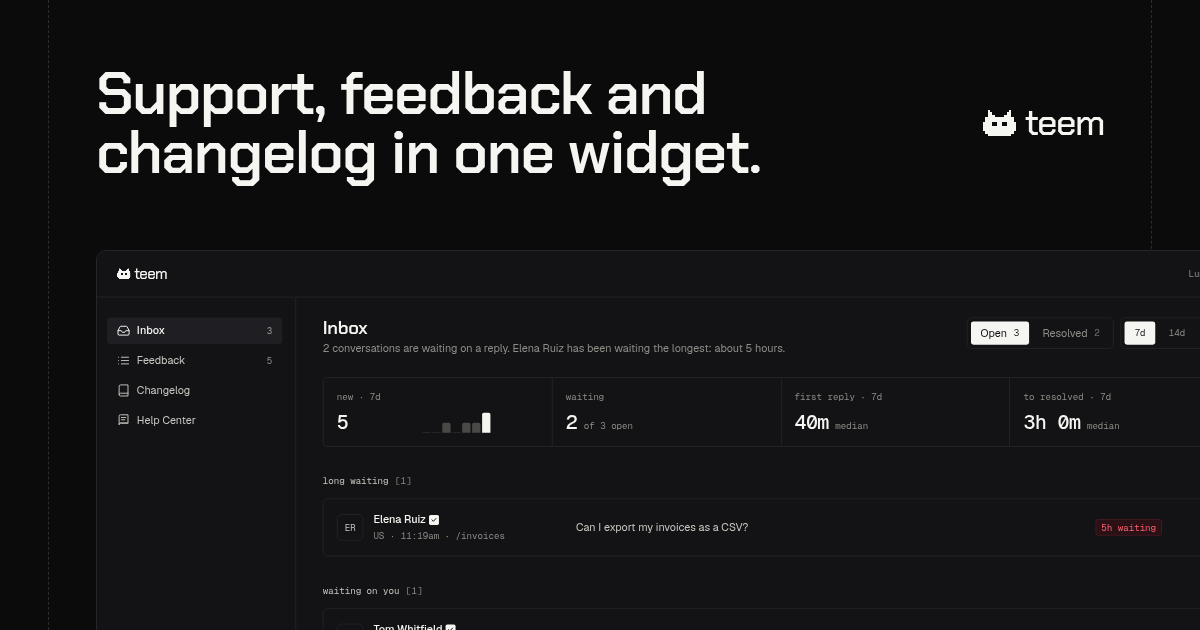
User reviews (0)