Website profiles · Technology insights · Alternatives

code.html.zone

Transform your code into beautiful, shareable screenshots. Beauty Code helps developers create stunning code images and efficiently manage their code snippets. Try it free today.

No paid content found
Visit website
Profile views 10 Outbound visits 1 Normal
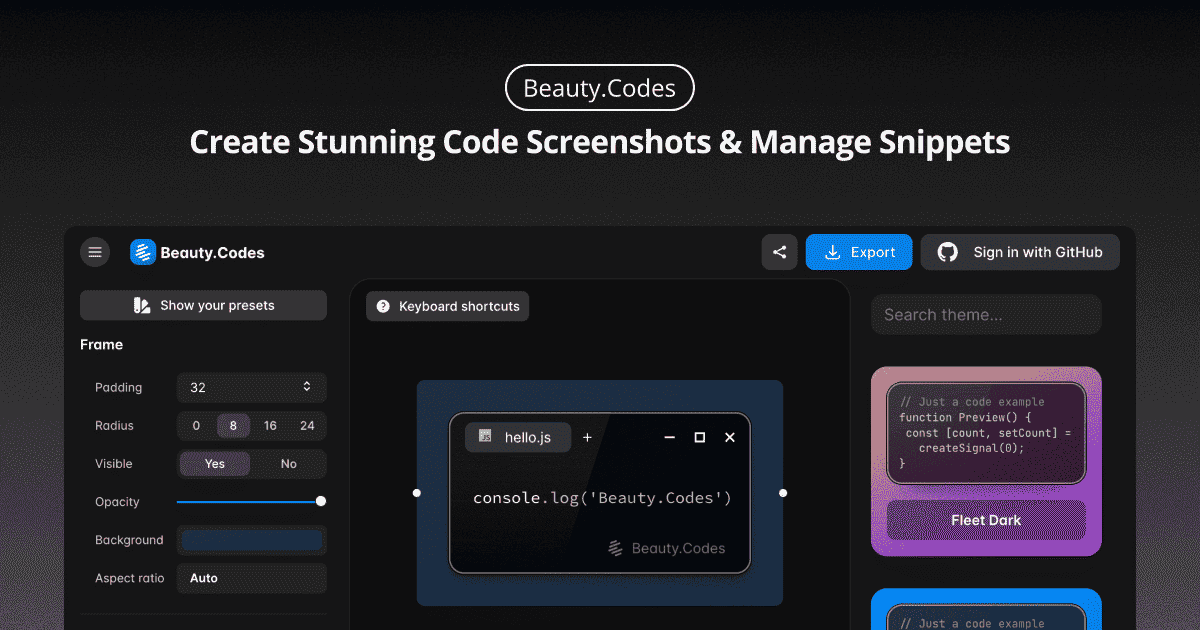
Beauty Code - Create Stunning Code Screenshots & Manage Snippets Full homepage screenshot

At a glance

Category
Development
Language
English
Paid-content signal
No paid content foundObserved
Registered
2023
Hosting
CloudflareInferred
HTTPS certificate trusted
PassedObserved
Last updated

Website review

This review may include AI-generated content and is not individually verified. Domain, certificate and other facts come from the observed data on this page.

What is Beauty Code?

Beauty Code is a browser-based tool for turning source code into polished, shareable screenshots and for keeping snippets organized. Instead of pasting raw code into a chat or document, you paste it into Beauty Code, apply a presentable theme and layout, and export an image that looks deliberate rather than accidental. The same workspace is meant to hold your snippets so you can find and reuse them later rather than re-copying from old projects.

Its two jobs map to two common situations:

  • Sharing: You want a screenshot for a slide, a README, a social post, a code review comment, or a bug report where formatting survives and nobody can silently edit your code.
  • Reuse: You keep small, frequently needed pieces — config blocks, regexes, boilerplate, shell one-liners — and want them retrievable instead of buried in old files.

The appeal is speed: it runs in the browser, so there is nothing to install, and the output is an image file you can drop anywhere. The trade-off is that an image is not copy-pasteable code, so it is a poor fit when the reader needs to run or edit what they see; for that, a snippet manager or a gist-style text link works better. Screenshots also need care with sensitive values, since anything visible in the image is exposed permanently.

If you are evaluating it for your own workflow, start with one real task: take a function you have been meaning to show a teammate, render it, and check whether the result is readable at the size it will actually appear. If it is, the snippet library is worth setting up next; if you find yourself needing editable text more often than images, a plain snippet tool will serve you better.

How do I create a code screenshot with Beauty Code?

Beauty Code is a browser-based tool for turning source code into shareable images. Based on the site's stated purpose, the workflow is: paste or type your code, adjust how it looks, then export the image.

Practical steps

  1. Open Beauty Code in a browser with JavaScript enabled — the page is an app, so it won't load without it.
  2. Paste your snippet into the code area.
  3. Set the language so syntax highlighting is applied correctly.
  4. Style the frame: theme, background, padding, window controls, line numbers, font size.
  5. Export as an image (typically PNG) and check the result at the size you'll actually share it.

What to decide before you style

  • Where it will be posted. Slides and documentation tolerate larger text and taller images; a chat message or social post needs a tighter crop and a readable font size on a phone.
  • How much code to include. A screenshot works for 5–20 lines that make one point. Longer excerpts are better shared as a link or a snippet manager entry than as an image.
  • Whether the code is sensitive. Screenshots are easy to paste somewhere permanent. Strip credentials, internal hostnames and customer data before exporting.
  • Whether you need to edit later. An image can't be edited or copied. Keep the original snippet somewhere you can retrieve it.

H3. A concrete scenario A developer writing a pull request description wants to show a before/after of a refactor. Two short screenshots at the same width and theme, placed side by side, communicate the change faster than a pasted diff. The same person might keep the longer version as a saved snippet in the tool and link to it instead of screenshotting 200 lines.

If your main need is storing and reusing snippets rather than producing images, a dedicated snippet manager or your editor's built-in snippet feature will serve you better; use Beauty Code when the output specifically needs to be a picture.

Can I customize the appearance of my code screenshots?

Yes, customization is the core purpose of a tool like Beauty Code. The site is built around turning code into presentable images, so appearance controls are the main reason to use it rather than a plain screenshot.

The page itself loads as a JavaScript app, so the exact options aren't visible without running it. In practice, these tools typically let you adjust:

  • Theme — light or dark backgrounds, often matching popular editor palettes.
  • Font and size — the typeface and scale of the rendered code.
  • Padding and framing — spacing around the code, window-style chrome, or a plain card.
  • Background — solid color, gradient, or transparency.
  • Line handling — which lines are shown, line numbers, and highlighting.

A useful next step is to open the app and test one snippet you'd actually share, such as a short function for a blog post or a pull request comment. Check whether the exported image stays readable when scaled down in a chat window, since heavy padding and small fonts are the most common mistakes.

If you only need a quick, unpolished capture, your operating system's built-in screenshot tool is faster. Reach for a dedicated tool when the image is going somewhere public and presentation matters.

How does Beauty Code help me manage my code snippets?

Beauty Code approaches snippet management as a byproduct of making code presentable. The site describes two connected jobs: turning code into "beautiful, shareable screenshots" and "efficiently manage their code snippets." In practice, that means it's built for people who save code mainly so they can show it to someone — a teammate, a blog reader, a client, a conference slide.

What that looks like day to day

  • A library of saved snippets you can return to, rather than re-pasting code from old chat threads or scratch files.
  • A screenshot step attached to each snippet, so the same saved code can be exported as an image without reformatting it again.
  • Styling choices applied at export time, letting you match a snippet to a slide deck, docs theme or social post.

Who it suits, and who it doesn't

Your situation Fit
You publish code in talks, posts or docs Strong — capture and presentation live in one place
You want a lightweight personal snippet shelf Reasonable, if you also value the image output
You need team-wide sharing, permissions or review Weak fit; this is presented as an individual tool
You want an IDE-integrated manager with search across a large repo Look elsewhere

The trade-off is real: a tool optimized for visual output tends to be lighter on the retrieval features that matter once a snippet collection grows past a few dozen entries. If you can't search by language, tag or project, "management" becomes scrolling.

A concrete test before committing

Take five real snippets you've reused in the past month. Save them, then try to find one again using only what the tool gives you — no memory of where you put it. If that takes more than a few seconds, the management side won't hold up as your collection grows, even if the screenshots look great.

For comparison, dedicated snippet managers like Pieces or editor-native options such as Visual Studio Code's built-in snippets cover the storage-and-retrieval side more deeply, while image-focused tools like Carbon cover presentation. Beauty Code's pitch is doing both in one place.

One caveat worth checking yourself: the page renders through JavaScript, so the public description is thin on specifics about storage, accounts or export formats. Confirm those details directly before you move a real snippet library into it.

Is Beauty Code free to use, or does it have paid plans?

Beauty Code’s site does not show a clear free-versus-paid plan structure. The only page evidence available is a JavaScript app shell with no pricing section, plan names, or payment links, so there is no reliable basis to say whether it is free or has paid plans.

If you need to know before using it, treat this as unconfirmed and check inside the app after it loads. Look for a pricing, upgrade, billing, or account settings area. A practical test is to try the core workflow — creating a code screenshot and managing snippets — and see whether export, saved libraries, or higher-resolution output are limited or require an account.

For a quick comparison, you can also check how similar tools present their terms, such as Carbon or Raycast Ray.so, where free browser-based screenshot creation is the norm and paid tiers usually appear only for team or storage features.

What programming languages and syntax highlighting themes does Beauty Code support?

The available page information does not list specific programming languages or syntax-highlighting themes for Beauty Code. The only page content is a JavaScript-required notice, so there are no supported-language names, theme names or theme counts to report.

What can be said from the product description is that Beauty Code is aimed at turning code into shareable screenshots and managing snippets. Language and theme support are therefore central selection criteria, but they are not documented in the supplied material.

How to check support yourself

  1. Open Beauty Code and create a test snippet in the language you use most, such as Python, TypeScript, Rust or SQL.
  2. Look for a language selector in the editor or screenshot settings; the presence of a language option usually indicates syntax highlighting.
  3. Cycle through the available themes and check how comments, strings, keywords and diffs are colored, since weak theme coverage often shows up in those token types.
  4. Export a screenshot and confirm the highlighting survives at the resolution you need for documentation, slides or social posts.

For comparison, dedicated code-image tools such as Carbon and Ray.so are known for polished screenshot output, while general snippet managers emphasize storage and retrieval. If your priority is a specific language or brand-matched theme, verify it directly in Beauty Code before relying on it.

Related questions

More questions →
How Beauty Code Helps You Manage Code Snippets

Beauty Code (code.html.zone) is a browser-based tool for turning code into shareable screenshots, and its snippet-management side is aimed at the same audience: developers who want to keep reusable code on hand and turn it into presentable images. Based on the site's own description, it "helps developers create stunning code images and efficiently manage their code snippets." The practical value is that saving and organizing snippets and generating screenshots live in one place, so you don't have to keep a separate notes app for storage and a separate tool for visuals.

One caveat worth stating up front: the site is a JavaScript app, and its landing page only renders the message "You need to enable JavaScript to run this app." That means the specific menus, storage limits, account requirements, and export formats are not documented in the material available here. Treat the workflow below as the general shape of snippet management in this kind of tool, and confirm the exact controls once you have the app open in a browser with JavaScript enabled.

What snippet management covers

Snippet management is the storage-and-retrieval half of the product. In practice it means:

  • Saving code you reuse — boilerplate, config blocks, utility functions, regex patterns, API call templates — instead of re-typing or re-searching for them.
  • Organizing by language or purpose — grouping snippets so a CSS grid helper doesn't get lost among Python scripts.
  • Finding them later — search or filtering so retrieval doesn't depend on remembering a filename.
  • Reusing them — copying a snippet back out, or feeding it directly into the screenshot generator.

The pairing with screenshots is the distinguishing part. A snippet you've saved can be rendered as an image without pasting it into a second tool, which matters if you regularly post code to social media, slide decks, documentation, or chat.

A practical workflow

  1. Open the app at code.html.zone in a browser with JavaScript enabled. If you see only the "enable JavaScript" notice, that's the blocker — not a missing feature.
  2. Add a snippet. Enter or paste the code, then give it a name you'll actually search for later. A name like "debounce hook" beats "snippet 14."
  3. Tag or categorize it by language or use case if the interface offers it. This is what makes a growing collection usable rather than a junk drawer.
  4. Verify it saved by reloading or navigating away and back. Confirm whether your snippets persist across sessions — if the tool stores them locally in the browser, clearing site data would remove them.
  5. Generate a screenshot from the snippet when you need to share it, and check the output before posting.

Common snags

  • JavaScript disabled or blocked — the app won't load at all. Check extensions and browser settings.
  • Assuming cloud sync — the available material doesn't state where snippets are stored or whether an account is required. Don't assume your snippets follow you across devices until you've confirmed it.
  • Assuming it's free — the site invites you to "try it free," but no pricing details are documented here. Free-to-try is not the same as free forever, and no login requirement is confirmed either way.
  • Losing work to a cleared cache — if storage turns out to be browser-local, export or copy anything important elsewhere.

Who this fits

Beauty Code suits developers who want a lightweight, single-purpose place to park reusable code and occasionally turn it into a clean image for sharing. It's a reasonable fit if your main need is presentation plus light organization.

It's a weaker fit if you need version history, team sharing, cross-device sync, or integration with an IDE — none of those are supported by the available description, and you'd be better served by a dedicated snippet manager or your editor's built-in snippets.

What is Beauty Code (code.html.zone)?

Beauty Code is a browser-based tool for turning source code into polished, shareable screenshots, and for keeping your code snippets organized in the same place. It's aimed at developers who want presentable code images for documentation, slides, social posts, or chat replies without hand-styling them in a design tool. One practical caveat: the site is a JavaScript app, so it needs JavaScript enabled in your browser to run at all.

What it does

The tool covers two related jobs:

  • Code-to-image rendering — you supply code, and it produces a styled image you can share. This is the "screenshot" side of the product.
  • Snippet management — it also stores and organizes snippets, so the same place you format code for sharing is where you keep it.

The site's own description frames it as helping developers "create stunning code images and efficiently manage their code snippets."

Who it's for

If you regularly paste code into places where plain monospace text looks flat — README files, blog posts, presentation decks, social media, issue trackers — a dedicated renderer saves you from manually matching fonts, padding, and background colors. The snippet library matters more if you reuse the same blocks often and want them formatted consistently rather than re-pasting from scratch each time.

If you only ever share code inside an IDE or a code host that already renders it well, the screenshot half of the tool may add little.

What to check before relying on it

  • JavaScript is required. The page returns "You need to enable JavaScript to run this app." with JavaScript off, so there's no non-JS fallback.
  • Pricing isn't stated in the available page information. The site invites you to "try it free," but no pricing page, plan details, or payment methods are documented here — so don't assume the full feature set is free or that no account is needed. Verify current terms on the site itself.
  • Feature specifics aren't documented in the source material. Themes, export formats, syntax highlighting languages, and storage limits aren't listed, so treat those as things to confirm in the app rather than assumed.

How to evaluate it for your workflow

  1. Open code.html.zone with JavaScript enabled.
  2. Paste a representative snippet — ideally one with the language and indentation you actually use.
  3. Render it and check the output against where you'll publish it (image size, contrast, readability at small scale).
  4. If snippet management is the draw, test whether saving and retrieving a snippet is faster than your current method.
  5. Confirm any limits or costs before committing, since the available page information doesn't cover them.

The deciding factor is usually output quality versus effort: if the rendered image is good enough to publish as-is and beats your manual process, it earns a place in your toolkit.

Why Use Beauty Code Instead of a Regular Screenshot Tool for Code?

Use Beauty Code when the screenshot is meant to be read as code — shared in a tweet, pasted into documentation, or dropped into a slide deck. A regular screenshot tool captures whatever pixels are on your screen, including your editor theme, cursor, line numbers you didn't want, and whatever window happened to be in front. Beauty Code is built around the opposite assumption: you paste code in, and it renders an image optimized for legibility and sharing. If you just need a quick record of what's on screen for yourself, a system screenshot is faster and fine.

Where a regular screenshot tool falls short

The core problem isn't image quality — it's that a screen capture treats code as generic pixels.

  • Framing is accidental. You get your sidebar, terminal tabs, and notification popups unless you carefully crop.
  • Readability depends on your editor. A dark theme with low-contrast comments may look fine to you at 100% zoom and unreadable once the image is scaled down in a feed.
  • No control over what's included. Line numbers, cursor position, and selection highlights are baked in.
  • Resolution is tied to your display. Retina captures look sharp; a 1080p monitor capture often looks soft when enlarged.
  • Nothing is reusable. The image is a dead end — there's no underlying snippet to edit or re-export later.

What Beauty Code does differently

Based on the site's own description, Beauty Code is positioned as two things in one: a tool to "transform your code into beautiful, shareable screenshots," and a way to "efficiently manage code snippets." That combination is the real distinction — the screenshot isn't a one-off artifact, it's an output of a snippet you keep.

The practical implications:

Dimension Regular screenshot tool Beauty Code
Input Whatever is on screen Code you provide
Visual framing Your editor chrome Purpose-built presentation
Reusability None — image only Snippet retained for reuse
Best for Personal records, bug reports Sharing, docs, social posts

Because the rendering is decoupled from your editor, the output doesn't inherit your theme's quirks or your window layout. And because the snippet is stored, you can regenerate an image later — for example, after a code change — instead of re-screenshotting and re-cropping.

When each option is the right call

Choose a regular screenshot tool if:

  • You need to show an error message, a UI state, or a stack trace in context.
  • The image is for yourself or a colleague who just needs to see what happened.
  • Speed matters more than presentation.

Choose Beauty Code if:

  • The image will appear somewhere it competes for attention — a social post, a README, a slide.
  • You want consistent-looking code images across a series of posts or docs.
  • You expect to reuse or update the snippet, so managing it in one place saves work.

One caveat worth checking yourself

The site requires JavaScript to run, so the actual editor, export options, and snippet-management features only appear once the app loads. Before committing, open it and confirm two things that matter for your workflow: what export formats and resolutions you can produce, and how snippets are stored and retrieved. Those specifics determine whether it fits your sharing channels and whether the "manage snippets" half of the promise is useful to you or just extra.

The short version: a screenshot tool answers "what's on my screen?" Beauty Code answers "how do I show this code clearly, and keep it around?" Pick based on which question you're actually asking.

How do you create a code screenshot with Beauty Code?

Beauty Code (code.html.zone) is a browser-based tool for turning source code into shareable images and for keeping snippets organized. To create a code screenshot, open the site in a browser with JavaScript enabled, put your code into the editor, adjust how it looks, and export the result as an image. The steps below describe that flow at the level the site itself supports; the page requires JavaScript to run, so nothing will render without it.

Before you start

  • A modern browser with JavaScript enabled. The site's own page states: "You need to enable JavaScript to run this app." If scripts are blocked, you will see only that message.
  • The code you want to capture, ready to paste.
  • No account or install is mentioned on the page, so treat sign-in and pricing as unconfirmed rather than assuming the tool is free or login-free.

Step-by-step: from code to image

1. Open the app

Go to code.html.zone in your browser. Because the interface is a JavaScript app, wait for it to finish loading before interacting. If the page stays blank, check whether a script blocker or strict privacy setting is preventing JavaScript from running.

2. Add your code

Paste or type the snippet into the editor. Use the exact code you want shown — indentation, line breaks, and comments all carry over into the image, so clean up anything you don't want visible before moving on.

3. Adjust the appearance

Beauty Code is positioned around making code "beautiful" and "shareable," so expect appearance controls for the screenshot. Tune these until the image reads clearly at the size it will be shared — for example, a snippet posted to a chat or slide deck needs larger text and tighter framing than one embedded in documentation.

4. Generate and export

Produce the image and export it. The site describes the output as "beautiful, shareable screenshots," which is the artifact you download or copy for sharing.

5. Reuse and manage snippets

Beyond one-off images, the tool is also for managing code snippets. If you plan to share the same code repeatedly, keeping it in the tool avoids re-pasting and re-styling each time.

What to check before you share

Check Why it matters
JavaScript enabled The app will not run without it
Code is final Formatting and comments are captured as-is
Readable at target size Screenshots are often viewed small in feeds and chats
Snippet saved Reuse beats rebuilding the same image

Common snags

  • Blank page: almost always JavaScript being disabled or blocked, since the app depends on it.
  • Unconfirmed account or price terms: the page does not state pricing or login requirements, so verify in the app before relying on either.
  • Styling drift: if you change the code after styling, re-check the export so the image matches the current snippet.
Is Beauty Code free to use, and how do you get started?

Beauty Code (code.html.zone) advertises a free trial, so you can evaluate it before committing to anything. However, the site's landing page does not display specific pricing, subscription tiers, or payment methods — and because the app requires JavaScript to run, you won't see the actual interface or any pricing details until you load it in a JavaScript-enabled browser. Treat "free" as "free to try" until you confirm the current terms on the site itself.

What the site actually tells you

The available information about code.html.zone is limited to its own promotional description:

  • It describes itself as a tool to "transform your code into beautiful, shareable screenshots."
  • It also claims to help developers "efficiently manage their code snippets."
  • It invites visitors to "try it free today."

What is not present on the page:

  • No price figures, plan names, or billing periods.
  • No payment platform links (e.g., Stripe, Paddle, PayPal).
  • No feature comparison between free and paid usage.

This means you cannot conclude from the page alone that the tool is permanently free, unlimited, or ad-supported. The only supported claim is that a free trial is offered.

Why you may see nothing at first

The page evidence shows a single message: "You need to enable JavaScript to run this app." Beauty Code appears to be a client-side web application, so:

  1. JavaScript must be enabled in your browser for the app to render at all.
  2. If you block scripts, use a text-only browser, or open the page with strict privacy extensions, you will see only that notice — no editor, no pricing, no sign-up form.
  3. Any pricing or account details live inside the running app, not in static HTML, which is why they don't appear in the page source.

How to get started

Because the interface is only visible after the app loads, the practical path is:

  1. Open code.html.zone in a modern browser (Chrome, Firefox, Safari, Edge) with JavaScript enabled.
  2. Wait for the app to render — you should see the code input/editor area rather than the JavaScript notice.
  3. Paste or type a code snippet into the editor.
  4. Apply styling options (theme, background, padding, window controls) to produce the screenshot look you want.
  5. Export or copy the resulting image.
  6. If you want snippet management, look for a save/library feature inside the app and check whether it requires an account.

Expected result: a rendered code image you can download or share. If it fails: the most common cause is JavaScript being disabled or blocked, not a broken site.

Deciding whether to commit

Question What you can confirm now What you must verify on the site
Is there a free option? The site says "try it free" Whether the free tier is time-limited or feature-limited
What does it cost? Nothing shown Current price and billing terms
Do I need an account? Not stated Whether saving snippets requires sign-up
Will it work for me? It runs in-browser with JavaScript Whether your browser/OS combination renders it correctly

If your only need is a one-off code screenshot, the free trial is likely enough to judge the output quality. If you plan to store and manage many snippets over time, confirm the account and pricing terms first, since the landing page doesn't disclose them.

Practical checks before relying on it

  • Test with your real code, including long lines and uncommon languages, to see how wrapping and syntax highlighting behave.
  • Check the export format (PNG, SVG, clipboard) against where you plan to publish — some platforms compress or resize images.
  • Confirm data handling if you're pasting proprietary code; the page doesn't state where snippets are processed or stored.
  • Re-check pricing directly on the site, since the information available here may be outdated and the page itself shows no figures.

Website Overview

Several search or sharing settings need attention. Together they may make snippets, preview images or preferred URLs less consistent across platforms.

Domain and Registration

The domain has about 3 years of registration history; its current configuration provides more context than age alone. The domain uses the common .zone extension, which is not an independent safety signal.

DNS and Email

Nameservers are provided by Cloudflare, indicating managed DNS hosting. MX records point to the Cloudflare Email Routing email service. No CNAME was found; the observed records resolve directly to addresses. SPF and DMARC are configured. DKIM status is unknown. TXT records include verification markers for Google. Such markers may also remain after a service stops being used.

TLS and Certificates

The public key uses EC with 256 bits. The server supplied a complete certificate chain. No organization name is present in the certificate; the available fields are consistent with domain validation. The certificate was issued within the Google Trust Services cloud or CDN ecosystem. The certificate's total validity is about 90 days, consistent with a short renewal cycle.

HTTP and Browser Security

The response lacks these common security headers: HSTS, CSP, Permissions-Policy. No X-Powered-By header was found, reducing one common source of backend fingerprinting information. The cf-ray response header indicates a CDN or caching proxy in the delivery path. No obvious internal addresses or debug information were found in the headers. The Server header identifies cloudflare without an exact version.

Technology Stack Analysis

The public page identifies Cloudflare without precise versions, leaving fewer clues for version-specific scanning.

Search and Social Sharing

The meta description has 178 characters and may be shortened in search results. No homepage canonical URL was detected. If duplicate URLs exist, consolidation may be less explicit. Twitter Card metadata is configured. The title has 64 characters, within a common display range. The observed directives allow indexing and link following.

Hosting and Email

DNSCloudflare
HostingCloudflare
EmailCloudflare Email Routing
Approximate IP geolocation (inferred; a CDN or proxy may differ from the origin server) Location unknown Inferred 104.21.75.196

Registration details

RDAP / WHOIS

RegistrarChengdu West Dimension Digital Technology Co., Ltd.
Registered2023-03-21
Expires2027-03-21
Domain statusactive
Nameserverskate.ns.cloudflare.com、tom.ns.cloudflare.com
DNSSECunsigned

DNS records

DNS

TypeNameValueTTLPriority
Acode.html.zone104.21.75.196300—
Acode.html.zone172.67.180.230300—
AAAAcode.html.zone2606:4700:3033::6815:4bc4300—
AAAAcode.html.zone2606:4700:3035::ac43:b4e6300—
MXhtml.zoneroute2.mx.cloudflare.net30039
MXhtml.zoneroute1.mx.cloudflare.net30072
MXhtml.zoneroute3.mx.cloudflare.net30096
NShtml.zonekate.ns.cloudflare.com86400—
NShtml.zonetom.ns.cloudflare.com86400—
TXThtml.zonegoogle-site-verification=vz7D--lwgPaq_LZNgIM7vrQ6rLUiB_EpW3V-nzUMvFQ300—
TXThtml.zonev=spf1 include:_spf.mx.cloudflare.net ~all300—
DMARC_dmarc.html.zonev=DMARC1; p=none; rua=mailto:[email protected]300—

TLS and certificates

TLS / SSL

AssessmentNormal configuration
Supported protocolsTLSv1.2、TLSv1.3
Negotiated protocolTLSv1.3
Certificate subjecthtml.zone
IssuerGoogle Trust Services
Valid until2026-11-27T05:15 · Remaining when checked: 60 days
Verification detailsCertificate trust: Passed · Hostname match: Passed

HTTP response headers

HTTP

HeaderValue
content-typetext/html
cache-controlpublic, max-age=0, must-revalidate
servercloudflare
x-frame-optionsSAMEORIGIN
x-content-type-optionsnosniff
referrer-policysame-origin

Identified technologies

Cloudflare

Pages, Search and Sharing

Meta descriptionTransform your code into beautiful, shareable screenshots. Beauty Code helps developers create stunning code images and efficiently manage their code snippets. Try it free today.
Canonical URLNot detected
LanguageEnglish (default)
Twitter Cardsummary

No rules found

User reviews (0)

  • No reviews yet.