
 简体中文
简体中文 English
Website review
This review may include AI-generated content and is not individually verified. Domain, certificate and other facts come from the observed data on this page.
What is Flotes?
Flotes is a Markdown note-taking app built around learning rather than just storage. Its stated purpose is to help you learn what you write: notes live in Notebooks, and the same notes can be studied as fill-in-the-blank cards, arranged on a canvas, linked as a wiki, or compiled into long-form summaries. Spaced repetition decides when you review, and everything is written in plain Markdown that you can import and export freely.
What each view is for
- Study — fill-in-the-blanks and concealed sections, with self-grading and spaced-repetition review. This is the core learning loop.
- Canvas — an infinite board where notes become nodes you can group, link and export using the open JSON Canvas format. Useful for mapping how topics relate.
- Wiki — backlinks stored as standard Markdown links, so connections survive export. This suits a personal knowledge base.
- Summary — aggregates notes into long-form content, for a blog post, documentation, or a one-place overview of a notebook.
- Notebooks and search — status, tags and filters for organization, plus full-text search with previews and sync across devices.
Who it fits
A student revising for exams is the clearest case: write lecture notes in Markdown during the week, then let spaced repetition schedule review, with fill-in-the-blank cards generated from the same text instead of a separate flashcard app. A developer or technical writer maintaining documentation benefits from the Markdown-first, no-lock-in approach and the Summary view. Someone who mainly wants quick disposable notes may find the learning machinery more than they need.
The trade-off is focus: because study, canvas, wiki and summary all draw on one Markdown source, you avoid duplicating notes across tools, but you do commit to a particular workflow and to writing in Markdown rather than a rich-text editor.
If you want to judge fit quickly, write one real set of notes on a topic you are actually learning, turn it into study cards, and see whether the review schedule feels useful after a few days. Flotes is an independently owned project, and there is a free tier with unlimited notes and all views, so that trial costs nothing. See Flotes.
How does Flotes help with studying and memorization?
Flotes is built around one idea: the notes you write should become the material you review. Instead of copying notes into a separate flashcard app, you study the Markdown notes you already made, using fill-in-the-blanks and concealed sections, then grade yourself. A spaced-repetition schedule decides when each item comes back, so you spend more time on weak material and less on what you already know.
How the study loop works
- Write notes in plain Markdown inside Notebooks.
- Convert or mark sections as study material, using fill-in-the-blank and hidden-section formats.
- Self-grade after each attempt.
- Review again at the interval the spaced-repetition algorithm selects.
The grading step matters more than it looks. Self-assessment is what feeds the scheduling, so honest ratings produce a useful review queue; generous ratings produce a queue that keeps showing you easy items and hides the gaps.
Other views that support learning
- Canvas places notes on an infinite canvas where you group and link nodes and embed web content, useful for seeing how topics relate rather than reading them in sequence.
- Wiki connects ideas through backlinks stored as standard Markdown links, which suits building a cumulative reference you return to over months.
- Summary aggregates notes into long-form content, helpful when you want one consolidated pass over a notebook before an exam or a piece of writing.
Because everything is plain Markdown with import and export, the study layer sits on top of files you can take elsewhere. That reduces the risk of investing months of review history in a format you cannot move.
Who gets the most from it
Students and self-directed learners who already take Markdown notes and want review built in, rather than maintaining two tools. If your notes live in a word processor or you prefer ready-made card decks shared by others, the benefit is smaller, since the workflow assumes you write and own the source notes.
A practical next step
Pick one notebook you have already written and convert a single section into fill-in-the-blank items. Study it for a week, grading yourself honestly, and see whether the scheduled reviews surface material you would otherwise have forgotten. If they do, expand to a second notebook; if not, the bottleneck is probably your note format rather than the review schedule.
Can I import my existing Markdown notes into Flotes?
Yes. Flotes is built around plain Markdown, and its own description says you can “import and export freely” with no lock-in, so bringing an existing Markdown collection in is an intended workflow rather than a workaround.
What to expect in practice
- Your notes stay readable as plain Markdown, so you are not converting them into a proprietary format.
- Notebooks act as customizable folders, which is the natural landing place for an imported folder tree.
- Once imported, the same notes can feed the other views: study cards, canvas, wiki-style backlinks, and long-form summaries.
- Backlinks are stored as standard Markdown links, so links you already wrote between notes should remain meaningful.
A realistic scenario
Suppose you keep a few hundred Markdown files in an Obsidian or plain-folder setup: lecture notes, book notes, project docs. You would import them, sort them into notebooks, then turn the densest ones into fill-in-the-blank study material with spaced repetition. The payoff is studying the notes you already wrote instead of rewriting them in a second tool.
Decision criteria
| If you… | Flotes fits well | Watch out for |
|---|---|---|
Have plain .md files |
Direct fit; open format both ways | — |
| Rely on plugin-specific syntax | Core Markdown survives | Custom plugin syntax may not render |
| Want to leave later | Export is explicitly supported | — |
| Need complex databases/queries | Not the focus here | Check whether your workflow depends on them |
Next step: import one notebook first, not your whole vault. Verify that headings, code blocks, and internal links survived, then decide whether to migrate the rest. If you want to compare approaches, Obsidian and Logseq are other Markdown-based options worth knowing.
Is Flotes free to use?
Yes. Flotes is free to use, with unlimited notes and access to all views, and no lock-in. The site also describes notes as free to share and publish. It has a separate pricing page, so paid plans may exist for additional features, but the free tier is presented as a complete note-taking and study tool rather than a trial.
What the free tier covers, based on the site's description
- Unlimited notes in customizable notebooks
- All views: study, canvas, wiki/backlinks and summary
- Plain Markdown with free import and export
- Full-text search and sync across devices
- Sharing and publishing notes on the web
Practical next step
If your main need is studying your own notes, start free and test the workflow with one real subject: write a few Markdown notes, convert them into fill-in-the-blank study prompts, and run a spaced-repetition review for a week. That tells you whether the study loop fits your habits before you consider any paid plan. Check the pricing page only if you hit a limit or need a feature the free tier does not include.
How does Flotes compare to other note-taking apps like Obsidian or Notion?
Flotes sits in a narrower niche than Obsidian or Notion: it is a Markdown note-taking tool built specifically around studying what you write. Obsidian is a local-first, plugin-heavy knowledge base; Notion is a flexible workspace for databases, docs, and team collaboration. Flotes instead turns notes into flash cards, mind maps, wikis, and summaries, and schedules review with spaced repetition.
Where each fits
- Flotes: Best if your goal is retention, not just storage. Notes live in Notebooks, and views include Study (fill-in-the-blanks, concealed sections, self-grading), Canvas, Wiki backlinks, and Summary. Markdown import/export keeps files portable.
- Obsidian: Best if you want deep customization, local files, and a large plugin ecosystem. You assemble your own spaced-repetition setup rather than getting one built in.
- Notion: Best if you need databases, project tracking, and shared team pages. Its block-based editor is not plain Markdown by default, and study features require manual systems.
Practical comparison
| Need | Flotes | Obsidian | Notion |
|---|---|---|---|
| Built-in spaced repetition | Yes | Via plugins | No |
| Plain Markdown files | Yes | Yes | Partial |
| Database/table workflows | Limited | Via plugins | Strong |
| Team collaboration | Not the focus | Limited | Strong |
| Learning-focused views | Study, Canvas, Wiki, Summary | Canvas, graph | Manual |
A concrete scenario
You are a student reading a textbook chapter. In Flotes, you write Markdown notes, then convert them into fill-in-the-blank cards and review them on a spaced-repetition schedule — all in one place. In Obsidian, you would write the notes and then configure a plugin to handle review. In Notion, you would likely copy key points into a separate flash-card tool.
How to decide
- Choose Flotes if studying and recall are your main reason for taking notes.
- Choose Obsidian if you want local ownership, tinkering, and a broad plugin ecosystem.
- Choose Notion if you need shared databases, docs, and team workflows.
Next step: if you already have notes in another app, check whether Flotes' Markdown import handles your existing files before committing. For a fuller picture of the alternatives, see Obsidian and Notion.
Can I collaborate or share my notes with others on Flotes?
Yes. Flotes is built around Markdown notes that you can publish or share on the web, and the sharing itself is described as free. For collaboration in the sense of several people editing the same notebook at once, the page evidence does not show real-time co-editing, so treat Flotes primarily as a writing-and-study tool with public or shared output rather than a live multiplayer workspace. The more distinctive sharing layer is the study side: because notes can become fill-in-the-blank cards and spaced-repetition reviews, a shared notebook can double as a study resource for a classmate, colleague or study group.
H3 Practical ways to use sharing on Flotes
- Publish a notebook as a web page. Useful for a course summary, a reading list, project documentation or a personal wiki you want others to read without an account.
- Send a note or notebook to a specific person. Good for handing over a revision guide or a set of definitions before an exam.
- Build a shared reference for a team. A notebook with backlinks and tags can act as a lightweight internal wiki, as long as you accept that updates are not simultaneous editing.
- Turn shared notes into study material. A group can work from the same Markdown source, then each person studies it with their own spaced-repetition schedule.
H3 What to check before relying on it
The page does not spell out permissions, comment threads, version history or whether a shared link can be made private. If you need restricted access or an audit trail, test this with a small notebook first. Also confirm whether recipients need a Flotes account to study the cards, or only to read the published page.
H3 How it compares with dedicated collaboration tools
| Need | Flotes fit | Better suited elsewhere |
|---|---|---|
| Publishing Markdown notes on the web | Strong: publish and share are part of the core flow | — |
| Studying your own notes with spaced repetition | Strong: study views are the main purpose | — |
| Several people editing one document live | Not shown on the page | Google Docs, Notion, Obsidian with sync services |
| Long-form documentation from notes | Supported through summaries | Dedicated docs platforms |
For a concrete test: create a notebook called "Biology revision", write five Markdown notes, publish it, and send the link to one classmate. Ask them to read it and to try studying from it. That single trial will tell you whether Flotes sharing matches how your group actually works. If you want to compare the Markdown-and-linking approach more broadly, look at Obsidian and Notion.
 Google Cloud DNS
 Vercel
 Google Workspace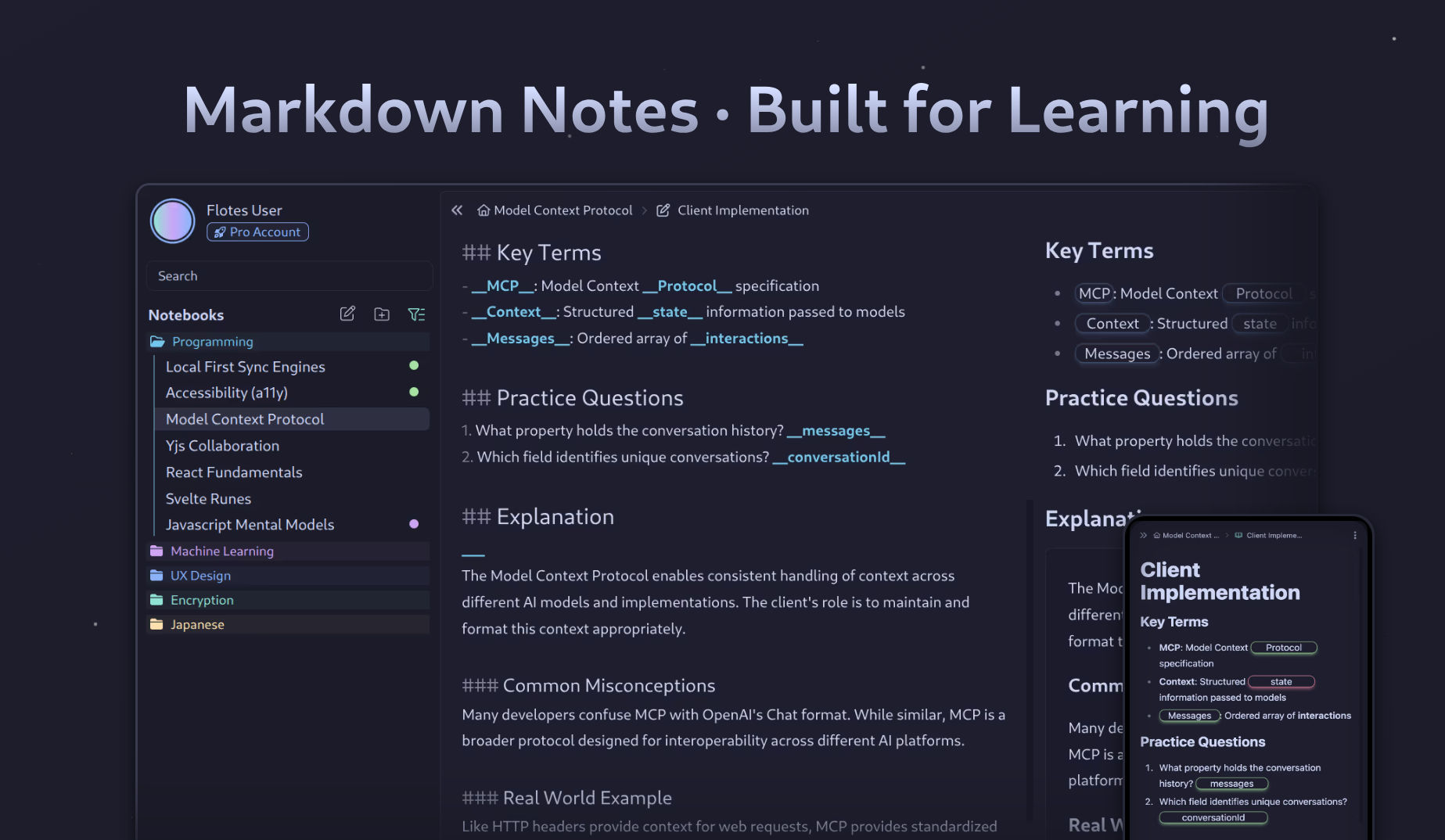

User reviews (0)