
 简体中文
简体中文 English
Website review
This review may include AI-generated content and is not individually verified. Domain, certificate and other facts come from the observed data on this page.
What is GrowthBook?
GrowthBook is an open-source platform that combines three related jobs in one product: experimentation (A/B and multivariate tests), feature flags (shipping changes behind toggles with rollouts and safety controls), and product analytics (understanding user behavior from your own data). Its distinguishing idea is being "warehouse-native": it works against the data warehouse your team already uses rather than requiring you to copy events into a separate analytics silo.
Who it tends to suit
- Data science and product teams that want statistically rigorous tests without a heavy proprietary vendor.
- Engineering teams that need feature flags with guardrails, such as ramp schedules and auto-rollbacks, so faster releases stay safe.
- Organizations with an existing warehouse and BI practice, since warehouse-native design fits that setup better than yet another tool holding its own copy of the data.
- Teams that prefer open source and self-hosting for transparency or data-control reasons.
A practical trade-off to weigh
| Consideration | What it means for you |
|---|---|
| Warehouse-native | Leverages data you already govern, but depends on a well-maintained warehouse and pipelines |
| Open source / self-hosted | More control and transparency; you take on more operational responsibility than a fully managed service |
| All-in-one scope | Fewer tools to integrate and reconcile, but you adopt a broader platform than a single-purpose flag or analytics tool |
| Cloud option | Lower maintenance if you don't want to run it yourself |
Next step: if you already have a warehouse and a testing backlog, start by connecting one real experiment or one flag rollout and compare the workflow against whatever you use today. If you don't have a warehouse or prefer a fully managed, narrower tool, the warehouse-native model may add friction rather than remove it. Pricing details are on GrowthBook.
How does GrowthBook's warehouse-native approach differ from traditional experimentation platforms?
GrowthBook's warehouse-native approach means the platform reads your product and experiment data directly from your existing data warehouse rather than requiring you to pipe events into a proprietary analytics store. In practice, that changes where your data lives, who can query it, and how much trust you place in a vendor's black box.
What "warehouse-native" changes
- Your warehouse stays the source of truth. Metrics are computed from tables you already own, so definitions and raw events remain visible and auditable.
- Less data duplication. Traditional platforms typically collect and store their own copy of events; a warehouse-native setup avoids maintaining a parallel dataset.
- SQL-level flexibility. Analysts can define custom metrics, join in business data, and debug results with the same tools they already use.
- Modeling stays in your hands. Because computation runs against your tables, metric logic is something your team can inspect and version.
How it differs from traditional platforms
| Dimension | Traditional experimentation platform | Warehouse-native (GrowthBook) |
|---|---|---|
| Data location | Vendor-hosted copy of events | Your warehouse tables |
| Metric definitions | Usually configured in the vendor UI | Often defined in SQL against your models |
| Custom analysis | Limited to vendor's feature set | Extendable with your own queries and joins |
| Setup burden | SDK event pipeline plus vendor storage | Warehouse connection plus assignment SDK |
| Trade-off | Faster to start, less control | More control, more reliance on your data stack |
Who feels the difference most
- Data teams with an established warehouse gain the most: no second source of truth, and metrics that match existing reporting.
- Small teams without a warehouse may find the setup heavier than a plug-and-play tool, since the approach assumes you have queryable product data.
- Regulated or privacy-sensitive organizations often prefer keeping event data inside their own infrastructure.
A practical next step
Before choosing, write down two or three core metrics (for example, activation or retention) and check whether you can express them as SQL against tables you already have. If yes, a warehouse-native tool fits naturally. If your events live only inside a vendor SDK and no warehouse exists, compare the cost of building that pipeline against the convenience of a traditional platform.
GrowthBook itself is open source and offers both a cloud option and self-hosting, so you can trial the warehouse connection before committing. See GrowthBook for the platform details and GrowthBook's pricing page for plan comparisons.
How do I set up and use feature flags in GrowthBook to safely release new features?
Feature flags in GrowthBook let you decouple deployment from release: you merge code behind a flag, then control who sees the feature by targeting rules, percentage rollouts, and schedules. Because GrowthBook is warehouse-native, flag exposure data can flow into your existing analytics warehouse so you can evaluate the feature's impact alongside your normal product metrics.
A practical setup path
- Create the flag in the GrowthBook app with a clear key (for example,
new-checkout-flow) and a default value. Keep the default as "off" so nothing changes for users until you decide. - Install an SDK for your language or framework (JavaScript, React, Python, Go, Java, Ruby, PHP, and others) and initialize it with your client key. Server-side SDKs are the safer choice for anything security- or pricing-related; client-side SDKs suit UI changes.
- Define targeting rules rather than a blanket on/off: internal users first, then a small percentage, then wider. You can target by user attributes such as country, plan, or device.
- Roll out gradually. GrowthBook supports percentage rollouts and ramp schedules with guardrails, plus auto-rollbacks, so a bad metric or error spike can revert the flag without a redeploy.
- Evaluate the experiment. Turn the flag into an experiment with a control and variation, connect your warehouse data source, and read results in GrowthBook or your own BI tool.
- Clean up. Once the feature is fully launched, remove the flag from code and archive it in GrowthBook. Stale flags are the main long-term cost of any flag system.
Choosing between deployment models
| GrowthBook Cloud | Self-Hosted | |
|---|---|---|
| Maintenance | Managed, instant updates | You run it in your cloud or on-prem |
| Data control | Warehouse-native, data stays in your warehouse | Full control of the application and data path |
| Best for | Teams wanting speed with minimal ops | Teams with strict data residency or security requirements |
Who this suits
Product and data science teams that already have a warehouse and want experimentation and flags in one place will get the most from it. GrowthBook is open source and transparent, which matters if you need to audit how assignment and statistics work. If you only need a simple on/off switch and have no analytics warehouse, a lighter flag service may be less setup.
Two caveats worth planning for
- Flag evaluation happens in your app or edge, so client-side flags are visible to users; never put secrets in a flag value.
- Consistent assignment depends on a stable user identifier. If your IDs change between sessions, users can flip between variations and muddy results.
Next step: pick one low-risk feature, create a flag with a 5% rollout to internal users, and watch it for a day before widening. The GrowthBook docs cover SDK setup and targeting syntax; the pricing page at GrowthBook outlines plan differences if you need to compare Cloud versus self-hosted costs. For background on why warehouse-native experimentation is structured this way, the open-source repository and docs are the most direct references.
Can I self-host GrowthBook, and what are the trade-offs versus using GrowthBook Cloud?
Yes. GrowthBook offers a self-hosted deployment that runs in your own cloud or on-premises environment, alongside a managed GrowthBook Cloud option. According to the site, both give you the same features and the same product — the difference is who operates the infrastructure.
Self-hosted vs. Cloud at a glance
| Dimension | Self-Hosted | GrowthBook Cloud |
|---|---|---|
| Where it runs | Your cloud or on-prem | Managed by GrowthBook |
| Feature set | Same features, same product | Same features, same product |
| Maintenance | Your team handles upgrades, scaling, uptime | Vendor handles it; described as low maintenance |
| Update speed | Depends on your release process | Described as instant updates |
| Data control | Full control inside your own environment | Warehouse-native, but vendor-operated service |
| Best fit | Teams with strict data-residency, security or procurement rules; platform engineers who want control | Teams that want to move fast without running infrastructure |
How to decide
- Choose self-hosted if data cannot leave your environment, if you need to satisfy internal security review or residency requirements, or if you already run comparable services and have platform capacity to own upgrades and scaling.
- Choose Cloud if speed of setup and low operational overhead matter more than hosting control, and your security posture allows a vendor-managed service.
A practical middle path: start on Cloud to validate experimentation practice, then migrate to self-hosted if a compliance or cost trigger appears. Because the product is the same, the migration is mostly an infrastructure exercise rather than a re-implementation.
For concrete deployment options and current plan details, check the vendor's own pages: GrowthBook and its pricing page. If you want a second reference point on self-hosted experimentation tooling, PostHog publishes a comparable open-source, self-hostable model you can evaluate side by side.
How does GrowthBook integrate with my existing data stack and tools like data warehouses or analytics platforms?
GrowthBook connects to your data warehouse rather than copying your event data into its own store. That "warehouse-native" approach means experiment metrics and product analytics are computed from the tables you already own, using your existing models of users and events.
How the connection typically works
- You point GrowthBook at a supported warehouse (for example, a cloud data warehouse such as BigQuery, Snowflake, Redshift or Postgres-style databases) and give it read access.
- You define where your experiment exposure data lives — usually a table your SDK or event pipeline already writes to.
- You map metric definitions (revenue, signups, retention) as SQL or through a data model layer, so a metric is defined once and reused across experiments.
- GrowthBook then queries that warehouse to produce experiment results and analytics views.
This differs from tools that require you to send events into their own pipeline. The trade-off: your warehouse becomes the source of truth and you keep full ownership of raw data, but result freshness depends on your warehouse's latency and your SQL/modeling quality. If your events land in the warehouse hourly, your experiment readouts will lag accordingly.
Analytics platforms and the wider stack
GrowthBook is positioned as a combined experimentation, feature flag and product analytics platform, so it can serve as the analysis layer instead of bolting a separate analytics tool onto your experiment tool. Its page also lists integrations for adapting to different workflows and tech stacks — worth checking the integrations page against your specific tools (event pipelines, reverse ETL, BI, identity resolution) before assuming coverage.
Practical scenario
Say you run a B2B SaaS product: your app writes exposures and conversion events into Snowflake, your dbt models already define "activated account" and "expansion revenue," and your team uses a BI tool for dashboards. You would connect GrowthBook to Snowflake, reuse the dbt-defined metrics as experiment metrics, and run feature flags through the SDK in your app. Experiment results then come from the same numbers your finance and BI teams already trust — no second definition of "active user."
Decision criteria
- Choose warehouse-native if data ownership, metric consistency and SQL flexibility matter more than instant, zero-setup reporting.
- Choose an all-in-one event pipeline if your team has no reliable warehouse modeling and wants results with minimal data engineering.
- Check two things first: whether your warehouse is supported, and whether the metrics you care about can be expressed in SQL against your existing tables.
Next step: open the integrations page and list your warehouse, event pipeline and BI tool, then confirm each appears. Then pick one existing metric — such as signup conversion — and try defining it in GrowthBook to see how closely it matches your current reporting.
What pricing plans does GrowthBook offer, and how does the cost compare to other experimentation platforms?
GrowthBook publishes its plan details on its pricing page, but the page evidence here doesn't include specific tiers or dollar amounts, so treat any exact figure you see elsewhere as something to verify directly at GrowthBook.
What the evidence does establish is the shape of the pricing decision. GrowthBook is offered two ways: a hosted GrowthBook Cloud (described as instant updates, low maintenance, warehouse-native, with a free start) and a Self-Hosted option that the site says has the same features and product, running 100% in your own cloud or on-prem. The homepage also claims customers see roughly half the cost of other solutions, and notes 1T+ feature flag lookups per day — a scale claim, not a price.
How to compare costs in practice
Vendor list prices rarely reflect what you actually pay, because experimentation platforms bill on different axes. Build a comparison on your own numbers:
- Seats vs. events vs. evaluations. Some tools charge per user, some per tracked event, some per feature-flag evaluation. A team with few users but heavy flag traffic can land very differently under each model.
- Warehouse costs. A warehouse-native tool runs queries against storage you already pay for, which can shift spend from the vendor to your data platform rather than eliminating it.
- Engineering time. Self-hosting removes licence fees but adds maintenance; hosted removes ops work but adds a subscription.
- Migration and instrumentation. Switching tools means re-instrumenting experiments and re-validating historical results.
A concrete scenario
Suppose you run 20 experiments a quarter with a five-person product data team and already have a well-governed warehouse. A warehouse-native setup fits naturally, since your metrics already live there. If instead you have no warehouse discipline and a small platform team, a hosted plan with low maintenance is the more realistic starting point, even at a higher subscription cost.
Decision criterion
Pick the model that matches your billing axis and your ops capacity, not the headline number. If your flag evaluation volume is high but your seat count is low, per-seat pricing will look cheap until it doesn't — model both at your projected 12-month volume before committing.
Next step: open the GrowthBook pricing page, note which axis each tier bills on, then run the same calculation for one alternative you're seriously considering.
 Amazon Route 53
 Cloudflare
 Google Workspace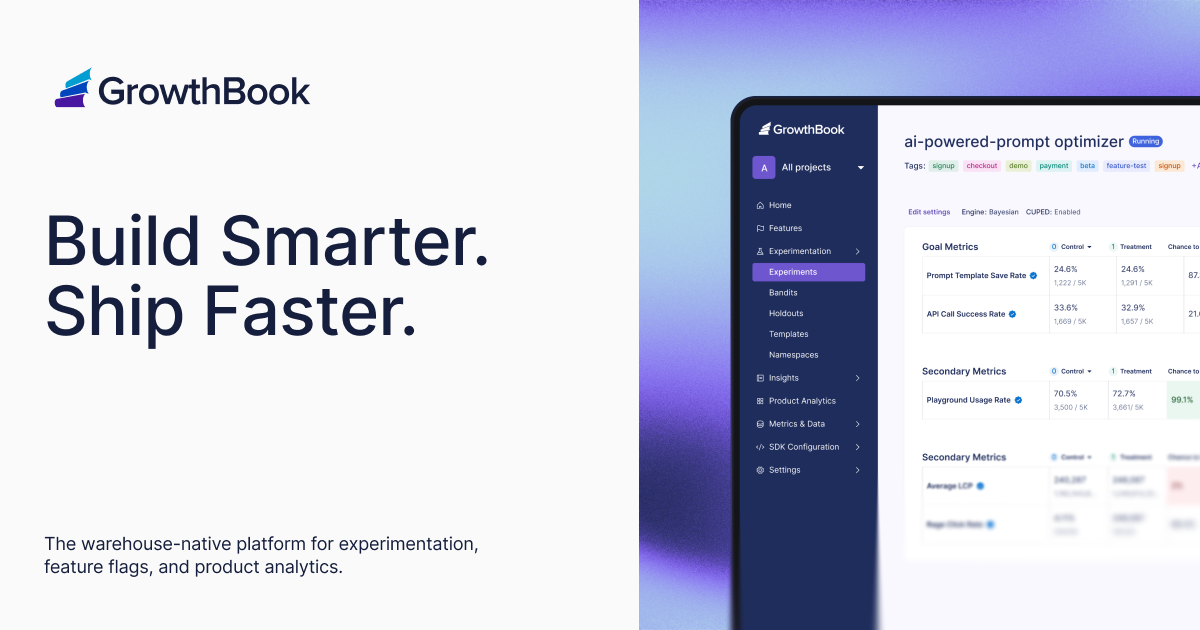

User reviews (0)