
 简体中文
简体中文 English
interviewer.ai
Interviewer.AI is the leading AI-powered video interview software that helps businesses to recruit, screen, and hire top talent. Try our smart video interview software today! No Credit Card Required! Cancel Anytime!
At a glance
- Category
- Artificial Intelligence
- Language
- English
- Paid-content signal
- Paid contentObserved
- Registered
- 2018
- Hosting
- CloudflareInferred
- HTTPS certificate trusted
- PassedObserved
- Last updated
Related questions
More questions →What Does It Mean to Be an IB Student? Roles and Expectations Across the Four Programmes
Being an IB student means more than attending a school that offers an International Baccalaureate programme. It means learning through a specific framework that asks you to think critically, communicate clearly, and take responsibility for your own progress. The IB's four programmes — the Primary Years Programme (PYP), Middle Years Programme (MYP), Diploma Programme (DP), and Career-related Programme (CP) — share a common philosophy but place different demands on students at each stage.
This article explains what the IB expects from students, how responsibilities change across the four programmes, and how families can prepare for the transition.
The foundation: the IB learner profile
Across all four programmes, the IB describes ten attributes it hopes students develop. These are usually called the learner profile. Students are encouraged to be:
- Inquirers — curious and skilled at asking good questions
- Knowledgeable — exploring ideas across a range of subjects
- Thinkers — using critical and creative thinking
- Communicators — expressing ideas confidently in more than one language
- Principled — acting with integrity and fairness
- Open-minded — appreciating other perspectives and cultures
- Caring — showing empathy and respect
- Risk-takers — approaching uncertainty with courage
- Balanced — attending to intellectual, physical, and emotional well-being
- Reflective — assessing their own learning and experience
These attributes are not a checklist to complete. They describe habits and dispositions that teachers look for and that students are expected to demonstrate over time. In practice, they shape how lessons are taught, how projects are assessed, and how students are asked to behave toward one another.
How student responsibilities differ across the four programmes
Each programme has its own structure, age range, and expectations. The table below summarises the main differences.
| Programme | Typical age range | Core expectation of the student | Main assessment emphasis |
|---|---|---|---|
| PYP | 3–12 | Active participation, curiosity, and reflection on learning | Teacher observation, portfolios, student-led conferences |
| MYP | 11–16 | Connecting subjects to real-world contexts; developing research and self-management skills | Criterion-based assessment, personal project, interdisciplinary units |
| DP | 16–19 | Independent academic work across six subject groups plus core requirements | External exams, coursework, extended essay, theory of knowledge |
| CP | 16–19 | Combining academic study with career-related learning and a reflective project | Career-related study, DP courses, personal and professional skills |
PYP: building the habits of inquiry
In the PYP, the student's main job is to engage. Children are expected to ask questions, work with others, and reflect on what they have learned. The emphasis is on developing curiosity and basic research skills rather than on formal examinations. Students often take part in units of inquiry that connect subjects, and they may lead conferences where they explain their learning to parents.
MYP: making connections and managing yourself
The MYP asks students to go further. They study eight subject groups and are expected to connect what they learn to the world around them. A key responsibility is the personal project, an independent piece of work that students plan, research, and complete over an extended period. This is often the first time students must manage a long-term deadline largely on their own. Service learning also becomes more structured, and students are encouraged to reflect on their role in the community.
DP: depth, independence, and the core
The DP is the most academically demanding of the four programmes. Students typically study six subjects, three at higher level and three at standard level, and complete three core requirements:
- Theory of knowledge (TOK) — a course that asks how we know what we claim to know
- The extended essay — an independent research paper of up to 4,000 words
- Creativity, activity, service (CAS) — a programme of ongoing experiences outside academic study
DP students are expected to manage a heavy workload, meet external examination deadlines, and produce original academic work. Independent study is not optional; it is central to the programme.
CP: academic study with a career focus
The CP is designed for students who want to combine academic courses with career-related learning. Students take at least two DP courses alongside a career-related study programme, and complete a reflective project. They also develop personal and professional skills. The CP suits students who learn best when their studies connect directly to a practical field, while still requiring the critical thinking and communication skills common to all IB programmes.
How assessment and independence change as students progress
One of the clearest patterns across the IB is the shift from teacher-led assessment toward student-led responsibility.
In the PYP, teachers observe and document learning, and students are guided through reflection. In the MYP, students are assessed against published criteria and must increasingly manage their own projects. By the DP and CP, students are preparing for external examinations and independent research, and they are expected to organise their time, seek help when needed, and meet deadlines without constant reminders.
This progression is deliberate. The IB wants students to leave as self-directed learners who can think for themselves.
Common misconceptions about being an IB student
Several myths circulate about the IB. Here are a few clarifications.
- "IB students must be geniuses." The programmes are demanding, but they are designed for a broad range of students. Effort, curiosity, and organisation matter as much as raw ability.
- "The IB is only about exams." Assessment includes projects, portfolios, oral work, and service. The DP has external exams, but the core requirements are equally important.
- "Students must be fluent in a second language before starting." Language learning is part of the IB, and support is usually available. Requirements vary by programme and school.
- "IB students have no free time." The workload is real, but the learner profile includes balance. Schools generally encourage students to manage their time and well-being.
- "All IB schools are the same." Schools implement the programmes in different ways, and the range of subjects and support offered can vary.
Preparing for the transition into an IB programme
If you are a student or a parent preparing to enter an IB programme, the following steps can help.
- Read the programme guide for your specific programme. The IB publishes curriculum and assessment information for PYP, MYP, DP, and CP. Understanding the structure reduces surprises.
- Talk to current students and teachers. Ask about workload, deadlines, and what support is available.
- Build organisational habits early. A simple planner, weekly review, and clear study space make a difference, especially in the MYP and DP.
- Practise reflection. The IB asks students to think about their own learning. Keeping a short journal or notes on what worked and what did not is useful preparation.
- Ask about language and subject choices. Requirements differ by programme and school, so confirm the details with the school directly.
- Plan for the core requirements. In the DP, the extended essay, TOK, and CAS take time. Starting early and setting interim deadlines helps.
- Use school support. Coordinators, counsellors, and teachers are there to help. Asking for guidance is part of being a successful IB student.
A practical summary
Being an IB student means developing the learner profile attributes while meeting the specific demands of your programme. In the PYP, that means curiosity and participation. In the MYP, it means making connections and managing independent work. In the DP, it means academic depth and completing the core. In the CP, it means combining academic study with career-related learning and reflection.
Across all four, the common thread is responsibility: for your learning, your time, and your contribution to the community around you. Understanding that early makes the transition smoother and the experience more rewarding.
What to Look for in a Video Platform Beyond Hosting and Sharing
If you're evaluating a video platform for a small business or marketing team, hosting and sharing are just the entry point. The features that actually determine whether a platform fits your workflow fall into four areas: privacy and playback control, collaboration and review tools, marketing and analytics capabilities, and practical limits like storage and mobile support. Most general-purpose tools (cloud storage, social networks, free hosts) cover hosting well but leave gaps in the other three. This guide walks through what each area means in practice, so you can map features to your own situation instead of comparing endless checklists.
Start by separating three jobs: hosting, editing, and marketing
Video platforms tend to bundle three distinct functions, and confusion usually comes from mixing them up:
- Hosting — storing a file, generating a player, delivering it reliably to viewers. This is the baseline.
- Editing — trimming, assembling, adding captions or branding. Some platforms include basic editors; others expect you to edit elsewhere and upload the result.
- Marketing and business features — privacy controls, lead capture, calls to action, analytics, team review workflows. These are what separate a "video host" from a "video platform."
A useful exercise: write down your last five video tasks (a product demo, a client pitch, a social clip, an internal training, a landing page embed). For each one, note which of the three jobs it required. If most of your tasks stop at hosting, a lighter tool may be enough. If several involve review cycles, gated access, or measuring viewer behavior, a fuller platform earns its cost.
Privacy and playback control: the business-vs-social divide
On social platforms, everything is public by default and wrapped in ads and recommendations. For business use, that's often the opposite of what you want. Look for:
- Granular privacy settings — can you restrict a video to specific people, a password, a domain, or an embed location? Can you make it unlisted but still embeddable?
- Ad-free playback — your product demo shouldn't end with a competitor's ad or an unrelated recommendation.
- Customizable embeds — control over player color, logo, and whether related videos appear. This matters when the video sits on your own site and represents your brand.
- Domain-level restrictions — the ability to limit playback to your own website prevents your content from being re-embedded elsewhere.
If your videos are purely promotional and public, these controls matter less. If you share client work, internal training, or pre-release material, they become the deciding factor.
Collaboration and review: the most common gap
This is where general-purpose tools most often fall short. A shared drive lets people comment on a file, but it doesn't give you a structured review process. A dedicated platform typically offers:
- Timestamped comments — feedback attached to a specific moment in the video, so "the logo looks off" points to an exact frame.
- Versioning — uploading a new cut while keeping the old one, so reviewers can see what changed.
- Approval status — a clear "approved" or "needs changes" state rather than a scattered email thread.
- Role-based access — reviewers who can comment but not download or reshare.
When this becomes relevant: as soon as more than two people need to sign off on a video, or when you're producing videos on a recurring schedule. For a solo operator publishing once a month, a simple comment thread may be sufficient.
Analytics and lead capture: beyond view counts
A raw view count tells you almost nothing actionable. Business-oriented platforms go further:
| Feature | What it tells you | When it matters |
|---|---|---|
| Watch time / engagement graph | Where viewers drop off | Improving content or editing |
| Viewer identity | Who watched (when gated) | Sales follow-up, internal training |
| Lead capture forms | Email collected before or during playback | Demand generation |
| Calls to action | Click-through to a page or booking link | Converting viewers |
| Embed/domain reports | Where your video is being watched | Tracking campaign performance |
If your goal is brand awareness, basic view counts may be fine. If you're using video to generate leads or train staff, the deeper metrics are the reason to choose a platform over a free host.
Practical limits that affect daily use
Feature lists rarely mention the constraints that cause friction later. Check these before committing:
- Storage and bandwidth limits — how much you can upload, and whether high viewership triggers overage fees.
- Upload size and length caps — relevant if you work with long recordings or high-resolution footage.
- Mobile app support — can you upload, review, and respond to comments from a phone? For teams that shoot on mobile, this is a real workflow factor.
- Export and portability — can you download your originals and embed codes if you leave? Lock-in is a hidden cost.
- Integrations — does it connect to the tools you already use (your website builder, CRM, or project tracker)?
Deciding between a full platform and a lighter tool
Use these rough conditions as a starting point:
A lighter tool (free host, cloud storage, social platform) is likely enough if:
- You publish occasionally and mostly to public channels.
- One person handles video end to end.
- You don't need gated access or viewer-level analytics.
A dedicated platform is worth evaluating if:
- Multiple people review or approve videos.
- You need privacy controls, ad-free playback, or branded embeds.
- You're using video for lead generation, training, or client delivery.
- You publish frequently enough that manual workarounds cost more than a subscription.
Pricing and plan details change often, so check the platform's current plans page directly rather than relying on secondhand comparisons. The right approach is to list your actual requirements first, then match them against what each option offers — not the other way around.
How to Try Interviewer.AI: Free Trial vs. Demo
You can try Interviewer.AI in two ways: start a free trial by creating an account (no credit card required, cancel anytime), or request a demo to see the platform end to end. The right path depends on whether you want to test the product hands-on or have someone walk you through it first. When you sign up, you also choose a track — business hiring teams and staffing agencies on one side, university admissions and career services on the other.
Start a Free Trial
The free trial is the self-serve route. According to the site, it requires no credit card and you can cancel anytime.
- Go to interviewer.ai and select Start free trial.
- Create your account.
- Choose the track that matches your use case:
- Business — hiring teams and staffing agencies
- University — admissions and career services
- Log in and begin setting up your first screening workflow.
Expected result: you get account access to the platform so you can evaluate the core products yourself — AI Video Interviews for async, structured screening at scale, AI Interviewer (Avatar) for live-feel conversational interviews, and AI Mock Interviews for practice with instant feedback.
Common snag: the trial is gated behind account creation, so decide your track up front. Picking the wrong one means your setup won't match how you actually hire or admit.
Request a Demo
Choose the demo if you want to see the platform end to end before committing time to setup, or if your volume is high. The site surfaces this path specifically for teams screening 500+ applicants per role, with a "Talk to sales" prompt.
- Go to interviewer.ai and select Schedule a demo (or Request a Demo).
- Provide your details and submit.
- A sales conversation follows, covering the platform end to end.
Expected result: a guided walkthrough of the platform rather than a self-serve account — useful for judging fit across integrations, structured interviews, and explainable AI scoring before you roll anything out.
Which Path Fits
| Your situation | Better starting point |
|---|---|
| Want to test the product yourself, low commitment | Free trial |
| High-volume roles (500+ applicants per role) | Demo |
| Need to see ATS integrations and workflows mapped to your stack | Demo |
| University admissions or career services | Free trial, University track |
| Just exploring, not ready to configure | Demo |
Both routes are entry points to the same platform, so the decision is about how much guidance you want before you start.
What You Can Evaluate Once In
The platform is organized around a few core products, so plan your trial around the one that matches your bottleneck:
- AI Video Interviews — async, structured screening at scale. Best if you need consistent questions across many candidates.
- AI Interviewer (Avatar) — conversational, live-feel interviews. Best if you want two-way interaction without scheduling live sessions.
- AI Mock Interviews — practice with instant AI feedback. Relevant if you're on the university/career-services side, or pointing candidates to preparation.
Supporting areas worth checking during a trial or demo: Explainable AI (transparent, bias-aware scoring), Structured Interviews (same questions for fair comparison), and Integrations (connecting your ATS and workflows).
Practical Notes
- The site states no credit card is required for the trial and that you can cancel anytime. It does not publish trial length or feature limits on the pages referenced here — confirm those during signup.
- Pricing is a separate page (interviewer.ai/pricing); the trial and demo pages don't state plan costs, so treat pricing as something to check directly rather than assume.
- If you're evaluating fairness and bias handling, the Explainable AI area is where that's addressed — worth requesting specifically in a demo.
What Features Does Interviewer.AI Offer for Screening Candidates?
Interviewer.AI is an AI video interview platform built for screening candidates at scale. Its core screening features are asynchronous AI video interviews, conversational AI Avatar interviews, structured question sets, explainable AI scoring, and ATS integrations. It fits teams that need to evaluate large applicant volumes consistently — the site positions it for roles with 500+ applicants — and also offers admissions and career-readiness use cases for universities. If you are screening a handful of senior candidates with highly individualized conversations, the structured, high-volume design is less of a match.
Core screening products
The platform groups its screening tools into three products:
| Product | What it does | Best suited for |
|---|---|---|
| AI Video Interviews | Asynchronous, structured screening at scale | High-volume roles where candidates record answers on their own time |
| AI Interviewer (Avatar) | Live-feel conversational interviews | Screening every applicant in a real two-way conversation |
| AI Mock Interviews | Practice with instant AI feedback | Candidates preparing for interviews (also used by universities for career readiness) |
The distinction matters for your workflow. Async video interviews let you collect comparable recordings without scheduling anyone. Avatar interviews add a conversational layer so the interaction feels closer to a live interview while still running without a human interviewer. Mock interviews are candidate-facing practice rather than a screening tool for employers.
How structured screening works
Structured interviews mean every candidate for a role answers the same questions, which is what makes side-by-side comparison possible. Combined with the platform's explainable AI, scoring is presented as transparent and bias-aware rather than a black-box ranking. In practice, this gives reviewers a consistent basis for shortlisting: same questions in, comparable signals out.
The site also frames the efficiency claim directly — cutting screening effort by 80% and producing better signal than resumes. Treat those as vendor-stated figures to validate against your own funnel rather than guaranteed outcomes.
Integrations and workflow fit
Interviewer.AI connects with your ATS and existing workflows, so screening results can flow into the systems your recruiters already use instead of a separate silo. This is the feature to check first if your team lives inside a specific ATS — confirm your system is supported before committing.
Role and team coverage
The platform lists solutions by team and by role, which helps you judge fit quickly:
- By team: staffing agencies (place more candidates faster), diversity hiring (reduce bias, widen the funnel), and sustainability (a calculator estimating CO2 saved versus in-person interview rounds).
- By role: warehouse workers, call center agents, caregivers, teachers, and hospitality/service roles such as bartenders and baristas — all high-volume or consistency-sensitive hiring.
- For universities: admissions interviews (including UK admissions and Australia admissions for verifying applicant intent and genuine-student checks), plus AI mock interviews for career services and teacher/faculty recruitment.
What to verify before deciding
- Pricing and trial terms: the site references a free trial, a pricing page, and "no credit card required," but the specific plan costs and limits are not stated in the available material — check the pricing page for current terms.
- Volume fit: the platform explicitly targets roles screening 500+ applicants. If your hiring volume is low, the structured-screening advantage is smaller.
- ATS compatibility: confirm your specific ATS is among the supported integrations.
- Scoring expectations: "explainable" and "bias-aware" describe how scores are presented; how you weight and act on them is still your hiring decision.
If your priority is consistent, high-volume screening with comparable candidate data, the feature set lines up. If you need deep, individualized human interviews at low volume, the structured model adds less value.
How Interviewer.AI Handles Fairness and Bias in AI Interviews
Interviewer.AI addresses fairness through three connected mechanisms: Explainable AI that makes scoring transparent, a bias-aware evaluation approach, and structured interviews that ask every candidate the same questions. The goal is to reduce bias in screening and widen the hiring funnel — but the platform's own materials frame this as bias-aware design, not a guarantee of a bias-free outcome. Fairness also depends on how your team configures questions, defines criteria, and reviews results.
The three mechanisms, and what each one actually does
Explainable AI: transparent, bias-aware scoring
Explainable AI is listed as a core platform capability described as "transparent, bias-aware scoring." In practice, this means the platform is designed to surface how a score was reached rather than returning an unexplained number. That matters for fairness because a recruiter or hiring manager can inspect the reasoning behind a recommendation instead of accepting it at face value.
What to verify when you evaluate it: whether explanations are available per candidate, whether they map back to the criteria you defined, and whether reviewers can document disagreement with a score. The source material confirms the capability exists and is positioned as transparent; it does not detail the exact scoring model, so treat specific claims about weighting as something to confirm in a demo.
Bias-aware evaluation
The platform's stated purpose includes reducing bias and widening the hiring funnel. "Bias-aware" is a design posture: the system is built with awareness of common bias risks in screening, such as inconsistent criteria or uneven treatment across candidates. It is not the same as a certified audit or a promise that no bias remains. Your configuration choices — which questions you ask, which signals you weight, which thresholds you set — still shape outcomes.
Structured interviews: same questions, fair comparison
Structured interviews mean every candidate for a role answers an identical set of questions. This is the most concrete fairness lever in the platform, because it removes the variability that comes from interviewers improvising different questions for different people. Identical inputs make candidate-to-candidate comparison more defensible, and they make the scoring criteria easier to audit.
How the pieces work together
| Mechanism | What it contributes to fairness | What it does not do on its own |
|---|---|---|
| Explainable AI | Makes scoring inspectable and reviewable | Replace human judgment on final decisions |
| Bias-aware evaluation | Reduces known bias risks in screening design | Certify a bias-free result |
| Structured interviews | Gives every candidate the same questions | Guarantee the questions themselves are well-designed |
The combination is what matters: structured interviews create comparable inputs, bias-aware design reduces known pitfalls, and explainable scoring lets a human check the output. Remove any one and the fairness argument weakens.
Where fairness is decided in practice
Most fairness outcomes are set before the AI runs. Consider a concrete scenario: a staffing agency screening a high-volume warehouse role. If the team writes vague questions, weights "communication" heavily for a role that barely uses it, or sets an aggressive auto-reject threshold, the structured format will apply those choices consistently — but consistently wrong. The platform enforces consistency; your team defines what consistency means.
Practical checks before you rely on results:
- Define criteria first. Decide what a good answer looks like before you write questions, so scoring maps to the role.
- Keep questions identical per role. This is the core of the structured approach — don't vary them mid-pipeline.
- Review explanations, not just scores. Use the transparent scoring to spot candidates who scored low for reasons unrelated to the job.
- Audit outcomes across groups. The platform reduces bias risk; monitoring pass rates is how you catch problems it can't see.
- Keep a human in the loop for rejections. Explainability exists so a person can intervene.
What to confirm before you commit
The source material supports the existence of Explainable AI, bias-aware scoring, and structured interviews, and states the purpose of reducing bias and widening the funnel. It does not publish the underlying model, audit results, or regulatory certifications. If fairness is a hard requirement for your organization, ask in a demo for: how explanations are generated, what bias testing has been done, how scoring criteria are configured and changed, and what reporting exists for outcome monitoring.
Website Overview
Identifiable technologies and additional version or configuration signals make the service easier to fingerprint, which may help targeted scanners narrow their checks. An established domain and managed infrastructure suggest continuity of operations and may support dependable delivery, although neither guarantees service quality.
Domain and Registration
Registered in 2018, this domain has about 8 years of history. That suggests continuity, although ownership and purpose may have changed. Transfer-protection status is present, helping reduce the risk of unauthorized domain transfers. The registrar is NameCheap, Inc., a widely used domain service provider. Registration contact information is publicly available through RDAP. The domain uses the common .ai extension, which is not an independent safety signal.
DNS and Email
Nameservers are provided by Cloudflare, indicating managed DNS hosting. MX records point to the Google Workspace email service. No CNAME was found; the observed records resolve directly to addresses. SPF and DMARC are configured. DKIM status is unknown. TXT records include verification markers for Google. Such markers may also remain after a service stops being used.
TLS and Certificates
The public key uses EC with 256 bits. The server supplied a complete certificate chain. No organization name is present in the certificate; the available fields are consistent with domain validation. The certificate was issued within the Google Trust Services cloud or CDN ecosystem. The certificate's total validity is about 90 days, consistent with a short renewal cycle.
HTTP and Browser Security
X-Powered-By exposes backend information: PHP/8.2.34. The response lacks these common security headers: HSTS, X-Content-Type-Options, Referrer-Policy, Permissions-Policy, clickjacking protection. The cf-ray response header indicates a CDN or caching proxy in the delivery path. No obvious internal addresses or debug information were found in the headers. The Server header identifies cloudflare without an exact version.
Technology Stack Analysis
The public page identifies Site Kit by Google 1.187.0, WordPress, jQuery, Google Analytics, Cloudflare, PHP, with exact versions exposed for 1 technologies. These details can narrow vulnerability checks, although exposure alone is not a vulnerability.
Search and Social Sharing
The meta description has 215 characters and may be shortened in search results. The Generator tag identifies Site Kit by Google 1.187.0, making the publishing system easier to fingerprint. Twitter Card metadata is configured. JSON-LD includes Organization data, helping describe the organization as an entity. The title has 58 characters, within a common display range.
Hosting and Email
 Cloudflare
 Google Workspace
Registration details
| Registrar | NameCheap, Inc. |
|---|---|
| Registered | 2018-05-22 |
| Expires | 2028-05-22 |
| Domain status | client transfer prohibited |
| Nameservers | buck.ns.cloudflare.com、lilith.ns.cloudflare.com |
| DNSSEC | unsigned |
DNS records
| Type | Name | Value | TTL | Priority |
|---|---|---|---|---|
| A | interviewer.ai | 104.21.36.46 | 300 | — |
| A | interviewer.ai | 172.67.185.51 | 300 | — |
| AAAA | interviewer.ai | 2606:4700:3030::ac43:b933 | 300 | — |
| AAAA | interviewer.ai | 2606:4700:3032::6815:242e | 300 | — |
| MX | interviewer.ai | aspmx.l.google.com | 300 | 1 |
| MX | interviewer.ai | alt1.aspmx.l.google.com | 300 | 5 |
| MX | interviewer.ai | alt2.aspmx.l.google.com | 300 | 5 |
| MX | interviewer.ai | alt3.aspmx.l.google.com | 300 | 10 |
| MX | interviewer.ai | alt4.aspmx.l.google.com | 300 | 10 |
| MX | interviewer.ai | ms54014162.msv1.invalid | 300 | 32767 |
| NS | interviewer.ai | buck.ns.cloudflare.com | 86400 | — |
| NS | interviewer.ai | lilith.ns.cloudflare.com | 86400 | — |
| TXT | interviewer.ai | google-site-verification=lN12f8AyDzQpwvkZWbX_wuXO0Yeo43uJIfzyZ7GW-LE | 300 | — |
| TXT | interviewer.ai | google-site-verification=p3yJEhl0J3pefA1uyOeOQd7zgSx5bxwfZ-IqGyIDHjw | 300 | — |
| TXT | interviewer.ai | google-site-verification=ueLI1TcRQ48cF_4f8mxYdfJY8-O9zzZjCw3n9BuL4-Y | 300 | — |
| TXT | interviewer.ai | v=spf1 include:_spf.google.com include:sendgrid.net include:servers.mcsv.net include:22512228.spf10.hubspotemail.net -all | 300 | — |
| DMARC | _dmarc.interviewer.ai | v=DMARC1; p=quarantine; pct=100; ri=86400; rua=mailto:[email protected] | 300 | — |
TLS and certificates
HTTP response headers
| Header | Value |
|---|---|
| content-type | text/html; charset=UTF-8 |
| cache-control | public, max-age=0 |
| server | cloudflare |
| content-security-policy | upgrade-insecure-requests |
Identified technologies
Pages, Search and Sharing
| Meta description | Interviewer.AI is the leading AI-powered video interview software that helps businesses to recruit, screen, and hire top talent. Try our smart video interview software today! No Credit Card Required! Cancel Anytime! |
|---|---|
| Canonical URL | https://interviewer.ai/ |
| Language | English (default) |
| Twitter Card | summary_large_image |
Social Sharing Preview
16 fields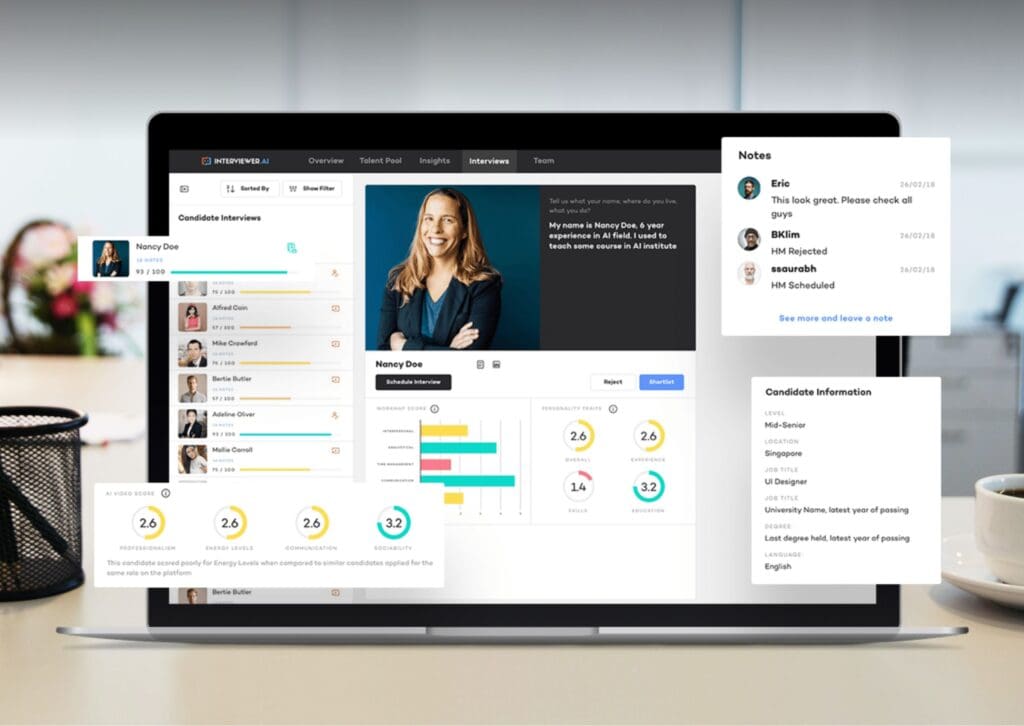

robots.txt (opens in a new tab)
5 rulesAll bots 1 allowed · 4 disallowed
- Allow
/wp-content/uploads/ - Disallow
/wp-content/plugins/ - Disallow
/wp-admin/ - Disallow
/readme.html - Disallow
/refer/
No matching rules.
Sitemaps
3Recent Updates
- Website images
- Screenshots
- Network details
- Website Technologies
- Pages and Search Information
- HTTP Response Information
- TLS and certificates
- DNS Information
- Domain Registration
- Website profile
- Website Description
- Website Name
- Website profile
- Website Description
- Website Name
User reviews (0)