Website profiles · Technology insights · Alternatives

manypixels.co

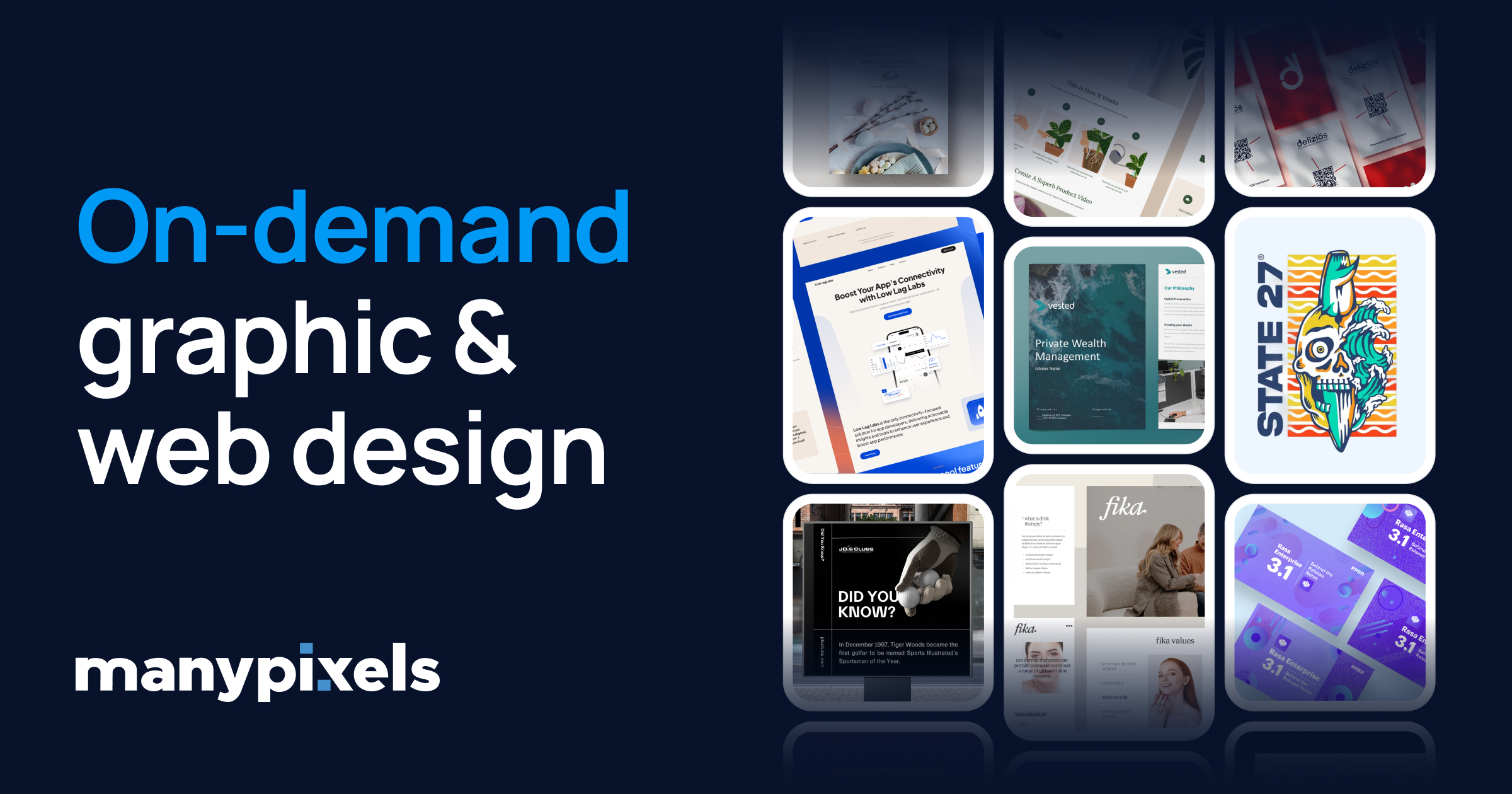
Skip the hiring. Get professional graphic design for a flat monthly rate — social media, web design, illustrations and more. 150,000+ projects delivered.

Paid content
Visit website
Profile views 5 Outbound visits 1 Normal
ManyPixels Full homepage screenshot

At a glance

Category
Design & Creativity
Language
English
Paid-content signal
Paid contentObserved
Registered
2017
Hosting
CloudflareInferred
HTTPS certificate trusted
PassedObserved
Last updated

Website review

This review may include AI-generated content and is not individually verified. Domain, certificate and other facts come from the observed data on this page.

What is ManyPixels?

ManyPixels is a subscription-based graphic and web design service. Instead of hiring a full-time designer or commissioning each project separately, you pay a recurring fee and submit design requests, which are handled by an assigned designer with support staff behind them. The site positions it as "creative as a service" for teams that need a steady flow of design work without building an in-house team.

What it covers

The service spans a broad range of creative output, including:

  • Marketing and advertising visuals
  • Custom illustrations and icons
  • Web and landing page design
  • Motion graphics and video editing
  • Brand and identity work, including logos
  • Print and presentation design
  • Social media graphics and display ads

How the process works

The workflow is deliberately simple, which is the main appeal for non-designers:

  1. You submit a request with references and brand assets.
  2. ManyPixels matches it with a suitable designer and starts work.
  3. You leave feedback directly in the platform and request revisions.
  4. Final files arrive in the formats you need.

Who it suits

This model fits startups, marketing teams and small businesses with a continuous but unpredictable design workload — the kind of organization that would otherwise juggle freelancers. It is less suited to work needing deep strategic ownership or a single dedicated senior designer embedded in your team.

What to weigh

A subscription makes sense when your monthly design volume is high enough that the flat fee beats per-project pricing. If your needs are occasional, a freelance marketplace or one-off commission may cost less. Before committing, check the current plan tiers and turnaround expectations on the pricing page, and consider a trial project to judge whether the output matches your brand standards.

For comparison, 99designs runs contests and one-off projects, while Canva covers simple self-serve design — both are different trade-offs against a managed subscription.

How does ManyPixels' subscription pricing compare to hiring a full-time designer?

ManyPixels uses a flat monthly subscription for on-demand design work, while a full-time designer is a salaried employee with benefits, equipment and management overhead. The subscription model is generally cheaper at low-to-moderate design volumes and easier to scale up or pause; a full-time hire becomes more economical when you need someone embedded in the team every day.

Where the subscription model wins

  • Predictable cost, no hiring cycle. You pick a plan and start submitting requests, rather than recruiting, interviewing and onboarding.
  • Variable workload fit. Marketing teams with bursts of social graphics, display ads, landing pages, presentations or illustrations can queue work without paying for idle time.
  • Breadth of skills. The page lists marketing and advertising, illustration, web design, motion and video, brand and identity, and print and presentation — useful when no single generalist covers everything.
  • Simple process. Submit a request with references and brand assets, a matched designer works on it, you comment in the platform, and files are delivered in the formats you need.

Where a full-time designer wins

  • Deep context. An in-house designer learns your product, tone and internal stakeholders continuously, which matters for complex, high-stakes brand work.
  • Real-time collaboration. Whiteboard sessions, quick pivots and cross-team input happen faster with someone in the room.
  • Ownership. Long-term design systems, brand governance and mentoring sit more naturally with an employee.

Practical comparison

Factor ManyPixels subscription Full-time designer
Cost structure Flat monthly rate Salary, benefits, tools, workspace
Commitment Monthly, can scale or pause Long-term employment
Speed to start Days Weeks to months
Skill range Multiple disciplines via a team One person's specialisms
Best for Variable, multi-format output Continuous, deeply contextual work

A useful next step

List your monthly design requests and estimate hours per item. If the total is part-time and spans several formats, a subscription is likely the better fit; if it exceeds a full workload and needs daily collaboration, hire. Many teams start with a subscription and add an in-house lead once volume and complexity justify it. For a second opinion on subscription design services, Design Pickle and Penji are worth comparing on turnaround and scope.

What is the process for requesting and receiving designs from ManyPixels?

ManyPixels runs on a four-step request-and-delivery loop: submit a brief, get matched with a designer, give feedback in the platform, then receive final files in the formats you need. The workflow is built for ongoing requests rather than one-off projects, so most of the practical detail lives in how you write the brief and how you handle revisions.

The four steps

  1. Submit your request. You describe what you need, share reference material, and upload brand assets such as logos, fonts and colour files. Quality here determines how few revision rounds you need.
  2. Designer assignment. ManyPixels matches the project to a designer with relevant skills. The page lists specialisms including UI, brand design, illustration, video editing and graphic design, so a motion or video request should route differently from a print piece.
  3. Feedback in-platform. You leave comments directly in the tool rather than by email, and the designer iterates until it is right.
  4. Delivery. Final designs arrive in the formats you ask for, ready for the channels you named.

What to put in a brief

  • Deliverable and dimensions: "1080×1080 Instagram carousel, three slides" beats "social media graphics."
  • Brand assets up front: logo files, fonts, colour codes, and any existing templates.
  • References: two or three images showing the direction you want, plus one showing what to avoid.
  • Copy: final text, or a clear note that placeholder text is fine for a first pass.
  • Format on delivery: editable source, PNG, PDF, MP4, or platform-ready exports.

Matching the workflow to your situation

Your situation How the loop suits you
Steady stream of social, ad and web assets Requests queue naturally; you batch briefs instead of briefing each asset separately
One-off logo or brand identity Workable, but you carry the strategy decisions yourself
Video editing and motion Supported per the service list; expect to supply raw footage and a clear edit direction
Tight, same-day turnaround Depends on plan tier and queue depth — confirm before relying on it

Practical trade-offs

The subscription model rewards volume and continuity: the more you brief in parallel, the more value you get per month. It suits marketing teams, founders and agencies that always have creative work in flight. It is a weaker fit if you need a single complex project with deep strategic discovery, or if you want to speak with the same designer on a call every week — the platform is asynchronous by design.

Before your first request, check the plan tiers and turnaround terms on the pricing page, since queue priority and revision limits usually vary by tier: ManyPixels. For a second opinion on the service from people who have used it, the customer reviews section of the same site is a reasonable starting point.

Can ManyPixels handle both graphic design and web design projects?

Yes. ManyPixels is set up as a single subscription covering both graphic and web design, with motion and video, illustration, brand identity, and print work listed alongside them. If your team currently splits small design jobs between a freelancer for social assets and a separate web person for landing pages, this is the kind of setup that consolidates both.

What the service covers

The page names these categories: marketing and advertising, illustrations, web design, motion and video, brand and identity, and print and presentation. Specific deliverables called out include presentation design, landing page design, brand identity, social media graphics, illustration, print, web design, logo design, motion graphics, video editing, display ads, and icon design.

How a project actually runs

  1. You submit a request with references and brand assets.
  2. A designer is matched to the work and starts.
  3. You leave feedback in the platform and iterate.
  4. Final files arrive in the formats you need.

The site reports 150,000+ designs completed, 2,000+ customers, and operation since 2018, and it lists named specialists by discipline — including a video editor, brand designers, illustrators, and UI designers.

Where the trade-off sits

A flat monthly subscription suits a steady flow of small-to-mid requests: ad variations, social templates, landing page sections, logo refreshes, illustration sets. It is a weaker fit for large one-off builds with heavy engineering — a full e-commerce replatform, a design system with a component library, or anything needing front-end code, CMS integration, or ongoing A/B testing infrastructure. Those usually need a dedicated web agency or in-house developer working alongside the designer, and the page does not claim development work.

A practical test before subscribing

Take one graphic task and one web task you already need — say a campaign banner set and a landing page layout — and submit both in the first cycle. That tells you whether one subscription realistically absorbs both queues, or whether the web side needs a separate route. Compare the plan tiers on ManyPixels against your monthly volume before committing, and if you want a second reference point for subscription-based design, Design Pickle runs a similar model.

How fast is the turnaround time for design requests on ManyPixels?

ManyPixels does not publish a single, fixed turnaround time that applies to every request. Its site describes a subscription design service where you submit a request, get matched with a designer, review work in the platform, and receive final files — but the stated workflow stops short of promising a specific number of hours or days per deliverable. The practical answer is that speed depends on the type and complexity of what you ask for: a social media graphic or display ad is typically much faster than a full website design, brand identity system, or motion/video edit.

What the process implies about speed

The published workflow has four stages: submit your request with references and brand assets, the designer starts, you leave feedback in the platform, and files are delivered. Each feedback round adds time, so the realistic turnaround for any single item is a function of:

  • Scope of the request — a single icon or ad variation versus a multi-page landing page.
  • How complete your brief is — brand assets, references and copy supplied up front reduce back-and-forth.
  • Number of revision rounds — the site says work is iterated until it is right, which means each round extends the clock.
  • Queue position — subscription services typically work through multiple client requests in parallel, so demand at any given moment can affect when your item starts.

How to get a concrete number

Because ManyPixels sells plans rather than per-project quotes, the fastest way to a real answer is to ask before you commit. Book a call or contact the team and describe two or three actual deliverables you need — for example, "ten social media graphics and one landing page" — then ask what turnaround they would commit to for each, and whether that is measured in business days or calendar days. You can also check the pricing page to see which plan tier corresponds to your expected volume, since higher tiers are generally designed for faster or more concurrent output. For comparison, other subscription design services such as Design Pickle and Penji publish their own turnaround expectations, which can help you benchmark what is normal in this category.

A useful decision criterion

If your need is same-day or next-day production work — routine social posts, ad variations, resizing — ask specifically whether the service supports that cadence and how many requests can run at once. If your need is a one-off website or brand identity, treat turnaround as a project timeline rather than a subscription speed feature, and get a written estimate for that specific deliverable.

What types of businesses or teams benefit most from using ManyPixels?

ManyPixels suits organizations that need a steady flow of creative work but don't want to recruit, contract and manage individual freelancers. Its subscription model and on-demand design team are aimed at recurring output rather than one-off projects, so the best fit is a business with a continuous pipeline of design requests.

Who gets the most value

  • Startups and small businesses without an in-house designer. A founder or marketer can submit briefs, share brand assets and receive finished files without hiring a full-time creative.
  • Lean marketing teams. If your team already knows what it needs — social graphics, display ads, landing pages, presentation decks — the platform works as an overflow design function.
  • Agencies and consultancies. Teams producing client-facing marketing visuals, brand assets and web pages on tight cycles can use it to absorb peaks without adding headcount.
  • E-commerce and content-driven brands. Frequent needs like social media graphics, illustrations, icons and ad creative fit the recurring-request pattern well.
  • Companies needing brand consistency across many assets. A dedicated designer and a single platform for feedback help keep logos, identity and campaign visuals aligned.

Who may be less well served

Businesses with occasional, unpredictable design needs may find a subscription less economical than hiring per project. Teams with highly regulated or deeply technical design work — for example, complex product UI or compliance-heavy materials — should confirm the designer's relevant experience before committing. Very fast, same-day turnarounds are also worth testing early, since the workflow includes briefing, design, feedback and delivery stages.

A practical next step

List your design requests for the next month and group them by type: social graphics, web pages, illustrations, video editing, brand assets. If that list is long and recurring, a subscription is likely to pay off; if it is short and sporadic, a per-project arrangement is usually the better comparison. ManyPixels publishes its scope of services and pricing plans on its site, so check those against your list before deciding.

Related questions

More questions →
How does ManyPixels' design subscription model work?

ManyPixels is a subscription-based graphic and web design service: instead of hiring a designer, you pay a flat monthly rate and submit design requests through a platform, which matches your project with a designer who works through your feedback until delivery. It fits teams that have a steady but varied flow of creative work — social media graphics, landing pages, brand identity, illustrations, print, motion, and video editing — and would rather pay a recurring fee than recruit, onboard, and manage in-house staff. It is less suited to one-off projects or work that needs a dedicated full-time designer embedded in your team.

The four-step workflow

The site describes the process from brief to delivery in four stages:

  1. Submit your request. You describe what you need, share references, and upload your brand assets.
  2. A designer gets to work. ManyPixels matches the project with the right designer and begins immediately.
  3. Provide feedback. You leave comments directly in the platform, and the team iterates until it's right.
  4. Files are delivered. You receive final designs in the formats you need, ready to use across channels.

The key mechanic is that matching happens on ManyPixels' side. You don't pick a designer from a roster; the service routes your request to someone with the relevant specialty. That's why the platform lists distinct roles — UI designer, graphic designer, brand designer, illustrator, video editor — rather than one generalist pool.

What's included in the scope

The service covers a broad set of creative categories rather than a single format:

Category Example deliverables
Marketing & advertising Display ads, social media graphics
Web design Landing pages, full website design
Brand & identity Logo design, brand identity systems
Illustration Custom illustrations, icon design
Motion & video Motion graphics, video editing
Print & presentation Print design, presentation design

If your request doesn't obviously fit a listed category, the site points you to an "Entire Scope of Service" page rather than ruling it out.

What the numbers suggest about scale

ManyPixels reports 150,000+ designs completed, 2,000+ customers served, and operating since 2018. These figures are useful as a rough signal of volume and longevity — a service that has processed that many projects has likely standardized its intake and revision process. They don't tell you anything about turnaround time, revision limits, or quality on your specific type of project, so treat them as context rather than a guarantee.

How to decide whether it fits

The model works best when:

  • Your design needs are recurring but varied — you'd otherwise be juggling multiple freelancers or a generalist hire.
  • You can write a clear brief and give consolidated feedback in the platform, since iteration happens through comments rather than meetings.
  • You want predictable monthly cost instead of per-project quotes.

It's a weaker fit when:

  • You have a single, one-time design need — a subscription only pays off across repeated requests.
  • You need a designer working inside your own tools and standups full-time.
  • Your work requires deep, ongoing strategic ownership of a brand rather than production of defined assets.

Practical next steps

To evaluate it against your own workload, start by listing the design requests you expect over the next one to three months and sorting them into the categories above. If most of them are production-oriented and repeatable, the subscription model matches that pattern. Then check the pricing page for current plan tiers and terms, since plan structure and what each tier includes are the details that determine whether the flat rate beats your alternatives. If you want to see output quality first, the site's portfolio and customer case studies show completed work before you commit.

How Music Video Editing Shapes a Song's Chart and Promotional Run

Music video editing is not just a creative afterthought—it is a release strategy. The cut you publish, how long it runs, how it is paced, and which versions you distribute across platforms all influence how a song is promoted, how playlists and programmers treat it, and whether the video supports or complicates a chart run. For artists, managers, and labels, understanding the difference between creative editing and chart-rule compliance is essential before the first frame goes live.

Why the Edit Is a Business Decision

A song can exist without a video, but once a video is attached, it becomes part of the song's commercial identity. Editors and directors shape that identity through:

  • Length – a full narrative video may run four to six minutes, while a platform-friendly cut may be trimmed to match the song's radio edit.
  • Pacing – faster cuts suit short-form clips and social teasers; slower, sustained shots suit lyric videos and performance pieces.
  • Versioning – the same song may need a clean version, an explicit version, a vertical cut, and a shortened edit for different outlets.

Each of these choices affects where the video can be placed, how it is promoted, and how it interacts with the song's chart eligibility.

The Main Edit Types and When to Use Them

Radio Edit

A shortened, often lyrically cleaned version timed to fit radio formatting. Use it when the song is being serviced to radio and you want the video to mirror what programmers are playing. If the video runs significantly longer than the radio edit, some promotional partners will use the shorter cut instead, which can split audience attention.

Lyric Video

A lower-cost, text-driven edit that can be released quickly, often before or alongside the official video. It is useful for maintaining momentum in the first days of a release, when fans want something to watch immediately. Lyric videos are also easier to update or replace if a lyric correction is needed.

Performance Cut

Focuses on the artist performing, often in a single setting or with minimal narrative. This is the most flexible format for promotional use because it can be trimmed, looped, or reformatted for vertical platforms without losing coherence.

Narrative Cut

A story-driven edit, usually the "official" video. It carries the most editorial weight but is also the hardest to shorten without losing meaning. If a narrative video is the primary release, plan a separate shorter cut for platforms that favor brevity.

Vertical / Short-Form Cut

A re-edited version framed for vertical screens, often using the hook or chorus. This is not simply a cropped version of the horizontal video—good vertical edits re-time cuts to the platform's pacing and place the most recognizable moment early.

How Edit Choices Interact With Promotion and Charts

Chart rules vary by territory and by chart, and they change over time. The safe approach is to treat the following as general principles rather than fixed rules:

  • Version strategy matters. Releasing multiple edits of the same song can help promotion, but it can also complicate how streams and sales are counted if the versions are treated as separate releases. Check the current rules of the specific chart you care about before splitting a release.
  • Timing matters. A video released before or at the same time as the song can concentrate attention. A video released weeks later can extend a song's promotional life but may miss the initial chart window.
  • Platform fit matters. A video that is poorly formatted for a major platform will get less promotional support, which can indirectly affect the song's visibility.

None of this guarantees a chart position. Editing supports a release; it does not replace audience demand.

A Practical Version Plan

Before editing begins, decide which versions you actually need. A workable starting point:

  1. Official video – the primary creative cut, full length.
  2. Radio edit video – matches the radio edit length and lyrics.
  3. Lyric video – fast turnaround, released early if needed.
  4. Vertical cut – 15–60 seconds, hook-first, for short-form platforms.
  5. Clean version – if the song has explicit content and you want broader placement.

For each version, note the intended platform, the target length, and the release date. This prevents last-minute re-edits that delay a rollout.

Common Mistakes to Avoid

  • Assuming one cut works everywhere. A four-minute narrative video rarely performs well as a short-form clip without re-editing.
  • Ignoring chart-rule details. If you plan to release multiple versions, confirm how they will be counted before release day.
  • Letting the edit drift from the audio. If the video uses a different mix or edit than the released audio, make sure that is intentional and documented.
  • Releasing the lyric video too late. Its main value is speed; if it arrives after the official video, it adds little.

What to Watch For in Industry Coverage

Industry news outlets track release strategies, version rollouts, and chart-rule changes. When reading coverage of a music video release, pay attention to:

  • Whether the video is described as an official video, lyric video, or visualizer.
  • Whether multiple versions were released and in what order.
  • Whether the coverage mentions chart performance, and if so, which chart and which tracking period.

These details tell you more about the strategy than the video's creative style alone.

Bottom Line

Music video editing is a promotional tool with real consequences for how a song is positioned. Decide your version plan before you shoot, match each cut to its platform, and verify chart-rule details for your territory before splitting a release. Creative editing and release strategy are not opposites—the best rollouts treat them as the same job.

Where to Find ManyPixels Pricing, Portfolio, and Customer Reviews

ManyPixels is a subscription-based graphic and web design service, and the three things most people want to check before signing up — pricing, portfolio, and customer reviews — are all reachable from the main navigation on manypixels.co. The pricing page is where you compare plans; the work and case studies pages show what the team has produced; the customer reviews page collects feedback from existing clients. If you just want to know where to click, the table below maps each need to its destination.

What you want to check Where to go What you'll find
Plan options and cost Pricing page (manypixels.co/pricing) Subscription tiers to pick from
Design quality and range Our work / Case Studies Sample designs and client projects
Real user feedback Customer Reviews Reviews from customers
Support and self-help Help Center, Blog, Free Illustrations Guides, articles, downloadable assets

Pricing: start here to compare plans

The site's own call to action is "Pick your plan," and the pricing page is the entry point for that. ManyPixels describes itself as a "subscription based design service," so the pricing page is structured around plan selection rather than per-project quotes. Visit it when you want to compare tiers before committing.

One caveat: the available page information confirms that a pricing page exists and that plans are chosen there, but it does not list specific prices, included request volumes, or turnaround times. Treat any specific number you see elsewhere as unverified until you read it on the pricing page itself.

Portfolio: judge the work before you buy

Two destinations serve this purpose:

  • Our work — a gallery of design categories the service covers.
  • Case Studies — longer-form examples of client projects.

The scope of work advertised spans marketing and advertising visuals, illustrations, web design, motion and video, brand and identity, and print and presentation. The portfolio categories mirror this: presentation design, landing page design, brand identity, social media graphics, illustration, print, web design, logo design, motion graphics, video editing, display ads, and icon design. Use the portfolio to check whether your specific need — say, a landing page or a set of display ads — appears in their output.

The site also cites scale signals: 150k+ designs completed, 2,000+ customers served, and operating since 2018. These are the company's own figures and are useful as context, not as independent proof of quality.

Customer reviews: see what users report

The Customer Reviews page collects feedback from people who have used the service. This is the place to look for patterns — how people describe turnaround, communication, and revision handling — rather than a single glowing quote. Pair what you read there with the case studies, since reviews tell you about the experience and case studies show you the output.

How the service works, in case it affects your decision

Understanding the workflow helps you interpret the portfolio and reviews. According to the site, the process runs in four steps:

  1. Submit your request — describe what you need, share references, and upload brand assets.
  2. Designer gets to work — the project is matched with a designer and starts immediately.
  3. Provide feedback — leave comments directly in the platform and iterate until it's right.
  4. Files are delivered — receive final designs in the formats you need.

If your evaluation depends on revision rounds or platform-based feedback, this is the mechanism to ask about when you book a call or start a plan.

Support and free resources

Beyond the commercial pages, the site offers a Help Center for support questions, a Blog for articles, and a Free Illustrations section with downloadable assets. These are worth a look if you want to sample the illustration style before subscribing, or if you have a pre-sales question the Help Center already answers.

A practical order of operations

If you're evaluating ManyPixels, this sequence covers the essentials efficiently:

  1. Open the pricing page and note the plan structure.
  2. Browse Our work and Case Studies for output in your category.
  3. Read Customer Reviews for experience signals.
  4. Check the Help Center for anything unresolved.
  5. Use Book a Call or Get Started when you're ready to move.

The site also offers a "See ManyPixels in action" video on the homepage, which is a quick way to preview the workflow before reading further.

What Is ManyPixels and What Does It Offer?

ManyPixels is a subscription-based graphic and web design service that gives you an on-demand design team instead of requiring you to hire one. It fits teams that have a steady or recurring flow of creative work — social media graphics, web design, illustrations, brand identity, motion and video, print, and presentations — and want it handled through a flat monthly plan rather than per-project contracts. According to the site, it has completed 150,000+ designs for 2,000+ customers and has been operating since 2018.

What ManyPixels actually is

The core model is "creative as a service": you pay a subscription, submit design requests, and work with assigned designers through a shared platform. The site describes it as "a subscription based design service powered by talented creatives and dedicated support," positioned as an alternative to hiring — "Skip the hiring."

That framing matters for who it suits. You are not buying a single deliverable; you are buying ongoing access to design capacity.

Services covered

ManyPixels lists its scope across these categories:

  • Marketing & Advertising
  • Illustrations
  • Web Design
  • Motion & Video
  • Brand & Identity
  • Print & Presentation

Within those, the specific design types shown on the site include:

Category Examples listed
Web & digital Landing page design, web design, display ads, icon design
Brand Brand identity design, logo design
Content & social Social media graphics, illustration design
Motion Motion graphics, video editing
Print & presentation Presentation design, print design

The site presents this as "a one-stop shop for all your creatives," so a single subscription can cover multiple needs rather than one narrow specialty.

How the process works

The workflow is a four-step loop:

  1. Submit your request — describe what you need, share references, and upload brand assets.
  2. Designer gets to work — the service matches your project with a designer and starts.
  3. Provide feedback — leave comments directly in the platform and iterate until it's right.
  4. Files are delivered — receive final designs in the formats you need.

The iteration step is the important one: revisions happen inside the platform, so the value depends on how clearly you brief and how quickly you respond.

Who it's a good fit for

ManyPixels makes sense if:

  • You have recurring design needs rather than a one-off project.
  • You want to avoid hiring a full-time designer or managing freelancers individually.
  • Your work spans multiple formats — for example, social graphics one week and a landing page the next.
  • You can write a clear brief and give feedback asynchronously.

It's a weaker fit if you need a single small asset, want to hand-pick a specific designer, or require work that falls outside the listed categories.

What to check before subscribing

The site's pricing page is where plan tiers, turnaround expectations, and revision limits live — those details determine whether the subscription matches your volume. Before committing, confirm:

  • Turnaround time for your typical request type.
  • How many requests you can run at once.
  • Revision limits per design.
  • What counts as in-scope versus an add-on.

You can see the plans at the pricing page and review past work in the site's portfolio and case studies sections, which is the fastest way to judge whether the output style matches your brand.

ManyPixels vs. Hiring a Designer or Agency: Which Fits Your Team?

ManyPixels is a subscription-based graphic and web design service that works best for teams with a steady but varied flow of creative requests who want to avoid the cost and commitment of a full-time hire or the overhead of a traditional agency. It is not the right fit if you need a single senior designer embedded in your team, or if your work requires deep strategic ownership of a brand. The choice comes down to three trade-offs: cost structure, turnaround and communication, and how much control you want over who does the work.

The three options at a glance

Dimension ManyPixels subscription Full-time designer Design agency
Cost structure Flat monthly rate (see pricing page) Salary, benefits, equipment, software Project or retainer fees, often with minimums
Commitment Ongoing subscription, cancel when you stop Long hiring and onboarding cycle Contract terms per project or retainer
Scope Marketing visuals, web design, illustrations, brand identity, motion and video, print and presentation Whatever you assign, within one person's skill set Usually defined by the agency's specialty
Capacity Shared across a team of creatives; requests queue One person's available hours Depends on the account team assigned
Communication Brief, feedback, and files handled in the platform Direct, in-house Through an account manager
Who does the work Matched to your project from a pool of designers The person you hired The agency's assigned team

How the subscription model actually works

ManyPixels describes a four-step process:

  1. Submit your request — you describe what you need, share references, and upload brand assets.
  2. A designer gets to work — the project is matched with a designer and begins.
  3. Provide feedback — you leave comments directly in the platform, and the work is iterated until it's right.
  4. Files are delivered — you receive final designs in the formats you need.

The company states it has completed 150,000+ designs for 2,000+ customers and has been operating since 2018. Its listed service areas include presentation design, landing pages, brand identity, social media graphics, illustration, print, web design, logos, motion graphics, video editing, display ads, and icon design.

The practical implication: you are buying access to a rotating pool of specialists rather than one person's time. That is an advantage when your requests span formats, and a limitation when you want one designer to hold long-term context on a single product.

Where a subscription wins

  • Your request volume is uneven. Some months you need ten social graphics and a landing page; other months you need almost nothing. A subscription absorbs that variance better than a salaried role.
  • You need many formats, not deep expertise in one. The service covers illustration, motion, print, and web work under one plan.
  • You want to skip hiring. No recruiting, onboarding, benefits, or equipment.
  • Your briefs are clear. The process assumes you can articulate what you want and give feedback in-platform.

Where a hire or agency wins

  • You need someone in the room. Strategy, stakeholder conversations, and fast verbal iteration are hard to run through a request queue.
  • You need one consistent hand. A full-time designer accumulates context that a rotating pool does not.
  • Your work is highly regulated or confidential. In-house keeps everything inside your walls.
  • You need an agency's strategic layer. Agencies typically bring research, positioning, and account management alongside execution — a different product from on-demand production.

What to evaluate before subscribing

  • Turnaround expectations. The site does not publish per-request delivery times in the material reviewed here, so confirm current service-level expectations before you commit.
  • Revision limits. The process says work is iterated until it's right, but check how many rounds a plan includes.
  • Who owns the files. Confirm licensing and ownership terms for delivered work.
  • Plan tiers and price. Pricing is on the ManyPixels pricing page; the tiers and what each includes are not detailed in the source material here, so review that page directly.
  • Your real request volume. Estimate how many design requests you actually generate per month. If it's one or two, a subscription may cost more than a freelancer per project.

A quick decision rule

Choose ManyPixels if you have a continuous, varied stream of production design work and no in-house designer. Choose a full-time hire if design is central to your product and needs daily, contextual involvement. Choose an agency if you need strategy and execution bundled, and can absorb higher cost and slower cycles.

Website Overview

An established domain and managed infrastructure suggest continuity of operations and may support dependable delivery, although neither guarantees service quality. Page metadata, canonical configuration and social previews work together to provide more consistent search and sharing presentation.

Domain and Registration

Registered in 2017, this domain has about 8 years of history. That suggests continuity, although ownership and purpose may have changed. Transfer-protection status is present, helping reduce the risk of unauthorized domain transfers. The registrar is NameCheap, Inc., a widely used domain service provider. The domain uses the common .co extension, which is not an independent safety signal.

DNS and Email

Nameservers are provided by Cloudflare, indicating managed DNS hosting. MX records point to the Google Workspace email service. SPF and DMARC are configured. DKIM status is unknown. TXT records include verification markers for Google. Such markers may also remain after a service stops being used. DNSSEC signatures were not detected, so this additional DNS authenticity protection is not confirmed.

TLS and Certificates

The public key uses EC with 256 bits. The server supplied a complete certificate chain. No organization name is present in the certificate; the available fields are consistent with domain validation. The certificate was issued within the Google Trust Services cloud or CDN ecosystem. The certificate's total validity is about 90 days, consistent with a short renewal cycle.

HTTP and Browser Security

The response lacks these common security headers: X-Content-Type-Options, Referrer-Policy, Permissions-Policy. No X-Powered-By header was found, reducing one common source of backend fingerprinting information. The cf-ray response header indicates a CDN or caching proxy in the delivery path. No obvious internal addresses or debug information were found in the headers. The Server header identifies cloudflare without an exact version.

Technology Stack Analysis

The public page identifies Webflow, HubSpot CMS, Google Tag Manager, Cloudflare without precise versions, leaving fewer clues for version-specific scanning.

Search and Social Sharing

Twitter Card metadata is configured. The title has 48 characters, within a common display range. A meta description is present, with 153 characters. The observed directives allow indexing and link following. No Generator meta tag is publicly exposed.

Hosting and Email

DNSCloudflare
HostingCloudflare
EmailGoogle Workspace
Approximate IP geolocation (inferred; a CDN or proxy may differ from the origin server) United States flagUnited States Inferred 198.202.211.1

Registration details

RDAP / WHOIS

RegistrarNameCheap, Inc.
Registered2017-11-28
Expires2026-11-28
Domain statusclientTransferProhibited https://icann.org/epp#clientTransferProhibited
Nameserversheather.ns.cloudflare.com、paul.ns.cloudflare.com
DNSSECunsigned

DNS records

DNS

TypeNameValueTTLPriority
Acdn.webflow.com198.202.211.1300—
AAAAcdn.webflow.com2620:cb:2000::1300—
MXmanypixels.coaspmx.l.google.com3001
MXmanypixels.coalt1.aspmx.l.google.com3005
MXmanypixels.coalt2.aspmx.l.google.com3005
MXmanypixels.coalt3.aspmx.l.google.com30010
MXmanypixels.coalt4.aspmx.l.google.com30010
NSmanypixels.coheather.ns.cloudflare.com86400—
NSmanypixels.copaul.ns.cloudflare.com86400—
TXTmanypixels.coahrefs-site-verification_bfe9bfea624aaa586ebff5abfbd3789eaa25bed0063a9bf314ca166ee39eb8c2300—
TXTmanypixels.cobrevo-code:eda20bd79edd6efac7db98910326cd79300—
TXTmanypixels.cogoogle-site-verification=CUZOUxuy5S-9f1SkKzTPMN6e-2QgSaZQSJoARKBAPUc300—
TXTmanypixels.cogoogle-site-verification=vCh2_MDAndmMRbeKkcD_GaHr0FRjwtTWb9YNxB3v7HE300—
TXTmanypixels.cogoogle-site-verification=vlD9COMhULVzwy6Eq-LJdNFFkDMYZcVunD2BVsJWhKY300—
TXTmanypixels.cogoogle-site-verification=zqzkAZ5y-pH6wK01MpDYrHz1Re_D0yOeSLtjFmy-Slk300—
TXTmanypixels.coproxy-ssl.webflow.com300—
TXTmanypixels.cov=spf1 include:_spf.google.com include:spf.autopilothq.com include:spf.tapfiliate.com include:spf.postie.getsitecontrol.com ~all300—
CNAMEwww.manypixels.cocdn.webflow.com3600—
DMARC_dmarc.manypixels.cov=DMARC1;p=none;sp=none;pct=100;rua=mailto:[email protected];ruf=mailto:[email protected];ri=86400;aspf=r;adkim=r;fo=1300—

TLS and certificates

TLS / SSL

AssessmentNormal configuration
Supported protocolsTLSv1.2、TLSv1.3
Negotiated protocolTLSv1.3
Certificate subjectwww.manypixels.co
IssuerGoogle Trust Services
Valid until2027-01-09T18:37 · Remaining when checked: 87 days
Verification detailsCertificate trust: Passed · Hostname match: Passed

HTTP response headers

HTTP

HeaderValue
content-typetext/html; charset=utf-8
servercloudflare
strict-transport-securitymax-age=31536000
content-security-policyframe-ancestors 'self'
x-frame-optionsSAMEORIGIN

Identified technologies

WebflowHubSpot CMSGoogle Tag ManagerCloudflare

Pages, Search and Sharing

Meta descriptionSkip the hiring. Get professional graphic design for a flat monthly rate — social media, web design, illustrations and more. 150,000+ projects delivered.
Canonical URLhttps://www.manypixels.co
LanguageEnglish (default)
Twitter Cardsummary_large_image
All bots 1 allowed · 3 disallowed
  • Allow/
  • Disallow/pricing-sale
  • Disallow/search
  • Disallow/dev

User reviews (0)

  • No reviews yet.