
 简体中文
简体中文 English
Website review
This review may include AI-generated content and is not individually verified. Domain, certificate and other facts come from the observed data on this page.
What is Franz?
Franz is a desktop messaging workspace for Mac, Windows and Linux that puts multiple chat and email services into one window instead of separate apps. According to the site, it supports 75+ services—WhatsApp, Slack, Gmail, Signal, Discord and Telegram among them—runs each in its own isolated container, and unifies notifications and unread badges. It also offers workspaces for grouping services, a "Magic Bar" for finding messages and jumping to tasks, and an AI assistant that can summarize across channels and draft replies.
Who it suits
The site positions Franz for people who constantly switch between client chat, team chat, inbox follow-through and secure threads—consultants, recruiters, founders and operators. A concrete case: a consultant with WhatsApp for clients, Slack for the internal team and email for handoffs can see all three in one view rather than hunting across apps.
Trade-offs to weigh
- Convenience vs. focus: one unified view reduces app-switching, but it also concentrates many notifications in one place; per-service notification settings matter.
- AI handling is a plan choice: the site separates plans by how AI is handled, so check the Pricing page if AI summaries and drafting are central to your workflow.
- Privacy posture: Franz says it is built in the EU and emphasizes privacy-conscious local features; if sensitive conversations are involved, review its privacy and security settings before adding accounts.
As a next step, list the three or four services you check most each day; if they span chat and email and you lose time switching, Franz is worth a trial. If you mostly use a single ecosystem, a native app may be simpler.
How does Franz keep each messaging service isolated and secure?
Franz runs each connected service in its own isolated container, so WhatsApp, Slack, Gmail, Signal and the rest operate as separate sessions rather than sharing one browsing context. That separation is the core of its security model: a session in one service is not directly exposed to another, and each keeps its own login state.
What the isolation means in practice
- Separate sessions per service. Logging into a work Slack and a personal WhatsApp keeps those credentials and cookies apart, which suits anyone mixing client, team and personal accounts on one machine.
- A contained environment per service. Because each service lives in its own container, a problem in one service is less likely to spill into the others—useful when you add many services or custom sites.
- Local-first handling. Franz describes privacy-conscious local features and notes it is built in the EU. Treat "local" as covering how the app handles data on your device, and check the privacy settings for what is stored and what analytics are sent.
A realistic scenario
A consultant runs client WhatsApp, internal Slack, Gmail for handoffs and Signal for sensitive threads in one window. Isolation keeps the client account from sharing a session with the internal one, and the unified unread badges mean nothing gets buried—without merging the accounts themselves.
Decision criterion
If your main risk is account bleed between work and personal identities, per-service containers address it directly. If your risk is a compromised third-party service reaching your data, isolation limits cross-service exposure but does not replace good account hygiene—use strong unique passwords and two-factor authentication per service.
For how isolation, workspaces and AI handling are packaged, compare plans on Franz before choosing.
Can I use Franz to get AI summaries across WhatsApp, Slack, and email at once?
Yes. Franz is designed to bring WhatsApp, Slack and email into one desktop workspace, and its AI Assistant is presented as working across those connected services at once. The page shows an example request ("Catch me up on ACME since Friday") that pulls together email, WhatsApp and Signal messages, identifies what changed and what is blocking, and drafts a reply.
What this looks like in practice
- Cross-service summaries: You ask one question and the assistant reports findings from multiple channels rather than you checking each app.
- Blocker and next-step extraction: The example summary separates what changed, what is blocking, and the next action.
- Draft replies: The assistant can draft a message, which you review before sending.
- Workspace context: Services are grouped into workspaces, so you can keep a client project's WhatsApp, Slack and inbox threads together.
Practical fit
This suits consultants, recruiters, founders and operators who switch between client chat, internal team chat and email all day. A recruiter juggling candidate WhatsApp threads, a hiring-manager Slack channel and email follow-ups is a good match. Someone who mainly lives in one app will get less from it.
Trade-offs to weigh
- Plan-dependent AI: The page frames plan choice around "how you want AI handled," so confirm which tier includes cross-service summaries before committing.
- Review still matters: Summaries and drafts are starting points; verify facts like legal status or pricing before acting.
- Connected accounts: You need to sign in to each service within Franz for it to see those messages.
Next step: List the two or three channels where your replies get buried, then check the plan details at Franz to confirm the AI Assistant covers them.
Which plan should I choose if I want AI features handled locally rather than in the cloud?
Choose the plan that explicitly states AI runs locally on your device. On Franz's pricing page, the plan descriptions are organized around "how you want AI handled," so the local-AI option is the one whose AI assistant is described as running on-device rather than through a cloud service. Look for wording like "local," "on-device," or "your data stays yours" attached to the AI assistant in that plan's feature list, and pick that tier. Avoid choosing based on price alone, because a cheaper plan may include the AI assistant only in cloud mode.
How to confirm before you commit
- Check the AI row in each plan: The plan you want should name local AI processing as an included feature, not just "AI summaries."
- Check the privacy section: Franz says its work is built in the EU with privacy-conscious local features. Confirm the plan you select actually extends that to the assistant, not just to message storage.
- Test with one sensitive service first: Add a work account (Slack or email) and run a summary request. If the assistant responds without a network round-trip indicator or cloud notice, you're on the local path.
Who this matters for
If you're a consultant, recruiter, or operator handling client contracts or confidential threads — the audience Franz describes — local AI is the safer default. If you only use AI for casual catch-ups on personal chats, cloud AI is usually fine and may be cheaper.
For a second opinion on desktop messaging aggregators and their privacy trade-offs, Signal publishes guidance on local versus server-side processing that helps frame the decision.
How do workspaces in Franz help me separate client chats from internal team conversations?
Workspaces in Franz give you separate named sets of services, so client chats and internal team conversations live in distinct views rather than one crowded sidebar. You switch between them instead of scrolling past the wrong accounts. According to the page evidence, Franz supports multiple workspaces (the interface shows a Workspaces section alongside Services) and runs each service in its own isolated container, with unified notifications and unread badges across services. The site positions this for consultants, recruiters, founders and operators who move between client chat, team chat and inbox follow-through all day.
What this looks like in practice
- A "Clients" workspace: WhatsApp for client threads, Gmail for handoffs, plus any client-specific Slack or Teams account.
- An "Internal" workspace: your team's Slack, Microsoft Teams and internal email.
- A "Personal" workspace: personal WhatsApp, Telegram or Discord, kept out of work views.
Because services run in isolated containers, a client WhatsApp account and a personal one can coexist without mixing sessions. Notifications stay unified, so you still see that something needs attention even when you are in the other workspace.
Trade-offs to weigh
| Approach | Strength | Weakness |
|---|---|---|
| One workspace, all services | Everything visible at once; nothing missed | Client and internal threads compete for attention; more misdirected replies |
| Separate workspaces per context | Cleaner focus; lower risk of replying in the wrong thread | You must switch views to catch something in the other workspace |
| Workspaces plus AI summaries | Summaries can pull cross-service context together | The page's example summary spans Email, WhatsApp and Signal, so check how it handles separation between contexts |
A practical decision rule: split workspaces by who you are accountable to (client vs. employer vs. self), not by app. That keeps the isolation meaningful when the same app appears in two contexts.
A concrete next step
Open Settings → Services, add each account you use, then create a workspace per audience and assign only the relevant services to each. Start with two workspaces—Clients and Internal—and add a third only when a genuinely separate context appears. If you want to compare this with other all-in-one messaging desktops, Franz is the product described here; Slack and Signal are the underlying services whose own apps handle a single context each.
What happens to my data given that Franz is built in the EU with privacy-focused local features?
Franz's EU development and "local" privacy features mean your message data is primarily handled on your own machine and in each service's own isolated container, rather than pooled into one Franz-run cloud inbox. That is the practical difference from a web-based aggregator: the app is a desktop workspace that displays your existing accounts side by side, so most of what you see still originates from WhatsApp, Slack, Gmail or Signal themselves.
What the page actually claims
- Local features: the page describes "privacy-conscious local features" and states "Your work stays yours. Built in the EU."
- Isolation: each supported service "runs in its own isolated container," which limits one service's session from bleeding into another inside the app.
- AI is a choice: a heading reads "Pick the plan that matches how you want AI handled," implying that AI summaries and the assistant are tied to plan selection rather than always-on.
What this does and doesn't settle
EU-built is a statement about where the software is developed and how the vendor frames its obligations, not a guarantee that no data leaves your device. Anything involving the Franz Assistant—such as the example "Catch me up on ACME since Friday"—implies message content is processed to produce a summary, so the meaningful question is whether that processing happens locally or on a server, and under which plan. The page does not spell this out, so treat it as the first thing to verify.
Each underlying service also keeps its own data under its own terms. Franz can isolate containers, but it cannot change what WhatsApp or Slack store on their servers.
How to decide
- If your concern is a single noisy inbox: Franz's cross-channel view and unified notifications solve that, and container isolation is a reasonable hygiene bonus.
- If your concern is confidentiality of message content: check, before adopting, exactly what the AI assistant sends off-device and whether a plan lets you keep AI disabled while still using the unified view.
- If you handle regulated client material: confirm retention and logging behaviour with the vendor directly, since the marketing page is about workflow, not compliance certifications.
A concrete test: install the free tier, connect one low-risk account, and observe network activity and assistant behaviour before adding client chat or secure threads.
For comparison, Signal's own desktop client at Signal is the reference point for end-to-end encrypted messaging, and Slack's documentation at Slack covers what that platform retains—useful baselines for judging what any aggregator adds or leaves untouched.
 Cloudflare
 Google Workspace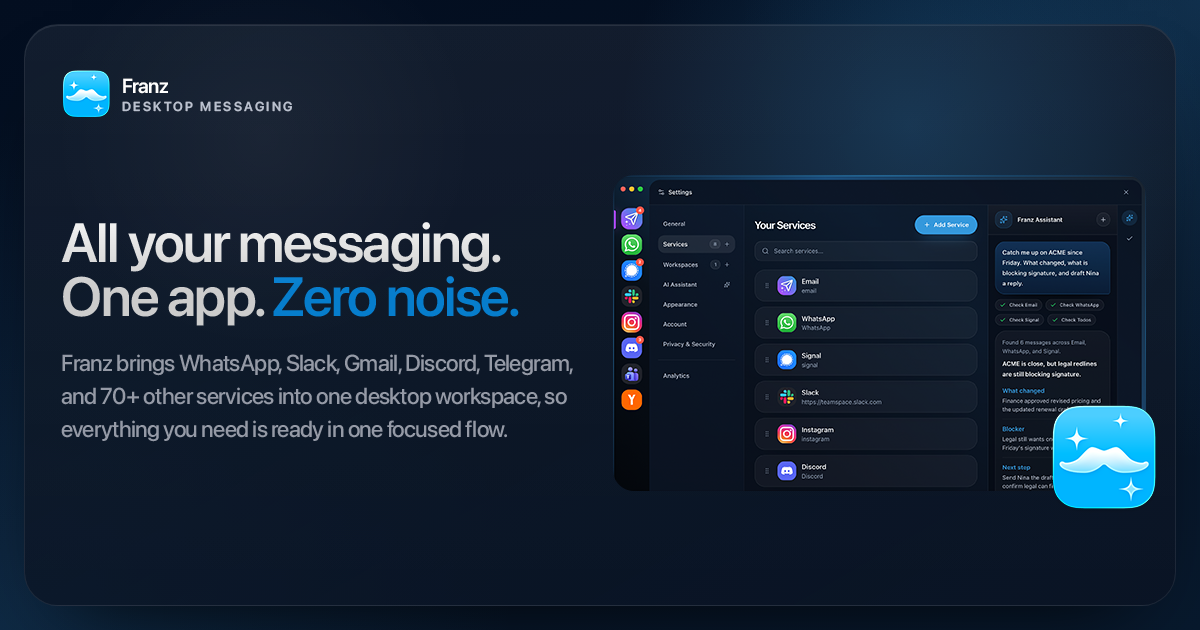

User reviews (0)