Website profiles · Technology insights · Alternatives

meetor.app

Meetor is the Effortless and Secure When2Meet Alternative - Simplify scheduling without the need for sign-ups, with our free and user-friendly interface.

No paid content found
Visit website
Profile views 9 Outbound visits 12 Normal
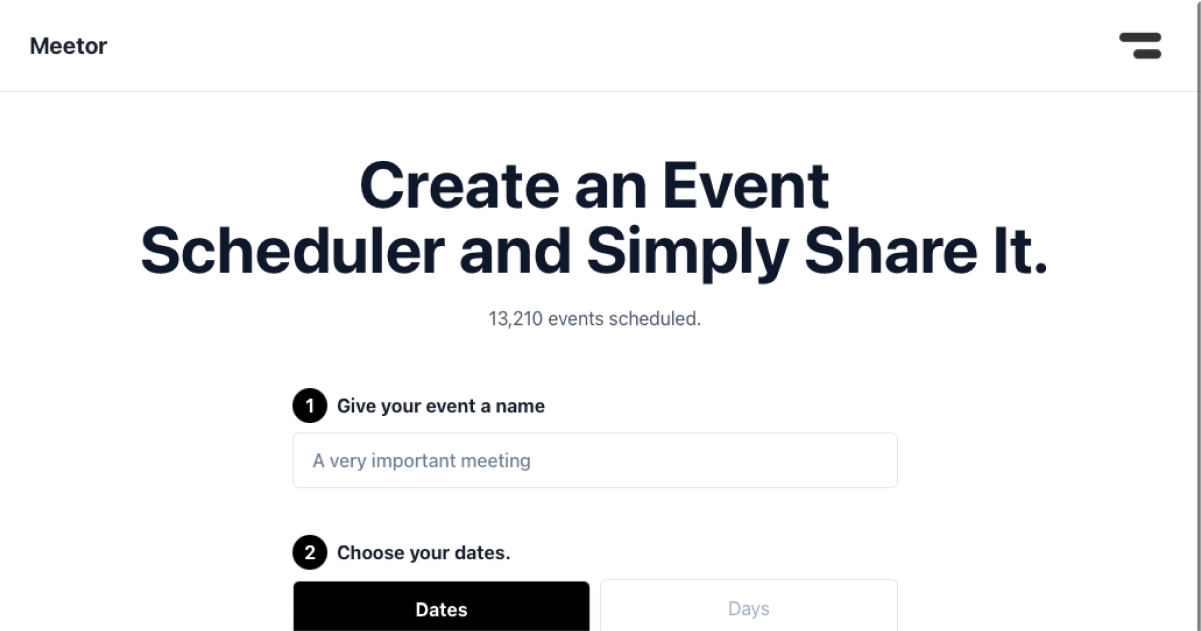
Meetor Full homepage screenshot

At a glance

Category
Productivity
Language
English
Paid-content signal
No paid content foundObserved
Registered
2023
Hosting
VercelInferred
HTTPS certificate trusted
PassedObserved
Last updated

Website review

This review may include AI-generated content and is not individually verified. Domain, certificate and other facts come from the observed data on this page.

What is Meetor?

Meetor is a free, browser-based group scheduling tool positioned as an alternative to When2meet. Its focus is on letting people find a common meeting time without creating accounts or signing up.

What it does

  • Creates a shared availability grid where participants mark when they are free.
  • Aggregates responses so the group can see overlapping times at a glance.
  • Avoids user accounts, which lowers the barrier for one-off scheduling among loosely connected people.

Who it suits

  • Teams coordinating a single meeting without adding another account to manage.
  • Organizers inviting external participants who may not want to register.
  • Casual groups (clubs, classes, friend circles) where speed matters more than calendar integration.

Trade-offs to expect

  • No-signup tools generally offer less persistent history and fewer integrations than calendar-based schedulers.
  • Privacy depends on how the link is shared; anyone with the link can typically view or edit responses.
  • For recurring meetings or large organizations, a tool tied to existing calendars may be a better fit.

A practical next step: if you already use When2meet, try Meetor on a low-stakes meeting first and compare how quickly your group responds. If you need calendar sync or recurring events, look at established schedulers instead.

How does Meetor compare to When2meet for scheduling group meetings?

Meetor positions itself as a When2meet alternative, so the comparison comes down to how much friction you want in the scheduling loop and how much control you need over the final time slot.

Where they differ in practice

Dimension Meetor When2meet
Account requirement No sign-ups, per its description No sign-ups
Core workflow Availability collection with a free, simple interface Availability grid, long-standing and widely recognized
Emphasis "Effortless and secure" scheduling Bare-bones availability polling

The practical difference is less about the basic idea — both collect when people are free — and more about the surrounding experience. Meetor's pitch stresses that you don't need accounts and that the interface stays simple, which matters when you're coordinating a group that includes people who won't create logins for a one-off meeting.

When each makes sense

  • Pick Meetor if your group is ad hoc: a club, a family gathering, a volunteer shift, or a class project where half the participants have never used a scheduling tool and you want them to click a link and be done.
  • Pick When2meet if familiarity is the priority. Its format is so widely used that many people already recognize the grid, which reduces explanation time even if the interface feels dated.
  • Consider either when the meeting is a one-off. Neither requires an account, so neither creates the "now I have another login" problem that calendar tools can introduce.

A concrete scenario

You're organizing a five-person project kickoff across two time zones. You paste a link into a group chat. With either tool, the people who respond fastest are usually the ones who already know the format. If your group skews toward people who've used When2meet before, they'll move faster there; if you're dealing with a mix of newcomers, a cleaner interface tends to produce fewer "how do I fill this in?" messages.

Decision criterion

Ask one question: does your group need the tool to feel familiar, or does it need the tool to feel simple? Familiarity favors When2meet; simplicity and a no-signup promise are what Meetor is selling. If your group is small and technically comfortable, the difference will be minor — try whichever link you can send fastest.

As a next step, create a test poll with three fake time slots and view it on a phone before sending it to your real group. Mobile rendering is where scheduling tools most often stumble, and it's the fastest way to tell whether Meetor's interface claim holds up for your participants.

Do participants need to create an account or sign up to use Meetor?

No. Participants do not need to create an account or sign up to use Meetor. The site positions itself as a When2Meet alternative built around sign-up-free scheduling, so the intended flow is that you share a link and people mark their availability directly.

What this means in practice

  • Organizers and participants can both join a scheduling poll without registering.
  • There is no password to remember or account to verify before responding.
  • Availability is typically collected through the shared poll link itself, which keeps the barrier low for one-off groups.

Why that matters for real groups

Sign-up-free tools work best when you are polling people who may never use the tool again: a club deciding on a rehearsal, a team picking a meeting slot, or a group of friends coordinating a trip. The trade-off is that account-based tools usually offer stronger identity checks and a persistent history of your polls, which matters if you schedule the same group repeatedly.

A useful next step

Before sending the link, do a quick test poll with two or three people and confirm that responses save correctly and that you can see everyone's availability in one view. If your group schedules together often, compare whether a no-signup tool or an account-based calendar tool fits your workflow better. You can try Meetor at Meetor.

Can I use Meetor to find a meeting time across different time zones?

Yes. Meetor is built for group scheduling, and its no-sign-up availability grid works across time zones — participants in different regions can mark the hours that suit them, and the overlap shows where everyone lines up.

H3 How it works in practice

  • Each person sees and marks times in their own local zone, so nobody has to convert manually.
  • You share one link; no accounts are needed for respondents, which matters when you're inviting people outside your organisation.
  • The resulting grid makes the common window visible, and you pick the slot that covers the most people.

H3 Where cross-time-zone scheduling gets tricky

  • Day boundaries: A slot that reads as late evening for one participant may be early morning for another, so check the date as well as the hour when you finalise.
  • Partial coverage: With widely spread groups, a true "everyone available" slot may not exist. Decide in advance whether you'll accept the best overlap or rotate inconvenient times between meetings.
  • Daylight saving: Zones shift at different dates, so re-confirm the final time close to the meeting rather than relying on a poll filled in weeks earlier.

H3 A concrete scenario A five-person project team split between Europe, India and the US west coast uses Meetor for a weekly sync. The grid typically shows a narrow window in the European late afternoon that lands in the US morning — workable, but only if the US participants accept an early start. For a one-off kickoff, that's fine; for a recurring call, consider alternating the slot so the same people aren't always the ones compromising.

H3 Next step Create the poll, list the date range in your own zone, and add a note asking respondents to answer in their local time. Once responses are in, convert the winning slot into a calendar invite with an explicit time zone and a link to a world clock reference so nobody misreads it.

If you want a second opinion on the same poll, When2meet is the closest familiar equivalent: When2meet.

Is Meetor free to use, and are there any paid plans or limits?

Meetor is presented as a free scheduling tool, and the available page information does not indicate any paid plans or premium tiers. It is positioned as a When2meet alternative that works without requiring sign-ups, so the core scheduling flow appears to be available at no cost.

That said, the page evidence is very thin, so I cannot confirm specific limits such as maximum participants, number of events, or any advanced features that might sit behind a paid tier. If those details matter for your use case, the safest next step is to open the site directly and look for a pricing or limits page before relying on it for a large or recurring group.

Practical way to decide

  • For casual use (a one-off meeting with a handful of people): a free, no-signup tool like this is usually the right fit. You avoid account creation and get a shareable link quickly.
  • For recurring or larger groups: check whether there are caps on respondents or events. Free scheduling tools often limit how many people can respond or how many polls you can keep active.
  • For anything sensitive: since no sign-up is needed, confirm how responses are stored and shared before using it for confidential scheduling.

If you want a comparison point, When2meet is the long-standing free option at When2meet, and Doodle offers both free and paid tiers at Doodle. Meetor's main draw is the combination of no sign-up and a simpler interface, which is most useful when you just need a quick availability poll without managing accounts.

How does Meetor protect the privacy and security of scheduling data?

Meetor's pitch centers on removing the usual weak point in group scheduling: the account. Its page presents it as a no-sign-up, free scheduling tool, which means participants join a poll by link rather than by creating profiles with names, email addresses and passwords that then sit on someone's server. Fewer stored accounts means less personal data to leak, and less exposure to credential-stuffing attacks that reuse passwords from other breaches. For anyone who has tried to collect availability from a client group or a class, that friction reduction is the practical benefit.

Beyond that, the public page gives no detail on the mechanics. It does not state encryption in transit or at rest, retention periods, who can view a poll, whether links are guessable, or how data is deleted. Any claim about those specifics would be an assumption, not a feature.

What you can verify yourself

  • Whether a poll link is unlisted and long enough that outsiders cannot stumble onto it.
  • Whether the creator can close or delete a poll once the date is chosen.
  • Whether the tool asks for email addresses, phone numbers or calendar access at any step.
  • Whether responses are visible to all participants or only to the organizer.

A realistic scenario

Suppose you are scheduling interviews for a hiring panel. Candidates' availability is sensitive, and you do not want it visible to other candidates. With an account-free tool, protection depends almost entirely on link handling: send each candidate a separate poll, or use one poll but confirm that individual responses are not shown to everyone. Then close the poll as soon as the slot is booked.

If your data is regulated or confidential, treat a no-sign-up tool as suitable for low-sensitivity coordination only, and check its privacy policy before entering names alongside availability. For stricter needs, compare against organizers with published data-handling terms, such as Doodle or Google Calendar appointment slots, and read their privacy documentation directly.

Related questions

More questions →
Do I Need to Sign Up to Use Meetor?

No. Meetor is built as a no-sign-up scheduling tool, so you can create and share a scheduling poll without registering an account or handing over personal details. That makes it a practical choice when you want to find a meeting time quickly and would rather not add another login to your life.

The trade-off is that anything tied to an account — saved history, a persistent dashboard, or profile-based features — isn't part of the deal. Meetor is positioned as an effortless, secure alternative to When2meet, and the no-sign-up design is central to that pitch.

What "No Sign-Up" Actually Means

When a scheduling tool says you don't need an account, it usually means three things:

  • No registration step. You go straight to creating a poll instead of confirming an email or setting a password.
  • No personal profile required. You don't need to provide a name, email, or other identifying information just to start.
  • Participants don't need accounts either. The people you invite respond through a shared link, not by logging in.

This is the same model that made When2meet popular: the barrier to entry is a link, not a signup form.

Why This Matters for Privacy and Convenience

Convenience

The biggest practical win is speed. There's no password to create, no confirmation email to wait for, and no "forgot password" detour if you only use the tool occasionally. For one-off scheduling — a team lunch, a study group, a family call — that's usually the right amount of friction.

Privacy

Because you don't create an account, there's no profile tying your identity to your availability over time. You share only what the poll needs: your name (or whatever label you choose) and the times you're free. Participants who are cautious about handing over their email address can respond without doing so.

That said, "no sign-up" is not the same as "no data at all." The poll itself has to store responses so everyone can see the results. Treat the shared link as the sensitive part: anyone who has it can typically view and respond to the poll.

How to Create and Share a Schedule

The flow is short by design:

  1. Open Meetor and start a new scheduling poll — no account step.
  2. Add the candidate dates or time slots you want people to choose from.
  3. Generate the poll link and send it to participants through email, chat, or any messaging app.
  4. Wait for responses. As people fill in their availability, the poll updates so you can see where the overlap is.
  5. Pick the winning slot based on the responses and confirm it with the group.

The exact labels and layout may vary, but the sequence — create, share, collect, decide — is the same regardless of the tool.

How Participants Respond

Participants don't need to sign up either. They open the link, mark the times that work for them, and submit. Their answers appear in the same poll view everyone else sees, which is what lets you spot the slot that works for the most people.

A few things worth knowing before you send the link:

  • Responses are visible to anyone with the link. Don't share it more widely than you intend.
  • There's no account to recover. If you lose the link, you may not be able to get back to the poll the way you would with a logged-in tool.
  • Keep a copy of the link somewhere you can find it — a note, a chat with yourself, or the calendar event you're planning.

When No Sign-Up Is the Right Fit

Situation No-sign-up tool like Meetor Account-based tool
One-off meeting with a new group Good fit — fastest path Overkill
Recurring scheduling you want to track over time Limited — no saved history Better fit
Participants who won't create accounts Good fit Poor fit
You need a persistent dashboard Not designed for it Better fit

If your goal is simply "find a time that works and move on," skipping the signup is the whole point. If you need to manage many polls over months and revisit them later, an account-based tool will serve you better.

Quick Answer Recap

  • Sign-up required? No — neither you nor your participants need an account.
  • Personal info required? Not to start; you share only what the poll needs.
  • How do you share it? Through a poll link you send to participants.
  • Main limitation? No account means no saved history or dashboard, so keep your link safe.

For a one-off scheduling task, that's usually a fair trade: less friction up front, and a bit more responsibility for holding onto the link yourself.

How Is Meetor Different from When2meet?

Meetor is a scheduling tool positioned as an alternative to When2meet, and the main differences come down to three things: no sign-up requirement, a stated emphasis on security and simplicity, and a free, user-friendly interface. If your goal is to find a time that works for a group without creating accounts or managing a login, Meetor is built for that use case. This comparison covers how the two tools differ in workflow, access, and positioning, so you can decide which fits your group.

The core difference: no sign-ups

The most concrete distinction is that Meetor is described as simplifying scheduling "without the need for sign-ups." That means participants can indicate their availability without registering an account first.

When2meet is also known for lightweight, no-account scheduling, so this is not a unique feature in the category — but it is the feature Meetor leads with. If avoiding registration is your top priority, both tools aim at that need; Meetor frames it as a central design choice rather than an afterthought.

How the workflows compare

Dimension Meetor When2meet
Account required No sign-up needed (per site description) No account needed for basic use
Positioning "Effortless and secure" alternative Long-standing, widely used availability poll
Interface Described as free and user-friendly Simple grid-based availability entry
Cost signals Described as free Free to use

The table reflects what Meetor states about itself. When2meet's column reflects its general reputation as a no-frills availability poll; treat those cells as category context rather than a feature-by-feature audit.

Where Meetor emphasizes security and simplicity

Meetor's description pairs "effortless" with "secure," which signals that it wants to be seen as a lower-friction, lower-risk option than juggling multiple scheduling accounts. In practice, for a reader deciding between tools, this matters most when:

  • You are coordinating people who are reluctant to create yet another account.
  • You want a single link or poll that participants can fill in quickly.
  • You prefer a clean interface over a feature-heavy calendar suite.

If your group already lives inside a calendar ecosystem and needs deep integrations, a dedicated availability poll like either of these may be too minimal — that is a limitation of the category, not just of Meetor.

Is Meetor a free alternative?

Yes — Meetor is presented as a free, user-friendly interface and an alternative to When2meet. The site does not list pricing tiers or payment platforms in the available information, so there is no evidence of a paid plan. That said, absence of pricing details is not proof of every feature being unlimited; if you need guarantees about limits or data handling, check the site directly before relying on it for sensitive scheduling.

When to choose which

  • Choose Meetor if you want a no-sign-up scheduling poll and you value the "secure and simple" framing, and you are open to a newer alternative.
  • Choose When2meet if you prefer the established, widely recognized tool that most participants have already used.
  • Choose neither if you need calendar syncing, recurring meeting automation, or enterprise controls — look for a full scheduling platform instead.

For most casual group scheduling — picking a meeting time among friends, a small team, or a club — the deciding factor is usually whether participants can respond without friction. Both tools target that, and Meetor's pitch is that it does so without sign-ups while emphasizing security and ease of use.

Is Meetor Secure for Scheduling Meetings?

Meetor is designed as a no-sign-up scheduling tool, and its own description positions it as "effortless and secure." The main security advantage is structural: because you don't create an account, you aren't handing over a password, email profile, or persistent personal identity just to find a meeting time. That said, "secure" here means reduced exposure, not a guarantee — you should still check the site's privacy details before entering sensitive information.

What Meetor Is

Meetor is a scheduling tool built as an alternative to When2meet. Its stated purpose is to simplify finding a time that works for a group without requiring sign-ups, using a free and user-friendly interface.

For a scheduling tool, that framing matters. The typical job is narrow: collect availability from several people and surface the overlapping windows.

Why No Sign-Up Matters for Privacy

The most concrete security-relevant feature is the absence of registration.

  • No account credentials. You don't create or store a password, so there's no login to be reused or leaked.
  • Less personal data submitted. A sign-up flow usually asks for an email, name, or profile details. Skipping it means less information tied to you.
  • Lower exposure if the service is breached. Data that was never collected can't be exposed.

This is a meaningful reduction in risk compared with tools that require accounts. It does not, however, make the tool automatically safe for confidential material.

How Scheduling Data Is Used

The purpose of the data you enter is coordination: indicating when you're available so the group can pick a time. Availability windows are the core input.

Practical implication: treat the tool as a place for when you're free, not for why or with whom in sensitive detail. If a meeting's existence is confidential, the availability pattern itself can reveal information — for example, that a certain group is coordinating at all.

Limits to Keep in Mind

  • "Secure" is a claim, not an audit. The site describes itself as secure, but the provided material doesn't include independent verification, encryption specifics, or a security certification.
  • No pricing or login details are confirmed here. Don't assume anything about paid tiers or account options beyond what the site states.
  • You are still sharing data with a third party. Any hosted tool receives what you type. The question is how much and how sensitive.

What to Check Before You Rely On It

  1. Open the site's privacy policy or privacy statement and read what is collected, how long it's kept, and whether it's shared.
  2. Confirm whether responses are public to anyone with the link or restricted to invited participants.
  3. Decide whether the meeting's existence is sensitive. If it is, avoid putting identifying context in the poll.
  4. For highly confidential coordination, prefer a tool your organization has vetted, or coordinate internally.

Bottom Line

Meetor reduces privacy exposure mainly by not requiring sign-ups, which means fewer credentials and less personal data in play. That makes it reasonable for ordinary scheduling where the main need is finding a common time. It is not a substitute for due diligence on sensitive meetings — check the privacy terms and keep confidential context out of the availability poll.

What is Meetor?

Meetor is a web-based scheduling tool designed to help groups find a meeting time that works for everyone. It positions itself as an alternative to When2meet, offering a free, user-friendly interface that does not require sign-ups. If you need to coordinate availability across several people without creating accounts or managing logins, Meetor is built for that use case.

What Meetor Does

At its core, Meetor solves a common coordination problem: when multiple people need to agree on a time, back-and-forth messages get messy fast. Meetor provides a shared space where participants indicate their availability, and the overlapping windows become visible.

According to the site, the tool is:

  • Effortless — the scheduling flow is meant to be quick and low-friction
  • Secure — described as a secure option for collecting availability
  • Sign-up free — no account creation is needed to use it
  • Free — presented as a free tool
  • User-friendly — the interface is designed for straightforward use

Meetor as a When2meet Alternative

When2meet is a well-known name in the no-frills scheduling space. Meetor explicitly frames itself as "the best alternative to When2meet," which tells you the intended comparison point: same general job (group availability polling), with an emphasis on being effortless and secure.

If you have used When2meet before, the mental model carries over. You are not getting a full calendar suite or a project management platform — you are getting a focused tool for one task: figuring out when a group can meet.

Who It Is For

Meetor fits situations like:

  • A small team trying to book a recurring sync
  • A group of friends planning an event
  • A class or club coordinating a session
  • Anyone who wants availability input without asking people to register

It is less suited to cases that require deep calendar integration, automated reminders, or enterprise-level controls — the site's description does not claim those capabilities.

Key Takeaways

Question Answer
What is it? An online scheduling/availability coordination tool
Main alternative to When2meet
Sign-up required? No
Cost Described as free
Interface User-friendly, effortless

If your goal is simply to collect availability from a group and find a common time without adding account overhead, Meetor is aimed directly at that need.

Is Meetor Free to Use?

Yes. Meetor is described as a free, user-friendly scheduling tool, and there is no mention of paid plans, subscriptions, or paywalls on the site. You can use it to simplify scheduling without signing up. The only caveat: the available site information doesn't list a pricing page or payment platform, so treat "free" as the current stated positioning rather than a formal price guarantee.

What the site says about cost

Meetor presents itself as "the effortless and secure When2Meet alternative" and highlights that it simplifies scheduling "without the need for sign-ups, with our free and user-friendly interface."

Two things stand out in that description:

  • Free is stated directly as part of the product description.
  • No sign-up is stated as a core feature, which matters because many scheduling tools hide cost or limits behind an account.

What is not mentioned

The available information does not include:

  • A pricing page or plan comparison
  • Any subscription, per-event, or per-user fee
  • Payment platforms or checkout links
  • Any feature described as "premium" or "paid"

That absence is not proof that nothing will ever be charged, but it does mean there is no documented paid tier to compare against.

How to confirm before you rely on it

If cost matters for a recurring workflow, verify it directly:

  1. Open meetor.app and look for a pricing, plans, or upgrade link.
  2. Create a scheduling poll and check whether any step asks for payment or account details.
  3. Check whether limits appear (number of participants, number of polls, date ranges) that might indicate a free tier rather than a fully free tool.

If none of those steps surfaces a payment request, you can reasonably treat the core scheduling flow as free to use.

Quick answer

Question Answer based on available info
Is Meetor free? Yes, described as free
Do I need an account? No sign-up required
Are there hidden fees mentioned? None mentioned
Is there a paid plan? Not indicated

For most people scheduling a meeting or event, Meetor works as a no-cost, no-sign-up option. Just confirm on the live site if you need certainty for ongoing or high-volume use.

Website Overview

Several search or sharing settings need attention. Together they may make snippets, preview images or preferred URLs less consistent across platforms.

Domain and Registration

Transfer-protection status is present, helping reduce the risk of unauthorized domain transfers. The domain has about 3 years of registration history; its current configuration provides more context than age alone. The registrar is CloudFlare, Inc., a widely used domain service provider. The domain uses the common .app extension, which is not an independent safety signal.

DNS and Email

Nameservers are provided by Cloudflare, indicating managed DNS hosting. No CNAME was found; the observed records resolve directly to addresses. No MX record was found. A conventional explicit inbound-mail route is not configured. TXT records include verification markers for Google. Such markers may also remain after a service stops being used. DNSSEC signatures were not detected, so this additional DNS authenticity protection is not confirmed.

TLS and Certificates

The public key uses EC with 256 bits. The server supplied a complete certificate chain. No organization name is present in the certificate; the available fields are consistent with domain validation. The certificate was issued within the Google Trust Services cloud or CDN ecosystem. The certificate's total validity is about 90 days, consistent with a short renewal cycle.

HTTP and Browser Security

The response lacks these common security headers: CSP, X-Content-Type-Options, Referrer-Policy, Permissions-Policy, clickjacking protection. CORS permits any origin to read this response. This is common for public resources; sensitive responses need narrower handling. No X-Powered-By header was found, reducing one common source of backend fingerprinting information. The cf-ray response header indicates a CDN or caching proxy in the delivery path. No obvious internal addresses or debug information were found in the headers.

Technology Stack Analysis

The public page identifies Next.js, Cloudflare, Vercel without precise versions, leaving fewer clues for version-specific scanning.

Search and Social Sharing

No homepage canonical URL was detected. If duplicate URLs exist, consolidation may be less explicit. Open Graph is partially configured; og:title, og:description, og:type is missing. The title has 42 characters, within a common display range. A meta description is present, with 153 characters. The observed directives allow indexing and link following.

Hosting and Email

DNSCloudflare
HostingVercel
EmailUnknown
Approximate IP geolocation (inferred; a CDN or proxy may differ from the origin server) Location unknown Inferred 104.21.68.27

Registration details

RDAP / WHOIS

RegistrarCloudFlare, Inc.
Registered2023-07-10
Expires2027-07-10
Domain statusclient transfer prohibited
Nameserversnico.ns.cloudflare.com、val.ns.cloudflare.com
DNSSECunsigned

DNS records

DNS

TypeNameValueTTLPriority
Awww.meetor.app104.21.68.27300—
Awww.meetor.app172.67.185.121300—
AAAAwww.meetor.app2606:4700:3030::ac43:b979300—
AAAAwww.meetor.app2606:4700:3037::6815:441b300—
NSmeetor.appnico.ns.cloudflare.com86400—
NSmeetor.appval.ns.cloudflare.com86400—
TXTmeetor.appgoogle-site-verification=qqpA3dNP9poyx9NFWbnfawJ5HUcs0J_EHTXTuI0-LVc300—

TLS and certificates

TLS / SSL

AssessmentNormal configuration
Supported protocolsTLSv1.2、TLSv1.3
Negotiated protocolTLSv1.3
Certificate subjectmeetor.app
IssuerGoogle Trust Services
Valid until2026-12-06T16:00 · Remaining when checked: 70 days
Verification detailsCertificate trust: Passed · Hostname match: Passed

HTTP response headers

HTTP

HeaderValue
content-typetext/html; charset=utf-8
cache-controlpublic, max-age=0, must-revalidate
servercloudflare
strict-transport-securitymax-age=63072000
access-control-allow-origin*

Identified technologies

Next.jsCloudflareVercel

Pages, Search and Sharing

Meta descriptionMeetor is the Effortless and Secure When2Meet Alternative - Simplify scheduling without the need for sign-ups, with our free and user-friendly interface.
Canonical URLNot detected
LanguageEnglish (default)
Twitter CardNot detected
All bots 1 allowed · 1 disallowed
  • Allow/
  • Disallow/private/

User reviews (0)

  • No reviews yet.