
 简体中文
简体中文 English
Website review
This review may include AI-generated content and is not individually verified. Domain, certificate and other facts come from the observed data on this page.
What is Tad?
Tad is a free, cross-platform desktop application for viewing and analyzing tabular data. According to the site, it is a fast viewer for CSV and Parquet files and for SQLite and DuckDB databases, and it handles large files. It also includes a Pivot Table for exploring and analyzing data, and it uses DuckDB internally for processing.
What it's for
- Inspecting data files quickly without loading them into a full database or spreadsheet tool.
- Exploring and summarizing data with the built-in Pivot Table.
- Working with common formats in one place: CSV, Parquet, SQLite and DuckDB.
- Fitting into data workflows—the site says it is designed for data engineers and data scientists.
Trade-offs to know
Tad is described on its own page as a perpetual work-in-progress hobby project, and the site warns that you are likely to encounter bugs, UI annoyances and corner cases. That is a candid signal: expect a capable but not fully polished tool, and be ready to report issues through its feedback channel.
A practical next step
If you mostly open CSVs in a spreadsheet but find large files slow or awkward, try Tad on a representative file first—ideally one near the size you actually work with—and check whether viewing, filtering and pivoting feel smooth before making it part of your routine. For a broader comparison of desktop data tools, see DuckDB if you want a database engine underneath your analysis.
How does Tad handle large CSV and Parquet files compared to a spreadsheet?
Tad is built to open large CSV and Parquet files that a spreadsheet would struggle with, and the page describes it as a "fast viewer" that "supports large files," using DuckDB internally for processing. That is the core difference: a spreadsheet loads an entire file into memory and recalculates cells as you edit, while Tad treats the file as a dataset to query and browse.
Where the difference shows up
- File size. A spreadsheet becomes slow or refuses to open files with millions of rows. Tad is explicitly aimed at large files, so a multi-gigabyte CSV export is a normal workload rather than an edge case.
- Parquet and databases. Spreadsheets generally open CSV and their own formats. Tad also reads Parquet and SQLite and DuckDB databases, which are common outputs of data pipelines.
- Analysis model. Tad includes a Pivot Table for exploring data, and the release notes mention filters, interactive column histograms for numeric columns, and case-insensitive string filters. In a spreadsheet you build pivot tables by hand; in Tad the pivot is part of the viewer.
- Editing. This is the trade-off. A spreadsheet is a calculation and editing tool. Tad is a viewer, so if your task is entering values, writing formulas, or producing a formatted report, a spreadsheet remains the right tool.
- Export. Tad can export filtered tables as CSV or Parquet, which fits a workflow where you narrow a large file and hand the subset to another tool.
A concrete scenario
Suppose a data engineer receives a 4 GB Parquet export and needs to check row counts, inspect a date column, and filter to one region before sharing results. Opening it in a spreadsheet is impractical; loading it in Tad, filtering, and exporting the filtered subset as Parquet is the intended path. Conversely, if an analyst needs to add a calculated column and format a chart for a slide, the spreadsheet wins.
Decision criterion
Choose based on whether the file fits comfortably in a spreadsheet and whether you need to edit. Large files, Parquet, or database-backed data point to Tad; small files with formulas and formatting point to a spreadsheet.
One caveat from the site itself: the author describes Tad as a "perpetual work-in-progress hobby project," so expect occasional bugs and rough UI edges, and report them through the feedback channel. For a comparable open-source option, GitHub hosts the Tad releases page referenced on the site.
Can I use Tad's pivot table to explore a SQLite or DuckDB database directly?
Yes. Tad is built to open SQLite and DuckDB databases as well as CSV and Parquet files, and its pivot table works on that data inside the app. The site describes it as "a fast viewer for CSV and Parquet files and SQLite and DuckDb databases that supports large files," with a pivot table for analyzing and exploring data, and says processing runs through DuckDB internally. So for a database file, the typical flow is: open the file in Tad, pick the table, then pivot and filter without writing SQL.
What that looks like in practice
- Quick profiling: Drop in a SQLite file from an app or a DuckDB file from an analysis run, then pivot a dimension against a measure to see counts, sums or distributions before committing to a query.
- Filtered exploration: Apply filters, inspect the result in the pivot table, and export the filtered table as CSV or Parquet (Parquet export was added in 0.14.0).
- Iterating on files: If a CSV or Parquet file changes on disk, reloading re-imports it based on the file's modification time (0.12.0), which suits pipelines that rewrite outputs.
Trade-offs to weigh
| Consideration | What it means for you |
|---|---|
| Read-only viewing and analysis | Good for inspection and pivoting; not a replacement for a database client when you need to write, alter schemas or manage users |
| DuckDB under the hood | Fast on large files, but some DuckDB extensions may need downloading, which can be blocked behind corporate firewalls (0.13.0 improved error handling here) |
| Hobby-project status | The site itself warns of bugs, UI annoyances and corner cases, so keep a fallback tool for critical work |
| Desktop install | Packaged installers exist for macOS (Intel and Apple Silicon), Linux and Windows, so it's a local app rather than a browser tool |
A concrete scenario
Suppose you inherit a SQLite file from a legacy service and need to answer "which regions and months drive most of the revenue?" Open the file in Tad, pivot region against month with revenue as the measure, add a filter for a date range, and export the filtered slice as Parquet for a colleague's notebook.
Next step
Install the build for your platform, open one of your own database files, and try a two-field pivot with one filter. If a table is large, start with a filtered subset to confirm the pivot behaves as expected before widening it. If you'd rather work in SQL, DuckDB covers querying SQLite and Parquet files directly; if you want a broader comparison of desktop data viewers, GitHub hosts Tad's releases and issue tracker.
Which platforms can I install Tad on, and is there a version for Apple Silicon Macs?
Tad offers packaged installers for macOS, Linux and Windows, and macOS builds are split by processor type: there is a separate installer for Apple Silicon Macs (M1/M2) alongside one for Intel (x86) Macs. Linux and Windows installers are listed for x86, and the page notes that additional formats, such as .rpm packages for RPM-based Linux distributions, are available on the project's GitHub releases page.
The practical point for Apple Silicon owners is to pick the M1/M2 installer rather than the x86 one; running the Intel build on an Apple Silicon machine would rely on translation and is not the intended path. The release notes also record that native Apple Silicon builds arrived in Tad 0.12.0, so older downloads predate that support.
If you are choosing between the two Mac installers, check "About This Mac" (or System Settings > General > About) to confirm whether the chip is Apple Silicon or Intel, then download the matching build from the official site: Tad.
Does Tad let me export filtered data to Parquet or CSV?
Yes. Tad can export a filtered table as either Parquet or CSV. The release notes for Tad 0.14.0 (June 21, 2024) list "Export filtered tables as Parquet (as well as CSV)" as a new feature, so the export reflects the rows remaining after your filters rather than the full original file.
What this means in practice
- Parquet is the better choice when you want to pass a filtered subset to another analytical tool or keep column types intact. It is compact and well suited to downstream processing in DuckDB, pandas or similar.
- CSV is the better choice when the next stop is a spreadsheet, a quick manual review, or a system that only accepts plain text. Copy/paste to Excel and Google Sheets is also supported per the 0.13.0 notes, which is handy for small slices.
A typical workflow: open a large CSV or Parquet file in Tad, apply filters, inspect a pivot table, then export only the narrowed result as Parquet for further analysis instead of re-filtering the whole file elsewhere.
Decision criterion
Export to Parquet if the filtered data will be read by another data tool; export to CSV if a person or a spreadsheet will open it. If you need both, the release notes indicate both formats are offered for filtered tables, so you can produce each from the same filter state.
One caveat from the site itself: Tad is described as a perpetual work-in-progress hobby project, so expect occasional bugs and UI rough edges. Verify an export on a small filter first if the result matters.
How do I report a bug or send feedback about Tad?
Send feedback or bug reports by email to [email protected], the contact address given on Tad - A Desktop Viewer App for Tabular Data. The site also points to a Help → Send Feedback option inside the app, which is the quicker route when Tad is already open.
What to include
The site doesn't prescribe a format, so this part is practical advice. A report that lets the developer reproduce the problem is far more useful than a description alone:
- Tad version (shown in the release history as 0.14.0, dated June 21, 2024) and your operating system and chip type, since builds exist for macOS Intel, Apple Silicon, Linux and Windows.
- The file type involved — CSV, Parquet, SQLite or DuckDB — and roughly how large it is.
- Steps that trigger the problem, plus the exact error text or a screenshot.
- Whether it happens on reload of the same file or only on first import.
Set expectations accordingly
The page describes Tad as "a perpetual work-in-progress hobby project," and warns that bugs, UI annoyances and corner cases are likely. That framing matters: a single-maintainer tool won't offer ticket queues or response-time commitments, so a clear, self-contained email is the best way to get a fix. For example, a data engineer whose filtered export to Parquet fails should state the Tad version, the source file format, the filter applied and the error message, rather than just "export is broken."
If you'd rather track fixes than report them, the site mentions a low-volume mailing list for release announcements only.
 GoDaddy
 Netlify
 Google Workspace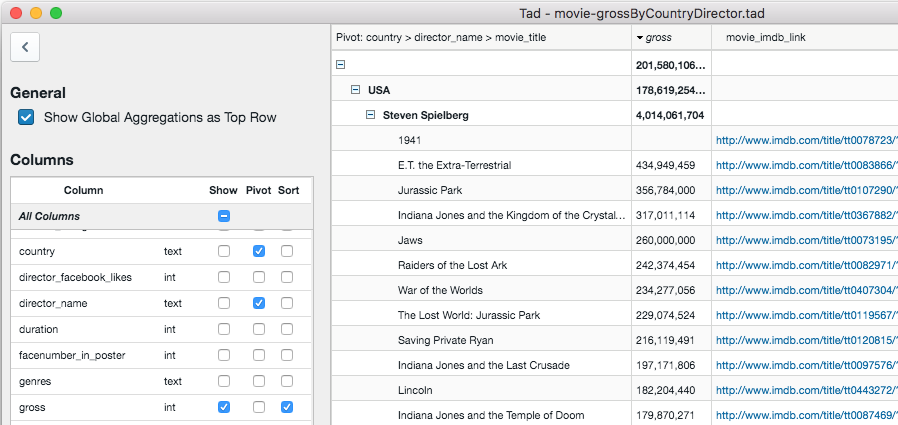
User reviews (0)