
 简体中文
简体中文 English
Website review
This review may include AI-generated content and is not individually verified. Domain, certificate and other facts come from the observed data on this page.
What is TuneJourney?
TuneJourney is a free, browser-based world radio directory built around an interactive 3D globe. Spin the globe (or hit a random spin) and it drops you into a Journey — a city or region — where you can pick a Tune, meaning a live radio station streaming right now. The site says it covers 100,000+ stations across 15,000+ locations, spanning FM, internet-only and community broadcasters.
Two features set it apart from a plain station list. First, AI talk detection can automatically skip chatter, which matters if you want continuous music rather than DJ segments or news breaks. Second, built-in games let you keep listening while you play. You can also filter by genre, country or audio quality, save favourites and build playlists, and it works on desktop and mobile without downloads or an account.
Who it suits
- Background listeners who want music with minimal setup and no signup.
- Genre explorers — jazz from New Orleans, electronic from Berlin, classical from Vienna, Afrobeats from Lagos are the kinds of examples the site gives.
- Armchair travellers who enjoy the geographic framing rather than searching by station name.
- People who dislike talk radio, since the skip feature targets exactly that.
If you mainly want a specific station or podcast on demand, a conventional directory such as Radio Garden or a platform like TuneIn may fit better; TuneJourney is aimed at discovery and casual listening.
A practical first step
Open the globe, spin once, and let it choose for you — then use the genre and country filters to narrow toward what you actually enjoy, and save the stations worth returning to. That turns a random spin into a shortlist quickly.
How does the AI talk-skipping feature work on TuneJourney?
TuneJourney describes its AI talk-skipping as talk detection that automatically skips chatter, so you can keep the music flowing without manually changing stations when a DJ starts talking. The site presents it as an optional toggle rather than a default: you turn it on when you want uninterrupted music.
What it actually does
Based on the page information, the feature is a playback filter layered on top of live radio streams:
- It listens for spoken segments — DJ patter, ads, news breaks, or station IDs.
- When talk is detected, it skips ahead rather than playing that segment.
- It is described as working alongside the other playback controls, including "enhanced playback" and filtering by genre, country, or audio quality.
Practical limits to expect
The site does not describe how detection is tuned, so treat this as an experience trade-off rather than a guarantee. Live radio is not on-demand: you cannot scrub to an exact point, and skipping depends on what the stream provides. Talk-heavy formats — news/talk stations, sports commentary, or call-in shows — are the hardest cases, because speech is the entire programme. Music stations with short ad breaks are the better fit.
A useful test: pick a pop or jazz station, enable talk detection, and listen for ten minutes while noting how often it jumps. If it skips a sung intro or an instrumental passage, lower your expectations for that station and try a different genre.
For listeners who want continuous background music while working, this is the most relevant feature. If you actually want presenters, interviews, or match commentary, leave talk detection off — otherwise you lose the content you came for.
Where it fits in your routine
TuneJourney's globe and "journeys" organise stations by city or region, so talk-skipping pairs naturally with browsing unfamiliar local stations where you do not speak the language and mainly want the music. If you prefer a simpler map-based approach without an AI filter, Radio Garden is the well-known comparison point; TuneJourney itself positions as an alternative to it.
Next step: open the site, spin the globe to a city whose music interests you, start a station, then toggle talk detection on and off during the same station to hear the difference for yourself.
Can I use TuneJourney without creating an account or downloading an app?
Yes. TuneJourney is designed for browser listening with no account and no download: you open the site, spin the 3D globe, and pick a "Journey" (a city or region) to start a live "Tune" (a radio station). The site states it is free and requires no signup.
What that means in practice:
- Access: works on desktop and mobile browsers; nothing to install.
- Saving: the page lists playlists and saved favourite stations, but without an account those saves are likely tied to your browser/device rather than a synced profile. If you switch devices or clear browser data, expect to rebuild your list.
- AI talk detection: an optional toggle that skips chatter automatically — useful for music-only listening, though it may occasionally cut into intros or ads you wanted to hear.
- Games: built-in games run alongside playback, aimed at casual background listening rather than focused album listening.
- Caveats: live streams can buffer or go offline depending on the broadcaster, and availability of specific stations varies by region and rights.
A concrete scenario: you want music while cooking, without signing up. Open TuneJourney, spin the globe, tap a city, and let it play. If you find something worth keeping, save it — but don't count on it following you to another device unless there's an account option.
Decision criterion: choose TuneJourney for zero-friction, no-account world radio browsing. If you need synced favourites, offline listening, or precise playback control, a dedicated radio app will serve you better. For a comparable globe-based alternative, see Radio Garden.
How is TuneJourney different from Radio Garden?
TuneJourney and Radio Garden share the same core idea — spin a globe, click a place, hear a local station — so the difference is mostly in the extras wrapped around that idea rather than the map itself. TuneJourney describes its catalogue as 100,000+ live stations across 15,000+ locations, organises them into "Journeys" (a city or region) containing "Tunes" (individual streams), and layers on filtering, playlists, an AI talk-skip toggle, random spin, and built-in games, all in the browser with no account.
TuneJourney is the option to try if you want more control over what you hear once you land somewhere. Radio Garden remains the reference point for the pure globe experience and is the better first stop if you simply want the novelty of dragging a sphere and hearing whatever comes up.
H3 Where they diverge in practice
| Aspect | TuneJourney | Radio Garden |
|---|---|---|
| Core interaction | 3D globe plus "Journeys" and "Tunes" | Globe-first, place-to-station |
| Finding stations | Filters for genre, country, audio quality; playlists; random spin | Primarily geographic browsing |
| Listening aids | AI talk detection to skip chatter; built-in games | Not described on the page |
| Account | None required | Not described here |
H3 Which fits your situation
- Background music while you work: TuneJourney's talk-skip is the meaningful difference. A news-heavy or DJ-chatty station is often unusable as background; if the AI detection reliably cuts that, you get music without babysitting the tab. Treat that as the feature to test first, since skip accuracy varies by station and stream type.
- Deliberate music discovery: Filters and playlists suit a listener who arrives with intent — "show me high-bitrate jazz stations in Brazil" — rather than browsing by geography alone.
- Casual exploration or a shared screen: The globe is the appeal. Both do this; TuneJourney adds games, which is a nice touch for a party or a second monitor but not a reason on its own.
- Low-friction listening: Both are browser-based. TuneJourney states no signup and no downloads, which matters on a locked-down work laptop.
A useful next step: pick one city you know well and one you don't, and play the same station on each site. That tells you quickly whether TuneJourney's filtering and talk-skip earn a place alongside Radio Garden, or whether the simpler globe is all you actually wanted.
What types of radio stations and genres can I find on TuneJourney?
TuneJourney organises live radio into Journeys (a city or region) and Tunes (the individual stations streaming inside that journey). According to the site, that adds up to 100,000+ live stations across 15,000+ locations, spanning FM radio, internet-only stations and community broadcasters. The genres it names explicitly include jazz, pop, rock, classical, electronic, hip-hop, Latin, Afrobeats and country, with example pairings such as jazz in New Orleans, electronic in Berlin, classical in Vienna and Afrobeats in Lagos.
What that means in practice
- Local flavour, not just global charts: because stations are filed by city or region, you can deliberately listen to a place rather than a genre — useful if you want a sense of a city's music scene rather than a generic "world music" playlist.
- Genre-first browsing: the site says you can filter by genre, country, audio quality or "enhanced playback," so genre is a first-class way in if you already know what you want.
- A mix of station types: commercial FM, online-only broadcasters and community/volunteer stations sit side by side, so expect wide variation in production quality, language and how much talking there is.
- Non-music content included: the AI talk-detection feature exists precisely because many stations carry news, phone-ins and ads — that tells you speech-heavy stations are part of the catalogue, not filtered out.
H3: Trade-offs worth knowing Breadth cuts both ways. A directory of this size will include dead or geo-restricted streams, low-bitrate feeds and stations that switch format without notice. The genre labels are also only as good as the directory's metadata: a "jazz" tag may cover smooth jazz, bebop or a station that plays jazz two hours a day. If you need reliable, high-quality audio for focused listening, filter by audio quality rather than browsing the globe at random.
H3: A concrete way to use it If you're working and want background sound without ads or DJ chatter, turn on AI talk detection, then pick one or two saved stations instead of spinning the globe repeatedly — the site supports playlists and favourites for exactly this. If you're exploring instead, use random spin or tap journeys at random and treat it as discovery rather than curation; expect to skip a fair number before finding a keeper.
H3: Similar places to compare If the globe format is what appeals to you, Radio Garden is the best-known reference point in this space, and TuneJourney itself positions as an alternative to it. For a large, long-established station directory with strong genre and country filtering, TuneIn covers similar ground with a different, list-based interface. Trying two or three side by side is the quickest way to judge whether the globe interaction is genuinely useful to you or just novel.
How do I save or organize my favorite radio stations on TuneJourney?
TuneJourney lets you save stations and organize them into playlists directly in the browser, without creating an account. According to the site, you can "create playlists and save your favourite stations," and the whole service is described as free with no signup required.
H3. What that means in practice Because saving happens without login, it most likely relies on your browser's local storage. That has real trade-offs:
- Works instantly: no email, no password, no verification step.
- Device-bound: favorites saved on your laptop generally won't appear on your phone, since there's no account syncing them.
- Fragile: clearing browser data, using private/incognito mode, or switching browsers can wipe your saved stations.
H3. A sensible way to organize If you're building a collection, a light structure helps:
- Save stations as you find them while spinning the globe.
- Group playlists by mood or use case — "focus," "morning news," "late-night jazz" — rather than by country, since genre and country filters already handle geography.
- Keep one small "favorites" playlist for stations you return to daily, and let broader playlists stay exploratory.
H3. If cross-device saving matters to you Since TuneJourney's own saving appears local, keep a simple external list (a notes app or bookmark folder) of station names and cities for anything you'd hate to lose. You can also compare how other world-radio sites handle accounts:
- Radio Garden — the globe-based service TuneJourney positions itself against.
- radio.net — a large directory with its own favorites features.
H3. Next step Open TuneJourney, spin to one station you like, and immediately test the save and playlist flow before investing time in organizing. If your saved item survives a page refresh, you know the feature is working as expected — and you can then decide whether local-only storage is enough or whether you want a backup list elsewhere.
 Cloudflare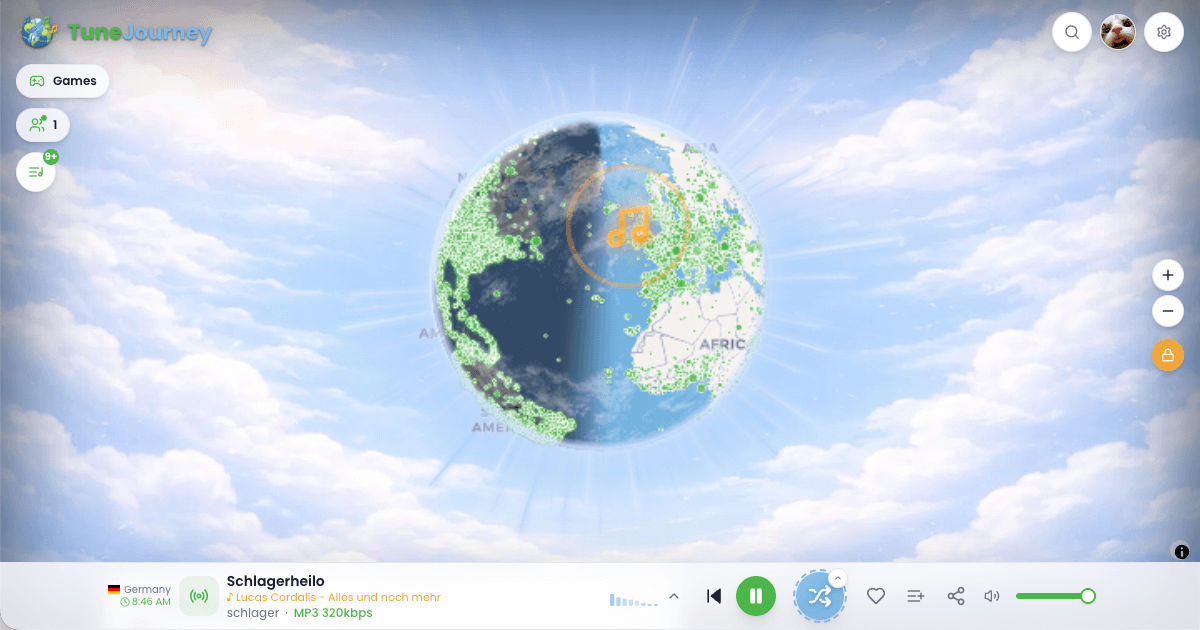

User reviews (0)