
 简体中文
简体中文 English
Website review
This review may include AI-generated content and is not individually verified. Domain, certificate and other facts come from the observed data on this page.
What is Unflip?
Unflip is a browser-based tile-flipping puzzle game. Each level is a grid of black and white tiles, and your goal is to turn every tile white. You do this by dragging from one corner of a square area to the opposite corner; any square region of 2x2 tiles or larger can be selected, and every tile inside it inverts—black becomes white and white becomes black. Because each move flips a whole block, solving a level means choosing regions whose overlaps cancel out unwanted flips.
How a session plays out
- Move: drag corner-to-corner across a square region to flip its tiles.
- Recover: use Undo for the last move and Restart to reset the level.
- Measure yourself: each level shows a "par," the minimum number of moves needed, so you can treat it as a hint or a self-imposed challenge.
- Progress: levels are numbered, and the game also offers daily levels; the page notes plans for more levels, including daily and weekly challenges.
Who it suits
It fits players who like compact logic puzzles with a clear win condition and a move-count target—similar in spirit to lights-out-style puzzles, but with free-form square selection rather than single-tile presses. A short coffee-break session works well: pick a level, aim for par, and restart if you overshoot. If you prefer long narrative games or reflex-based action, this is a different kind of play.
Practical note
Par is the most useful built-in guide: if you're stuck, compare your move count to par to see whether you're close or have taken a wrong turn, then Undo back to a clean state rather than restarting blind.
A reasonable next step is to open Unflip and play the first level to feel how overlapping flips interact before chasing par scores.
How do I solve a level in Unflip?
In Unflip, the goal is to make every tile white. You do this by dragging from one corner of a square area to the opposite corner to select it; the selected area must be at least 2x2, and every tile inside it flips colour — black becomes white and white becomes black. Solve a level by choosing a sequence of these flips that leaves no black tiles, using Undo to step back and Restart to begin again. The "Par" figure is the minimum number of moves needed, so treat it as a target or a hint rather than a rule.
A practical solving approach
- Work from the edges inward. A flip in the middle changes many tiles at once, including ones you have already made white. Flipping near a corner or edge usually disturbs fewer solved tiles.
- Fix one tile at a time. Pick a black tile and find the smallest square that flips it without turning too many white neighbours black. Repeat, checking the board after each move.
- Use Undo deliberately. If a move creates more black tiles than it removes, undo it and try a different square rather than pressing on.
- Compare with Par. If you finish well above Par, restart and look for a larger or better-placed square that handles several black tiles at once.
For example, a beginner might start with a single black tile in a corner, flip a 2x2 square covering it, and find that three white tiles around it have turned black. Undoing and instead flipping a 2x3 area along that edge may clear the corner while leaving the rest of the board untouched. This trial-and-reverse rhythm is the core of the game; the level editor and daily levels on Unflip give you fresh boards to practise it on.
What does par mean in Unflip and how do I use it as a hint?
In Unflip, "par" is the minimum number of moves needed to solve a level—the target score for solving it as efficiently as possible. The game shows it as a fraction like "40/3 moves," where the second number is par and the first is your current move count. You win by making all tiles white, and par tells you the fewest flips that can get you there.
Using par as a hint
Par doesn't reveal which squares to flip, so treat it as a budget rather than a solution:
- Check your count against par as you play. If you're well past par, your approach probably has wasted flips—restart and rethink rather than grinding on.
- Aim to match par, then beat the puzzle's feel. Solving at par is the efficient route; the game treats hitting par as a "Perfect!" result.
- When stuck, count the remaining black tiles. Each flip changes a square area, so a level's par roughly reflects how many overlapping flips are unavoidable. If you need many more moves than par, you're likely flipping areas that undo earlier progress.
- Use Undo and Restart freely. Par is most useful when you test a short sequence, compare your move count, and back out if you overshoot.
Practical scenario
Say a level shows "5/3 moves" and you're at 5 with tiles still black. Rather than keep flipping, restart, look for a single large square that covers several black tiles at once, and try to reach 3 moves. Large flips are usually the key to low move counts.
For the exact rules and the in-game wording, see Unflip - Puzzle Game.
Is Unflip free to play, and what do the archive and full access purchases include?
Yes. The core game is free to play: you open a level, drag across a square of tiles to flip black and white, and keep going until every tile is white. The page lists no paywall on the main levels, and it includes a level editor plus a "Daily Level #1" entry, so you can try the mechanics and build your own boards without buying anything.
What the paid options add
The page shows two one-time purchases, both framed as lifetime access rather than a subscription:
| Option | What the page says it includes | Who it suits |
|---|---|---|
| Daily/Weekly Archive ($4.99) | All past daily and weekly levels, lifetime access, plus future levels as they are released | Players who finish the free levels and want a steady supply of hand-made puzzles without designing their own |
| Full Access ($19.99) | All current and future features and content, early access to a hint system, and support for development | Players who expect to stay with the game long term and want the hint system and whatever gets added later |
The archive is the narrower buy: it fills in puzzles you missed and keeps adding new ones. Full Access is broader and less specific — "all future features and content" is a promise about what may come, not a list you can check today, so treat the early hint access as the only concrete extra named.
A practical way to decide
Play the free levels first and note whether you rely on "Par" (the minimum move count shown per level) as your difficulty gauge. If you enjoy replaying past dailies, the $4.99 archive is the direct fit. If you find yourself stuck and want hints, or you like the idea of supporting a solo developer's ongoing work, Full Access is the one that covers that. The page also invites players to a Discord for weekly puzzles and updates, which is a free way to gauge how actively new content appears before spending anything.
How does the daily level work and how is it different from the main levels?
The daily level is a single puzzle served as a shared challenge, separate from the main progression. According to the game's own instructions, the goal is the same in both modes: flip 2x2-or-larger square areas to invert tile colors and make every tile white. The difference is in structure and pacing rather than rules.
Daily level
- One puzzle at a time. The page labels it as "Daily Level #1," suggesting a rotating or numbered sequence rather than a campaign.
- Same mechanics, fixed puzzle. You still drag corner-to-corner, use Undo and Restart, and chase "par" (the minimum move count).
- Bounded commitment. It suits a short session: open the site, solve today's board, compare your moves against par, and stop.
- Archive access is paid. The page lists an option to "Play all past daily & weekly levels" for $4.99, so missed days are gated behind that purchase.
Main levels
- Sequential progression. Main levels are numbered ("Unflip Level 1") and introduce techniques; the first level's hint is to pull from one corner of the square to the other.
- Structured difficulty. Levels build on each other, with par and best-move tracking per level.
- More surrounding content. The page also references challenge levels, puzzle books, and a level editor, which sit alongside the main set rather than the daily rotation.
Practical difference
If you want to learn the mechanic, start with the main levels, where early boards teach the drag gesture and par gives you a target. If you already understand flipping, the daily level is the better five-minute habit, and par turns it into a light score chase. A player who misses several days should weigh the $4.99 archive against simply waiting for the next daily, since the core puzzle is identical either way.
As a next step, play one main level and note your move count against par; that gap tells you whether the daily's par target will feel like a fair challenge or a frustration.
Can I create and share my own Unflip puzzles with the level editor?
Yes. Unflip includes a built-in level editor and a “Submit Solution” option, so you can build your own boards and share solutions rather than only playing the built-in levels.
What the editor supports
The page evidence points to these creation tools:
- Custom board size — a “Change size” control and a “Default size” setting.
- Manual tile drawing — “Draw” can be toggled on or off, with “Undo” and “Clear” available.
- Solution input — a “Submit Solution” field and an “Input String” field.
- Sharing — a “Share Link” button, and “Save as Daily” for setting a level as a daily challenge.
- Level management — “Add level,” “Delete,” and “Select,” plus import/export through “To JSON,” “Append JSON,” and “Add from json.”
- Puzzle books — “Add book,” “Change Book Title,” and a “Book Icon” toggle for grouping levels.
Practical scenario
Suppose you design a small 4x4 board and want a friend to try it. You would set the size, draw the starting tiles, work out a solution, enter it in the solution field, and then copy the share link. If you later want a themed set, you can collect several levels into a puzzle book with its own title and icon.
Trade-offs to keep in mind
The editor is clearly built for people comfortable with a grid-and-string workflow. The JSON import/export and input-string fields are useful for precise sharing and bulk work, but they are less friendly than drag-and-drop-only tools. The “Par” value is the minimum moves needed, so a level without a sensible par may feel unfair or trivial. Designing a good puzzle means testing that the start state is solvable and that the solution isn't obvious in one or two moves.
Decision criterion
Use the editor if you want to make and distribute your own Unflip variants and don't mind a technical interface. If you mainly want curated puzzles, the main levels and daily challenges are the better starting point; the archive is a paid option noted on the page.
 Cloudflare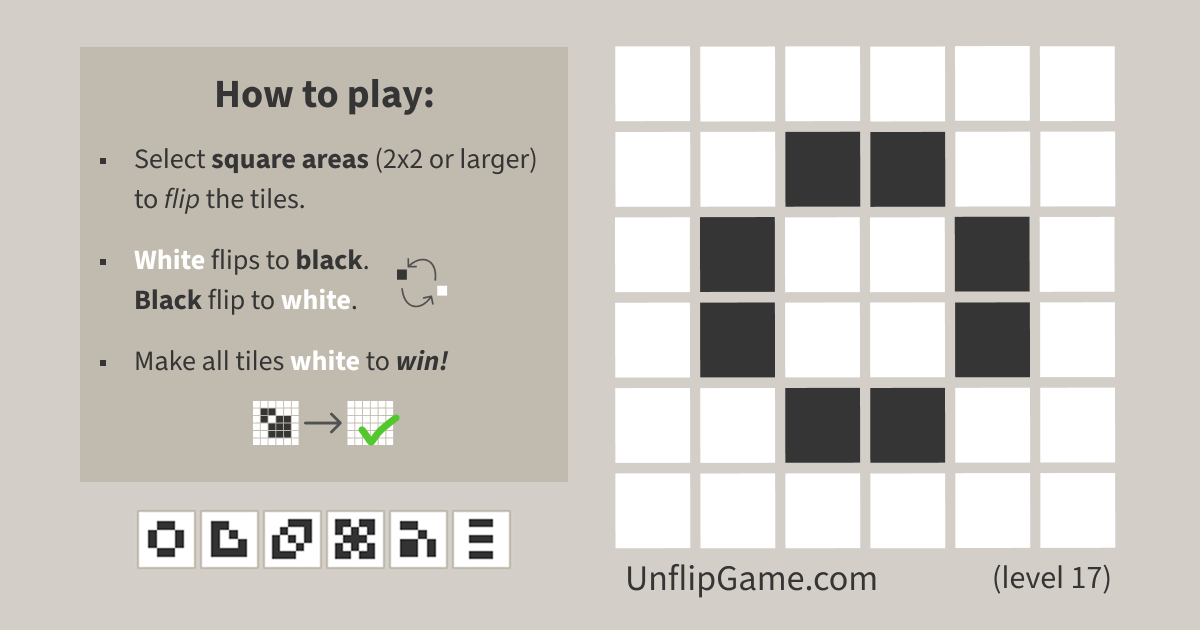

User reviews (0)