Website profiles · Technology insights · Alternatives

emotes.io

Browse a huge collection of Unicode emotes, text faces, kaomoji and other copy-and-paste characters. Click any emote to copy it to the clipboard, then paste it anywhere you like.

No paid content found
Visit website
Profile views 1 Outbound visits 10 Normal
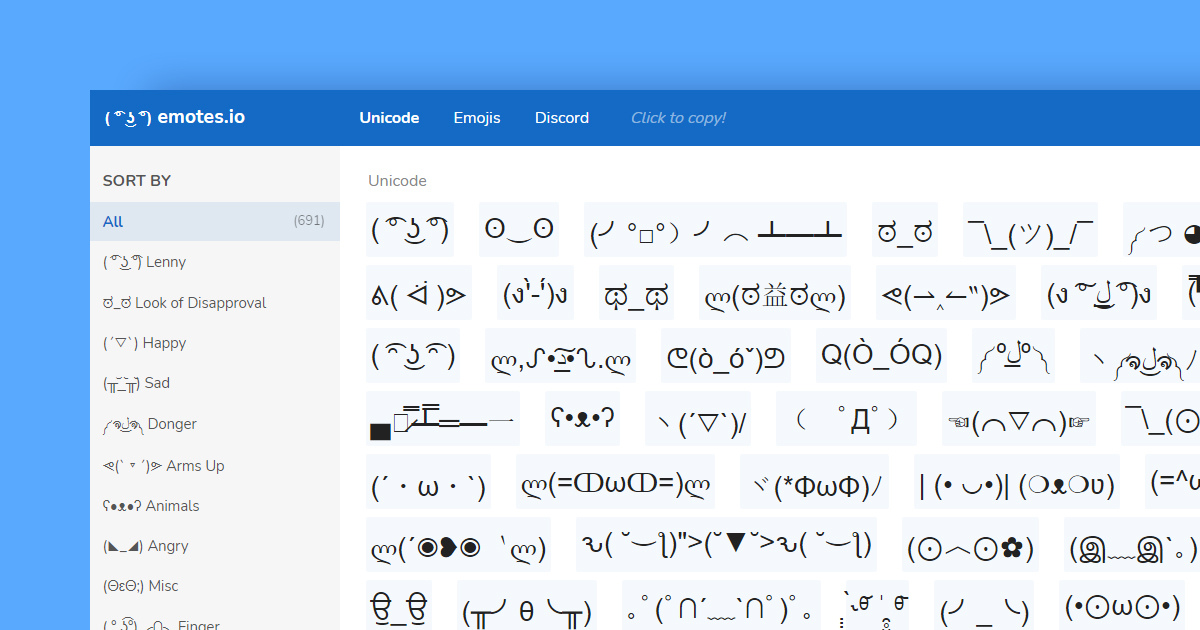
( ͡° ͜ʖ ͡°) emotes.io Full homepage screenshot

At a glance

Category
Productivity
Language
English
Paid-content signal
No paid content foundObserved
Registered
Unknown
Hosting
Leaseweb Canada Inc.Inferred
HTTPS certificate trusted
PassedObserved
Last updated

Website review

This review may include AI-generated content and is not individually verified. Domain, certificate and other facts come from the observed data on this page.

What is emotes.io?

emotes.io is a free, browse-and-copy library of Unicode emoticons, text faces and kaomoji — over 700 of them on one page. Each entry is plain text, so clicking one copies it to your clipboard and you can paste it into chat apps, social posts, usernames or documents that accept Unicode. There is no account or software involved; it is a lookup page, not a messaging tool or emoji keyboard.

What you'll find there

The collection is organised by mood and character type, so you can scan rather than search. Typical entries include:

  • Classic text faces: Lenny Face ( ͡° ͜ʖ ͡°), Disapproval Face ಠ_ಠ, Shrug ¯_(ツ)_/¯
  • Action emotes: Flipping Table (╯°□°)╯( ┻━┻, Fight Stance (ง'̀-'́)ง, Flexing Arms
  • Animal and cute faces: Cute Bear ʕ•ᴥ•ʔ, Happy Cat, Butterfly
  • Emotional states: Crying, Rage, Shocked, Smug Grin, Deal With It

The page also has sort and filter controls, which help when you know the vibe you want ("sad", "angry") but not the exact face.

Who it suits

Someone writing a quick forum or Discord reply who wants a distinctive reaction without installing anything. It is less useful if you need standard emoji (those are built into most keyboards) or if the platform you're posting to strips unusual characters — some older systems and usernames render combining marks as boxes.

A practical example

Suppose you want a lighthearted "I give up" reply in a group chat. Open the page, filter or scan for the table-flip or shrug entries, click the one you like, and paste it into the message box. Check the preview before sending: faces built from combining diacritics can look misaligned at small font sizes.

Decision criterion

Use emotes.io when you want a specific, recognisable text face and don't want to hunt through a search engine. If you need a broad set of standard emoji or platform-specific reactions, your device's built-in picker is the faster route.

How do I copy an emote from emotes.io and paste it into a chat or social media post?

Click any emote on the page and it copies to your clipboard immediately, then paste it into your chat box or post with Ctrl+V (Windows) or Cmd+V (Mac). The site's own instruction is simply "Click to copy!" — there is no download, account or file involved, because these are plain Unicode text characters rather than images.

A concrete example

Say you want the classic Lenny face for a group chat. Find it in the list (it appears as ( ͡° ͜ʖ ͡°)), click it once, switch to your chat window, and paste. It arrives as ordinary text, so it works in the same places typed characters do: messaging apps, forum posts, comment sections, social captions and even email.

What to expect in different places

Destination What usually happens
Messaging apps and forums Pastes as text; looks the same for most readers
Social media posts and captions Generally fine, but some platforms strip unusual spacing or combining marks
Usernames, bios, short fields Often rejected or truncated by character limits and validation rules
Anything with a strict font May render as boxes or misaligned symbols

The practical trade-off is portability versus fidelity. Simple faces like ಠ_ಠ or ʕ•ᴥ•ʔ survive almost anywhere; elaborate ones built from stacked combining marks, such as the flipping-table or dollar-eyes emotes, depend on the reader's device and font, so they can look squashed or broken on some screens.

A useful next step

Before committing an emote to a public post or profile, paste it into a note on your own phone and desktop and check both. If it looks wrong on either, pick a simpler face from the same category — the site groups emotes by mood and style, so a Lenny variant or a basic kaomoji is usually a safe substitute. For heavy use across many platforms, a dedicated emote collection such as Emojipedia is worth knowing for standard emoji, while text faces remain the better fit when you want something that reads as typed rather than illustrated.

What is the Lenny face ( ͡° ͜ʖ ͡°) and where do people typically use it?

The Lenny face is the emoticon ( ͡° ͜ʖ ͡°): a pair of raised eyebrows around a small vertical mark and a wide, slightly lopsided mouth. It is built from Unicode characters rather than an image, so it can be pasted into any text field. On ( ͡° ͜ʖ ͡°) emotes.io it appears as the site's lead example alongside variants such as a happy Lenny and a disappointed Lenny.

What it conveys

The expression is deliberately ambiguous. It usually reads as smug, knowing, mischievous or suggestive, and the joke depends on that ambiguity: the same face can signal "I know something you don't," mock disapproval, or a playful innuendo. Because it is text, it also travels well: it survives copying between apps that strip images or custom emoji.

Where people use it

  • Chat and messaging: Discord, Slack, WhatsApp and group texts, where pasting it into a reply adds a wry tone without a sticker.
  • Forum and comment threads: a compact way to signal skepticism or a double meaning in a short post.
  • Social media captions and replies: often paired with a vague or suggestive statement to make the implication explicit.
  • Gaming and streaming chat: alongside other dongers and kaomoji as a shared in-joke.
  • Usernames and profiles: some people place it in display names or bios, though it can look cluttered and may not render in every font.

Practical notes

Rendering varies by platform and font: on some systems the marks sit unevenly or collapse into boxes, so check how it looks before using it in something polished like a slide or a formal email. Its suggestive edge also makes it a poor fit for professional or unfamiliar audiences. If you want a different tone, the same site groups alternatives by mood, including a shrugging face, a table flip and a cute bear; emotes.io lets you click any entry to copy it. As a next step, keep two or three variants on hand, such as the plain Lenny for a dry joke and a neutral shrug for moments when the implication would misfire.

How can I find a specific emote like the table flip or shrug face on emotes.io instead of scrolling through the whole list?

Use the Filters and Sort By controls on the page to narrow the list, then click the emote to copy it. The site groups recognizable text faces by name—for example, “Flipping Table (╯°□°)╯( ┻━┻,” “Disapproval Face ಠ_ಠ,” and “Shrug Smile ̄\_(ツ)_/ ̄”—so searching or filtering by a plain-language label is the practical route rather than scanning every entry.

A quick workflow

  1. Open the Filters section and look for a name or category matching what you want, such as “table,” “shrug,” “crying,” or “cat.”
  2. If filtering is too broad, use Sort By to bring similar faces together, then scan the shorter results.
  3. Click the chosen emote; the page’s instruction is “Click to copy!” Paste it into a chat, comment or document.

For a concrete case: if you need the classic table flip for a group chat, filter or search for “flip” or “table” rather than scrolling. If you only remember the visual—a face with raised arms—try “shrug,” “arms,” or “donger,” since the site uses those labels for several variants.

Choosing between similar results

Need Likely label to try Why
Classic table flip Flipping Table The page lists this as a named entry
Simple disapproval Disapproval Face Easy to recognize and reuse
Shrug or “I don’t know” Shrug Smile / Shrug Big Eyes Several shrug variants exist
Celebratory raised arms Donger Arms Up / Cheering Arms Up Different tone from a plain shrug

If the built-in filters do not expose the exact label, a browser find (Ctrl+F or Command+F) on the visible list is a sensible fallback, but it only searches loaded text, not hidden categories. For broader Unicode face references beyond this collection, Unicode documents character standards, though it is not a copy-paste emote gallery.

Which emotes work in platforms that don't support images, like plain-text comments or usernames?

Unicode emotes are the right choice for plain-text fields: they are ordinary keyboard characters, so they survive where images and custom emoji cannot. On emotes.io, every entry is a copy-and-paste text face—clicking one copies it to the clipboard—so you can paste it into a comment box, a chat message or a display name without uploading anything. Examples from the page include the Lenny Face ( ͡° ͜ʖ ͡°), Shrug ̄_(ツ)/ ̄, Disapproval Face ಠ_ಠ, Table Flip (╯°□°)╯( ┻━┻ and Hug / Raise ༼ つ ◕◕ ༽つ.

Where they work well, and where they don't

Use case Outlook Practical caveat
Plain-text comments, forums, chat Usually fine; they are just characters Length matters—faces like the long sad face or multi-character dongers count as many characters
Usernames and display names Often accepted, since no image is involved Many services restrict allowed characters or cap name length; test before committing
Older or strict systems Hit or miss Some fonts lack the combining marks, so faces can render as boxes or misaligned

A concrete test before you rely on one

If you are choosing a display name for a forum or game, paste your chosen face into the actual name field and save it, then view it on a phone as well as a desktop. Faces built from common characters—ಠ_ಠ, ʕ•ᴥ•ʔ, ( ͡° ͜ʖ ͡°)—tend to hold up better than elaborate ones with many stacked diacritics, which are the first to break across fonts. For comments, prefer a short face at the end of your text rather than a long construction in the middle, and keep a plain-text fallback in mind for formal or professional contexts where a kaomoji may read as unserious.

If you want a wider pool to choose from, emotes.io is organized by mood and style, which helps when you need something specific like a shrug or a celebration rather than browsing blindly.

Are the emotes on emotes.io free to use, and can I use them in my own content?

Yes—emotes.io is a copy-and-paste collection with no pricing signals on the page, so there is nothing to pay to use the characters themselves. The emotes are Unicode text, not artwork, so you paste them into messages, profiles, captions, or documents rather than downloading or embedding files.

What "free to use" means here

  • The characters: Unicode symbols like ( ͡° ͜ʖ ͡°) and (╯°□°)╯( ┻━┻ are standard text characters or character sequences, not owned images. Typing or pasting them raises no licensing question.
  • The site's role: emotes.io provides a browsable list of over 700 emotes, with filters and sorting, and clicking one copies it to your clipboard. That is a convenience, not a license.
  • Your content: using a text face in a caption, chat, or video overlay is normal text use. The page does not claim ownership of the emotes.

Practical caveats for your own content

  • Rendering varies. Different platforms, fonts, and devices may display combining marks differently—some faces break apart or show boxes on mobile apps or in certain editors. Test on your target platform before publishing.
  • Some faces carry internet-culture connotations. Lenny faces, "deal with it," and table-flip emotes are widely recognized and can read as meme-speak or irony. In professional or formal contexts, that tone may not suit your audience.
  • Clipboard quirks. Copying from a web page can pick up stray spaces or invisible characters; paste into a plain-text field first if an emote looks misaligned.

A concrete scenario

If you run a gaming Discord or a social account with a playful voice, open ( ͡° ͜ʖ ͡°) emotes.io, filter to the mood you need (celebration, disapproval, sadness), click to copy, and paste into your post. Then preview it on a phone and desktop—if it holds together, you are done. For a brand account with a formal tone, choose sparingly or skip text faces entirely.

As a next step, decide by audience: casual communities can use these freely and often; corporate or accessibility-focused content should favor standard emoji, which screen readers announce more reliably than kaomoji.

Related questions

More questions →
What Are Unicode Emotes and How Do You Copy and Paste Them?

Unicode emotes are text-based faces and figures built from standard Unicode characters—such as the Lenny face ( ͡° ͜ʖ ͡°), the shrug ̄\(ツ)/ ̄, and the table flip (╯°□°)╯( ┻━┻—that you copy and paste as plain text. They work anywhere text is accepted, including chat apps, forums, and social posts, because they don't rely on image files or platform-specific emoji sets. The main condition: the destination must render the underlying Unicode characters, which most modern systems do, though spacing and alignment can shift between fonts.

How Unicode emotes differ from emoji and kaomoji

All three are ways to express a face or gesture in text, but they behave differently.

Type How it's built Example Rendering behavior
Unicode emote Unicode characters, often with combining marks and spacing ( ͡° ͜ʖ ͡°) Plain text; appearance depends on the font and platform
Kaomoji Japanese-style text faces using punctuation and symbols ʕ•ᴥ•ʔ Plain text; same font dependency
Emoji Single standardized code points with color glyphs 😀 Rendered as a colored image by the platform's emoji font

The practical difference is compatibility. An emoji looks the same almost everywhere because the platform supplies the artwork. A Unicode emote or kaomoji is only as consistent as the font rendering it—so a face that lines up neatly on one device may look slightly stretched or misaligned on another. The emotes.io collection mixes these categories under one browsable list, labeling entries like "Lenny Face," "Donger," "Shrug," and "Table Flip," which makes it easy to find a specific style by name.

Finding and copying an emote on emotes.io

The site presents a large single-page collection (its title advertises over 700 emotes) with sorting and filtering controls, and the instruction "Click to copy!" appears alongside the list.

  1. Open the collection. Go to emotes.io and scroll the "Unicode emoticons" list.
  2. Narrow the list if needed. Use the Sort By and Filters controls in the page headings to reduce the set—useful when you want a category such as happy, sad, angry, or animal faces rather than scrolling the whole page.
  3. Pick by name or appearance. Entries are labeled with descriptive names (for example "Disapproval Face," "Dancing Celebration," "Cute Bear," "Sniper Rifle"), so you can scan for the mood or gesture you want.
  4. Click the emote. Per the site's own instruction, clicking copies it to your clipboard.
  5. Paste it. Use your normal paste command (Ctrl+V or Cmd+V) into the chat box, comment field, or post editor.

Verify it worked: paste into a plain-text field first, such as a notes app, to confirm the characters copied intact before sending.

Common problems when pasting

  • Misaligned or broken faces. Some emotes use combining diacritics and unusual spacing characters. If the destination uses a font that handles these differently, the face can look crooked. Try a different emote from the same category, or test in another app.
  • Line breaks. Long emotes may wrap in narrow chat windows. Shorten your message or place the emote on its own line.
  • Stripped characters. A few platforms sanitize unusual Unicode. If an emote disappears after sending, that platform likely doesn't support those characters—pick a simpler one.
  • Searching by name. If you can't find a specific face, search the collection using common names like "shrug," "table flip," "lenny," or "donger," since these are the labels the site uses.

When to use which

Choose a Unicode emote or kaomoji when you want a distinctive, text-only face that travels as plain text and doesn't depend on emoji support—good for forums, code comments, and older chat systems. Choose an emoji when consistent, colorful rendering across devices matters more than uniqueness. Either way, copy from a list like emotes.io, paste into a test field first, and confirm the face looks right before you send it.

What Is the Shrug Face Emoticon and How Do You Type or Copy It?

The shrug face is the text emoticon ¯\(ツ)/¯ — a raised-arms figure built from a macron, underscores, a Japanese katakana character (ツ), and slashes. It signals "I don't know," "whatever," or mild resignation. The fastest way to use it is to copy it from a Unicode emote list like emotes.io, where clicking an emote copies it to your clipboard for pasting into chats, posts, or documents. If you type it by hand, the main pitfall is the backslash: in Markdown and code it must be escaped as \\, or the left arm disappears.

What the Shrug Face Is Made Of

The standard shrug is assembled from ordinary Unicode characters, not an emoji:

Part Character Role
Left arm ¯\ Raised arm and shoulder
Body _(ツ)_ Underscores as torso, ツ as the face
Right arm /¯ Raised arm and shoulder

The ツ is a katakana syllable ("tsu") that happens to look like a neutral, slightly bemused face. Because every piece is a standard character, the shrug works anywhere plain text does — no emoji font required — but it is also vulnerable to formatting rules that treat \, _, and * as markup.

How to Copy and Paste the Shrug Face

  1. Open a Unicode emote collection such as emotes.io, which lists the shrug alongside variants like "Shrug Smile" and "Shrug Big Eyes."
  2. Click the shrug entry. The site's stated behavior is that clicking an emote copies it to your clipboard.
  3. Paste with Ctrl+V (Windows/Linux) or Cmd+V (Mac) into your chat, comment box, or document.
  4. Check the result before sending — some apps auto-convert underscores or slashes.

Expected result: the full figure appears with both arms intact. If one arm is missing, see the escaping section below.

Why the Shrug Face Breaks — and How to Fix It

The backslash is an escape character in Markdown, many programming languages, and some chat formatting. A single \ before _ can be consumed as an escape, leaving ¯_(ツ)_/¯ with no left arm.

Fix for Markdown, code, and developer tools: double the backslash.

¯\\_(ツ)_/¯

Fix for plain-text fields (most chat apps, SMS, social posts): paste the single-backslash version directly; escaping usually isn't applied there, so the original renders correctly.

If a platform strips or mangles the character regardless, fall back to a variant without a backslash, or use the word "shrug" — the meaning survives even when the art doesn't.

Common Variants and When to Use Them

The emotes.io list includes several shrug forms, each with a different tone:

  • Standard shrug ¯\(ツ)/¯ — neutral "no idea" or "oh well." The safe default for work chats and casual replies.
  • Shrug Smile ̄\(ツ)/ ̄ — same figure with spacing that reads slightly softer; good when you want to signal good humor rather than indifference.
  • Shrug Big Eyes ̄\(⊙〈⊙)/ ̄ — wide-eyed version that reads as surprised confusion; useful when the "I don't know" is genuine bafflement.
  • Cat shrug ლ(=ↀωↀ=)ლ — a cat-faced variant for playful or informal contexts.

Choose the standard form when clarity matters, and the cat or big-eyes forms when the tone is light and the audience knows you well.

Where the Shrug Face Works Well — and Where It Doesn't

The shrug renders reliably in chat apps, forums, email, SMS, and social posts that accept plain Unicode text. It is less dependable in:

  • Markdown documents and READMEs — escape the backslash or the left arm vanishes.
  • Code comments and string literals — the backslash may need doubling depending on the language.
  • Fields with strict character limits or filters — some forms are long; a short variant or the word "shrug" is safer.
  • Environments with limited font coverage — ツ is widely supported, but unusual variants using rarer symbols may show as boxes.

For a quick, reliable result, copy from an emote list, paste, and glance at the output before sending.

What Is 'Emoticon Fun' and How Do You Find, Copy, and Paste Fun Unicode Emoticons?

"Emoticon fun" refers to using Unicode text faces — also called kaomoji, emoticons, or dongers — to add humor and emotion to chats, posts, and comments. You find them on a copy-and-paste list like emotes.io, click one to copy it, then paste it into any text field. This works best on platforms that accept Unicode characters and render them in a consistent font; wide or stacked faces may look different depending on the app and device.

What counts as an emoticon, and how is it different from emoji?

Emoticons are built from standard text characters — parentheses, slashes, dots, Greek and Japanese letters, and symbols — rather than from picture glyphs. Emoji are single coded images; emoticons are strings of characters that form a face when read left to right.

That difference matters in practice:

  • Emoticons inherit the font and size of the surrounding text, so they can look different across apps and may wrap or misalign on narrow screens.
  • Emoji render as fixed images and usually look the same everywhere.
  • Emoticons are more expressive in a text-only, "typed by hand" way, which is the core of emoticon fun.

Common types of fun emoticons and what they express

The emotes.io collection groups faces by mood and gesture. These are the categories you'll reach for most:

Type Example What it conveys
Lenny face / donger ( ͡° ͜ʖ ͡°) Smug, suggestive, or knowing humor
Shrug ¯\(ツ)/¯ "I don't know" or "whatever"
Table flip (╯°□°)╯( ┻━┻ Frustration or mock rage
Disapproval ಠ_ಠ Skepticism or deadpan judgment
Deal with it (̿▀̿ ̿Ĺ̯̿̿▀̿ ̿) Cool dismissal
Cute kaomoji ʕ•ᴥ•ʔ, (๑>ᴗ<๑) Affection, shyness, playfulness
Celebration ᕕ( ᐛ )ᕗ, ヽ( ́▽`)/ Excitement or cheering
Sad / crying ಥ_ಥ, (╥╯θ╰╥) Sadness or comic despair

The site also lists variants such as Lenny with dollar eyes, angry dongers, cat shrugs, and fight stances, so you can match a specific joke rather than a generic mood.

How to find and copy an emoticon on emotes.io

The site describes itself as a large list of Unicode emotes, text faces, and kaomoji with a click-to-copy interface. The workflow is:

  1. Open the list. The main page shows "All your favorite emotes in one page" with a "Click to copy!" prompt.
  2. Narrow it down. Use the Sort By and Filters controls in the headings to organize the collection, or scan by name — entries are labeled (e.g., "Shrug Smile," "Flipping Table," "Donger Arms Up").
  3. Click the emote. Clicking copies it to your clipboard, per the site's instructions.
  4. Paste it. Paste into your chat, comment box, or post and send.

If you're hunting for one specific face, look for its label rather than scrolling: names like shrug, table flip, lenny face, and donger map directly to the entries.

Why pasted emoticons sometimes look wrong — and how to check

Because emoticons are character strings, not images, their appearance depends on the font and width of the platform. Expect these issues:

  • Misalignment: Faces with stacked marks (like the Lenny face or "deal with it" glasses) can break onto two lines in narrow chat bubbles.
  • Missing glyphs: Some characters (particularly combining marks and rare symbols) may show as boxes if the font lacks them.
  • Spacing shifts: A face that looks centered on the website may look lopsided in a different font.

A simple habit avoids most of this: paste the emote into the message box and preview it before sending. If it breaks, try a simpler face from the same category — for example, a basic shrug instead of an elaborate donger.

Quick answers

Can I use these anywhere? Anywhere that accepts Unicode text — chat apps, forums, social posts, documents. Rendering quality varies by platform, so preview first.

Do I need an account or payment? The site's instructions describe clicking to copy with no mention of login or pricing; treat that as unconfirmed and check the page itself if it matters to you.

What if I can't find the exact face? Search the list by its common name (shrug, table flip, lenny, donger) or browse the mood-based labels such as "Happy," "Sad," "Angry," and "Celebration."

What Is ASCII Art? How It Differs from Emoji and Kaomoji

ASCII art is an image or design built entirely from standard keyboard characters — letters, numbers, punctuation, and symbols — arranged so the shape reads as a picture or decorative text. It differs from emoji, which are single Unicode pictographs, and from kaomoji, which are Japanese-style text emoticons like (・ᴗ・)♡. Use ASCII art when you need visuals in a plain-text space where emoji may not render, such as code comments, terminal output, or older forums. Use emoji or kaomoji instead when you want a quick, colorful symbol that displays reliably on modern apps.

ASCII art vs. emoji vs. kaomoji

Feature ASCII art Emoji Kaomoji
Built from Keyboard characters (letters, punctuation, symbols) Single Unicode pictographs Text characters, often Japanese-style faces
Example (^_^) or a multi-line picture 😀 ❤️ 🌸 (・ᴗ・)♡
Color None — monochrome text Full color None
Best for Plain-text environments, code, retro/tech aesthetics Social apps, quick reactions Cute text emoticons in chats and bios
Rendering risk Breaks if font or spacing differs Breaks if platform lacks the emoji Breaks if font spacing differs

The key distinction: emoji are characters that carry their own image, while ASCII art and kaomoji are arrangements of ordinary characters that only look like something when the spacing holds.

Common types of ASCII art

  • One-line text art — small faces and icons that fit inline, e.g. (^_^), (T_T), (¬_¬).
  • Multi-line pictures — larger images built across several rows, such as animals, logos, or objects.
  • Decorative borders and dividers — lines like ====, ~~~~, or *~*~*~* used to separate sections of text.
  • Text banners — words spelled out in large block letters made from characters.

Where ASCII art works best

ASCII art shines in environments that strip out or don't support rich formatting:

  • Code comments and README files
  • Terminal and command-line output
  • Plain-text emails and older forum posts
  • Signatures and bios where you want a retro or tech look

For Instagram, TikTok, or WhatsApp, emoji and kaomoji usually display more reliably and colorfully. CuteEmoji.AI, for instance, groups kaomoji and aesthetic symbols alongside its emoji collections for exactly these social use cases.

How to copy or make ASCII art

To copy ready-made art:

  1. Find the piece you want (many sites, including CuteEmoji.AI, list ASCII art and kaomoji alongside emoji).
  2. Select the characters exactly as shown.
  3. Paste into your target field and check that the alignment still looks right.

To make simple art yourself:

  1. Choose a fixed-width (monospace) font so every character takes equal space.
  2. Sketch your shape on a grid, one character per cell.
  3. Use characters that suggest the shape — / and \ for diagonals, _ and - for horizontals, O or 0 for circles.
  4. Paste into your destination and adjust spacing if it shifts.

Expected result: the art reads as intended in a monospace context. If it looks skewed, the font is likely proportional rather than fixed-width.

Limitations to watch for

  • Font and spacing differences are the main failure point. Proportional fonts collapse the alignment that ASCII art depends on.
  • Platform wrapping can break multi-line pieces if the text box is too narrow.
  • No color — ASCII art is monochrome by nature, unlike emoji.
  • Emoji substitution — some apps auto-convert certain character sequences into emoji, which can corrupt the art.

If your art keeps breaking, switch to a monospace font, widen the container, or use emoji/kaomoji instead.

What Is Lorem Ipsum and How Do You Generate Placeholder Text?

Lorem Ipsum is dummy text used to fill a layout before real content exists. It looks like readable Latin, so reviewers focus on typography, spacing, and visual balance instead of getting distracted by the words. You use it when you need to test a design, mockup, or template and the final copy is not ready yet. The text itself carries no meaning, so it should never ship as real content.

Where Lorem Ipsum Comes From

The standard passage is derived from Cicero's De Finibus Bonorum et Malorum, a philosophical work written in 45 BC. The familiar opening line, "Lorem ipsum dolor sit amet…", is a scrambled, altered excerpt rather than a faithful quotation. Words were changed, added, and removed over time, which is why the result reads like Latin but does not translate into coherent sentences.

The version most people recognize today was popularized in the 1960s, when Letraset sheets used it for type specimens, and it spread further with desktop publishing software that shipped it as default placeholder text.

Why Designers and Publishers Use It

  • It has realistic texture. Letter and word distribution resembles natural language, so line lengths and paragraph shapes look plausible.
  • It stays neutral. Readers do not start interpreting or editing the copy, which keeps feedback on the layout.
  • It is widely recognized. Clients and collaborators understand it signals "content goes here."

A common mistake is treating Lorem Ipsum as a finished draft. If placeholder text reaches a live page, it signals unfinished work and can hurt credibility or search visibility.

How to Generate Placeholder Text

A Lipsum generator produces random Lorem Ipsum on demand. The general workflow:

  1. Choose the unit you need — words, sentences, or paragraphs.
  2. Set the quantity, such as five paragraphs or 50 words.
  3. Generate the text and copy it into your layout.
  4. Check that the amount fills the space realistically, then replace it with real content before publishing.

Common Variations

Variation Typical use
Words Button labels, short headings, tight UI elements
Sentences Captions, single-line descriptions
Paragraphs Body copy blocks, article layouts, multi-column pages

Some generators also offer lists, byte counts, or HTML output. Pick the format that matches where the text will be pasted, since pasting paragraph text into a single-line field creates messy wrapping.

What to Watch For

  • Length is not meaning. A generator can produce any amount of text, but it will not tell you whether your real copy fits the design.
  • Do not publish it. Search for "Lorem ipsum" before launch to catch leftovers.
  • Match the language of your audience. If your product is not English, placeholder text in Latin can hide line-length problems that appear once real translated copy is inserted.

For quick layout work, a generator is the fastest path. For anything user-facing, treat the result as a temporary stand-in and swap it out before the work goes live.

Website Overview

Several search or sharing settings need attention. Together they may make snippets, preview images or preferred URLs less consistent across platforms. An active inbound-mail setup with incomplete authentication may leave the domain more open to impersonation. Provider hosting alone does not close that gap.

Domain and Registration

Unknown

DNS and Email

The observed email authentication setup is incomplete: DMARC is missing. Nameservers are provided by greengeeks.net, indicating managed DNS hosting. MX records point to the emotes.io email service. No CNAME was found; the observed records resolve directly to addresses. TXT records include verification markers for Google. Such markers may also remain after a service stops being used.

TLS and Certificates

The certificate uses an RSA 2048-bit public key, offering broad client compatibility. The server supplied a complete certificate chain. No organization name is present in the certificate; the available fields are consistent with domain validation. The certificate was issued by Let's Encrypt, commonly associated with automated certificate services. The certificate's total validity is about 89 days, consistent with a short renewal cycle.

HTTP and Browser Security

X-Powered-By exposes backend information: PHP/8.5.11. The response lacks these common security headers: CSP, Referrer-Policy, Permissions-Policy. No obvious internal addresses or debug information were found in the headers. No explicit CDN or WAF marker was found in the response headers. No CORS permission header was found, so browsers normally restrict cross-origin script access.

Technology Stack Analysis

The public page identifies Google Analytics, PHP without precise versions, leaving fewer clues for version-specific scanning.

Search and Social Sharing

The title has 81 characters and may be truncated in search results. The meta description has 178 characters and may be shortened in search results. No homepage canonical URL was detected. If duplicate URLs exist, consolidation may be less explicit. Twitter Card metadata is configured. The observed directives allow indexing and link following.

Hosting and Email

DNSgreengeeks.net
HostingLeaseweb Canada Inc.
Emailemotes.io
Approximate IP geolocation (inferred; a CDN or proxy may differ from the origin server) Canada flagCanada Inferred 184.107.122.225

Registration details

RDAP / WHOIS

Unknown

DNS records

DNS

TypeNameValueTTLPriority
Aemotes.io184.107.122.22514400—
MXemotes.ioemotes.io144000
NSemotes.ions1.greengeeks.net86400—
NSemotes.ions2.greengeeks.net86400—
TXTemotes.iogoogle-site-verification=vUNW2kyMT8ipHGT4m0dWfeh4DJVo0EHu_bFDrTZYlPI14400—
TXTemotes.iov=spf1 ip4:184.107.122.225 include:spf.greengeeks.net +a +mx ~all14400—

TLS and certificates

TLS / SSL

AssessmentNormal configuration
Supported protocolsTLSv1.2、TLSv1.3
Negotiated protocolTLSv1.3
Certificate subjectemotes.io
IssuerLet's Encrypt
Valid until2026-11-24T11:52 · Remaining when checked: 32 days
Verification detailsCertificate trust: Passed · Hostname match: Passed

HTTP response headers

HTTP

HeaderValue
content-typetext/html; charset=UTF-8
strict-transport-securitymax-age=31536000; includeSubDomains; preload
x-frame-optionsSAMEORIGIN
x-content-type-optionsnosniff

Identified technologies

Google AnalyticsPHP

Pages, Search and Sharing

Meta descriptionBrowse a huge collection of Unicode emotes, text faces, kaomoji and other copy-and-paste characters. Click any emote to copy it to the clipboard, then paste it anywhere you like.
Canonical URLNot detected
LanguageEnglish (default)
Twitter Cardsummary_large_image
All bots 0 allowed · 0 disallowed
  • IntervalCrawl delay 60 seconds

User reviews (0)

  • No reviews yet.