
 简体中文
简体中文 English
Website review
This review may include AI-generated content and is not individually verified. Domain, certificate and other facts come from the observed data on this page.
What is FacileThings?
FacileThings is a productivity application built specifically around the Getting Things Done (GTD) methodology. Its central claim is that the GTD workflow is embedded in the system itself, so users don't have to design or maintain their own structure for capturing, clarifying, organizing, and reviewing work. It is aimed at people who already follow GTD or want to adopt it without building a custom setup in a general-purpose task manager.
What it does
- Built-in GTD workflow: The capture-to-review process is part of the product rather than something you configure yourself.
- Alignment with purpose and goals: Daily tasks can be connected to larger purposes, goals, and areas of focus, so the tool supports deciding what is worth doing, not just tracking what is due.
- Guided routines: It includes structured tools for the Weekly Review, a Mind Sweep (a brain-dump exercise), and AI-assisted Project Natural Planning.
- Calendar integration: Google and Outlook calendars, personal and professional, can be brought together in one place.
- Delegation and agendas: Tasks can be delegated to collaborators, and agendas are kept ready for meetings.
- Mobile apps: iOS and Android apps support capturing items and checking off tasks away from a desk.
- Free trial: A 30-day free trial is offered with no credit card required, and cancellation is described as one click.
Who it suits, and the trade-off
FacileThings makes most sense for someone who has read about GTD and wants the method enforced by the software, or who has tried to run GTD inside a generic to-do app and found the upkeep exhausting. The trade-off is the flip side of that structure: if you prefer a flexible, build-your-own system, or you don't follow GTD, the prescribed workflow may feel like extra ceremony. Someone who mainly needs a simple shared task list may be better served by a lighter tool.
As a next step, compare FacileThings with other GTD-oriented options before committing—for example Todoist, which is general-purpose but often adapted to GTD, or Evernote for reference material. The deciding question: do you want the method built in for you, or do you want to shape the tool around your own habits?
How does FacileThings differ from a standard to-do app for someone practicing GTD?
FacileThings is built around the GTD workflow itself, so the difference from a standard to-do app is structural rather than cosmetic. Instead of giving you a blank list and letting you invent a system, it embeds the capture-clarify-organize-reflect-engage sequence into the tool. The site describes the GTD methodology as "fully embedded in the system," so you spend less time designing and maintaining a setup and more time actually processing what comes in.
Where the practical difference shows up
- Capture to clarification, not just capture. A standard to-do app stops at "add a task." FacileThings is positioned around moving items through the GTD steps, which matters if your problem is a backlog of unprocessed inputs rather than a shortage of checkboxes.
- Alignment beyond the next action. The site emphasizes linking daily tasks to purpose, goals, and areas of focus. A plain to-do app typically has projects at most; this adds the higher horizons that GTD practitioners use to decide what actually deserves attention.
- Guided reflection. Weekly Review, Mind Sweep, and AI-assisted Project Natural Planning are presented as built-in tools. In a generic app you would run these as external habits or templates; here they are part of the product.
- Calendar consolidation. Google and Outlook calendars, personal and professional, can be integrated in one place, which supports the GTD habit of treating the calendar as hard landscape rather than a task dump.
- Delegation and agendas. Tasks can be delegated to collaborators and agendas kept ready for meetings, a feature most simple to-do apps do not address.
A comparison at a glance
| Concern | Standard to-do app | FacileThings |
|---|---|---|
| Method | You impose your own | GTD workflow built in |
| Setup effort | Low, but you design the system | Lower maintenance, per the site's framing |
| Reflection | Usually absent | Weekly Review and Mind Sweep tools |
| Life alignment | Rarely beyond projects | Purpose, goals, areas of focus |
| Calendars | Often separate | Google and Outlook integrated |
| Delegation | Basic or none | Task delegation with agendas |
Who benefits and who doesn't
If you already know GTD and your friction is maintaining the system, the embedded workflow and review tools are the draw. If you want a lightweight list for groceries and errands, the added structure is overhead you would be paying for without using. A reasonable next step is to run one real Weekly Review inside the free trial with your actual backlog, and judge whether the guided process saves you time compared with your current setup. The site offers a 30-day trial without a credit card, and pricing details are on FacileThings. For background on the method itself, see Getting Things Done.
Does FacileThings require setup or configuration before I can start using it?
FacileThings is built so that the GTD© workflow is already embedded in the system, which reduces the need to design your own structure before you begin. The site's own framing is that you "don't need to think about it" — the methodology's stages are pre-built rather than something you configure from scratch.
That said, "no methodology setup" is not the same as "no input." To get value from it you will still do the normal GTD front-end work:
- Capture your open loops — a mind sweep of what's on your plate, personal and professional.
- Process into the built-in lists — inbox, next actions, projects, waiting-for, someday/maybe — rather than inventing your own categories.
- Add your contexts and areas of focus so tasks line up with the goals the tool is designed to connect them to.
- Connect calendars — the site describes integrating Google and Outlook calendars, personal and professional, in one place, which is a one-time linking step.
- Set up collaborators if you plan to delegate tasks and use the agenda view before meetings.
A realistic first-session plan
If you want to test it quickly, spend the first sitting on capture and calendar connection only, then run one Weekly Review using the guided tool. That tells you whether the guided workflow suits how you think before you invest in tidying every project.
When the low-setup approach helps — and when it doesn't
It suits people who have read about GTD, feel overwhelmed, and want the structure handed to them rather than assembled. It suits less well anyone with an unusual workflow that doesn't map onto standard GTD lists, or teams wanting a shared task board rather than a personal system.
For comparison on how much structure different tools impose, Todoist and Things are general task managers you shape yourself, while Flow leans toward team task management. The trade-off is consistent: less configuration up front usually means less freedom to restructure later.
Can I connect my Google and Outlook calendars to FacileThings?
Yes. FacileThings supports connecting both Google and Outlook calendars, including personal and work accounts, so they appear together in one place. The site also mentions that your agendas are available with a click, which suits people who want to see a person's related tasks and calendar items before a meeting.
A practical next step is to decide how you want the combined view to work before connecting anything: keep one calendar as your main planning surface and use the other for reference, or review both together during a weekly planning session. If calendar consolidation is your main need rather than GTD workflow support, compare it with a dedicated calendar tool; if you want calendars alongside projects and next actions, FacileThings' integrated approach is the relevant fit.
What does the 30-day free trial include, and do I need a credit card to start?
The trial gives you 30 days of access to FacileThings, and no credit card is required to start. The site also says you can cancel anytime with one click, which suggests the trial doesn't lock you into a paid plan by default.
According to the page, the trial covers the full working environment rather than a stripped-down demo: the GTD workflow is built into the system, so you can run your own tasks and projects through it. That includes:
- GTD-based capture and organization, with the methodology's workflow embedded so you don't have to design your own structure.
- Alignment tools for connecting daily tasks to purpose, goals and areas of focus.
- Guided reviews, including the Weekly Review, Mind Sweep and AI-assisted Project Natural Planning.
- Calendar integration for Google and Outlook calendars, personal and professional, in one place.
- Delegation and agendas for tasks assigned to collaborators.
- Mobile apps for iOS and Android, so you can capture and check off items away from your desk.
How to judge whether 30 days is enough
Thirty days is roughly four weekly cycles, which is the right unit for testing a GTD tool: the Weekly Review is where most systems either prove useful or become a chore. A practical plan is to spend the first week capturing everything and setting up projects, then use the remaining weeks to test whether the guided review actually reduces your backlog rather than just reshuffling it.
The trial is most informative if you have a real mix of commitments to load into it—work deadlines, personal errands, delegated items—rather than a handful of sample tasks. If you mainly need a simple to-do list, the structure here may feel like more process than you want; if your problem is feeling overwhelmed by unclear commitments, the embedded workflow is the part worth evaluating.
As a next step, check the pricing page before the trial ends so you know what happens to your data and account if you decide not to continue.
Is there a mobile app for capturing tasks and reviewing projects on the go?
Yes. FacileThings offers iOS and Android apps for capturing items on the go, checking off completed tasks and reviewing projects, according to its site. The web service is built around the GTD workflow, so the mobile apps are best understood as a companion for quick capture and review rather than a separate to-do app.
What the mobile app is for
- Capture: Add tasks or ideas when they occur to you, then sort them later in the GTD workflow.
- Review: Check projects and next actions while away from your desk.
- Complete: Tick off tasks as you finish them.
Who benefits most
Someone already following GTD who needs to record commitments during commutes, meetings or errands, and who wants those items to land in the same trusted system as desktop work. The site also describes guided tools such as Weekly Review, Mind Sweep and AI-assisted Project Natural Planning; these are useful for structured reviews, though the page does not detail how each works on mobile.
A practical check before committing
Install the app and test one real scenario: capture five items during a day out, then confirm they appear correctly in your project lists and can be processed in a weekly review. If that loop feels quick and reliable, the mobile side fits your workflow. For a broader comparison of GTD-oriented tools, see Getting Things Done and Todoist.
 Hetzner Online GmbH
 Fastmail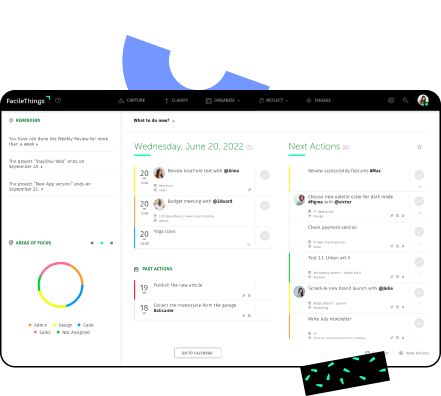
User reviews (0)