Website profiles · Technology insights · Alternatives

fusele.netlify.app

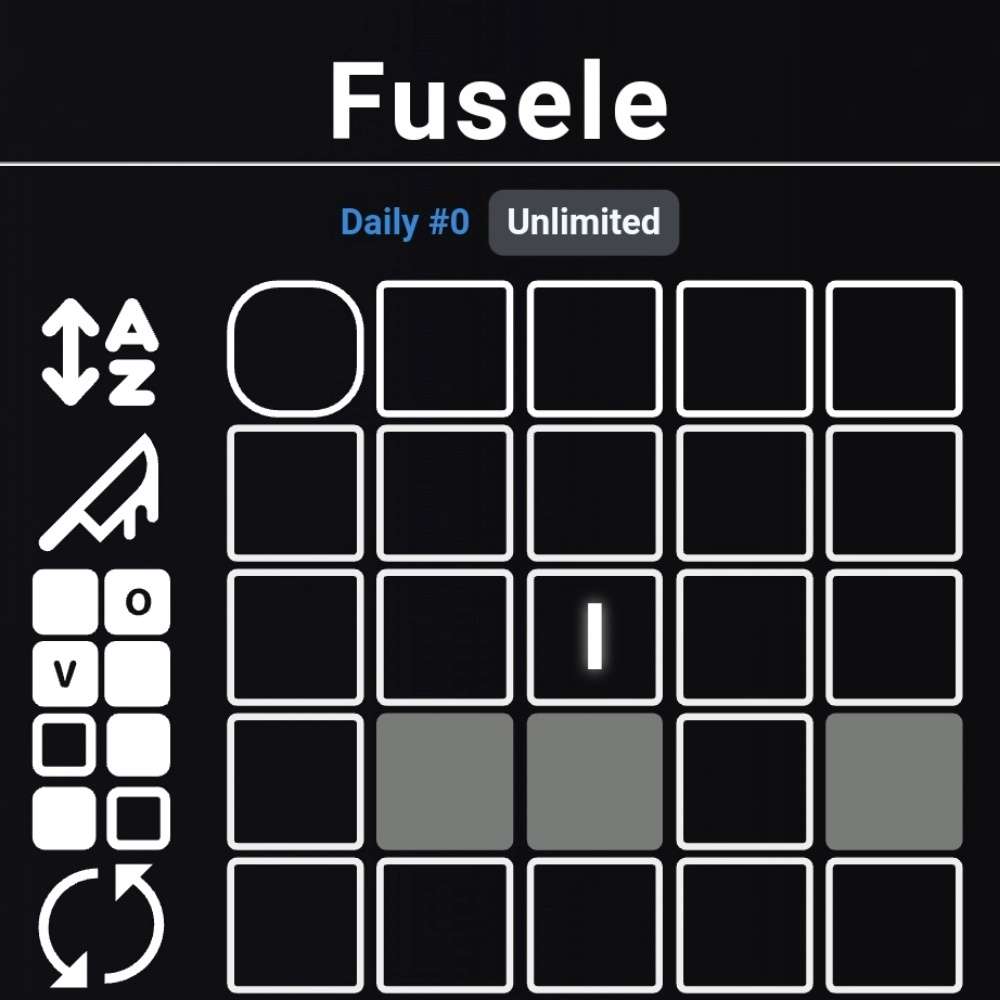
Fusele is a game like Wordle, but each row has a different twist to it!

No paid content found
Visit website
Profile views 0 Outbound visits 0 Normal
Fusele Full homepage screenshot

At a glance

Category
Games & Board Games
Language
English
Paid-content signal
No paid content foundObserved
Registered
2018
Hosting
NetlifyInferred
HTTPS certificate trusted
PassedObserved
Last updated

Website review

This review may include AI-generated content and is not individually verified. Domain, certificate and other facts come from the observed data on this page.

What is Fusele?

Fusele is a free browser-based word game that takes Wordle's basic format—guess a five-letter word, with green marking correct positions and yellow marking letters that appear elsewhere—and changes the rules for each row of guesses. According to the game's own instructions, the twist for each row is shown by an icon to the left of that row, which you hover over on a computer or tap on a phone.

What makes it different from Wordle

Instead of one consistent set of hints, Fusele assigns a different hint type to each row. The instructions describe several:

  • Repeated letters: one row requires you to repeat a letter in your guess.
  • Proximity hints: a tile can turn orange to show that the answer's letter in that position is within a few letters of your guess alphabetically, rather than exact.
  • Reversed yellow clues: some rows replace yellow with blue, where a blue tile means one of your other guessed letters belongs in that spot.

The top-row twists are grouped into subcategories and won't appear together in the same game, so the combinations stay varied rather than piling every rule into one puzzle.

Who it suits

Fusele is aimed at players who have grown comfortable with Wordle and want more to think about per guess. Because each row carries its own logic, it rewards careful reading of the row icons before typing—a habit plain Wordle never demands. It is less suited to someone wanting a quick, low-effort daily puzzle; the extra rules add interpretation time.

Practical details

The page shows daily statistics for both normal and "blind" modes, a guess distribution, a countdown to the next daily puzzle, and a share option. There are also accessibility and comfort settings: polygon shapes instead of colors for different hint types (useful for colorblind players), dark mode, disabling confetti, a QWERTY layout toggle, moving the keyboard to the bottom, and clearing input that isn't an accepted word. The game also lists a "play again" option, so practice rounds are possible beyond the daily.

As a next step, play one round with the shapes setting enabled even if your color vision is typical—it makes the row-by-row rule changes easier to track while you learn them. If you enjoy the daily-puzzle habit, The New York Times hosts the original Wordle for comparison.

How does the twist in each row of Fusele work compared to standard Wordle?

Fusele keeps Wordle's core loop—guess a five-letter word, use green for correct position and yellow for present-but-misplaced—but changes the clue rules on a row-by-row basis. Each row carries its own twist, so the same colored tile can mean something different depending on which row you're on. The page instructs players to hover (PC) or tap (mobile) the icons left of each row to see that row's twist before guessing.

What the documented twists change

Twist How it differs from standard Wordle
Repeat-a-letter row You must repeat a letter in your guess; the example uses BLOOM, where a yellow L signals the letter is in the word but elsewhere.
"Nearby letter" row Tiles compare your letter to the answer's letter in the same position by alphabet distance. Green means exact match; orange means the answer's letter is within 3 letters alphabetically; gray means farther than 3.
Reverse blue clues Yellow is replaced by blue, which works backwards: a blue tile means some other letter from your guess (gray or blue) belongs in that space. In the example, a blue I means the second answer letter is N, E or S.

The page also notes that the top-row twists sit in their own colored subcategories and won't appear together in one game, and that a settings option replaces hint colors with shapes for colorblind players.

Practical consequence

Standard Wordle lets you build one consistent mental model across six rows. Fusele asks you to re-read the clue semantics each row, which rewards players who check the row icon first and slows down anyone who assumes yellow always means "misplaced." A concrete case: seeing orange in the nearby-letter row, a Wordle habit might read it as "close but wrong spot," when it actually constrains the answer's letter to a three-letter alphabetical window.

Next step: before your first guess, tap each row's icon and note whether that row uses color-distance, reversed blue, or repetition rules, then plan guesses that satisfy the strictest row first.

How do I read the colored and shaped hints in Fusele, including for colorblind players?

Fusele keeps the standard Wordle colour code as its base and changes how a row's hints behave, so the first thing to read is the twist for that row, not just the colour. Green still means the letter is in the correct spot, and yellow still means the letter is in the word but somewhere else. The row icons to the left of each guess explain that row's twist: hover on a computer or tap on mobile.

Reading the twists

  • Repeated letters: one row requires a repeated letter in your guess. A yellow tile there still only tells you the letter is in the answer, in a different position.
  • Proximity hints: instead of exact position, a tile shows how close your letter is alphabetically to the answer's letter in that same slot. Green means exact; orange means the answer's letter is within three letters alphabetically; grey means it is farther away.
  • Reverse blue clues: yellow is replaced by blue. A blue tile means some other letter from your guess (grey or blue) occupies that space in the answer, so you are narrowing a set of possible letters rather than confirming your own.

Shapes and colourblind support

The settings menu has a "use polygons for different hint types" option, which adds a distinct shape to each hint type so colour is not the only signal. There are also settings to darken the borders of grey tiles that behave differently from normal, to turn disallowed letters red, and to use a QWERTY layout or move the keyboard to the bottom.

A practical routine

Before your first guess, check the row icons for the day's twists. On proximity rows, treat orange as a range clue and use it to bracket letters rather than fix a position. On reverse-blue rows, read blue as "the answer's letter here is one of my other guessed letters," which makes a guess with several distinct letters more informative. If you are colourblind or play on a dim screen, turn on polygons first, then the darkened grey borders, since those two changes carry most of the clarity.

For comparison, standard Wordle at The New York Times uses only green, yellow and grey with no per-row variations, and Quordle-style multi-board games at Merriam-Webster change the number of boards rather than the hint logic. Fusele's difference is that the hint rules themselves shift row by row, so the icons are the part worth checking every game.

What do the daily statistics and guess distribution charts track in Fusele?

Fusele's daily statistics panel tracks your performance on the daily puzzle across three headline numbers: games played, games won, and win rate. Below those, the guess distribution chart shows how many of your wins came in one guess, two guesses, and so on up through seven, with a separate "X" bucket for games you lost. A second panel mirrors this layout for the daily blind mode—same played/won/win-rate figures and the same guess-distribution bars—so your results with hints hidden are kept apart from your normal daily results. The page also shows a countdown to the next daily puzzle and a share button, which fits the pattern of sharing a result grid after finishing.

How to read the charts

The distribution is only about wins, so a lopsided bar at four or five guesses tells you your typical solve, while a large X count tells you how often the twists trip you up. Because Fusele changes the rule on every row, comparing your normal and blind distributions is the more interesting number: a wide gap between them suggests you lean on the row hints more than you might expect, while a narrow gap means you're reading the word itself well.

A practical next step

Play a few dailies, then check both panels side by side. If your blind win rate lags far behind your standard one, spend a session hovering (or tapping) each row's icon before guessing to learn the twist types, then retry blind. For a different daily word routine, The New York Times hosts the original Wordle, and qntm documents the rules in detail if you want to understand the underlying mechanics.

How do I adjust the keyboard, input, and visual settings in Fusele?

Fusele puts its display and input controls in a visual settings panel: you can move the keyboard to the bottom of the screen, switch to a QWERTY layout, turn disallowed letters red, and clear your input automatically after pressing "Enter" when the guess isn't an accepted word.

What each setting changes

  • Move keyboard to the bottom — puts the on-screen keyboard low on the page, which suits phone play and one-handed typing.
  • Use QWERTY keyboard layout — arranges the letter keys in the familiar QWERTY order rather than Fusele's default arrangement.
  • Turn disallowed letters red — marks letters that can't be part of a valid guess, so you spot typos before submitting.
  • Clear your input after pressing "Enter" if it is not an accepted word — empties the row automatically when a guess is rejected, so you can retype without deleting letter by letter.

Visual hint settings

  • Use polygons for different hint types — adds shapes to the tiles so hint categories are distinguishable without relying on color, which the game presents as a colorblind aid.
  • Black incognito tiles — renders hidden tiles in black.
  • Darken the borders of gray tiles that behave differently from normal — flags gray tiles whose meaning isn't the standard "letter not in the word."
  • Disable confetti — turns off the celebration animation after a win.

A practical way to decide

If you mostly play on a phone, start with the bottom keyboard and the auto-clear option; mistyped guesses are the most common source of frustration in Wordle-style games. If you have trouble telling orange from yellow or blue from green, turn on the polygon shapes before your first game rather than mid-solve.

The settings sit on the same page as the board, so changes apply to the puzzle you're currently playing. For the twist rules behind each row's colors, the in-page "how to play" section and the left-of-row icons on Fusele explain what each hint type means.

What happens if the Fusele page fails to load or loads slowly?

If Fusele fails to load or loads slowly, the page itself suggests three steps: reload it first, then wait for a fix, then contact the developer (named on the page as Toir). The site also notes that if your connection is otherwise fine, a loading problem usually points to an error on the page's side rather than your network.

What you can do in practice

  • Check your connection briefly, then reload once. A single hard refresh rules out a stale cached copy.
  • Give it a short wait before retrying. The page explicitly mentions slow loads, so a second attempt a few minutes later is reasonable.
  • Try a different browser or a private window if the reload keeps failing. This separates a browser-specific problem from a site-wide one.
  • Reach out to the developer if reloading and waiting both fail, as the error message recommends.

One practical note: Fusele keeps daily statistics and a "next daily in" countdown, so a failed load near the daily reset can cost you that day's puzzle if you don't return before the timer runs out. Playing earlier in the day leaves more slack for a retry.

If you want a fallback word game

The original The New York Times Wordle is the reference version Fusele builds on, and it runs on stable infrastructure if you just want a puzzle while Fusele is down.

Related questions

More questions →
Can You Use CC0 Assets in Commercial Games? Licensing and Integration Basics

Yes. CC0 assets can be used in commercial games without paying royalties or crediting the creator. CC0 is a public-domain dedication: the creator has waived copyright and related rights to the fullest extent allowed by law. That means you can copy, modify, redistribute, and sell work built on those assets — including in a game you charge money for.

This article explains what CC0 actually covers, how it differs from other Creative Commons licenses, and how to bring CC0 assets into engines like Unreal and Unity and tools like Blender, Maya, and 3ds Max.

What CC0 actually means

CC0 is not a license in the traditional sense — it is a waiver. When a creator applies CC0 to their work, they give up their copyright and agree not to enforce related rights. You are free to:

  • Use the asset in personal, educational, or commercial projects
  • Modify, remix, and build derivative works
  • Distribute the asset or your derivative as part of a larger project
  • Do all of the above without attribution

There is no requirement to credit the creator, no share-alike clause forcing you to open-source your game, and no non-commercial restriction. For a studio shipping a paid title, that combination is unusually permissive.

One practical caveat: CC0 applies to the rights the creator holds. It cannot waive third-party rights the creator never owned. A scanned statue, a branded product, or a recognizable logo in a texture may still carry trademark or personality-rights issues. Treat CC0 as clearing copyright, not as clearing everything.

CC0 vs. other Creative Commons licenses

The differences matter most when you are choosing assets for a commercial build. The table below summarizes the common variants.

| License | Commercial use | Attribution required | Share-alike | Notes for games | |---|---|---|---|---|---| | CC0 | Yes | No | No | Closest to public domain; safest for closed-source commercial titles | | CC BY | Yes | Yes | No | Fine for commercial use, but you must credit — plan for a credits screen | | CC BY-SA | Yes | Yes | Yes | Derivatives may need to be shared under the same license; risky for proprietary code/assets | | CC BY-NC | No | Yes | No | Excludes commercial projects; avoid for any monetized game | | CC BY-ND | Yes | Yes | No | No derivatives — you cannot modify the asset, which limits integration |

If your goal is a commercial game with no legal overhead, CC0 is the simplest choice. CC BY is workable if you can maintain attribution. Avoid NC and ND for anything you intend to sell or heavily adapt.

How CC0 assets fit into game engines and pipelines

CC0 libraries typically provide HDRIs, PBR textures, and 3D models. Each type has a natural place in a game pipeline.

HDRIs

HDRIs are high-dynamic-range environment maps. In Unreal, they are commonly used for sky lighting via a Sky Light set to use an HDRI cubemap or a Sky Sphere material. In Unity, they feed the skybox and the environment lighting in the Lighting window. You can also use them as reflection probes or as the basis for image-based lighting in Blender, Maya, or 3ds Max for look development before export.

Textures

PBR texture sets usually ship as albedo (base color), roughness, metallic, normal, and sometimes ambient occlusion or height maps. These drop directly into Unreal's material system or Unity's Standard/URP/HDRP shaders. Keep the resolution appropriate: 4K textures are useful for hero assets, but 1K or 2K is often enough for background props and saves memory.

Models

Static meshes and props can be imported as FBX or OBJ. Check the scale and pivot before placing them in a level. If the asset was authored for offline rendering, it may have very high poly counts — decimate or LOD it before use in a real-time scene.

Practical steps for importing and adapting assets

  1. Download and verify the license. Confirm the asset page states CC0. Save a screenshot or the license text alongside the file.
  2. Organize by type. Keep HDRIs, textures, and models in separate folders. A consistent naming convention (for example, env_forest_01_4k.hdr) saves time later.
  3. Import into your engine. In Unreal, drag the FBX into the Content Browser and set up materials. In Unity, import the FBX and assign a PBR material, then wire the texture maps to the correct slots.
  4. Adapt scale and orientation. Real-world assets may be authored in meters or centimeters. Check against a reference cube of known size.
  5. Optimize. Reduce texture resolution where it will not be seen up close, generate LODs for models, and bake lighting where appropriate.
  6. Test in context. Place the asset in a representative scene and check lighting, reflections, and performance before committing it to the project.

What CC0 does not cover

CC0 clears copyright, but a few things still deserve a second look:

  • Trademarks and logos. A texture containing a recognizable brand mark is not automatically safe to ship.
  • Recognizable people or property. A model of a real person or a distinctive building may raise personality or property-rights questions.
  • Third-party content inside the asset. If a creator included someone else's work without permission, the CC0 dedication does not fix that.

For most generic assets — rocks, foliage, generic furniture, abstract HDRIs — these concerns are minimal. For anything depicting a real brand, person, or landmark, verify independently.

Documenting asset sources for teams and clients

Even though CC0 requires no attribution, keeping records is good practice. It protects you if a client or publisher asks for provenance, and it helps when a team member needs to know where a file came from.

A simple tracking sheet works:

Asset name Type Source License Date downloaded Notes
forest_01_4k.hdr HDRI Poly Haven CC0 2025-01-10 Used for level 2 sky
rock_cliff_a.fbx Model Poly Haven CC0 2025-01-10 Decimated to 8k tris

Store this alongside your project files. If you later combine CC0 assets with CC BY assets, the sheet makes it obvious which ones need credit.

Bottom line

CC0 assets are safe for commercial games, require no attribution, and impose no royalties or share-alike obligations. The main work is practical: verify the license, check for third-party rights, import and optimize the asset for your engine, and keep a record of where it came from. Do that, and a CC0 library becomes a legitimate, low-friction source for production assets in Unreal, Unity, Blender, Maya, and 3ds Max.

How to Play Fusele: Understanding Each Row's Wordle Twist

Fusele is a Wordle variant where every row applies a different twist to the standard color hints. To play it well, you need to check each row's rule before guessing: hover over (PC) or tap (mobile) the icon to the left of a row to see what that row changes. Green still means the letter is in the correct spot, and yellow still means the letter is in the word but in a different spot—but individual rows can redefine what a color means, so the same tile color may not tell you the same thing from one row to the next.

The core loop

  1. Enter a five-letter guess and press Enter.
  2. Read the colored tiles, but interpret them through that row's twist, not the standard Wordle rules alone.
  3. Use the revealed information to narrow down the answer on the next row.
  4. Repeat until you solve the word or run out of rows.

The twist for each row is shown by the icon to its left. If you skip that step, the hints can actively mislead you, because a color that normally means "right letter, wrong spot" may mean something else on that row.

Twists you will encounter

Fusele's help page lists the twists it currently uses. The top-row twists sit in their own subcategories (shown in color) and will not appear together in the same game. Three documented examples:

Twist What the hints mean Example from the help page
Repeated letter You must repeat a letter in your guess BLOOM is guessed; L is yellow, so the letter is in the word but in a different spot
Alphabetical proximity Tiles show whether your letter is near the corresponding answer letter L is green (exact spot); R is orange, meaning the 5th answer letter is within 3 letters of R alphabetically; gray means farther than 3 letters away
Blue reverse clues Yellow clues are replaced by blue, which work in reverse A blue I means the 2nd answer letter is N, E, or S—i.e., some other gray or blue letter from your guess belongs in that space

The proximity twist is the one most likely to trip you up: an orange tile is useful information, but it is not a yellow tile, so don't treat it as "letter present, wrong position." Likewise, a blue tile points at a different letter in your guess occupying that space, not the letter on the tile itself.

Make the hints easier to read

Two settings on the page help with interpretation:

  • Use polygons for different hint types — swaps colors for shapes so you can tell hint types apart, which the help page describes as intended for colorblind players.
  • Use QWERTY keyboard layout and Move keyboard to the bottom — layout and placement options if the default keyboard feels awkward.

There is also a Black incognito tiles option and a setting to darken the borders of gray tiles that behave differently from normal, which flags gray tiles whose meaning is not the standard "letter not in the word." If a row's twist changes what gray means, that border cue is worth turning on.

Track results and practice

The page keeps daily statistics (games played, games won, win rate, average win guesses, and a guess distribution for 1–7 and X) plus a separate blind statistics panel with the same breakdown. A countdown shows the next daily puzzle, and PLAY AGAIN and SHARE buttons let you replay and share results. Use replay to practice a twist you just misread—the proximity and blue-clue rows in particular reward a few dry runs before you rely on them under daily pressure.

Common sticking points

  • Reading a tile by standard Wordle rules. Check the row icon first; the color may not mean what you expect.
  • Ignoring the subcategory note. Top-row twists are grouped and won't co-occur, so don't plan a strategy that assumes two of them appear together.
  • Misreading blue tiles. A blue tile refers to another letter in your guess filling that position—not the letter shown.
  • Over-trusting gray. With the border-darkening setting on, a bordered gray tile is telling you it behaves differently from a normal gray.

If the page fails to load or loads very slowly on a good connection, the help text suggests reloading, waiting for a fix, or contacting Toir.

Website Overview

An established domain and managed infrastructure suggest continuity of operations and may support dependable delivery, although neither guarantees service quality. Page metadata, canonical configuration and social previews work together to provide more consistent search and sharing presentation.

Domain and Registration

Registered in 2018, this domain has about 8 years of history. That suggests continuity, although ownership and purpose may have changed. Transfer-protection status is present, helping reduce the risk of unauthorized domain transfers. The domain uses the common .app extension, which is not an independent safety signal.

DNS and Email

Nameservers are provided by NS1, indicating managed DNS hosting. CAA records restrict which certificate authorities are authorized to issue certificates. No CNAME was found; the observed records resolve directly to addresses. No MX record was found. A conventional explicit inbound-mail route is not configured. TXT records include verification markers for Google. Such markers may also remain after a service stops being used.

TLS and Certificates

The certificate includes the organization field Netlify, Inc. The certificate issuer is DigiCert Inc, a commercial certificate authority. The public key uses EC with 256 bits. The server supplied a complete certificate chain. The certificate is valid for about 396 days in total, with 150 days remaining.

HTTP and Browser Security

The response lacks these common security headers: CSP, X-Content-Type-Options, Referrer-Policy, Permissions-Policy. No X-Powered-By header was found, reducing one common source of backend fingerprinting information. No obvious internal addresses or debug information were found in the headers. The Server header contains the custom value Netlify. No explicit CDN or WAF marker was found in the response headers.

Technology Stack Analysis

The public page identifies Netlify without precise versions, leaving fewer clues for version-specific scanning.

Search and Social Sharing

Open Graph is partially configured; og:type is missing. Twitter Card metadata is configured. The title has 6 characters, within a common display range. A meta description is present, with 71 characters. The observed directives allow indexing and link following.

Hosting and Email

DNSNS1
HostingNetlify
EmailUnknown
Approximate IP geolocation (inferred; a CDN or proxy may differ from the origin server) United States flagAshburn, Virginia, United States Inferred 18.208.88.157

Registration details

RDAP / WHOIS

RegistrarName.com, Inc.
Registered2018-05-08
Expires2031-05-08
Domain statusclient transfer prohibited
Nameserversdns1.p01.nsone.net、dns2.p01.nsone.net、dns3.p01.nsone.net、dns4.p01.nsone.net
DNSSECunsigned

DNS records

DNS

TypeNameValueTTLPriority
Afusele.netlify.app18.208.88.157120—
Afusele.netlify.app98.84.224.111120—
AAAAfusele.netlify.app2600:1f18:16e:df01::258311—
AAAAfusele.netlify.app2600:1f18:16e:df01::259311—
NSnetlify.appdns1.p01.nsone.net3600—
NSnetlify.appdns2.p01.nsone.net3600—
NSnetlify.appdns3.p01.nsone.net3600—
NSnetlify.appdns4.p01.nsone.net3600—
TXTnetlify.app_kvz3va36b5cudpl46gbej22cfyyw9081800—
TXTnetlify.appgoogle-site-verification=0KCpoJchrixypEMvtkzLtj6VMqMXKcuWS7j2jjjDcys1800—
TXTnetlify.appv=spf1 -all1800—
CAAnetlify.app128 iodef "mailto:[email protected]"1800—
CAAnetlify.app128 issue "digicert.com;account=2d83e9ac9b6776c3f215150f6ebceea8cefe3bc2e1fb5efffb1d71e200575226"1800—
DMARC_dmarc.netlify.appv=DMARC1; p=reject; rua=mailto:[email protected]; ruf=mailto:[email protected]; fo=1300—

TLS and certificates

TLS / SSL

AssessmentNormal configuration
Supported protocolsTLSv1.2、TLSv1.3
Negotiated protocolTLSv1.3
Certificate subject*.netlify.app
IssuerDigiCert Inc
Valid until2027-03-19T23:59 · Remaining when checked: 150 days
Verification detailsCertificate trust: Passed · Hostname match: Passed

HTTP response headers

HTTP

HeaderValue
content-typetext/html; charset=UTF-8
cache-controlpublic,max-age=0,must-revalidate
serverNetlify
strict-transport-securitymax-age=31536000; includeSubDomains; preload
x-frame-optionsDENY

Identified technologies

Netlify

Pages, Search and Sharing

Meta descriptionFusele is a game like Wordle, but each row has a different twist to it!
Canonical URLhttps://fusele.netlify.app/
LanguageEnglish (default)
Twitter Cardsummary

No robots.txt found

Recent Updates

  • Website images
  • Screenshots
  • Pages and Search Information

User reviews (0)

  • No reviews yet.