Website profiles · Technology insights · Alternatives

growmeorganic.com

Find emails from B2B & B2C businesses | 15M+ verified B2B email database | Google Map Extractor | Automate Sales Navigator | FREE Email Finder

Paid content
Visit website
Profile views 7 Outbound visits 1 Normal
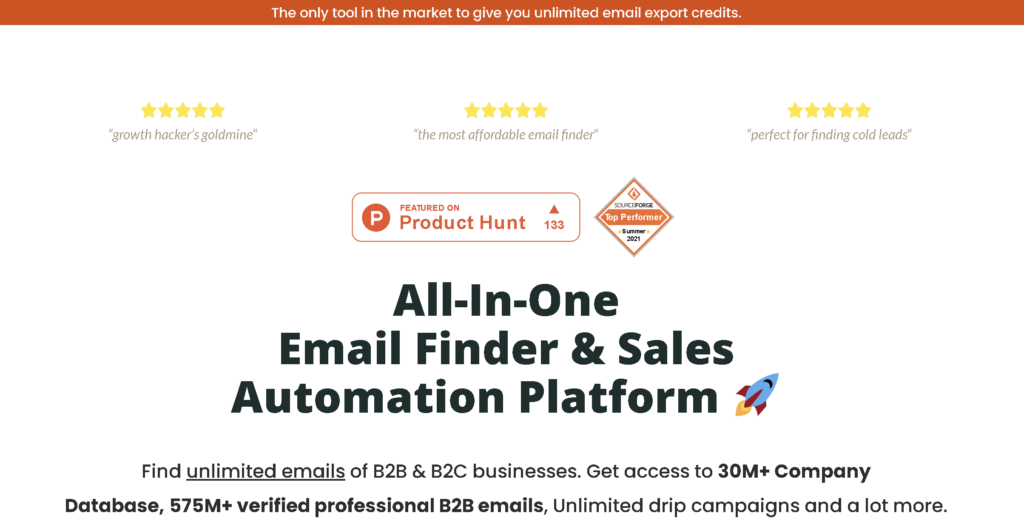
GrowMeOrganic Full homepage screenshot

At a glance

Category
Business Services
Language
English
Paid-content signal
Paid contentObserved
Registered
2019
Hosting
hstgr.netInferred
HTTPS certificate trusted
PassedObserved
Last updated

Website review

This review may include AI-generated content and is not individually verified. Domain, certificate and other facts come from the observed data on this page.

What is GrowMeOrganic?

GrowMeOrganic is a B2B prospecting and cold-outreach toolkit. It combines a contact database with tools for finding emails, automating LinkedIn activity, and running email campaigns. The pitch is that you can go from "who should I contact?" to "the follow-up just went out" without stitching together several separate services.

Its main pieces, based on the site's own descriptions:

  • Email and contact finding — Bulk lookup of verified B2B contacts, including emails and phone numbers, drawn from a database the site describes as 15M+ companies and 575M+ professionals.
  • Company and employee search — Filter companies by industry, size, location or name, and find employees by job title or company domain.
  • LinkedIn prospecting — Personalized connection requests and follow-ups run in an automated, human-like way.
  • Cold email campaigns — Automated, behavior-triggered follow-ups, open/click/reply tracking, campaign scheduling, email warm-up, AI image personalization, and API/webhooks.
  • Lead scoring — Points assigned to leads based on how they engage with your emails.
  • Email provider connections — Send and receive through Gmail, G Suite, Yahoo or an SMTP service such as Amazon SES.

Who it suits

Small sales teams, founders doing their own outreach, and agencies running campaigns for multiple clients. The combination of database plus sequencing is most valuable if you are starting from little or no contact data. If you already have a mature CRM and a separate data provider, the overlap may be less compelling.

Trade-offs to weigh

A built-in database is convenient, but coverage and accuracy vary by region and industry — always spot-check a sample before committing to a large campaign. Automated LinkedIn activity also carries account-restriction risk, so keep volumes conservative and messages genuinely personalized. Pricing is tiered and a 14-day free trial is advertised; check the current GrowMeOrganic pricing page for what each plan actually includes.

Next step: sign up for the trial with one narrow use case — for example, one industry and one job title in one country — and measure how many of the exported emails actually deliver and reply before scaling up.

How does GrowMeOrganic's email finder work to find verified B2B contact details?

GrowMeOrganic's email finder is a prospecting tool that pulls verified B2B contact details from a pre-built database and from live web sources, then feeds them into outreach campaigns. Its own page describes two main paths: searching a database of 15M+ companies and 575M+ professional contacts, and extracting contacts directly from a company's website or a domain list.

Ways to source contacts

  • Database search: Filter the pre-scraped company and contact database by industry, company size, location, name, job title and domain, then export in bulk.
  • Domain-based lookup: Enter a company domain to retrieve employee names, job titles, emails and phone numbers, including decision makers.
  • Local business extraction: Use the Google Maps-style extractor to pull business details such as emails and phone numbers from local listings.
  • LinkedIn prospecting: Automate Sales Navigator-style prospecting to build lists from professional profiles.

What "verified" means in practice

The page claims verified emails and phone numbers, automated bulk exports and company details. Verification here is best understood as a filtering step: the tool checks contacts against its database and validation rules before export. That reduces bounce risk, but no finder guarantees 100% deliverability. Expect to run your own validation on any list before a large send.

How it connects to outreach

Once contacts are found, the same platform handles the follow-through: personalized cold emails, automated follow-ups based on recipient behavior, open/click/reply tracking, lead scoring, email warm-up, and connection to Gmail, GSuite, Yahoo or any SMTP provider such as Amazon SES. So it is less a standalone finder and more a find-verify-email-track loop.

Practical scenario

A SaaS founder targeting HR managers at mid-sized UK firms could filter by industry, company size and location, export the matching contacts, then run a sequenced follow-up campaign and score leads by which ones open or reply. The trade-off is consolidation versus best-of-breed: one tool covers sourcing and sending, but a dedicated verifier or CRM may still be worth adding for high-volume or compliance-heavy outreach.

Next step

Start with the free trial, export a small sample list, and check bounce rates before committing to a larger campaign. If you want to compare options, look at Apollo.io and Hunter.

Can GrowMeOrganic automate LinkedIn Sales Navigator outreach?

Yes. GrowMeOrganic is built partly around LinkedIn prospecting, and its page specifically advertises automating Sales Navigator activity — including sending personalized connection requests and follow-up messages on autopilot rather than manually working through a list.

What the automation covers, per the site

  • Connection requests with personalized notes — the page lists "personalized invitation" and "human-like automation" as features, so the intent is outreach that doesn't read as obviously scripted.
  • Automated, behavior-triggered follow-ups — messages can be scheduled based on what a prospect does (opens, clicks, replies), with tracking for opens, clicks, replies and conversions.
  • Lead scoring — points are assigned to leads based on engagement, so the most responsive prospects surface first.
  • Email as a parallel channel — you connect Gmail, GSuite, Yahoo or any SMTP provider (the page names Amazon SES) and run cold email alongside LinkedIn activity, with an email warm-up system and AI image personalization.

Where it fits and where it doesn't This suits a solo founder, SDR or small agency running high-volume outbound who wants LinkedIn and email in one workflow instead of stitching together separate tools. It's less useful if your outreach depends on genuine one-to-one research per prospect, or if you're in a category where LinkedIn automation carries real account-restriction risk — the page doesn't address rate limits or account safety, so treat "human-like automation" as a design goal rather than a guarantee.

Practical next step Before committing, run a 14-day trial (the page says no credit card required) on a single, narrow ICP segment — say, one job title in one industry — and measure reply quality, not just volume. If replies read as templated or your acceptance rate drops, dial back the automation and use the tool mainly for list-building and email follow-ups.

For broader context on outbound tooling, LinkedIn publishes its own guidance on Sales Navigator use, and HubSpot covers cold outreach fundamentals if you're comparing approaches.

How does GrowMeOrganic's lead scoring help identify engaging users?

Lead scoring in GrowMeOrganic assigns points to prospects based on how they behave with your emails, then surfaces the people with the highest totals so you can prioritize them. According to the product page, it tracks opens, clicks, replies and conversion rates, and uses those signals to flag which leads are most interested. That turns a flat contact list into a ranked shortlist, which matters when you can only send a limited number of personal follow-ups.

In practice, that changes how you sequence outreach. Instead of emailing every contact on the same schedule, you can route high scorers into a manual, personalized thread while low scorers stay in an automated nurture campaign. A common setup is to score an open low, a click higher and a reply highest, then trigger a notification or CRM task once someone crosses a threshold.

Two practical cautions: behavior scoring rewards engagement, not fit, so a curious non-buyer can outrank a quiet decision-maker; and email opens are unreliable because of privacy features that pre-fetch images. Weight clicks, replies and site activity more heavily than opens if accuracy matters to you.

Next step: define three or four scoring events, assign each a point value, and set one threshold that triggers a human follow-up. Review the list weekly to check whether high scorers actually convert.

To compare how other tools handle behavioral triggers, see HubSpot and Mailchimp.

What email providers can I connect with GrowMeOrganic for sending and receiving emails?

GrowMeOrganic says you can connect and send/receive email from "any email account provided," specifically naming Gmail, GSuite (Google Workspace), Yahoo, and any email SMTP server such as Amazon SES.

What that means in practice

  • Gmail / Google Workspace / Yahoo: the simplest route if your outreach already runs from a mainstream mailbox. Expect to authorize the account and send through it.
  • Custom SMTP (e.g., Amazon SES): the better fit if you use a dedicated sending domain or an infrastructure provider for deliverability control. You supply the SMTP credentials yourself.

How to choose

Your situation Sensible connection
Solo founder sending from a personal Gmail Gmail
Team on Google Workspace with shared domains GSuite / Google Workspace
Legacy Yahoo inbox Yahoo
High-volume cold outreach on a separate domain SMTP provider such as Amazon SES

A common setup is to keep your primary inbox on Google Workspace for replies while routing cold campaigns through a secondary domain on SMTP, so a deliverability problem never touches your main address.

Next step: open GrowMeOrganic's email-provider connection settings and confirm which of these your plan exposes, then test with a single sending account before adding more. For provider-side limits and setup steps, check Google Workspace Help or Amazon SES documentation.

Is there a free trial for GrowMeOrganic and what are the pricing plans?

Yes — GrowMeOrganic advertises a 14-day free trial with no credit card required, and signup is described as taking under 30 seconds. The site also points to a dedicated pricing page, but the specific plan tiers, monthly prices and feature limits are not listed in the page material provided, so treat any exact figures as something to confirm on GrowMeOrganic before committing.

What the free trial gets you

The trial is positioned as full access to the core prospecting workflow, not a stripped-down demo. Based on the page evidence, that includes:

  • A verified B2B contact database (15M+ companies, 575M+ professionals)
  • Bulk email and phone number extraction, plus company details and bulk exports
  • LinkedIn prospecting with personalized invitations and human-like automation
  • Automated, behavior-triggered follow-ups with open, click, reply and conversion tracking
  • Lead scoring to rank the most engaged prospects
  • Connections to Gmail, GSuite, Yahoo or any SMTP provider such as Amazon SES

How to judge the pricing

Because the plan details aren't visible here, the practical move is to open the pricing page and map it against your actual sending volume:

Your situation What to check on the pricing page
Solo founder testing cold outreach Whether the entry tier caps email credits or export volume
Small sales team (2–5 seats) Per-seat cost vs. shared credit pools
Agency running multiple client campaigns Whether you need separate workspaces or accounts
High-volume sender Cost per verified contact, not the headline monthly fee

Two things drive the real cost more than the plan name: how many verified emails you export per month, and how many sending accounts you need for warm-up and rotation. A cheap tier that runs out of credits mid-campaign usually ends up costing more than the next level up.

Next step: start the 14-day trial, run one real campaign against a small list from your target industry, and note your export count and reply rate after week one. That gives you a concrete usage number to match against whichever plan fits when the trial ends.

Related questions

More questions →
What Sales Automation Features Does GrowMeOrganic Provide for Cold Outreach?

GrowMeOrganic bundles cold-outreach automation into four connected areas: personalized follow-up sequences triggered by prospect behavior, engagement tracking (opens, clicks, replies, conversions), Lead Scoring that ranks prospects by how they interact with your emails, and supporting infrastructure such as email warm-up, AI image personalization, campaign scheduling, and API/Webhooks. It also connects to your existing inbox — Gmail, GSuite, Yahoo, or any SMTP server like Amazon SES — so sending and receiving stay in the account you already use. The features below are what the site documents; treat them as the scope of the tool rather than a guarantee of results.

Automated, behavior-triggered follow-ups

The core automation is a follow-up sequence that fires based on what the recipient does, not just a fixed timer. The site describes it as emailing "at the right time with automated follow-up emails based on the user's behavior." In practice this means you define a sequence, and the next message in it is chosen by whether the prospect opened, clicked, or replied.

What the page lists under this feature:

  • Automated follow-up emails
  • Open, click, reply, and conversion tracking
  • Unlimited email warm-up
  • AI image personalization
  • Precise campaign scheduling
  • API/Webhooks for marketing automation

The warm-up and scheduling pieces matter for deliverability and timing; the AI image personalization is a content-level touch rather than a sending rule.

Engagement tracking

Tracking is built into the same follow-up flow, so the metrics you get are the ones that drive the automation: opens, clicks, replies, and conversion rates. Because these signals feed the sequence logic, a prospect who opens but doesn't reply can be routed differently from one who never opens. This is the mechanism that makes the follow-ups "behavior-based" rather than a blind drip.

Lead Scoring

Lead Scoring assigns points to leads based on their behavior, then surfaces the people who have shown the most interest in your emails. The stated purpose is to "identify engaging users" — i.e., to help you decide who to prioritize. It works on the same behavioral signals as the tracking layer, so scoring and follow-up automation draw from one data set rather than two disconnected tools.

Email provider connections

You connect and send/receive from any email account you provide, including:

  • Gmail and GSuite
  • Yahoo
  • Any email SMTP server, such as Amazon SES

This means outreach runs through your own sending identity rather than a separate mailbox, which is relevant if reply handling and domain reputation matter to you.

Where these features sit in the wider product

The automation layer is one part of GrowMeOrganic. The same platform also provides a B2B contact database (the site cites 15M+ companies and 575M+ professionals), a Google Maps extractor for local businesses, LinkedIn/Sales Navigator prospecting, and bulk export of verified contacts with emails and phone numbers. The typical flow is: source contacts from the database or extractor, then run them through the automation and scoring features above.

What to check before committing

  • Plan limits aren't specified here. The site references a 14-day free trial with no credit card required and a pricing page, but the feature set above isn't mapped to specific tiers in the available material — check the pricing page for which automation features each plan includes.
  • "Unlimited" appears in the feature list (unlimited email warm-up, unlimited credits). Confirm what "unlimited" covers on your chosen plan, since these terms often carry fair-use conditions.
  • Deliverability depends on your setup. Warm-up and scheduling help, but sending volume, domain reputation, and list quality still drive inbox placement.

If your goal is behavior-driven follow-ups with built-in tracking and lead ranking, these features cover that workflow. If you mainly need contact sourcing, the database and extractor are the relevant parts instead.

What Is GrowMeOrganic and What Does It Help Users Do?

GrowMeOrganic is a B2B/B2C email finder and sales automation platform. It helps users find verified professional contact details in bulk, then reach those contacts through automated cold email and LinkedIn outreach. According to the site, it provides access to more than 15M+ companies and 575M+ professionals worldwide, and it offers a 14-day free trial with no credit card required and sign-up in under 30 seconds.

It is best suited to people doing outbound prospecting — sales teams, recruiters, agencies, and founders — who need contact data and a way to act on it without stitching together several separate tools.

Core capabilities

Contact and company discovery

  • Email finder and verified contacts: Search a database of 575M+ professional contacts and pull emails and phone numbers, plus company details, in bulk.
  • Company search: Filter 15M+ companies by industry, company size, location, name, and more, then export with one click.
  • Employee lookup by domain: Enter a company website and retrieve emails and phone numbers for its employees, along with company and social details — useful for reaching decision makers by job title.

Prospecting sources beyond the database

  • Google Map Extractor: Find local businesses as prospects.
  • LinkedIn / Sales Navigator automation: Grow your network by connecting with professionals by industry, job profile, or country, using personalized invitation notes on autopilot.

Outreach and follow-up

  • Cold email software: Send from any connected account, including Gmail, GSuite, Yahoo, or any SMTP server such as Amazon SES.
  • Automated, personalized follow-ups: Trigger follow-up emails based on recipient behavior, with campaign scheduling and API/Webhooks for marketing automation.
  • Tracking: Monitor opens, clicks, replies, and conversion rates.
  • Email warm-up: An unlimited email warm-up system to protect sender reputation.
  • AI image personalization: Generate personalized visuals for campaigns.

Lead prioritization

  • Lead Scoring: Assign points to leads based on their behavior so you can identify who has engaged most with your emails.

What it replaces in a typical workflow

Task Without GrowMeOrganic With GrowMeOrganic
Finding contacts Manual research or multiple data tools Bulk search across 575M+ contacts
Local business prospecting Separate scraping setup Google Map Extractor
LinkedIn outreach Manual connection requests Automated, personalized invitations
Follow-ups Manual reminders Behavior-triggered automated sequences
Prioritizing leads Guesswork Behavior-based lead scoring

Who it fits

GrowMeOrganic makes sense if your main job is generating and working through outbound prospect lists — especially if you want contact data, LinkedIn automation, and cold email sequencing in one place. If you only need occasional single-contact lookups, a lighter tool may be enough.

The site's own testimonials describe it as a "growth hacker's goldmine," "the most affordable email finder," and "perfect for cold outreach." Pricing details and plan limits are listed on the pricing page, so check there for current tiers before committing.

What to Check Before Choosing GrowMeOrganic for Email Finding and Outreach

GrowMeOrganic is a B2B email finder and sales automation tool that combines a large contact database with cold email and LinkedIn outreach features. Before committing, check four things: whether the 14-day free trial covers what you need to test, how contact credits and exports work on your intended plan, which email providers you can connect, and whether the automation features match your outreach volume. The site advertises a 14-day free trial with no credit card required and sign-up in under 30 seconds, but plan limits and pricing details live on the Pricing page, so verify them there rather than assuming.

What GrowMeOrganic actually does

The platform bundles three functions that are often sold separately:

  • Contact discovery — a database of 15M+ companies and 575M+ professional contacts, searchable by industry, company size, location, name, job title, and domain.
  • Bulk export — verified emails and phone numbers, company details, and automated bulk exports.
  • Outreach automation — cold email sequences, LinkedIn connection requests with personalized notes, automated follow-ups triggered by user behavior, open/click/reply tracking, and lead scoring.

It also includes an email warm-up system and AI image personalization for campaigns.

Check the free trial terms first

The site states a 14-day free trial, no credit card required, sign-up in under 30 seconds. That is enough time to test whether the database returns usable contacts for your target market and whether the sending tools connect to your mailbox.

What to verify during the trial:

  1. Search a sample of your real target companies and job titles — do the returned emails and phone numbers match what you can validate independently?
  2. Run a small export to see whether your plan caps the number of contacts or exports.
  3. Connect your sending mailbox and send a test sequence to confirm tracking and follow-ups fire correctly.

The trial length and no-card requirement come from the site's own messaging. Credit limits during the trial are not specified in the available material, so confirm them in your account or on the Pricing page.

Compare plans on the dimensions that affect cost

The site links to a Pricing page and a detailed competitor comparison at growmeorganic.com/pricing and growmeorganic.com/pricing/#competitors. Use those pages for current numbers, since the source material does not list prices or tier limits.

When comparing, weigh these dimensions consistently across options:

Dimension Why it matters
Contact/credit allowance Determines how many prospects you can pull per month
Export limits Bulk export is a core feature — check if it is capped
Email provider support Whether your sending setup is compatible
Automation features Follow-ups, warm-up, lead scoring, API/webhooks
Trial terms Length and whether a card is required

Confirm your email provider is supported

GrowMeOrganic states it connects to Gmail, GSuite, Yahoo, or any email SMTP server such as Amazon SES. If you send from a provider outside that list, verify compatibility before buying, since sending and receiving through your own account is central to the follow-up and tracking features.

Decide based on your outreach setup

  • Choose it if you need contact discovery and cold outreach in one tool, send from Gmail/GSuite/Yahoo/SMTP, and want to test the database quality during a no-card trial.
  • Look elsewhere if you only need a standalone email verifier, or your sending infrastructure is not on a supported provider and you cannot confirm SMTP compatibility.

The practical next step is to start the 14-day trial, run a real search-and-export test against your target list, connect your mailbox, and then compare the Pricing page against the competitor comparison before the trial ends.

How Does GrowMeOrganic Find Verified B2B Emails and Contact Details?

GrowMeOrganic finds B2B emails and contact details by combining a pre-built database of companies and professionals with search filters (industry, company size, location, job title, domain) and bulk export tools. According to the site, the database covers 15M+ companies and 575M+ professionals, and the platform is built for bulk retrieval of verified contacts, emails, and phone numbers. It fits teams doing cold outreach, LinkedIn prospecting, or local business research who need contact lists at scale rather than one-off lookups.

What data GrowMeOrganic actually provides

The site describes two connected data layers:

  • Company database: 15M+ companies, searchable by industry, company size, location, and name.
  • Professional database: 575M+ professionals, searchable by job title, industry, job profile, or country.

For each contact, the stated outputs include verified emails and phone numbers, plus company details. This means you can build a list at either the company level (to find target accounts) or the person level (to find decision makers inside those accounts).

How the email finding and verification works

GrowMeOrganic presents itself as an "Email Finder" that returns verified B2B contact details in bulk. Based on the site's description, the workflow is:

  1. Choose a search path. You can search the pre-scraped database by filters, or pull employees from a specific company website or domain.
  2. Apply filters. Narrow results by industry, company size, location, name, job title, or domain.
  3. Retrieve contacts. The platform returns emails and phone numbers for the matching companies or employees.
  4. Export in bulk. Results can be exported in one click, with automated bulk exports listed as a feature.

The site labels the returned contacts as "verified," and lists "Verified Contacts" as a core deliverable. It does not publish the specific verification method (for example, SMTP checks or bounce testing) on the pages reviewed here, so treat "verified" as the vendor's claim rather than a documented technical process.

Filtering options you can use

Filter dimension What it targets
Industry Companies in a specific vertical
Company size Companies by employee count or scale
Location Companies or people by geography
Company name Specific target accounts
Job title Decision makers and specific roles
Domain / website All employees at a given company

This combination is what lets you go from a broad market to a narrow list — for example, "marketing managers at 50–200 person SaaS companies in the US" — without manually researching each company.

What else the platform does with the contacts

Finding emails is one part of a broader outreach workflow the site describes:

  • LinkedIn prospecting and automation: Send personalized connection requests with a note on autopilot.
  • Cold email software: Send automated, personalized follow-ups based on user behavior, with tracking for opens, clicks, replies, and conversions.
  • Lead scoring: Assign points to leads based on their behavior to identify the most engaged contacts.
  • Email provider connection: Send and receive from Gmail, GSuite, Yahoo, or any SMTP server such as Amazon SES.
  • Email warm-up: An unlimited email warm-up system is listed as a feature.

Access and pricing signals

The site advertises a 14-day free trial with no credit card required and says sign-up takes less than 30 seconds. A pricing page exists, and the site also links to a competitor comparison. Specific plan prices are not stated in the material reviewed here, so check the pricing page directly for current numbers and limits.

Practical conditions to keep in mind

  • Bulk use is the design goal. If you only need a handful of contacts, the value proposition (large database plus bulk export) matters less.
  • "Verified" is a vendor claim. Test a sample against your own bounce rates before committing a full campaign to the list.
  • Coverage is global but not universal. 575M+ professionals is large, but niche industries, small local businesses, or non-public roles may still be missing.
  • Free trial first. With no credit card required, the lowest-risk way to judge data quality for your specific target market is to run a real search and export during the trial.

Website Overview

Identifiable technologies and additional version or configuration signals make the service easier to fingerprint, which may help targeted scanners narrow their checks. An established domain and managed infrastructure suggest continuity of operations and may support dependable delivery, although neither guarantees service quality.

Domain and Registration

Registered in 2019, this domain has about 7 years of history. That suggests continuity, although ownership and purpose may have changed. Transfer-protection status is present, helping reduce the risk of unauthorized domain transfers. The domain uses the common .com extension, which is not an independent safety signal.

DNS and Email

The lowest TTL is 60 seconds, supporting rapid record changes at the cost of more frequent lookups. Nameservers are provided by dns-parking.com, indicating managed DNS hosting. MX records point to the Google Workspace email service. CAA records restrict which certificate authorities are authorized to issue certificates. SPF and DMARC are configured. DKIM status is unknown.

TLS and Certificates

The public key uses EC with 256 bits. The server supplied a complete certificate chain. No organization name is present in the certificate; the available fields are consistent with domain validation. The certificate was issued by Let's Encrypt, commonly associated with automated certificate services. The certificate's total validity is about 89 days, consistent with a short renewal cycle.

HTTP and Browser Security

X-Powered-By exposes backend information: PHP/8.2.33. The response lacks these common security headers: HSTS, X-Content-Type-Options, Referrer-Policy, Permissions-Policy, clickjacking protection. No obvious internal addresses or debug information were found in the headers. The Server header contains the custom value hcdn. No explicit CDN or WAF marker was found in the response headers.

Technology Stack Analysis

The public page identifies Site Kit by Google 1.149.1, WordPress, React, jQuery, Google Tag Manager, PHP, with exact versions exposed for 1 technologies. These details can narrow vulnerability checks, although exposure alone is not a vulnerability.

Search and Social Sharing

The Generator tag identifies Site Kit by Google 1.149.1, making the publishing system easier to fingerprint. Twitter Card metadata is configured. JSON-LD includes Organization data, helping describe the organization as an entity. The title has 60 characters, within a common display range. A meta description is present, with 142 characters.

Hosting and Email

DNSdns-parking.com
Hostinghstgr.net
EmailGoogle Workspace
Approximate IP geolocation (inferred; a CDN or proxy may differ from the origin server) Cyprus flagCyprus Inferred 2.57.91.56

Registration details

RDAP / WHOIS

RegistrarHOSTINGER operations, UAB
Registered2019-08-03
Expires2027-08-03
Domain statusclient transfer prohibited
Nameserversns1.dns-parking.com、ns2.dns-parking.com
DNSSECunsigned

DNS records

DNS

TypeNameValueTTLPriority
Awww.growmeorganic.com.cdn.hstgr.net2.57.91.5660—
Awww.growmeorganic.com.cdn.hstgr.net88.222.222.14160—
AAAAwww.growmeorganic.com.cdn.hstgr.net2a02:4780:4b:2406:52fc:cc9b:b308:554a60—
AAAAwww.growmeorganic.com.cdn.hstgr.net2a02:4780:4d:a3f2:c299:d6c4:8e18:bf3c60—
MXgrowmeorganic.comaspmx.l.google.com36001
MXgrowmeorganic.comalt1.aspmx.l.google.com36005
MXgrowmeorganic.comalt2.aspmx.l.google.com36005
MXgrowmeorganic.comalt3.aspmx.l.google.com360010
MXgrowmeorganic.comalt4.aspmx.l.google.com360010
NSgrowmeorganic.comns1.dns-parking.com86400—
NSgrowmeorganic.comns2.dns-parking.com86400—
TXTgrowmeorganic.comgoogle-site-verification=F6p2OLRTgdg9_LAJ8k9wsUevzPsnVYdicOzmhYVD85A14400—
TXTgrowmeorganic.comstripe-verification=5de70cead7bcf9c80de48cf1ed3e17605999d3429a56e452832e8f26f5d9a2ee14400—
TXTgrowmeorganic.comv=spf1 include:_spf.google.com ~all14400—
CNAMEwww.growmeorganic.comwww.growmeorganic.com.cdn.hstgr.net300—
CAAgrowmeorganic.com0 issue "letsencrypt.org"14400—
CAAgrowmeorganic.com0 issue "pki.goog"14400—
CAAgrowmeorganic.com0 issue "sectigo.com"14400—
CAAgrowmeorganic.com0 issuewild "letsencrypt.org"14400—
CAAgrowmeorganic.com0 issuewild "pki.goog"14400—
CAAgrowmeorganic.com0 issuewild "sectigo.com"14400—
DMARC_dmarc.growmeorganic.comv=DMARC1; p=none;14400—
DMARC_dmarc.growmeorganic.comv=DMARC1; p=none; rua=mailto:[email protected]14400—

TLS and certificates

TLS / SSL

AssessmentNormal configuration
Supported protocolsTLSv1.2、TLSv1.3
Negotiated protocolTLSv1.3
Certificate subjectgrowmeorganic.com
IssuerLet's Encrypt
Valid until2026-12-19T14:49 · Remaining when checked: 74 days
Verification detailsCertificate trust: Passed · Hostname match: Passed

HTTP response headers

HTTP

HeaderValue
content-typetext/html; charset=UTF-8
cache-controlpublic, max-age=0
serverhcdn
content-security-policyupgrade-insecure-requests

Identified technologies

Site Kit by Google 1.149.1WordPressReactjQueryGoogle Tag ManagerPHP

Pages, Search and Sharing

Meta descriptionFind emails from B2B & B2C businesses | 15M+ verified B2B email database | Google Map Extractor | Automate Sales Navigator | FREE Email Finder
Canonical URLhttps://www.growmeorganic.com/
LanguageEnglish (default)
Twitter Cardsummary_large_image
All bots 1 allowed · 7 disallowed
  • Allow/wp-admin/admin-ajax.php
  • Disallow/wp-includes/
  • Disallow/wp-admin/
  • Disallow/readme.html
  • Disallow/refer/
  • Disallow/download/
  • Disallow/checkout/
  • Disallow/shop/

User reviews (0)

  • No reviews yet.